

F
licenseB
qualityD
maintenanceA MCP server that can run Kubernetes commands with a given kubeconfig path and provide interpretation of the commands.
1
4
-

MCP 💬 提示 🗂️ 资源 🤖 工具
🗂️🤖 列出 Kubernetes 上下文
💬🤖 列出 Kubernetes 命名空间
🤖 列出并获取任何 Kubernetes 资源
包括 Pod、服务、部署等资源的自定义映射,但可以列出和检索任何资源
🤖 列出 Kubernetes 节点
💬 列出 Kubernetes pod
🤖 获取 Kubernetes 事件
🤖 获取 Kubernetes pod 日志
🤖 在 Kubernetes pod 中运行命令
Related MCP server: kubernetes-mcp-server
要使用 Inspector 的最新发布版本,您可以运行以下命令:
npx @modelcontextprotocol/inspector npx @strowk/mcp-k8s以下与 Claude Desktop 的聊天演示了当选择特定上下文作为资源并被要求检查 pod 日志中是否存在 kube-system 命名空间中的错误时的情况:
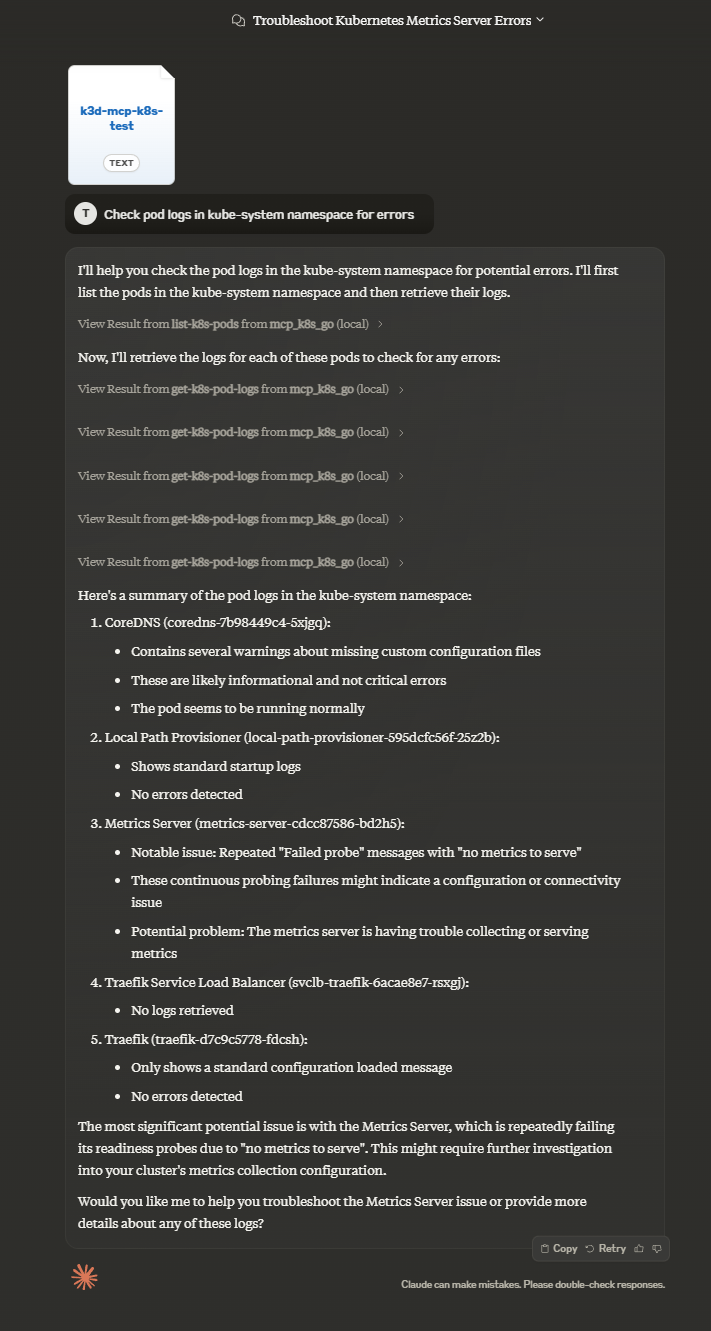
要将此 MCP 服务器与 Claude Desktop(或任何其他客户端)一起使用,您可能需要选择要使用的安装方式。
您有多种选择:
|锻造工艺|mcp-获取|预建 NPM|Github 中预建|来自来源|使用 Docker| |---|---|---|---|---|---|---| |克劳德·塞普|汽车|汽车|手动的|手动的|手动的|手动的| |先决条件|Node.js|Node.js|Node.js|没有任何|Golang|Docker|
要通过Smithery自动安装 MCP K8S Go for Claude Desktop:
npx -y @smithery/cli install @strowk/mcp-k8s --client claude要通过mcp-get自动安装 MCP K8S Go for Claude Desktop:
npx @michaellatman/mcp-get@latest install @strowk/mcp-k8s如果您已安装 npm 并想要使用预构建的二进制文件,请使用此功能:
npm install -g @strowk/mcp-k8s然后通过运行mcp-k8s --version检查版本,如果打印了安装的版本,则可以继续将配置添加到claude_desktop_config.json文件:
{
  "mcpServers": {
    "mcp_k8s": {
      "command": "mcp-k8s",
      "args": []
    }
  }
}或者使用npx和任何客户端:
npx @strowk/mcp-k8s以克劳德为例:
{
  "mcpServers": {
    "mcp_k8s": {
      "command": "npx",
      "args": [
        "@strowk/mcp-k8s"
      ]
    }
  }
}前往GitHub 发布并下载适合您平台的最新版本。
解压存档,其中包含名为mcp-k8s-go的二进制文件,将该二进制文件放在 PATH 中的某个位置,然后将以下配置添加到claude_desktop_config.json文件中:
{
  "mcpServers": {
    "mcp_k8s": {
      "command": "mcp-k8s-go",
      "args": []
    }
  }
}您需要安装 Golang 来构建此项目:
go get github.com/strowk/mcp-k8s-go
go install github.com/strowk/mcp-k8s-go,然后在claude_desktop_config.json文件中添加如下配置:
{
  "mcpServers": {
    "mcp_k8s_go": {
      "command": "mcp-k8s-go",
      "args": []
    }
  }
}该服务器自 0.3.1-beta.2 版本起构建并发布到 Docker Hub,并提供适用于 linux/amd64 和 linux/arm64 架构的多架构镜像。
您可以像这样使用最新标签 fe:
docker run -i -v ~/.kube/config:/home/nonroot/.kube/config --rm mcpk8s/server:latestWindows 用户可能至少需要在 Git Bash 中将~/.kube/config替换为//c/Users/<username>/.kube/config /.kube/config。
对于克劳德来说:
{
  "mcpServers": {
    "mcp_k8s_go": {
      "command": "docker",
      "args": [
        "run",
        "-i",
        "-v",
        "~/.kube/config:/home/nonroot/.kube/config",
        "--rm",
        "mcpk8s/server:latest"
      ]
    }
  }
}MCP 服务器使用以下环境变量:
KUBECONFIG :Kubernetes 配置文件的路径(可选,默认为 ~/.kube/config)
支持以下命令行选项:
--allowed-contexts=<ctx1,ctx2,...> :允许用户访问的 Kubernetes 上下文列表(以逗号分隔)。如果未指定,则允许所有上下文。
--help :显示帮助信息
--version :显示版本信息
This server cannot be deployed
An MCP server that let you interact with Cycloid.io Internal Development Portal and Platform
MCP server for Superserve sandboxes: create, exec, and manage Firecracker microVMs
A MCP server built for developers enabling Git based project management with project and personal…