


@chargebee/mcpofficial
A
licenseA
qualityF
maintenanceMCP Server that connects AI agents to Chargebee Platform.
2
69 npm
16
MIT

Provides tools for accessing VanMoof bike data including customer information, bike details, rider preferences, weekly ride statistics, and city/world ride summaries through the VanMoof API
Click on "Deploy Server".
Wait a few minutes for the server to deploy. Once ready, it will show a "Started" state.
In the chat, type @ followed by the MCP server name and your instructions, e.g., "@mcp-server-vanmoof What's the color of my VanMoof bike?"
That's it! The server will respond to your query, and you can continue using it as needed.
Here is a step-by-step guide with screenshots.
The VanMoof MCP Server implements the MCP specification to create a seamless connection between AI agents and key VanMoof services like VanMoof customer data, including bike details, VanMoof rider cities, rider preferences and weekly rides.
The VanMoof MCP Server supercharges your agents with VanMoof rider context. Here are some cool prompts you can try:
"Give me my VanMoof bike details, please."
"What is the name of my VanMoof's bike?"
"What is the frame number of my VanMoof's bike?"
"What is the color of my VanMoof's bike?"
"In which cities in the world are VanMoof rides tracked?"
"Create a table of the cities in the Netherlands where VanMoof rides are tracked with longitude and latitude columns"
"Retrieves a list of cities in the Netherlands where VanMoof rides are tracked and formats them into a table with columns for longitude and latitude."
"Get my VanMoof's rider preferences"
"Which city is configured in my VanMoof's rider preference?"
"Give me my weekly ride stats for 2025-03-25 on my VanMoof"
"What was my top speed on my VanMoof's bike?"
"What was my longest ride on my VanMoof's bike?"
"What are the city statistics of today's week?"
"What are the world's bike statistics of today's week?"
"Compare the world statistics with the city statistics. What can you conclude?"
"Compare my weekly VanMoof ride statistics with the city and world bike statistics. Store the results in markdown table for the comparison."
Related MCP server: commercetools MCP Essentials
get_customer_data: Retrieves customer data from the VanMoof autenticated user
get_vanmoof_cities: Retrieves a list of city data from the VanMoof API.
get_rider_preferences: Retrieves rider preferences from the VanMoof autenticated user.
get_rides_summary: Retrieves total rides summary from the VanMoof autenticated user.
get_rides_for_week(date_in_week: str = ""): Retrieves rides for a specific week from the VanMoof autenticated user.
get_city_rides_thisweek: Retrieves total city rides summary from VanMoof riders in this week.
get_world_rides_thisweek: Retrieves total world rides summary from VanMoof riders in this week.
The VanMoof MCP Server requires Python. If you have not it installed, follow the instructions here.
Also install uv. This an extremely fast Python package and project manager, written in Rust. Follow the instruction here to install uv.
run below command in your terminal:
git clone https://github.com/stefanstranger/mcp-server-vanmoofThe MCP inspector is a developer tool for testing and debugging MCP servers.
Before local debugging and testing configure the .env file with your VanMoof credentials.
Rename the .env-example file to .env and configure your VanMoof credentials.
Run the following to test and debug the VanMoof MCP Server:
mcp dev c:\github\mcp-server-vanmoof\server.pyConfigure the following arguments:
run --with mcp[cli] --with requests --with tzlocal mcp run c://github//mcp-server-vanmoof//server.py
And the Environment Arguments for VANMOOF_USERNAME and VANMOOF_PASSWORD in the Webbrowser after you have started the MCP inspector.
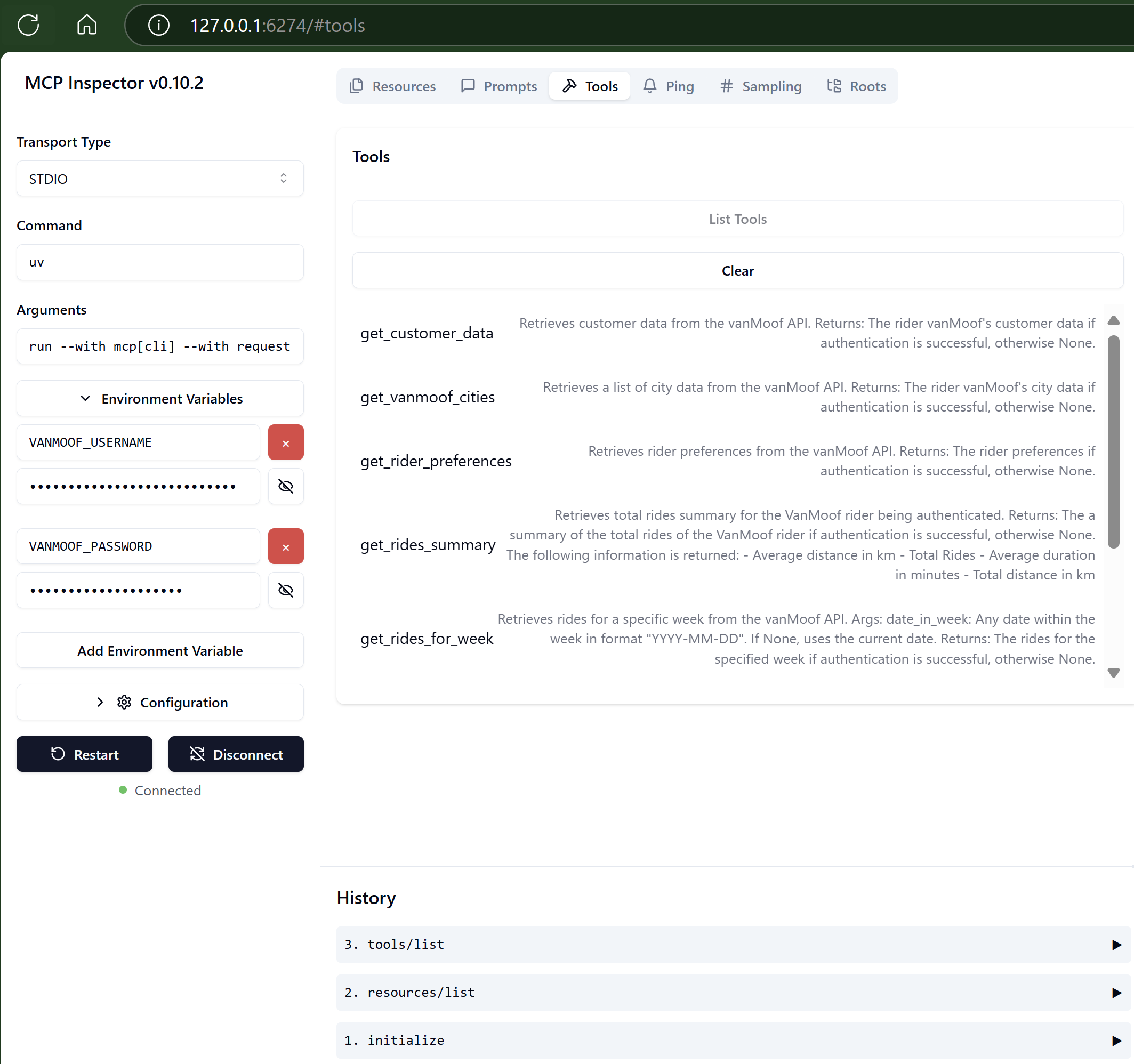
There are two ways to launch MCP Inspector:
Launch with MCP CLI
Launch with npx @modelcontextprotocol/inspector
If you install the SDK with the cli option like uv add "mcp[cli]", you can use the MCP CLI. To start MCP Inspector, run mcp dev.
If you want to use the npx to launch the MCP Inspector run, after you have started your Python environment in your host.:
npx @modelcontextprotocol/inspector uv run --with mcp[cli] --with requests --with tzlocal mcp run c://github//mcp-server-vanmoof//server.py -e VANMOOF_USERNAME=john.doe@outlook.com -e VANMOOF_PASSWORD=[very secret password]Add the following to your claude_desktop_config.json file:
{
  "mcpServers": {
    "mcp-server-vanmoof": {
            "type": "stdio",
            "command": "uv",
            "args": [
              "run",
              "--with",
              "mcp[cli]",
              "--with",
              "requests",
              "--with",
              "tzlocal",
              "mcp",
              "run",
              "C:\\Github\\mcp-server-vanmoof\\server.py"
            ],
            "env": {
              "VANMOOF_USERNAME": "john.doe@outlook.com",
              "VANMOOF_PASSWORD": "[VanMoof user account password]"
            }
        }
  }
}Your VanMoof credentials are stored as plain text in the MCP Client configurations. Don't share these with others!!
    Retrieves total city rides summary from VanMoof riders.


    Returns:
        The a summary of the total rides of the VanMoof rider city if authentication is successful, otherwise None.
        The following information is returned:
        - City name
        - Average distance in km
        - Total Rides
        - Average duration in minutes
        - Location in latitude and longitude
Inputs: no named parameters.
    Retrieves customer data from the vanMoof API.

    Returns:
        The rider vanMoof's customer data if authentication is successful, otherwise None.
Inputs: no named parameters.
    Retrieves rider preferences from the vanMoof API.

    Returns:
        The rider preferences if authentication is successful, otherwise None.
Inputs: no named parameters.
    Retrieves rides for a specific week from the vanMoof API.

    Args:
        date_in_week: Any date within the week in format "YYYY-MM-DD".
                    If None, uses the current date.

    Returns:
        The rides for the specified week if authentication is successful, otherwise None.
Inputs: date_in_week.
    Retrieves total rides summary for the VanMoof rider being authenticated.


    Returns:
        The a summary of the total rides of the VanMoof rider if authentication is successful, otherwise None.
        The following information is returned:
        - Average distance in km
        - Total Rides
        - Average duration in minutes
        - Total distance in km
Inputs: no named parameters.
    Retrieves a list of city data from the vanMoof API.

    Returns:
        The rider vanMoof's city data if authentication is successful, otherwise None.
Inputs: no named parameters.
    Retrieves total world rides summary from VanMoof riders.


    Returns:
        The a summary of the total rides of the VanMoof rider city if authentication is successful, otherwise None.
        The following information is returned:
        - Average distance in km
        - Total Rides
        - Average duration in minutes
Inputs: no named parameters.
Recent tool additions, removals, and schema changes observed during successful MCP inspections.
Loading tool schema changelog…
Scored across 7 tools
Multiple tools have overlapping purposes that could cause confusion. get_city_rides_thisweek, get_rides_summary, and get_world_rides_thisweek all return similar ride summary data with only subtle differences in scope (city vs. world vs. general). get_rides_for_week also overlaps with these but adds a date parameter, creating ambiguity about when to use which summary tool.
All tools follow a consistent verb_noun pattern with 'get_' prefix and snake_case naming. The naming is perfectly predictable across all seven tools, making it easy to understand the pattern and anticipate tool names.
Seven tools is a reasonable number for a bike sharing/ride tracking API. While the count is appropriate, the tools feel slightly redundant rather than each earning its distinct place due to the overlapping summary tools.
The server provides good read operations for customer data, preferences, cities, and rides, but lacks any write/update capabilities. For a rider data API, there are notable gaps - no tools to update preferences, log new rides, or modify customer information, which limits agent workflows to read-only operations.
One MCP server for the services your AI needs: memory, files, Microsoft 365, kanban and more.
MCP server connecting AI agents to 100+ apps (Gmail, Slack, Notion, GitHub) via one-click OAuth.
The Mercado Pago MCP Server implements the Model Context Protocol to provide AI agents and LLMs with access to Mercado Pago's APIs and tools within compatible development environments. It acts as an intermediary that translates Mercado Pago resources into executable functions (tools) that AI applications can invoke to perform actions and automate flows. The server simplifies integration, enables using documentation to implement or improve code, and optimizes operations through natural language interactions without manual implementations.
MCP server for building and testing AI agents with multi-model experimentation and insights.
