A
licenseNot graded
qualityF
maintenanceMCP Server for Nutanix Prism Central
13
MIT

This MCP server lets Claude/agents connect to Apache Pinot to inspect metadata, run read-only SQL, and manage schemas and table configs.
Test Pinot broker/controller/query connectivity and diagnostics.
Execute validated read-only SELECT/WITH queries.
List tables; inspect table size, segments, segment metadata, and per-column index details.
Fetch schemas and table configs (schema shows a combined tool; README documents separate get_schema and get_table_config).
Create/update schemas and create/update table configurations.
README also documents bounded paging, dry-run confirmation for mutations, optional incident/trace tools, table filtering, auth/TLS, rate limits, and response timing evidence.
Integrates with Apache Pinot to enable real-time analytics and metadata queries, allowing users to list tables/segments, execute SQL queries, view schema and column-level metadata, and perform data analysis on Pinot clusters.
Click on "Deploy Server".
Wait a few minutes for the server to deploy. Once ready, it will show a "Started" state.
In the chat, type @ followed by the MCP server name and your instructions, e.g., "@StarTree MCP Server for Apache Pinot show me the top 10 customers by revenue this month"
That's it! The server will respond to your query, and you can continue using it as needed.
Here is a step-by-step guide with screenshots.


Related MCP server: mcp-oceanbase
This project is a Python-based Model Context Protocol (MCP) server for interacting with Apache Pinot. It is built using the FastMCP framework. It is designed to integrate with Claude Desktop to enable real-time analytics and metadata queries on a Pinot cluster.
It allows you to
List tables, segments, and schema info from Pinot
Execute read-only SQL queries
View index/column-level metadata
Designed to assist business users via Claude integration
and much more.
Every tool advertises typed input and output JSON Schemas, MCP risk annotations, and failure-recovery guidance for agent planning.
Large query, table, segment-name, and segment-metadata responses use bounded pages with continuation metadata instead of returning unbounded agent context.
Read-only SQL is parsed and enforced before execution; validation, permission, and transient connectivity errors are surfaced as actionable MCP errors.
Every mutating tool supports dry_run; always preview the exact target and
payload before applying. Applying requires the preview's short-lived, one-time
confirmation_token, including for table-filter reloads. A preview is not a
guarantee that Pinot will accept the later write.
Single-purpose schema and table-config inspection tools avoid ambiguous combined
operations: use get_schema and get_table_config independently.
Tool names are case-sensitive and use underscores. Version 4 renamed four tools to make every operation verb-first; clients using the former noun-first names must update their calls.
Tool | Purpose |
| Diagnose broker, controller, and query connectivity. |
| List visible Pinot table names. |
| Get one table's column schema. |
| Get one table's indexing and ingestion configuration. |
| Get reported and estimated storage size for one table. |
| List exact segment names for one table. |
| Page through metadata for a table's segments. |
| Inspect per-column indexes for one exact segment. |
| Run one read-only Pinot SQL query. |
| Open and query an opt-in scoped evidence run. |
| Fetch recorded span edges and close with citations. |
| Preview or apply schema changes. |
| Preview or apply table-config changes. |
| Preview or apply the configured table-filter YAML. |
For every schema, table-config, or table-filter change, first call the same tool
with dry_run=true, present the preview to the user, and call it with
dry_run=false and the preview's one-time confirmation_token only after
confirmation. Editing a table-filter file after preview invalidates its token.
Pinot performs authoritative validation during table/schema apply calls, so a
write can still fail after a successful preview.
read_query returns the existing page fields plus metadata. For example,
{"query":"SELECT service, count(*) FROM events GROUP BY service","limit":20}
returns metadata.completeness as complete, partial, or unknown, along with
native server counts, query ID, query SHA-256, and bounded execution statistics.
Missing resultTable or required execution flags remains unknown. A partial
server response or group limit remains partial; an empty page is not proof of
healthy telemetry. Native complete describes this bounded SQL execution, not
coverage of the incident window or the entire dataset. row_limit_reached is
separate from execution completeness and paging.
The MCP query path uses pinotdb>=9.2.1 through cursor.execute_native() for
submission and decoding. The SDK exposes full structured query_statistics;
MCP projects bounded counters and safe execution evidence into the tool response.
The path submits once and does not switch transports after an ambiguous failure.
Its unique clientQueryId and applicationName=mcp-pinot support optional
correlation with query history or broker logs when available. Python integrations can
call execute_query_with_metadata(..., timeout_seconds=5) to bound native and
HTTP timeouts without modifying shared configuration. HTTP timeouts are
inactivity limits; late results are rejected, but this is not native cancellation.
Tool results, including tool errors, include timing evidence in the standard
MCP response _meta["io.github.startreedata/mcp-pinot"]. Existing tool data and
output schemas are preserved. For example, this response metadata fragment
requires no log access:
{
  "_meta": {
    "io.github.startreedata/mcp-pinot": {
      "request_id": "38cb1444b20c446a96bc272531f34518",
      "status": "success",
      "admitted": true,
      "queue_wait_ms": 12,
      "execution_ms": 84,
      "duration_ms": 97
    }
  }
}
MCP rate-limit protocol errors preserve their JSON-RPC code and message and carry
the same envelope in error.data._meta["io.github.startreedata/mcp-pinot"].
Other transport/protocol failures or cancellation may not produce a tool result.
With MCP_TRANSPORT=http on the default port 8080, a FastMCP Python client reads
wire _meta through result.meta. call_tool_mcp also returns tool errors:
from fastmcp import Client


async def read_timing():
    async with Client("http://localhost:8080/mcp") as client:
        result = await client.call_tool_mcp("read_query", {"query": "SELECT 1"})
        return result.meta["io.github.startreedata/mcp-pinot"]
Orchestrators should read .meta and forward this evidence to the agent when the
host does not automatically surface protocol metadata.
queue_wait_ms measures only waiting for the MCP concurrency semaphore.
execution_ms measures the admitted MCP tool pipeline, including SDK HTTP work
and validation; admitted=false means that pipeline never started. duration_ms
covers the server's tool invocation, including admission checks, and excludes
model reasoning and client delivery. status is success or error for the MCP
outcome; for read_query, separately inspect metadata.completeness.
An agent can use queue_wait_ms to identify MCP admission delay, then inspect
read_query's metadata.native_stats.timeUsedMs for Pinot's native query duration
when present. Native query time overlaps execution_ms; their different timer
boundaries do not support exact network-overhead subtraction. The shared
request_id also appears in query metadata and native clientQueryId, enabling
optional history/log correlation when more context is needed.
Response timing metadata contains no secrets, principal identifiers, tool
arguments, SQL, or rows. Audit logs record the same timings with hashed principal
identifiers. MCP_MAX_RESPONSE_BYTES limits the tool payload before this bounded
timing envelope is added; it excludes the added observability metadata.
Cancellation is audit-only when no response is returned and does not prove that
Pinot execution stopped.
Incident tools are disabled until the server starts with --incident-profiles.
See the incident evidence guide and
example profile for configuration and a
workflow using begin_investigation, query_incident, optional get_trace, and
finish_investigation. Evidence queries expose the same response _meta timings
and native request IDs when reported; log access is optional. Runs are
owner-bound and budgeted; complete execution still leaves root-cause hypotheses
and dataset coverage unvalidated. This first version uses bounded in-memory state
in one process.
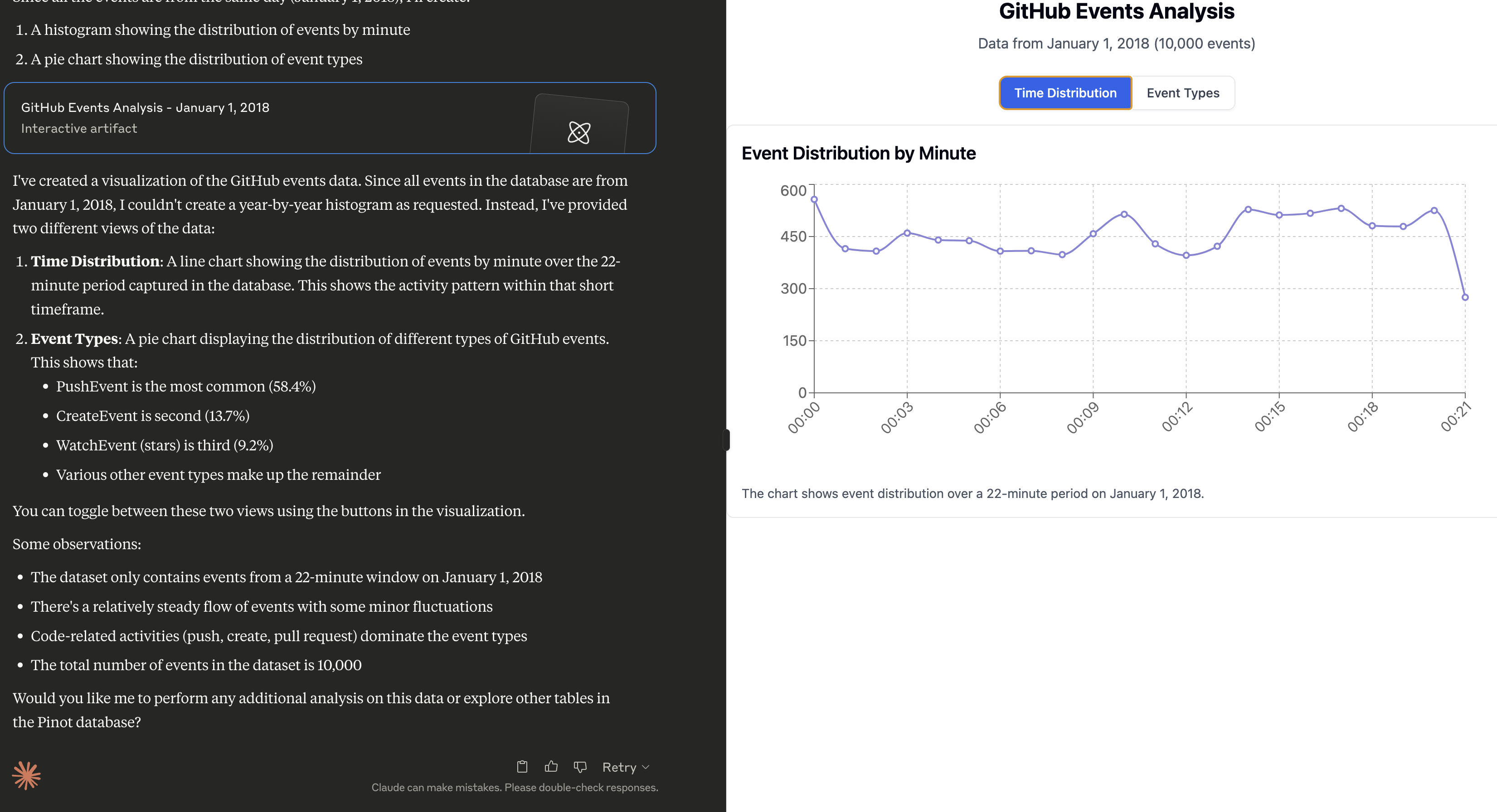
See Pinot MCP in action below:
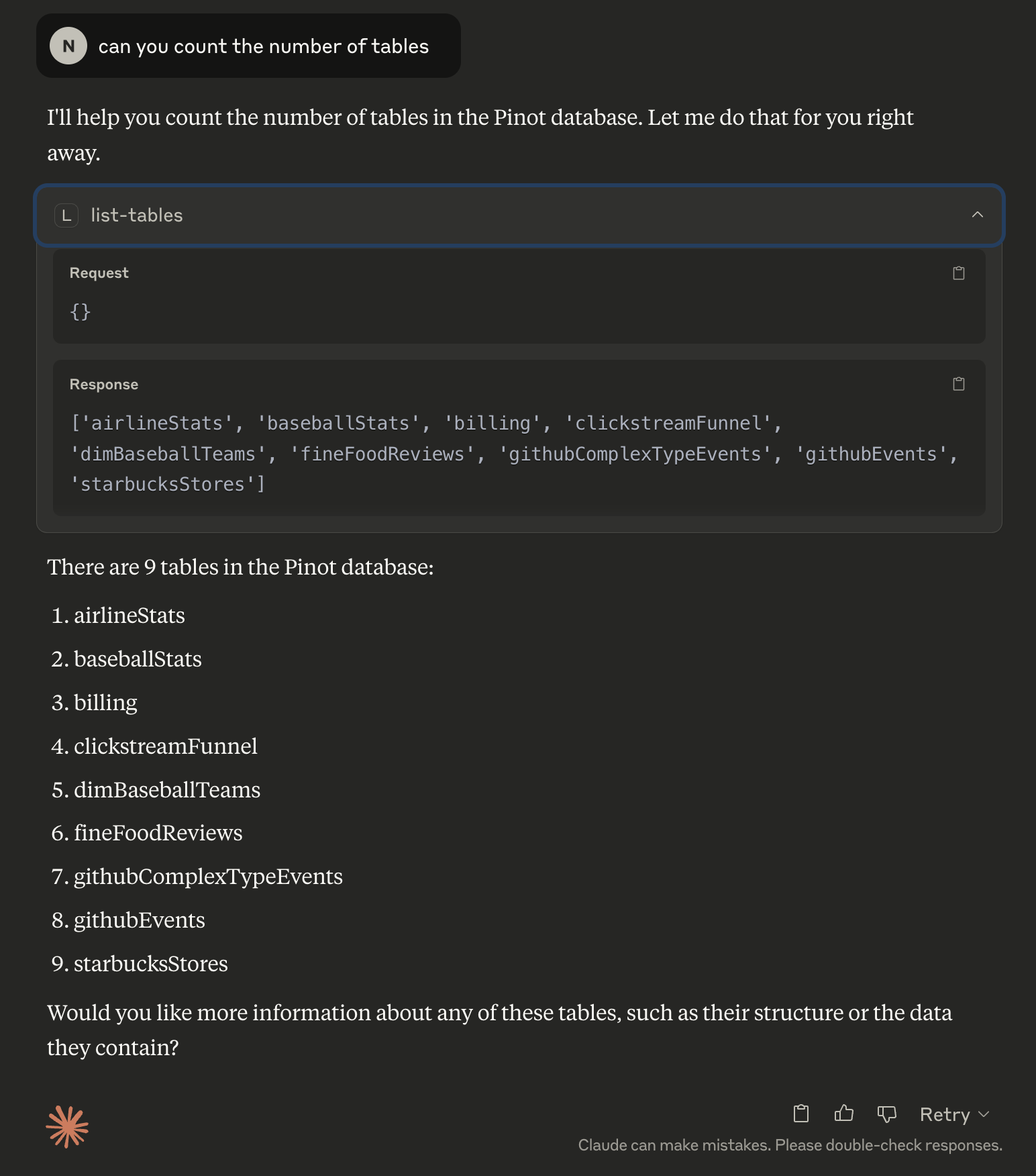
Prompt:
Can you do a histogram plot on the GitHub events against time
Once Claude is running, click the hammer 🛠️ icon and try these prompts:
Can you help me analyse my data in Pinot? Use the Pinot tool and look at the list of tables to begin with.
Can you do a histogram plot on the GitHub events against time
uv is a fast Python package installer and resolver, written in Rust. It's designed to be a drop-in replacement for pip with significantly better performance.
curl -LsSf https://astral.sh/uv/install.sh | sh

# Reload your bashrc/zshrc to take effect. Alternatively, restart your terminal
# source ~/.bashrc# Clone the repository
git clone https://github.com/startreedata/mcp-pinot.git
cd mcp-pinot
uv pip install -e . # Install dependencies
# For development dependencies (including testing tools), use:
# uv pip install -e .[dev] The MCP server expects a uvicorn config style .env file in the root directory to configure the Pinot cluster connection. This repo includes a sample .env.example file that assumes a pinot quickstart setup.
mv .env.example .envThe server loads configuration from environment variables and from a .env file
found from the current working directory. Process environment variables take
precedence over .env, so deployment-time settings cannot be silently replaced
by a checked-out file.
Use case | Required settings | Notes |
Claude Desktop |
| Default and recommended for local desktop use; no HTTP listener is started. |
Local HTTP |
| Explicit local web profile. Accessible only from the same machine. |
Remote HTTP/HTTPS |
| The server refuses non-loopback HTTP/HTTPS binds unless an auth provider is active, and a wildcard bind requires an explicit Host allowlist. Use |
Helm exposure |
| Helm defaults are local-only and render no Service unless exposure is explicitly enabled. |
Variable | Default | Description |
|
| Pinot controller endpoint used for metadata and table/schema operations. |
|
| Pinot broker endpoint used for SQL queries. |
| Parsed from | Optional host override for the broker connection. |
| Parsed from | Optional port override for the broker connection. |
| Parsed from | Optional scheme override, usually |
| unset | Basic authentication for Pinot. |
| unset | Bearer or raw token for Pinot; takes precedence over |
| unset | File containing a Pinot token: one line of printable ASCII, with or without a |
| empty | Optional database header for multi-database Pinot deployments. |
|
| Enables Pinot multi-stage query engine query option. |
|
| HTTP request timeout in seconds. |
|
| HTTP connection timeout in seconds. |
|
| SQL query timeout in seconds. |
Variable | Default | Description |
|
| Transport mode. Use |
|
| HTTP bind host. Set |
|
| HTTP listen port. |
|
| MCP HTTP path. |
| exact host[:port] of a concrete bind | Comma-separated Host authorities accepted at the MCP endpoint. A wildcard bind ( |
| unset | Comma-separated browser |
| unset | TLS private key path. Requires |
| unset | TLS certificate path. Requires |
|
| Application log level: |
|
| Per-principal (authenticated) or per-peer (loopback HTTP) tool-call rate and burst limits. |
|
| Maximum in-memory client buckets; least-recently-used buckets are evicted. |
|
| Idle time before a rate-limit bucket can be evicted. |
|
| Confirmation-token lifetime, constrained to 30–3600 seconds. Tokens are process-bound and intentionally fail after restart. |
An auth provider is required before binding HTTP or HTTPS to a non-loopback host.
Variable | Default | Description |
| unset | Active auth provider: |
| ||
| empty | Shared bearer secret for |
|
| Space- or comma-separated scopes granted to the static principal. Use |
|
| Legacy flag; |
| empty | OAuth client ID. |
| empty | OAuth client secret. |
|
| Public base URL for this MCP server. |
| empty | Upstream authorization endpoint. |
| empty | Upstream token endpoint. |
| empty | JWKS URI used for token verification. |
| empty | Expected token issuer. |
| canonical MCP resource URI | Audience tokens are validated against. Defaults to |
|
| Pinot scopes granted to every principal this provider authenticates, unioned onto the scopes the token already carries. Needed because general-purpose OIDC providers issue a fixed scope catalog and cannot mint |
| unset | Optional JSON object with additional authorization parameters. |
Variable | Default | Description |
| unset | YAML file with |
See SECURITY.md for the production exposure checklist and vulnerability reporting process.
⚠️ Security Note: For production access control, use Pinot's native table-level ACLs (available since Pinot 0.8.0+). Table filtering in this MCP server is a convenience feature for organizing tables and improving UX, not a security boundary. It uses best-effort SQL parsing and should not be relied upon for security.
Table filtering allows you to control which Pinot tables are visible through the MCP server. This is useful for:
Reduce Cognitive Load: Focus on relevant tables when your Pinot cluster has hundreds or thousands of tables
Multi-Tenancy UX: Run multiple MCP server instances against the same Pinot cluster, each showing different table subsets for different teams or use cases
Environment Separation: Deploy different MCP server instances (dev, staging, prod) that show only environment-specific tables
Hide System Tables: Filter out internal, test, or deprecated tables from end-user view
When table filtering is enabled, all table operations are filtered to show only the configured tables.
Table filtering applies across all MCP operations:
Table Listing - Only configured tables appear in table lists
Query Execution - SQL queries are checked to ensure all referenced tables (in FROM, JOIN, subqueries, CTEs, etc.) match the configured patterns
Table Operations - Direct table access operations filter by table name:
Get table details, size, and metadata
Get table segments and segment metadata
Get index/column details
Get/update table configurations
Schema Operations - Schema operations filter by schema name:
Get/create/update schemas
Create table configurations
Copy the example configuration file:
cp table_filters.yaml.example table_filters.yamlEdit table_filters.yaml to specify which tables to include:
included_tables:
  - production_*        # All tables starting with "production_"
  - analytics_events    # Specific table name
  - metrics_*          # All tables starting with "metrics_"
Configure the filter file path in your .env:
PINOT_TABLE_FILTER_FILE=table_filters.yamlThe filter supports glob-style patterns using standard Unix filename pattern matching:
exact_table_name - Matches exactly this table
prefix_* - Matches all tables starting with "prefix_"
*_suffix - Matches all tables ending with "_suffix"
*pattern* - Matches all tables containing "pattern"
sharded_table_? - Matches tables with exactly one character after the underscore (e.g., sharded_table_1, sharded_table_a)
When filtering is enabled, SQL queries are checked before execution:
Supported SQL Features: FROM clauses, JOIN clauses (INNER, LEFT, RIGHT, OUTER, CROSS), subqueries, CTEs (WITH), and comma-separated table lists
Quoted Identifiers: Supports both double-quoted ("table name") and backtick-quoted (`table_name`) table names
Schema Prefixes: Handles schema-qualified table names (e.g., database.schema.table)
Comments: Removes SQL comments before checking
Example filtered query:
SELECT * FROM allowed_table
JOIN other_table ON allowed_table.id = other_table.id
Error: Query references unauthorized tables: other_table. Allowed tables: allowed_table, prod_*
Fail-Fast Validation:
⚠️ If PINOT_TABLE_FILTER_FILE is configured but the file doesn't exist, the server will fail to start with a FileNotFoundError
This prevents accidentally showing all tables due to misconfiguration
Empty filter files or missing included_tables key will show all tables (no filtering)
Comprehensive Filtering:
All MCP tools that access tables apply filtering before execution
Consistent filtering across all table access points
Clear error messages indicate which tables don't match the configured patterns
To disable table filtering, either:
Remove the PINOT_TABLE_FILTER_FILE environment variable, or
Don't configure it in your .env file
When not configured, all tables in the Pinot cluster are visible.
When a filter file supplies both allow_all: true and a non-empty
included_tables, the explicit allow-list takes precedence and the server logs a
warning. Applying a reload requires the token from an unchanged dry-run candidate.
The read_query tool always validates SQL before forwarding it to Pinot. It
accepts one statement only, and that statement must be a read-only SELECT or
WITH ... SELECT query. SQL comments are stripped, semicolon-stacked statements
are rejected, and write/DDL/admin keywords are blocked.
To enable OAuth authentication, set the following environment variables in your .env file:
Required variables (when OAUTH_ENABLED=true):
OAUTH_CLIENT_ID: OAuth client ID
OAUTH_CLIENT_SECRET: OAuth client secret
OAUTH_BASE_URL: Your MCP server base URL
OAUTH_AUTHORIZATION_ENDPOINT: OAuth authorization endpoint URL
OAUTH_TOKEN_ENDPOINT: OAuth token endpoint URL
OAUTH_JWKS_URI: JSON Web Key Set URI for token verification
OAUTH_ISSUER: Token issuer identifier
Optional variables:
OAUTH_AUDIENCE: audience tokens are validated against. Defaults to the canonical MCP resource URI (OAUTH_BASE_URL + MCP_PATH). Set it when your provider issues a different aud — for example an IdP that puts the client ID there.
OAUTH_GRANTED_SCOPES: Pinot scopes granted to authenticated principals (default all three). Use pinot:read to make the deployment read-only for every OIDC caller.
OAUTH_REQUIRED_SCOPES: baseline scopes an access token must already carry (default: none enforced).
OAUTH_EXTRA_AUTH_PARAMS: Additional authorization parameters as JSON object (e.g., {"scope": "openid profile"})
Tool-level authorization uses pinot:read / pinot:write / pinot:admin. General-purpose OIDC providers issue a fixed scope catalog and cannot mint resource scopes like these, so OAUTH_GRANTED_SCOPES is what makes an authenticated user able to call anything — narrow it rather than leaving tools ungated.
Example configuration:
OAUTH_ENABLED=true
OAUTH_CLIENT_ID=client-id
OAUTH_CLIENT_SECRET=client-secret
OAUTH_BASE_URL=http://localhost:8000
OAUTH_AUTHORIZATION_ENDPOINT=https://example.com/oauth/authorize
OAUTH_TOKEN_ENDPOINT=https://example.com/oauth/token
OAUTH_JWKS_URI=https://example.com/.well-known/jwks.json
OAUTH_ISSUER=https://example.com
OAUTH_AUDIENCE=http://localhost:8000/mcp
OAUTH_EXTRA_AUTH_PARAMS={"scope": "openid profile"}uv --directory . run mcp_pinot/server.pyYou should see logs indicating that the server is running.
Security notes:
STDIO is the default. When HTTP is selected it binds to
127.0.0.1; setMCP_HOST=0.0.0.0only with OAuth or static-token authentication plus TLS or an authenticated reverse proxy.The server refuses to start when HTTP is bound to a non-loopback host without an auth provider (
AUTH_PROVIDER=oauthorstatic, or the legacyOAUTH_ENABLED=true).
read_queryenforces a single read-only SQL statement before execution. This is a guardrail, not a replacement for Pinot authentication and authorization.The supported
mcp[cli]dependency includes DNS rebinding protections for the Streamable HTTP server.Confirmation replay state and rate-limit buckets are process-local. Run exactly one server process/Helm replica. The chart rejects
replicas != 1; horizontal scaling requires a shared state-store implementation.
/readyzreports MCP process readiness, not Pinot cluster health. Usetest_connectionto diagnose Pinot dependencies.
Start Pinot QuickStart using docker:
docker run --name pinot-quickstart -p 2123:2123 -p 9000:9000 -p 8000:8000 -d apachepinot/pinot:1.5.1 QuickStart -type batchQuery MCP Server
uv --directory . run examples/example_client.pyThis quickstart just checks all the tools and queries the airlineStats table.
vi ~/Library/Application\ Support/Claude/claude_desktop_config.json{
"mcpServers": {
"pinot_mcp": {
"command": "/path/to/uv",
"args": [
"--directory",
"/path/to/mcp-pinot-repo",
"run",
"mcp_pinot/server.py"
],
"env": {
// You can also include your .env config here
}
}
}
}Replace /path/to/uv with the absolute path to the uv command, you can run which uv to figure it out.
Replace /path/to/mcp-pinot with the absolute path to the folder where you cloned this repo.
Note: you must use stdio transport when running your server to use with Claude desktop.
You could also configure environment variables here instead of the .env file, in case you want to connect to multiple pinot clusters as MCP servers.
Claude will now auto-launch the MCP server on startup and recognize the new Pinot-based tools.
The release workflow publishes a Claude Desktop MCP Bundle (.mcpb). Its UV
runtime installs the locked dependencies for the user's platform, so one small
bundle works across macOS, Linux, and Windows. To build one locally:
npm install -g @anthropic-ai/mcpb@2.1.2
mcpb validate manifest.json
mcpb pack
Open the resulting .mcpb file to install it in Claude Desktop.
See SECURITY.md for vulnerability reporting instructions, security categories, and the checklist for safely exposing the MCP HTTP endpoint.
MCP tool definitions live in mcp_pinot/server.py; Pinot HTTP/DB operations
live in mcp_pinot/pinot_client.py.
See MCP SDK compatibility and migration for the dependency policy, SDK 2 integration changes, validation, and rollback.
Build the project with
uv sync --frozenTest the repo with:
uv run pytest --cov=mcp_pinotdocker build -t mcp-pinot .docker run --rm -i -v "$(pwd)/.env:/app/config/.env:ro" mcp-pinotThis uses the default STDIO transport. For HTTP/Kubernetes deployments, configure an inbound auth provider before binding to a non-loopback address; see the configuration and Helm sections above.
Create a new schema
| Name | Required | Description | Default |
|---|---|---|---|
| force | No | ||
| override | No | ||
| schemaJson | Yes |
Does the description disclose side effects, auth requirements, rate limits, or destructive behavior?
No annotations are provided, so the description carries the full burden of behavioral disclosure. 'Create a new schema' implies a write/mutation operation, but it doesn't describe permissions needed, whether it's idempotent, what happens on conflicts, or any side effects. For a tool with 3 parameters and no annotation coverage, this is a significant gap in transparency.
Agents need to know what a tool does to the world before calling it. Descriptions should go beyond structured annotations to explain consequences.
Is the description appropriately sized, front-loaded, and free of redundancy?
The description is extremely concise with a single sentence ('Create a new schema'), which is front-loaded and wastes no words. While it's under-specified, it's not verbose or poorly structured—it efficiently states the core action without unnecessary elaboration.
Shorter descriptions cost fewer tokens and are easier for agents to parse. Every sentence should earn its place.
Given the tool's complexity, does the description cover enough for an agent to succeed on first attempt?
Given the complexity (a mutation tool with 3 parameters, no annotations, and no output schema), the description is completely inadequate. It doesn't explain what the tool returns, how to handle errors, or the meaning of parameters. For a tool that likely creates database schemas with configuration options, this lacks essential context for effective use.
Complex tools with many parameters or behaviors need more documentation. Simple tools need less. This dimension scales expectations accordingly.
Does the description clarify parameter syntax, constraints, interactions, or defaults beyond what the schema provides?
Schema description coverage is 0%, meaning none of the 3 parameters (force, override, schemaJson) are documented in the schema. The description adds no information about these parameters—it doesn't explain what schemaJson should contain, when to use force or override, or their interactions. With low coverage and no compensation in the description, this fails to provide parameter semantics.
Input schemas describe structure but not intent. Descriptions should explain non-obvious parameter relationships and valid value ranges.
Does the description clearly state what the tool does and how it differs from similar tools?
The description 'Create a new schema' is a tautology that merely restates the tool name without adding specificity. It doesn't explain what kind of schema is being created, what resource it affects, or how it differs from sibling tools like 'update-schema' or 'get-schema'. While it uses a clear verb ('Create'), it lacks the resource and scope details needed for full clarity.
Agents choose between tools based on descriptions. A clear purpose with a specific verb and resource helps agents select the right tool.
Does the description explain when to use this tool, when not to, or what alternatives exist?
The description provides no guidance on when to use this tool versus alternatives. With siblings like 'update-schema' and 'get-schema', it doesn't specify if this is for initial creation only, what prerequisites might exist, or when to choose it over other tools. There's no mention of context, exclusions, or alternatives, leaving usage ambiguous.
Agents often have multiple tools that could apply. Explicit usage guidance like "use X instead of Y when Z" prevents misuse.
Create table configuration
| Name | Required | Description | Default |
|---|---|---|---|
| tableConfigJson | Yes | ||
| validationTypesToSkip | No |
Does the description disclose side effects, auth requirements, rate limits, or destructive behavior?
No annotations are provided, so the description carries the full burden of behavioral disclosure. 'Create table configuration' implies a write operation but fails to describe any behavioral traits such as permissions required, whether the creation is idempotent, error handling, or side effects. This leaves critical operational context unspecified for a mutation tool.
Agents need to know what a tool does to the world before calling it. Descriptions should go beyond structured annotations to explain consequences.
Is the description appropriately sized, front-loaded, and free of redundancy?
The description is extremely concise with a single three-word phrase, 'Create table configuration', which is front-loaded and wastes no words. While it lacks detail, it efficiently communicates the core action without unnecessary elaboration, earning full marks for brevity and structure.
Shorter descriptions cost fewer tokens and are easier for agents to parse. Every sentence should earn its place.
Given the tool's complexity, does the description cover enough for an agent to succeed on first attempt?
Given the tool's complexity as a mutation operation with two parameters, 0% schema coverage, no annotations, and no output schema, the description is severely incomplete. It does not compensate for the lack of structured data, failing to explain behavior, parameters, or outcomes, making it inadequate for effective tool use.
Complex tools with many parameters or behaviors need more documentation. Simple tools need less. This dimension scales expectations accordingly.
Does the description clarify parameter syntax, constraints, interactions, or defaults beyond what the schema provides?
Schema description coverage is 0%, meaning parameters are undocumented in the schema. The description adds no information about the two parameters ('tableConfigJson' and 'validationTypesToSkip'), their purposes, formats, or examples. For a tool with two parameters and no schema documentation, this represents a significant gap in parameter understanding.
Input schemas describe structure but not intent. Descriptions should explain non-obvious parameter relationships and valid value ranges.
Does the description clearly state what the tool does and how it differs from similar tools?
The description 'Create table configuration' is a tautology that restates the tool name with minimal elaboration. It specifies the verb 'Create' and resource 'table configuration', but lacks specificity about what a table configuration entails or how it differs from sibling tools like 'create-schema' or 'update-table-config'. This provides only basic purpose without meaningful differentiation.
Agents choose between tools based on descriptions. A clear purpose with a specific verb and resource helps agents select the right tool.
Does the description explain when to use this tool, when not to, or what alternatives exist?
The description provides no guidance on when to use this tool versus alternatives. It does not mention prerequisites, appropriate contexts, or exclusions, nor does it reference sibling tools like 'create-schema' or 'update-table-config' for comparison. Without any usage instructions, the agent lacks direction on tool selection.
Agents often have multiple tools that could apply. Explicit usage guidance like "use X instead of Y when Z" prevents misuse.
Fetch a schema by name
| Name | Required | Description | Default |
|---|---|---|---|
| schemaName | Yes |
Does the description disclose side effects, auth requirements, rate limits, or destructive behavior?
No annotations are provided, so the description carries full burden for behavioral disclosure. 'Fetch' implies a read operation, but the description doesn't specify whether this requires authentication, what happens if the schema doesn't exist, rate limits, or what format the returned data takes. This leaves significant behavioral gaps for a tool with no annotation coverage.
Agents need to know what a tool does to the world before calling it. Descriptions should go beyond structured annotations to explain consequences.
Is the description appropriately sized, front-loaded, and free of redundancy?
The description is extremely concise at just three words, front-loading the essential information with zero wasted language. Every word earns its place in communicating the core function.
Shorter descriptions cost fewer tokens and are easier for agents to parse. Every sentence should earn its place.
Given the tool's complexity, does the description cover enough for an agent to succeed on first attempt?
For a tool with no annotations, no output schema, and minimal parameter documentation, the description is insufficiently complete. It doesn't address what the tool returns, error conditions, authentication requirements, or how it differs from similar schema-related tools in the sibling list. The context demands more comprehensive guidance.
Complex tools with many parameters or behaviors need more documentation. Simple tools need less. This dimension scales expectations accordingly.
Does the description clarify parameter syntax, constraints, interactions, or defaults beyond what the schema provides?
With 0% schema description coverage and a single required parameter 'schemaName', the description adds minimal value beyond the schema. It mentions 'by name' which hints at the parameter's purpose, but doesn't explain what constitutes a valid schema name, format expectations, or whether it's case-sensitive. The description doesn't adequately compensate for the lack of schema documentation.
Input schemas describe structure but not intent. Descriptions should explain non-obvious parameter relationships and valid value ranges.
Does the description clearly state what the tool does and how it differs from similar tools?
The description clearly states the action ('fetch') and resource ('schema by name'), making the purpose immediately understandable. However, it doesn't differentiate from sibling tools like 'tableconfig-schema-details' or 'update-schema' that also involve schemas, so it doesn't reach the highest clarity level.
Agents choose between tools based on descriptions. A clear purpose with a specific verb and resource helps agents select the right tool.
Does the description explain when to use this tool, when not to, or what alternatives exist?
The description provides no guidance on when to use this tool versus alternatives. With siblings like 'tableconfig-schema-details' and 'update-schema' that also handle schemas, there's no indication of when this specific fetch operation is appropriate versus other schema-related operations.
Agents often have multiple tools that could apply. Explicit usage guidance like "use X instead of Y when Z" prevents misuse.
Get table configuration
| Name | Required | Description | Default |
|---|---|---|---|
| tableName | Yes | ||
| tableType | No |
Does the description disclose side effects, auth requirements, rate limits, or destructive behavior?
No annotations are provided, so the description carries the full burden of behavioral disclosure. The description only states 'Get table configuration', offering no information about whether this is a read-only operation, what permissions are required, how errors are handled, or what the output format might be. This is inadequate for a tool with parameters and no output schema.
Agents need to know what a tool does to the world before calling it. Descriptions should go beyond structured annotations to explain consequences.
Is the description appropriately sized, front-loaded, and free of redundancy?
The description is extremely concise with just three words, making it front-loaded and free of unnecessary details. However, this conciseness comes at the cost of under-specification, but based solely on structure and brevity, it earns full marks for being succinct.
Shorter descriptions cost fewer tokens and are easier for agents to parse. Every sentence should earn its place.
Given the tool's complexity, does the description cover enough for an agent to succeed on first attempt?
Given the tool has 2 parameters with 0% schema coverage, no annotations, and no output schema, the description is completely inadequate. It doesn't explain what table configuration includes, how to use the parameters, what the tool returns, or how it differs from sibling tools. This leaves significant gaps for an AI agent to understand and invoke the tool correctly.
Complex tools with many parameters or behaviors need more documentation. Simple tools need less. This dimension scales expectations accordingly.
Does the description clarify parameter syntax, constraints, interactions, or defaults beyond what the schema provides?
The schema description coverage is 0%, meaning neither parameter ('tableName' and 'tableType') is documented in the schema. The description adds no information about these parameters—it doesn't explain what 'tableName' refers to, what 'tableType' might be, or how they affect the configuration retrieval. This fails to compensate for the lack of schema documentation.
Input schemas describe structure but not intent. Descriptions should explain non-obvious parameter relationships and valid value ranges.
Does the description clearly state what the tool does and how it differs from similar tools?
The description 'Get table configuration' is essentially a tautology that restates the tool name 'get-table-config' with minimal elaboration. It specifies the verb 'Get' and resource 'table configuration', but provides no additional detail about what table configuration entails or distinguishes it from sibling tools like 'table-details' or 'tableconfig-schema-details'.
Agents choose between tools based on descriptions. A clear purpose with a specific verb and resource helps agents select the right tool.
Does the description explain when to use this tool, when not to, or what alternatives exist?
The description provides no guidance on when to use this tool versus alternatives. With multiple sibling tools related to tables and configurations (e.g., 'table-details', 'tableconfig-schema-details', 'list-tables'), there is no indication of when this specific tool is appropriate, what prerequisites exist, or what distinguishes it from other options.
Agents often have multiple tools that could apply. Explicit usage guidance like "use X instead of Y when Z" prevents misuse.
Get index/column details for a segment
| Name | Required | Description | Default |
|---|---|---|---|
| segmentName | Yes | ||
| tableName | Yes |
Does the description disclose side effects, auth requirements, rate limits, or destructive behavior?
With no annotations provided, the description carries the full burden of behavioral disclosure. It states 'Get' which implies a read-only operation, but it doesn't clarify if this requires specific permissions, what the return format is (e.g., structured data, error handling), or any rate limits. The description is minimal and lacks essential behavioral context for safe and effective use.
Agents need to know what a tool does to the world before calling it. Descriptions should go beyond structured annotations to explain consequences.
Is the description appropriately sized, front-loaded, and free of redundancy?
The description is a single, efficient sentence with no wasted words, making it easy to parse. However, it's front-loaded but under-specified—while concise, it lacks the necessary detail to be fully helpful, balancing brevity with insufficient information.
Shorter descriptions cost fewer tokens and are easier for agents to parse. Every sentence should earn its place.
Given the tool's complexity, does the description cover enough for an agent to succeed on first attempt?
Given the complexity of a tool with 2 parameters, 0% schema coverage, no annotations, and no output schema, the description is incomplete. It doesn't explain what 'index/column details' include, how results are structured, or any dependencies, making it inadequate for the agent to understand the tool's full context and usage.
Complex tools with many parameters or behaviors need more documentation. Simple tools need less. This dimension scales expectations accordingly.
Does the description clarify parameter syntax, constraints, interactions, or defaults beyond what the schema provides?
The schema description coverage is 0%, so the description must compensate for undocumented parameters. It mentions 'for a segment', which hints at the 'segmentName' parameter, but doesn't explain what 'segment' means or how it relates to 'tableName'. No additional semantics are provided for the two required parameters, leaving their purpose and usage unclear beyond the schema's basic types.
Input schemas describe structure but not intent. Descriptions should explain non-obvious parameter relationships and valid value ranges.
Does the description clearly state what the tool does and how it differs from similar tools?
The description 'Get index/column details for a segment' clearly states the action (get) and resource (index/column details), but it's vague about what 'details' entail and doesn't differentiate from siblings like 'segment-metadata-details' or 'table-details'. It specifies the scope ('for a segment') but lacks precision about the output format or depth of information.
Agents choose between tools based on descriptions. A clear purpose with a specific verb and resource helps agents select the right tool.
Does the description explain when to use this tool, when not to, or what alternatives exist?
No explicit guidance on when to use this tool versus alternatives like 'segment-metadata-details' or 'table-details' is provided. The description implies usage for retrieving index/column information related to a segment, but it doesn't specify prerequisites, exclusions, or comparative contexts with sibling tools, leaving the agent to infer usage based on tool names alone.
Agents often have multiple tools that could apply. Explicit usage guidance like "use X instead of Y when Z" prevents misuse.
List all tables in Pinot
| Name | Required | Description | Default |
|---|---|---|---|
No parameters | |||
Does the description disclose side effects, auth requirements, rate limits, or destructive behavior?
No annotations are provided, so the description carries the full burden. It states the action ('List all tables') but doesn't disclose behavioral traits such as whether this is a read-only operation, if it requires authentication, rate limits, pagination, or what the output format looks like. This is a significant gap for a tool with zero annotation coverage.
Agents need to know what a tool does to the world before calling it. Descriptions should go beyond structured annotations to explain consequences.
Is the description appropriately sized, front-loaded, and free of redundancy?
The description is a single, efficient sentence that directly states the tool's purpose without any wasted words. It's appropriately sized and front-loaded, making it easy to parse quickly.
Shorter descriptions cost fewer tokens and are easier for agents to parse. Every sentence should earn its place.
Given the tool's complexity, does the description cover enough for an agent to succeed on first attempt?
Given the lack of annotations and output schema, the description is incomplete. It doesn't explain what 'List all tables' entails—such as the return format, any limitations, or how it interacts with the Pinot system. For a tool with no structured data to rely on, this leaves critical gaps in understanding.
Complex tools with many parameters or behaviors need more documentation. Simple tools need less. This dimension scales expectations accordingly.
Does the description clarify parameter syntax, constraints, interactions, or defaults beyond what the schema provides?
The input schema has 0 parameters with 100% coverage, so no parameter documentation is needed. The description doesn't add parameter details, but that's acceptable here since there are no parameters to describe, aligning with the baseline for zero parameters.
Input schemas describe structure but not intent. Descriptions should explain non-obvious parameter relationships and valid value ranges.
Does the description clearly state what the tool does and how it differs from similar tools?
The description clearly states the verb ('List') and resource ('tables in Pinot'), making the purpose immediately understandable. However, it doesn't differentiate from sibling tools like 'table-details' or 'tableconfig-schema-details', which might also involve table information, so it doesn't fully distinguish its scope.
Agents choose between tools based on descriptions. A clear purpose with a specific verb and resource helps agents select the right tool.
Does the description explain when to use this tool, when not to, or what alternatives exist?
The description provides no guidance on when to use this tool versus alternatives. With siblings like 'table-details' (likely for specific table info) and 'tableconfig-schema-details' (likely for configuration), there's no indication of context or exclusions, leaving the agent to infer usage.
Agents often have multiple tools that could apply. Explicit usage guidance like "use X instead of Y when Z" prevents misuse.
Execute a SELECT query on the Pinot database
| Name | Required | Description | Default |
|---|---|---|---|
| query | Yes | SELECT SQL query to execute |
Does the description disclose side effects, auth requirements, rate limits, or destructive behavior?
No annotations are provided, so the description carries full burden for behavioral disclosure. While 'Execute a SELECT query' implies a read-only operation, it doesn't specify permissions needed, query limitations (e.g., timeout, result size), error handling, or what the response looks like. This leaves significant gaps for a database query tool.
Agents need to know what a tool does to the world before calling it. Descriptions should go beyond structured annotations to explain consequences.
Is the description appropriately sized, front-loaded, and free of redundancy?
The description is a single, efficient sentence that directly states the tool's function without unnecessary words. It's appropriately sized and front-loaded with the core action.
Shorter descriptions cost fewer tokens and are easier for agents to parse. Every sentence should earn its place.
Given the tool's complexity, does the description cover enough for an agent to succeed on first attempt?
Given no annotations, no output schema, and a database query tool that could have complex behaviors (e.g., SQL syntax, result format, error cases), the description is incomplete. It doesn't address what the tool returns, how to handle queries, or any constraints, leaving the agent with insufficient context.
Complex tools with many parameters or behaviors need more documentation. Simple tools need less. This dimension scales expectations accordingly.
Does the description clarify parameter syntax, constraints, interactions, or defaults beyond what the schema provides?
Schema description coverage is 100%, with the single parameter 'query' documented as 'SELECT SQL query to execute' in the schema. The description adds no additional parameter information beyond what's already in the schema, so it meets the baseline for high schema coverage.
Input schemas describe structure but not intent. Descriptions should explain non-obvious parameter relationships and valid value ranges.
Does the description clearly state what the tool does and how it differs from similar tools?
The description clearly states the action ('Execute') and target ('SELECT query on the Pinot database'), making the purpose immediately understandable. However, it doesn't differentiate this tool from potential sibling query execution tools (though none are listed among siblings), keeping it from a perfect score.
Agents choose between tools based on descriptions. A clear purpose with a specific verb and resource helps agents select the right tool.
Does the description explain when to use this tool, when not to, or what alternatives exist?
The description provides no guidance on when to use this tool versus alternatives. With siblings like 'list-tables' or 'table-details' that might provide related data, there's no indication of when a SELECT query is preferred over those structured retrieval methods.
Agents often have multiple tools that could apply. Explicit usage guidance like "use X instead of Y when Z" prevents misuse.
List segments for a table
| Name | Required | Description | Default |
|---|---|---|---|
| tableName | Yes | Table name |
Does the description disclose side effects, auth requirements, rate limits, or destructive behavior?
No annotations are provided, so the description carries the full burden of behavioral disclosure. It states the action ('List segments') but does not describe traits such as whether this is a read-only operation, if it requires specific permissions, what the output format looks like (e.g., list of segment names or objects), or any rate limits. The description is minimal and lacks essential behavioral context for a tool with no annotation coverage.
Agents need to know what a tool does to the world before calling it. Descriptions should go beyond structured annotations to explain consequences.
Is the description appropriately sized, front-loaded, and free of redundancy?
The description is a single, clear sentence with zero wasted words. It is appropriately sized for a simple list operation and front-loaded with the core action. Every part of the sentence earns its place by directly stating the tool's function.
Shorter descriptions cost fewer tokens and are easier for agents to parse. Every sentence should earn its place.
Given the tool's complexity, does the description cover enough for an agent to succeed on first attempt?
Given the tool's simplicity (one parameter, no output schema, no annotations), the description is incomplete. It lacks information on behavioral traits (e.g., read-only nature, output format), usage context, and does not leverage the absence of annotations to provide necessary details. For a tool with no structured data beyond the input schema, the description should do more to ensure the agent can use it correctly.
Complex tools with many parameters or behaviors need more documentation. Simple tools need less. This dimension scales expectations accordingly.
Does the description clarify parameter syntax, constraints, interactions, or defaults beyond what the schema provides?
Schema description coverage is 100%, with the parameter 'tableName' fully documented in the schema as 'Table name'. The description does not add any meaning beyond this, such as explaining what constitutes a valid table name or providing examples. With high schema coverage, the baseline score of 3 is appropriate, as the description does not compensate but also does not detract.
Input schemas describe structure but not intent. Descriptions should explain non-obvious parameter relationships and valid value ranges.
Does the description clearly state what the tool does and how it differs from similar tools?
The description clearly states the verb ('List') and resource ('segments for a table'), making the purpose understandable. It distinguishes from siblings like 'list-tables' (which lists tables) or 'segment-metadata-details' (which provides detailed metadata), but could be more specific about what 'segments' are in this context. No tautology or misleading elements are present.
Agents choose between tools based on descriptions. A clear purpose with a specific verb and resource helps agents select the right tool.
Does the description explain when to use this tool, when not to, or what alternatives exist?
The description provides no guidance on when to use this tool versus alternatives. It does not mention prerequisites (e.g., needing an existing table), exclusions, or comparisons to siblings like 'segment-metadata-details' (which might offer more detailed segment information). Usage is implied by the action but lacks explicit context.
Agents often have multiple tools that could apply. Explicit usage guidance like "use X instead of Y when Z" prevents misuse.
Get metadata for segments of a table
| Name | Required | Description | Default |
|---|---|---|---|
| tableName | Yes |
Does the description disclose side effects, auth requirements, rate limits, or destructive behavior?
No annotations are provided, so the description carries the full burden of behavioral disclosure. It states 'Get metadata for segments of a table', which implies a read-only operation, but does not specify permissions, rate limits, error handling, or what 'metadata' entails (e.g., format, scope). This is inadequate for a tool with no annotation coverage.
Agents need to know what a tool does to the world before calling it. Descriptions should go beyond structured annotations to explain consequences.
Is the description appropriately sized, front-loaded, and free of redundancy?
The description is a single, clear sentence with no wasted words. It is appropriately sized and front-loaded, making it easy to parse quickly without unnecessary elaboration.
Shorter descriptions cost fewer tokens and are easier for agents to parse. Every sentence should earn its place.
Given the tool's complexity, does the description cover enough for an agent to succeed on first attempt?
Given the lack of annotations and output schema, the description is incomplete. It does not explain what 'metadata' includes, how segments are defined, or the return format. For a tool that likely returns structured data about table segments, this leaves significant gaps in understanding its behavior and output.
Complex tools with many parameters or behaviors need more documentation. Simple tools need less. This dimension scales expectations accordingly.
Does the description clarify parameter syntax, constraints, interactions, or defaults beyond what the schema provides?
The input schema has one parameter 'tableName' with 0% description coverage, and the description does not add any details about this parameter (e.g., format, examples, constraints). Since there is only one parameter, the baseline is 4, but the description fails to compensate for the lack of schema documentation, so it is scored lower as it provides no semantic value beyond the schema.
Input schemas describe structure but not intent. Descriptions should explain non-obvious parameter relationships and valid value ranges.
Does the description clearly state what the tool does and how it differs from similar tools?
The description clearly states the verb 'Get' and the resource 'metadata for segments of a table', which is specific and understandable. However, it does not explicitly differentiate from sibling tools like 'segment-list' or 'table-details', which might have overlapping or related functionality, so it falls short of a perfect score.
Agents choose between tools based on descriptions. A clear purpose with a specific verb and resource helps agents select the right tool.
Does the description explain when to use this tool, when not to, or what alternatives exist?
The description provides no guidance on when to use this tool versus alternatives. With siblings such as 'segment-list' and 'table-details', there is no indication of context, prerequisites, or exclusions, leaving the agent to infer usage from the name alone.
Agents often have multiple tools that could apply. Explicit usage guidance like "use X instead of Y when Z" prevents misuse.
Get table config and schema
| Name | Required | Description | Default |
|---|---|---|---|
| tableName | Yes |
Does the description disclose side effects, auth requirements, rate limits, or destructive behavior?
No annotations are provided, so the description carries the full burden of behavioral disclosure. It only states the action ('Get') without explaining what 'Get' entails—such as whether it's a read-only operation, if it requires permissions, what format the output is in, or any rate limits. This leaves significant gaps in understanding the tool's behavior.
Agents need to know what a tool does to the world before calling it. Descriptions should go beyond structured annotations to explain consequences.
Is the description appropriately sized, front-loaded, and free of redundancy?
The description is extremely concise with just three words, making it front-loaded and efficient. However, this brevity borders on under-specification, as it lacks necessary details for a tool with behavioral and parameter gaps, slightly reducing its effectiveness.
Shorter descriptions cost fewer tokens and are easier for agents to parse. Every sentence should earn its place.
Given the tool's complexity, does the description cover enough for an agent to succeed on first attempt?
Given the tool's complexity (a read operation with one parameter), lack of annotations, 0% schema coverage, and no output schema, the description is incomplete. It doesn't address behavioral traits, parameter meaning, or output details, making it inadequate for the agent to use the tool correctly without additional context.
Complex tools with many parameters or behaviors need more documentation. Simple tools need less. This dimension scales expectations accordingly.
Does the description clarify parameter syntax, constraints, interactions, or defaults beyond what the schema provides?
Schema description coverage is 0%, meaning the input schema provides no descriptions for the 'tableName' parameter. The description adds no semantic information about this parameter, such as what constitutes a valid table name, examples, or constraints. With one undocumented parameter, the description fails to compensate for the schema's lack of detail.
Input schemas describe structure but not intent. Descriptions should explain non-obvious parameter relationships and valid value ranges.
Does the description clearly state what the tool does and how it differs from similar tools?
The description 'Get table config and schema' clearly states the verb 'Get' and the resources 'table config and schema', providing a basic understanding of what the tool does. However, it doesn't differentiate this tool from its siblings 'get-schema' and 'get-table-config', which appear to perform similar functions, making the purpose somewhat vague in context.
Agents choose between tools based on descriptions. A clear purpose with a specific verb and resource helps agents select the right tool.
Does the description explain when to use this tool, when not to, or what alternatives exist?
The description provides no guidance on when to use this tool versus alternatives like 'get-schema' or 'get-table-config'. It lacks any context about prerequisites, exclusions, or comparisons with sibling tools, leaving the agent with no usage direction beyond the basic purpose.
Agents often have multiple tools that could apply. Explicit usage guidance like "use X instead of Y when Z" prevents misuse.
Get table size details
| Name | Required | Description | Default |
|---|---|---|---|
| tableName | Yes | Table name |
Does the description disclose side effects, auth requirements, rate limits, or destructive behavior?
No annotations are provided, so the description carries the full burden of behavioral disclosure. While 'Get' implies a read operation, the description doesn't specify what 'size details' includes (e.g., row count, storage size, partitions), whether there are rate limits, authentication requirements, or error conditions. This leaves significant gaps in understanding the tool's behavior.
Agents need to know what a tool does to the world before calling it. Descriptions should go beyond structured annotations to explain consequences.
Is the description appropriately sized, front-loaded, and free of redundancy?
The description is extremely concise at just three words, with zero wasted language. It's front-loaded with the core purpose and doesn't include any unnecessary elaboration, making it efficient for quick understanding.
Shorter descriptions cost fewer tokens and are easier for agents to parse. Every sentence should earn its place.
Given the tool's complexity, does the description cover enough for an agent to succeed on first attempt?
Given the lack of annotations and output schema, the description is incomplete for a tool that presumably returns detailed table information. It doesn't explain what 'size details' encompasses, the format of the response, or any behavioral nuances, leaving the agent with insufficient context to use the tool effectively.
Complex tools with many parameters or behaviors need more documentation. Simple tools need less. This dimension scales expectations accordingly.
Does the description clarify parameter syntax, constraints, interactions, or defaults beyond what the schema provides?
Schema description coverage is 100%, with the single parameter 'tableName' clearly documented in the schema. The description adds no additional parameter semantics beyond what the schema provides, so it meets the baseline for adequate but unremarkable coverage.
Input schemas describe structure but not intent. Descriptions should explain non-obvious parameter relationships and valid value ranges.
Does the description clearly state what the tool does and how it differs from similar tools?
The description clearly states the verb 'Get' and the resource 'table size details', making the purpose understandable. However, it doesn't distinguish this tool from potential sibling tools like 'get-table-config' or 'segment-metadata-details' that might also retrieve table-related information, preventing a perfect score.
Agents choose between tools based on descriptions. A clear purpose with a specific verb and resource helps agents select the right tool.
Does the description explain when to use this tool, when not to, or what alternatives exist?
The description provides no guidance on when to use this tool versus alternatives. With multiple sibling tools like 'get-table-config', 'segment-metadata-details', and 'list-tables', there's no indication of what makes 'table-details' unique or when it should be preferred over other table-related tools.
Agents often have multiple tools that could apply. Explicit usage guidance like "use X instead of Y when Z" prevents misuse.
Test Pinot connection and return diagnostics
| Name | Required | Description | Default |
|---|---|---|---|
No parameters | |||
Does the description disclose side effects, auth requirements, rate limits, or destructive behavior?
With no annotations provided, the description carries the full burden of behavioral disclosure. It states the tool tests a connection and returns diagnostics, but doesn't elaborate on what 'diagnostics' includes (e.g., success/failure status, error details, performance metrics), whether it's a read-only operation, if it has side effects (e.g., logging or caching), or any rate limits. This leaves significant gaps in understanding the tool's behavior.
Agents need to know what a tool does to the world before calling it. Descriptions should go beyond structured annotations to explain consequences.
Is the description appropriately sized, front-loaded, and free of redundancy?
The description is a single, efficient sentence that front-loads the core action ('Test Pinot connection') and outcome ('return diagnostics'). There's no wasted wording, and it's appropriately sized for a simple, parameterless tool, making it easy for an agent to parse quickly.
Shorter descriptions cost fewer tokens and are easier for agents to parse. Every sentence should earn its place.
Given the tool's complexity, does the description cover enough for an agent to succeed on first attempt?
Given the tool's low complexity (0 parameters, no annotations, no output schema), the description is minimally adequate. It states what the tool does, but lacks details on diagnostics content or behavioral traits. For a connection-testing tool, more context on output format or error handling would be helpful, though the simplicity keeps it from being severely incomplete.
Complex tools with many parameters or behaviors need more documentation. Simple tools need less. This dimension scales expectations accordingly.
Does the description clarify parameter syntax, constraints, interactions, or defaults beyond what the schema provides?
The tool has 0 parameters, and the schema description coverage is 100%, so there's no need for parameter details in the description. The description doesn't add parameter semantics, but that's appropriate here. A baseline of 4 is applied since no parameters exist, and the description doesn't mislead about inputs.
Input schemas describe structure but not intent. Descriptions should explain non-obvious parameter relationships and valid value ranges.
Does the description clearly state what the tool does and how it differs from similar tools?
The description clearly states the tool's purpose with a specific verb ('Test') and resource ('Pinot connection'), and indicates it returns diagnostics. However, it doesn't explicitly differentiate this from sibling tools like 'read-query' or 'table-details' that might also involve connection testing indirectly, so it doesn't reach the highest score.
Agents choose between tools based on descriptions. A clear purpose with a specific verb and resource helps agents select the right tool.
Does the description explain when to use this tool, when not to, or what alternatives exist?
The description provides no guidance on when to use this tool versus alternatives. It doesn't mention prerequisites (e.g., whether a connection must be established first), typical use cases (e.g., troubleshooting or setup verification), or how it differs from other tools that might test connectivity as a side effect. This lack of context leaves the agent with minimal usage direction.
Agents often have multiple tools that could apply. Explicit usage guidance like "use X instead of Y when Z" prevents misuse.
Update an existing schema
| Name | Required | Description | Default |
|---|---|---|---|
| force | No | ||
| reload | No | ||
| schemaJson | Yes | ||
| schemaName | Yes |
Does the description disclose side effects, auth requirements, rate limits, or destructive behavior?
With no annotations provided, the description carries the full burden of behavioral disclosure. It states the action ('Update') but doesn't reveal critical traits: whether this is a safe or destructive operation, permission requirements, side effects (e.g., impact on existing data), rate limits, or error handling. For a mutation tool with zero annotation coverage, this leaves significant behavioral gaps.
Agents need to know what a tool does to the world before calling it. Descriptions should go beyond structured annotations to explain consequences.
Is the description appropriately sized, front-loaded, and free of redundancy?
The description is a single, efficient sentence with no wasted words. It's front-loaded with the core action and resource, making it immediately understandable at a basic level. Every word earns its place, though this conciseness comes at the cost of completeness.
Shorter descriptions cost fewer tokens and are easier for agents to parse. Every sentence should earn its place.
Given the tool's complexity, does the description cover enough for an agent to succeed on first attempt?
Given the tool's complexity (mutation operation with 4 parameters), lack of annotations, 0% schema coverage, and no output schema, the description is severely incomplete. It doesn't address behavioral risks, parameter meanings, return values, or differentiation from siblings. For a schema-update tool in this context, the description provides inadequate guidance.
Complex tools with many parameters or behaviors need more documentation. Simple tools need less. This dimension scales expectations accordingly.
Does the description clarify parameter syntax, constraints, interactions, or defaults beyond what the schema provides?
Schema description coverage is 0%, so the description must compensate for undocumented parameters. It mentions no parameters at all, failing to explain the meaning of 'schemaName', 'schemaJson', 'force', or 'reload'. The description adds zero value beyond what the bare schema provides, leaving all four parameters semantically opaque to the agent.
Input schemas describe structure but not intent. Descriptions should explain non-obvious parameter relationships and valid value ranges.
Does the description clearly state what the tool does and how it differs from similar tools?
The description 'Update an existing schema' clearly states the verb ('Update') and resource ('existing schema'), making the basic purpose understandable. However, it doesn't distinguish this tool from its sibling 'update-table-config' or other schema-related tools, leaving ambiguity about what specifically gets updated. The description is functional but lacks specificity about scope or differentiation.
Agents choose between tools based on descriptions. A clear purpose with a specific verb and resource helps agents select the right tool.
Does the description explain when to use this tool, when not to, or what alternatives exist?
The description provides no guidance on when to use this tool versus alternatives like 'create-schema' or 'update-table-config'. It doesn't mention prerequisites (e.g., schema must exist), exclusions, or contextual triggers. The agent must infer usage from the tool name alone, which is insufficient for informed selection among siblings.
Agents often have multiple tools that could apply. Explicit usage guidance like "use X instead of Y when Z" prevents misuse.
Update table configuration
| Name | Required | Description | Default |
|---|---|---|---|
| tableConfigJson | Yes | ||
| tableName | Yes | ||
| validationTypesToSkip | No |
Does the description disclose side effects, auth requirements, rate limits, or destructive behavior?
No annotations are provided, so the description carries the full burden of behavioral disclosure. It states 'update' implies a mutation but fails to describe permissions needed, whether changes are reversible, side effects, or response format. This is inadequate for a mutation tool with zero annotation coverage.
Agents need to know what a tool does to the world before calling it. Descriptions should go beyond structured annotations to explain consequences.
Is the description appropriately sized, front-loaded, and free of redundancy?
The description is extremely concise with a single phrase, 'Update table configuration', which is front-loaded and wastes no words. However, this conciseness comes at the cost of underspecification, but it earns full marks for brevity.
Shorter descriptions cost fewer tokens and are easier for agents to parse. Every sentence should earn its place.
Given the tool's complexity, does the description cover enough for an agent to succeed on first attempt?
Given the complexity of a mutation tool with 3 parameters, 0% schema coverage, no annotations, and no output schema, the description is completely inadequate. It lacks essential details on behavior, parameters, usage, and output, making it insufficient for effective tool invocation.
Complex tools with many parameters or behaviors need more documentation. Simple tools need less. This dimension scales expectations accordingly.
Does the description clarify parameter syntax, constraints, interactions, or defaults beyond what the schema provides?
Schema description coverage is 0%, meaning all three parameters (tableConfigJson, tableName, validationTypesToSkip) are undocumented in the schema. The description adds no information about these parameters, their purposes, formats, or examples, failing to compensate for the coverage gap.
Input schemas describe structure but not intent. Descriptions should explain non-obvious parameter relationships and valid value ranges.
Does the description clearly state what the tool does and how it differs from similar tools?
The description 'Update table configuration' restates the tool name 'update-table-config' with minimal elaboration, making it tautological. It specifies the verb 'update' and resource 'table configuration' but lacks detail on what aspects of configuration are updated or how this differs from sibling tools like 'update-schema' or 'create-table-config'.
Agents choose between tools based on descriptions. A clear purpose with a specific verb and resource helps agents select the right tool.
Does the description explain when to use this tool, when not to, or what alternatives exist?
No guidance is provided on when to use this tool versus alternatives such as 'create-table-config' or 'update-schema'. The description offers no context, prerequisites, or exclusions, leaving the agent with no usage direction.
Agents often have multiple tools that could apply. Explicit usage guidance like "use X instead of Y when Z" prevents misuse.
Recent tool additions, removals, and schema changes observed during successful MCP inspections.
v1.0.0create-schemacreate-table-configget-schemaget-table-configindex-column-detailslist-tablesread-querysegment-listsegment-metadata-detailstable-detailstableconfig-schema-detailstest-connectionupdate-schemaupdate-table-configScored across 14 tools
Every tool has a clearly distinct purpose with no ambiguity. Each tool targets a specific resource (schema, table, segment, query, connection) and action (create, get, list, update, test, read), making it easy for an agent to select the correct tool. For example, 'get-schema' and 'update-schema' are clearly differentiated by their actions on the same resource.
Tool names follow a highly consistent verb-noun pattern throughout, using kebab-case (e.g., create-schema, get-table-config, list-tables). This predictable naming convention enhances readability and makes the tool set easy to navigate. All tools adhere to this style without any deviations or mixed conventions.
With 14 tools, the count is well-scoped for managing Apache Pinot databases, covering essential operations like schema and table configuration, querying, segment management, and diagnostics. Each tool earns its place by addressing a specific need in the domain, avoiding bloat or thin coverage.
The tool set provides complete CRUD/lifecycle coverage for Apache Pinot management, including create, read, update, and list operations for schemas, tables, and segments, plus query execution and connection testing. There are no obvious gaps or dead ends, enabling agents to handle full workflows effectively.
MCP server for Product Management
MCP Server for an Agent Task Marketplace
MCP-Native LLM Orchestration Agent