YokTez MCP
Click on "Deploy Server".
Wait a few minutes for the server to deploy. Once ready, it will show a "Started" state.
In the chat, type
@followed by the MCP server name and your instructions, e.g., "@YokTez MCP Search for machine learning theses from Istanbul Technical University"
That's it! The server will respond to your query, and you can continue using it as needed.
Here is a step-by-step guide with screenshots.
YokTez MCP: YÖK Ulusal Tez Merkezi için MCP Sunucusu
Bu proje, Yükseköğretim Kurulu (YÖK) Ulusal Tez Merkezi'ne erişimi kolaylaştıran bir FastMCP sunucusu oluşturur. Bu sayede, YÖK Tez Merkezi'nden tez arama ve tezlerin PDF içeriklerini Markdown formatında getirme işlemleri, Model Context Protocol (MCP) destekleyen LLM (Büyük Dil Modeli) uygulamaları (örneğin Claude Desktop veya 5ire) ve diğer istemciler tarafından araç (tool) olarak kullanılabilir hale gelir.
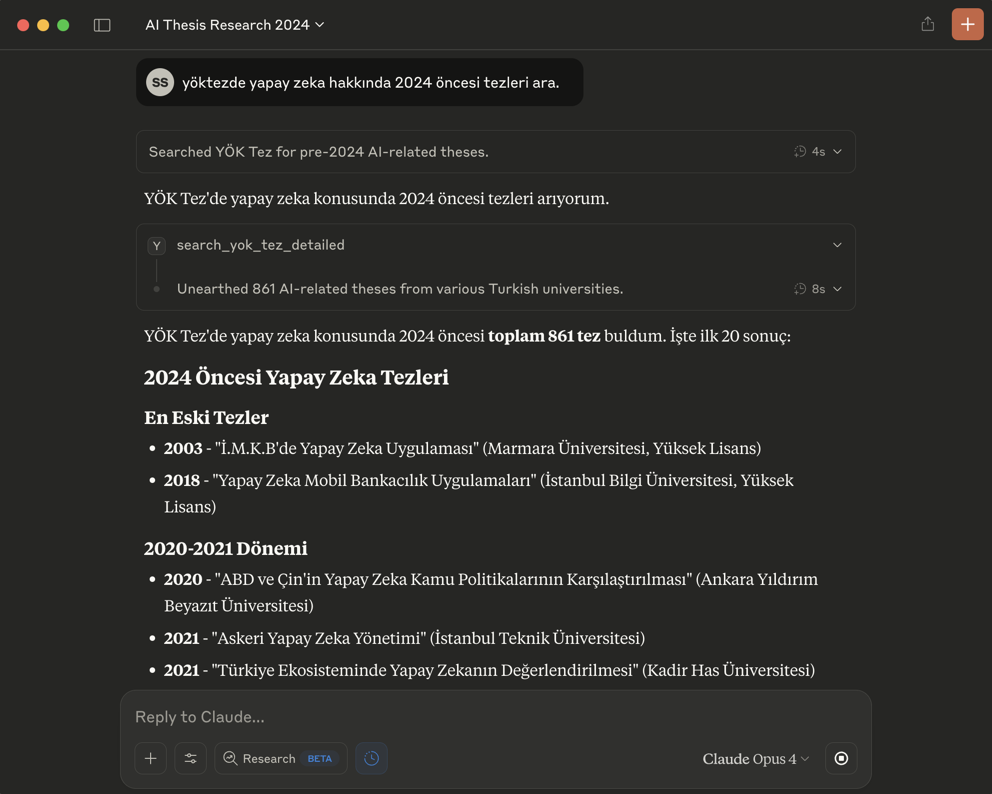
🎯 Temel Özellikler
YÖK Ulusal Tez Merkezi'ne programatik erişim için standart bir MCP arayüzü.
Aşağıdaki yetenekler:
Detaylı Tez Arama: Başlık, yazar, danışman, üniversite, enstitü, anabilim/bilim dalı, tez türü, yıl aralığı, izin durumu, tez numarası, konu, dizin ve özet metni gibi çeşitli kriterlere göre tez arama.
Tez Belgesi Getirme: Belirli bir tezin PDF içeriğini, PDF sayfa bazında, işlenmiş Markdown formatında getirme.
Metadata Çıkarımı: Tez detay sayfalarından başlık, yazar, yıl, özet gibi önemli üst verilerin çıkarılması.
PDF İzin Kontrolü: Erişilemeyen veya yayın izni olmayan tezler için uygun bildirim.
Karar metinlerinin LLM'ler tarafından daha kolay işlenebilmesi için Markdown formatına çevrilmesi.
Claude Desktop uygulaması ile
fastmcp installkomutu (veya manuel yapılandırma) kullanılarak kolay entegrasyon.YokTez MCP 5ire gibi Claude Desktop haricindeki MCP istemcilerini de destekler.
🚀 5 Dakikada Başla (Remote MCP)
✅ Kurulum Gerektirmez! Hemen Kullan!
🔗 Remote MCP Adresi: https://yoktezmcp.fastmcp.app/mcp
Claude Desktop ile Kullanım
Claude Desktop'ı açın
Settings → Connectors → Add Custom Connector
Bilgileri girin:
Name:
YokTez MCPURL:
https://yoktezmcp.fastmcp.app/mcp
Add butonuna tıklayın
Hemen kullanmaya başlayın! 🎉
Google Antigravity ile Kullanım
Agent session açın ve editörün yan panelindeki "…" dropdown menüsüne tıklayın
MCP Servers seçeneğini seçin - MCP Store açılacak
Üstteki Manage MCP Servers butonuna tıklayın
View raw config seçeneğine tıklayın
mcp_config.jsondosyasına aşağıdaki yapılandırmayı ekleyin:
{
"mcpServers": {
"yoktez-mcp": {
"serverUrl": "https://yoktezmcp.fastmcp.app/mcp/",
"headers": {
"Content-Type": "application/json"
}
}
}
}💡 İpucu: Remote MCP sayesinde Python, uv veya herhangi bir kurulum yapmadan doğrudan Claude Desktop üzerinden YÖK Ulusal Tez Merkezi'ne erişebilirsiniz!
🚀 Claude Haricindeki Modellerle Kullanmak İçin Çok Kolay Kurulum (Örnek: 5ire için)
Bu bölüm, YokTez MCP aracını 5ire gibi Claude Desktop dışındaki MCP istemcileriyle kullanmak isteyenler içindir.
Python Kurulumu: Sisteminizde Python 3.11 kurulu olmalıdır. Kurulum sırasında "Add Python to PATH" (Python'ı PATH'e ekle) seçeneğini işaretlemeyi unutmayın. Buradan 3.11 sürümünü indirebilirsiniz.
Git Kurulumu (Windows): Bilgisayarınıza git yazılımını indirip kurun. "Git for Windows/x64 Setup" seçeneğini indirmelisiniz.
uvKurulumu:Windows Kullanıcıları (PowerShell): Bir CMD ekranı açın ve bu kodu çalıştırın:
powershell -ExecutionPolicy ByPass -c "irm https://astral.sh/uv/install.ps1 | iex"Mac/Linux Kullanıcıları (Terminal): Bir Terminal ekranı açın ve bu kodu çalıştırın:
curl -LsSf https://astral.sh/uv/install.sh | sh
Microsoft Visual C++ Redistributable (Windows): Bazı Python paketlerinin doğru çalışması için gereklidir. Buradan indirip kurun.
İşletim sisteminize uygun 5ire MCP istemcisini indirip kurun.
5ire'ı açın. Workspace -> Providers menüsünden kullanmak istediğiniz LLM servisinin API anahtarını girin.
Tools menüsüne girin. +Local veya New yazan butona basın.
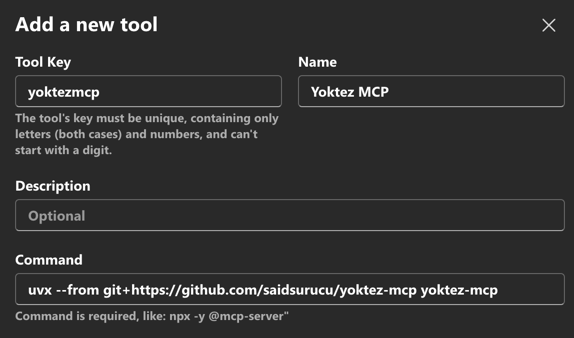
Tool Key:
yoktezmcpName:
YokTez MCPCommand:
uvx --from git+https://github.com/saidsurucu/yoktez-mcp yoktez-mcpSave butonuna basarak kaydedin.

Şimdi Tools altında YokTez MCP'yi görüyor olmalısınız. Üstüne geldiğinizde sağda çıkan butona tıklayıp etkinleştirin (yeşil ışık yanmalı).
Artık YokTez MCP ile konuşabilirsiniz.
⚙️ Claude Desktop Manuel Kurulumu
Ön Gereksinimler: Python,
uv, (Windows için) Microsoft Visual C++ Redistributable'ın sisteminizde kurulu olduğundan emin olun. Detaylı bilgi için yukarıdaki "5ire için Kurulum" bölümündeki ilgili adımlara bakabilirsiniz.Claude Desktop Settings -> Developer -> Edit Config.
Açılan
claude_desktop_config.jsondosyasınamcpServersaltına ekleyin:{ "mcpServers": { // ... (varsa diğer sunucularınız) ... "YokTez MCP": { "command": "uvx", "args": [ "--from", "git+https://github.com/saidsurucu/yoktez-mcp", "yoktez-mcp" ] } } }Claude Desktop'ı kapatıp yeniden başlatın.
🧩 MCP Yerine Skill Olarak Kullanım (Claude in Chrome / Claude Desktop tarayıcısı)
Sunucu kurmak istemeyenler için aynı yetenekler skills/yoktez klasöründe bir Claude skill'i olarak da var. Skill, tarayıcıda açık bir tez.yok.gov.tr sekmesine JavaScript enjekte ederek çalışır; Python, uv ya da MCP sunucusu gerekmez. YÖK'te CAPTCHA veya giriş zorunluluğu olmadığından hem Claude in Chrome eklentisiyle hem de Claude Desktop'ın yerleşik tarayıcısıyla çalışır.
Skill'in yapabildikleri:
Anahtar kelimeyle arama (tez adı / yazar / danışman / konu / anahtar kelime / özet; en fazla 3 terim, ve/veya)
Detaylı arama: Anabilim Dalı kodları (birden fazlası birleştirilir), tez adı, yazar, danışman, anahtar kelime, özet, tez numarası, tür, dil, yıl, izin durumu
Anabilim Dalı adından kod bulma, son eklenen tezler
Danışman, Türkçe/İngilizce özet, anahtar kelimeler ve hazır atıflar (APA, IEEE, MLA, Chicago, Harvard)
Tez PDF'ini sayfa aralığıyla metin olarak okuma (yazarın kısıtladığı tezlerde kısıtlama gerekçesini bildirir)
Kurulum (Claude Code):
git clone https://github.com/saidsurucu/yoktez-mcp && cp -r yoktez-mcp/skills/yoktez ~/.claude/skills/Kurulum (Claude Desktop / claude.ai): skills/yoktez klasörünü zip'leyip Settings → Capabilities → Skills bölümünden yükleyin.
Ayrıntılar için skills/yoktez/SKILL.md ve skills/yoktez/reference.md dosyalarına bakın.
🛠️ Kullanılabilir Araçlar (MCP Tools)
Bu FastMCP sunucusu LLM modelleri için aşağıdaki araçları sunar:
search_yok_tez_detailed: YÖK Ulusal Tez Merkezi'nde çeşitli detaylı kriterleri kullanarak tez araması yapar.Parametreler:
thesis_title,author_name,advisor_name,university_name,institute_name,department_name,discipline_name,thesis_number,subject_headings,index_terms,abstract_text,thesis_type,permission_status,thesis_status,language,institute_group,year_start,year_end,page,results_per_page.Döndürdüğü Değer:
YokTezSearchResult(sayfalanmış tez özeti listesi, toplam sonuç sayısı vb. içerir)
get_yok_tez_document_markdown: Belirli bir YÖK tezinin PDF içeriğini, istenen PDF sayfasına göre Markdown formatında getirir.Parametreler:
detail_page_url(tez detay sayfası URL'si),page_number(istenen PDF sayfa numarası).Döndürdüğü Değer:
YokTezDocumentMarkdown(sayfanın Markdown içeriği, toplam sayfa sayısı, metadata vb. içerir)
📜 Lisans
Bu proje MIT Lisansı altında lisanslanmıştır. Detaylar için LICENSE dosyasına bakınız.
Available Tools
6 toolsget_yok_tez_document_markdownGet Yok Tez Document MarkdownA
Retrieves a specific YÖK thesis PDF using its detail page URL. It fetches metadata from the detail page, downloads the PDF (if permissible and not cached), isolates the specified PDF page, converts that page to Markdown, and returns the content.
Inputs: detail_page_url (required), page_number. Returns: Model for the Markdown content extracted from a YÖK Thesis PDF page.
get_yok_tez_thesis_detailsGet Yok Tez Thesis DetailsA
Fetch rich thesis metadata WITHOUT downloading the PDF.
Returns:
Advisor name
Full hierarchical location (University / Institute / Department / Discipline)
Turkish abstract (full text)
English abstract (full text)
Turkish keywords (parsed bilingual pairs)
English keywords (parsed bilingual pairs)
Citations in APA, IEEE, MLA, Chicago, and Harvard formats
Much cheaper than get_yok_tez_document_markdown — calls a single JSON endpoint instead of downloading the full PDF. Ideal for surveying or citing theses without needing their body text.
Inputs: thesis_key, encrypted_no, detail_page_url. Returns: Rich thesis metadata fetched directly from YÖK's tezBilgiDetay.jsp endpoint. Re…
list_recent_yok_tezList Recent Yok TezA
List recent YÖK theses without a search keyword.
Calls YÖK's TezIslemleri endpoint (islem=7 or islem=8) and returns the same result shape as search_yok_tez_detailed. This is the ONLY way to enumerate recent theses since the regular search endpoint requires a keyword.
Useful for:
Monitoring new theses added to YÖK each week (SON_15_GUN)
Browsing the current year's full corpus (BU_YIL)
Inputs: mode, page, results_per_page. Returns: Model for YÖK Thesis search results.
list_yok_tez_anabilim_daliList Yok Tez Anabilim DaliA
Find YÖK departments (Anabilim Dalı) whose name contains a keyword.
YÖK's regular keyword search canNOT search inside department names. Use this tool first to discover the relevant departments and their codes, then pass the codes you want to 'search_yok_tez_by_anabilim_dali' to retrieve theses from those departments.
Example: keyword='hukuk' returns departments like 'KAMU HUKUKU ANABİLİM DALI' (code 41), 'TİCARET HUKUKU ANABİLİM DALI' (code 906), etc. The LLM can then pick one or several codes to search.
Inputs: keyword (required), max_results. Returns: Result of searching YÖK's department (anabilim dalı) list by keyword.
search_yok_tez_by_anabilim_daliSearch Yok Tez By Anabilim DaliA
Search YÖK theses filtered by department (Anabilim Dalı) code(s).
This uses YÖK's advanced search path, which filters by department. Unlike 'search_yok_tez_detailed', it does NOT support a free full-text/abstract keyword — but it DOES support filtering by thesis title, author, advisor and index terms, plus the usual type/language/permission/status/year filters.
Workflow:
Call 'list_yok_tez_anabilim_dali' with a keyword (e.g. 'hukuk') to get codes.
Pass the chosen code(s) here. Multiple codes are searched and merged.
Note: YÖK caps each department's result batch at ~2000; 'total_results_found' reflects YÖK's reported totals while 'results_in_batch' is what was actually fetched.
Inputs: anabilim_dali_codes (required), page, language, year_end, +9 more. Returns: Model for YÖK Thesis search results.
search_yok_tez_detailedSearch Yok Tez DetailedA
Search the YÖK National Thesis Center.
YÖK's API was redesigned in 2026: searches are now keyword-based against ONE field type at a time (with optional additional keyword slots joined by AND/OR), plus a small set of filter dropdowns (type, language, permission, status, years).
University/institute/department text filters are no longer respected by YÖK and have been removed from this tool. The 'thesis_number' parameter has also been removed since YÖK no longer supports direct lookup by thesis number through this endpoint.
Provide either:
'keyword' (preferred — combine with 'search_field' if you need to restrict the search to a specific field like title or author), or
one of the legacy aliases (thesis_title, author_name, advisor_name, subject_headings, index_terms, abstract_text) which auto-set 'search_field'.
Inputs: page, keyword, language, year_end, +17 more. Returns: Model for YÖK Thesis search results.
Tool Schema Changelog
Recent tool additions, removals, and schema changes observed during successful MCP inspections.
Loading tool schema changelog…
TDQS
Scored across 6 tools
The tools have distinct purposes: search by keyword, list recent, list departments, search by departments, get details, and get document markdown. However, list_recent_yok_tez and search_yok_tez_detailed both return the same result shape, and there is a slight overlap between the search tool and the department-based search tool, even though the descriptions clarify the distinction.
Naming is mostly consistent with a verb_noun pattern (search_, list_, get_), but the verbs vary (search vs list vs get) and the noun phrases are inconsistent in length and specificity (e.g., 'search_yok_tez_detailed' vs 'get_yok_tez_document_markdown'). Also, one tool uses 'yok_tez' and another uses 'yok_tez_by_anabilim_dali' which is a bit unpredictable.
With only 6 tools, the set is tightly scoped for the domain of searching and retrieving YÖK theses. Each tool covers a distinct functionality: search, list recent, discover departments, search by department, get metadata, and get full text. This is well within the ideal range (3-15) and there is no bloat.
The tool set covers the main workflows: keyword search, recent listings, department discovery and search, rich metadata retrieval, and full-text PDF-to-Markdown conversion. However, there is no direct lookup by thesis number (removed by YÖK) and no apparent way to download the PDF itself, which could be a minor gap for users needing the original file.
Maintenance
Related MCP Connectors
Web search, URL content extraction to Markdown, site mapping, and recursive web crawler.
Search arXiv/Semantic Scholar/OpenAlex + medical evidence (PubMed/Europe PMC) + LaTeX/PDF tools.
Web search, fetch, extract, and research for AI agents. Markdown output + AI-synthesized answers.
Web search, Google SERP, page extraction to markdown and cited answers for AI agents.
Related MCP Servers
- AlicenseAqualityDmaintenanceProvides an MCP interface for accessing YOKATLAS (Turkish Higher Education Council Atlas) data, enabling LLM applications like Claude to search and retrieve details about undergraduate and associate degree programs in Turkey.474MIT
- AlicenseNot gradedqualityDmaintenanceProvides programmatic access to Turkey's Ministry of Justice Legislation Information System (mevzuat.gov.tr), enabling users to search legislation, retrieve article hierarchies, and fetch article contents in Markdown format through natural language.1MIT
- FlicenseNot gradedqualityDmaintenanceEnables searching and retrieving full text of Yargıtay (Turkish Supreme Court) decisions as Markdown, via the official karararama.yargitay.gov.tr system.2-
- AlicenseNot gradedqualityBmaintenanceEnables AI assistants to search Turkish judicial decisions, legislation, and regulatory rulings from sources including Yargıtay, Danıştay, UYAP Emsal, Anayasa Mahkemesi, Sayıştay, AİHM, Resmî Gazete, and various regulatory authorities, and to retrieve decision texts as Markdown.MIT