F
licenseNot graded
qualityD
maintenanceProvides access to Turkish higher education data, enabling search and retrieval of detailed information about bachelor's and associate degree programs from universities across Turkey.
-

This server provides programmatic access to YÖKATLAS (Turkish Higher Education Atlas) data through the Model Context Protocol, enabling LLM applications to search and retrieve detailed information about Turkish university programs.
Search Bachelor's Degree Programs - Find undergraduate programs using fuzzy matching for university names (e.g., "boğaziçi" → "BOĞAZİÇİ ÜNİVERSİTESİ") and partial matching for program names (e.g., "bilgisayar" finds all computer programs). Filter by city, score type (SAY/EA/SOZ/DIL), university type (State/Foundation/TRNC/International), fee status (Free/Paid/Scholarship/Discounted), education type (Regular/Evening/Open Education/Distance Learning), and availability (Filled/Not Filled/New).
Search Associate Degree Programs - Locate 2-year programs with the same fuzzy matching capabilities and filtering options, using TYT scores (150-550 points) instead of SAY/EA/SOZ/DIL.
Get Bachelor's Degree Program Details - Retrieve comprehensive data for specific programs using YÖP codes, including quota, placement scores, student demographics, academic staff, facility information, and historical placement trends (data available for years 2020-2030).
Get Associate Degree Program Details - Obtain extensive details for associate degree programs using YÖP codes, including quota, placement data, student distribution, academic staff, and facility information (data available for years 2020-2030).
Key Features: Intelligent parameter normalization, type-safe validation, historical data access, and integration with MCP clients including Claude Desktop and others through the standardized MCP interface.
Click on "Deploy Server".
Wait a few minutes for the server to deploy. Once ready, it will show a "Started" state.
In the chat, type @ followed by the MCP server name and your instructions, e.g., "@YOKATLAS API MCP Server find computer engineering programs in Istanbul"
That's it! The server will respond to your query, and you can continue using it as needed.
Here is a step-by-step guide with screenshots.
Bu proje, YÖKATLAS verilerine erişimi kolaylaştıran bir FastMCP sunucusu oluşturur. Bu sayede, YÖKATLAS'tan lisans ve önlisans program arama ve detaylı istatistik getirme işlemleri, Model Context Protocol (MCP) destekleyen LLM (Büyük Dil Modeli) uygulamaları (örneğin Claude Desktop veya 5ire) ve diğer istemciler tarafından araç (tool) olarak kullanılabilir hale gelir.
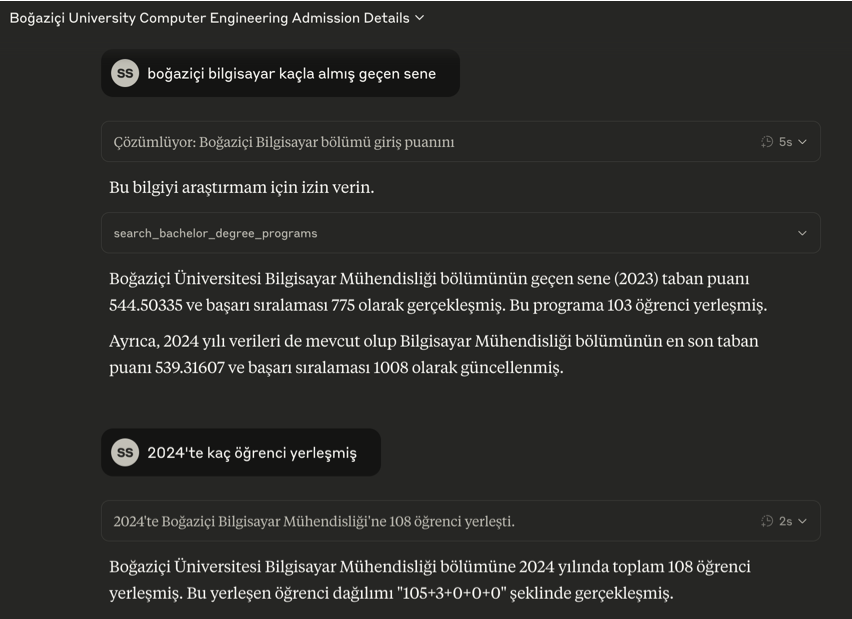
🎯 Temel Özellikler
YÖKATLAS tercih kılavuzu JSON API'sine programatik erişim için standart bir MCP arayüzü.
Aşağıdaki yetenekler:
Birleşik Akıllı Arama: Lisans + önlisans tek arama; fuzzy matching ile üniversite/program/il adı çözümlemesi (örn: "boğaziçi" → "BOĞAZİÇİ ÜNİVERSİTESİ")
4 Yıllık İstatistik: Her programa ait kontenjan, yerleşen, taban puanı, başarı sırası, akademik kadro ve KPSS verileri tek seferde (current + 3 history)
Net Sihirbazı: Son yerleşen kişinin ders bazında net sayıları (TYT/AYT/YDT), taban puan, OBP ve katsayı
Lookup Araçları: Üniversite, program grubu ve il listelerine doğrudan erişim
Filtreleme: Puan türü (SAY/SÖZ/EA/DİL/TYT), üniversite türü (DEVLET/VAKIF), başarı sırası aralığı, sayfalama ve sıralama
Claude Desktop uygulaması ile fastmcp install komutu (veya manuel yapılandırma) kullanılarak kolay entegrasyon.
YOKATLAS MCP 5ire gibi Claude Desktop haricindeki MCP istemcilerini de destekler.
⚠️ v0.6.0 Breaking Change — YÖK Atlas Nisan 2026'da React tabanlı SPA'ya geçti, eski HTML scraping endpoint'leri ve detaylı atlas verileri (cinsiyet/lise alanı dağılımı, akademisyen ünvan dağılımı, KPSS yıllara göre, vb.) site genelinden kaldırıldı. Bu MCP yeni JSON API'ye karşı yazıldı; sadece resmî API'nin sunduğu temel istatistikler döner.
🔗 Remote MCP Adresi: https://yokatlasmcp.fastmcp.app/mcp
Claude Desktop'ı açın
Settings → Connectors → Add Custom Connector
Bilgileri girin:
Name: YOKATLAS MCP
URL: https://yokatlasmcp.fastmcp.app/mcp
Add butonuna tıklayın
Hemen kullanmaya başlayın! 🎉
Agent session açın ve editörün yan panelindeki "…" dropdown menüsüne tıklayın
MCP Servers seçeneğini seçin - MCP Store açılacak
Üstteki Manage MCP Servers butonuna tıklayın
View raw config seçeneğine tıklayın
mcp_config.json dosyasına aşağıdaki yapılandırmayı ekleyin:
{
  "mcpServers": {
    "yokatlas-mcp": {
      "serverUrl": "https://yokatlasmcp.fastmcp.app/mcp/",
      "headers": {
        "Content-Type": "application/json"
      }
    }
  }
}
💡 İpucu: Remote MCP sayesinde Python, uv veya herhangi bir kurulum yapmadan doğrudan Claude Desktop üzerinden YÖKATLAS verilerine erişebilirsiniz!
Related MCP server: YokTez MCP
Bu bölüm, YOKATLAS MCP aracını 5ire gibi Claude Desktop dışındaki MCP istemcileriyle kullanmak isteyenler içindir.
Python Kurulumu: Sisteminizde Python 3.12 kurulu olmalıdır. Kurulum sırasında "Add Python to PATH" (Python'ı PATH'e ekle) seçeneğini işaretlemeyi unutmayın. Buradan indirebilirsiniz.
Git Kurulumu (Windows): Bilgisayarınıza git yazılımını indirip kurun. "Git for Windows/x64 Setup" seçeneğini indirmelisiniz.
uv Kurulumu:
Windows Kullanıcıları (PowerShell): Bir CMD ekranı açın ve bu kodu çalıştırın: powershell -ExecutionPolicy ByPass -c "irm https://astral.sh/uv/install.ps1 | iex"
Mac/Linux Kullanıcıları (Terminal): Bir Terminal ekranı açın ve bu kodu çalıştırın: curl -LsSf https://astral.sh/uv/install.sh | sh
Microsoft Visual C++ Redistributable (Windows): Bazı Python paketlerinin doğru çalışması için gereklidir. Buradan indirip kurun.
İşletim sisteminize uygun 5ire MCP istemcisini indirip kurun.
5ire'ı açın. Workspace -> Providers menüsünden kullanmak istediğiniz LLM servisinin API anahtarını girin.
Tools menüsüne girin. +Local veya New yazan butona basın.
Tool Key: yokatlasmcp
Name: YOKATLAS MCP
Command:
uvx --from git+https://github.com/saidsurucu/yokatlas-mcp yokatlas-mcpSave butonuna basarak kaydedin.
Şimdi Tools altında YOKATLAS MCP'yi görüyor olmalısınız. Üstüne geldiğinizde sağda çıkan butona tıklayıp etkinleştirin (yeşil ışık yanmalı).
Artık YOKATLAS MCP ile konuşabilirsiniz.
Ön Gereksinimler: Python, uv, (Windows için) Microsoft Visual C++ Redistributable'ın sisteminizde kurulu olduğundan emin olun. Detaylı bilgi için yukarıdaki "5ire için Kurulum" bölümündeki ilgili adımlara bakabilirsiniz.
Claude Desktop Settings -> Developer -> Edit Config.
Açılan claude_desktop_config.json dosyasına mcpServers altına ekleyin:
{
  "mcpServers": {
    "YOKATLAS MCP": {
      "command": "uvx",
      "args": [
        "--from", "git+https://github.com/saidsurucu/yokatlas-mcp",
        "yokatlas-mcp"
      ]
    }
  }
}
Claude Desktop'ı kapatıp yeniden başlatın.
Bu FastMCP sunucusu LLM modelleri için aşağıdaki araçları sunar:
search_programs: Lisans + önlisans birleşik arama (akıllı fuzzy matching).
Parametreler:
degree_type: 'bachelor' (lisans) veya 'associate' (önlisans). Boş bırakılırsa ikisi de döner.
puan_turu: SAY, SÖZ/SOZ, EA, DİL/DIL, TYT (ASCII varyantlar otomatik normalize edilir).
universite, program, il: Smart fuzzy match (örn. "boğaziçi", "bilgisayar", "ankara").
universite_turu: DEVLET veya VAKIF.
kilavuz_kodu: int — tek programa filtre (eski "atlas detayı" use-case'i için).
min_basari_sirasi, max_basari_sirasi: Başarı sırası aralığı.
page, size, sort_by, direction: Sayfalama ve sıralama (default: basariSirasi ASC, size=20, max size=500).
Döndürülen Veri: Her sonuç 4 yıllık istatistikleri (current + history) içerir: kontenjan, yerleşen, taban puanı, başarı sırası, KPSS skorları, akademik kadro sayıları.
search_netler: Net Sihirbazı — son yerleşen kişinin ders bazında net sayıları.
Parametreler:
universite, program: Smart fuzzy match (tekil değer, liste değil). program çözümlendiğinde, puan_turu açıkça belirtilmemişse eşleşen program grubundan otomatik doldurulur.
puan_turu: SAY, SÖZ/SOZ, EA, DİL/DIL, TYT.
universite_turu: DEVLET veya VAKIF.
yil: Belirli bir yıla filtrele (örn. 2024).
katsayi: Puan hesaplamasında kullanılan katsayıya göre filtrele.
page, size: Sayfalama (default: size=20, max size=500).
Döndürülen Veri: puan_turu'ye göre değişen net alanları (TYT her zaman var; SAY/SÖZ/EA/DİL kendi AYT/YDT alanlarını ekler), ayrıca katsayi, taban_puan, obp.
list_universities: YÖKATLAS'taki tüm üniversiteleri (universite_id, universite_adi) listeler.
list_program_groups: Tüm program gruplarını (birim_grup_id, birim_grup_adi, puan_turu) listeler — geçerli program filtre değerlerini keşfetmek için kullanın.
list_cities: 81 ili (il_kodu, il_adi) listeler.
Eski API'den geçenler için kısaca:
Eski (v0.5) | Yeni (v0.6) |
|
|
|
|
|
|
|
|
|
|
| Kaldırıldı (yeni API'de doğrudan karşılığı yok) |
|
|
Bu proje MIT Lisansı altında lisanslanmıştır. Detaylar için LICENSE dosyasına bakınız.
Get comprehensive details for a specific associate degree program from YOKATLAS Atlas.
Parameters:
yop_kodu (str): Program YÖP code (e.g., '120910060')
year (int): Data year (e.g., 2024, 2023)
Returns detailed information including:
General program information and statistics
Quota, placement, and score data
Student demographics and distribution
Academic staff and facility information
Historical placement trends
| Name | Required | Description | Default |
|---|---|---|---|
| yop_kodu | Yes | Program YÖP code (e.g., '120910060') - unique identifier for the associate degree program | |
| year | Yes | Data year for statistics (e.g., 2024, 2023) |
| Name | Required | Description |
|---|---|---|
No output parameters | ||
Does the description disclose side effects, auth requirements, rate limits, or destructive behavior?
With no annotations provided, the description carries the full burden of behavioral disclosure. It describes what information is returned (comprehensive details including multiple categories) which is helpful, but doesn't mention important behavioral aspects like whether this is a read-only operation, potential rate limits, authentication requirements, or error conditions. The description adds value but doesn't fully compensate for the lack of annotations.
Agents need to know what a tool does to the world before calling it. Descriptions should go beyond structured annotations to explain consequences.
Is the description appropriately sized, front-loaded, and free of redundancy?
The description is well-structured and front-loaded with the core purpose, followed by parameter documentation and return value details. Every sentence earns its place by providing essential information without redundancy. The bulleted list of return categories is efficient and informative.
Shorter descriptions cost fewer tokens and are easier for agents to parse. Every sentence should earn its place.
Given the tool's complexity, does the description cover enough for an agent to succeed on first attempt?
Given that an output schema exists (though not shown here), the description doesn't need to fully explain return values. It provides a comprehensive overview of what information is returned through the bulleted list. However, for a tool with no annotations, it could benefit from more behavioral context about how the tool operates, potential limitations, or error handling.
Complex tools with many parameters or behaviors need more documentation. Simple tools need less. This dimension scales expectations accordingly.
Does the description clarify parameter syntax, constraints, interactions, or defaults beyond what the schema provides?
Schema description coverage is 100%, so the schema already documents both parameters thoroughly. The description adds marginal value by providing examples ('e.g., 2024, 2023') and clarifying that yop_kodu is a 'unique identifier for the associate degree program' - though similar information exists in the schema. The description also provides context about what the parameters enable (getting data for a specific program in a specific year).
Input schemas describe structure but not intent. Descriptions should explain non-obvious parameter relationships and valid value ranges.
Does the description clearly state what the tool does and how it differs from similar tools?
The description clearly states the specific action ('Get comprehensive details'), resource ('associate degree program from YOKATLAS Atlas'), and scope ('specific associate degree program'). It distinguishes from sibling tools by specifying associate degree programs (vs. bachelor degree tools) and details retrieval (vs. search tools).
Agents choose between tools based on descriptions. A clear purpose with a specific verb and resource helps agents select the right tool.
Does the description explain when to use this tool, when not to, or what alternatives exist?
The description provides clear context about when to use this tool (to get comprehensive details for a specific associate degree program when you have the YÖP code and year). However, it doesn't explicitly state when NOT to use it or mention alternatives like the search_associate_degree_programs tool for when you don't have the specific code.
Agents often have multiple tools that could apply. Explicit usage guidance like "use X instead of Y when Z" prevents misuse.
Get comprehensive details for a specific bachelor's degree program from YOKATLAS Atlas.
Parameters:
yop_kodu (str): Program YÖP code (e.g., '102210277')
year (int): Data year (e.g., 2024, 2023)
Returns detailed information including:
General program information and statistics
Quota, placement, and score data
Student demographics and distribution
Academic staff and facility information
Historical placement trends
| Name | Required | Description | Default |
|---|---|---|---|
| yop_kodu | Yes | Program YÖP code (e.g., '102210277') - unique identifier for the bachelor's degree program | |
| year | Yes | Data year for statistics (e.g., 2024, 2023) |
| Name | Required | Description |
|---|---|---|
No output parameters | ||
Does the description disclose side effects, auth requirements, rate limits, or destructive behavior?
With no annotations provided, the description carries the full burden. It indicates this is a read operation ('Get') and lists the types of information returned, but doesn't disclose behavioral traits like rate limits, authentication needs, error conditions, or whether the data is real-time vs. cached. It adds some context about what data is included but lacks operational details.
Agents need to know what a tool does to the world before calling it. Descriptions should go beyond structured annotations to explain consequences.
Is the description appropriately sized, front-loaded, and free of redundancy?
The description is well-structured and front-loaded with the core purpose. It uses bullet points efficiently to detail return information without redundancy. Every sentence earns its place by clarifying scope and outputs.
Shorter descriptions cost fewer tokens and are easier for agents to parse. Every sentence should earn its place.
Given the tool's complexity, does the description cover enough for an agent to succeed on first attempt?
Given the tool's moderate complexity (2 parameters, read-only), 100% schema coverage, and the presence of an output schema (implied by 'Returns detailed information'), the description is complete enough. It specifies the resource scope, parameters, and return data types, which aligns well with the structured data provided.
Complex tools with many parameters or behaviors need more documentation. Simple tools need less. This dimension scales expectations accordingly.
Does the description clarify parameter syntax, constraints, interactions, or defaults beyond what the schema provides?
Schema description coverage is 100%, so the schema already documents both parameters thoroughly. The description adds minimal value by listing parameters and providing examples, but doesn't explain semantics beyond what's in the schema (e.g., what YÖP code format entails). Baseline is 3, but it gets a point for reinforcing parameter importance with the examples.
Input schemas describe structure but not intent. Descriptions should explain non-obvious parameter relationships and valid value ranges.
Does the description clearly state what the tool does and how it differs from similar tools?
The description clearly states the verb 'Get comprehensive details' and specifies the resource as 'a specific bachelor's degree program from YOKATLAS Atlas.' It distinguishes from sibling tools by focusing on bachelor's degree programs (vs. associate degree tools) and on retrieving details for a specific program (vs. search tools).
Agents choose between tools based on descriptions. A clear purpose with a specific verb and resource helps agents select the right tool.
Does the description explain when to use this tool, when not to, or what alternatives exist?
The description implies usage context by specifying it's for retrieving details of a specific bachelor's degree program, which differentiates it from search tools. However, it doesn't explicitly state when to use this tool versus alternatives like 'search_bachelor_degree_programs' or provide exclusions (e.g., not for associate degrees).
Agents often have multiple tools that could apply. Explicit usage guidance like "use X instead of Y when Z" prevents misuse.
Search for associate degree (önlisans) programs with smart fuzzy matching and user-friendly parameters.
Smart Features:
Fuzzy university name matching (e.g., "anadolu" → "ANADOLU ÜNİVERSİTESİ")
Partial program name matching (e.g., "turizm" finds all tourism programs)
Intelligent parameter normalization
Type-safe validation
Parameters:
university: University name (fuzzy matching supported)
program: Program/department name (partial matching supported)
city: City name
university_type: Type of university (Devlet, Vakıf, etc.)
fee_type: Fee/scholarship information
education_type: Type of education (Örgün, İkinci, etc.)
results_limit: Maximum number of results to return
Note: Associate degree programs use TYT scores, not SAY/EA/SOZ/DIL like bachelor programs.
| Name | Required | Description | Default |
|---|---|---|---|
| university | No | University name with fuzzy matching support (e.g., 'anadolu' → 'ANADOLU ÜNİVERSİTESİ') | |
| program | No | Program name with partial matching (e.g., 'turizm' finds all tourism programs) | |
| city | No | City name where the university is located | |
| university_type | No | University type: Devlet (State), Vakıf (Foundation), KKTC (TRNC), Yurt Dışı (International) | |
| fee_type | No | Fee status: Ücretsiz (Free), Ücretli (Paid), İÖ-Ücretli (Evening-Paid), Burslu (Scholarship), İndirimli (Discounted), AÖ-Ücretli (Open Education-Paid), UÖ-Ücretli (Distance Learning-Paid) | |
| education_type | No | Education type: Örgün (Regular), İkinci (Evening), Açıköğretim (Open Education), Uzaktan (Distance Learning) | |
| availability | No | Program availability: Doldu (Filled), Doldu# (Filled with conditions), Dolmadı (Not filled), Yeni (New program) | |
| results_limit | No | Maximum number of results to return | |
| yop_kodu | No | ||
| uni_adi | No | ||
| program_adi | No | ||
| sehir_adi | No | ||
| universite_turu | No | ||
| ucret_burs | No | ||
| ogretim_turu | No | ||
| doluluk | No | ||
| ust_puan | No | ||
| alt_puan | No | ||
| page | No |
| Name | Required | Description |
|---|---|---|
No output parameters | ||
Does the description disclose side effects, auth requirements, rate limits, or destructive behavior?
With no annotations provided, the description carries the full burden of behavioral disclosure. It describes smart features like fuzzy matching, partial matching, normalization, and validation, which are useful behavioral traits. However, it doesn't mention performance characteristics (e.g., rate limits), error handling, or what the output looks like (though an output schema exists). It adequately covers search behavior but lacks broader operational context.
Agents need to know what a tool does to the world before calling it. Descriptions should go beyond structured annotations to explain consequences.
Is the description appropriately sized, front-loaded, and free of redundancy?
The description is well-structured with sections for smart features, parameters, and a note, making it easy to scan. It's appropriately sized for a complex tool with 19 parameters. However, some redundancy exists (e.g., parameter explanations partially repeat schema descriptions), and the note about TYT scores could be more integrated.
Shorter descriptions cost fewer tokens and are easier for agents to parse. Every sentence should earn its place.
Given the tool's complexity, does the description cover enough for an agent to succeed on first attempt?
Given the complexity (19 parameters, low schema coverage, no annotations) and the presence of an output schema, the description is reasonably complete. It explains the tool's purpose, key parameters, and smart features, and the output schema handles return values. However, it doesn't fully address all parameters or provide usage examples, leaving some gaps for such a parameter-rich tool.
Complex tools with many parameters or behaviors need more documentation. Simple tools need less. This dimension scales expectations accordingly.
Does the description clarify parameter syntax, constraints, interactions, or defaults beyond what the schema provides?
Schema description coverage is 42% (low), but the description compensates by listing and briefly explaining 7 key parameters (university, program, city, university_type, fee_type, education_type, results_limit) with examples. It adds meaning beyond the schema by grouping them and noting smart features like fuzzy/partial matching. However, it doesn't cover all 19 parameters, leaving some undocumented (e.g., yop_kodu, ust_puan).
Input schemas describe structure but not intent. Descriptions should explain non-obvious parameter relationships and valid value ranges.
Does the description clearly state what the tool does and how it differs from similar tools?
The description clearly states the tool's purpose: 'Search for associate degree (önlisans) programs with smart fuzzy matching and user-friendly parameters.' It specifies the verb ('search'), resource ('associate degree programs'), and distinguishes from siblings by focusing on associate degrees versus bachelor degrees in sibling tools like 'search_bachelor_degree_programs'.
Agents choose between tools based on descriptions. A clear purpose with a specific verb and resource helps agents select the right tool.
Does the description explain when to use this tool, when not to, or what alternatives exist?
The description provides clear context for when to use this tool: for searching associate degree programs, with a note that they use TYT scores, not SAY/EA/SOZ/DIL like bachelor programs. This implicitly distinguishes it from 'search_bachelor_degree_programs', but it doesn't explicitly state when not to use it or mention alternatives like 'get_associate_degree_atlas_details' for detailed information.
Agents often have multiple tools that could apply. Explicit usage guidance like "use X instead of Y when Z" prevents misuse.
Search for bachelor's degree programs with smart fuzzy matching and user-friendly parameters.
Smart Features:
Fuzzy university name matching (e.g., "boğaziçi" → "BOĞAZİÇİ ÜNİVERSİTESİ")
Partial program name matching (e.g., "bilgisayar" finds all computer programs)
Intelligent parameter normalization
Type-safe validation
Parameters:
university: University name (fuzzy matching supported)
program: Program/department name (partial matching supported)
city: City name
score_type: Score type (SAY, EA, SOZ, DIL)
university_type: Type of university (Devlet, Vakıf, etc.)
fee_type: Fee/scholarship information
education_type: Type of education (Örgün, İkinci, etc.)
results_limit: Maximum number of results to return
| Name | Required | Description | Default |
|---|---|---|---|
| university | No | University name with fuzzy matching support (e.g., 'boğaziçi' → 'BOĞAZİÇİ ÜNİVERSİTESİ') | |
| program | No | Program/department name with partial matching (e.g., 'bilgisayar' finds all computer programs) | |
| city | No | City name where the university is located | |
| score_type | No | Score type | |
| university_type | No | University type | |
| fee_type | No | Fee status: Ücretsiz (Free), Ücretli (Paid), İÖ-Ücretli (Evening-Paid), Burslu (Scholarship), İndirimli (Discounted), AÖ-Ücretli (Open Education-Paid), UÖ-Ücretli (Distance Learning-Paid) | |
| education_type | No | Education type: Örgün (Regular), İkinci (Evening), Açıköğretim (Open Education), Uzaktan (Distance Learning) | |
| availability | No | Program availability: Doldu (Filled), Doldu# (Filled with conditions), Dolmadı (Not filled), Yeni (New program) | |
| results_limit | No | Maximum number of results to return | |
| uni_adi | No | ||
| program_adi | No | ||
| sehir | No | ||
| puan_turu | No | ||
| universite_turu | No | ||
| ucret_burs | No | ||
| ogretim_turu | No | ||
| length | No |
| Name | Required | Description |
|---|---|---|
No output parameters | ||
Does the description disclose side effects, auth requirements, rate limits, or destructive behavior?
With no annotations provided, the description carries full burden. It describes smart matching features (fuzzy, partial) and intelligent parameter normalization, which are valuable behavioral insights. However, it doesn't disclose important aspects like rate limits, authentication requirements, error handling, or whether this is a read-only operation (though 'search' implies it likely is).
Agents need to know what a tool does to the world before calling it. Descriptions should go beyond structured annotations to explain consequences.
Is the description appropriately sized, front-loaded, and free of redundancy?
The description is well-structured with clear sections (overview, smart features, parameters). It's appropriately sized for a complex tool with many parameters. Some redundancy exists between the parameter explanations and schema descriptions, but overall it's efficient and front-loaded with the most important information.
Shorter descriptions cost fewer tokens and are easier for agents to parse. Every sentence should earn its place.
Given the tool's complexity, does the description cover enough for an agent to succeed on first attempt?
For a complex tool with 17 parameters, 53% schema coverage, and no annotations, the description does a reasonable job explaining the core functionality and primary parameters. However, it doesn't address the many additional parameters in the schema (uni_adi, program_adi, etc.), and while an output schema exists, the description provides no context about result format or structure.
Complex tools with many parameters or behaviors need more documentation. Simple tools need less. This dimension scales expectations accordingly.
Does the description clarify parameter syntax, constraints, interactions, or defaults beyond what the schema provides?
With schema description coverage at only 53%, the description compensates well by listing and briefly explaining all 8 primary parameters with practical examples. It clarifies matching behavior for university, program, and city parameters, and explains the purpose of results_limit. However, it doesn't cover the 9 additional parameters (uni_adi, program_adi, etc.) that appear in the schema.
Input schemas describe structure but not intent. Descriptions should explain non-obvious parameter relationships and valid value ranges.
Does the description clearly state what the tool does and how it differs from similar tools?
The description clearly states the tool searches for bachelor's degree programs with specific smart features. It distinguishes from sibling tools by focusing on bachelor's degrees (vs. associate degrees in siblings), but doesn't explicitly contrast with 'get_bachelor_degree_atlas_details' which appears to be a detail retrieval tool rather than a search tool.
Agents choose between tools based on descriptions. A clear purpose with a specific verb and resource helps agents select the right tool.
Does the description explain when to use this tool, when not to, or what alternatives exist?
The description provides no guidance on when to use this tool versus alternatives like 'get_bachelor_degree_atlas_details' or 'search_associate_degree_programs'. It mentions smart features but doesn't explain when these features are beneficial or when other tools might be more appropriate.
Agents often have multiple tools that could apply. Explicit usage guidance like "use X instead of Y when Z" prevents misuse.
Recent tool additions, removals, and schema changes observed during successful MCP inspections.
v1.0.0get_associate_degree_atlas_details2 fields changedInput schema / properties / year / titleRemoved value: -"Year"Input schema / properties / yop_kodu / titleRemoved value: -"Yop Kodu"get_bachelor_degree_atlas_details2 fields changedInput schema / properties / year / titleRemoved value: -"Year"Input schema / properties / yop_kodu / titleRemoved value: -"Yop Kodu"search_associate_degree_programs19 fields changedInput schema / properties / alt_puan / titleRemoved value: -"Alt Puan"Input schema / properties / availability / titleRemoved value: -"Availability"Input schema / properties / city / titleRemoved value: -"City"Input schema / properties / doluluk / titleRemoved value: -"Doluluk"Input schema / properties / education_type / titleRemoved value: -"Education Type"Input schema / properties / fee_type / titleRemoved value: -"Fee Type"Input schema / properties / ogretim_turu / titleRemoved value: -"Ogretim Turu"Input schema / properties / page / titleRemoved value: -"Page"Input schema / properties / program / titleRemoved value: -"Program"Input schema / properties / program_adi / titleRemoved value: -"Program Adi"Input schema / properties / results_limit / titleRemoved value: -"Results Limit"Input schema / properties / sehir_adi / titleRemoved value: -"Sehir Adi"Input schema / properties / ucret_burs / titleRemoved value: -"Ucret Burs"Input schema / properties / uni_adi / titleRemoved value: -"Uni Adi"Input schema / properties / universite_turu / titleRemoved value: -"Universite Turu"Input schema / properties / university / titleRemoved value: -"University"Input schema / properties / university_type / titleRemoved value: -"University Type"Input schema / properties / ust_puan / titleRemoved value: -"Ust Puan"Input schema / properties / yop_kodu / titleRemoved value: -"Yop Kodu"search_bachelor_degree_programs17 fields changedInput schema / properties / availability / titleRemoved value: -"Availability"Input schema / properties / city / titleRemoved value: -"City"Input schema / properties / education_type / titleRemoved value: -"Education Type"Input schema / properties / fee_type / titleRemoved value: -"Fee Type"Input schema / properties / length / titleRemoved value: -"Length"Input schema / properties / ogretim_turu / titleRemoved value: -"Ogretim Turu"Input schema / properties / program / titleRemoved value: -"Program"Input schema / properties / program_adi / titleRemoved value: -"Program Adi"Input schema / properties / puan_turu / titleRemoved value: -"Puan Turu"Input schema / properties / results_limit / titleRemoved value: -"Results Limit"Input schema / properties / score_type / titleRemoved value: -"Score Type"Input schema / properties / sehir / titleRemoved value: -"Sehir"Input schema / properties / ucret_burs / titleRemoved value: -"Ucret Burs"Input schema / properties / uni_adi / titleRemoved value: -"Uni Adi"Input schema / properties / universite_turu / titleRemoved value: -"Universite Turu"Input schema / properties / university / titleRemoved value: -"University"Input schema / properties / university_type / titleRemoved value: -"University Type"get_associate_degree_atlas_detailsget_bachelor_degree_atlas_detailssearch_associate_degree_programssearch_bachelor_degree_programsScored across 4 tools
Each tool has a clearly distinct purpose: two tools retrieve detailed information for specific programs (associate vs bachelor degrees), while two tools search for programs (associate vs bachelor degrees). The degree level distinction prevents any ambiguity between tools.
All tools follow a consistent verb_noun pattern with clear action prefixes (get_ for retrieval, search_ for searching) and descriptive suffixes that indicate the degree type and function. The naming is perfectly uniform across all four tools.
Four tools is ideal for this server's scope of providing YOKATLAS university program data. It covers both associate and bachelor degrees with complementary search and detail retrieval functions, making each tool essential without redundancy.
The tool set provides complete coverage for the domain: users can search for programs (both associate and bachelor degrees) and retrieve comprehensive details for specific programs. This covers the core workflow of discovering and examining university programs without any apparent gaps.
MCP server unifying ERPs, CRMs, APIs and knowledge base for Claude, ChatGPT and Gemini.
Provide detailed Pokémon data and information through a standardized MCP interface. Enable LLMs an…
YouTube transcripts, search, channel browsing, and playlists for AI agents via MCP.
Capability registry for the agentic economy. Semantic search over verified MCP server listings.