
project-graph-mcp
[](https://www.npmjs.com/package/project-graph-mcp)
[](https://opensource.org/licenses/MIT)
[](https://nodejs.org)
# project-graph-mcp
[Website and documentation](https://rnd-pro.github.io/project-graph-mcp/)
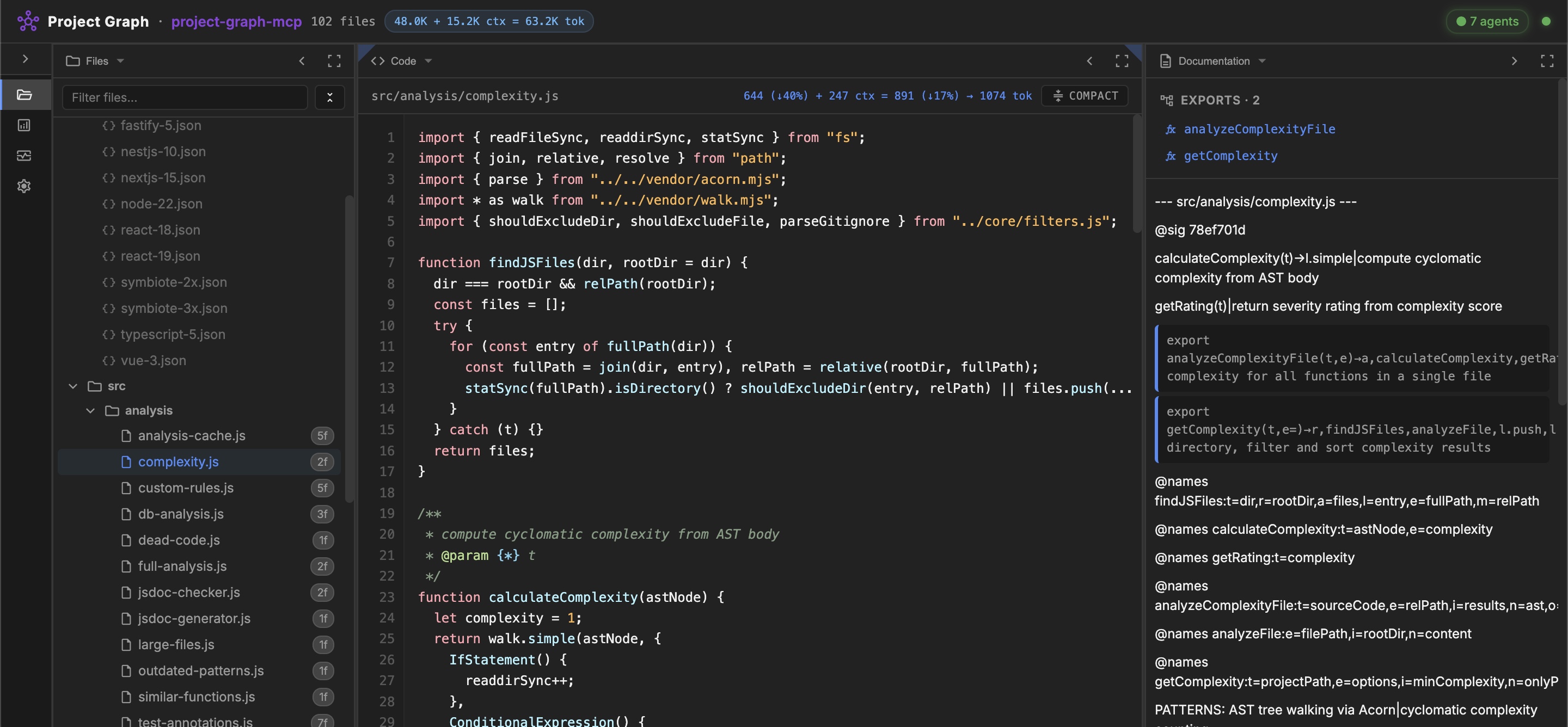
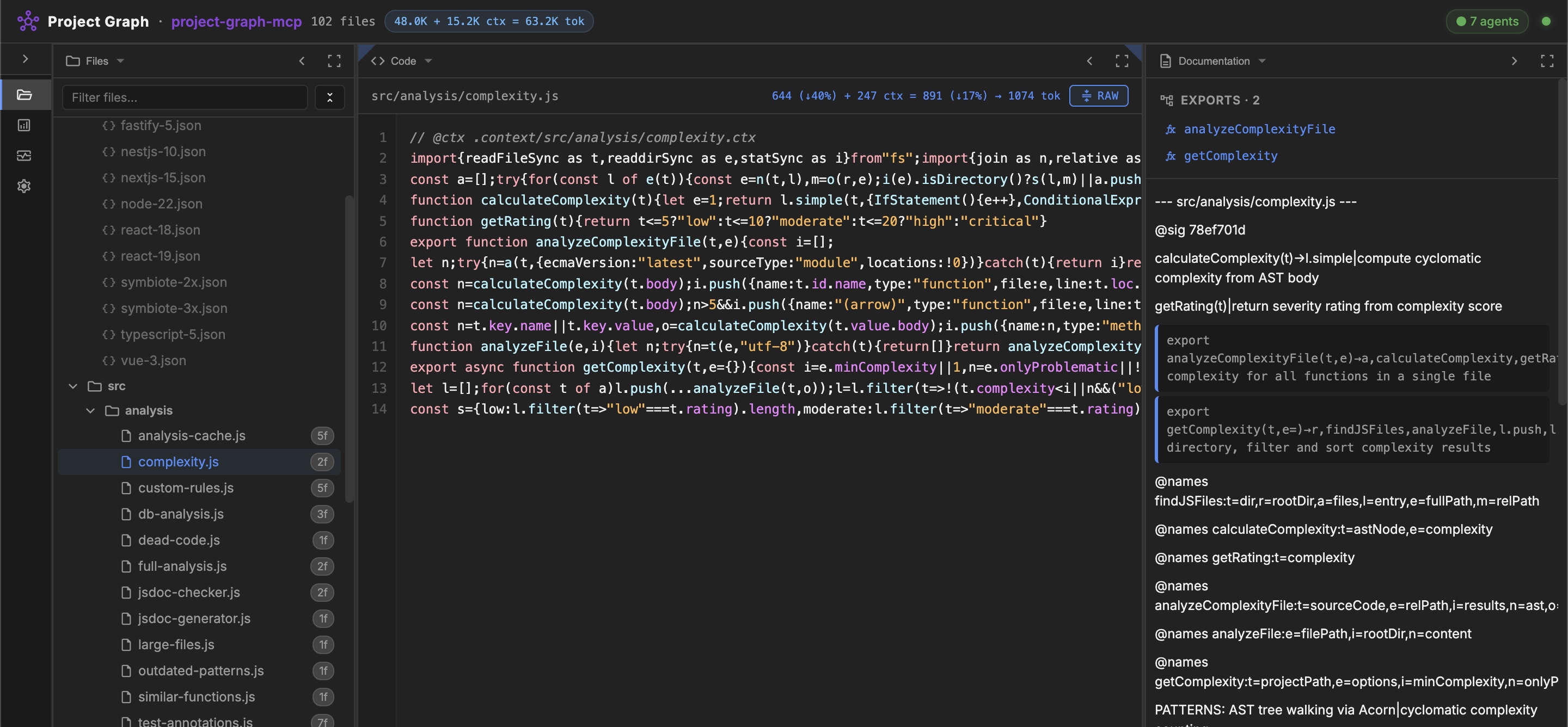
**Maximize your AI agent's context window.** An MCP server that lets agents read and edit your codebase in **compact mode** — minified source with all variable names preserved. `.ctx` documentation is injected only in the focus zone, so agents can start with structure and request implementation detail when needed.
> [!TIP]
> **19 MCP tools, zero config.** Add one line to your MCP config and the server downloads itself on the next IDE restart.
## Features
- **Project Skeleton** — compact AST-based JSON graph of files, symbols, and relationships
- **Compact Code Mode** — project-wide `compact`/`beautify`; agents read and edit minified source while names remain available for restoration
- **AI Context Layer** — one call loads skeleton + docs + compressed files; progressive loading (Overview → Focus)
- **Code Quality Analysis** — dead code, complexity, duplicates, large files, legacy patterns, JSDoc consistency, Health Score (0-100)
- **Multi-Language Parsers** — JavaScript (AST/Acorn), TypeScript, Python, Go (regex-based)
- **Doc Dialect** — auto-generated `.ctx` documentation with AST signatures, staleness detection, self-enriching `@enrich` markers
- **Database Analysis** — schema extraction from SQL migrations, table usage, dead tables
- **Test Checklists** — persistent test state in `.ctx.md` files, agent-driven `mark_test_passed`
- **Monorepo Support** — auto-discovery of sub-projects in `packages/`, `apps/`, `services/`
- **Framework Rules** — 11 rulesets (86 rules) for React, Vue, Next.js, Express, NestJS, TypeScript, Node.js, Symbiote.js
- **Security** — path traversal protection on all operations
## Quick Start
Generate the MCP config for your IDE (with correct paths):
```bash
npx -y project-graph-mcp config
```
Copy the output JSON into your IDE's MCP config file, then restart.
<details>
<summary>Where is my MCP config file?</summary>
| IDE | Config path |
|-----|------------|
| Antigravity | `~/.gemini/antigravity/mcp_config.json` |
| Gemini CLI | `~/.gemini/settings.json` |
| Cursor | `.cursor/mcp.json` |
| Windsurf | `.windsurf/mcp.json` |
| Claude Code | Run: `claude mcp add project-graph npx -y project-graph-mcp` |
See **[CONFIGURATION.md](CONFIGURATION.md)** for all supported IDEs.
</details>
<details>
<summary>Alternative: from source</summary>
```bash
git clone --recursive https://github.com/rnd-pro/project-graph-mcp
cd project-graph-mcp
npm install
```
> **Note:** The source checkout no longer needs the former `vendor/symbiote-node` submodule.
</details>
### CLI
```bash
npx project-graph-mcp skeleton src/ # Project skeleton
npx project-graph-mcp expand SN # Expand minified symbol
npx project-graph-mcp deps SNG # Get dependencies
npx project-graph-mcp deadcode src/ # Find unused code
npx project-graph-mcp complexity src/ # Cyclomatic complexity
npx project-graph-mcp analyze src/ # Full health analysis
npx project-graph-mcp compress src/f.js # Compress file for AI
npx project-graph-mcp docs src/ # Project docs (doc-dialect)
npx project-graph-mcp generate-ctx src/ # Generate .context/ docs
npx project-graph-mcp compact src/ --dry-run # Compact all files
npx project-graph-mcp mode . # Show current editing mode
npx project-graph-mcp help # All commands
```
### Web Dashboard
> [!NOTE]
> `project-graph-mcp` is a **pure stdio MCP server** — it does not include a web server. For the visual UI (file tree, code viewer, dependency graph, live monitoring, marketplace), install [**mcp-agent-portal**](https://github.com/rnd-pro/mcp-agent-portal): `npx mcp-agent-portal`.
## MCP Ecosystem
Best used as part of [**mcp-agent-portal**](https://github.com/rnd-pro/mcp-agent-portal) — a unified MCP aggregator that combines all RND-PRO servers behind a single config entry:
```json
{
"mcpServers": {
"agent-portal": {
"command": "npx",
"args": ["-y", "mcp-agent-portal"]
}
}
}
```
> [!TIP]
> The Portal runs a **singleton backend** to prevent resource exhaustion when you open multiple IDE windows. It transparently spawns `project-graph-mcp` as a public child tool server and keeps `agent-pool-mcp` as its internal execution runtime. One `mcp-agent-portal` entry replaces separate public configs for child servers.
Also works standalone when you need only project graph tools:
```bash
# Generate a config with the correct path for this server:
npx -y project-graph-mcp config
# Or use mcp-agent-portal as the unified orchestration gateway.
```
> [!IMPORTANT]
> Agent workers launched by Agent Portal can use their own `project-graph-mcp` instance to navigate the codebase independently without blocking the primary orchestrator.
## Documentation
- [CONFIGURATION.md](CONFIGURATION.md) — Setup for all supported IDEs
- [GUIDE.md](GUIDE.md) — Comprehensive usage guide with all tools
- [ARCHITECTURE.md](ARCHITECTURE.md) — Source code structure
- [AGENT_ROLE.md](docs/examples/AGENT_ROLE.md) — Full system prompt for agents
## Related Projects
- [mcp-agent-portal](https://github.com/rnd-pro/mcp-agent-portal) — Unified MCP aggregator + web dashboard + AI agent runtime
- [agent-pool-mcp](https://github.com/rnd-pro/agent-pool-mcp) — Internal execution runtime used by Agent Portal orchestration
- [Symbiote.js](https://github.com/symbiotejs/symbiote.js) — Isomorphic Reactive Web Components framework
- [JSDA-Kit](https://github.com/rnd-pro/jsda-kit) — SSG/SSR toolkit for modern web applications
## License
MIT © [RND-PRO.com](https://rnd-pro.com)
---
**Made with ❤️ by the RND-PRO team**
TDQS
Scored across 19 tools
Each tool targets a distinct functional area: context provision, navigation, analysis, documentation, custom rules, testing, and caching. Even similar tools like get_skeleton and get_ai_context have clearly differentiated purposes (skeleton-only vs. full context), eliminating ambiguity.
Tool names mix single-word domain identifiers (docs, compact, db, jsdoc, navigate, analyze, testing, filters) with snake_case verb phrases (get_focus_zone, invalidate_cache, set_custom_rule). While descriptive, the lack of a uniform verb_noun or noun_verb pattern across all tools makes naming slightly inconsistent.
The 19 tools are slightly above the ideal 3-15 range, but the server's broad scope (code graph navigation, analysis, documentation, testing, custom rules, AI context) justifies the count. Each tool serves a clear purpose, and no tool feels redundant.
The tool set provides comprehensive coverage of codebase analysis and AI assistance: navigation, quality analysis, test tracking, documentation management, custom rules, and context generation. Minor gaps like a missing delete_custom_rule are workable and do not create dead ends.