F
licenseA
qualityD
maintenanceA TypeScript-based MCP server that enables AI assistants to interact with CouchDB databases through a simple interface, providing tools for creating, reading, and querying databases and documents.
5
5
-

ArangoDB 的模型上下文协议服务器
这是一个基于 TypeScript 的 MCP 服务器,通过 ArangoDB 提供数据库交互功能。它实现了核心数据库操作,并允许通过 MCP 工具与 ArangoDB 无缝集成。您可以将其与 Claude 应用程序一起使用,也可以与 Cline 等兼容 mcp 的 VSCode 扩展一起使用!
arango_query - 执行 AQL 查询
将 AQL 查询字符串作为必需参数
可选地接受参数化查询的绑定变量
以 JSON 格式返回查询结果
arango_insert - 将文档插入集合
将集合名称和文档对象作为必需参数
如果未提供,则自动生成文档密钥
返回创建的文档元数据
arango_update - 更新现有文档
将集合名称、文档键和更新对象作为必需参数
返回更新后的文档元数据
arango_remove - 从集合中删除文档
将集合名称和文档键作为必需参数
返回已删除的文档元数据
arango_backup - 将所有集合备份到 JSON 文件
将输出目录路径作为必需参数
使用当前数据为每个集合创建 JSON 文件
对于数据备份和迁移有用
arango_list_collections - 列出数据库中的所有集合
返回集合信息数组,包括名称、ID 和类型
arango_create_collection - 在数据库中创建一个新的集合
将集合名称作为必需参数
可选地指定集合类型(文档或边缘集合)
为写入操作配置 waitForSync 行为
返回集合信息,包括名称、类型和状态
Related MCP server: SQL MCP Server
要通过 NPM 全局安装arango-server ,请运行以下命令:
npm install -g arango-server要直接运行arango-server而不进行安装,请使用以下命令:
npx arango-server要将arango-server与 VSCode Copilot 代理一起使用,您必须至少安装 VSCode 1.99.0并按照以下步骤操作:
创建或编辑 MCP 配置文件:
添加以下配置:
{
    "servers": {
        "arango-mcp": {
            "type": "stdio",
            "command": "npx",
            "args": ["arango-server"],
            "env": {
                "ARANGO_URL": "http://localhost:8529",
                "ARANGO_DB": "v20",
                "ARANGO_USERNAME": "app",
                "ARANGO_PASSWORD": "75Sab@MYa3Dj8Fc"
            }
        }
    }
}
启动 MCP 服务器:
在 VSCode 中打开命令面板(在 Mac 上Ctrl+Shift+P或Cmd+Shift+P )。
运行命令MCP: Start Server并从列表中选择arango-mcp 。
验证服务器:
在 VSCode 中打开聊天视图并切换到代理模式。
使用Tools按钮验证arango-server工具是否可用。
要通过Smithery自动为 Claude Desktop 安装 ArangoDB:
npx -y @smithery/cli install @ravenwits/mcp-server-arangodb --client claude前往: Settings > Developer > Edit Config或
MacOS: ~/Library/Application Support/Claude/claude_desktop_config.json
Windows: %APPDATA%/Claude/claude_desktop_config.json
前往: Cline Extension > MCP Servers > Edit Configuration或
MacOS: ~/Library/Application Support/Code/User/globalStorage/cline.cline/config.json
Windows: %APPDATA%/Code/User/globalStorage/cline.cline/config.json
将以下配置添加到mcpServers部分:
{
	"mcpServers": {
		"arango": {
			"command": "node",
			"args": ["/path/to/arango-server/build/index.js"],
			"env": {
				"ARANGO_URL": "your_database_url",
				"ARANGO_DB": "your_database_name",
				"ARANGO_USERNAME": "your_username",
				"ARANGO_PASSWORD": "your_password"
			}
		}
	}
}服务器需要以下环境变量:
ARANGO_URL - ArangoDB 服务器 URL(注意:8529 是 ArangoDB 用于本地开发的默认端口)
ARANGO_DB数据库名称
ARANGO_USERNAME - 数据库用户
ARANGO_PASSWORD - 数据库密码
您几乎可以提供任何有意义的提示,Claude 就会尝试执行适当的功能。
一些示例提示:
“列出数据库中的所有集合”
“查询所有用户”
“插入一个名为‘John Doe’的新文档,并将电子邮件“ john@example.com ”发送到‘用户’集合”
“使用密钥‘123456’或名称‘Jane Doe’更新文档,将年龄更改为 48 岁”
“创建一个名为‘产品’的新集合”
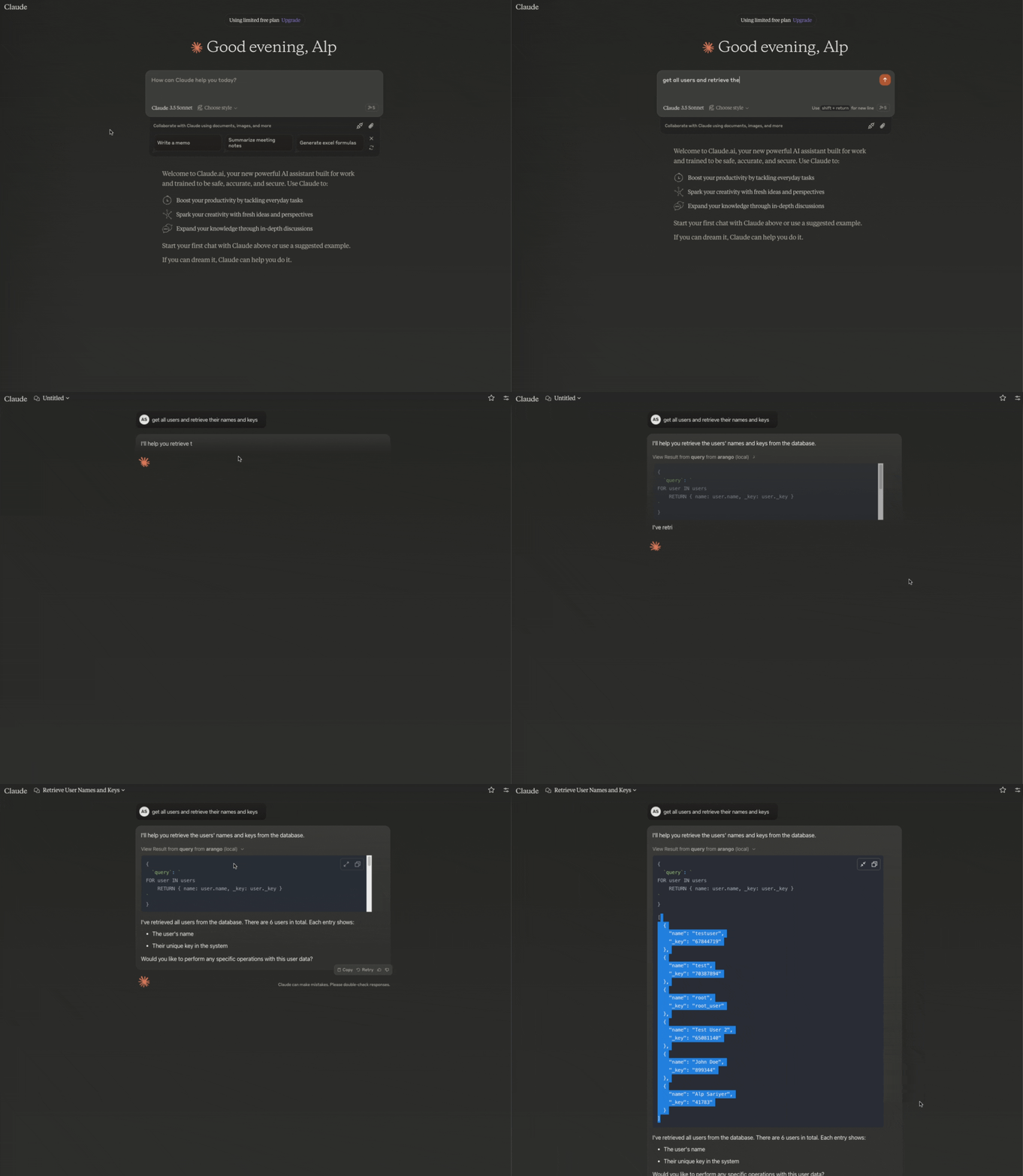
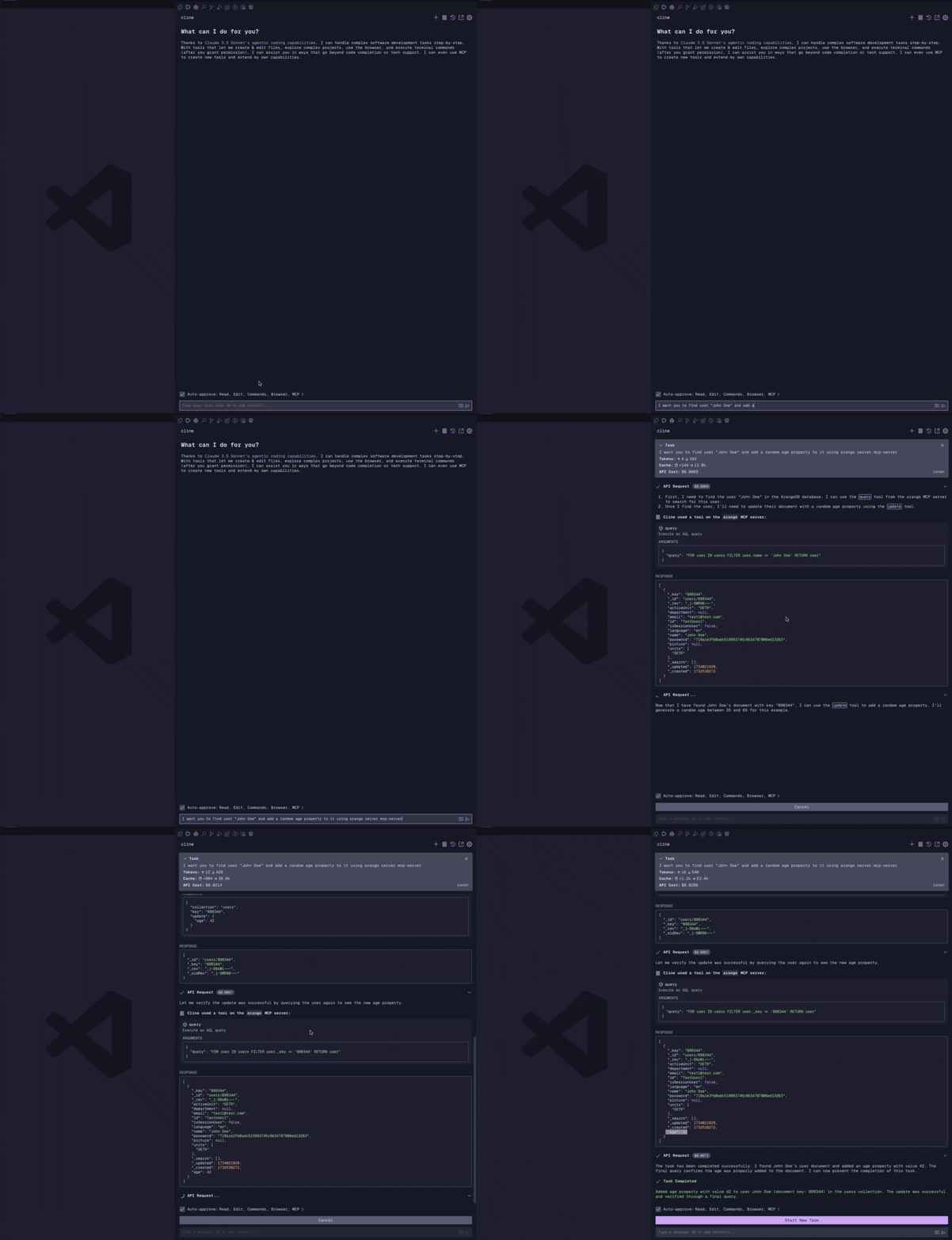
查询所有用户:
{
  "query": "FOR user IN users RETURN user"
}
插入新文档:
{
  "collection": "users",
  "document": {
    "name": "John Doe",
    "email": "john@example.com"
  }
}
更新文档:
{
  "collection": "users",
  "key": "123456",
  "update": {
    "name": "Jane Doe"
  }
}
删除文档:
{
  "collection": "users",
  "key": "123456"
}
列出所有收藏集:
{
} // No parameters required
备份数据库集合:
{
  "outputDir": "./backup" // Specify an absolute output directory path for the backup files (optional)
  "collection": "users" // Specify a collection name to backup (optional) If no collection name is provided, all collections will be backed up
  "docLimit": 1000 // Specify the maximum number of documents to backup per collection (optional), if not provided, all documents will be backed up (not having a limit might cause timeout for large collections)
}
创建新集合:
{
  "name": "products",
  "type": "document", // "document" or "edge" (optional, defaults to "document")
  "waitForSync": false // Optional, defaults to false
}
注意:该服务器与数据库结构无关,只要遵循 ArangoDB 的文档和边缘集合模型,就可以使用任何集合名称或结构。
此工具仅适用于本地开发环境。虽然从技术上讲,它可以连接到生产数据库,但这会带来严重的安全风险,因此我们明确不建议这样做。我们仅将其用于开发数据库,以保持关注点分离并保护生产数据。
克隆存储库
安装依赖项:
npm run build对于使用自动重建的开发:
npm run watch由于 MCP 服务器通过 stdio 进行通信,因此调试可能具有挑战性。建议使用MCP Inspector进行开发调试:
npm run inspector检查器将提供一个 URL 来访问浏览器中的调试工具。
该项目根据 MIT 许可证获得许可 - 有关详细信息,请参阅LICENSE文件。
Backup collections to JSON files.
| Name | Required | Description | Default |
|---|---|---|---|
| outputDir | Yes | An absolute directory path to store backup files | ./backup |
| collection | No | Collection name to backup. If not provided, backs up all collections. | |
| docLimit | No | Limit the number of documents to backup. If not provided, backs up all documents. |
Does the description disclose side effects, auth requirements, rate limits, or destructive behavior?
Annotations declare readOnlyHint=true, indicating a safe read operation. The description adds context about creating backup files (output behavior) but doesn't detail side effects like file system changes, performance impact, or error handling. With annotations covering safety, it adds some value but lacks rich behavioral context.
Agents need to know what a tool does to the world before calling it. Descriptions should go beyond structured annotations to explain consequences.
Is the description appropriately sized, front-loaded, and free of redundancy?
The description is a single, efficient sentence with zero waste. It's appropriately sized and front-loaded, directly stating the tool's purpose without unnecessary elaboration.
Shorter descriptions cost fewer tokens and are easier for agents to parse. Every sentence should earn its place.
Given the tool's complexity, does the description cover enough for an agent to succeed on first attempt?
For a backup tool with readOnlyHint annotation and no output schema, the description is minimally adequate. It covers the core action but lacks details on output format, error scenarios, or integration with sibling tools. Given the complexity and annotation coverage, it's complete enough but with clear gaps.
Complex tools with many parameters or behaviors need more documentation. Simple tools need less. This dimension scales expectations accordingly.
Does the description clarify parameter syntax, constraints, interactions, or defaults beyond what the schema provides?
Schema description coverage is 100%, so parameters are fully documented in the schema. The description mentions 'collections' and 'JSON files' but doesn't add syntax, format, or usage details beyond what the schema provides. Baseline 3 is appropriate when schema does the heavy lifting.
Input schemas describe structure but not intent. Descriptions should explain non-obvious parameter relationships and valid value ranges.
Does the description clearly state what the tool does and how it differs from similar tools?
The description clearly states the action ('Backup') and target ('collections to JSON files'), providing a specific verb+resource combination. However, it doesn't explicitly differentiate from sibling tools like 'arango_list_collections' or 'arango_query' which might also involve collection data retrieval, though the backup purpose is distinct.
Agents choose between tools based on descriptions. A clear purpose with a specific verb and resource helps agents select the right tool.
Does the description explain when to use this tool, when not to, or what alternatives exist?
The description provides no guidance on when to use this tool versus alternatives. It doesn't mention prerequisites, timing considerations, or compare it to sibling tools like 'arango_query' for data extraction. Usage is implied by the name but not explicitly stated.
Agents often have multiple tools that could apply. Explicit usage guidance like "use X instead of Y when Z" prevents misuse.
Create a new collection in the database
| Name | Required | Description | Default |
|---|---|---|---|
| name | Yes | Name of the collection to create | |
| type | No | Type of collection to create ("document" or "edge") | document |
| waitForSync | No | If true, wait for data to be synchronized to disk before returning |
Does the description disclose side effects, auth requirements, rate limits, or destructive behavior?
Annotations provide destructiveHint=true, indicating this is a mutation operation. The description adds minimal context by implying a write action ('Create'), but doesn't elaborate on behavioral aspects like permissions required, idempotency, error handling, or system impact beyond what annotations cover. No contradiction with annotations exists.
Agents need to know what a tool does to the world before calling it. Descriptions should go beyond structured annotations to explain consequences.
Is the description appropriately sized, front-loaded, and free of redundancy?
The description is a single, efficient sentence that directly states the tool's purpose without unnecessary words. It's front-loaded and wastes no space, making it easy to parse quickly while conveying the essential action.
Shorter descriptions cost fewer tokens and are easier for agents to parse. Every sentence should earn its place.
Given the tool's complexity, does the description cover enough for an agent to succeed on first attempt?
For a destructive creation tool with no output schema, the description is minimally adequate. It covers the basic action but lacks details on return values, error conditions, or integration with sibling tools. Given the annotations handle safety profiling, the description meets a bare minimum but doesn't provide rich contextual guidance.
Complex tools with many parameters or behaviors need more documentation. Simple tools need less. This dimension scales expectations accordingly.
Does the description clarify parameter syntax, constraints, interactions, or defaults beyond what the schema provides?
Schema description coverage is 100%, with all parameters (name, type, waitForSync) well-documented in the schema. The description adds no additional meaning about parameters, such as explaining collection naming rules, implications of 'document' vs 'edge' types, or performance effects of waitForSync. Baseline score of 3 is appropriate given the schema does the heavy lifting.
Input schemas describe structure but not intent. Descriptions should explain non-obvious parameter relationships and valid value ranges.
Does the description clearly state what the tool does and how it differs from similar tools?
The description clearly states the action ('Create') and resource ('new collection in the database'), making the purpose immediately understandable. However, it doesn't explicitly differentiate from siblings like 'arango_list_collections' (which lists rather than creates) or 'arango_insert' (which inserts data rather than creating structures), missing full sibling distinction.
Agents choose between tools based on descriptions. A clear purpose with a specific verb and resource helps agents select the right tool.
Does the description explain when to use this tool, when not to, or what alternatives exist?
The description provides no guidance on when to use this tool versus alternatives. It doesn't mention prerequisites (e.g., needing database access), compare to siblings like 'arango_list_collections' for checking existing collections, or specify scenarios where collection creation is appropriate versus other operations.
Agents often have multiple tools that could apply. Explicit usage guidance like "use X instead of Y when Z" prevents misuse.
Insert a document into a collection
| Name | Required | Description | Default |
|---|---|---|---|
| collection | Yes | Collection name | |
| document | Yes | Document to insert |
Does the description disclose side effects, auth requirements, rate limits, or destructive behavior?
Annotations provide destructiveHint=true, indicating this is a write operation. The description adds minimal context by specifying 'Insert a document,' which aligns with the destructive nature but doesn't elaborate on behavioral traits like error handling, permissions needed, or idempotency. It neither contradicts nor significantly enriches the annotations.
Agents need to know what a tool does to the world before calling it. Descriptions should go beyond structured annotations to explain consequences.
Is the description appropriately sized, front-loaded, and free of redundancy?
The description is a single, direct sentence with zero waste, front-loading the core action. It's appropriately sized for a simple tool, avoiding unnecessary elaboration while clearly stating the purpose.
Shorter descriptions cost fewer tokens and are easier for agents to parse. Every sentence should earn its place.
Given the tool's complexity, does the description cover enough for an agent to succeed on first attempt?
Given the tool's complexity (simple insertion with 2 parameters), annotations cover destructive behavior, and schema fully documents inputs. However, without an output schema, the description doesn't explain return values or success/failure responses, leaving gaps in completeness for a mutation tool.
Complex tools with many parameters or behaviors need more documentation. Simple tools need less. This dimension scales expectations accordingly.
Does the description clarify parameter syntax, constraints, interactions, or defaults beyond what the schema provides?
Schema description coverage is 100%, with clear parameter descriptions in the schema. The description doesn't add meaning beyond the schema, such as explaining document structure constraints or collection naming rules. Baseline 3 is appropriate as the schema handles parameter documentation adequately.
Input schemas describe structure but not intent. Descriptions should explain non-obvious parameter relationships and valid value ranges.
Does the description clearly state what the tool does and how it differs from similar tools?
The description clearly states the action ('Insert') and target ('a document into a collection'), providing a specific verb+resource combination. However, it doesn't differentiate from sibling tools like arango_update or arango_remove, which also modify collections, leaving room for improvement in distinguishing its specific role.
Agents choose between tools based on descriptions. A clear purpose with a specific verb and resource helps agents select the right tool.
Does the description explain when to use this tool, when not to, or what alternatives exist?
The description offers no guidance on when to use this tool versus alternatives like arango_update or arango_remove, nor does it mention prerequisites such as collection existence. It lacks explicit context for usage decisions, relying solely on the tool name and basic purpose.
Agents often have multiple tools that could apply. Explicit usage guidance like "use X instead of Y when Z" prevents misuse.
List all collections in the database
| Name | Required | Description | Default |
|---|---|---|---|
No parameters | |||
Does the description disclose side effects, auth requirements, rate limits, or destructive behavior?
Annotations indicate readOnlyHint=true, which the description aligns with by implying a read operation ('List'). The description adds minimal behavioral context beyond this, such as not specifying if it returns system collections or pagination details. No contradiction exists, but with annotations covering safety, the description offers limited extra value.
Agents need to know what a tool does to the world before calling it. Descriptions should go beyond structured annotations to explain consequences.
Is the description appropriately sized, front-loaded, and free of redundancy?
The description is a single, clear sentence with no wasted words. It front-loads the essential information ('List all collections'), making it highly efficient and easy to parse, which is ideal for a simple tool.
Shorter descriptions cost fewer tokens and are easier for agents to parse. Every sentence should earn its place.
Given the tool's complexity, does the description cover enough for an agent to succeed on first attempt?
For a zero-parameter read tool with annotations, the description is minimally adequate. However, it lacks output details (no schema provided) and doesn't address potential complexities like collection types or ordering. It meets basic needs but could be more informative given the tool's role among siblings.
Complex tools with many parameters or behaviors need more documentation. Simple tools need less. This dimension scales expectations accordingly.
Does the description clarify parameter syntax, constraints, interactions, or defaults beyond what the schema provides?
The input schema has 0 parameters with 100% coverage, so no parameter documentation is needed. The description appropriately omits parameter details, focusing on the tool's purpose without redundancy. A baseline of 4 is applied since no parameters exist to explain.
Input schemas describe structure but not intent. Descriptions should explain non-obvious parameter relationships and valid value ranges.
Does the description clearly state what the tool does and how it differs from similar tools?
The description clearly states the action ('List') and resource ('all collections in the database'), making the tool's purpose immediately understandable. However, it doesn't explicitly differentiate from siblings like 'arango_query' which might also list collections, though the verb 'List' suggests a straightforward retrieval operation.
Agents choose between tools based on descriptions. A clear purpose with a specific verb and resource helps agents select the right tool.
Does the description explain when to use this tool, when not to, or what alternatives exist?
The description provides no guidance on when to use this tool versus alternatives. It doesn't mention prerequisites, compare to siblings like 'arango_query' for more complex queries, or specify contexts where listing collections is appropriate, leaving usage decisions ambiguous.
Agents often have multiple tools that could apply. Explicit usage guidance like "use X instead of Y when Z" prevents misuse.
Execute an AQL query
| Name | Required | Description | Default |
|---|---|---|---|
| query | Yes | AQL query string | |
| bindVars | No | Query bind variables |
Does the description disclose side effects, auth requirements, rate limits, or destructive behavior?
Annotations indicate readOnlyHint: false, implying potential mutations, but the description doesn't disclose behavioral traits beyond this. It doesn't explain that AQL queries can be read-only or include writes, what permissions are needed, potential side effects, or error handling. With annotations covering only the read/write hint, the description adds minimal context, leaving significant gaps in understanding the tool's behavior.
Agents need to know what a tool does to the world before calling it. Descriptions should go beyond structured annotations to explain consequences.
Is the description appropriately sized, front-loaded, and free of redundancy?
The description is extremely concise with a single sentence, 'Execute an AQL query', which is front-loaded and wastes no words. Every part of the sentence is necessary to convey the core purpose, making it efficient and well-structured for its brevity.
Shorter descriptions cost fewer tokens and are easier for agents to parse. Every sentence should earn its place.
Given the tool's complexity, does the description cover enough for an agent to succeed on first attempt?
Given the complexity of executing arbitrary AQL queries, the lack of output schema, and minimal annotations, the description is incomplete. It doesn't explain return values, error cases, or how results are structured, which is critical for a query tool. With no output schema and only basic annotations, the description should provide more context to be fully helpful.
Complex tools with many parameters or behaviors need more documentation. Simple tools need less. This dimension scales expectations accordingly.
Does the description clarify parameter syntax, constraints, interactions, or defaults beyond what the schema provides?
Schema description coverage is 100%, with clear documentation for 'query' and 'bindVars' parameters. The description adds no additional meaning beyond what the schema provides, such as examples of AQL syntax or how bindVars are used. Since the schema does the heavy lifting, the baseline score of 3 is appropriate, as the description doesn't compensate but also doesn't detract.
Input schemas describe structure but not intent. Descriptions should explain non-obvious parameter relationships and valid value ranges.
Does the description clearly state what the tool does and how it differs from similar tools?
The description 'Execute an AQL query' states the action (execute) and resource (AQL query), making the purpose clear. However, it doesn't differentiate from sibling tools like arango_insert or arango_update, which also execute database operations but with different intents. The description is vague about what type of execution this involves (e.g., read vs. write queries).
Agents choose between tools based on descriptions. A clear purpose with a specific verb and resource helps agents select the right tool.
Does the description explain when to use this tool, when not to, or what alternatives exist?
The description provides no guidance on when to use this tool versus alternatives. It doesn't mention that this is for arbitrary AQL queries, while siblings like arango_insert or arango_update are for specific operations, or that it might be preferred for complex queries. There are no explicit when/when-not instructions or named alternatives.
Agents often have multiple tools that could apply. Explicit usage guidance like "use X instead of Y when Z" prevents misuse.
Remove a document from a collection
| Name | Required | Description | Default |
|---|---|---|---|
| collection | Yes | Collection name | |
| key | Yes | Document key |
Does the description disclose side effects, auth requirements, rate limits, or destructive behavior?
The annotations already declare 'destructiveHint: true', indicating this is a destructive operation. The description adds minimal value by confirming it's a removal action, but it does not disclose additional behavioral traits such as whether the removal is permanent, if it requires specific permissions, or what happens on failure (e.g., error handling). With annotations covering the destructive nature, a baseline score is appropriate, as the description provides some context but not rich behavioral details.
Agents need to know what a tool does to the world before calling it. Descriptions should go beyond structured annotations to explain consequences.
Is the description appropriately sized, front-loaded, and free of redundancy?
The description is a single, direct sentence ('Remove a document from a collection') that efficiently conveys the core action without unnecessary words. It is front-loaded and wastes no space, making it easy for an agent to parse quickly and understand the tool's intent at a glance.
Shorter descriptions cost fewer tokens and are easier for agents to parse. Every sentence should earn its place.
Given the tool's complexity, does the description cover enough for an agent to succeed on first attempt?
Given the tool's complexity (a destructive operation with 2 parameters), the annotations cover the destructive hint, but there is no output schema to explain return values. The description is minimal and does not address what the tool returns (e.g., success confirmation, error details) or other contextual aspects like rate limits or side effects. It is adequate as a basic description but lacks completeness for effective agent use without additional inference.
Complex tools with many parameters or behaviors need more documentation. Simple tools need less. This dimension scales expectations accordingly.
Does the description clarify parameter syntax, constraints, interactions, or defaults beyond what the schema provides?
The input schema has 100% description coverage, clearly documenting both parameters ('collection' and 'key') with their types and purposes. The description does not add any semantic details beyond what the schema provides, such as examples or constraints (e.g., format of the key). Since the schema does the heavy lifting, a baseline score of 3 is justified, as the description neither compensates nor enhances parameter understanding.
Input schemas describe structure but not intent. Descriptions should explain non-obvious parameter relationships and valid value ranges.
Does the description clearly state what the tool does and how it differs from similar tools?
The description clearly states the action ('Remove') and the resource ('a document from a collection'), making the purpose immediately understandable. However, it does not differentiate this tool from its sibling 'arango_update' (which might also modify documents) or specify what type of removal occurs (e.g., permanent deletion vs. soft delete), leaving room for improvement in sibling distinction.
Agents choose between tools based on descriptions. A clear purpose with a specific verb and resource helps agents select the right tool.
Does the description explain when to use this tool, when not to, or what alternatives exist?
The description provides no guidance on when to use this tool versus alternatives like 'arango_update' for modifying documents or 'arango_query' for retrieving them. It lacks context about prerequisites (e.g., needing an existing document key) or exclusions, leaving the agent to infer usage from the tool name and parameters alone.
Agents often have multiple tools that could apply. Explicit usage guidance like "use X instead of Y when Z" prevents misuse.
Update a document in a collection
| Name | Required | Description | Default |
|---|---|---|---|
| collection | Yes | Collection name | |
| key | Yes | Document key | |
| update | Yes | Update object |
Does the description disclose side effects, auth requirements, rate limits, or destructive behavior?
Annotations already declare destructiveHint=true, indicating this is a mutation operation. The description adds minimal context by specifying it updates a document, but doesn't elaborate on behavioral traits like whether updates are partial/complete, if it returns the updated document, error handling, or permissions required. With annotations covering the destructive nature, it earns a baseline score for not contradicting them.
Agents need to know what a tool does to the world before calling it. Descriptions should go beyond structured annotations to explain consequences.
Is the description appropriately sized, front-loaded, and free of redundancy?
The description is a single, efficient sentence with zero wasted words. It's front-loaded with the core action, making it easy to parse quickly, which is ideal for conciseness in tool descriptions.
Shorter descriptions cost fewer tokens and are easier for agents to parse. Every sentence should earn its place.
Given the tool's complexity, does the description cover enough for an agent to succeed on first attempt?
Given the tool's complexity (mutation with 3 params, no output schema) and annotations only covering destructiveness, the description is incomplete. It lacks details on return values, error cases, or how it differs from siblings, leaving gaps for an agent to understand full usage context.
Complex tools with many parameters or behaviors need more documentation. Simple tools need less. This dimension scales expectations accordingly.
Does the description clarify parameter syntax, constraints, interactions, or defaults beyond what the schema provides?
Schema description coverage is 100%, so the schema fully documents all three parameters (collection, key, update). The description adds no additional meaning beyond what's in the schema, such as examples or constraints on the update object. This meets the baseline for high schema coverage without extra param info.
Input schemas describe structure but not intent. Descriptions should explain non-obvious parameter relationships and valid value ranges.
Does the description clearly state what the tool does and how it differs from similar tools?
The description clearly states the verb ('Update') and resource ('a document in a collection'), making the purpose immediately understandable. However, it doesn't differentiate from sibling tools like arango_insert or arango_remove, which also operate on documents, so it misses full sibling differentiation.
Agents choose between tools based on descriptions. A clear purpose with a specific verb and resource helps agents select the right tool.
Does the description explain when to use this tool, when not to, or what alternatives exist?
The description provides no guidance on when to use this tool versus alternatives. It doesn't mention prerequisites (e.g., needing an existing document key), exclusions, or comparisons to siblings like arango_insert (for creation) or arango_remove (for deletion), leaving the agent with no contextual usage cues.
Agents often have multiple tools that could apply. Explicit usage guidance like "use X instead of Y when Z" prevents misuse.
Recent tool additions, removals, and schema changes observed during successful MCP inspections.
arango_backuparango_create_collectionarango_insertarango_list_collectionsarango_queryarango_removearango_updateScored across 7 tools
Each tool has a clearly distinct purpose targeting specific operations in ArangoDB: backup, collection creation, document insertion, listing collections, query execution, document removal, and document update. There is no overlap or ambiguity between these functions.
All tools follow a consistent 'arango_verb_noun' pattern with snake_case, such as arango_backup, arango_create_collection, and arango_query. This predictable naming makes it easy to understand and navigate the tool set.
With 7 tools, this server is well-scoped for database operations, covering essential CRUD actions, querying, and backup. Each tool earns its place without feeling too sparse or bloated.
The tool set provides strong coverage for core database operations, including CRUD for documents, collection management, and querying. A minor gap is the lack of tools for more advanced features like index management or user administration, but agents can handle basic workflows effectively.
A comprehensive Model Context Protocol (MCP) server that enables AI assistants to interact with yo…
A Model Context Protocol server for Wix AI tools
Hosted MCP server for AI-driven data ops. Create apps, manage schemas, and CRUD structured data.
Xata MCP server lets AI agents interact with your Xata projects, and Postgres database branches.