GHAS MCP server (GitHub Advanced Security)
servidor ghas-mcp
Servidor MCP para realizar llamadas a GHAS para repositorios de GitHub.
Actualmente cuenta con las siguientes herramientas compatibles:
list_dependabot_alerts: enumera todas las alertas de dependabot para un repositorio
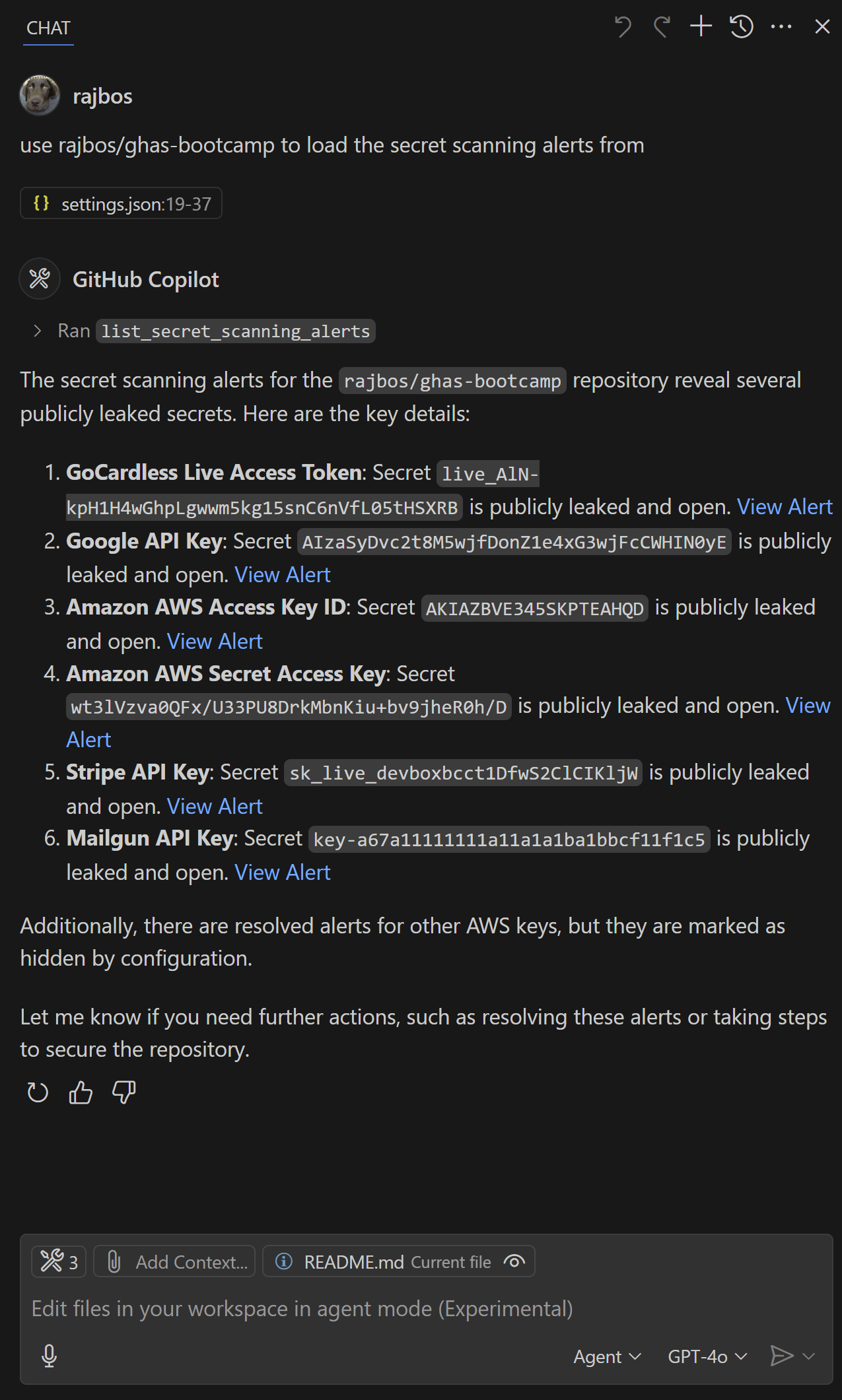
list_secret_scanning_alerts: enumera todas las alertas de escaneo secreto para un repositorio
list_code_scanning_alerts: enumera todas las alertas de escaneo de código para un repositorio
¡Asegúrese de agregar estos tres ámbitos (solo lectura) al PAT configurado y también a la organización correcta!
Instalar en VS Code y VS Code Insiders
Usa los botones para instalar el servidor en tu entorno de VS Code o VS Code Insiders. ¡Asegúrate de leer el enlace antes de confiar en él! Los enlaces llevan a vscode.dev e insiders.vscode.dev y contienen instrucciones para instalar el servidor.
VS Code te permitirá ver la configuración antes de que suceda algo:
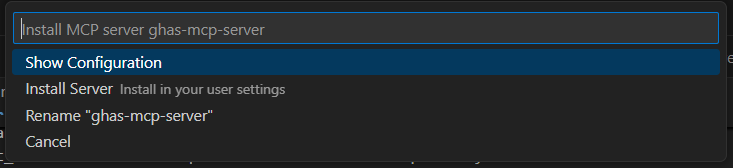
Ejemplo de configuración
Agregue las siguientes configuraciones a su configuración de MCP en el editor.
Opción segura: utilizar la CLI de GitHub autenticada
En lugar de almacenar un token de acceso personal (ver la siguiente sección), también puedes usar la CLI de GitHub autenticada. Esto usará las credenciales que hayas configurado en la CLI de GitHub. Esto es útil cuando tienes la CLI de GitHub instalada y autenticada.
Para utilizar la CLI de GitHub para la autenticación, siga los pasos a continuación:
Agregue
"GITHUB_PERSONAL_ACCESS_TOKEN_USE_GHCLI": "true"a sus variables de entorno.Asegúrese de tener la CLI de GitHub instalada y autenticada ejecutando
gh auth login.
Configuración:
{
"mcp": {
"inputs": [
]
},
"servers": {
"ghas-mcp-server": {
"command": "npx",
"args": [
"-y",
"@rajbos/ghas-mcp-server"
],
"env": {
"GITHUB_PERSONAL_ACCESS_TOKEN_USE_GHCLI": "true"
}
}
}
}Related MCP server: SonarQube MCP Server
Configuración con un token de acceso personal
Para VS Code se vería así:
{
"mcp": {
"inputs": [
{
"id": "github_personal_access_token",
"description": "GitHub Personal Access Token",
"type": "promptString",
"password": true
}
]
},
"servers": {
"ghas-mcp-server": {
"command": "npx",
"args": [
"-y",
"@rajbos/ghas-mcp-server"
],
"env": {
"GITHUB_PERSONAL_ACCESS_TOKEN": "${input:github_personal_access_token}"
}
}
}
}Resultados

Contribuyendo
¡Agradecemos sus contribuciones! Si tiene ideas para nuevas herramientas o mejoras, abra un problema o envíe una solicitud de incorporación de cambios.
Inicio rápido
# Install dependencies
npm install
# Build the project
npm run build
Estructura del proyecto
ghas-mcp-server/
├── src/
│ ├── operations/ # MCP Tools
│ │ └── security.ts
│ └── index.ts # Server entry point
├── package.json
└── tsconfig.jsonAgregar componentes
El proyecto viene con las herramientas GHAS en src/operations/security.ts .
Edificio
Realizar cambios en sus herramientas
Ejecute
npm run buildpara compilarEl servidor cargará automáticamente sus herramientas al iniciarse
Probando la compilación local
Puede probar su compilación local configurando la versión de compilación local con la siguiente configuración de MCP:
"servers": {
"ghas-mcp-server": {
"command": "node",
"args": [
"C:/Users/RobBos/Code/Repos/rajbos/ghas-mpc-server/dist/index.js"
],
"env": {
"GITHUB_PERSONAL_ACCESS_TOKEN_USE_GHCLI": "true"
}
}
}¡No olvides cambiar la ruta a tu compilación local y compilar el proyecto primero!
Más información
Available Tools
3 toolslist_code_scanning_alertsC
List the current GitHub Advanced Security code scanning alerts for a repository
| Name | Required | Description | Default |
|---|---|---|---|
| owner | Yes | ||
| repo | Yes |
TDQS
Does the description disclose side effects, auth requirements, rate limits, or destructive behavior?
With no annotations provided, the description carries the full burden of behavioral disclosure. It mentions 'List the current... alerts' but does not specify whether this is a read-only operation, if it requires authentication, rate limits, pagination, or what the output format entails. This leaves significant gaps in understanding the tool's behavior.
Agents need to know what a tool does to the world before calling it. Descriptions should go beyond structured annotations to explain consequences.
Is the description appropriately sized, front-loaded, and free of redundancy?
The description is a single, efficient sentence that directly states the tool's purpose without unnecessary words. It is front-loaded and appropriately sized, making it easy to parse quickly.
Shorter descriptions cost fewer tokens and are easier for agents to parse. Every sentence should earn its place.
Given the tool's complexity, does the description cover enough for an agent to succeed on first attempt?
Given the tool's complexity (listing security alerts), lack of annotations, and no output schema, the description is incomplete. It does not cover behavioral aspects like permissions, response format, or error handling, which are crucial for effective use. The description alone is insufficient for an agent to fully understand how to invoke and interpret results.
Complex tools with many parameters or behaviors need more documentation. Simple tools need less. This dimension scales expectations accordingly.
Does the description clarify parameter syntax, constraints, interactions, or defaults beyond what the schema provides?
The input schema has 0% description coverage, but the description does not add any meaning to the parameters 'owner' and 'repo' beyond implying they relate to a GitHub repository. Since there are only 2 parameters, the baseline is 4, but the description fails to compensate for the lack of schema details, such as explaining what 'owner' and 'repo' represent, resulting in a score of 3.
Input schemas describe structure but not intent. Descriptions should explain non-obvious parameter relationships and valid value ranges.
Does the description clearly state what the tool does and how it differs from similar tools?
The description clearly states the verb ('List') and resource ('GitHub Advanced Security code scanning alerts for a repository'), making the tool's purpose specific and understandable. However, it does not explicitly differentiate from sibling tools like 'list_dependabot_alerts' or 'list_secret_scanning_alerts', which prevents a score of 5.
Agents choose between tools based on descriptions. A clear purpose with a specific verb and resource helps agents select the right tool.
Does the description explain when to use this tool, when not to, or what alternatives exist?
The description provides no guidance on when to use this tool versus alternatives, such as the sibling tools for Dependabot or secret scanning alerts. It lacks any context about prerequisites, exclusions, or specific scenarios where this tool is preferred, offering only a basic statement of function.
Agents often have multiple tools that could apply. Explicit usage guidance like "use X instead of Y when Z" prevents misuse.
list_dependabot_alertsC
List the current GitHub Dependabot alerts for a repository
| Name | Required | Description | Default |
|---|---|---|---|
| owner | Yes | ||
| repo | Yes |
TDQS
Does the description disclose side effects, auth requirements, rate limits, or destructive behavior?
No annotations are provided, so the description carries the full burden of behavioral disclosure. It states the tool lists alerts but does not describe key behaviors like whether it requires authentication, rate limits, pagination, or what the output format looks like. For a tool with zero annotation coverage, this lack of detail is a significant gap, warranting a score of 2.
Agents need to know what a tool does to the world before calling it. Descriptions should go beyond structured annotations to explain consequences.
Is the description appropriately sized, front-loaded, and free of redundancy?
The description is a single, efficient sentence: 'List the current GitHub Dependabot alerts for a repository.' It is front-loaded with the core action and resource, with no wasted words or unnecessary details. This makes it highly concise and well-structured, earning a score of 5.
Shorter descriptions cost fewer tokens and are easier for agents to parse. Every sentence should earn its place.
Given the tool's complexity, does the description cover enough for an agent to succeed on first attempt?
Given the tool's complexity (listing security alerts), lack of annotations, and no output schema, the description is incomplete. It does not cover behavioral aspects like authentication needs, rate limits, or output format, which are crucial for an AI agent to use the tool effectively. With these gaps, the description falls short of being fully helpful, resulting in a score of 2.
Complex tools with many parameters or behaviors need more documentation. Simple tools need less. This dimension scales expectations accordingly.
Does the description clarify parameter syntax, constraints, interactions, or defaults beyond what the schema provides?
The input schema has 2 parameters (owner and repo) with 0% description coverage, meaning the schema provides no semantic details. The description does not add any parameter-specific information, such as explaining what 'owner' and 'repo' refer to or their expected formats. Since the description does not compensate for the low schema coverage, the baseline score of 3 is applied, as it neither adds value nor fully addresses the gap.
Input schemas describe structure but not intent. Descriptions should explain non-obvious parameter relationships and valid value ranges.
Does the description clearly state what the tool does and how it differs from similar tools?
The description clearly states the tool's purpose: 'List the current GitHub Dependabot alerts for a repository.' It specifies the verb ('List'), resource ('GitHub Dependabot alerts'), and scope ('for a repository'), which is specific and actionable. However, it does not explicitly differentiate from sibling tools like 'list_code_scanning_alerts' or 'list_secret_scanning_alerts', which reduces the score from a 5 to a 4.
Agents choose between tools based on descriptions. A clear purpose with a specific verb and resource helps agents select the right tool.
Does the description explain when to use this tool, when not to, or what alternatives exist?
The description provides no guidance on when to use this tool versus alternatives. It does not mention sibling tools or any context for choosing this tool over others, such as for dependency-related security issues. Without explicit usage instructions or exclusions, the score is a 2, as it offers minimal guidance beyond the basic purpose.
Agents often have multiple tools that could apply. Explicit usage guidance like "use X instead of Y when Z" prevents misuse.
list_secret_scanning_alertsC
List the current GitHub Advanced Security secret scanning alerts for a repository
| Name | Required | Description | Default |
|---|---|---|---|
| owner | Yes | ||
| repo | Yes |
TDQS
Does the description disclose side effects, auth requirements, rate limits, or destructive behavior?
With no annotations provided, the description carries the full burden of behavioral disclosure. It states the tool lists alerts but does not describe key traits like whether it requires authentication, has rate limits, returns paginated results, or what the output format is. This leaves significant gaps in understanding how the tool behaves.
Agents need to know what a tool does to the world before calling it. Descriptions should go beyond structured annotations to explain consequences.
Is the description appropriately sized, front-loaded, and free of redundancy?
The description is a single, clear sentence that efficiently conveys the core purpose without unnecessary words. It is appropriately sized and front-loaded, making it easy to understand at a glance.
Shorter descriptions cost fewer tokens and are easier for agents to parse. Every sentence should earn its place.
Given the tool's complexity, does the description cover enough for an agent to succeed on first attempt?
Given the tool's complexity (listing security alerts), lack of annotations, no output schema, and low parameter schema coverage, the description is incomplete. It does not provide enough context on behavior, output, or parameter usage, making it inadequate for effective tool invocation.
Complex tools with many parameters or behaviors need more documentation. Simple tools need less. This dimension scales expectations accordingly.
Does the description clarify parameter syntax, constraints, interactions, or defaults beyond what the schema provides?
The input schema has 2 parameters with 0% description coverage, so the schema provides no semantic information. The description does not add any meaning to the parameters (owner, repo), such as explaining what they represent or how to format them, failing to compensate for the low schema coverage.
Input schemas describe structure but not intent. Descriptions should explain non-obvious parameter relationships and valid value ranges.
Does the description clearly state what the tool does and how it differs from similar tools?
The description clearly states the action ('List') and the resource ('GitHub Advanced Security secret scanning alerts for a repository'), making the purpose specific and understandable. However, it does not explicitly differentiate from sibling tools like 'list_code_scanning_alerts' or 'list_dependabot_alerts', which would be needed for a score of 5.
Agents choose between tools based on descriptions. A clear purpose with a specific verb and resource helps agents select the right tool.
Does the description explain when to use this tool, when not to, or what alternatives exist?
The description provides no guidance on when to use this tool versus alternatives, such as the sibling tools listed. It mentions the context ('for a repository') but lacks explicit when/when-not instructions or comparisons to other alert-listing tools, leaving usage unclear.
Agents often have multiple tools that could apply. Explicit usage guidance like "use X instead of Y when Z" prevents misuse.
Tool Schema Changelog
Recent tool additions, removals, and schema changes observed during successful MCP inspections.
3 tool updates
v1.0.0- First observed
list_code_scanning_alerts - First observed
list_dependabot_alerts - First observed
list_secret_scanning_alerts
TDQS
Scored across 3 tools
Each tool has a clearly distinct purpose targeting different types of GitHub Advanced Security alerts: code scanning, Dependabot, and secret scanning. The descriptions explicitly differentiate the alert types, leaving no ambiguity about which tool to use for each security domain.
All tools follow a perfect verb_noun pattern with 'list_' prefix followed by the specific alert type (code_scanning_alerts, dependabot_alerts, secret_scanning_alerts). The naming is completely consistent across all three tools with no deviations in style or structure.
With only 3 tools, the server feels quite thin for GitHub Advanced Security's scope, which includes multiple security domains and potential operations beyond just listing alerts. While the tools cover the core alert types, the count is borderline minimal for what could be a more comprehensive security management interface.
The toolset is severely incomplete for GitHub Advanced Security operations. While it covers listing three types of alerts, there are significant gaps: no ability to create, update, dismiss, or resolve alerts; no access to security overviews or metrics; and no coverage of other GHAS features like code scanning analyses or security advisories. This creates dead ends for agents needing to take action on security findings.
Maintenance
Related MCP Connectors
Deep security scans of repos you own from your editor: dependency CVEs, SAST, git-history secrets.
Defensive vulnerability intelligence search across public CVE/NVD and GitHub advisory APIs with CVSS
Screens public GitHub repos and PRs to generate risk maps, findings, and merge-readiness signals.
Threat intel + your scans/findings/Shield posture. CVE, EPSS, KEV, package vuln lookup, DAST.
Related MCP Servers
- AlicenseAqualityNot gradedmaintenanceEnterprise-grade MCP (Model Context Protocol) server for detecting secrets and sensitive information in GitHub repositories. Scans for 35+ types of secrets including API keys, passwords, tokens, and credentials with production-ready reliability features.50-
- AlicenseNot gradedqualityDmaintenanceServer for SonarQube Give AI assistants direct access to your code quality, security & analysis data2MIT
- AlicenseAqualityBmaintenanceMCP server for Cursor that scans codebases for security issues including hardcoded secrets, SAST, vulnerable dependencies, and IaC misconfigurations.7MIT
- FlicenseAqualityDmaintenanceEnables searching and analyzing CVEs and vulnerabilities from multiple sources, optimized for PR review scenarios to help developers identify the latest security issues.82-
Appeared in Searches
- CodeQL static analysis tool and semantic code analysis platform
- A platform for hosting and sharing code
- Using separate agents for schema validation, code standards, and directory structure enforcement in development workflows
- Information about Git, a version control system
- A database for looking up CVEs on the National Vulnerability Database