Glama
paulotaylor

Voyp MCP Server

by paulotaylor

Voyp Model Context Protocol server

The Model Context Protocol (MCP) is an open standard that enables AI systems to interact seamlessly with various data sources and tools, facilitating secure, two-way connections.

Developed by Anthropic, the Model Context Protocol (MCP) enables AI assistants like Claude to seamlessly integrate with VOYP's calling capabilities. This integration provides AI models with possibility of making phone calls and monitor their progress.

The Voyp MCP server allows you to:

  • Construct robust call contexts to use when making calls

  • Search for business information when calling restaurants, dentists, etc...

  • Call and make appointments, reservations, consultations, inquiries, etc...

  • Provide status of the call

  • Hangup call

Prerequisites 🔧

Before you use Voyp, you need:

  • Voyp API key

    • You will also need to buy credits to spend while making calls. You can also buy credits here

  • Claude Desktop, Goose or other compatible clients

  • Node.js (v20 or higher)

    • You can verify your Node.js installation by running:

      • node --version

  • Git installed (only needed if using Git installation method)

    • On macOS: brew install git

    • On Linux:

      • Debian/Ubuntu: sudo apt install git

      • RedHat/CentOS: sudo yum install git

    • On Windows: Download Git for Windows

Related MCP server: bubblyphone-agents

Remote Voyp MCP server (Http Streamable)

You can connect directly to the stream-enabled endpoint here:

https://api.voyp.app/mcp/stream

Voyp supports the OAuth2 authentication flow

You must add the Authorization header to your requests with your Voyp API Key or OAuth2 access tooken:

Authorization: Bearer sk_xyz

Voyp MCP server installation for Goose ⚡ (Stdio)

To install the voyp-mcp server you will need to add the extension manually.
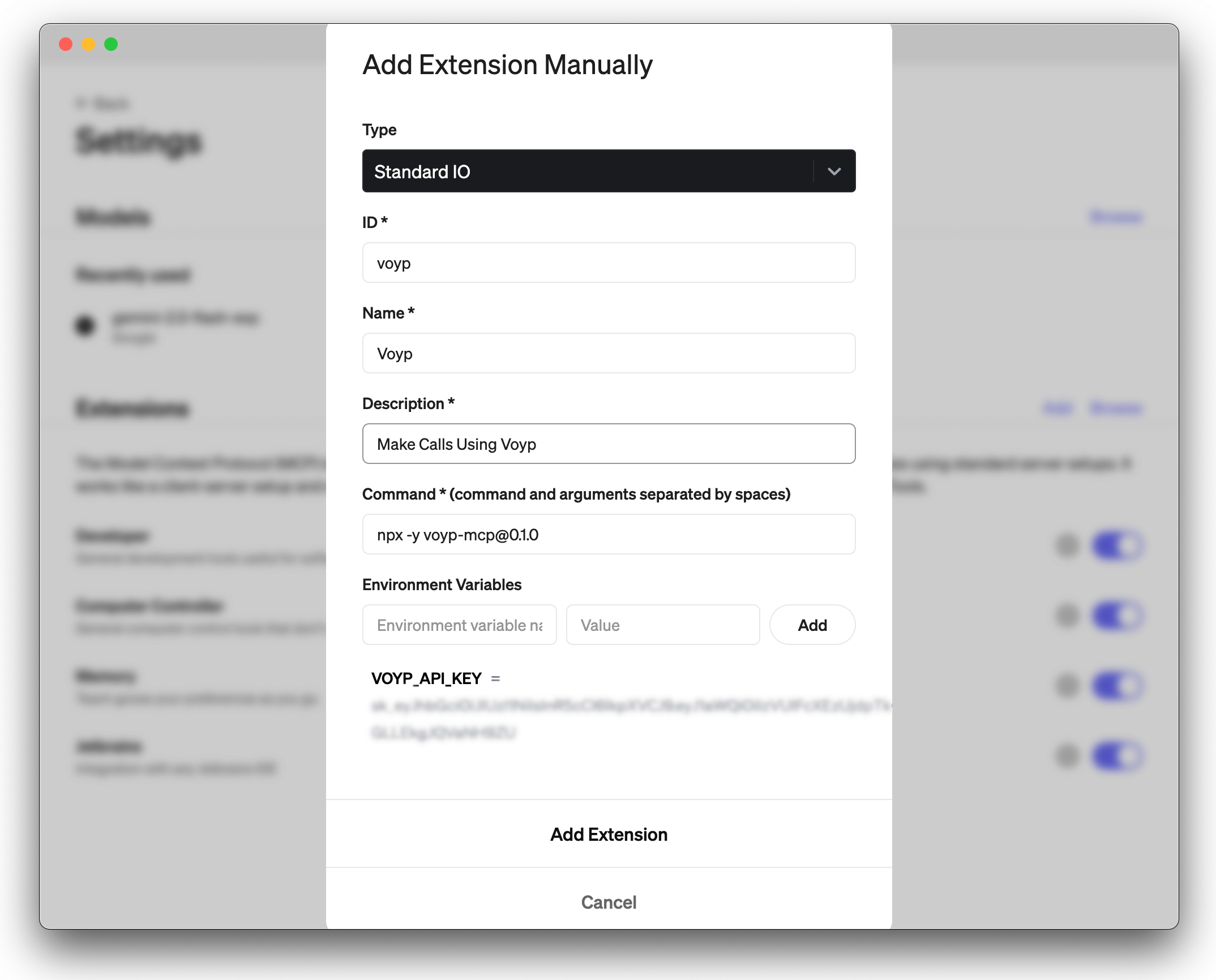
Adding VOYP MCP server to Goose

Voyp + Goose Demo:

Voyp + Goose Demo

Voyp MCP server installation for Claude Desktop ⚡ (Stdio)

To install the voyp-mcp server, you can use the following methods:

  1. Installing via Smithery

  2. Running with NPX

  3. Git installation

1. Installing via Smithery

To install Voyp Model Context Protocol server for Claude Desktop automatically via Smithery:

npx -y @smithery/cli install @paulotaylor/voyp-mcp --client claude

2. Running with NPX

npx -y voyp-mcp@0.1.0   

Although you can launch a server on its own, it's not particularly helpful in isolation. Instead, you should integrate it into an MCP client. Below is an example of how to configure the Claude Desktop app to work with the voyp-mcp server.

Configuring the Claude Desktop app ⚙️

For macOS:

# Create the config file if it doesn't exist
touch "$HOME/Library/Application Support/Claude/claude_desktop_config.json"

# Opens the config file in TextEdit 
open -e "$HOME/Library/Application Support/Claude/claude_desktop_config.json"

# Alternative method using Visual Studio Code (requires VS Code to be installed)
code "$HOME/Library/Application Support/Claude/claude_desktop_config.json"

For Windows:

code %APPDATA%\Claude\claude_desktop_config.json

Add the Voyp server configuration:

Replace your-VOYP-api-key with your actual VOYP API key.

{
  "mcpServers": {
    "voyp-mcp": {
      "command": "npx",
      "args": ["-y", "voyp-mcp"],
      "env": {
        "VOYP_API_KEY": "your-VOYP-api-key"
      }
    }
  }
}

3. Git Installation

  1. Clone the repository:

git clone https://github.com/paulotaylor/voyp-mcp.git
cd voyp-mcp
  1. Install dependencies:

npm install
  1. Build the project:

npm run build

Configuring the Claude Desktop app ⚙️

Follow the configuration steps outlined in the Configuring the Claude Desktop app section above, using the below JSON configuration.

Replace your-VOYP-api-key-here with your actual VOYP API key and /path/to/voyp-mcp with the actual path where you cloned the repository on your system.

{
  "mcpServers": {
    "voyp": {
      "command": "npx",
      "args": ["/path/to/voyp-mcp/build/index.js"],
      "env": {
        "VOYP_API_KEY": "your-VOYP-api-key"
      }
    }
  }
}

Usage in Claude Desktop App 🎯

Once the installation is complete, and the Claude desktop app is configured, you must completely close and re-open the Claude desktop app to see the voyp-mcp server. You should see a hammer icon in the bottom left of the app, indicating available MCP tools, you can click on the hammer icon to see more details on the start_call and hangup_call tools.

Now claude will have complete access to the voyp-mcp server, including the start_call and hangup_call tools.

Voyp + Claude Desktop Demo:
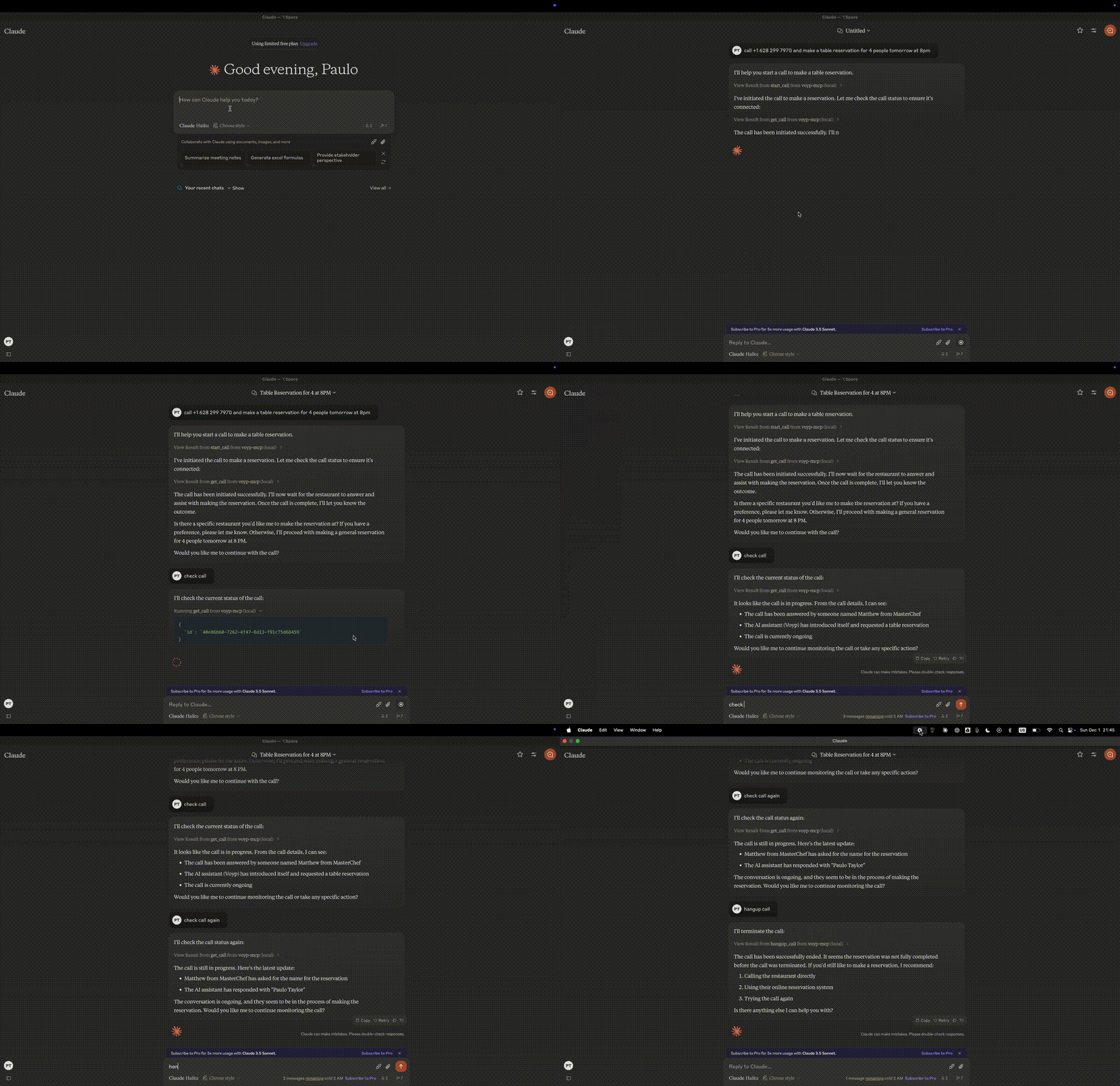
Voyp + Claude Desktop Demo

Troubleshooting 🛠️

Common Issues

  1. Server Not Found

    • Verify the npm installation by running npm --verison

    • Check Claude Desktop configuration syntax by running code ~/Library/Application\ Support/Claude/claude_desktop_config.json

    • Ensure Node.js is properly installed by running node --version

  2. NPX related issues

  • If you encounter errors related to npx, you may need to use the full path to the npx executable instead.

  • You can find this path by running which npx in your terminal, then replace the "command": "npx" line with "command": "/full/path/to/npx" in your configuration.

  1. API Key Issues

    • Confirm your VOYP API key is valid

    • Check the API key is correctly set in the config

    • Verify no spaces or quotes around the API key

Acknowledgments ✨

Available Tools

7 tools
get_callC

Retrieve call details

ParametersJSON Schema
NameRequiredDescriptionDefault
idYesCall Id

TDQS

C2.6/5.0
Behavior2/5

Does the description disclose side effects, auth requirements, rate limits, or destructive behavior?

No annotations are provided, so the description carries the full burden of behavioral disclosure. 'Retrieve' implies a read operation, but the description doesn't specify whether this requires authentication, what happens if the call ID is invalid, or any rate limits. It lacks crucial behavioral context for a tool that presumably accesses sensitive call data.

Agents need to know what a tool does to the world before calling it. Descriptions should go beyond structured annotations to explain consequences.

Conciseness4/5

Is the description appropriately sized, front-loaded, and free of redundancy?

The description is extremely concise at just two words, which is appropriate for a simple retrieval tool. However, it's arguably too brief given the lack of behavioral context and usage guidelines. It's front-loaded but under-specified rather than efficiently comprehensive.

Shorter descriptions cost fewer tokens and are easier for agents to parse. Every sentence should earn its place.

Completeness2/5

Given the tool's complexity, does the description cover enough for an agent to succeed on first attempt?

For a tool that retrieves call details with no annotations and no output schema, the description is insufficient. It doesn't explain what 'details' include, the format of returned data, error conditions, or authentication requirements. Given the sensitivity of call data and the existence of related sibling tools, more context is needed.

Complex tools with many parameters or behaviors need more documentation. Simple tools need less. This dimension scales expectations accordingly.

Parameters3/5

Does the description clarify parameter syntax, constraints, interactions, or defaults beyond what the schema provides?

The input schema has 100% description coverage with the 'id' parameter documented as 'Call Id'. The description adds no additional parameter information beyond what's already in the schema. With high schema coverage, the baseline score of 3 is appropriate as the schema does the heavy lifting.

Input schemas describe structure but not intent. Descriptions should explain non-obvious parameter relationships and valid value ranges.

Purpose3/5

Does the description clearly state what the tool does and how it differs from similar tools?

The description 'Retrieve call details' clearly states the action (retrieve) and resource (call details), but it's vague about what specific details are retrieved and doesn't distinguish this from potential sibling tools like 'get_user' or 'start_call'. It provides basic purpose but lacks specificity.

Agents choose between tools based on descriptions. A clear purpose with a specific verb and resource helps agents select the right tool.

Usage Guidelines2/5

Does the description explain when to use this tool, when not to, or what alternatives exist?

The description provides no guidance on when to use this tool versus alternatives. With sibling tools like 'hangup_call' and 'start_call' that also relate to calls, there's no indication of when retrieval is appropriate versus other call-related operations. No usage context or exclusions are mentioned.

Agents often have multiple tools that could apply. Explicit usage guidance like "use X instead of Y when Z" prevents misuse.

get_userB

Retrieve user profile

ParametersJSON Schema
NameRequiredDescriptionDefault

No parameters

TDQS

B3.1/5.0
Behavior2/5

Does the description disclose side effects, auth requirements, rate limits, or destructive behavior?

No annotations are provided, so the description carries the full burden. 'Retrieve' implies a read operation, but it doesn't disclose behavioral traits such as authentication needs, rate limits, error handling, or what 'user profile' entails (e.g., fields returned). For a tool with zero annotation coverage, this is inadequate, leaving significant gaps in understanding how it behaves.

Agents need to know what a tool does to the world before calling it. Descriptions should go beyond structured annotations to explain consequences.

Conciseness5/5

Is the description appropriately sized, front-loaded, and free of redundancy?

The description is a single, efficient sentence ('Retrieve user profile') with zero waste. It's front-loaded and appropriately sized for a simple tool, making it easy to parse quickly without unnecessary elaboration.

Shorter descriptions cost fewer tokens and are easier for agents to parse. Every sentence should earn its place.

Completeness2/5

Given the tool's complexity, does the description cover enough for an agent to succeed on first attempt?

Given the complexity (simple retrieval tool), lack of annotations, and no output schema, the description is incomplete. It doesn't explain what 'user profile' includes, potential return values, or any behavioral context. For a tool with no structured data to rely on, this minimal description fails to provide sufficient completeness for effective use.

Complex tools with many parameters or behaviors need more documentation. Simple tools need less. This dimension scales expectations accordingly.

Parameters4/5

Does the description clarify parameter syntax, constraints, interactions, or defaults beyond what the schema provides?

The input schema has 0 parameters with 100% coverage, meaning no parameters are documented in the schema. The description doesn't add parameter details, but since there are no parameters, this is acceptable. Baseline is 4 for 0 parameters, as no additional semantics are needed beyond the schema's completeness.

Input schemas describe structure but not intent. Descriptions should explain non-obvious parameter relationships and valid value ranges.

Purpose4/5

Does the description clearly state what the tool does and how it differs from similar tools?

The description 'Retrieve user profile' clearly states the verb ('retrieve') and resource ('user profile'), making the purpose unambiguous. However, it doesn't differentiate from sibling tools like 'get_call' or 'search_place', which would require a 5. The description is specific but lacks sibling distinction.

Agents choose between tools based on descriptions. A clear purpose with a specific verb and resource helps agents select the right tool.

Usage Guidelines2/5

Does the description explain when to use this tool, when not to, or what alternatives exist?

The description provides no guidance on when to use this tool versus alternatives. With siblings like 'search_place' and 'search_places' that might involve user-related queries, there's no indication of context, prerequisites, or exclusions. It's a basic statement with no usage instructions.

Agents often have multiple tools that could apply. Explicit usage guidance like "use X instead of Y when Z" prevents misuse.

hangup_callC

Hangup an existing call

ParametersJSON Schema
NameRequiredDescriptionDefault
idYesID of the call

TDQS

C2.9/5.0
Behavior2/5

Does the description disclose side effects, auth requirements, rate limits, or destructive behavior?

With no annotations, the description carries full burden but only states the action without disclosing behavioral traits. It doesn't mention if this is destructive (likely yes for hanging up), requires specific permissions, has side effects, or what happens post-execution (e.g., call termination confirmation).

Agents need to know what a tool does to the world before calling it. Descriptions should go beyond structured annotations to explain consequences.

Conciseness5/5

Is the description appropriately sized, front-loaded, and free of redundancy?

The description is a single, efficient sentence with zero waste, front-loading the core action. It's appropriately sized for a simple tool, earning its place without unnecessary elaboration.

Shorter descriptions cost fewer tokens and are easier for agents to parse. Every sentence should earn its place.

Completeness2/5

Given the tool's complexity, does the description cover enough for an agent to succeed on first attempt?

For a destructive tool with no annotations and no output schema, the description is incomplete. It lacks details on behavioral impact (e.g., what 'hangup' entails), error conditions, or return values, leaving significant gaps in understanding the tool's full context.

Complex tools with many parameters or behaviors need more documentation. Simple tools need less. This dimension scales expectations accordingly.

Parameters3/5

Does the description clarify parameter syntax, constraints, interactions, or defaults beyond what the schema provides?

Schema description coverage is 100%, so the schema already documents the 'id' parameter fully. The description adds no additional meaning beyond implying the call must exist, which is minimal value. Baseline 3 is appropriate as the schema does the heavy lifting.

Input schemas describe structure but not intent. Descriptions should explain non-obvious parameter relationships and valid value ranges.

Purpose4/5

Does the description clearly state what the tool does and how it differs from similar tools?

The description clearly states the action ('hangup') and target ('an existing call'), providing a specific verb+resource combination. However, it doesn't differentiate from sibling tools like 'start_call' or 'get_call' beyond the obvious action difference, missing explicit comparison.

Agents choose between tools based on descriptions. A clear purpose with a specific verb and resource helps agents select the right tool.

Usage Guidelines2/5

Does the description explain when to use this tool, when not to, or what alternatives exist?

No guidance is provided on when to use this tool versus alternatives. The description doesn't mention prerequisites (e.g., needing an active call), exclusions, or comparisons to siblings like 'start_call' or 'get_call', leaving usage context implied at best.

Agents often have multiple tools that could apply. Explicit usage guidance like "use X instead of Y when Z" prevents misuse.

search_placeC

Search place details in a given location

ParametersJSON Schema
NameRequiredDescriptionDefault
placeYesName of place to search. Ex: The Lane Salon
locationYesPlace location. Ex: San Francisco, CA

TDQS

C2.9/5.0
Behavior2/5

Does the description disclose side effects, auth requirements, rate limits, or destructive behavior?

With no annotations, the description carries full burden but provides minimal behavioral context. It doesn't disclose whether this is a read-only operation, what data sources are used, rate limits, authentication needs, or what 'details' include. The phrase 'search place details' implies a lookup but lacks specificity.

Agents need to know what a tool does to the world before calling it. Descriptions should go beyond structured annotations to explain consequences.

Conciseness5/5

Is the description appropriately sized, front-loaded, and free of redundancy?

The description is a single, efficient sentence with zero waste. It's front-loaded with the core purpose and appropriately sized for a simple search tool.

Shorter descriptions cost fewer tokens and are easier for agents to parse. Every sentence should earn its place.

Completeness2/5

Given the tool's complexity, does the description cover enough for an agent to succeed on first attempt?

For a search tool with no annotations and no output schema, the description is incomplete. It doesn't explain what 'details' are returned, potential limitations, or error conditions. Given the lack of structured data, more context is needed for effective use.

Complex tools with many parameters or behaviors need more documentation. Simple tools need less. This dimension scales expectations accordingly.

Parameters3/5

Does the description clarify parameter syntax, constraints, interactions, or defaults beyond what the schema provides?

Schema description coverage is 100%, so the schema fully documents both parameters. The description adds no additional meaning beyond implying that 'location' contextualizes the search, which is already clear from the schema. Baseline 3 is appropriate as the schema does the heavy lifting.

Input schemas describe structure but not intent. Descriptions should explain non-obvious parameter relationships and valid value ranges.

Purpose4/5

Does the description clearly state what the tool does and how it differs from similar tools?

The description clearly states the action ('search') and resource ('place details'), specifying the scope ('in a given location'). It distinguishes from sibling 'search_places' by focusing on details rather than general search, but doesn't explicitly differentiate from 'search_place_by_number'.

Agents choose between tools based on descriptions. A clear purpose with a specific verb and resource helps agents select the right tool.

Usage Guidelines2/5

Does the description explain when to use this tool, when not to, or what alternatives exist?

No guidance is provided on when to use this tool versus alternatives like 'search_places' or 'search_place_by_number'. The description implies usage for detailed place searches but offers no explicit comparison or exclusion criteria.

Agents often have multiple tools that could apply. Explicit usage guidance like "use X instead of Y when Z" prevents misuse.

search_place_by_numberB

Find place name and address by phone number

ParametersJSON Schema
NameRequiredDescriptionDefault
numberYesPhone number in E.164 format. Ex: +1234567890

TDQS

B3.1/5.0
Behavior2/5

Does the description disclose side effects, auth requirements, rate limits, or destructive behavior?

No annotations are provided, so the description carries the full burden of behavioral disclosure. It states the tool 'finds' information, implying a read-only operation, but doesn't clarify if it requires authentication, has rate limits, returns partial or full results, or handles errors. For a tool with no annotations, this leaves significant gaps in understanding its behavior beyond the basic purpose.

Agents need to know what a tool does to the world before calling it. Descriptions should go beyond structured annotations to explain consequences.

Conciseness5/5

Is the description appropriately sized, front-loaded, and free of redundancy?

The description is a single, efficient sentence: 'Find place name and address by phone number.' It is front-loaded with the core purpose, uses clear language, and avoids unnecessary words. Every part of the sentence earns its place by conveying essential information without waste.

Shorter descriptions cost fewer tokens and are easier for agents to parse. Every sentence should earn its place.

Completeness3/5

Given the tool's complexity, does the description cover enough for an agent to succeed on first attempt?

Given the tool's complexity (simple lookup with one parameter) and the lack of annotations and output schema, the description is minimally complete. It states what the tool does but doesn't cover behavioral aspects like response format, error handling, or prerequisites. For a basic search tool, this is adequate but leaves room for improvement in providing a fuller context.

Complex tools with many parameters or behaviors need more documentation. Simple tools need less. This dimension scales expectations accordingly.

Parameters3/5

Does the description clarify parameter syntax, constraints, interactions, or defaults beyond what the schema provides?

The input schema has 100% description coverage, with the parameter 'number' documented as 'Phone number in E.164 format. Ex: +1234567890.' The description adds no additional meaning beyond this, as it only mentions 'phone number' without specifying format or constraints. Since the schema does the heavy lifting, the baseline score of 3 is appropriate, indicating adequate but not enhanced parameter understanding.

Input schemas describe structure but not intent. Descriptions should explain non-obvious parameter relationships and valid value ranges.

Purpose4/5

Does the description clearly state what the tool does and how it differs from similar tools?

The description clearly states the tool's purpose: 'Find place name and address by phone number.' It specifies the verb ('find') and the resources ('place name and address'), making it easy to understand what the tool does. However, it doesn't explicitly distinguish this tool from sibling tools like 'search_place' or 'search_places' (which might search by other criteria), so it doesn't reach the highest score.

Agents choose between tools based on descriptions. A clear purpose with a specific verb and resource helps agents select the right tool.

Usage Guidelines2/5

Does the description explain when to use this tool, when not to, or what alternatives exist?

The description provides no guidance on when to use this tool versus alternatives. It doesn't mention sibling tools like 'search_place' or 'search_places', nor does it specify scenarios where this tool is preferred (e.g., when you have a phone number but not other place details). Without any usage context or exclusions, it offers minimal help in tool selection.

Agents often have multiple tools that could apply. Explicit usage guidance like "use X instead of Y when Z" prevents misuse.

search_placesC

Search places in a given location

ParametersJSON Schema
NameRequiredDescriptionDefault
searchYesPlaces to search. Ex: italian restaurants in New York City, US

TDQS

C2.9/5.0
Behavior2/5

Does the description disclose side effects, auth requirements, rate limits, or destructive behavior?

No annotations are provided, so the description carries the full burden of behavioral disclosure. It states the action ('Search') but doesn't cover critical aspects like whether this is a read-only operation, potential rate limits, authentication needs, or what the search results might include (e.g., format, pagination). This is a significant gap for a search tool with zero annotation coverage.

Agents need to know what a tool does to the world before calling it. Descriptions should go beyond structured annotations to explain consequences.

Conciseness5/5

Is the description appropriately sized, front-loaded, and free of redundancy?

The description is a single, efficient sentence ('Search places in a given location') that is front-loaded and wastes no words. It directly communicates the core function without unnecessary elaboration, earning a perfect score for conciseness.

Shorter descriptions cost fewer tokens and are easier for agents to parse. Every sentence should earn its place.

Completeness2/5

Given the tool's complexity, does the description cover enough for an agent to succeed on first attempt?

Given the lack of annotations and output schema, the description is incomplete. It doesn't explain what the search returns (e.g., list of places, details), how results are structured, or any behavioral traits like error handling. For a search tool with no structured support, this leaves the agent under-informed.

Complex tools with many parameters or behaviors need more documentation. Simple tools need less. This dimension scales expectations accordingly.

Parameters3/5

Does the description clarify parameter syntax, constraints, interactions, or defaults beyond what the schema provides?

The input schema has 100% description coverage, with the 'search' parameter documented as 'Places to search. Ex: italian restaurants in New York City, US.' The description adds no additional meaning beyond this, as it doesn't elaborate on syntax or constraints. With high schema coverage, the baseline score of 3 is appropriate.

Input schemas describe structure but not intent. Descriptions should explain non-obvious parameter relationships and valid value ranges.

Purpose4/5

Does the description clearly state what the tool does and how it differs from similar tools?

The description clearly states the tool's purpose as 'Search places in a given location,' which includes a specific verb ('Search') and resource ('places'). However, it doesn't explicitly differentiate from sibling tools like 'search_place' or 'search_place_by_number,' which appear to be similar search operations, preventing a perfect score.

Agents choose between tools based on descriptions. A clear purpose with a specific verb and resource helps agents select the right tool.

Usage Guidelines2/5

Does the description explain when to use this tool, when not to, or what alternatives exist?

The description provides no guidance on when to use this tool versus alternatives. With sibling tools like 'search_place' and 'search_place_by_number' available, there is no indication of context, prerequisites, or exclusions, leaving the agent to guess based on tool names alone.

Agents often have multiple tools that could apply. Explicit usage guidance like "use X instead of Y when Z" prevents misuse.

start_callC

Start a new phone call via Voyp API. The API returns the call id and a URL where users can track the progress of the call

ParametersJSON Schema
NameRequiredDescriptionDefault
numberYesPhone number to call in E.164 format
languageNoLanguage of the call. Ex: en-US, pt-PT, fr-FR
contextYesContext of the call. Ex: Order a pizza

TDQS

C2.9/5.0
Behavior2/5

Does the description disclose side effects, auth requirements, rate limits, or destructive behavior?

With no annotations provided, the description carries the full burden of behavioral disclosure. It mentions that the API returns a call id and tracking URL, which adds some context about outputs. However, it fails to disclose critical traits like whether this is a mutating operation (implied by 'Start'), potential side effects (e.g., initiating a real phone call), error handling, or rate limits. For a tool with zero annotation coverage, this leaves significant gaps.

Agents need to know what a tool does to the world before calling it. Descriptions should go beyond structured annotations to explain consequences.

Conciseness4/5

Is the description appropriately sized, front-loaded, and free of redundancy?

The description is appropriately sized with two sentences that are front-loaded: the first states the purpose, and the second explains the return values. There is no wasted text, making it efficient. However, it could be slightly more structured by explicitly separating purpose from behavioral details, keeping it at 4 rather than 5.

Shorter descriptions cost fewer tokens and are easier for agents to parse. Every sentence should earn its place.

Completeness2/5

Given the tool's complexity, does the description cover enough for an agent to succeed on first attempt?

Given the complexity of initiating a phone call (a mutating operation with real-world effects), no annotations, and no output schema, the description is incomplete. It lacks details on permissions, error cases, what the tracking URL entails, or how to handle the call id. For a tool with 3 parameters and significant behavioral implications, this is inadequate.

Complex tools with many parameters or behaviors need more documentation. Simple tools need less. This dimension scales expectations accordingly.

Parameters3/5

Does the description clarify parameter syntax, constraints, interactions, or defaults beyond what the schema provides?

Schema description coverage is 100%, meaning the input schema fully documents parameters like 'number', 'language', and 'context'. The description adds no additional meaning beyond what the schema provides, such as examples or usage notes for parameters. Baseline is 3 when the schema does the heavy lifting, but no extra value is added.

Input schemas describe structure but not intent. Descriptions should explain non-obvious parameter relationships and valid value ranges.

Purpose4/5

Does the description clearly state what the tool does and how it differs from similar tools?

The description clearly states the action ('Start a new phone call') and resource ('via Voyp API'), with the verb 'Start' being specific. It distinguishes from siblings like 'get_call' or 'hangup_call' by indicating creation rather than retrieval or termination. However, it doesn't explicitly differentiate from all siblings (e.g., 'search_place' tools), keeping it at 4 rather than 5.

Agents choose between tools based on descriptions. A clear purpose with a specific verb and resource helps agents select the right tool.

Usage Guidelines2/5

Does the description explain when to use this tool, when not to, or what alternatives exist?

The description provides no guidance on when to use this tool versus alternatives. It doesn't mention prerequisites, such as authentication or account setup, or compare to sibling tools like 'get_call' for retrieving call details. Usage is implied by the action but lacks explicit context or exclusions.

Agents often have multiple tools that could apply. Explicit usage guidance like "use X instead of Y when Z" prevents misuse.

TDQS

B3.1/5.0
Disambiguation3/5

The tools have some clear distinctions, such as get_call vs. hangup_call vs. start_call for call operations, but there is significant overlap between search_place, search_places, and search_place_by_number, which could cause confusion about which to use for location-based searches. The descriptions help clarify, but the boundaries are not perfectly distinct.

Naming Consistency4/5

Most tools follow a consistent verb_noun pattern (e.g., get_call, get_user, hangup_call, start_call), with clear and readable naming. However, the search tools have minor deviations (search_place, search_places, search_place_by_number), which slightly disrupts the pattern but remains mostly consistent.

Tool Count5/5

With 7 tools, the count is well-scoped for a server focused on phone calls and place searches. Each tool appears to serve a specific purpose without unnecessary duplication, fitting within the typical 3-15 range for a coherent toolset.

Completeness3/5

For call operations, there is good coverage with get, start, and hangup, but missing update or list operations for calls or users could be a gap. For place searches, the tools cover various search methods, but without create or delete operations, the surface feels incomplete for a full lifecycle in the domain.

Maintenance

ActivityInactive
ResponsivenessSyncing

Resources

Unclaimed servers have limited discoverability.

Looking for Admin?

If you are the server author, to access and configure the admin panel.

Related MCP Connectors

  • The Telnyx MCP server is an official implementation of the Model Context Protocol that enables AI clients (like Claude Desktop, Cursor, and OpenAI Agents) to interact with Telnyx's telephony, messaging, and AI assistant APIs. It provides comprehensive capabilities including making and managing phone calls, sending SMS/MMS messages, purchasing and configuring phone numbers, creating AI assistants with custom instructions, managing cloud storage buckets, scraping and embedding website content, and handling integration secrets. The server exists as both a local implementation and a remotely hosted version, allowing developers to integrate real-world communication infrastructure directly into AI applications.

  • Hosted MCP server connecting AI assistants to 9,000+ apps and 40,000+ actions via Zapier.

  • Give AI agents real phone numbers, messages, and voice calls via MCP.

  • Discover and call 10,000+ production APIs from one MCP server. Pay-per-call billing for AI agents.

Related MCP Servers

Latest Blog Posts

MCP directory API

We provide all the information about MCP servers via our MCP API.

curl -X GET 'https://glama.ai/api/mcp/v1/servers/paulotaylor/voyp-mcp'

If you have feedback or need assistance with the MCP directory API, please join our Discord server