FPL MCP Server
Provides access to Fantasy Premier League API data, enabling retrieval of gameweek fixtures, team performance statistics, player data, and private league standings through natural language queries.
Click on "Deploy Server".
Wait a few minutes for the server to deploy. Once ready, it will show a "Started" state.
In the chat, type
@followed by the MCP server name and your instructions, e.g., "@FPL MCP Server show me the fixtures for gameweek 5"
That's it! The server will respond to your query, and you can continue using it as needed.
Here is a step-by-step guide with screenshots.
FPL MCP Server
A Model Context Protocol (MCP) server for the Fantasy Premier League API.
Installation
Install from NPM (Recommended)
npm install -g fpl-mcpInstall from Source
git clone https://github.com/owen-lacey/fpl-mcp.git
cd fpl-mcp
npm install
npm run buildRelated MCP server: Fantasy Premier League MCP Server
Quick Start
Using with Claude Desktop
If installed via NPM, add this to your claude_desktop_config.json:
{
"mcpServers": {
"fpl-api": {
"command": "npx",
"args": ["fpl-mcp@latest"]
}
}
}If installed from source, use:
{
"mcpServers": {
"fpl-api": {
"command": "node",
"args": ["/path/to/fpl-mcp/build/src/server.js"]
}
}
}Inspect the MCP tools
Use the Model Inspector to explore available tools:
npx @modelcontextprotocol/inspector npx fpl-mcpUsage Example
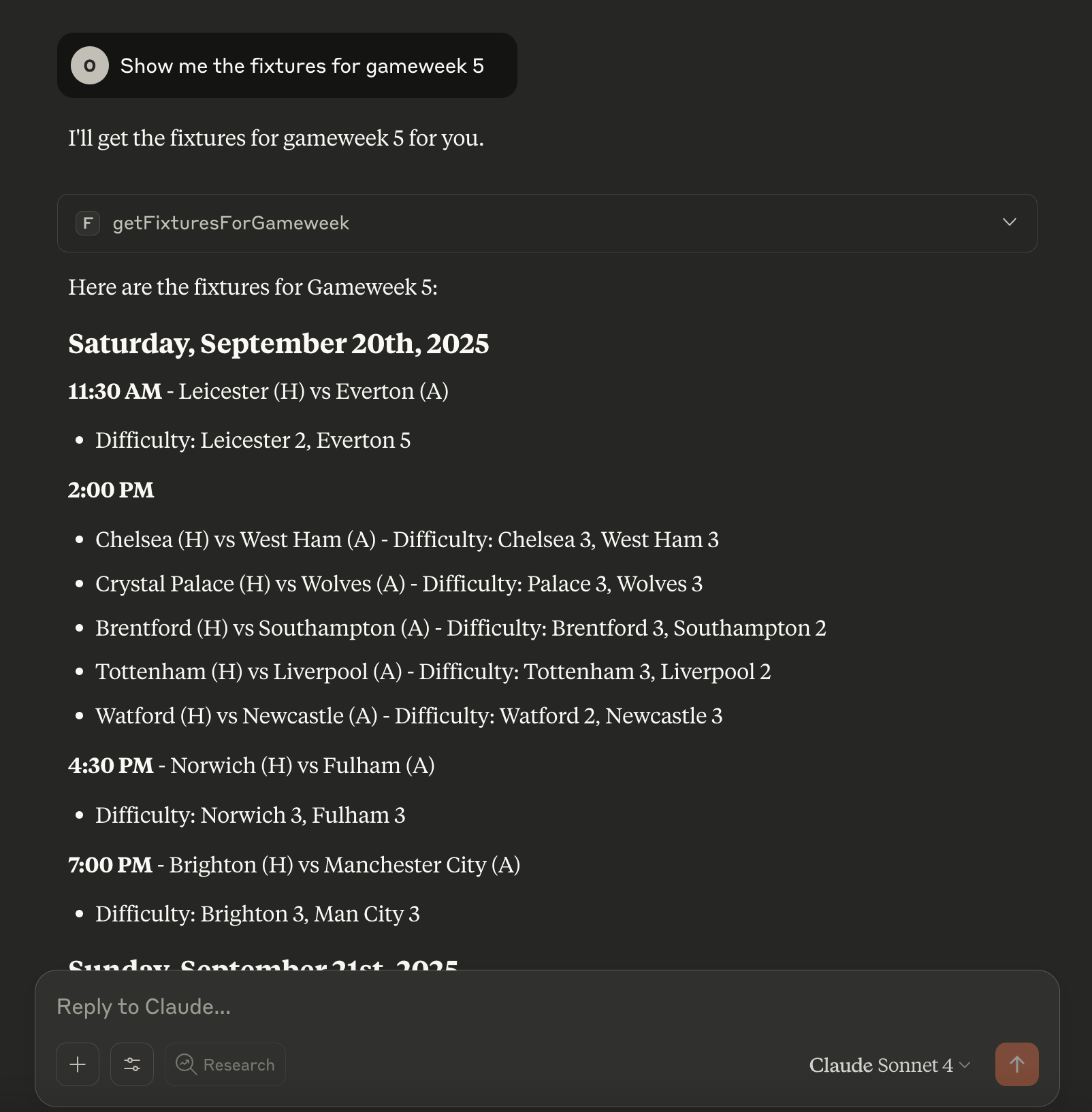
You can connect this MCP server to Claude Desktop and interact with FPL data using natural language.
Endpoints Supported
See docs/fpl-api-cheatsheet.md for all FPL API endpoints exposed as MCP tools.
Example Prompts
Use these prompts to interact with the MCP server via your LLM:
"Show me the fixtures for gameweek 5."
"How am I doing in my private leagues (team id is 12345)?"
"How did mo salah get on in GW1?"
You can ask natural language questions about any supported endpoint. The LLM will use the appropriate MCP tool to fetch the data.
Development
Publishing to npm
This repository includes a GitHub Actions workflow that automatically publishes to npm when the version number in package.json changes.
Setup
Create an npm access token:
Log in to npmjs.com
Go to Access Tokens in your account settings
Generate a new "Automation" token
Add the token to GitHub Secrets:
Go to your repository Settings > Secrets and variables > Actions
Create a new secret named
NPM_TOKENPaste your npm token as the value
Publish a new version:
Update the version in
package.json(e.g.,1.0.1→1.0.2)Commit and push to the
mainbranchThe workflow will automatically build and publish to npm
A git tag (e.g.,
v1.0.2) will be created automatically
License
MIT
Available Tools
16 toolsgetBestClassicPrivateLeaguesGet Best Classic Private LeaguesB
Fetch list of best classic private leagues
Inputs: no named parameters.
getChipDataGet Chip DataC
Fetch all chip data
Inputs: no named parameters.
getElementSummaryGet Element SummaryC
Fetch details for a specific player (element)
Inputs: elementId (required).
getEntryGet EntryC
Fetch general info about a team by entry ID
Inputs: entryId (required).
getEntryHistoryGet Entry HistoryC
Fetch this and previous season performance of a team
Inputs: entryId (required).
getEntryPicksGet Entry PicksC
Fetch squad picks of a team for a specific week
Inputs: entryId (required), gw (required).
getEntryTransfersGet Entry TransfersC
Fetch all transfers of a team
Inputs: entryId (required).
getFixturesGet FixturesB
Fetch all FPL fixtures
Inputs: no named parameters.
getFixturesForGameweekGet Fixtures For GameweekC
Fetch fixtures for a specific gameweek
Inputs: gw (required).
getGameweekDataGet Gameweek DataB
Fetch all gameweek data
Inputs: no named parameters.
getLeagueStandingsGet League StandingsD
Fetch information about a league by ID
Inputs: leagueId (required).
getLeagueStandingsPageGet League Standings PageB
Fetch a page of league standings for leagues with more than 50 teams
Inputs: leagueId (required), page (required).
getLiveEventGet Live EventB
Fetch focused live stats for a gameweek. Optionally filter to specific players by providing elementIds array.
Inputs: gw (required), elementIds.
getPlayerDataGet Player DataB
Fetch all player data
Inputs: no named parameters.
getRegionsGet RegionsB
Fetch FPL region list
Inputs: no named parameters.
getTeamDataGet Team DataC
Fetch all team data
Inputs: no named parameters.
Tool Schema Changelog
Recent tool additions, removals, and schema changes observed during successful MCP inspections.
Loading tool schema changelog…
TDQS
Scored across 16 tools
Every tool has a clearly distinct purpose targeting specific FPL resources like leagues, players, teams, fixtures, or gameweeks, with no overlap in functionality. The descriptions precisely indicate what each tool fetches, making it easy for an agent to select the correct one without confusion.
All tool names follow a consistent verb_noun pattern starting with 'get' followed by a descriptive noun phrase (e.g., getElementSummary, getFixturesForGameweek), with no deviations in style or convention. This predictability enhances usability and clarity across the entire set.
With 16 tools, the server is well-scoped for the FPL domain, covering a comprehensive range of data points from player details to league standings without being excessive. Each tool serves a specific, necessary function, making the count appropriate for thorough data retrieval in fantasy football.
The tool set provides complete coverage for fetching FPL data, including CRUD-like operations for players, teams, leagues, fixtures, and gameweeks, with no obvious gaps. It supports both general queries (e.g., getPlayerData) and specific ones (e.g., getElementSummary), ensuring agents can access all needed information without dead ends.
Related MCP Connectors
Provide detailed Pokémon data and information through a standardized MCP interface. Enable LLMs an…
Connects AI assistants to TrackingTime for querying time entries, projects, tasks, customers, and team data using natural language.
Query, explore, and manage your databases through natural conversation.
List datasets, schemas, run APL queries, and use prompts for exploration, anomalies, and monitoring.
Related MCP Servers
- AlicenseNot gradedqualityDmaintenanceConnects LLMs to the Fantasy Premier League API for intelligent team management, enabling natural language player research, competitor analysis, transfer decisions, and strategic planning using friendly names instead of IDs.3MIT
- AlicenseAqualityDmaintenanceEnables AI assistants to analyze Fantasy Premier League data, providing tools for player search, fixture analysis, manager comparisons, and strategy prompts for transfer planning and lineup selection.1936 PyPI1MIT
- FlicenseNot gradedqualityDmaintenanceEnables natural language querying of football/soccer data via the API-Football service, providing access to leagues, teams, players, fixtures, standings, and statistics.2-
- AlicenseNot gradedqualityDmaintenanceProvides tools and resources to interact with the Fantasy Premier League API, enabling player analysis, fixture insights, and team management through natural language.63 npmMIT