


A
licenseA
qualityD
maintenanceFlowcheck MCP exposes workflow analysis tools from the Flowcheck API so AI agents can detect issues and validate processes programmatically.
22
40 npm
MIT

让您的 AI 代理拥有与您在 Power Automate 门户中相同的可见性——甚至更多。 Graph API 只返回顶层运行状态——代理看不到操作输入、循环迭代或嵌套失败。FlowStudio MCP 将所有这些都呈现出来。
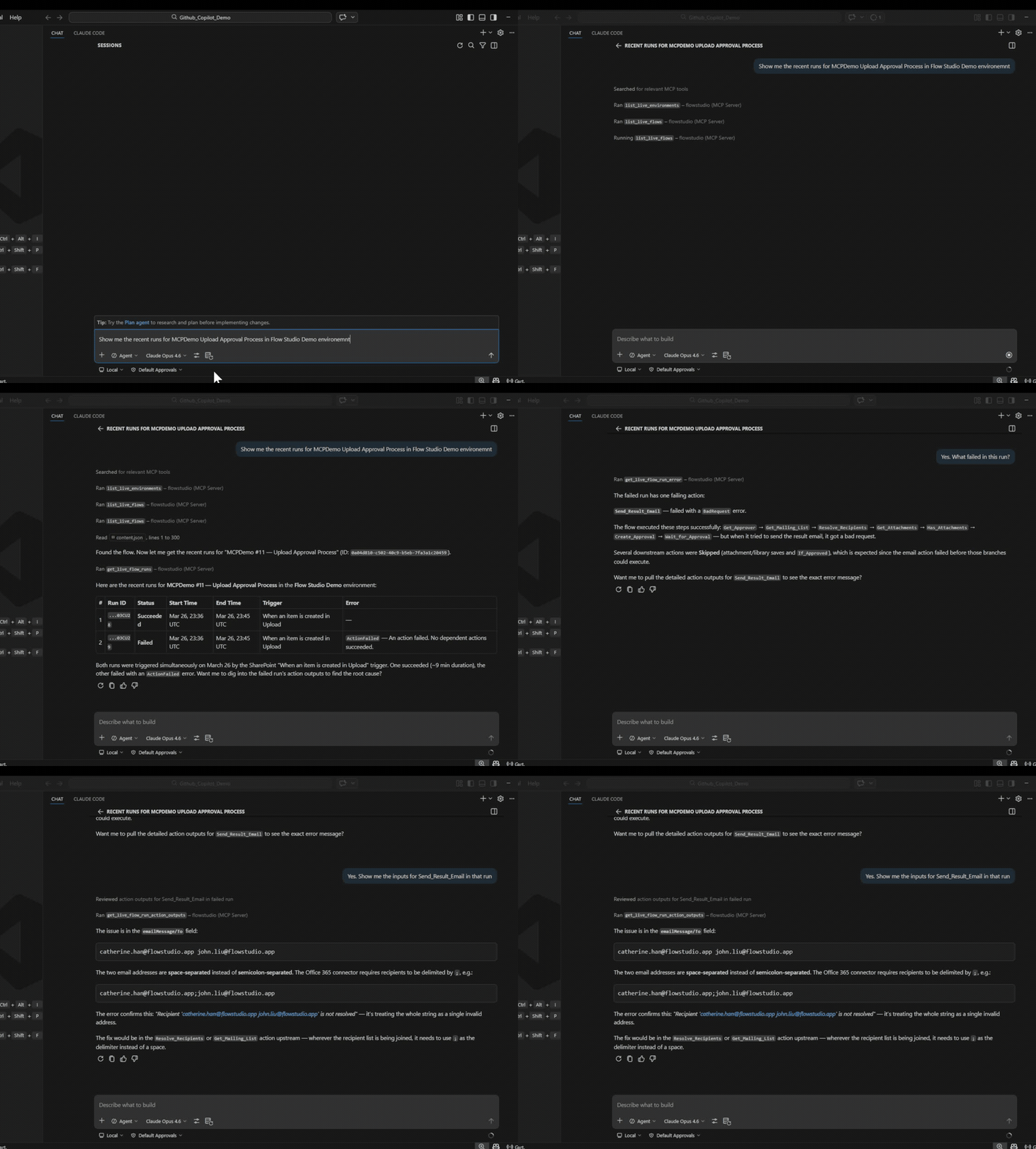
您可以点击浏览门户并找到根本原因。您的代理却做不到——除非它拥有 MCP。
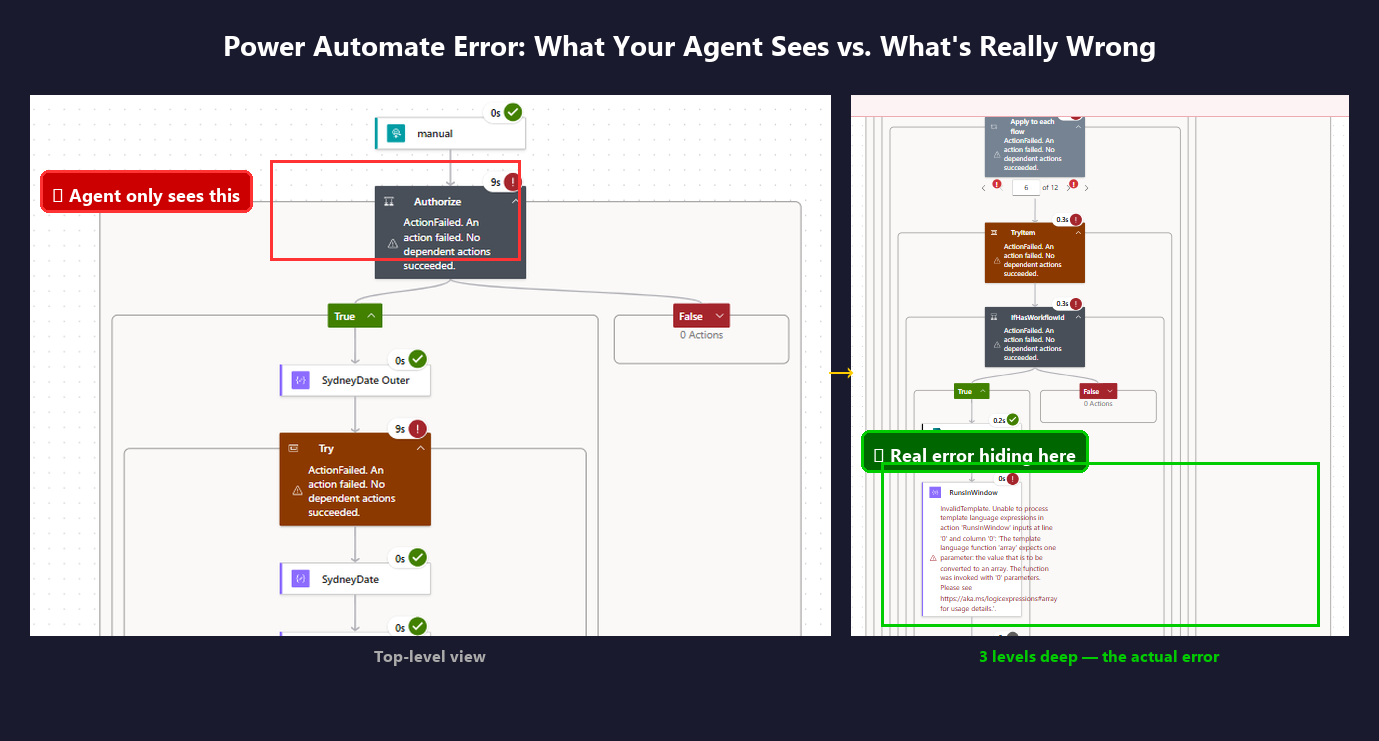
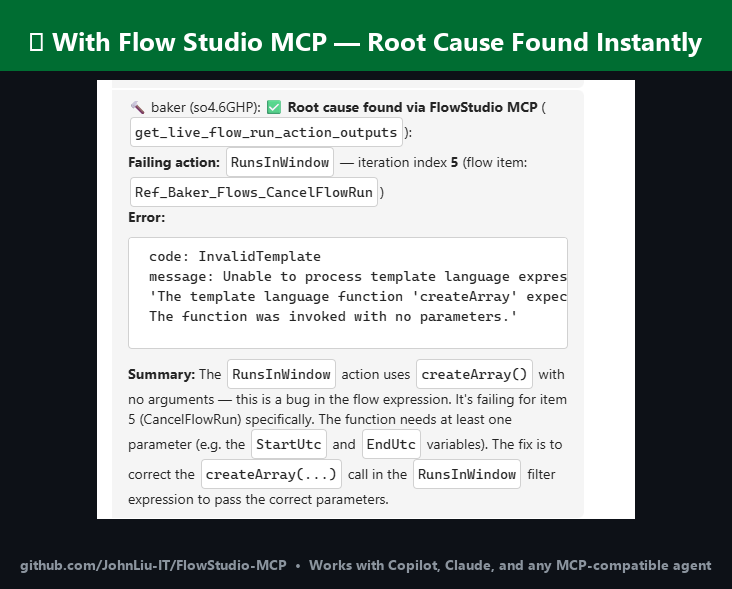
您的代理能看到流失败,却看不到原因——Graph API 只返回状态代码
您希望代理能看到操作级别的输入和输出,就像您在门户中看到的那样
一个循环有数百次迭代,其中一些产生了错误输出——在门户中您需要逐个点击,而代理可以一次性扫描所有迭代的输入和输出
您希望在不打开管理中心的情况下检查整个租户的流运行状况、失败率和制作者活动
您需要大规模对流进行分类、检测孤立资源或审计连接器——而无需安装 CoE Starter Kit
您厌倦了在代理与门户之间充当中间人
Related MCP server: MCP Power Automate
核心区别:Graph API 为您的代理提供运行状态。MCP 为您的代理提供每个操作的输入和输出。
代理看到的内容 | Graph API | FlowStudio MCP |
运行通过或失败 | 是 | 是 |
操作输入和输出 | 否 | 是 |
超出状态代码的错误详情 | 否 | 是 |
子流运行详情 | 否 | 是 |
循环迭代数据 | 否 | 是 |
流定义(读取 + 写入) | 有限 | 完整 JSON |
重新提交 / 取消运行 | 有限 | 是 |
缓存的流运行状况与失败率 | 否 | 是 |
制作者 / Power Apps / 连接器清单 | 否 | 是 |
治理元数据(标记、影响、所有者) | 否 | 是 |
技能 | 描述 |
连接并操作 Power Automate 云流——列出流、读取定义、检查运行、重新提交、取消 | |
用于调查失败流的分步诊断流程 | |
从零开始构建、搭建并部署 Power Automate 流定义 | |
流运行状况、失败率、制作者清单、Power Apps、环境和连接数量 | |
按影响对流分类、检测孤立项、审计连接器、管理通知、计算归档分数 |
前三个技能使用实时 Power Automate API 调用。监控和治理技能使用缓存存储——每日快照,包含聚合统计、修复提示和治理元数据。使用存储工具需要 FlowStudio for Teams 或 MCP Pro+ 订阅。
每个技能都遵循 Agent Skills 规范,并与任何兼容的代理配合使用。
Copilot, Claude Code, ChatGPT, Codex, OpenClaw, Gemini CLI, Cursor, Goose, Amp, OpenHands
完整教程请参见 learn.flowstudio.app:
入门 —— 为任何代理安装 FlowStudio MCP
使用 AI 代理构建流 —— 一个完整的 3 步示例
Vibe code Power Automate —— 描述流,代理来构建它
VS Code 中的 Power Automate —— 在编辑器中处理流
调试失败的流 —— 从操作级数据中找到根本原因
按代理:ChatGPT · Claude · GitHub Copilot · Copilot Studio · Codex
使用您的 Microsoft 账户登录,而不是粘贴密钥。在 ChatGPT(开启开发者模式)或 claude.ai 中将 https://mcp.flowstudio.app/mcp/oauth 添加为连接器,然后按照登录提示操作。教程:ChatGPT for Power Automate。
批准后可通过 Claude 插件市场获取。要在本地测试:
git clone https://github.com/ninihen1/power-automate-mcp-skills.git
claude --plugin-dir ./power-automate-mcp-skills
然后连接 MCP 服务器:
claude mcp add --transport http flowstudio https://mcp.flowstudio.app/mcp \
  --header "x-api-key: <YOUR_TOKEN>"
在 mcp.flowstudio.app 获取您的令牌。
在 Codex 会话中,直接安装技能:
$skill-installer install https://github.com/ninihen1/power-automate-mcp-skills/tree/main/skills/power-automate-mcp
$skill-installer install https://github.com/ninihen1/power-automate-mcp-skills/tree/main/skills/power-automate-debug
$skill-installer install https://github.com/ninihen1/power-automate-mcp-skills/tree/main/skills/power-automate-build
$skill-installer install https://github.com/ninihen1/power-automate-mcp-skills/tree/main/skills/power-automate-monitoring
$skill-installer install https://github.com/ninihen1/power-automate-mcp-skills/tree/main/skills/power-automate-governance
然后在 ~/.codex/config.toml 中连接 MCP 服务器:
[mcp_servers.flowstudio]
url = "https://mcp.flowstudio.app/mcp"

[mcp_servers.flowstudio.http_headers]
x-api-key = "<YOUR_TOKEN>"在 skills.sh 上搜索 flowstudio,或者:
npx skills add github/awesome-copilot -s flowstudio-power-automate-mcp
npx skills add github/awesome-copilot -s flowstudio-power-automate-debug
npx skills add github/awesome-copilot -s flowstudio-power-automate-build
npx skills add github/awesome-copilot -s flowstudio-power-automate-monitoring
npx skills add github/awesome-copilot -s flowstudio-power-automate-governancenpx clawhub@latest install power-automate-mcpnpx smithery skill add flowstudio/power-automate-mcp将技能文件夹复制到您项目的 .github/skills/ 目录(或您的代理发现技能的任何位置)。
Claude Code:
claude mcp add --transport http flowstudio https://mcp.flowstudio.app/mcp \
--header "x-api-key: <YOUR_TOKEN>"Codex(~/.codex/config.toml):
[mcp_servers.flowstudio]
url = "https://mcp.flowstudio.app/mcp"

[mcp_servers.flowstudio.http_headers]
x-api-key = "<YOUR_TOKEN>"
Copilot / VS Code(.vscode/mcp.json):
{
  "servers": {
    "flowstudio": {
      "type": "http",
      "url": "https://mcp.flowstudio.app/mcp",
      "headers": { "x-api-key": "<YOUR_TOKEN>" }
    }
  }
}
在 mcp.flowstudio.app 获取您的令牌。
这些来自真实的生产环境调查,而非演示。
子流中的表达式错误 ——
contains(string(...)) 在嵌套属性上崩溃。代理从父流追踪到
子流,穿过循环迭代,找到了出错的输入。门户只显示 "ExpressionEvaluationFailed",
没有任何上下文。
数据录入问题,而非流缺陷 —— 用户接连报告了两个“缺陷”。代理证明两者都是数据录入 错误(电子邮件中缺少逗号,CC 字段中只有一个地址)。流本身是正确的。 几秒钟内即完成诊断。
空值导致子流崩溃 ——
当 38% 的记录 Name 字段为空时,split(Name, ', ') 崩溃。代理从父流
追踪到子流、循环直到操作,找到根本原因,并通过 update_live_flow
部署了修复。
一个 FlowStudio MCP 订阅(涵盖所有实时工具)
对于存储工具(监控、治理):FlowStudio for Teams 或 MCP Pro+
MCP 端点:https://mcp.flowstudio.app/mcp
API 密钥 / JWT 令牌(通过 x-api-key 标头传递)
skills/
  power-automate-mcp/          core connection & operation skill
  power-automate-debug/        debug workflow skill
  power-automate-build/        build & deploy skill
  power-automate-monitoring/   flow health & tenant inventory skill
  power-automate-governance/   compliance & governance skill
examples/                      real debugging walkthroughs
README.md
LICENSE MIT适用于 Copilot、Claude、ChatGPT 以及任何与 MCP 兼容的代理。
awesome-copilot(已合并)
skills.sh(3K+ 次安装)
Smithery(已发布)
ClawHub(v1.1.0)
欢迎贡献。每个技能文件夹必须包含一个带有必需 frontmatter 的 SKILL.md。格式请参考现有技能。
关键词:Power Automate 调试、流运行历史、表达式求值失败、子流失败、嵌套操作错误、循环迭代输出、代理自动化 MCP、Power Platform AI、流定义部署、重新提交失败的运行、流监控、治理、CoE、孤立项检测、连接器审计、归档分数、制作者清单
This server cannot be deployed
Generate, inspect, and manage Flowstep UI designs directly from your AI assistant.
Automate 1,000+ services from any MCP-compatible AI agent: build Applets, run actions and queries.
Run field service from Claude, ChatGPT or Copilot: dispatch, billing, customer messages, photos, and change the software itself, with a confirm step before every change. This address is the India region; US East, Canada, Norway and NZ addresses are at fieldproxy.ai/mcp.
Give your AI agents the tools to build, manage, and run automation workflows.