


A
licenseA
qualityD
maintenanceFlowcheck MCP exposes workflow analysis tools from the Flowcheck API so AI agents can detect issues and validate processes programmatically.
22
40 npm
MIT

AI 에이전트에게 Power Automate 포털에서 볼 수 있는 것과 동일한 가시성을 부여하세요 — 그리고 그보다 조금 더.
Graph API는 최상위 실행 상태만 반환합니다. 에이전트는 작업 입력, 루프 반복, 중첩 실패를 볼 수 없습니다. FlowStudio MCP는 이 모든 것을 공개합니다.
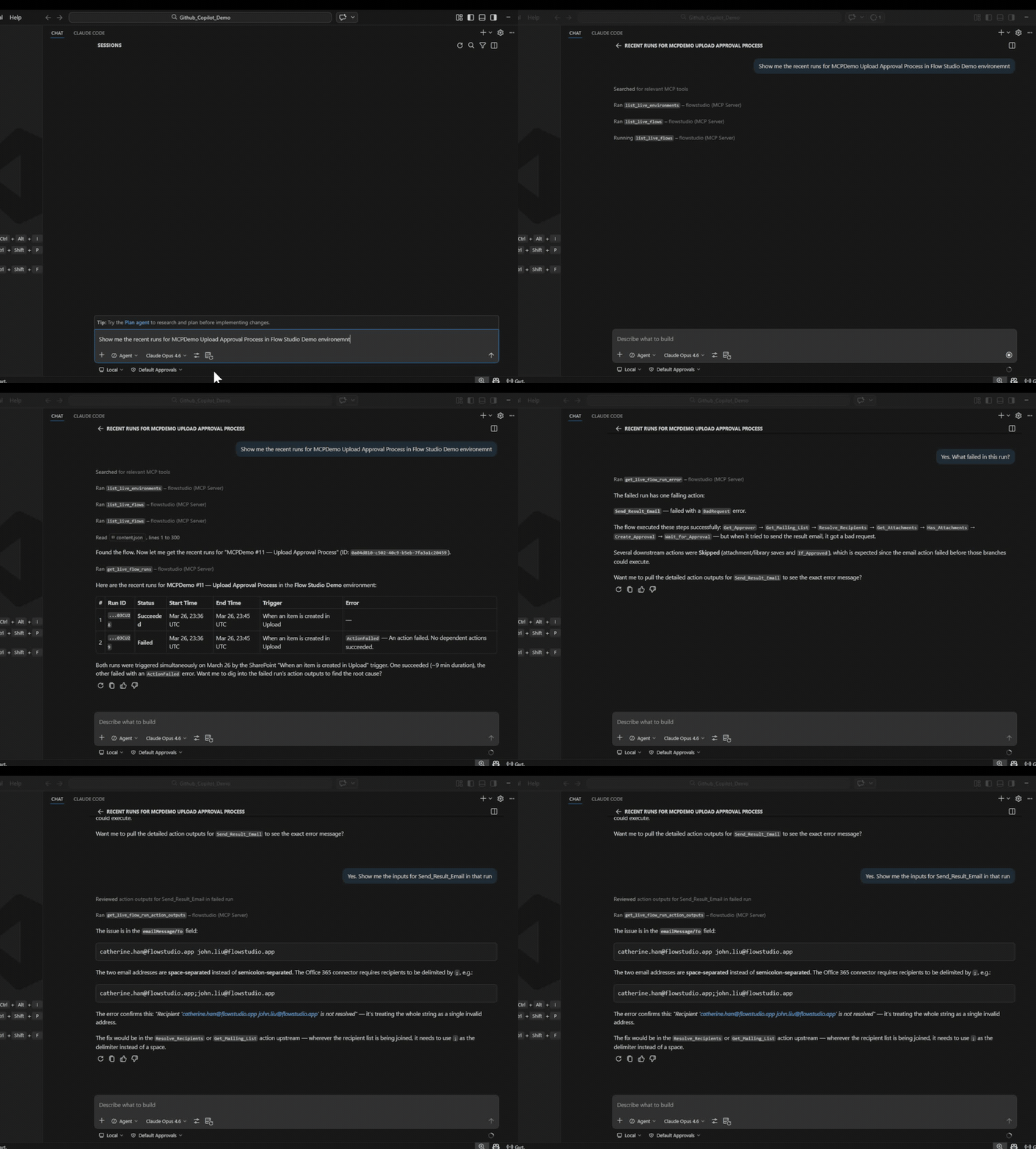
여러분은 포털을 탐색하며 근본 원인을 찾을 수 있습니다. 에이전트는 MCP가 없이는 그렇게 할 수 없습니다.
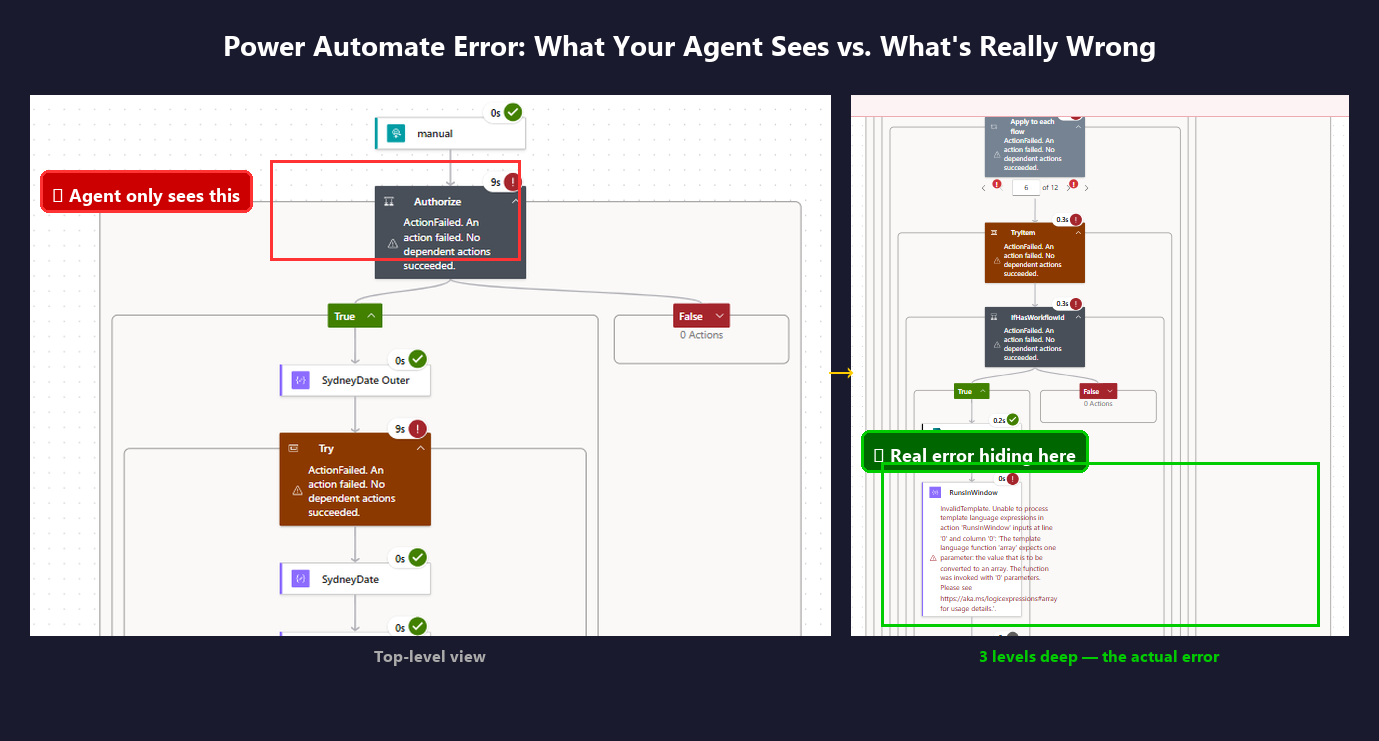
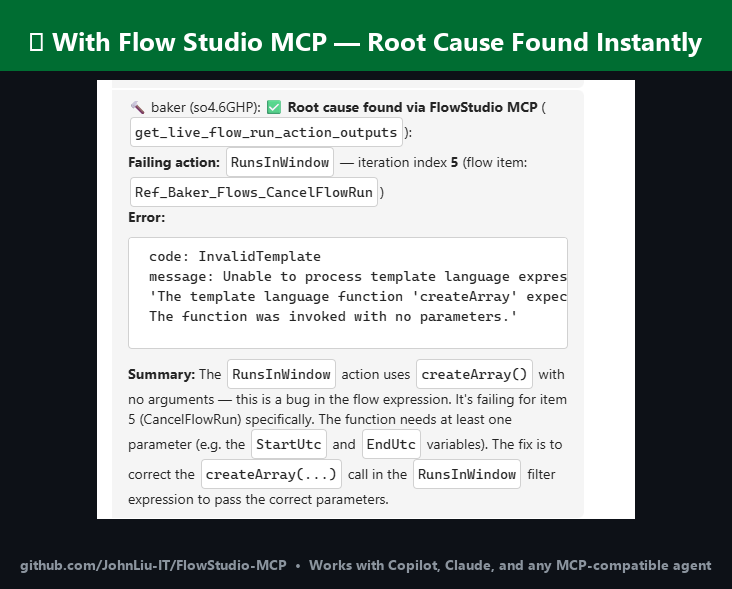
에이전트가 흐름이 실패했는지는 알 수 있지만 왜 실패했는지는 알 수 없는 경우 — Graph API는 상태 코드만 반환합니다
에이전트가 포털에서처럼 작업 수준의 입력과 출력을 볼 수 있기를 원하는 경우
루프에 수백 개의 반복이 있고 그중 일부가 잘못된 출력을 생성한 경우 — 포털에서는 각각을 클릭하며 확인해야 하지만 에이전트는 모든 반복 입력과 출력을 한 번에 스캔할 수 있습니다
관리 센터를 열지 않고 테넌트 전반의 흐름 상태, 실패율, 메이커 활동을 확인하려는 경우
CoE Starter Kit을 설치하지 않고 대규모로 흐름을 분류하거나 고아 리소스를 탐지하거나 커넥터를 감사해야 하는 경우
에이전트와 포털 사이의 중간자 역할이 지겨운 경우
Related MCP server: MCP Power Automate
핵심 차이점: Graph API는 에이전트에게 실행 상태를 제공합니다. MCP는 에이전트에게 모든 작업의 입력과 출력을 제공합니다.
에이전트가 볼 수 있는 것 | Graph API | FlowStudio MCP |
실행 성공 또는 실패 | 예 | 예 |
작업 입력 및 출력 | 아니요 | 예 |
상태 코드 외 오류 세부 정보 | 아니요 | 예 |
하위 흐름 실행 세부 정보 | 아니요 | 예 |
루프 반복 데이터 | 아니요 | 예 |
흐름 정의(읽기 + 쓰기) | 제한적 | 전체 JSON |
실행 다시 제출 / 취소 | 제한적 | 예 |
캐시된 흐름 상태 및 실패율 | 아니요 | 예 |
메이커 / Power Apps / 커넥터 인벤토리 | 아니요 | 예 |
거버넌스 메타데이터(태그, 영향도, 소유자) | 아니요 | 예 |
스킬 | 설명 |
Power Automate 클라우드 흐름에 연결하고 운영 — 흐름 나열, 정의 읽기, 실행 확인, 다시 제출, 취소 | |
실패하는 흐름을 조사하기 위한 단계별 진단 프로세스 | |
Power Automate 흐름 정의를 처음부터 빌드, 스캐폴드, 배포 | |
흐름 상태, 실패율, 메이커 인벤토리, Power Apps, 환경 및 커넥터 수 | |
영향도별로 흐름 분류, 고아 리소스 탐지, 커넥터 감사, 알림 관리, 아카이브 점수 계산 |
처음 세 가지 스킬은 라이브 Power Automate API 호출을 사용합니다. 모니터링 및 거버넌스 스킬은 캐시된 저장소를 사용합니다 — 집계된 통계, 수정 힌트, 거버넌스 메타데이터가 담긴 일일 스냅샷입니다. 저장소 도구에는 FlowStudio for Teams 또는 MCP Pro+ 구독이 필요합니다.
각 스킬은 Agent Skills specification을 따르며 호환되는 모든 에이전트에서 작동합니다.
Copilot, Claude Code, ChatGPT, Codex, OpenClaw, Gemini CLI, Cursor, Goose, Amp, OpenHands
learn.flowstudio.app에서 전체 가이드를 확인하세요:
시작하기 — 모든 에이전트에 FlowStudio MCP 설치
AI 에이전트로 흐름 빌드하기 — 3단계로 진행되는 실제 예제
Vibe code로 Power Automate 만들기 — 흐름을 설명하면 에이전트가 빌드합니다
VS Code에서 Power Automate 사용하기 — 편집기에서 흐름 작업
실패하는 흐름 디버깅하기 — 작업 수준 데이터에서 근본 원인 찾기
에이전트별: ChatGPT · Claude · GitHub Copilot · Copilot Studio · Codex
키를 붙여넣는 대신 Microsoft 계정으로 로그인하세요. ChatGPT(개발자 모드 켜짐) 또는 claude.ai에서 https://mcp.flowstudio.app/mcp/oauth를 커넥터로 추가한 다음 로그인 프롬프트를 따르세요. 가이드: ChatGPT for Power Automate.
승인 후 Claude 플러그인 마켓플레이스에서 사용할 수 있습니다. 로컬에서 테스트하려면:
git clone https://github.com/ninihen1/power-automate-mcp-skills.git
claude --plugin-dir ./power-automate-mcp-skills
그런 다음 MCP 서버를 연결합니다:
claude mcp add --transport http flowstudio https://mcp.flowstudio.app/mcp \
  --header "x-api-key: <YOUR_TOKEN>"
토큰은 mcp.flowstudio.app에서 받으세요.
Codex 세션 안에서 스킬을 직접 설치합니다:
$skill-installer install https://github.com/ninihen1/power-automate-mcp-skills/tree/main/skills/power-automate-mcp
$skill-installer install https://github.com/ninihen1/power-automate-mcp-skills/tree/main/skills/power-automate-debug
$skill-installer install https://github.com/ninihen1/power-automate-mcp-skills/tree/main/skills/power-automate-build
$skill-installer install https://github.com/ninihen1/power-automate-mcp-skills/tree/main/skills/power-automate-monitoring
$skill-installer install https://github.com/ninihen1/power-automate-mcp-skills/tree/main/skills/power-automate-governance
그런 다음 ~/.codex/config.toml에서 MCP 서버를 연결합니다:
[mcp_servers.flowstudio]
url = "https://mcp.flowstudio.app/mcp"

[mcp_servers.flowstudio.http_headers]
x-api-key = "<YOUR_TOKEN>"skills.sh에서 flowstudio 검색, 또는:
npx skills add github/awesome-copilot -s flowstudio-power-automate-mcp
npx skills add github/awesome-copilot -s flowstudio-power-automate-debug
npx skills add github/awesome-copilot -s flowstudio-power-automate-build
npx skills add github/awesome-copilot -s flowstudio-power-automate-monitoring
npx skills add github/awesome-copilot -s flowstudio-power-automate-governancenpx clawhub@latest install power-automate-mcpnpx smithery skill add flowstudio/power-automate-mcp스킬 폴더를 프로젝트의 .github/skills/ 디렉터리(또는 에이전트가 스킬을 찾는 위치)에 복사하세요.
Claude Code:
claude mcp add --transport http flowstudio https://mcp.flowstudio.app/mcp \
  --header "x-api-key: <YOUR_TOKEN>"
Codex (~/.codex/config.toml):
[mcp_servers.flowstudio]
url = "https://mcp.flowstudio.app/mcp"

[mcp_servers.flowstudio.http_headers]
x-api-key = "<YOUR_TOKEN>"
Copilot / VS Code (.vscode/mcp.json):
{
  "servers": {
    "flowstudio": {
      "type": "http",
      "url": "https://mcp.flowstudio.app/mcp",
      "headers": { "x-api-key": "<YOUR_TOKEN>" }
    }
  }
}
토큰은 mcp.flowstudio.app에서 받으세요.
데모가 아닌 실제 프로덕션 조사에서 가져온 사례입니다.
하위 흐름의 식 오류 — contains(string(...))가 중첩 속성에서 충돌했습니다. 에이전트는 부모 흐름에서 하위 흐름으로, 루프 반복을 거쳐 추적하여 실패한 입력을 찾아냈습니다. 포털은 컨텍스트 없이 "ExpressionEvaluationFailed"만 표시했습니다.
흐름 버그가 아닌 데이터 입력 오류 — 사용자가 두 건의 "버그"를 연달아 보고했습니다. 에이전트는 두 건 모두 데이터 입력 오류(이메일의 누락된 쉼표, CC 필드의 단일 주소)임을 입증했습니다. 흐름은 정상이었습니다. 몇 초 만에 진단했습니다.
Null 값으로 인한 하위 흐름 충돌 — 레코드의 38%에서 Name이 null일 때 split(Name, ', ')이 충돌했습니다. 에이전트는 부모에서 하위, 루프, 작업까지 추적하여 근본 원인을 찾고 update_live_flow로 수정 사항을 배포했습니다.
FlowStudio MCP 구독(모든 라이브 도구)
저장소 도구(모니터링, 거버넌스)용: FlowStudio for Teams 또는 MCP Pro+
MCP 엔드포인트: https://mcp.flowstudio.app/mcp
API 키 / JWT 토큰(x-api-key 헤더로 전달)
skills/
  power-automate-mcp/          core connection & operation skill
  power-automate-debug/        debug workflow skill
  power-automate-build/        build & deploy skill
  power-automate-monitoring/   flow health & tenant inventory skill
  power-automate-governance/   compliance & governance skill
examples/                      real debugging walkthroughs
README.md
LICENSE MITCopilot, Claude, ChatGPT 및 모든 MCP 호환 에이전트에서 작동합니다.
awesome-copilot (병합됨)
skills.sh (3K+ 설치)
Smithery (게시됨)
ClawHub (v1.1.0)
기여를 환영합니다. 각 스킬 폴더에는 필수 frontmatter가 포함된 SKILL.md가 있어야 합니다. 형식은 기존 스킬을 참조하세요.
키워드: Power Automate 디버깅, 흐름 실행 기록, 식 평가 실패, 하위 흐름 실패, 중첩 작업 오류, 루프 반복 출력, 에이전트 자동화 MCP, Power Platform AI, 흐름 정의 배포, 실패한 실행 다시 제출, 흐름 모니터링, 거버넌스, CoE, 고아 리소스 탐지, 커넥터 감사, 아카이브 점수, 메이커 인벤토리
This server cannot be deployed
Generate, inspect, and manage Flowstep UI designs directly from your AI assistant.
Automate 1,000+ services from any MCP-compatible AI agent: build Applets, run actions and queries.
Run field service from Claude, ChatGPT or Copilot: dispatch, billing, customer messages, photos, and change the software itself, with a confirm step before every change. This address is the India region; US East, Canada, Norway and NZ addresses are at fieldproxy.ai/mcp.
Give your AI agents the tools to build, manage, and run automation workflows.