A
licenseA
qualityA
maintenanceA token-efficient MCP server that gives AI agents structured access to the web, returning compact page summaries and targeted queries instead of full accessibility dumps.
23
366 npm
183
MIT

touch-browser is an evidence-first web browsing and claim verification MCP server for AI agents, enabling structured research, policy enforcement, and citation-ready reporting.
Status & Telemetry: Check runtime/daemon status (tb_status), view telemetry summaries and recent events.
Session Management: Create and close headless research sessions; synthesize multi-tab sessions into citation-ready JSON or Markdown reports (tb_session_synthesize).
Tab Management: Open, list, select, and close individual tabs within a session.
Web Browsing & Search: Open pages by URL (tb_open), perform web searches (tb_search), and open top or ranked results (tb_search_open_top, tb_search_open_result).
Content Reading: Get a readable Markdown view of any page (tb_read_view) for scope checking before extraction.
Claim Extraction & Verification: Verify claims against page content (tb_extract), receiving structured verdicts (evidence-supported, contradicted, insufficient-evidence, needs-more-browsing) with confidence levels, support snippets, and explanations.
Policy Evaluation: Classify pages/actions as allow, review, or block (tb_policy); manage policy profiles (tb_profile, tb_profile_set); review supervised checkpoint guidance (tb_checkpoint).
Interactive Actions: Click elements, type into fields, submit forms, and refresh pages.
Risk & Approval Management: Approve supervised risks once per session (tb_approve).
Secret Handling: Store sensitive values in daemon memory only (tb_secret_store), type stored secrets into fields without persisting to disk (tb_type_secret), and clear secrets (tb_secret_clear).
Uses Brave as a search engine for evidence gathering, with a persistent browser search profile.
Downloads standalone runtime bundles from GitHub Releases during MCP package setup.
Distributes standalone runtime bundles via GitHub Releases, which are verified and installed automatically.
Uses Google as a search engine for evidence gathering, with a persistent browser search profile.
Generates readable Markdown views of web pages for human review and citation-ready synthesis reports.
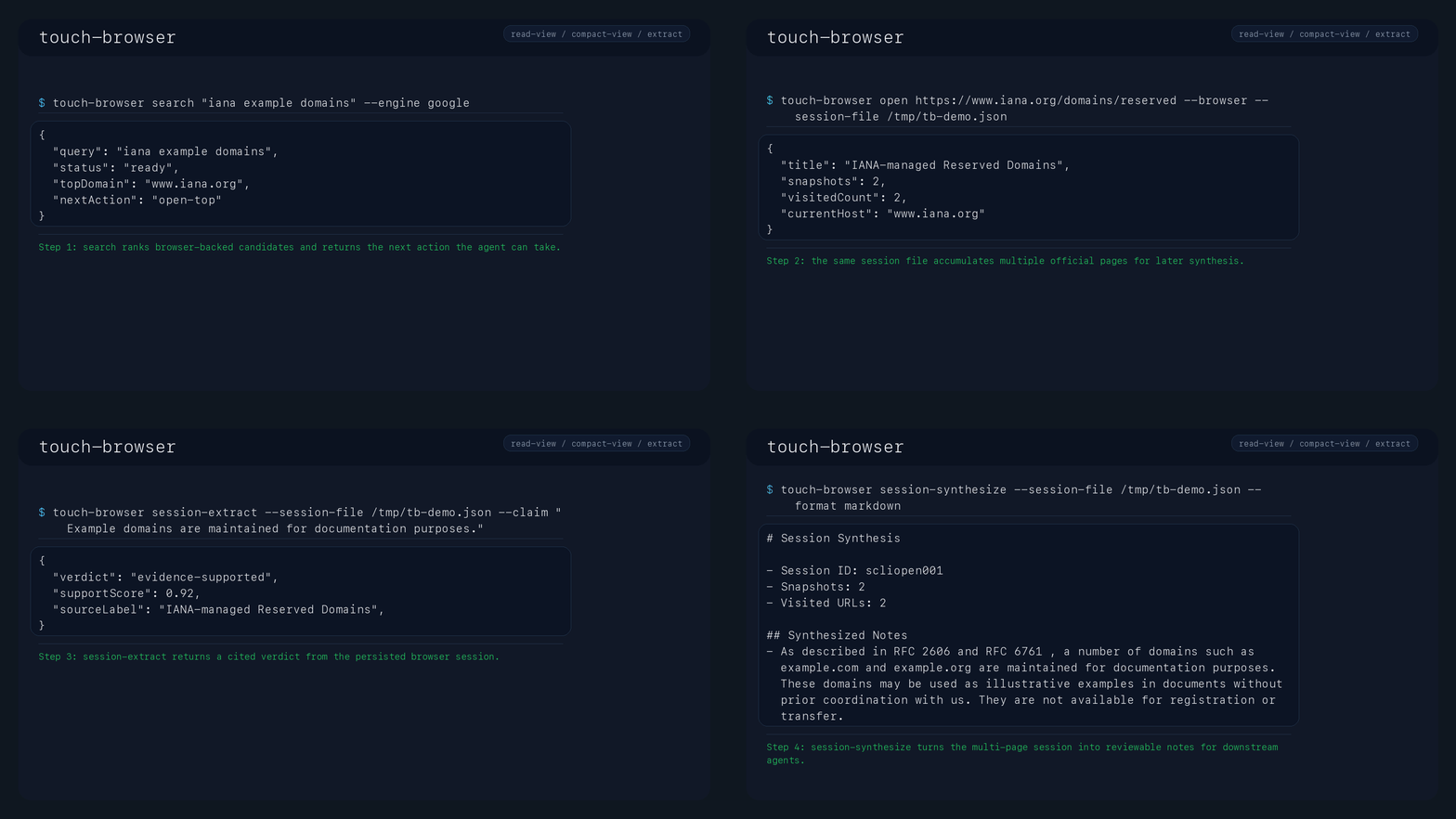


Ask a claim. Get page-grounded evidence, verdicts, and citations.
touch-browser is an evidence verification layer for AI agents. It does more than fetch a page or convert HTML to Markdown. It opens a page, compiles a structured snapshot, and tells you whether the current page supports a claim, contradicts it, or still needs more browsing.
Use it when you need:
source-linked evidence instead of raw HTML dumps
support snippets and verdict explanations that an agent can inspect before answering
a safe unresolved path for borderline claims instead of bluffing
policy-gated browsing instead of blind automation
replayable, auditable multi-page research sessions
Evidence-first, not fact-final:
touch-browser helps an AI collect page-local evidence and trace where it came from
a higher-level model or human still decides what is true across pages or across the wider world
Before the first browser-backed run, check the local runtime:
touch-browser quickstart
touch-browser doctor
quickstart shows the safe local first-use flow, success signals, and common pitfalls. doctor verifies the installed executable, runtime resources, data root, Node runtime, Playwright Chromium, MCP bridge entrypoint, and semantic model readiness. If it reports attention-required, repair those local dependencies before judging browser behavior.
After installing, run one command to see the product difference from a raw fetch:
touch-browser quick https://www.iana.org/help/example-domains \
  --claim "As described in RFC 2606 and RFC 6761, a number of domains such as example.com and example.org are maintained for documentation purposes."
Decision path for the output:
Check top-level status.
Check summary.reusableClaims and reuseSummary.allClaimsReusable.
Check each claimOutcomes[].verdict.
Check claimOutcomes[].reviewRecommended.
Quote claimOutcomes[].primarySupportSnippet when you need one evidence line.
Use claimOutcomes[].citation.url and citation.retrievedAt when handing evidence to another system.
Expected shape:
{
  "status": "succeeded",
  "summary": {
    "claimCount": 1,
    "supportedClaims": 1,
    "reusableClaims": 1
  },
  "claimOutcomes": [
    {
      "verdict": "evidence-supported",
      "confidenceBand": "high",
      "reviewRecommended": false,
      "reuseAllowed": true,
      "primarySupportSnippet": {
        "snippet": "..."
      },
      "citation": {
        "url": "https://www.iana.org/help/example-domains",
        "retrievedAt": "..."
      }
    }
  ]
}
The important signal is not that the page was fetched. It is that the claim was routed into a verdict, a confidence band, a reusable snippet, and a source citation.
MCP hosts do not expose the quick CLI command directly. For MCP, use the same idea as a tool loop: tb_session_create -> tb_open -> tb_extract.
Related MCP server: browser-research-mcp
extract ReturnsAbbreviated claimOutcome shape from the current extractor:
{
  "statement": "The Starter plan costs $29 per month.",
  "verdict": "evidence-supported",
  "confidenceBand": "high",
  "reviewRecommended": false,
  "supportSnippets": [
    {
      "blockId": "b4",
      "stableRef": "rmain:table:plan-monthly-price-snapshots-starter-29-10-000-t",
      "snippet": "Starter | $29 | 10,000"
    }
  ],
  "verdictExplanation": "Matched direct support in 3 page block(s). Review the attached snippets before reusing the claim."
}
The extractor returns four verdicts:
evidence-supported: the current page surfaced usable support
contradicted: the current page surfaced conflicting evidence
insufficient-evidence: the current page did not provide enough direct support
needs-more-browsing: the current page is not specific enough yet, so the next step is another page
confidenceBand, reviewRecommended, supportSnippets, verdictExplanation, and matchSignals are there so an agent can decide what to do next without blindly trusting the first match.
claimOutcomeFirst-time users should ignore most fields at first and use this order:
Read verdict.
If reviewRecommended is true, do not reuse the claim without a human or second-pass verifier.
If you need one quote-like evidence line, use primarySupportSnippet.
If you need the reason for the verdict, read verdictExplanation.
If the verdict is not enough to answer, follow nextActionHint.
Use matchSignals only when you are debugging or comparing evidence quality. It is not the first field to read.
claimOutcomes is the per-call decision log for every submitted claim. evidenceSupportedClaims, contradictedClaims, insufficientEvidenceClaims, and needsMoreBrowsingClaims are status-grouped views of the same extraction result. session-synthesize aggregates those grouped views across opened tabs in a session.
Primary local-host MCP path:
npm package: @nangman-infra/touch-browser-mcp
scope: public docs and research web
MCP contract: headless-only, automatic search-engine selection, supervised recovery handoff for challenge/auth/MFA
Recommended host config:
{
  "mcpServers": {
    "touch-browser": {
      "command": "npx",
      "args": ["-y", "@nangman-infra/touch-browser-mcp"]
    }
  }
}
On first launch, the package downloads the matching standalone runtime bundle from GitHub Releases, verifies the published .sha256, installs it under ~/.touch-browser/npm-mcp/versions/, and then starts touch-browser mcp.
Use this package when you want a local MCP host such as Claude Desktop, Cursor, or Codex to attach without a separate manual runtime install.
Tagged v* pushes now build standalone macOS and Linux bundles in the Standalone Release workflow. Each bundle includes:
bin/touch-browser
the optimized Rust binary under runtime/touch-browser-bin
a bundled Node runtime and Playwright adapter
the default semantic runner scripts with lazy semantic/NLI model download
Browser actions keep the Playwright adapter as the zero-config compatibility default. For new CLI deployments, the main recommended browser engine is the Rust CDP path. Enable it with:
TOUCH_BROWSER_BROWSER_ADAPTER=cdp-rust touch-browser open <target> --browser --session-file /tmp/tb.json
pnpm run fixtures:browser-adapter-parity
The CDP adapter reports browser-backed captures as sourceType: "cdp-rust",
reuses persistent browser context directories, applies the search identity
profile for search-result captures, and is covered by parity fixtures plus CLI
E2E validation for follow, click, type, submit, pagination, expand, iframe,
shadow DOM, SPA updates, download clicks, persistent-session actions, and
cross-origin nested shadow interactions. It still requires Chrome or Chromium.
Set TOUCH_BROWSER_CDP_BROWSER=/absolute/path/to/chrome when it is not
installed in a standard location.
The slim bundle profile is now the default release profile. It includes Playwright Chromium for zero-config browser actions, skips semantic model caches, and downloads semantic/NLI models lazily on first use. This keeps the installed browser path usable on first run while still reducing model-cache weight:
pnpm run build:standalone-bundle -- local-devUse the full profile only when an offline bundle must also include warm model caches:
pnpm run build:standalone-bundle:full -- local-devWhen a tagged release is published, download the matching tarball from GitHub Releases, unpack it, and run:
./touch-browser-<version>-<platform>-<arch>/install.sh
touch-browser telemetry-summary
touch-browser update --check
To build the same portable bundle locally:
pnpm install --frozen-lockfile
pnpm run build:standalone-bundle -- v0.1.0-rc1

# Then install the bundled command into PATH
./dist/standalone/touch-browser-v0.1.0-rc1-<platform>-<arch>/install.sh
touch-browser telemetry-summary
touch-browser update --check
The standalone path is still the official CLI, operations, offline, and fallback install path:
unpack a standalone bundle
run install.sh
use the installed touch-browser command for every CLI and serve operation
The installer now performs a managed install:
managed versions live under ~/.touch-browser/install/versions/<bundle-name>
the active version is ~/.touch-browser/install/current
the PATH command points at ~/.touch-browser/install/current/bin/touch-browser
touch-browser update swaps current to a newly verified release bundle
touch-browser uninstall --purge-all --yes removes the managed install and all stored data
This is the command-only proof path that matches the installed user experience:
touch-browser open https://www.iana.org/help/example-domains --browser --session-file /tmp/tb-first-run.json
touch-browser session-read --session-file /tmp/tb-first-run.json --main-only
touch-browser session-extract --session-file /tmp/tb-first-run.json \
  --claim "As described in RFC 2606 and RFC 6761, a number of domains such as example.com and example.org are maintained for documentation purposes."
touch-browser session-synthesize --session-file /tmp/tb-first-run.json --format markdown
touch-browser session-close --session-file /tmp/tb-first-run.json
Installed search now keeps an engine-level persistent trust profile by default:
Google: ~/.touch-browser/browser-search/profiles/google-default
Brave: ~/.touch-browser/browser-search/profiles/brave-default
profile state metadata: ~/.touch-browser/browser-search/<engine>.profile-state.json
Prerequisites: rustup, Node.js 18+, pnpm.
bash scripts/bootstrap-local.sh
cargo build --release -p touch-browser-cli
pnpm run build:standalone-bundle -- local-dev
./dist/standalone/touch-browser-local-dev-<platform>-<arch>/install.sh
Source checkout is a contributor workflow. Release and operations docs still assume the installed touch-browser command from the standalone bundle.
bootstrap-local.sh installs the default semantic models under:
~/.touch-browser/models/evidence/embedding
~/.touch-browser/models/evidence/nli
Use TOUCH_BROWSER_EVIDENCE_EMBEDDING_MODEL_PATH or TOUCH_BROWSER_EVIDENCE_NLI_MODEL_PATH only when you need to override those default locations.
touch-browser is not trying to replace every crawler or browser tool. Its job starts after page acquisition.
Need | Markdown-only fetch | touch-browser |
Read the page | yes | yes |
Keep source-linked block refs | partial | yes |
Judge whether the page supports a claim | no | yes |
Return contradiction and unresolved states | no | yes |
Give support snippets and verdict explanations | no | yes |
Tell the agent to escalate instead of answering | no | yes |
These are the latest local benchmark rerun signals from 2026-05-05, not a promise about every future public page:
Benchmark | Current generated signal |
Public web benchmark |
|
Real-user research benchmark | average supported claim rate |
Adversarial benchmark | verified exact verdict accuracy |
Citation metrics | classification, citation, unsupported-claim, and support-ref precision/recall |
Tool comparison benchmark | extract false-positive rate |
Evidence-grounded web research benchmark | current seed |
See benchmarks/README.md for the benchmark map and generated report locations.
Primary surface:
extract: verify claims against the current page and return structured claim outcomes
Supporting read surfaces:
read-view: readable Markdown for a human reviewer or verifier model
compact-view: low-token semantic state for agent loops
search: structured discovery before opening candidate pages
Safety and audit surfaces:
policy: classify pages and actions as allow, review, or block
session-synthesize: turn a multi-page session into JSON or Markdown with citations
serve: expose the runtime over stdio JSON-RPC for MCP or agent integration
an evidence-first extractor
a selective prediction surface
a verifier-friendly routing layer
a universal truth oracle
a generic crawler replacement
a guarantee that every unsupported claim is false
Recommended MCP setup for local hosts:
{
  "mcpServers": {
    "touch-browser": {
      "command": "npx",
      "args": ["-y", "@nangman-infra/touch-browser-mcp"]
    }
  }
}
The MCP package is intentionally narrower than the full CLI:
scope is public docs and research web
recommended loop is tb_search -> tb_search_open_top -> tb_read_view -> tb_extract
tb_session_create accepts an optional caller-provided sessionId for external correlation
tb_open needs target for stateless use; with sessionId, it can omit target to reopen the active tab URL
tb_read_view, tb_extract, and tb_policy can omit target when sessionId points at an opened active tab
tb_extract always needs claims
tb_session_synthesize needs sessionId and at least one opened tab
long-running MCP calls emit notifications/progress when the host provides _meta.progressToken
tb_cancel can reset the daemon; use MCP notifications/cancelled for an in-flight request
engine is not exposed over MCP
headed is not exposed over MCP
if the page indicates challenge, auth, MFA, or other supervised recovery, stop and hand off to a human instead of retrying with different browser settings
Alternative MCP bridge setup for an installed standalone command:
{
  "mcpServers": {
    "touch-browser": {
      "command": "touch-browser",
      "args": ["mcp"]
    }
  }
}
The bridge starts touch-browser serve underneath and exposes tools like tb_search, tb_search_open_top, tb_open, tb_read_view, tb_extract, tb_tab_open, and tb_session_synthesize.
Repository checkout integration asset:
{
  "mcpServers": {
    "touch-browser": {
      "command": "node",
      "args": ["integrations/mcp/bridge/index.mjs"]
    }
  }
}
The standalone bundle ships touch-browser mcp and touch-browser serve. The checked-in Node launcher remains a repository integration asset for repo checkouts or container images.
By default the bridge prefers an explicit TOUCH_BROWSER_SERVE_COMMAND, then an explicit binary path, then an installed or packaged touch-browser binary, then repo-local target/{release,debug} binaries. If none are available, it fails fast with an install/build instruction instead of dropping back to cargo run.
Use TOUCH_BROWSER_SERVE_COMMAND if you want to force a specific built binary or wrapper command.
Query / URL / fixture / browser tab
  -> browser-first search result parsing
  -> Acquisition
  -> Observation compiler
  -> read-view / compact-view
  -> extract (evidence + citations + optional verifier)
  -> policy
  -> session synthesis / replay
-> CLI / JSON-RPC serve / MCPquick start and operations: doc/INSTALL_AND_OPERATIONS.md
command surface: doc/CLI_SURFACE_SPEC.md
evidence operating model: doc/EVIDENCE_OPERATING_MODEL.md
npm MCP package: packages/mcp/README.md
examples: examples/README.md
integrations: integrations/README.md
benchmarks and positioning: doc/README.md
pilot and operations package: doc/PILOT_PACKAGE_SPEC.md, doc/OPERATIONS_SECURITY_PACKAGE_SPEC.md
This repository now uses MPL-2.0.
commercial and non-commercial use are allowed
if you distribute modified MPL-covered files, those covered files stay under MPL-2.0
separate files in a larger work can use different terms
full legal text: LICENSE
plain-language policy: LICENSE-POLICY.md
Persist supervised approval risks for the current daemon session so repeated ack flags are not required.
| Name | Required | Description | Default |
|---|---|---|---|
| sessionId | Yes | The browser session to use for this operation. | |
| ackRisks | Yes | The risk codes to persist as approved for the session. |
| Name | Required | Description |
|---|---|---|
| sessionId | Yes | |
| approvedRisks | Yes | |
| policyProfile | Yes |
Does the description disclose side effects, auth requirements, rate limits, or destructive behavior?
With no annotations provided, the description bears full responsibility for behavioral disclosure. It states the tool persists risks but does not mention idempotency, error handling, permissions, or effects on previous approvals. This leaves significant behavioral uncertainty.
Agents need to know what a tool does to the world before calling it. Descriptions should go beyond structured annotations to explain consequences.
Is the description appropriately sized, front-loaded, and free of redundancy?
The description is a single, front-loaded sentence with no waste. It is concise, though it could include more context without becoming too long. The structure is efficient.
Shorter descriptions cost fewer tokens and are easier for agents to parse. Every sentence should earn its place.
Given the tool's complexity, does the description cover enough for an agent to succeed on first attempt?
Given the tool's simplicity (2 parameters, output schema exists), the description explains the core purpose but lacks details on edge cases, return values, or constraints. It is minimally complete for a simple tool but leaves room for improvement.
Complex tools with many parameters or behaviors need more documentation. Simple tools need less. This dimension scales expectations accordingly.
Does the description clarify parameter syntax, constraints, interactions, or defaults beyond what the schema provides?
Schema coverage is 100%, so baseline is 3. The description adds no additional meaning beyond the schema; it only restates the effect of the parameters. No enhancement or clarification beyond what is already in the input schema.
Input schemas describe structure but not intent. Descriptions should explain non-obvious parameter relationships and valid value ranges.
Does the description clearly state what the tool does and how it differs from similar tools?
The description clearly states the tool's purpose: to persist supervised approval risks for the current daemon session, avoiding repeated ack flags. The verb 'persist' and resource 'supervised approval risks' are specific, and it distinguishes from sibling tools like tb_policy or tb_session_close.
Agents choose between tools based on descriptions. A clear purpose with a specific verb and resource helps agents select the right tool.
Does the description explain when to use this tool, when not to, or what alternatives exist?
The description implies usage when repeated ack flags are desired to be avoided, but it does not explicitly state when to use or not use this tool, nor does it mention alternatives. No guidance on prerequisites or conditions.
Agents often have multiple tools that could apply. Explicit usage guidance like "use X instead of Y when Z" prevents misuse.
Best-effort cancellation and daemon reset for long-running MCP browser work. MCP hosts should prefer notifications/cancelled for an in-flight request.
| Name | Required | Description | Default |
|---|---|---|---|
| reason | No | Optional cancellation reason for logs or host UI. |
| Name | Required | Description |
|---|---|---|
| cancelled | Yes | |
| reason | Yes | |
| restartedOnNextCall | Yes |
Does the description disclose side effects, auth requirements, rate limits, or destructive behavior?
No annotations exist, so description is the sole source. It correctly notes 'best-effort' and 'daemon reset', implying possible side effects and partial success. However, it omits details on what exactly gets reset or how errors are communicated.
Agents need to know what a tool does to the world before calling it. Descriptions should go beyond structured annotations to explain consequences.
Is the description appropriately sized, front-loaded, and free of redundancy?
Two concise sentences, no filler. First sentence states core purpose, second provides behavioral guidance. Perfectly front-loaded.
Shorter descriptions cost fewer tokens and are easier for agents to parse. Every sentence should earn its place.
Given the tool's complexity, does the description cover enough for an agent to succeed on first attempt?
Given the tool's simplicity (0 required params, output schema exists), description sufficiently covers purpose and a key usage constraint. Could be more complete by noting expected result or failure modes, but output schema mitigates need for return value details.
Complex tools with many parameters or behaviors need more documentation. Simple tools need less. This dimension scales expectations accordingly.
Does the description clarify parameter syntax, constraints, interactions, or defaults beyond what the schema provides?
Schema coverage is 100% and description adds no extra meaning to 'reason' parameter beyond what schema already states. Baseline score of 3 is appropriate.
Input schemas describe structure but not intent. Descriptions should explain non-obvious parameter relationships and valid value ranges.
Does the description clearly state what the tool does and how it differs from similar tools?
Clearly states the tool does 'cancellation and daemon reset for long-running MCP browser work'. The verb 'cancel' and resource 'runtime work' are specific. Distinguishes from sibling tools which are focused on UI interaction or data operations.
Agents choose between tools based on descriptions. A clear purpose with a specific verb and resource helps agents select the right tool.
Does the description explain when to use this tool, when not to, or what alternatives exist?
Explicitly advises preferring 'notifications/cancelled' over this tool for in-flight requests. Provides context for when alternative method is more appropriate, though does not exhaustively list other alternatives.
Agents often have multiple tools that could apply. Explicit usage guidance like "use X instead of Y when Z" prevents misuse.
Return the current supervised checkpoint guidance for a daemon session/tab.
| Name | Required | Description | Default |
|---|---|---|---|
| sessionId | Yes | The browser session to use for this operation. | |
| tabId | No | The specific tab to use inside the session. If omitted, the active tab is used. |
| Name | Required | Description |
|---|---|---|
| sessionId | Yes | |
| tabId | Yes | |
| diagnostics | No | |
| result | Yes |
Does the description disclose side effects, auth requirements, rate limits, or destructive behavior?
With no annotations, the description must disclose behavioral traits. It states 'return' implying a safe read operation, but does not clarify if there are side effects, permissions needed, or constraints like requiring an active session. Minimal disclosure.
Agents need to know what a tool does to the world before calling it. Descriptions should go beyond structured annotations to explain consequences.
Is the description appropriately sized, front-loaded, and free of redundancy?
Single sentence, front-loaded with action and resource. Concise with no wasted words. However, it may be overly terse for such a specialized tool; a bit more context would improve usability.
Shorter descriptions cost fewer tokens and are easier for agents to parse. Every sentence should earn its place.
Given the tool's complexity, does the description cover enough for an agent to succeed on first attempt?
Given the tool's simplicity and existence of an output schema, the description is minimally adequate. However, it lacks explanation of what 'supervised checkpoint guidance' entails, leaving the agent to infer behavior without full context.
Complex tools with many parameters or behaviors need more documentation. Simple tools need less. This dimension scales expectations accordingly.
Does the description clarify parameter syntax, constraints, interactions, or defaults beyond what the schema provides?
Schema coverage is 100%, so baseline is 3. The description adds no extra meaning beyond what the schema provides; it only mentions 'session/tab' generically. No additional context for parameter values or formatting.
Input schemas describe structure but not intent. Descriptions should explain non-obvious parameter relationships and valid value ranges.
Does the description clearly state what the tool does and how it differs from similar tools?
The description uses a specific verb ('return') and identifies the resource ('supervised checkpoint guidance for a daemon session/tab'), clearly differentiating it from sibling tools like tb_approve or tb_cancel which have different purposes.
Agents choose between tools based on descriptions. A clear purpose with a specific verb and resource helps agents select the right tool.
Does the description explain when to use this tool, when not to, or what alternatives exist?
No guidance on when to use this tool versus alternatives. There is no mention of prerequisites, typical scenarios, or exclusions. Sibling tools like tb_session_close or tb_status exist but no differentiation is provided.
Agents often have multiple tools that could apply. Explicit usage guidance like "use X instead of Y when Z" prevents misuse.
Click an interactive target inside an existing daemon session/tab.
| Name | Required | Description | Default |
|---|---|---|---|
| sessionId | Yes | The browser session to use for this operation. | |
| tabId | No | The specific tab to use inside the session. If omitted, the active tab is used. | |
| targetRef | Yes | The interactive element reference to click. | |
| ackRisks | No | The supervised risk codes acknowledged for this action. |
| Name | Required | Description |
|---|---|---|
| sessionId | Yes | |
| tabId | Yes | |
| diagnostics | No | |
| result | Yes |
Does the description disclose side effects, auth requirements, rate limits, or destructive behavior?
No annotations are provided, so the description must disclose behavioral traits. It does not mention side effects, required permissions, or what happens after the click (e.g., navigation, waiting). The ackRisks parameter implies risks but they are not explained.
Agents need to know what a tool does to the world before calling it. Descriptions should go beyond structured annotations to explain consequences.
Is the description appropriately sized, front-loaded, and free of redundancy?
The description is a single sentence of 10 words, front-loaded with the core action. No extraneous information; every word is necessary.
Shorter descriptions cost fewer tokens and are easier for agents to parse. Every sentence should earn its place.
Given the tool's complexity, does the description cover enough for an agent to succeed on first attempt?
Despite having an output schema and 4 parameters with full schema coverage, the description is too minimal. It does not explain the concept of 'interactive target', how to obtain a targetRef, or the significance of ackRisks, leaving significant gaps for an agent.
Complex tools with many parameters or behaviors need more documentation. Simple tools need less. This dimension scales expectations accordingly.
Does the description clarify parameter syntax, constraints, interactions, or defaults beyond what the schema provides?
Schema description coverage is 100%, so all parameters have descriptions. The tool description adds no additional parameter meaning beyond what the schema provides, meeting the baseline of 3.
Input schemas describe structure but not intent. Descriptions should explain non-obvious parameter relationships and valid value ranges.
Does the description clearly state what the tool does and how it differs from similar tools?
The description uses a specific verb ('Click') and resource ('interactive target') along with context ('inside an existing daemon session/tab'), clearly distinguishing it from sibling tools like tb_type or tb_submit.
Agents choose between tools based on descriptions. A clear purpose with a specific verb and resource helps agents select the right tool.
Does the description explain when to use this tool, when not to, or what alternatives exist?
No guidance on when to use this tool versus alternatives, nor any exclusion criteria or prerequisites. The description is purely declarative without usage context.
Agents often have multiple tools that could apply. Explicit usage guidance like "use X instead of Y when Z" prevents misuse.
Extract claim outcomes from a target or opened daemon tab. In a session, omit target to use the active opened tab; claims is always required.
| Name | Required | Description | Default |
|---|---|---|---|
| target | No | The URL or target whose evidence should be extracted. Required for stateless extraction; optional when sessionId points at an opened active tab. | |
| claims | Yes | Required list of claims to verify against the target or active opened tab and support with citations when possible. | |
| browser | No | When true, use the browser-backed acquisition path for this operation. | |
| budget | No | Token budget for snapshot and semantic processing. Default is 512. | |
| mainOnly | No | When true, extract only from the page's main content. | |
| verifierCommand | No | An optional verifier command to run for this operation. | |
| sourceRisk | No | The source risk label to attach to the result or citation. | |
| sourceLabel | No | The human-readable source label to attach to the result or citation. | |
| allowDomains | No | Restrict the operation to this list of allowed domains. | |
| sessionId | No | The browser session to use for this operation. | |
| tabId | No | The specific tab to use inside the session. If omitted, the active tab is used. |
| Name | Required | Description |
|---|---|---|
| open | No | |
| extract | No | |
| sessionState | No | |
| sessionId | No | |
| tabId | No | |
| diagnostics | No | |
| result | No |
Does the description disclose side effects, auth requirements, rate limits, or destructive behavior?
No annotations are provided, so the description must convey behavioral traits. It implies a read/analysis operation (extract), mentions citation support, but does not disclose potential side effects, authentication needs, or rate limits. Some context is given but missing important details for a tool with many parameters.
Agents need to know what a tool does to the world before calling it. Descriptions should go beyond structured annotations to explain consequences.
Is the description appropriately sized, front-loaded, and free of redundancy?
The description is two sentences, front-loaded with the main purpose, and includes key usage guidance without extraneous detail. Every sentence earns its place.
Shorter descriptions cost fewer tokens and are easier for agents to parse. Every sentence should earn its place.
Given the tool's complexity, does the description cover enough for an agent to succeed on first attempt?
Given the tool's complexity (11 parameters, 1 required) and the presence of an output schema, the description adequately covers the core function and key parameter relationships. It could elaborate on what 'extract claim outcomes' entails, but is complete enough for selection.
Complex tools with many parameters or behaviors need more documentation. Simple tools need less. This dimension scales expectations accordingly.
Does the description clarify parameter syntax, constraints, interactions, or defaults beyond what the schema provides?
Schema description coverage is 100%, so baseline is 3. The description adds value by explaining the target-session relationship and re-stating claims requirement, but does not enrich other parameters (browser, budget, etc.) beyond their schema descriptions.
Input schemas describe structure but not intent. Descriptions should explain non-obvious parameter relationships and valid value ranges.
Does the description clearly state what the tool does and how it differs from similar tools?
The description clearly states the verb 'Extract' and the resource 'claim outcomes from a target or opened daemon tab'. It distinguishes from sibling tools (e.g., tb_read_view, tb_search) which have different purposes.
Agents choose between tools based on descriptions. A clear purpose with a specific verb and resource helps agents select the right tool.
Does the description explain when to use this tool, when not to, or what alternatives exist?
Provides clear context on when to omit target (in a session with active tab) and emphasizes that claims is always required. Does not explicitly exclude alternatives, but sibling tools are distinct enough to imply usage boundaries.
Agents often have multiple tools that could apply. Explicit usage guidance like "use X instead of Y when Z" prevents misuse.
Open a public web document or official reference page headlessly, either statelessly or inside a daemon session/tab. target is required for stateless use; with sessionId it can be omitted to reopen the active tab URL.
| Name | Required | Description | Default |
|---|---|---|---|
| target | No | The URL or public web target to open. Required unless sessionId points at an opened active tab. | |
| browser | No | When true, open the target through the browser-backed acquisition path. | |
| budget | No | Token budget for snapshot and semantic processing. Default is 512. | |
| sourceRisk | No | The source risk label to attach to the result or citation. | |
| sourceLabel | No | The human-readable source label to attach to the result or citation. | |
| verifierCommand | No | An optional verifier command to run for this operation. | |
| allowDomains | No | Restrict navigation for this open request to these domains. | |
| sessionId | No | An existing session to reuse for this open request. | |
| tabId | No | A specific session tab to reuse for this open request. |
| Name | Required | Description |
|---|---|---|
| version | No | |
| action | No | |
| status | No | |
| payloadType | No | |
| output | No | |
| diagnostics | No | |
| policy | No | |
| failureKind | No | |
| message | No | |
| sessionId | No | |
| tabId | No | |
| result | No |
Does the description disclose side effects, auth requirements, rate limits, or destructive behavior?
Discloses headless operation and session reuse, but with no annotations, the description does not cover side effects, error scenarios, resource impact, or whether the operation is read-only, leaving important behavioral gaps.
Agents need to know what a tool does to the world before calling it. Descriptions should go beyond structured annotations to explain consequences.
Is the description appropriately sized, front-loaded, and free of redundancy?
Two sentences efficiently convey the core purpose and a key usage condition with no wasted words. Front-loaded and well-structured.
Shorter descriptions cost fewer tokens and are easier for agents to parse. Every sentence should earn its place.
Given the tool's complexity, does the description cover enough for an agent to succeed on first attempt?
Given 9 parameters and no annotations, the description is too sparse. It only addresses the target parameter's condition, leaving the purpose and implications of other parameters unexplained, and lacks overall usage guidance.
Complex tools with many parameters or behaviors need more documentation. Simple tools need less. This dimension scales expectations accordingly.
Does the description clarify parameter syntax, constraints, interactions, or defaults beyond what the schema provides?
Schema coverage is 100%, so each parameter is already described. The description adds value by clarifying the target required condition for stateless vs session use, but does not enhance understanding of other parameters.
Input schemas describe structure but not intent. Descriptions should explain non-obvious parameter relationships and valid value ranges.
Does the description clearly state what the tool does and how it differs from similar tools?
The description clearly states the tool opens a public web document or official reference page headlessly, with specific verb and resource. It distinguishes from search and click tools but does not explicitly differentiate from the sibling tb_tab_open.
Agents choose between tools based on descriptions. A clear purpose with a specific verb and resource helps agents select the right tool.
Does the description explain when to use this tool, when not to, or what alternatives exist?
Provides context on stateless versus session-based usage and when target is required, but lacks explicit guidance on when to choose this tool over alternatives or when not to use it.
Agents often have multiple tools that could apply. Explicit usage guidance like "use X instead of Y when Z" prevents misuse.
Return the policy evaluation for a target or daemon tab on the public docs/research web surface.
| Name | Required | Description | Default |
|---|---|---|---|
| target | No | The URL or target whose policy classification should be reported. | |
| browser | No | When true, use the browser-backed acquisition path for this operation. | |
| sourceRisk | No | The source risk label to attach to the result or citation. | |
| sourceLabel | No | The human-readable source label to attach to the result or citation. | |
| allowDomains | No | Restrict the operation to this list of allowed domains. | |
| sessionId | No | The browser session to use for this operation. | |
| tabId | No | The specific tab to use inside the session. If omitted, the active tab is used. |
| Name | Required | Description |
|---|---|---|
| policy | No | |
| sessionState | No | |
| sessionId | No | |
| tabId | No | |
| diagnostics | No | |
| result | No |
Does the description disclose side effects, auth requirements, rate limits, or destructive behavior?
No annotations exist, so the description must fully convey behavior. It only states 'Return the policy evaluation,' which is a read operation, but does not disclose potential side effects, authentication needs, rate limits, or other behavioral traits. This is insufficient for a tool with 7 parameters.
Agents need to know what a tool does to the world before calling it. Descriptions should go beyond structured annotations to explain consequences.
Is the description appropriately sized, front-loaded, and free of redundancy?
The description is a single, front-loaded sentence with no wasted words. Every element contributes to the purpose, making it efficiently concise.
Shorter descriptions cost fewer tokens and are easier for agents to parse. Every sentence should earn its place.
Given the tool's complexity, does the description cover enough for an agent to succeed on first attempt?
An output schema exists, reducing the need to explain return values. However, the description lacks context about 'policy evaluation' or 'daemon tab,' and given the tool's complexity (7 parameters), a more detailed explanation of its use case would improve completeness.
Complex tools with many parameters or behaviors need more documentation. Simple tools need less. This dimension scales expectations accordingly.
Does the description clarify parameter syntax, constraints, interactions, or defaults beyond what the schema provides?
Schema description coverage is 100%, so the baseline is 3. The description adds no extra meaning beyond the schema; it does not elaborate on how parameters like target, browser, or sourceRisk are used in context.
Input schemas describe structure but not intent. Descriptions should explain non-obvious parameter relationships and valid value ranges.
Does the description clearly state what the tool does and how it differs from similar tools?
The description clearly states the tool returns a policy evaluation for a target or daemon tab, specifying the surface (public docs/research web). While it is specific, it does not differentiate from sibling tools, which all have distinct names but overlapping domains.
Agents choose between tools based on descriptions. A clear purpose with a specific verb and resource helps agents select the right tool.
Does the description explain when to use this tool, when not to, or what alternatives exist?
The description implies usage for policy evaluation on the public docs/research web surface, but it provides no explicit guidance on when to use this tool versus alternatives, nor any exclusions or prerequisites.
Agents often have multiple tools that could apply. Explicit usage guidance like "use X instead of Y when Z" prevents misuse.
Return the active policy profile for a daemon session/tab.
| Name | Required | Description | Default |
|---|---|---|---|
| sessionId | Yes | The browser session to use for this operation. | |
| tabId | No | The specific tab to use inside the session. If omitted, the active tab is used. |
| Name | Required | Description |
|---|---|---|
| sessionId | Yes | |
| tabId | Yes | |
| diagnostics | No | |
| result | Yes |
Does the description disclose side effects, auth requirements, rate limits, or destructive behavior?
No annotations are provided, so description must carry full burden. It only says 'Return' implying read-only, but doesn't disclose side effects, permissions, or behavior on missing session/tab.
Agents need to know what a tool does to the world before calling it. Descriptions should go beyond structured annotations to explain consequences.
Is the description appropriately sized, front-loaded, and free of redundancy?
Single sentence, no redundancy, front-loaded with purpose.
Shorter descriptions cost fewer tokens and are easier for agents to parse. Every sentence should earn its place.
Given the tool's complexity, does the description cover enough for an agent to succeed on first attempt?
Adequate for a tool with high schema coverage and output schema, but lacks explanation of what a policy profile is and how it relates to sessions; no mention of exclusions or prerequisites.
Complex tools with many parameters or behaviors need more documentation. Simple tools need less. This dimension scales expectations accordingly.
Does the description clarify parameter syntax, constraints, interactions, or defaults beyond what the schema provides?
Schema description coverage is 100%, so baseline is 3. Description adds no extra meaning beyond what the schema already provides for sessionId and tabId.
Input schemas describe structure but not intent. Descriptions should explain non-obvious parameter relationships and valid value ranges.
Does the description clearly state what the tool does and how it differs from similar tools?
The description clearly states it returns the active policy profile for a daemon session/tab, using a specific verb and resource, and distinguishes from siblings like tb_profile_set and tb_policy.
Agents choose between tools based on descriptions. A clear purpose with a specific verb and resource helps agents select the right tool.
Does the description explain when to use this tool, when not to, or what alternatives exist?
No guidance on when to use this tool versus alternatives like tb_policy or tb_profile_set; no when-to-use or when-not-to-use information.
Agents often have multiple tools that could apply. Explicit usage guidance like "use X instead of Y when Z" prevents misuse.
Set the active policy profile for a daemon session/tab.
| Name | Required | Description | Default |
|---|---|---|---|
| sessionId | Yes | The browser session to use for this operation. | |
| tabId | No | The specific tab to use inside the session. If omitted, the active tab is used. | |
| profile | Yes | The policy profile name to apply to the session. |
| Name | Required | Description |
|---|---|---|
| sessionId | Yes | |
| tabId | Yes | |
| diagnostics | No | |
| result | Yes |
Does the description disclose side effects, auth requirements, rate limits, or destructive behavior?
No annotations exist, so description must disclose behavioral traits. It only states a mutation occurs without details on side effects, permissions, or reversibility. The term 'active' is vague, and the relationship between session and tab is unexplained.
Agents need to know what a tool does to the world before calling it. Descriptions should go beyond structured annotations to explain consequences.
Is the description appropriately sized, front-loaded, and free of redundancy?
Single sentence, concise, front-loaded with verb and resource. No wasted words.
Shorter descriptions cost fewer tokens and are easier for agents to parse. Every sentence should earn its place.
Given the tool's complexity, does the description cover enough for an agent to succeed on first attempt?
Does not explain return values (output schema exists but not described), synchronous nature, or implications for other tabs/sessions. Insufficient for a mutation tool with no annotations.
Complex tools with many parameters or behaviors need more documentation. Simple tools need less. This dimension scales expectations accordingly.
Does the description clarify parameter syntax, constraints, interactions, or defaults beyond what the schema provides?
Schema description coverage is 100%, so baseline is 3. The description adds no extra meaning beyond the schema's parameter descriptions.
Input schemas describe structure but not intent. Descriptions should explain non-obvious parameter relationships and valid value ranges.
Does the description clearly state what the tool does and how it differs from similar tools?
The description clearly states the action ('Set') and the resource ('active policy profile') with scope ('daemon session/tab'). It is specific enough to distinguish from sibling tools like 'tb_profile' which might list profiles, but does not explicitly differentiate.
Agents choose between tools based on descriptions. A clear purpose with a specific verb and resource helps agents select the right tool.
Does the description explain when to use this tool, when not to, or what alternatives exist?
No guidance provided on when to use this tool versus alternatives (e.g., tb_profile, tb_policy). No prerequisites or exclusions mentioned.
Agents often have multiple tools that could apply. Explicit usage guidance like "use X instead of Y when Z" prevents misuse.
Return a readable Markdown view of a target or opened daemon tab for scope checking. In a session, omit target to use the active opened tab.
| Name | Required | Description | Default |
|---|---|---|---|
| target | No | The URL or target to convert into a readable view. Required for stateless reads; optional when sessionId points at an opened active tab. | |
| browser | No | When true, use the browser-backed acquisition path for this operation. | |
| budget | No | Token budget for snapshot and semantic processing. Default is 512. | |
| mainOnly | No | When true, return only the page's main content in the read view. | |
| sourceRisk | No | The source risk label to attach to the result or citation. | |
| sourceLabel | No | The human-readable source label to attach to the result or citation. | |
| allowDomains | No | Restrict the operation to this list of allowed domains. | |
| sessionId | No | The browser session to use for this operation. | |
| tabId | No | The specific tab to use inside the session. If omitted, the active tab is used. |
| Name | Required | Description |
|---|---|---|
| sourceUrl | No | |
| sourceTitle | No | |
| markdownText | No | |
| approxTokens | No | |
| charCount | No | |
| lineCount | No | |
| mainOnly | No | |
| mainContentQuality | No | |
| mainContentReason | No | |
| mainContentHint | No | |
| refIndex | No | |
| sessionState | No | |
| sessionId | No | |
| tabId | No | |
| diagnostics | No | |
| result | No |
Does the description disclose side effects, auth requirements, rate limits, or destructive behavior?
With no annotations, the description must bear the burden of behavioral disclosure. It implies a read operation through the verb 'Read' and output format, but does not explicitly state non-destructiveness, permissions needed, or error behavior. This is adequate but leaves gaps.
Agents need to know what a tool does to the world before calling it. Descriptions should go beyond structured annotations to explain consequences.
Is the description appropriately sized, front-loaded, and free of redundancy?
The description is two sentences, front-loaded with the core purpose, followed by a concise usage tip. Every word serves a purpose with no redundancy.
Shorter descriptions cost fewer tokens and are easier for agents to parse. Every sentence should earn its place.
Given the tool's complexity, does the description cover enough for an agent to succeed on first attempt?
Despite having 9 parameters, the description focuses only on target and session usage. With output schema present, it may be sufficient for basic use, but the many configuration parameters (budget, mainOnly, etc.) are left unexplained, limiting completeness for complex scenarios.
Complex tools with many parameters or behaviors need more documentation. Simple tools need less. This dimension scales expectations accordingly.
Does the description clarify parameter syntax, constraints, interactions, or defaults beyond what the schema provides?
Schema coverage is 100%, so baseline is 3. The description adds value by explaining how the target parameter relates to session state (omit target for active tab), which is not fully captured in the schema descriptions.
Input schemas describe structure but not intent. Descriptions should explain non-obvious parameter relationships and valid value ranges.
Does the description clearly state what the tool does and how it differs from similar tools?
The description clearly states the tool returns a readable Markdown view of a target or opened tab, distinguishing it from sibling tools like tb_open or tb_search. The phrase 'for scope checking' adds context, but it could more explicitly contrast with similar tools.
Agents choose between tools based on descriptions. A clear purpose with a specific verb and resource helps agents select the right tool.
Does the description explain when to use this tool, when not to, or what alternatives exist?
The description provides a clear usage scenario: 'In a session, omit target to use the active opened tab.' This guides when to use the tool in session contexts. However, it lacks guidance on when not to use it or alternatives for stateless reads.
Agents often have multiple tools that could apply. Explicit usage guidance like "use X instead of Y when Z" prevents misuse.
Refresh the current headless research tab after query or filter changes.
| Name | Required | Description | Default |
|---|---|---|---|
| sessionId | Yes | The browser session to use for this operation. | |
| tabId | No | The specific tab to use inside the session. If omitted, the active tab is used. |
| Name | Required | Description |
|---|---|---|
| sessionId | Yes | |
| tabId | Yes | |
| diagnostics | No | |
| result | Yes |
Does the description disclose side effects, auth requirements, rate limits, or destructive behavior?
No annotations provided, so description must carry full burden. Only states 'refresh' without detailing side effects, prerequisites, authentication needs, or what happens to the tab state. Insufficient for a mutation-like tool.
Agents need to know what a tool does to the world before calling it. Descriptions should go beyond structured annotations to explain consequences.
Is the description appropriately sized, front-loaded, and free of redundancy?
Single sentence, front-loaded with verb and resource, zero wasted words. Efficiently conveys core action.
Shorter descriptions cost fewer tokens and are easier for agents to parse. Every sentence should earn its place.
Given the tool's complexity, does the description cover enough for an agent to succeed on first attempt?
With no annotations and a simple description, the tool lacks behavioral context. Output schema exists but doesn't explain refresh behavior. For a tool with 2 parameters and sibling tools, more detail expected.
Complex tools with many parameters or behaviors need more documentation. Simple tools need less. This dimension scales expectations accordingly.
Does the description clarify parameter syntax, constraints, interactions, or defaults beyond what the schema provides?
Schema coverage is 100% with descriptions for both parameters. Description adds no extra meaning beyond restating the schema context, so baseline 3 applies.
Input schemas describe structure but not intent. Descriptions should explain non-obvious parameter relationships and valid value ranges.
Does the description clearly state what the tool does and how it differs from similar tools?
Description clearly states verb 'Refresh' and resource 'current headless research tab' with context after query/filter changes. Distinguishes from sibling tab tools like tb_tab_open or tb_tab_select, but 'current' may conflict with tabId parameter.
Agents choose between tools based on descriptions. A clear purpose with a specific verb and resource helps agents select the right tool.
Does the description explain when to use this tool, when not to, or what alternatives exist?
No explicit guidance on when to use this tool vs alternatives. Context 'after query or filter changes' is implied but not elaborated. No exclusions or when-not scenarios provided.
Agents often have multiple tools that could apply. Explicit usage guidance like "use X instead of Y when Z" prevents misuse.
Search the public docs/research web headlessly and structure the result page for follow-up browsing. Search engine selection is automatic; follow tb_search_open_top before read-view or extract.
| Name | Required | Description | Default |
|---|---|---|---|
| sessionId | Yes | The session that will run the web search. | |
| tabId | No | An existing tab to reuse for the search results page. | |
| query | Yes | The search query to run. | |
| budget | No | Token budget for search-result snapshot and semantic processing. Default is 2048 for search. |
| Name | Required | Description |
|---|---|---|
| sessionId | Yes | |
| tabId | Yes | |
| diagnostics | No | |
| result | Yes |
Does the description disclose side effects, auth requirements, rate limits, or destructive behavior?
Discloses key behaviors: headless execution, automatic search engine selection, and structured result page. With no annotations, this is adequate. Slightly less transparent on output specifics, but implicit in 'structure the result page'.
Agents need to know what a tool does to the world before calling it. Descriptions should go beyond structured annotations to explain consequences.
Is the description appropriately sized, front-loaded, and free of redundancy?
Two sentences, front-loaded with core purpose, followed by critical usage guidance. No redundant words; every sentence serves a distinct role.
Shorter descriptions cost fewer tokens and are easier for agents to parse. Every sentence should earn its place.
Given the tool's complexity, does the description cover enough for an agent to succeed on first attempt?
Covers purpose, workflow, and key behavioral aspect. With output schema present, return values are handled. Could add brief note on error handling or timeout, but not essential for a search tool.
Complex tools with many parameters or behaviors need more documentation. Simple tools need less. This dimension scales expectations accordingly.
Does the description clarify parameter syntax, constraints, interactions, or defaults beyond what the schema provides?
Schema coverage is 100%, so baseline 3. Description adds no extra parameter meaning beyond what the schema already provides. The mention of automatic engine selection is useful context but not parameter-specific.
Input schemas describe structure but not intent. Descriptions should explain non-obvious parameter relationships and valid value ranges.
Does the description clearly state what the tool does and how it differs from similar tools?
Clearly states verb 'Search', resource 'public docs/research web', and specifies headless execution with structured result for follow-up. Distinguishes from siblings like tb_search_open_top by explicitly mentioning it as a follow-up step.
Agents choose between tools based on descriptions. A clear purpose with a specific verb and resource helps agents select the right tool.
Does the description explain when to use this tool, when not to, or what alternatives exist?
Provides clear context: search engine selection is automatic, and directs to use tb_search_open_top before read-view or extract. However, does not explicitly list alternatives or when not to use this tool, which would elevate to a 5.
Agents often have multiple tools that could apply. Explicit usage guidance like "use X instead of Y when Z" prevents misuse.
Open one structured search result into a new research tab when you must override the recommended order after tb_search.
| Name | Required | Description | Default |
|---|---|---|---|
| sessionId | Yes | The browser session to use for this operation. | |
| tabId | No | The specific tab to use inside the session. If omitted, the active tab is used. | |
| rank | Yes | The 1-based rank of the search result to open in a new tab. |
| Name | Required | Description |
|---|---|---|
| sessionId | Yes | |
| searchTabId | Yes | |
| openedTabId | Yes | |
| selectionStrategy | Yes | |
| selectedResult | Yes | |
| diagnostics | No | |
| result | Yes |
Does the description disclose side effects, auth requirements, rate limits, or destructive behavior?
No annotations provided, so description carries full burden. It states it opens a new research tab but does not disclose other behavioral traits like whether the tab becomes active, required permissions, or side effects on the current tab. Basic but adequate.
Agents need to know what a tool does to the world before calling it. Descriptions should go beyond structured annotations to explain consequences.
Is the description appropriately sized, front-loaded, and free of redundancy?
Single sentence front-loads the action and purpose. Zero wasted words. Efficient and clear.
Shorter descriptions cost fewer tokens and are easier for agents to parse. Every sentence should earn its place.
Given the tool's complexity, does the description cover enough for an agent to succeed on first attempt?
Given the presence of an output schema (handling return values) and full parameter descriptions in schema, the description adequately provides usage context and distinguishes from sibling. Could mention prerequisite that tb_search must have been performed, but implied by 'after tb_search'.
Complex tools with many parameters or behaviors need more documentation. Simple tools need less. This dimension scales expectations accordingly.
Does the description clarify parameter syntax, constraints, interactions, or defaults beyond what the schema provides?
Schema description coverage is 100%, so description adds minimal meaning beyond schema. The description re-emphasizes 'rank' as 1-based, but this is already in schema. Baseline 3 is appropriate.
Input schemas describe structure but not intent. Descriptions should explain non-obvious parameter relationships and valid value ranges.
Does the description clearly state what the tool does and how it differs from similar tools?
Description clearly states it opens one structured search result into a new research tab, and distinguishes from tb_search_open_top by noting it overrides recommended order. However, it could be more explicit about the exact difference from the sibling.
Agents choose between tools based on descriptions. A clear purpose with a specific verb and resource helps agents select the right tool.
Does the description explain when to use this tool, when not to, or what alternatives exist?
Description provides when to use: 'when you must override the recommended order after tb_search'. This gives clear context, but does not explicitly mention when not to use it or alternatives beyond the sibling name.
Agents often have multiple tools that could apply. Explicit usage guidance like "use X instead of Y when Z" prevents misuse.
Open the top recommended search results into new research tabs. Prefer this immediately after tb_search, then inspect tabs with tb_read_view before tb_extract.
| Name | Required | Description | Default |
|---|---|---|---|
| sessionId | Yes | The browser session to use for this operation. | |
| tabId | No | The specific tab to use inside the session. If omitted, the active tab is used. | |
| limit | No | The maximum number of top-ranked search results to open. |
| Name | Required | Description |
|---|---|---|
| sessionId | Yes | |
| searchTabId | Yes | |
| openedCount | Yes | |
| openedTabs | Yes |
Does the description disclose side effects, auth requirements, rate limits, or destructive behavior?
No annotations are provided, so the description carries the full burden. It states the tool opens new tabs, but lacks details on side effects (e.g., whether it modifies existing tabs, required permissions beyond sessionId, or rate limits). The workflow hint adds minimal behavioral context but is not comprehensive.
Agents need to know what a tool does to the world before calling it. Descriptions should go beyond structured annotations to explain consequences.
Is the description appropriately sized, front-loaded, and free of redundancy?
The description is only two sentences: the first states the core action, the second provides usage guidance. No extraneous information. Every sentence adds value.
Shorter descriptions cost fewer tokens and are easier for agents to parse. Every sentence should earn its place.
Given the tool's complexity, does the description cover enough for an agent to succeed on first attempt?
Given the tool has an output schema (not shown but noted in context), the description does not need to explain return values. It adequately covers the action and workflow. However, it could be more explicit about relying on prior tb_search results, though this is implied.
Complex tools with many parameters or behaviors need more documentation. Simple tools need less. This dimension scales expectations accordingly.
Does the description clarify parameter syntax, constraints, interactions, or defaults beyond what the schema provides?
Schema coverage is 100%, so baseline is 3. The description does not add any additional meaning to the parameters beyond the schema definitions. For example, it doesn't explain what 'top recommended' means or how the 'limit' parameter affects behavior.
Input schemas describe structure but not intent. Descriptions should explain non-obvious parameter relationships and valid value ranges.
Does the description clearly state what the tool does and how it differs from similar tools?
The description uses the specific verb 'Open' and resource 'top recommended search results into new research tabs', clearly distinguishing it from sibling tools like tb_search (which performs search) and tb_search_open_result (which might open a specific result). The purpose is unambiguous.
Agents choose between tools based on descriptions. A clear purpose with a specific verb and resource helps agents select the right tool.
Does the description explain when to use this tool, when not to, or what alternatives exist?
The description explicitly states when to use the tool: 'Prefer this immediately after tb_search', and what to do next: 'inspect tabs with tb_read_view before tb_extract'. This provides clear workflow context and helps the agent decide correct sequencing.
Agents often have multiple tools that could apply. Explicit usage guidance like "use X instead of Y when Z" prevents misuse.
Clear one stored daemon secret or all secrets for a session.
| Name | Required | Description | Default |
|---|---|---|---|
| sessionId | Yes | The browser session to use for this operation. | |
| targetRef | No | The target reference whose stored secret should be cleared. Omit to clear all stored secrets for the session. |
| Name | Required | Description |
|---|---|---|
| sessionId | Yes | |
| removed | Yes | |
| secretCount | Yes |
Does the description disclose side effects, auth requirements, rate limits, or destructive behavior?
The description identifies the tool as destructive (clearing secrets) but, with no annotations available, it omits details like required permissions or reversibility.
Agents need to know what a tool does to the world before calling it. Descriptions should go beyond structured annotations to explain consequences.
Is the description appropriately sized, front-loaded, and free of redundancy?
Single sentence conveys the full purpose efficiently without fluff.
Shorter descriptions cost fewer tokens and are easier for agents to parse. Every sentence should earn its place.
Given the tool's complexity, does the description cover enough for an agent to succeed on first attempt?
With output schema present, return values need no explanation. The description covers core functionality adequately for a simple clear operation.
Complex tools with many parameters or behaviors need more documentation. Simple tools need less. This dimension scales expectations accordingly.
Does the description clarify parameter syntax, constraints, interactions, or defaults beyond what the schema provides?
Schema coverage is 100%, so baseline is 3. The description only paraphrases the schema (e.g., 'Omit to clear all stored secrets') without adding extra semantic value.
Input schemas describe structure but not intent. Descriptions should explain non-obvious parameter relationships and valid value ranges.
Does the description clearly state what the tool does and how it differs from similar tools?
The description uses specific verb 'clear' and resource 'stored daemon secret or all secrets for a session', clearly distinguishing from sibling tools like tb_secret_store and tb_type_secret.
Agents choose between tools based on descriptions. A clear purpose with a specific verb and resource helps agents select the right tool.
Does the description explain when to use this tool, when not to, or what alternatives exist?
The description implies usage (to clear stored secrets) but provides no explicit when-to-use or when-not-to-use guidance, nor does it mention alternatives among sibling tools.
Agents often have multiple tools that could apply. Explicit usage guidance like "use X instead of Y when Z" prevents misuse.
Store a sensitive value only in daemon memory for a specific target ref.
| Name | Required | Description | Default |
|---|---|---|---|
| sessionId | Yes | The browser session to use for this operation. | |
| targetRef | Yes | The target reference that this stored secret is intended for. | |
| value | Yes | The sensitive value to store only in session memory. |
| Name | Required | Description |
|---|---|---|
| sessionId | Yes | |
| stored | Yes | |
| targetRef | Yes | |
| secretCount | Yes |
Does the description disclose side effects, auth requirements, rate limits, or destructive behavior?
With no annotations provided, the description carries the full burden. It mentions 'only in daemon memory' (non-persistent) but omits key traits like whether it overwrites existing values, scope (do different targetRefs share storage?), or security implications.
Agents need to know what a tool does to the world before calling it. Descriptions should go beyond structured annotations to explain consequences.
Is the description appropriately sized, front-loaded, and free of redundancy?
A single 10-word sentence is concise and front-loaded. It communicates the core action without extra words, though it could be slightly expanded for clarity without losing efficiency.
Shorter descriptions cost fewer tokens and are easier for agents to parse. Every sentence should earn its place.
Given the tool's complexity, does the description cover enough for an agent to succeed on first attempt?
Given the existence of an output schema and the complexity of session management, the description lacks context about the lifecycle of the stored secret, how it interacts with sessions, and when it should be used. More detail on typical use cases would improve completeness.
Complex tools with many parameters or behaviors need more documentation. Simple tools need less. This dimension scales expectations accordingly.
Does the description clarify parameter syntax, constraints, interactions, or defaults beyond what the schema provides?
Schema coverage is 100% and each parameter has a description. The tool description adds little beyond the schema: it echoes 'target ref' but no new semantics. Baseline 3 is appropriate.
Input schemas describe structure but not intent. Descriptions should explain non-obvious parameter relationships and valid value ranges.
Does the description clearly state what the tool does and how it differs from similar tools?
The description uses a specific verb ('Store') and resource ('sensitive value') and adds the detail 'only in daemon memory for a specific target ref.' This clearly distinguishes it from siblings like tb_secret_clear (clearing) and tb_type_secret (typing into an element). However, it could be more explicit about it being a session secret.
Agents choose between tools based on descriptions. A clear purpose with a specific verb and resource helps agents select the right tool.
Does the description explain when to use this tool, when not to, or what alternatives exist?
The description provides no guidance on when to use this tool versus alternatives (e.g., tb_type_secret) or prerequisites. It simply states the action without context or exclusions.
Agents often have multiple tools that could apply. Explicit usage guidance like "use X instead of Y when Z" prevents misuse.
Close a daemon session and clean up all tab state.
| Name | Required | Description | Default |
|---|---|---|---|
| sessionId | Yes | The browser session to use for this operation. |
| Name | Required | Description |
|---|---|---|
| sessionId | Yes | |
| removed | Yes | |
| removedTabs | Yes |
Does the description disclose side effects, auth requirements, rate limits, or destructive behavior?
Discloses destructive behavior (closing session, cleaning tab state) but no details on side effects or reversibility. No annotations provided to supplement.
Agents need to know what a tool does to the world before calling it. Descriptions should go beyond structured annotations to explain consequences.
Is the description appropriately sized, front-loaded, and free of redundancy?
Single sentence with no fluff. Front-loaded with action and object. Efficient.
Shorter descriptions cost fewer tokens and are easier for agents to parse. Every sentence should earn its place.
Given the tool's complexity, does the description cover enough for an agent to succeed on first attempt?
Simple tool with output schema present but not described. No return value info. Adequate for basic use but could be more complete.
Complex tools with many parameters or behaviors need more documentation. Simple tools need less. This dimension scales expectations accordingly.
Does the description clarify parameter syntax, constraints, interactions, or defaults beyond what the schema provides?
Schema covers sessionId with generic description. Text adds no extra meaning beyond schema. Baseline score for 100% coverage.
Input schemas describe structure but not intent. Descriptions should explain non-obvious parameter relationships and valid value ranges.
Does the description clearly state what the tool does and how it differs from similar tools?
Description clearly states the tool closes a daemon session and cleans up tab state. Distinguishes from siblings like tb_session_create and tb_session_synthesize.
Agents choose between tools based on descriptions. A clear purpose with a specific verb and resource helps agents select the right tool.
Does the description explain when to use this tool, when not to, or what alternatives exist?
No guidance on when to use this tool versus alternatives like tb_session_create or tb_status. Lacks when-not-to-use or prerequisites.
Agents often have multiple tools that could apply. Explicit usage guidance like "use X instead of Y when Z" prevents misuse.
Create a headless research session for public docs and reference workflows. The caller may provide sessionId as a correlation id; otherwise the daemon generates one. The returned active tab is empty until tb_open or tb_search_open_top opens a page.
| Name | Required | Description | Default |
|---|---|---|---|
| sessionId | No | Optional caller-provided session identifier for external correlation. Use 1-128 ASCII letters, digits, hyphen, underscore, or colon. | |
| allowDomains | No | Domains this session is allowed to visit. |
| Name | Required | Description |
|---|---|---|
| sessionId | Yes | |
| activeTabId | Yes | |
| headless | Yes | |
| allowDomains | Yes | |
| tabCount | Yes |
Does the description disclose side effects, auth requirements, rate limits, or destructive behavior?
With no annotations, the description carries the full burden. It discloses headless nature, sessionId correlation, and empty active tab behavior, but does not address potential side effects, permissions, or failure modes. Adequate but not comprehensive.
Agents need to know what a tool does to the world before calling it. Descriptions should go beyond structured annotations to explain consequences.
Is the description appropriately sized, front-loaded, and free of redundancy?
Two sentences, front-loaded with purpose, no extraneous words. Every sentence provides essential information.
Shorter descriptions cost fewer tokens and are easier for agents to parse. Every sentence should earn its place.
Given the tool's complexity, does the description cover enough for an agent to succeed on first attempt?
Given the simple tool with 2 optional params and an output schema, the description covers key behavioral context (empty tab, correlation ID). Some additional context on error handling or session lifecycle would be beneficial, but the output schema likely handles return values.
Complex tools with many parameters or behaviors need more documentation. Simple tools need less. This dimension scales expectations accordingly.
Does the description clarify parameter syntax, constraints, interactions, or defaults beyond what the schema provides?
Schema description coverage is 100%, so baseline is 3. The description adds value for sessionId (noting daemon generation if omitted) but adds nothing for allowDomains, thus meeting but not exceeding the baseline.
Input schemas describe structure but not intent. Descriptions should explain non-obvious parameter relationships and valid value ranges.
Does the description clearly state what the tool does and how it differs from similar tools?
The description clearly states 'Create a headless research session for public docs and reference workflows', providing a specific verb and resource that distinguishes it from sibling tools like tb_session_close or tb_session_synthesize.
Agents choose between tools based on descriptions. A clear purpose with a specific verb and resource helps agents select the right tool.
Does the description explain when to use this tool, when not to, or what alternatives exist?
The description implies usage for creating research sessions but lacks explicit guidance on when to use this tool over alternatives, such as when to create a new session vs reuse an existing one. No exclusions or prerequisites are mentioned.
Agents often have multiple tools that could apply. Explicit usage guidance like "use X instead of Y when Z" prevents misuse.
Aggregate opened tabs inside a daemon session into a citation-ready synthesis report. Requires sessionId and at least one opened tab.
| Name | Required | Description | Default |
|---|---|---|---|
| sessionId | Yes | The browser session to use for this operation. | |
| noteLimit | No | The maximum number of notes to include in the synthesis report. |
| Name | Required | Description |
|---|---|---|
| sessionId | Yes | |
| activeTabId | Yes | |
| tabCount | Yes | |
| format | Yes | |
| markdown | No | |
| report | Yes | |
| tabReports | Yes |
Does the description disclose side effects, auth requirements, rate limits, or destructive behavior?
No annotations are provided, so the description must fully convey behavioral traits. It states the tool aggregates tabs into a report, but does not disclose whether it modifies state, if it is read-only, or any side effects. The prerequisite about opened tabs is helpful but insufficient for full transparency.
Agents need to know what a tool does to the world before calling it. Descriptions should go beyond structured annotations to explain consequences.
Is the description appropriately sized, front-loaded, and free of redundancy?
The description is a single concise sentence, front-loading the purpose and essential prerequisite. Every word earns its place with no redundancy.
Shorter descriptions cost fewer tokens and are easier for agents to parse. Every sentence should earn its place.
Given the tool's complexity, does the description cover enough for an agent to succeed on first attempt?
Given the presence of an output schema, the description does not need to detail return values. It covers the core operation and prerequisites. It could be improved by mentioning error conditions or output format overview, but is adequate for the tool's simplicity.
Complex tools with many parameters or behaviors need more documentation. Simple tools need less. This dimension scales expectations accordingly.
Does the description clarify parameter syntax, constraints, interactions, or defaults beyond what the schema provides?
Schema coverage is 100%, so baseline is 3. The description adds the prerequisite hint about 'at least one opened tab' but does not add meaning to the parameters beyond what the schema already provides. The noteLimit parameter remains as described in the schema.
Input schemas describe structure but not intent. Descriptions should explain non-obvious parameter relationships and valid value ranges.
Does the description clearly state what the tool does and how it differs from similar tools?
The description clearly states the verb 'aggregate', the resource 'opened tabs', and the output 'citation-ready synthesis report'. It distinguishes this tool from all siblings, none of which perform synthesis.
Agents choose between tools based on descriptions. A clear purpose with a specific verb and resource helps agents select the right tool.
Does the description explain when to use this tool, when not to, or what alternatives exist?
The description specifies prerequisites (sessionId and at least one opened tab), which clarifies when the tool can be used. However, it does not explicitly state when not to use it or suggest alternatives, but no alternatives exist among siblings.
Agents often have multiple tools that could apply. Explicit usage guidance like "use X instead of Y when Z" prevents misuse.
Return runtime and daemon capability status.
| Name | Required | Description | Default |
|---|---|---|---|
No parameters | |||
| Name | Required | Description |
|---|---|---|
| status | Yes | |
| transport | Yes | |
| version | Yes | |
| daemon | Yes | |
| methods | Yes |
Does the description disclose side effects, auth requirements, rate limits, or destructive behavior?
No annotations exist, so description should disclose behavior. It only says 'Return ... status' without detailing side effects, required permissions, or output structure. With output schema present, description doesn't reference it.
Agents need to know what a tool does to the world before calling it. Descriptions should go beyond structured annotations to explain consequences.
Is the description appropriately sized, front-loaded, and free of redundancy?
Single, front-loaded sentence with no extraneous words. Efficiently conveys core purpose.
Shorter descriptions cost fewer tokens and are easier for agents to parse. Every sentence should earn its place.
Given the tool's complexity, does the description cover enough for an agent to succeed on first attempt?
For a simple, parameterless status tool, the description is adequate. Could optionally mention output schema, but not essential.
Complex tools with many parameters or behaviors need more documentation. Simple tools need less. This dimension scales expectations accordingly.
Does the description clarify parameter syntax, constraints, interactions, or defaults beyond what the schema provides?
No parameters exist, so description cannot add param meaning. Baseline 4 is appropriate given 100% schema coverage and zero params.
Input schemas describe structure but not intent. Descriptions should explain non-obvious parameter relationships and valid value ranges.
Does the description clearly state what the tool does and how it differs from similar tools?
The description clearly states the tool returns 'runtime and daemon capability status', which is a specific verb+resource. It distinguishes from sibling tools that perform actions like clicking or opening.
Agents choose between tools based on descriptions. A clear purpose with a specific verb and resource helps agents select the right tool.
Does the description explain when to use this tool, when not to, or what alternatives exist?
No guidance on when to use this status tool versus other tools. Doesn't mention alternatives or conditions for invocation.
Agents often have multiple tools that could apply. Explicit usage guidance like "use X instead of Y when Z" prevents misuse.
Submit a form or submit control inside an existing daemon session/tab.
| Name | Required | Description | Default |
|---|---|---|---|
| sessionId | Yes | The browser session to use for this operation. | |
| tabId | No | The specific tab to use inside the session. If omitted, the active tab is used. | |
| targetRef | Yes | The form or submit control reference to trigger. | |
| ackRisks | No | The supervised risk codes acknowledged for this action. |
| Name | Required | Description |
|---|---|---|
| sessionId | Yes | |
| tabId | Yes | |
| diagnostics | No | |
| result | Yes |
Does the description disclose side effects, auth requirements, rate limits, or destructive behavior?
No annotations exist, so description must disclose behavior. It fails to mention side effects (navigation, validation), risk acknowledgment (ackRisks parameter), or return value (output schema exists but is not referenced).
Agents need to know what a tool does to the world before calling it. Descriptions should go beyond structured annotations to explain consequences.
Is the description appropriately sized, front-loaded, and free of redundancy?
Single sentence is efficient and gets the point across without fluff. However, it could be slightly more descriptive without becoming verbose.
Shorter descriptions cost fewer tokens and are easier for agents to parse. Every sentence should earn its place.
Given the tool's complexity, does the description cover enough for an agent to succeed on first attempt?
Despite an output schema, description omits important context: required parameters (sessionId, targetRef), risk acknowledgment, and what 'daemon session/tab' implies. Leaves many gaps for the agent.
Complex tools with many parameters or behaviors need more documentation. Simple tools need less. This dimension scales expectations accordingly.
Does the description clarify parameter syntax, constraints, interactions, or defaults beyond what the schema provides?
Schema coverage is 100%, and descriptions adequately define parameters. Description does not add extra meaning beyond the schema, but parameter names and types are clear enough for a 3.
Input schemas describe structure but not intent. Descriptions should explain non-obvious parameter relationships and valid value ranges.
Does the description clearly state what the tool does and how it differs from similar tools?
Description clearly states it submits a form or submit control, distinguishing it from interactive sibling tools like tb_click and tb_type. However, it does not explicitly differentiate from tb_approve or tb_cancel, which may also handle form actions.
Agents choose between tools based on descriptions. A clear purpose with a specific verb and resource helps agents select the right tool.
Does the description explain when to use this tool, when not to, or what alternatives exist?
No guidance on when to use this tool vs alternatives. With many sibling tools (e.g., tb_click, tb_type), the agent lacks criteria for choosing submit over other interaction methods.
Agents often have multiple tools that could apply. Explicit usage guidance like "use X instead of Y when Z" prevents misuse.
Close one daemon tab and update the active tab if needed.
| Name | Required | Description | Default |
|---|---|---|---|
| sessionId | Yes | The browser session to use for this operation. | |
| tabId | Yes | The specific tab to use inside the session. If omitted, the active tab is used. |
| Name | Required | Description |
|---|---|---|
| sessionId | Yes | |
| tabId | Yes | |
| removed | Yes | |
| removedState | Yes | |
| activeTabId | Yes | |
| remainingTabCount | Yes |
Does the description disclose side effects, auth requirements, rate limits, or destructive behavior?
Only states that it 'update[s] the active tab if needed,' but no details on side effects (e.g., closing last tab, session impact). With no annotations, this is insufficient. Additionally, description implies tabId is optional while schema requires it, causing confusion.
Agents need to know what a tool does to the world before calling it. Descriptions should go beyond structured annotations to explain consequences.
Is the description appropriately sized, front-loaded, and free of redundancy?
Single sentence, no wasted words, but missing critical context. Conciseness is good but at the expense of completeness.
Shorter descriptions cost fewer tokens and are easier for agents to parse. Every sentence should earn its place.
Given the tool's complexity, does the description cover enough for an agent to succeed on first attempt?
Given the output schema exists (not shown) and sibling tools, the description should clarify how this tool interacts with tab selection and session state. Current description is too minimal for safe invocation.
Complex tools with many parameters or behaviors need more documentation. Simple tools need less. This dimension scales expectations accordingly.
Does the description clarify parameter syntax, constraints, interactions, or defaults beyond what the schema provides?
Schema provides descriptions for both parameters (100% coverage), but the description contradicts the schema by suggesting tabId can be omitted. This undermines clarity and adds no extra value.
Input schemas describe structure but not intent. Descriptions should explain non-obvious parameter relationships and valid value ranges.
Does the description clearly state what the tool does and how it differs from similar tools?
The description clearly identifies the action 'close one daemon tab' and mentions updating the active tab. It distinguishes from sibling tools like tb_tab_list and tb_tab_open, though 'daemon tab' is jargon that may cause confusion.
Agents choose between tools based on descriptions. A clear purpose with a specific verb and resource helps agents select the right tool.
Does the description explain when to use this tool, when not to, or what alternatives exist?
No guidance on when to use this tool versus alternatives like tb_tab_select or tb_session_close. The agent receives no context about prerequisites or typical use cases.
Agents often have multiple tools that could apply. Explicit usage guidance like "use X instead of Y when Z" prevents misuse.
List all daemon tabs registered for a session.
| Name | Required | Description | Default |
|---|---|---|---|
| sessionId | Yes | The browser session to use for this operation. |
| Name | Required | Description |
|---|---|---|
| sessionId | Yes | |
| activeTabId | Yes | |
| tabs | Yes |
Does the description disclose side effects, auth requirements, rate limits, or destructive behavior?
With no annotations, the description carries full burden. It only states it lists tabs but does not disclose side effects, prerequisites (e.g., session must exist), or whether the list is dynamic or static.
Agents need to know what a tool does to the world before calling it. Descriptions should go beyond structured annotations to explain consequences.
Is the description appropriately sized, front-loaded, and free of redundancy?
The description is a single sentence, front-loaded and concise. However, it is so brief that it misses opportunities to add context.
Shorter descriptions cost fewer tokens and are easier for agents to parse. Every sentence should earn its place.
Given the tool's complexity, does the description cover enough for an agent to succeed on first attempt?
Given the tool's simplicity and the presence of an output schema, the description is adequate but lacks details on return values or edge cases like an empty list.
Complex tools with many parameters or behaviors need more documentation. Simple tools need less. This dimension scales expectations accordingly.
Does the description clarify parameter syntax, constraints, interactions, or defaults beyond what the schema provides?
Schema coverage is 100%, so the description adds little beyond the schema. The term 'daemon tabs' is slightly different from the title but still clear.
Input schemas describe structure but not intent. Descriptions should explain non-obvious parameter relationships and valid value ranges.
Does the description clearly state what the tool does and how it differs from similar tools?
The description clearly states the verb 'List' and the resource 'daemon tabs registered for a session', which is specific and distinct from sibling tools like tb_tab_open or tb_tab_close.
Agents choose between tools based on descriptions. A clear purpose with a specific verb and resource helps agents select the right tool.
Does the description explain when to use this tool, when not to, or what alternatives exist?
No guidance on when to use this tool versus alternatives like tb_tab_select or tb_tab_open. The description implies listing but does not exclude other contexts.
Agents often have multiple tools that could apply. Explicit usage guidance like "use X instead of Y when Z" prevents misuse.
Create a new headless research tab, optionally opening a narrowed public web target immediately.
| Name | Required | Description | Default |
|---|---|---|---|
| sessionId | Yes | The browser session to use for this operation. | |
| target | No | An optional URL or target to open immediately in the new tab. | |
| sourceRisk | No | The source risk label to attach to the result or citation. | |
| sourceLabel | No | The human-readable source label to attach to the result or citation. | |
| allowDomains | No | Restrict the operation to this list of allowed domains. |
| Name | Required | Description |
|---|---|---|
| sessionId | Yes | |
| activeTabId | No | |
| tab | No | |
| tabId | No | |
| diagnostics | No | |
| result | No |
Does the description disclose side effects, auth requirements, rate limits, or destructive behavior?
With no annotations provided, the description carries full responsibility for behavioral disclosure. It mentions the tab is 'headless' and the target is 'narrowed public web', but lacks details on what happens with the session, whether the tab persists, error handling, or any constraints beyond the input schema.
Agents need to know what a tool does to the world before calling it. Descriptions should go beyond structured annotations to explain consequences.
Is the description appropriately sized, front-loaded, and free of redundancy?
The description is a single, front-loaded sentence without any wasted words. It efficiently conveys the core action and optional feature, though it could be slightly more informative without losing conciseness.
Shorter descriptions cost fewer tokens and are easier for agents to parse. Every sentence should earn its place.
Given the tool's complexity, does the description cover enough for an agent to succeed on first attempt?
Given the tool has 5 parameters, 1 required, and an existing output schema, the description is short but covers the essential purpose. It does not explain return values (though output schema exists) or side effects like resource cleanup or session state changes, leaving some gaps for a tab creation operation.
Complex tools with many parameters or behaviors need more documentation. Simple tools need less. This dimension scales expectations accordingly.
Does the description clarify parameter syntax, constraints, interactions, or defaults beyond what the schema provides?
All five parameters are documented in the input schema (100% coverage), so the baseline is 3. The description adds the phrase 'narrowed public web target' which hints at restriction but does not substantially clarify parameter semantics beyond the schema descriptions.
Input schemas describe structure but not intent. Descriptions should explain non-obvious parameter relationships and valid value ranges.
Does the description clearly state what the tool does and how it differs from similar tools?
The description clearly states the action ('Create'), the resource ('new headless research tab'), and the optional behavior ('optionally opening a narrowed public web target immediately'). It effectively distinguishes from sibling tools like tb_tab_close, tb_tab_list, and tb_tab_select, making the purpose unambiguous.
Agents choose between tools based on descriptions. A clear purpose with a specific verb and resource helps agents select the right tool.
Does the description explain when to use this tool, when not to, or what alternatives exist?
The description provides no explicit guidance on when to use this tool versus alternatives such as tb_open or tb_search_open_top. There is no mention of prerequisites, contexts where the tool should be avoided, or recommendations for specific use cases.
Agents often have multiple tools that could apply. Explicit usage guidance like "use X instead of Y when Z" prevents misuse.
Set the active daemon tab for a session.
| Name | Required | Description | Default |
|---|---|---|---|
| sessionId | Yes | The browser session to use for this operation. | |
| tabId | Yes | The specific tab to use inside the session. If omitted, the active tab is used. |
| Name | Required | Description |
|---|---|---|
| sessionId | Yes | |
| activeTabId | Yes | |
| tab | Yes |
Does the description disclose side effects, auth requirements, rate limits, or destructive behavior?
With no annotations, the description bears full responsibility for behavioral disclosure. It only states 'Set the active daemon tab' without mentioning side effects, error conditions, or what happens if the tab does not exist. This is insufficient for safe invocation.
Agents need to know what a tool does to the world before calling it. Descriptions should go beyond structured annotations to explain consequences.
Is the description appropriately sized, front-loaded, and free of redundancy?
A single, compact sentence that efficiently communicates the core action. No wasted words, appropriate for a simple operation.
Shorter descriptions cost fewer tokens and are easier for agents to parse. Every sentence should earn its place.
Given the tool's complexity, does the description cover enough for an agent to succeed on first attempt?
Despite high schema coverage and an output schema, the description lacks critical context such as behavioral implications of selecting a tab, error handling, or relationship to other tab operations. The tool is simple but the description is too sparse to be fully actionable.
Complex tools with many parameters or behaviors need more documentation. Simple tools need less. This dimension scales expectations accordingly.
Does the description clarify parameter syntax, constraints, interactions, or defaults beyond what the schema provides?
Schema coverage is 100% and existing parameter descriptions are adequate. The tool description adds no extra meaning beyond the schema, so it meets the baseline of 3.
Input schemas describe structure but not intent. Descriptions should explain non-obvious parameter relationships and valid value ranges.
Does the description clearly state what the tool does and how it differs from similar tools?
The description clearly states the verb 'Set' and resource 'active daemon tab', distinguishing from sibling tools like tb_tab_close or tb_tab_list. However, 'daemon tab' is somewhat jargon, and the purpose is clear but not exceptionally detailed.
Agents choose between tools based on descriptions. A clear purpose with a specific verb and resource helps agents select the right tool.
Does the description explain when to use this tool, when not to, or what alternatives exist?
No guidance on when to use this tool versus alternatives such as tb_tab_open or tb_tab_list. No prerequisites or exclusions mentioned, leaving the agent without context for appropriate usage.
Agents often have multiple tools that could apply. Explicit usage guidance like "use X instead of Y when Z" prevents misuse.
Return recent pilot telemetry events for the current runtime.
| Name | Required | Description | Default |
|---|---|---|---|
| limit | No | The maximum number of recent telemetry events to return. |
| Name | Required | Description |
|---|---|---|
| limit | Yes | |
| events | Yes | |
| result | Yes |
Does the description disclose side effects, auth requirements, rate limits, or destructive behavior?
No annotations are present, so the description must bear the full burden of behavioral disclosure. It fails to explain what 'recent' means (time window), what events are included, or any side effects. The tool could be read-only but no confirmation.
Agents need to know what a tool does to the world before calling it. Descriptions should go beyond structured annotations to explain consequences.
Is the description appropriately sized, front-loaded, and free of redundancy?
The description is extremely concise, containing only one sentence. While this is efficient, it sacrifices necessary detail, making it borderline under-specified.
Shorter descriptions cost fewer tokens and are easier for agents to parse. Every sentence should earn its place.
Given the tool's complexity, does the description cover enough for an agent to succeed on first attempt?
Given the presence of an output schema (inferred from context signals) and a sibling telemetry summary tool, the description is incomplete. It does not mention the output format, how events are ordered, or how this differs from tb_telemetry_summary.
Complex tools with many parameters or behaviors need more documentation. Simple tools need less. This dimension scales expectations accordingly.
Does the description clarify parameter syntax, constraints, interactions, or defaults beyond what the schema provides?
Schema coverage is 100% for the limit parameter, so baseline is 3. The description adds no additional meaning beyond the schema; it could clarify that 'recent' implies a default time window or that limit caps the number of events.
Input schemas describe structure but not intent. Descriptions should explain non-obvious parameter relationships and valid value ranges.
Does the description clearly state what the tool does and how it differs from similar tools?
The description clearly states it returns recent pilot telemetry events, using a specific verb and resource. However, it does not distinguish itself from sibling tb_telemetry_summary, which likely provides a summary rather than raw events.
Agents choose between tools based on descriptions. A clear purpose with a specific verb and resource helps agents select the right tool.
Does the description explain when to use this tool, when not to, or what alternatives exist?
No guidance is provided on when to use this tool versus alternatives like tb_telemetry_summary. There are no prerequisites or context on the 'current runtime' scope.
Agents often have multiple tools that could apply. Explicit usage guidance like "use X instead of Y when Z" prevents misuse.
Return the aggregated pilot telemetry summary for the current runtime.
| Name | Required | Description | Default |
|---|---|---|---|
No parameters | |||
| Name | Required | Description |
|---|---|---|
| result | Yes | |
| summary | Yes |
Does the description disclose side effects, auth requirements, rate limits, or destructive behavior?
No annotations are provided. The description does not disclose whether the operation is read-only, idempotent, requires authentication, or has side effects. Minimal behavioral context beyond the basic action.
Agents need to know what a tool does to the world before calling it. Descriptions should go beyond structured annotations to explain consequences.
Is the description appropriately sized, front-loaded, and free of redundancy?
Single sentence, no fluff. Perfectly concise and front-loaded.
Shorter descriptions cost fewer tokens and are easier for agents to parse. Every sentence should earn its place.
Given the tool's complexity, does the description cover enough for an agent to succeed on first attempt?
Given zero parameters and an output schema (not provided but exists), the description is somewhat vague about what 'aggregated' means or what time period it covers. It suffices for basic understanding but lacks detail.
Complex tools with many parameters or behaviors need more documentation. Simple tools need less. This dimension scales expectations accordingly.
Does the description clarify parameter syntax, constraints, interactions, or defaults beyond what the schema provides?
The input schema has zero parameters, so schema description coverage is 100%. The description adds no parameter details, but none are needed. Baseline 4 applies.
Input schemas describe structure but not intent. Descriptions should explain non-obvious parameter relationships and valid value ranges.
Does the description clearly state what the tool does and how it differs from similar tools?
The description clearly states it returns an aggregated pilot telemetry summary for the current runtime. The verb 'Return' and resource are unambiguous, but 'aggregated' and 'current runtime' could be more precisely defined.
Agents choose between tools based on descriptions. A clear purpose with a specific verb and resource helps agents select the right tool.
Does the description explain when to use this tool, when not to, or what alternatives exist?
No guidance on when to use this tool versus alternatives like 'tb_telemetry_recent'. No context on prerequisites or exclusions provided.
Agents often have multiple tools that could apply. Explicit usage guidance like "use X instead of Y when Z" prevents misuse.
Type into an interactive field inside an existing daemon session/tab.
| Name | Required | Description | Default |
|---|---|---|---|
| sessionId | Yes | The browser session to use for this operation. | |
| tabId | No | The specific tab to use inside the session. If omitted, the active tab is used. | |
| targetRef | Yes | The interactive field reference to type into. | |
| value | Yes | The text value to type into the target field. | |
| sensitive | No | When true, treat the typed value as sensitive. | |
| ackRisks | No | The supervised risk codes acknowledged for this action. |
| Name | Required | Description |
|---|---|---|
| sessionId | Yes | |
| tabId | Yes | |
| diagnostics | No | |
| result | Yes |
Does the description disclose side effects, auth requirements, rate limits, or destructive behavior?
With no annotations, the description must fully disclose behavior but only says 'type into an interactive field.' It does not mention side effects, whether it waits for the field, supports special keys, or how sensitive typing is handled despite the 'sensitive' parameter.
Agents need to know what a tool does to the world before calling it. Descriptions should go beyond structured annotations to explain consequences.
Is the description appropriately sized, front-loaded, and free of redundancy?
The description is a single concise sentence that is front-loaded with the key action. While brief, it contains no filler and is easy to parse.
Shorter descriptions cost fewer tokens and are easier for agents to parse. Every sentence should earn its place.
Given the tool's complexity, does the description cover enough for an agent to succeed on first attempt?
Given the complexity (6 parameters, sibling tools, and output schema exists), the description is insufficient. It does not explain return values, handling of risks (ackRisks), or when to use the sensitive flag.
Complex tools with many parameters or behaviors need more documentation. Simple tools need less. This dimension scales expectations accordingly.
Does the description clarify parameter syntax, constraints, interactions, or defaults beyond what the schema provides?
Schema description coverage is 100%, so the baseline is 3. The description does not add extra meaning beyond what the schema already provides for each parameter.
Input schemas describe structure but not intent. Descriptions should explain non-obvious parameter relationships and valid value ranges.
Does the description clearly state what the tool does and how it differs from similar tools?
The description clearly states the verb 'Type' and resource 'interactive field' within an existing daemon session/tab. It distinguishes from many sibling tools like tb_click, tb_extract, etc., but does not differentiate from tb_type_secret, which is a close sibling.
Agents choose between tools based on descriptions. A clear purpose with a specific verb and resource helps agents select the right tool.
Does the description explain when to use this tool, when not to, or what alternatives exist?
No guidance is provided on when to use this tool vs alternatives, particularly tb_type_secret. There is no mention of prerequisites, context, or prohibited usage scenarios.
Agents often have multiple tools that could apply. Explicit usage guidance like "use X instead of Y when Z" prevents misuse.
Type a previously stored daemon secret into a sensitive field without persisting it to disk.
| Name | Required | Description | Default |
|---|---|---|---|
| sessionId | Yes | The browser session to use for this operation. | |
| tabId | No | The specific tab to use inside the session. If omitted, the active tab is used. | |
| targetRef | Yes | The sensitive field reference that should receive the stored secret. | |
| ackRisks | No | The supervised risk codes acknowledged for this action. |
| Name | Required | Description |
|---|---|---|
| sessionId | Yes | |
| tabId | Yes | |
| diagnostics | No | |
| result | Yes |
Does the description disclose side effects, auth requirements, rate limits, or destructive behavior?
No annotations are provided, so the description carries the full burden. It discloses the non-persistence behavior, but omits important details such as risk acknowledgment (ackRisks parameter), what the tool returns (output schema exists but not described), and any side effects like clearing the secret after use. This is insufficient for a security-sensitive operation.
Agents need to know what a tool does to the world before calling it. Descriptions should go beyond structured annotations to explain consequences.
Is the description appropriately sized, front-loaded, and free of redundancy?
The description is a single sentence that is concise and front-loaded with the core purpose. It avoids unnecessary words. However, it could include a bit more detail (e.g., mentioning ackRisks) without becoming verbose.
Shorter descriptions cost fewer tokens and are easier for agents to parse. Every sentence should earn its place.
Given the tool's complexity, does the description cover enough for an agent to succeed on first attempt?
Given the complexity of the tool (security-sensitive, requires a stored secret) and the existence of an output schema, the description is incomplete. It does not mention prerequisites like having stored the secret with tb_secret_store, how to obtain the session, or that risk acknowledgment may be needed. The output schema is not described but that is acceptable per guidelines.
Complex tools with many parameters or behaviors need more documentation. Simple tools need less. This dimension scales expectations accordingly.
Does the description clarify parameter syntax, constraints, interactions, or defaults beyond what the schema provides?
Schema coverage is 100%, so a baseline of 3 is appropriate. The description does not add any extra meaning beyond the schema's parameter descriptions. For example, 'targetRef' is described in schema as 'The sensitive field reference that should receive the stored secret.' The description does not elaborate further.
Input schemas describe structure but not intent. Descriptions should explain non-obvious parameter relationships and valid value ranges.
Does the description clearly state what the tool does and how it differs from similar tools?
The description clearly states the specific verb 'Type' and the resource 'a previously stored daemon secret into a sensitive field', and includes an important non-persistence guarantee. It distinguishes itself from siblings like tb_type (which types non-secret text) and tb_secret_store (which stores secrets).
Agents choose between tools based on descriptions. A clear purpose with a specific verb and resource helps agents select the right tool.
Does the description explain when to use this tool, when not to, or what alternatives exist?
The description implies when to use this tool (to input a stored secret without persisting). The sibling tool list provides context for alternatives (e.g., tb_type for non-secret, tb_secret_store for storing). However, it does not explicitly state when not to use it or provide exclusion criteria.
Agents often have multiple tools that could apply. Explicit usage guidance like "use X instead of Y when Z" prevents misuse.
Recent tool additions, removals, and schema changes observed during successful MCP inspections.
v0.7.0tb_approve3 fields changedInput schema / properties / ackRisks / descriptionAdded value: +"The risk codes to persist as approved for the session."Input schema / properties / sessionId / descriptionAdded value: +"The browser session to use for this operation."Output schema / (root)Previous value: -nullNew value: +{
+ "additionalProperties": false,
+ "properties": {
+ "approvedRisks": {
+ "items": {
+ "type": "string"
+ },
+ "type": "array"
+ },
+ "policyProfile": {
+ "type": "string"
+ },
+ "sessionId": {
+ "type": "string"
+ }
+ },
+ "required": [
+ "sessionId",
+ "approvedRisks",
+ "policyProfile"
+ ],
+ "type": "object"
+}tb_canceltb_checkpoint3 fields changedInput schema / properties / sessionId / descriptionAdded value: +"The browser session to use for this operation."Input schema / properties / tabId / descriptionAdded value: +"The specific tab to use inside the session. If omitted, the active tab is used."Output schema / (root)Previous value: -nullNew value: +{
+ "additionalProperties": false,
+ "properties": {
+ "diagnostics": {
+ "additionalProperties": true,
+ "type": "object"
+ },
+ "result": {
+ "additionalProperties": true,
+ "type": "object"
+ },
+ "sessionId": {
+ "type": "string"
+ },
+ "tabId": {
+ "type": "string"
+ }
+ },
+ "required": [
+ "sessionId",
+ "tabId",
+ "result"
+ ],
+ "type": "object"
+}tb_click5 fields changedInput schema / properties / ackRisks / descriptionAdded value: +"The supervised risk codes acknowledged for this action."Input schema / properties / sessionId / descriptionAdded value: +"The browser session to use for this operation."Input schema / properties / tabId / descriptionAdded value: +"The specific tab to use inside the session. If omitted, the active tab is used."Input schema / properties / targetRef / descriptionAdded value: +"The interactive element reference to click."Output schema / (root)Previous value: -nullNew value: +{
+ "additionalProperties": false,
+ "properties": {
+ "diagnostics": {
+ "additionalProperties": true,
+ "type": "object"
+ },
+ "result": {
+ "additionalProperties": true,
+ "type": "object"
+ },
+ "sessionId": {
+ "type": "string"
+ },
+ "tabId": {
+ "type": "string"
+ }
+ },
+ "required": [
+ "sessionId",
+ "tabId",
+ "result"
+ ],
+ "type": "object"
+}tb_extract12 fields changedInput schema / properties / allowDomains / descriptionAdded value: +"Restrict the operation to this list of allowed domains."Input schema / properties / browser / descriptionAdded value: +"When true, use the browser-backed acquisition path for this operation."Input schema / properties / budget / descriptionAdded value: +"Token budget for snapshot and semantic processing. Default is 512."Input schema / properties / claims / descriptionAdded value: +"Required list of claims to verify against the target or active opened tab and support with citations when possible."Input schema / properties / mainOnly / descriptionAdded value: +"When true, extract only from the page's main content."Input schema / properties / sessionId / descriptionAdded value: +"The browser session to use for this operation."Input schema / properties / sourceLabel / descriptionAdded value: +"The human-readable source label to attach to the result or citation."Input schema / properties / sourceRisk / descriptionAdded value: +"The source risk label to attach to the result or citation."Input schema / properties / tabId / descriptionAdded value: +"The specific tab to use inside the session. If omitted, the active tab is used."Input schema / properties / target / descriptionAdded value: +"The URL or target whose evidence should be extracted. Required for stateless extraction; optional when sessionId points at an opened active tab."Input schema / properties / verifierCommand / descriptionAdded value: +"An optional verifier command to run for this operation."Output schema / (root)Previous value: -nullNew value: +{
+ "additionalProperties": false,
+ "minProperties": 1,
+ "properties": {
+ "diagnostics": {
+ "additionalProperties": true,
+ "type": "object"
+ },
+ "extract": {
+ "additionalProperties": false,
+ "properties": {
+ "action": {
+ "type": "string"
+ },
+ "diagnostics": {
+ "additionalProperties": true,
+ "type": [
+ "object",
+ "null"
+ ]
+ },
+ "failureKind": {
+ "type": "string"
+ },
+ "message": {
+ "type": "string"
+ },
+ "output": {
+ "additionalProperties": true,
+ "type": [
+ "object",
+ "null"
+ ]
+ },
+ "payloadType": {
+ "type": "string"
+ },
+ "policy": {
+ "additionalProperties": false,
+ "properties": {
+ "allowlistedDomains": {
+ "items": {
+ "type": "string"
+ },
+ "type": "array"
+ },
+ "blockedRefs": {
+ "items": {
+ "type": "string"
+ },
+ "type": "array"
+ },
+ "decision": {
+ "type": "string"
+ },
+ "riskClass": {
+ "type": "string"
+ },
+ "signals": {
+ "items": {
+ "additionalProperties": false,
+ "properties": {
+ "detail": {
+ "type": "string"
+ },
+ "kind": {
+ "type": "string"
+ },
+ "origin": {
+ "type": "string"
+ },
+ "stableRef": {
+ "type": "string"
+ }
+ },
+ "required": [
+ "kind",
+ "origin",
+ "detail"
+ ],
+ "type": "object"
+ },
+ "type": "array"
+ },
+ "sourceRisk": {
+ "type": "string"
+ }
+ },
+ "required": [
+ "decision",
+ "sourceRisk",
+ "riskClass",
+ "blockedRefs",
+ "signals"
+ ],
+ "type": "object"
+ },
+ "status": {
+ "type": "string"
+ },
+ "version": {
+ "type": "string"
+ }
+ },
+ "required": [
+ "version",
+ "action",
+ "status",
+ "payloadType",
+ "message"
+ ],
+ "type": "object"
+ },
+ "open": {
+ "additionalProperties": false,
+ "properties": {
+ "action": {
+ "type": "string"
+ },
+ "diagnostics": {
+ "additionalProperties": true,
+ "type": [
+ "object",
+ "null"
+ ]
+ },
+ "failureKind": {
+ "type": "string"
+ },
+ "message": {
+ "type": "string"
+ },
+ "output": {
+ "additionalProperties": true,
+ "type": [
+ "object",
+ "null"
+ ]
+ },
+ "payloadType": {
+ "type": "string"
+ },
+ "policy": {
+ "additionalProperties": false,
+ "properties": {
+ "allowlistedDomains": {
+ "items": {
+ "type": "string"
+ },
+ "type": "array"
+ },
+ "blockedRefs": {
+ "items": {
+ "type": "string"
+ },
+ "type": "array"
+ },
+ "decision": {
+ "type": "string"
+ },
+ "riskClass": {
+ "type": "string"
+ },
+ "signals": {
+ "items": {
+ "additionalProperties": false,
+ "properties": {
+ "detail": {
+ "type": "string"
+ },
+ "kind": {
+ "type": "string"
+ },
+ "origin": {
+ "type": "string"
+ },
+ "stableRef": {
+ "type": "string"
+ }
+ },
+ "required": [
+ "kind",
+ "origin",
+ "detail"
+ ],
+ "type": "object"
+ },
+ "type": "array"
+ },
+ "sourceRisk": {
+ "type": "string"
+ }
+ },
+ "required": [
+ "decision",
+ "sourceRisk",
+ "riskClass",
+ "blockedRefs",
+ "signals"
+ ],
+ "type": "object"
+ },
+ "status": {
+ "type": "string"
+ },
+ "version": {
+ "type": "string"
+ }
+ },
+ "required": [
+ "version",
+ "action",
+ "status",
+ "payloadType",
+ "message"
+ ],
+ "type": "object"
+ },
+ "result": {
+ "additionalProperties": false,
+ "properties": {
+ "extract": {
+ "additionalProperties": false,
+ "properties": {
+ "action": {
+ "type": "string"
+ },
+ "diagnostics": {
+ "additionalProperties": true,
+ "type": [
+ "object",
+ "null"
+ ]
+ },
+ "failureKind": {
+ "type": "string"
+ },
+ "message": {
+ "type": "string"
+ },
+ "output": {
+ "additionalProperties": true,
+ "type": [
+ "object",
+ "null"
+ ]
+ },
+ "payloadType": {
+ "type": "string"
+ },
+ "policy": {
+ "additionalProperties": false,
+ "properties": {
+ "allowlistedDomains": {
+ "items": {
+ "type": "string"
+ },
+ "type": "array"
+ },
+ "blockedRefs": {
+ "items": {
+ "type": "string"
+ },
+ "type": "array"
+ },
+ "decision": {
+ "type": "string"
+ },
+ "riskClass": {
+ "type": "string"
+ },
+ "signals": {
+ "items": {
+ "additionalProperties": false,
+ "properties": {
+ "detail": {
+ "type": "string"
+ },
+ "kind": {
+ "type": "string"
+ },
+ "origin": {
+ "type": "string"
+ },
+ "stableRef": {
+ "type": "string"
+ }
+ },
+ "required": [
+ "kind",
+ "origin",
+ "detail"
+ ],
+ "type": "object"
+ },
+ "type": "array"
+ },
+ "sourceRisk": {
+ "type": "string"
+ }
+ },
+ "required": [
+ "decision",
+ "sourceRisk",
+ "riskClass",
+ "blockedRefs",
+ "signals"
+ ],
+ "type": "object"
+ },
+ "status": {
+ "type": "string"
+ },
+ "version": {
+ "type": "string"
+ }
+ },
+ "required": [
+ "version",
+ "action",
+ "status",
+ "payloadType",
+ "message"
+ ],
+ "type": "object"
+ },
+ "open": {
+ "additionalProperties": false,
+ "properties": {
+ "action": {
+ "type": "string"
+ },
+ "diagnostics": {
+ "additionalProperties": true,
+ "type": [
+ "object",
+ "null"
+ ]
+ },
+ "failureKind": {
+ "type": "string"
+ },
+ "message": {
+ "type": "string"
+ },
+ "output": {
+ "additionalProperties": true,
+ "type": [
+ "object",
+ "null"
+ ]
+ },
+ "payloadType": {
+ "type": "string"
+ },
+ "policy": {
+ "additionalProperties": false,
+ "properties": {
+ "allowlistedDomains": {
+ "items": {
+ "type": "string"
+ },
+ "type": "array"
+ },
+ "blockedRefs": {
+ "items": {
+ "type": "string"
+ },
+ "type": "array"
+ },
+ "decision": {
+ "type": "string"
+ },
+ "riskClass": {
+ "type": "string"
+ },
+ "signals": {
+ "items": {
+ "additionalProperties": false,
+ "properties": {
+ "detail": {
+ "type": "string"
+ },
+ "kind": {
+ "type": "string"
+ },
+ "origin": {
+ "type": "string"
+ },
+ "stableRef": {
+ "type": "string"
+ }
+ },
+ "required": [
+ "kind",
+ "origin",
+ "detail"
+ ],
+ "type": "object"
+ },
+ "type": "array"
+ },
+ "sourceRisk": {
+ "type": "string"
+ }
+ },
+ "required": [
+ "decision",
+ "sourceRisk",
+ "riskClass",
+ "blockedRefs",
+ "signals"
+ ],
+ "type": "object"
+ },
+ "status": {
+ "type": "string"
+ },
+ "version": {
+ "type": "string"
+ }
+ },
+ "required": [
+ "version",
+ "action",
+ "status",
+ "payloadType",
+ "message"
+ ],
+ "type": "object"
+ },
+ "sessionState": {
+ "additionalProperties": false,
+ "properties": {
+ "currentUrl": {
+ "type": [
+ "string",
+ "null"
+ ]
+ },
+ "mode": {
+ "type": "string"
+ },
+ "openedAt": {
+ "type": "string"
+ },
+ "policyProfile": {
+ "type": "string"
+ },
+ "sessionId": {
+ "type": "string"
+ },
+ "snapshotIds": {
+ "items": {
+ "type": "string"
+ },
+ "type": "array"
+ },
+ "status": {
+ "type": "string"
+ },
+ "updatedAt": {
+ "type": "string"
+ },
+ "version": {
+ "type": "string"
+ },
+ "visitedUrls": {
+ "items": {
+ "type": "string"
+ },
+ "type": "array"
+ },
+ "workingSetRefs": {
+ "items": {
+ "type": "string"
+ },
+ "type": "array"
+ }
+ },
+ "required": [
+ "version",
+ "sessionId",
+ "mode",
+ "status",
+ "policyProfile",
+ "openedAt",
+ "updatedAt",
+ "visitedUrls",
+ "snapshotIds"
+ ],
+ "type": "object"
+ }
+ },
+ "required": [
+ "open",
+ "extract",
+ "sessionState"
+ ],
+ "type": "object"
+ },
+ "sessionId": {
+ "type": "string"
+ },
+ "sessionState": {
+ "additionalProperties": false,
+ "properties": {
+ "currentUrl": {
+ "type": [
+ "string",
+ "null"
+ ]
+ },
+ "mode": {
+ "type": "string"
+ },
+ "openedAt": {
+ "type": "string"
+ },
+ "policyProfile": {
+ "type": "string"
+ },
+ "sessionId": {
+ "type": "string"
+ },
+ "snapshotIds": {
+ "items": {
+ "type": "string"
+ },
+ "type": "array"
+ },
+ "status": {
+ "type": "string"
+ },
+ "updatedAt": {
+ "type": "string"
+ },
+ "version": {
+ "type": "string"
+ },
+ "visitedUrls": {
+ "items": {
+ "type": "string"
+ },
+ "type": "array"
+ },
+ "workingSetRefs": {
+ "items": {
+ "type": "string"
+ },
+ "type": "array"
+ }
+ },
+ "required": [
+ "version",
+ "sessionId",
+ "mode",
+ "status",
+ "policyProfile",
+ "openedAt",
+ "updatedAt",
+ "visitedUrls",
+ "snapshotIds"
+ ],
+ "type": "object"
+ },
+ "tabId": {
+ "type": "string"
+ }
+ },
+ "type": "object"
+}tb_open11 fields changedInput schema / properties / allowDomains / descriptionAdded value: +"Restrict navigation for this open request to these domains."Input schema / properties / browser / descriptionAdded value: +"When true, open the target through the browser-backed acquisition path."Input schema / properties / budget / descriptionAdded value: +"Token budget for snapshot and semantic processing. Default is 512."Input schema / properties / sessionId / descriptionAdded value: +"An existing session to reuse for this open request."Input schema / properties / sourceLabel / descriptionAdded value: +"The human-readable source label to attach to the result or citation."Input schema / properties / sourceRisk / descriptionAdded value: +"The source risk label to attach to the result or citation."Input schema / properties / tabId / descriptionAdded value: +"A specific session tab to reuse for this open request."Input schema / properties / target / descriptionAdded value: +"The URL or public web target to open. Required unless sessionId points at an opened active tab."Input schema / properties / verifierCommand / descriptionAdded value: +"An optional verifier command to run for this operation."Input schema / requiredPrevious value: -[
- "target"
-]New value: +[]Output schema / (root)Previous value: -nullNew value: +{
+ "additionalProperties": false,
+ "minProperties": 1,
+ "properties": {
+ "action": {
+ "type": "string"
+ },
+ "diagnostics": {
+ "additionalProperties": true,
+ "type": "object"
+ },
+ "failureKind": {
+ "type": "string"
+ },
+ "message": {
+ "type": "string"
+ },
+ "output": {
+ "additionalProperties": true,
+ "type": [
+ "object",
+ "null"
+ ]
+ },
+ "payloadType": {
+ "type": "string"
+ },
+ "policy": {
+ "additionalProperties": false,
+ "properties": {
+ "allowlistedDomains": {
+ "items": {
+ "type": "string"
+ },
+ "type": "array"
+ },
+ "blockedRefs": {
+ "items": {
+ "type": "string"
+ },
+ "type": "array"
+ },
+ "decision": {
+ "type": "string"
+ },
+ "riskClass": {
+ "type": "string"
+ },
+ "signals": {
+ "items": {
+ "additionalProperties": false,
+ "properties": {
+ "detail": {
+ "type": "string"
+ },
+ "kind": {
+ "type": "string"
+ },
+ "origin": {
+ "type": "string"
+ },
+ "stableRef": {
+ "type": "string"
+ }
+ },
+ "required": [
+ "kind",
+ "origin",
+ "detail"
+ ],
+ "type": "object"
+ },
+ "type": "array"
+ },
+ "sourceRisk": {
+ "type": "string"
+ }
+ },
+ "required": [
+ "decision",
+ "sourceRisk",
+ "riskClass",
+ "blockedRefs",
+ "signals"
+ ],
+ "type": "object"
+ },
+ "result": {
+ "additionalProperties": false,
+ "properties": {
+ "action": {
+ "type": "string"
+ },
+ "diagnostics": {
+ "additionalProperties": true,
+ "type": [
+ "object",
+ "null"
+ ]
+ },
+ "failureKind": {
+ "type": "string"
+ },
+ "message": {
+ "type": "string"
+ },
+ "output": {
+ "additionalProperties": true,
+ "type": [
+ "object",
+ "null"
+ ]
+ },
+ "payloadType": {
+ "type": "string"
+ },
+ "policy": {
+ "additionalProperties": false,
+ "properties": {
+ "allowlistedDomains": {
+ "items": {
+ "type": "string"
+ },
+ "type": "array"
+ },
+ "blockedRefs": {
+ "items": {
+ "type": "string"
+ },
+ "type": "array"
+ },
+ "decision": {
+ "type": "string"
+ },
+ "riskClass": {
+ "type": "string"
+ },
+ "signals": {
+ "items": {
+ "additionalProperties": false,
+ "properties": {
+ "detail": {
+ "type": "string"
+ },
+ "kind": {
+ "type": "string"
+ },
+ "origin": {
+ "type": "string"
+ },
+ "stableRef": {
+ "type": "string"
+ }
+ },
+ "required": [
+ "kind",
+ "origin",
+ "detail"
+ ],
+ "type": "object"
+ },
+ "type": "array"
+ },
+ "sourceRisk": {
+ "type": "string"
+ }
+ },
+ "required": [
+ "decision",
+ "sourceRisk",
+ "riskClass",
+ "blockedRefs",
+ "signals"
+ ],
+ "type": "object"
+ },
+ "status": {
+ "type": "string"
+ },
+ "version": {
+ "type": "string"
+ }
+ },
+ "required": [
+ "version",
+ "action",
+ "status",
+ "payloadType",
+ "message"
+ ],
+ "type": "object"
+ },
+ "sessionId": {
+ "type": "string"
+ },
+ "status": {
+ "type": "string"
+ },
+ "tabId": {
+ "type": "string"
+ },
+ "version": {
+ "type": "string"
+ }
+ },
+ "type": "object"
+}tb_policy8 fields changedInput schema / properties / allowDomains / descriptionAdded value: +"Restrict the operation to this list of allowed domains."Input schema / properties / browser / descriptionAdded value: +"When true, use the browser-backed acquisition path for this operation."Input schema / properties / sessionId / descriptionAdded value: +"The browser session to use for this operation."Input schema / properties / sourceLabel / descriptionAdded value: +"The human-readable source label to attach to the result or citation."Input schema / properties / sourceRisk / descriptionAdded value: +"The source risk label to attach to the result or citation."Input schema / properties / tabId / descriptionAdded value: +"The specific tab to use inside the session. If omitted, the active tab is used."Input schema / properties / target / descriptionAdded value: +"The URL or target whose policy classification should be reported."Output schema / (root)Previous value: -nullNew value: +{
+ "additionalProperties": false,
+ "minProperties": 1,
+ "properties": {
+ "diagnostics": {
+ "additionalProperties": true,
+ "type": "object"
+ },
+ "policy": {
+ "additionalProperties": false,
+ "properties": {
+ "allowlistedDomains": {
+ "items": {
+ "type": "string"
+ },
+ "type": "array"
+ },
+ "blockedRefs": {
+ "items": {
+ "type": "string"
+ },
+ "type": "array"
+ },
+ "decision": {
+ "type": "string"
+ },
+ "riskClass": {
+ "type": "string"
+ },
+ "signals": {
+ "items": {
+ "additionalProperties": false,
+ "properties": {
+ "detail": {
+ "type": "string"
+ },
+ "kind": {
+ "type": "string"
+ },
+ "origin": {
+ "type": "string"
+ },
+ "stableRef": {
+ "type": "string"
+ }
+ },
+ "required": [
+ "kind",
+ "origin",
+ "detail"
+ ],
+ "type": "object"
+ },
+ "type": "array"
+ },
+ "sourceRisk": {
+ "type": "string"
+ }
+ },
+ "required": [
+ "decision",
+ "sourceRisk",
+ "riskClass",
+ "blockedRefs",
+ "signals"
+ ],
+ "type": "object"
+ },
+ "result": {
+ "additionalProperties": false,
+ "properties": {
+ "policy": {
+ "additionalProperties": false,
+ "properties": {
+ "allowlistedDomains": {
+ "items": {
+ "type": "string"
+ },
+ "type": "array"
+ },
+ "blockedRefs": {
+ "items": {
+ "type": "string"
+ },
+ "type": "array"
+ },
+ "decision": {
+ "type": "string"
+ },
+ "riskClass": {
+ "type": "string"
+ },
+ "signals": {
+ "items": {
+ "additionalProperties": false,
+ "properties": {
+ "detail": {
+ "type": "string"
+ },
+ "kind": {
+ "type": "string"
+ },
+ "origin": {
+ "type": "string"
+ },
+ "stableRef": {
+ "type": "string"
+ }
+ },
+ "required": [
+ "kind",
+ "origin",
+ "detail"
+ ],
+ "type": "object"
+ },
+ "type": "array"
+ },
+ "sourceRisk": {
+ "type": "string"
+ }
+ },
+ "required": [
+ "decision",
+ "sourceRisk",
+ "riskClass",
+ "blockedRefs",
+ "signals"
+ ],
+ "type": "object"
+ },
+ "sessionState": {
+ "additionalProperties": false,
+ "properties": {
+ "currentUrl": {
+ "type": [
+ "string",
+ "null"
+ ]
+ },
+ "mode": {
+ "type": "string"
+ },
+ "openedAt": {
+ "type": "string"
+ },
+ "policyProfile": {
+ "type": "string"
+ },
+ "sessionId": {
+ "type": "string"
+ },
+ "snapshotIds": {
+ "items": {
+ "type": "string"
+ },
+ "type": "array"
+ },
+ "status": {
+ "type": "string"
+ },
+ "updatedAt": {
+ "type": "string"
+ },
+ "version": {
+ "type": "string"
+ },
+ "visitedUrls": {
+ "items": {
+ "type": "string"
+ },
+ "type": "array"
+ },
+ "workingSetRefs": {
+ "items": {
+ "type": "string"
+ },
+ "type": "array"
+ }
+ },
+ "required": [
+ "version",
+ "sessionId",
+ "mode",
+ "status",
+ "policyProfile",
+ "openedAt",
+ "updatedAt",
+ "visitedUrls",
+ "snapshotIds"
+ ],
+ "type": "object"
+ }
+ },
+ "required": [
+ "policy",
+ "sessionState"
+ ],
+ "type": "object"
+ },
+ "sessionId": {
+ "type": "string"
+ },
+ "sessionState": {
+ "additionalProperties": false,
+ "properties": {
+ "currentUrl": {
+ "type": [
+ "string",
+ "null"
+ ]
+ },
+ "mode": {
+ "type": "string"
+ },
+ "openedAt": {
+ "type": "string"
+ },
+ "policyProfile": {
+ "type": "string"
+ },
+ "sessionId": {
+ "type": "string"
+ },
+ "snapshotIds": {
+ "items": {
+ "type": "string"
+ },
+ "type": "array"
+ },
+ "status": {
+ "type": "string"
+ },
+ "updatedAt": {
+ "type": "string"
+ },
+ "version": {
+ "type": "string"
+ },
+ "visitedUrls": {
+ "items": {
+ "type": "string"
+ },
+ "type": "array"
+ },
+ "workingSetRefs": {
+ "items": {
+ "type": "string"
+ },
+ "type": "array"
+ }
+ },
+ "required": [
+ "version",
+ "sessionId",
+ "mode",
+ "status",
+ "policyProfile",
+ "openedAt",
+ "updatedAt",
+ "visitedUrls",
+ "snapshotIds"
+ ],
+ "type": "object"
+ },
+ "tabId": {
+ "type": "string"
+ }
+ },
+ "type": "object"
+}tb_profile3 fields changedInput schema / properties / sessionId / descriptionAdded value: +"The browser session to use for this operation."Input schema / properties / tabId / descriptionAdded value: +"The specific tab to use inside the session. If omitted, the active tab is used."Output schema / (root)Previous value: -nullNew value: +{
+ "additionalProperties": false,
+ "properties": {
+ "diagnostics": {
+ "additionalProperties": true,
+ "type": "object"
+ },
+ "result": {
+ "additionalProperties": true,
+ "type": "object"
+ },
+ "sessionId": {
+ "type": "string"
+ },
+ "tabId": {
+ "type": "string"
+ }
+ },
+ "required": [
+ "sessionId",
+ "tabId",
+ "result"
+ ],
+ "type": "object"
+}tb_profile_set4 fields changedInput schema / properties / profile / descriptionAdded value: +"The policy profile name to apply to the session."Input schema / properties / sessionId / descriptionAdded value: +"The browser session to use for this operation."Input schema / properties / tabId / descriptionAdded value: +"The specific tab to use inside the session. If omitted, the active tab is used."Output schema / (root)Previous value: -nullNew value: +{
+ "additionalProperties": false,
+ "properties": {
+ "diagnostics": {
+ "additionalProperties": true,
+ "type": "object"
+ },
+ "result": {
+ "additionalProperties": true,
+ "type": "object"
+ },
+ "sessionId": {
+ "type": "string"
+ },
+ "tabId": {
+ "type": "string"
+ }
+ },
+ "required": [
+ "sessionId",
+ "tabId",
+ "result"
+ ],
+ "type": "object"
+}tb_read_view10 fields changedInput schema / properties / allowDomains / descriptionAdded value: +"Restrict the operation to this list of allowed domains."Input schema / properties / browser / descriptionAdded value: +"When true, use the browser-backed acquisition path for this operation."Input schema / properties / budget / descriptionAdded value: +"Token budget for snapshot and semantic processing. Default is 512."Input schema / properties / mainOnly / descriptionAdded value: +"When true, return only the page's main content in the read view."Input schema / properties / sessionId / descriptionAdded value: +"The browser session to use for this operation."Input schema / properties / sourceLabel / descriptionAdded value: +"The human-readable source label to attach to the result or citation."Input schema / properties / sourceRisk / descriptionAdded value: +"The source risk label to attach to the result or citation."Input schema / properties / tabId / descriptionAdded value: +"The specific tab to use inside the session. If omitted, the active tab is used."Input schema / properties / target / descriptionAdded value: +"The URL or target to convert into a readable view. Required for stateless reads; optional when sessionId points at an opened active tab."Output schema / (root)Previous value: -nullNew value: +{
+ "additionalProperties": false,
+ "minProperties": 1,
+ "properties": {
+ "approxTokens": {
+ "minimum": 0,
+ "type": "integer"
+ },
+ "charCount": {
+ "minimum": 0,
+ "type": "integer"
+ },
+ "diagnostics": {
+ "additionalProperties": true,
+ "type": "object"
+ },
+ "lineCount": {
+ "minimum": 0,
+ "type": "integer"
+ },
+ "mainContentHint": {
+ "type": "string"
+ },
+ "mainContentQuality": {
+ "type": "string"
+ },
+ "mainContentReason": {
+ "type": "string"
+ },
+ "mainOnly": {
+ "type": "boolean"
+ },
+ "markdownText": {
+ "type": "string"
+ },
+ "refIndex": {
+ "items": {
+ "additionalProperties": false,
+ "properties": {
+ "id": {
+ "type": "string"
+ },
+ "kind": {
+ "type": "string"
+ },
+ "ref": {
+ "type": "string"
+ }
+ },
+ "required": [
+ "id",
+ "kind",
+ "ref"
+ ],
+ "type": "object"
+ },
+ "type": "array"
+ },
+ "result": {
+ "additionalProperties": false,
+ "properties": {
+ "approxTokens": {
+ "minimum": 0,
+ "type": "integer"
+ },
+ "charCount": {
+ "minimum": 0,
+ "type": "integer"
+ },
+ "lineCount": {
+ "minimum": 0,
+ "type": "integer"
+ },
+ "mainContentHint": {
+ "type": "string"
+ },
+ "mainContentQuality": {
+ "type": "string"
+ },
+ "mainContentReason": {
+ "type": "string"
+ },
+ "mainOnly": {
+ "type": "boolean"
+ },
+ "markdownText": {
+ "type": "string"
+ },
+ "refIndex": {
+ "items": {
+ "additionalProperties": false,
+ "properties": {
+ "id": {
+ "type": "string"
+ },
+ "kind": {
+ "type": "string"
+ },
+ "ref": {
+ "type": "string"
+ }
+ },
+ "required": [
+ "id",
+ "kind",
+ "ref"
+ ],
+ "type": "object"
+ },
+ "type": "array"
+ },
+ "sessionState": {
+ "additionalProperties": false,
+ "properties": {
+ "currentUrl": {
+ "type": [
+ "string",
+ "null"
+ ]
+ },
+ "mode": {
+ "type": "string"
+ },
+ "openedAt": {
+ "type": "string"
+ },
+ "policyProfile": {
+ "type": "string"
+ },
+ "sessionId": {
+ "type": "string"
+ },
+ "snapshotIds": {
+ "items": {
+ "type": "string"
+ },
+ "type": "array"
+ },
+ "status": {
+ "type": "string"
+ },
+ "updatedAt": {
+ "type": "string"
+ },
+ "version": {
+ "type": "string"
+ },
+ "visitedUrls": {
+ "items": {
+ "type": "string"
+ },
+ "type": "array"
+ },
+ "workingSetRefs": {
+ "items": {
+ "type": "string"
+ },
+ "type": "array"
+ }
+ },
+ "required": [
+ "version",
+ "sessionId",
+ "mode",
+ "status",
+ "policyProfile",
+ "openedAt",
+ "updatedAt",
+ "visitedUrls",
+ "snapshotIds"
+ ],
+ "type": "object"
+ },
+ "sourceTitle": {
+ "type": "string"
+ },
+ "sourceUrl": {
+ "type": "string"
+ }
+ },
+ "required": [
+ "sourceUrl",
+ "sourceTitle",
+ "markdownText",
+ "approxTokens",
+ "charCount",
+ "lineCount",
+ "mainOnly",
+ "mainContentQuality",
+ "mainContentReason",
+ "refIndex",
+ "sessionState"
+ ],
+ "type": "object"
+ },
+ "sessionId": {
+ "type": "string"
+ },
+ "sessionState": {
+ "additionalProperties": false,
+ "properties": {
+ "currentUrl": {
+ "type": [
+ "string",
+ "null"
+ ]
+ },
+ "mode": {
+ "type": "string"
+ },
+ "openedAt": {
+ "type": "string"
+ },
+ "policyProfile": {
+ "type": "string"
+ },
+ "sessionId": {
+ "type": "string"
+ },
+ "snapshotIds": {
+ "items": {
+ "type": "string"
+ },
+ "type": "array"
+ },
+ "status": {
+ "type": "string"
+ },
+ "updatedAt": {
+ "type": "string"
+ },
+ "version": {
+ "type": "string"
+ },
+ "visitedUrls": {
+ "items": {
+ "type": "string"
+ },
+ "type": "array"
+ },
+ "workingSetRefs": {
+ "items": {
+ "type": "string"
+ },
+ "type": "array"
+ }
+ },
+ "required": [
+ "version",
+ "sessionId",
+ "mode",
+ "status",
+ "policyProfile",
+ "openedAt",
+ "updatedAt",
+ "visitedUrls",
+ "snapshotIds"
+ ],
+ "type": "object"
+ },
+ "sourceTitle": {
+ "type": "string"
+ },
+ "sourceUrl": {
+ "type": "string"
+ },
+ "tabId": {
+ "type": "string"
+ }
+ },
+ "type": "object"
+}tb_refresh3 fields changedInput schema / properties / sessionId / descriptionAdded value: +"The browser session to use for this operation."Input schema / properties / tabId / descriptionAdded value: +"The specific tab to use inside the session. If omitted, the active tab is used."Output schema / (root)Previous value: -nullNew value: +{
+ "additionalProperties": false,
+ "properties": {
+ "diagnostics": {
+ "additionalProperties": true,
+ "type": "object"
+ },
+ "result": {
+ "additionalProperties": true,
+ "type": "object"
+ },
+ "sessionId": {
+ "type": "string"
+ },
+ "tabId": {
+ "type": "string"
+ }
+ },
+ "required": [
+ "sessionId",
+ "tabId",
+ "result"
+ ],
+ "type": "object"
+}tb_search5 fields changedInput schema / properties / budget / descriptionAdded value: +"Token budget for search-result snapshot and semantic processing. Default is 2048 for search."Input schema / properties / query / descriptionAdded value: +"The search query to run."Input schema / properties / sessionId / descriptionAdded value: +"The session that will run the web search."Input schema / properties / tabId / descriptionAdded value: +"An existing tab to reuse for the search results page."Output schema / (root)Previous value: -nullNew value: +{
+ "additionalProperties": false,
+ "properties": {
+ "diagnostics": {
+ "additionalProperties": true,
+ "type": "object"
+ },
+ "result": {
+ "additionalProperties": false,
+ "properties": {
+ "browserContextDir": {
+ "type": [
+ "string",
+ "null"
+ ]
+ },
+ "browserProfileDir": {
+ "type": [
+ "string",
+ "null"
+ ]
+ },
+ "engine": {
+ "type": "string"
+ },
+ "query": {
+ "type": "string"
+ },
+ "result": {
+ "additionalProperties": false,
+ "properties": {
+ "engine": {
+ "type": "string"
+ },
+ "finalUrl": {
+ "type": "string"
+ },
+ "generatedAt": {
+ "type": "string"
+ },
+ "nextActionHints": {
+ "items": {
+ "additionalProperties": false,
+ "properties": {
+ "action": {
+ "type": "string"
+ },
+ "actor": {
+ "type": "string"
+ },
+ "canAutoRun": {
+ "type": "boolean"
+ },
+ "detail": {
+ "type": "string"
+ },
+ "headedRequired": {
+ "type": "boolean"
+ },
+ "resultRanks": {
+ "items": {
+ "minimum": 1,
+ "type": "integer"
+ },
+ "type": "array"
+ }
+ },
+ "required": [
+ "action",
+ "actor",
+ "canAutoRun",
+ "detail",
+ "headedRequired",
+ "resultRanks"
+ ],
+ "type": "object"
+ },
+ "type": "array"
+ },
+ "query": {
+ "type": "string"
+ },
+ "recommendedResultRanks": {
+ "items": {
+ "minimum": 1,
+ "type": "integer"
+ },
+ "type": "array"
+ },
+ "recovery": {
+ "additionalProperties": false,
+ "properties": {
+ "attempts": {
+ "items": {
+ "additionalProperties": false,
+ "properties": {
+ "engine": {
+ "type": "string"
+ },
+ "status": {
+ "type": "string"
+ }
+ },
+ "required": [
+ "engine",
+ "status"
+ ],
+ "type": "object"
+ },
+ "type": "array"
+ },
+ "finalEngine": {
+ "type": "string"
+ },
+ "humanInterventionRequiredNow": {
+ "type": "boolean"
+ },
+ "recovered": {
+ "type": "boolean"
+ }
+ },
+ "required": [
+ "recovered",
+ "humanInterventionRequiredNow",
+ "finalEngine",
+ "attempts"
+ ],
+ "type": "object"
+ },
+ "resultCount": {
+ "minimum": 0,
+ "type": "integer"
+ },
+ "results": {
+ "items": {
+ "additionalProperties": false,
+ "properties": {
+ "domain": {
+ "type": "string"
+ },
+ "officialLikely": {
+ "type": "boolean"
+ },
+ "rank": {
+ "minimum": 1,
+ "type": "integer"
+ },
+ "recommendedSurface": {
+ "type": "string"
+ },
+ "selectionScore": {
+ "type": "number"
+ },
+ "snippet": {
+ "type": "string"
+ },
+ "title": {
+ "type": "string"
+ },
+ "url": {
+ "type": "string"
+ }
+ },
+ "required": [
+ "rank",
+ "url",
+ "title",
+ "snippet",
+ "domain",
+ "officialLikely",
+ "recommendedSurface",
+ "selectionScore"
+ ],
+ "type": "object"
+ },
+ "type": "array"
+ },
+ "searchUrl": {
+ "type": "string"
+ },
+ "status": {
+ "type": "string"
+ },
+ "statusDetail": {
+ "type": "string"
+ },
+ "version": {
+ "type": "string"
+ }
+ },
+ "required": [
+ "version",
+ "status",
+ "query",
+ "engine",
+ "searchUrl",
+ "finalUrl",
+ "generatedAt",
+ "resultCount",
+ "results",
+ "recommendedResultRanks",
+ "nextActionHints",
+ "recovery"
+ ],
+ "type": "object"
+ },
+ "resultCount": {
+ "minimum": 0,
+ "type": "integer"
+ },
+ "search": {
+ "additionalProperties": false,
+ "properties": {
+ "engine": {
+ "type": "string"
+ },
+ "finalUrl": {
+ "type": "string"
+ },
+ "generatedAt": {
+ "type": "string"
+ },
+ "nextActionHints": {
+ "items": {
+ "additionalProperties": false,
+ "properties": {
+ "action": {
+ "type": "string"
+ },
+ "actor": {
+ "type": "string"
+ },
+ "canAutoRun": {
+ "type": "boolean"
+ },
+ "detail": {
+ "type": "string"
+ },
+ "headedRequired": {
+ "type": "boolean"
+ },
+ "resultRanks": {
+ "items": {
+ "minimum": 1,
+ "type": "integer"
+ },
+ "type": "array"
+ }
+ },
+ "required": [
+ "action",
+ "actor",
+ "canAutoRun",
+ "detail",
+ "headedRequired",
+ "resultRanks"
+ ],
+ "type": "object"
+ },
+ "type": "array"
+ },
+ "query": {
+ "type": "string"
+ },
+ "recommendedResultRanks": {
+ "items": {
+ "minimum": 1,
+ "type": "integer"
+ },
+ "type": "array"
+ },
+ "recovery": {
+ "additionalProperties": false,
+ "properties": {
+ "attempts": {
+ "items": {
+ "additionalProperties": false,
+ "properties": {
+ "engine": {
+ "type": "string"
+ },
+ "status": {
+ "type": "string"
+ }
+ },
+ "required": [
+ "engine",
+ "status"
+ ],
+ "type": "object"
+ },
+ "type": "array"
+ },
+ "finalEngine": {
+ "type": "string"
+ },
+ "humanInterventionRequiredNow": {
+ "type": "boolean"
+ },
+ "recovered": {
+ "type": "boolean"
+ }
+ },
+ "required": [
+ "recovered",
+ "humanInterventionRequiredNow",
+ "finalEngine",
+ "attempts"
+ ],
+ "type": "object"
+ },
+ "resultCount": {
+ "minimum": 0,
+ "type": "integer"
+ },
+ "results": {
+ "items": {
+ "additionalProperties": false,
+ "properties": {
+ "domain": {
+ "type": "string"
+ },
+ "officialLikely": {
+ "type": "boolean"
+ },
+ "rank": {
+ "minimum": 1,
+ "type": "integer"
+ },
+ "recommendedSurface": {
+ "type": "string"
+ },
+ "selectionScore": {
+ "type": "number"
+ },
+ "snippet": {
+ "type": "string"
+ },
+ "title": {
+ "type": "string"
+ },
+ "url": {
+ "type": "string"
+ }
+ },
+ "required": [
+ "rank",
+ "url",
+ "title",
+ "snippet",
+ "domain",
+ "officialLikely",
+ "recommendedSurface",
+ "selectionScore"
+ ],
+ "type": "object"
+ },
+ "type": "array"
+ },
+ "searchUrl": {
+ "type": "string"
+ },
+ "status": {
+ "type": "string"
+ },
+ "statusDetail": {
+ "type": "string"
+ },
+ "version": {
+ "type": "string"
+ }
+ },
+ "required": [
+ "version",
+ "status",
+ "query",
+ "engine",
+ "searchUrl",
+ "finalUrl",
+ "generatedAt",
+ "resultCount",
+ "results",
+ "recommendedResultRanks",
+ "nextActionHints",
+ "recovery"
+ ],
+ "type": "object"
+ },
+ "searchUrl": {
+ "type": "string"
+ },
+ "sessionFile": {
+ "type": "string"
+ },
+ "sessionState": {
+ "additionalProperties": false,
+ "properties": {
+ "currentUrl": {
+ "type": [
+ "string",
+ "null"
+ ]
+ },
+ "mode": {
+ "type": "string"
+ },
+ "openedAt": {
+ "type": "string"
+ },
+ "policyProfile": {
+ "type": "string"
+ },
+ "sessionId": {
+ "type": "string"
+ },
+ "snapshotIds": {
+ "items": {
+ "type": "string"
+ },
+ "type": "array"
+ },
+ "status": {
+ "type": "string"
+ },
+ "updatedAt": {
+ "type": "string"
+ },
+ "version": {
+ "type": "string"
+ },
+ "visitedUrls": {
+ "items": {
+ "type": "string"
+ },
+ "type": "array"
+ },
+ "workingSetRefs": {
+ "items": {
+ "type": "string"
+ },
+ "type": "array"
+ }
+ },
+ "required": [
+ "version",
+ "sessionId",
+ "mode",
+ "status",
+ "policyProfile",
+ "openedAt",
+ "updatedAt",
+ "visitedUrls",
+ "snapshotIds"
+ ],
+ "type": "object"
+ }
+ },
+ "required": [
+ "engine",
+ "query",
+ "result",
+ "search",
+ "resultCount",
+ "searchUrl",
+ "sessionFile",
+ "sessionState"
+ ],
+ "type": "object"
+ },
+ "sessionId": {
+ "type": "string"
+ },
+ "tabId": {
+ "type": "string"
+ }
+ },
+ "required": [
+ "sessionId",
+ "tabId",
+ "result"
+ ],
+ "type": "object"
+}tb_search_open_result4 fields changedInput schema / properties / rank / descriptionAdded value: +"The 1-based rank of the search result to open in a new tab."Input schema / properties / sessionId / descriptionAdded value: +"The browser session to use for this operation."Input schema / properties / tabId / descriptionAdded value: +"The specific tab to use inside the session. If omitted, the active tab is used."Output schema / (root)Previous value: -nullNew value: +{
+ "additionalProperties": false,
+ "properties": {
+ "diagnostics": {
+ "additionalProperties": true,
+ "type": "object"
+ },
+ "openedTabId": {
+ "type": "string"
+ },
+ "result": {
+ "additionalProperties": true,
+ "type": "object"
+ },
+ "searchTabId": {
+ "type": "string"
+ },
+ "selectedResult": {
+ "additionalProperties": false,
+ "properties": {
+ "domain": {
+ "type": "string"
+ },
+ "officialLikely": {
+ "type": "boolean"
+ },
+ "rank": {
+ "minimum": 1,
+ "type": "integer"
+ },
+ "recommendedSurface": {
+ "type": "string"
+ },
+ "selectionScore": {
+ "type": "number"
+ },
+ "snippet": {
+ "type": "string"
+ },
+ "title": {
+ "type": "string"
+ },
+ "url": {
+ "type": "string"
+ }
+ },
+ "required": [
+ "rank",
+ "url",
+ "title",
+ "snippet",
+ "domain",
+ "officialLikely",
+ "recommendedSurface",
+ "selectionScore"
+ ],
+ "type": "object"
+ },
+ "selectionStrategy": {
+ "type": "string"
+ },
+ "sessionId": {
+ "type": "string"
+ }
+ },
+ "required": [
+ "sessionId",
+ "searchTabId",
+ "openedTabId",
+ "selectionStrategy",
+ "selectedResult",
+ "result"
+ ],
+ "type": "object"
+}tb_search_open_top4 fields changedInput schema / properties / limit / descriptionAdded value: +"The maximum number of top-ranked search results to open."Input schema / properties / sessionId / descriptionAdded value: +"The browser session to use for this operation."Input schema / properties / tabId / descriptionAdded value: +"The specific tab to use inside the session. If omitted, the active tab is used."Output schema / (root)Previous value: -nullNew value: +{
+ "additionalProperties": false,
+ "properties": {
+ "openedCount": {
+ "minimum": 0,
+ "type": "integer"
+ },
+ "openedTabs": {
+ "items": {
+ "additionalProperties": false,
+ "properties": {
+ "diagnostics": {
+ "additionalProperties": true,
+ "type": "object"
+ },
+ "result": {
+ "additionalProperties": true,
+ "type": "object"
+ },
+ "selectedResult": {
+ "additionalProperties": false,
+ "properties": {
+ "domain": {
+ "type": "string"
+ },
+ "officialLikely": {
+ "type": "boolean"
+ },
+ "rank": {
+ "minimum": 1,
+ "type": "integer"
+ },
+ "recommendedSurface": {
+ "type": "string"
+ },
+ "selectionScore": {
+ "type": "number"
+ },
+ "snippet": {
+ "type": "string"
+ },
+ "title": {
+ "type": "string"
+ },
+ "url": {
+ "type": "string"
+ }
+ },
+ "required": [
+ "rank",
+ "url",
+ "title",
+ "snippet",
+ "domain",
+ "officialLikely",
+ "recommendedSurface",
+ "selectionScore"
+ ],
+ "type": "object"
+ },
+ "tabId": {
+ "type": "string"
+ }
+ },
+ "required": [
+ "tabId",
+ "selectedResult",
+ "result"
+ ],
+ "type": "object"
+ },
+ "type": "array"
+ },
+ "searchTabId": {
+ "type": "string"
+ },
+ "sessionId": {
+ "type": "string"
+ }
+ },
+ "required": [
+ "sessionId",
+ "searchTabId",
+ "openedCount",
+ "openedTabs"
+ ],
+ "type": "object"
+}tb_secret_clear3 fields changedInput schema / properties / sessionId / descriptionAdded value: +"The browser session to use for this operation."Input schema / properties / targetRef / descriptionAdded value: +"The target reference whose stored secret should be cleared. Omit to clear all stored secrets for the session."Output schema / (root)Previous value: -nullNew value: +{
+ "additionalProperties": false,
+ "properties": {
+ "removed": {
+ "type": "boolean"
+ },
+ "secretCount": {
+ "minimum": 0,
+ "type": "integer"
+ },
+ "sessionId": {
+ "type": "string"
+ }
+ },
+ "required": [
+ "sessionId",
+ "removed",
+ "secretCount"
+ ],
+ "type": "object"
+}tb_secret_store4 fields changedInput schema / properties / sessionId / descriptionAdded value: +"The browser session to use for this operation."Input schema / properties / targetRef / descriptionAdded value: +"The target reference that this stored secret is intended for."Input schema / properties / value / descriptionAdded value: +"The sensitive value to store only in session memory."Output schema / (root)Previous value: -nullNew value: +{
+ "additionalProperties": false,
+ "properties": {
+ "secretCount": {
+ "minimum": 0,
+ "type": "integer"
+ },
+ "sessionId": {
+ "type": "string"
+ },
+ "stored": {
+ "type": "boolean"
+ },
+ "targetRef": {
+ "type": "string"
+ }
+ },
+ "required": [
+ "sessionId",
+ "stored",
+ "targetRef",
+ "secretCount"
+ ],
+ "type": "object"
+}tb_session_close2 fields changedInput schema / properties / sessionId / descriptionAdded value: +"The browser session to use for this operation."Output schema / (root)Previous value: -nullNew value: +{
+ "additionalProperties": false,
+ "properties": {
+ "removed": {
+ "type": "boolean"
+ },
+ "removedTabs": {
+ "minimum": 0,
+ "type": "integer"
+ },
+ "sessionId": {
+ "type": "string"
+ }
+ },
+ "required": [
+ "sessionId",
+ "removed",
+ "removedTabs"
+ ],
+ "type": "object"
+}tb_session_create3 fields changedInput schema / properties / allowDomains / descriptionAdded value: +"Domains this session is allowed to visit."Input schema / properties / sessionIdAdded value: +{
+ "description": "Optional caller-provided session identifier for external correlation. Use 1-128 ASCII letters, digits, hyphen, underscore, or colon.",
+ "type": "string"
+}Output schema / (root)Previous value: -nullNew value: +{
+ "additionalProperties": false,
+ "properties": {
+ "activeTabId": {
+ "type": "string"
+ },
+ "allowDomains": {
+ "items": {
+ "type": "string"
+ },
+ "type": "array"
+ },
+ "headless": {
+ "type": "boolean"
+ },
+ "sessionId": {
+ "type": "string"
+ },
+ "tabCount": {
+ "minimum": 1,
+ "type": "integer"
+ }
+ },
+ "required": [
+ "sessionId",
+ "activeTabId",
+ "headless",
+ "allowDomains",
+ "tabCount"
+ ],
+ "type": "object"
+}tb_session_synthesize3 fields changedInput schema / properties / noteLimit / descriptionAdded value: +"The maximum number of notes to include in the synthesis report."Input schema / properties / sessionId / descriptionAdded value: +"The browser session to use for this operation."Output schema / (root)Previous value: -nullNew value: +{
+ "additionalProperties": false,
+ "properties": {
+ "activeTabId": {
+ "type": [
+ "string",
+ "null"
+ ]
+ },
+ "format": {
+ "type": "string"
+ },
+ "markdown": {
+ "type": [
+ "string",
+ "null"
+ ]
+ },
+ "report": {
+ "additionalProperties": false,
+ "properties": {
+ "contradictedClaims": {
+ "items": {
+ "additionalProperties": true,
+ "type": "object"
+ },
+ "type": "array"
+ },
+ "evidenceReportCount": {
+ "minimum": 0,
+ "type": "integer"
+ },
+ "evidenceSupportedClaims": {
+ "items": {
+ "additionalProperties": true,
+ "type": "object"
+ },
+ "type": "array"
+ },
+ "generatedAt": {
+ "type": "string"
+ },
+ "insufficientEvidenceClaims": {
+ "items": {
+ "additionalProperties": true,
+ "type": "object"
+ },
+ "type": "array"
+ },
+ "needsMoreBrowsingClaims": {
+ "items": {
+ "additionalProperties": true,
+ "type": "object"
+ },
+ "type": "array"
+ },
+ "sessionId": {
+ "type": "string"
+ },
+ "snapshotCount": {
+ "minimum": 0,
+ "type": "integer"
+ },
+ "synthesizedNotes": {
+ "items": {
+ "type": "string"
+ },
+ "type": "array"
+ },
+ "version": {
+ "type": "string"
+ },
+ "visitedUrls": {
+ "items": {
+ "type": "string"
+ },
+ "type": "array"
+ },
+ "workingSetRefs": {
+ "items": {
+ "type": "string"
+ },
+ "type": "array"
+ }
+ },
+ "required": [
+ "version",
+ "sessionId",
+ "generatedAt",
+ "snapshotCount",
+ "evidenceReportCount",
+ "visitedUrls",
+ "workingSetRefs",
+ "synthesizedNotes",
+ "evidenceSupportedClaims",
+ "insufficientEvidenceClaims"
+ ],
+ "type": "object"
+ },
+ "sessionId": {
+ "type": "string"
+ },
+ "tabCount": {
+ "minimum": 0,
+ "type": "integer"
+ },
+ "tabReports": {
+ "items": {
+ "additionalProperties": false,
+ "properties": {
+ "report": {
+ "additionalProperties": false,
+ "properties": {
+ "contradictedClaims": {
+ "items": {
+ "additionalProperties": true,
+ "type": "object"
+ },
+ "type": "array"
+ },
+ "evidenceReportCount": {
+ "minimum": 0,
+ "type": "integer"
+ },
+ "evidenceSupportedClaims": {
+ "items": {
+ "additionalProperties": true,
+ "type": "object"
+ },
+ "type": "array"
+ },
+ "generatedAt": {
+ "type": "string"
+ },
+ "insufficientEvidenceClaims": {
+ "items": {
+ "additionalProperties": true,
+ "type": "object"
+ },
+ "type": "array"
+ },
+ "needsMoreBrowsingClaims": {
+ "items": {
+ "additionalProperties": true,
+ "type": "object"
+ },
+ "type": "array"
+ },
+ "sessionId": {
+ "type": "string"
+ },
+ "snapshotCount": {
+ "minimum": 0,
+ "type": "integer"
+ },
+ "synthesizedNotes": {
+ "items": {
+ "type": "string"
+ },
+ "type": "array"
+ },
+ "version": {
+ "type": "string"
+ },
+ "visitedUrls": {
+ "items": {
+ "type": "string"
+ },
+ "type": "array"
+ },
+ "workingSetRefs": {
+ "items": {
+ "type": "string"
+ },
+ "type": "array"
+ }
+ },
+ "required": [
+ "version",
+ "sessionId",
+ "generatedAt",
+ "snapshotCount",
+ "evidenceReportCount",
+ "visitedUrls",
+ "workingSetRefs",
+ "synthesizedNotes",
+ "evidenceSupportedClaims",
+ "insufficientEvidenceClaims"
+ ],
+ "type": "object"
+ },
+ "tabId": {
+ "type": "string"
+ }
+ },
+ "required": [
+ "tabId",
+ "report"
+ ],
+ "type": "object"
+ },
+ "type": "array"
+ }
+ },
+ "required": [
+ "sessionId",
+ "activeTabId",
+ "tabCount",
+ "format",
+ "report",
+ "tabReports"
+ ],
+ "type": "object"
+}tb_status1 field changedOutput schema / (root)Previous value: -nullNew value: +{
+ "additionalProperties": false,
+ "properties": {
+ "daemon": {
+ "type": "boolean"
+ },
+ "methods": {
+ "items": {
+ "type": "string"
+ },
+ "type": "array"
+ },
+ "status": {
+ "type": "string"
+ },
+ "transport": {
+ "type": "string"
+ },
+ "version": {
+ "type": "string"
+ }
+ },
+ "required": [
+ "status",
+ "transport",
+ "version",
+ "daemon",
+ "methods"
+ ],
+ "type": "object"
+}tb_submit5 fields changedInput schema / properties / ackRisks / descriptionAdded value: +"The supervised risk codes acknowledged for this action."Input schema / properties / sessionId / descriptionAdded value: +"The browser session to use for this operation."Input schema / properties / tabId / descriptionAdded value: +"The specific tab to use inside the session. If omitted, the active tab is used."Input schema / properties / targetRef / descriptionAdded value: +"The form or submit control reference to trigger."Output schema / (root)Previous value: -nullNew value: +{
+ "additionalProperties": false,
+ "properties": {
+ "diagnostics": {
+ "additionalProperties": true,
+ "type": "object"
+ },
+ "result": {
+ "additionalProperties": true,
+ "type": "object"
+ },
+ "sessionId": {
+ "type": "string"
+ },
+ "tabId": {
+ "type": "string"
+ }
+ },
+ "required": [
+ "sessionId",
+ "tabId",
+ "result"
+ ],
+ "type": "object"
+}tb_tab_close3 fields changedInput schema / properties / sessionId / descriptionAdded value: +"The browser session to use for this operation."Input schema / properties / tabId / descriptionAdded value: +"The specific tab to use inside the session. If omitted, the active tab is used."Output schema / (root)Previous value: -nullNew value: +{
+ "additionalProperties": false,
+ "properties": {
+ "activeTabId": {
+ "type": [
+ "string",
+ "null"
+ ]
+ },
+ "remainingTabCount": {
+ "minimum": 0,
+ "type": "integer"
+ },
+ "removed": {
+ "type": "boolean"
+ },
+ "removedState": {
+ "type": "boolean"
+ },
+ "sessionId": {
+ "type": "string"
+ },
+ "tabId": {
+ "type": "string"
+ }
+ },
+ "required": [
+ "sessionId",
+ "tabId",
+ "removed",
+ "removedState",
+ "activeTabId",
+ "remainingTabCount"
+ ],
+ "type": "object"
+}tb_tab_list2 fields changedInput schema / properties / sessionId / descriptionAdded value: +"The browser session to use for this operation."Output schema / (root)Previous value: -nullNew value: +{
+ "additionalProperties": false,
+ "properties": {
+ "activeTabId": {
+ "type": [
+ "string",
+ "null"
+ ]
+ },
+ "sessionId": {
+ "type": "string"
+ },
+ "tabs": {
+ "items": {
+ "additionalProperties": false,
+ "properties": {
+ "active": {
+ "type": "boolean"
+ },
+ "currentUrl": {
+ "type": [
+ "string",
+ "null"
+ ]
+ },
+ "hasState": {
+ "type": "boolean"
+ },
+ "latestSearchQuery": {
+ "type": [
+ "string",
+ "null"
+ ]
+ },
+ "latestSearchResultCount": {
+ "minimum": 0,
+ "type": "integer"
+ },
+ "sessionFile": {
+ "type": "string"
+ },
+ "snapshotCount": {
+ "minimum": 0,
+ "type": "integer"
+ },
+ "tabId": {
+ "type": "string"
+ },
+ "visitedUrlCount": {
+ "minimum": 0,
+ "type": "integer"
+ }
+ },
+ "required": [
+ "tabId",
+ "active",
+ "sessionFile",
+ "hasState",
+ "visitedUrlCount",
+ "snapshotCount",
+ "latestSearchResultCount"
+ ],
+ "type": "object"
+ },
+ "type": "array"
+ }
+ },
+ "required": [
+ "sessionId",
+ "activeTabId",
+ "tabs"
+ ],
+ "type": "object"
+}tb_tab_open6 fields changedInput schema / properties / allowDomains / descriptionAdded value: +"Restrict the operation to this list of allowed domains."Input schema / properties / sessionId / descriptionAdded value: +"The browser session to use for this operation."Input schema / properties / sourceLabel / descriptionAdded value: +"The human-readable source label to attach to the result or citation."Input schema / properties / sourceRisk / descriptionAdded value: +"The source risk label to attach to the result or citation."Input schema / properties / target / descriptionAdded value: +"An optional URL or target to open immediately in the new tab."Output schema / (root)Previous value: -nullNew value: +{
+ "additionalProperties": false,
+ "properties": {
+ "activeTabId": {
+ "type": "string"
+ },
+ "diagnostics": {
+ "additionalProperties": true,
+ "type": "object"
+ },
+ "result": {
+ "additionalProperties": true,
+ "type": "object"
+ },
+ "sessionId": {
+ "type": "string"
+ },
+ "tab": {
+ "additionalProperties": false,
+ "properties": {
+ "active": {
+ "type": "boolean"
+ },
+ "currentUrl": {
+ "type": [
+ "string",
+ "null"
+ ]
+ },
+ "hasState": {
+ "type": "boolean"
+ },
+ "latestSearchQuery": {
+ "type": [
+ "string",
+ "null"
+ ]
+ },
+ "latestSearchResultCount": {
+ "minimum": 0,
+ "type": "integer"
+ },
+ "sessionFile": {
+ "type": "string"
+ },
+ "snapshotCount": {
+ "minimum": 0,
+ "type": "integer"
+ },
+ "tabId": {
+ "type": "string"
+ },
+ "visitedUrlCount": {
+ "minimum": 0,
+ "type": "integer"
+ }
+ },
+ "required": [
+ "tabId",
+ "active",
+ "sessionFile",
+ "hasState",
+ "visitedUrlCount",
+ "snapshotCount",
+ "latestSearchResultCount"
+ ],
+ "type": "object"
+ },
+ "tabId": {
+ "type": "string"
+ }
+ },
+ "required": [
+ "sessionId"
+ ],
+ "type": "object"
+}tb_tab_select3 fields changedInput schema / properties / sessionId / descriptionAdded value: +"The browser session to use for this operation."Input schema / properties / tabId / descriptionAdded value: +"The specific tab to use inside the session. If omitted, the active tab is used."Output schema / (root)Previous value: -nullNew value: +{
+ "additionalProperties": false,
+ "properties": {
+ "activeTabId": {
+ "type": "string"
+ },
+ "sessionId": {
+ "type": "string"
+ },
+ "tab": {
+ "additionalProperties": false,
+ "properties": {
+ "active": {
+ "type": "boolean"
+ },
+ "currentUrl": {
+ "type": [
+ "string",
+ "null"
+ ]
+ },
+ "hasState": {
+ "type": "boolean"
+ },
+ "latestSearchQuery": {
+ "type": [
+ "string",
+ "null"
+ ]
+ },
+ "latestSearchResultCount": {
+ "minimum": 0,
+ "type": "integer"
+ },
+ "sessionFile": {
+ "type": "string"
+ },
+ "snapshotCount": {
+ "minimum": 0,
+ "type": "integer"
+ },
+ "tabId": {
+ "type": "string"
+ },
+ "visitedUrlCount": {
+ "minimum": 0,
+ "type": "integer"
+ }
+ },
+ "required": [
+ "tabId",
+ "active",
+ "sessionFile",
+ "hasState",
+ "visitedUrlCount",
+ "snapshotCount",
+ "latestSearchResultCount"
+ ],
+ "type": "object"
+ }
+ },
+ "required": [
+ "sessionId",
+ "activeTabId",
+ "tab"
+ ],
+ "type": "object"
+}tb_telemetry_recent2 fields changedInput schema / properties / limit / descriptionAdded value: +"The maximum number of recent telemetry events to return."Output schema / (root)Previous value: -nullNew value: +{
+ "additionalProperties": false,
+ "properties": {
+ "events": {
+ "items": {
+ "additionalProperties": true,
+ "properties": {
+ "currentUrl": {
+ "type": "string"
+ },
+ "operation": {
+ "type": "string"
+ },
+ "payload": {
+ "additionalProperties": true,
+ "type": "object"
+ },
+ "policyDecision": {
+ "type": "string"
+ },
+ "policyProfile": {
+ "type": "string"
+ },
+ "recordedAtMs": {
+ "minimum": 0,
+ "type": "integer"
+ },
+ "riskClass": {
+ "type": "string"
+ },
+ "sessionId": {
+ "type": "string"
+ },
+ "status": {
+ "type": "string"
+ },
+ "surface": {
+ "type": "string"
+ }
+ },
+ "required": [
+ "operation",
+ "recordedAtMs",
+ "status",
+ "surface"
+ ],
+ "type": "object"
+ },
+ "type": "array"
+ },
+ "limit": {
+ "minimum": 1,
+ "type": "integer"
+ },
+ "result": {
+ "items": {
+ "additionalProperties": true,
+ "properties": {
+ "currentUrl": {
+ "type": "string"
+ },
+ "operation": {
+ "type": "string"
+ },
+ "payload": {
+ "additionalProperties": true,
+ "type": "object"
+ },
+ "policyDecision": {
+ "type": "string"
+ },
+ "policyProfile": {
+ "type": "string"
+ },
+ "recordedAtMs": {
+ "minimum": 0,
+ "type": "integer"
+ },
+ "riskClass": {
+ "type": "string"
+ },
+ "sessionId": {
+ "type": "string"
+ },
+ "status": {
+ "type": "string"
+ },
+ "surface": {
+ "type": "string"
+ }
+ },
+ "required": [
+ "operation",
+ "recordedAtMs",
+ "status",
+ "surface"
+ ],
+ "type": "object"
+ },
+ "type": "array"
+ }
+ },
+ "required": [
+ "limit",
+ "events",
+ "result"
+ ],
+ "type": "object"
+}tb_telemetry_summary1 field changedOutput schema / (root)Previous value: -nullNew value: +{
+ "additionalProperties": false,
+ "properties": {
+ "result": {
+ "additionalProperties": false,
+ "properties": {
+ "dbPath": {
+ "type": "string"
+ },
+ "distinctSessionCount": {
+ "minimum": 0,
+ "type": "integer"
+ },
+ "latestRecordedAtMs": {
+ "minimum": 0,
+ "type": "integer"
+ },
+ "operationCounts": {
+ "additionalProperties": {
+ "minimum": 0,
+ "type": "integer"
+ },
+ "type": "object"
+ },
+ "statusCounts": {
+ "additionalProperties": {
+ "minimum": 0,
+ "type": "integer"
+ },
+ "type": "object"
+ },
+ "surfaceCounts": {
+ "additionalProperties": {
+ "minimum": 0,
+ "type": "integer"
+ },
+ "type": "object"
+ },
+ "totalEvents": {
+ "minimum": 0,
+ "type": "integer"
+ }
+ },
+ "required": [
+ "dbPath",
+ "distinctSessionCount",
+ "latestRecordedAtMs",
+ "operationCounts",
+ "statusCounts",
+ "surfaceCounts",
+ "totalEvents"
+ ],
+ "type": "object"
+ },
+ "summary": {
+ "additionalProperties": false,
+ "properties": {
+ "dbPath": {
+ "type": "string"
+ },
+ "distinctSessionCount": {
+ "minimum": 0,
+ "type": "integer"
+ },
+ "latestRecordedAtMs": {
+ "minimum": 0,
+ "type": "integer"
+ },
+ "operationCounts": {
+ "additionalProperties": {
+ "minimum": 0,
+ "type": "integer"
+ },
+ "type": "object"
+ },
+ "statusCounts": {
+ "additionalProperties": {
+ "minimum": 0,
+ "type": "integer"
+ },
+ "type": "object"
+ },
+ "surfaceCounts": {
+ "additionalProperties": {
+ "minimum": 0,
+ "type": "integer"
+ },
+ "type": "object"
+ },
+ "totalEvents": {
+ "minimum": 0,
+ "type": "integer"
+ }
+ },
+ "required": [
+ "dbPath",
+ "distinctSessionCount",
+ "latestRecordedAtMs",
+ "operationCounts",
+ "statusCounts",
+ "surfaceCounts",
+ "totalEvents"
+ ],
+ "type": "object"
+ }
+ },
+ "required": [
+ "result",
+ "summary"
+ ],
+ "type": "object"
+}tb_type7 fields changedInput schema / properties / ackRisks / descriptionAdded value: +"The supervised risk codes acknowledged for this action."Input schema / properties / sensitive / descriptionAdded value: +"When true, treat the typed value as sensitive."Input schema / properties / sessionId / descriptionAdded value: +"The browser session to use for this operation."Input schema / properties / tabId / descriptionAdded value: +"The specific tab to use inside the session. If omitted, the active tab is used."Input schema / properties / targetRef / descriptionAdded value: +"The interactive field reference to type into."Input schema / properties / value / descriptionAdded value: +"The text value to type into the target field."Output schema / (root)Previous value: -nullNew value: +{
+ "additionalProperties": false,
+ "properties": {
+ "diagnostics": {
+ "additionalProperties": true,
+ "type": "object"
+ },
+ "result": {
+ "additionalProperties": true,
+ "type": "object"
+ },
+ "sessionId": {
+ "type": "string"
+ },
+ "tabId": {
+ "type": "string"
+ }
+ },
+ "required": [
+ "sessionId",
+ "tabId",
+ "result"
+ ],
+ "type": "object"
+}tb_type_secret5 fields changedInput schema / properties / ackRisks / descriptionAdded value: +"The supervised risk codes acknowledged for this action."Input schema / properties / sessionId / descriptionAdded value: +"The browser session to use for this operation."Input schema / properties / tabId / descriptionAdded value: +"The specific tab to use inside the session. If omitted, the active tab is used."Input schema / properties / targetRef / descriptionAdded value: +"The sensitive field reference that should receive the stored secret."Output schema / (root)Previous value: -nullNew value: +{
+ "additionalProperties": false,
+ "properties": {
+ "diagnostics": {
+ "additionalProperties": true,
+ "type": "object"
+ },
+ "result": {
+ "additionalProperties": true,
+ "type": "object"
+ },
+ "sessionId": {
+ "type": "string"
+ },
+ "tabId": {
+ "type": "string"
+ }
+ },
+ "required": [
+ "sessionId",
+ "tabId",
+ "result"
+ ],
+ "type": "object"
+}v0.1.11tb_approvetb_checkpointtb_clicktb_extracttb_opentb_policytb_profiletb_profile_settb_read_viewtb_refreshtb_searchtb_search_open_resulttb_search_open_toptb_secret_cleartb_secret_storetb_session_closetb_session_createtb_session_synthesizetb_statustb_submittb_tab_closetb_tab_listtb_tab_opentb_tab_selecttb_telemetry_recenttb_telemetry_summarytb_typetb_type_secretScored across 29 tools
Most tools have distinct purposes, but there is potential confusion between tb_open and tb_tab_open, and between tb_session_create and tb_tab_open. Descriptions help differentiate them, so the ambiguity is minimal.
All tools follow a consistent 'tb_' prefix with snake_case action names (e.g., tb_session_create, tb_search_open_top). This makes the set predictable and easy to navigate.
With 29 tools, the server has a large surface area for a browser automation tool. While each tool serves a specific function, the count exceeds typical coherence and may overwhelm agents.
The tool set covers a wide range of browser interactions (navigation, search, form submission, session management, secrets, telemetry). Minor gaps like scrolling or waiting exist, but the core workflow is well-supported.
Stealth web browser for agents: search, fetch, click, download and type in persistent MCP sessions.
Hyperbrowser MCP — wraps the Hyperbrowser AI-agent browsing API
Web pages as clean Markdown and JSON for AI agents, in fewer tokens, with an Evidence Record.
Live AI-native web search with citations. One tool for every MCP client. Flat per-request pricing.