
mcp-server-polarion
<!-- mcp-name: io.github.devemberx/mcp-server-polarion -->
<div align="center">
<img src="https://raw.githubusercontent.com/devemberx/mcp-server-polarion/main/.github/assets/icon.png" alt="mcp-server-polarion" width="140">
# mcp-server-polarion
**Talk to your Polarion — AI reads, writes, and reorganizes documents, work items, test runs, and traceability links.**
[Features](#features) · [Quickstart](#quickstart) · [Tools](#tools) · [Example Prompts](#example-prompts) · [Setup](#setup)
[](https://github.com/devemberx/mcp-server-polarion/actions/workflows/ci.yml)
[](https://github.com/devemberx/mcp-server-polarion/actions/workflows/publish.yml)
[](https://pypi.org/project/mcp-server-polarion/)
[](https://www.python.org/)
[](LICENSE)
</div>
A [Model Context Protocol (MCP)](https://modelcontextprotocol.io) server for **Polarion ALM**, built for real-world instances: every write supports `dry_run`, guards validate fields and enum values before anything is committed, and requests are paced to a rate cap you configure for your instance — so an AI assistant can work on production data without surprises.
## Features
- **47 tools** covering read and write across documents, work items, test runs, traceability links, comments, and attachments.
- **Read** — render documents as Markdown, search with Lucene or SQL, walk incoming/outgoing links, resolve enum options.
- **Write** — create and update work items, documents, and test runs, manage links, reorganize document structure, post comments.
- **Safe writes** — every write tool supports `dry_run`, and pre-write guards validate fields, enum values, and link targets before hitting Polarion.
- **Plays nice with your server** — requests are serialized and paced to a configurable rate cap, with automatic retries on 429/5xx responses.
- **Built for LLMs** — strict async, fully typed, pagination on every list tool, docstrings written as the assistant's manual.
## Quickstart
Requires **Polarion 2506+** and [**uv**](https://docs.astral.sh/uv/) — see [Prerequisites](#prerequisites). Fastest path — Claude Code:
```bash
claude mcp add mcp-server-polarion \
-e POLARION_URL=https://polarion.example.com \
-e POLARION_TOKEN=your-personal-access-token \
-- uvx mcp-server-polarion
```
Other clients (VS Code, Claude Desktop, Cursor) — see [Client Configuration](#client-configuration).
## Tools
Work-item get/read tools accept `custom_field_ids`: omit it (or pass `null`) to
retain all custom fields, pass `[]` for standard metadata/body only, or supply
custom field IDs to select their values. Explicit selections use sparse backend
fields and exclude unrelated custom values from the response. Missing selected
keys do not prove that a field is empty or absent. Raw HTML round-trip and Markdown
read behavior remain unchanged.
### Read
<!-- tool-table:read:start -->
| Tool | Description |
|---|---|
| `list_projects` | List accessible projects |
| `list_documents` | List documents in a project |
| `list_work_items` | List work items in a project (Lucene/SQL query) |
| `list_test_runs` | List test runs in a project (Lucene query, templates filter) |
| `get_test_run` | Get test run details, optionally with the raw HTML report body |
| `list_test_records` | List a test run's execution records, one per test case iteration |
| `get_test_record` | Get one test record's execution comment and test-case revision |
| `get_sql_query_recipes` | Fetch copy-paste SQL recipes for advanced queries |
| `get_html_recipes` | Fetch copy-paste Polarion HTML templates for raw-HTML body edits |
| `get_document` | Get document metadata, optionally with the raw body HTML |
| `read_document` | Render a document end-to-end as Markdown |
| `read_document_parts` | List a document's structural parts with embedded work item metadata |
| `get_work_item` | Get work item details with the body as raw HTML |
| `read_work_item` | Get work item details with the body as Markdown |
| `list_work_item_test_steps` | List a test case Test Steps grid as Markdown cells |
| `list_work_item_links` | List a work item's outgoing or incoming links |
| `list_document_attachments` | List a document's attachments with file name, size, and author |
| `get_document_attachment_content` | Fetch an image attachment for viewing (bitmap as image, SVG as text) |
| `list_work_item_attachments` | List a work item's attachments with file name, size, and author |
| `get_work_item_attachment_content` | Fetch a work item image attachment for viewing (bitmap as image, SVG as text) |
| `list_test_record_attachments` | List a test record's attachments with file name, size, and author |
| `get_test_record_attachment_content` | Fetch a test record image attachment for viewing (bitmap as image, SVG as text) |
| `list_document_comments` | List a document's comments with thread relationships |
| `list_work_item_comments` | List a work item's comments with thread relationships |
| `list_document_enum_options` | Resolve valid enum ids for a document field |
| `list_work_item_enum_options` | Resolve valid enum ids for a work item field |
<!-- tool-table:read:end -->
All list tools support pagination via `page_size` (1–100) and `page_number` parameters.
### Write
<!-- tool-table:write:start -->
| Tool | Description |
|---|---|
| `create_work_items` | Create one or more work items in a single request |
| `update_work_items` | Update fields, body, or workflow status on one or more work items |
| `create_document` | Create a new document |
| `update_document` | Update document metadata, body, or workflow status |
| `copy_document` | Copy a document to a new name, space, or project |
| `create_test_runs` | Create one or more test runs, optionally from a template |
| `create_test_records` | Record test-case execution results on a test run |
| `update_test_runs` | Update title, status, group, or custom fields on one or more test runs |
| `update_test_records` | Update result, comment, or defect link on one or more test records of a test run |
| `create_work_item_links` | Create one or more outgoing links from a source work item |
| `update_work_item_link` | Update `suspect` / `revision` on one outgoing link |
| `delete_work_item_links` | Delete one or more outgoing links from a source work item |
| `move_work_item_to_document` | Attach a work item to a document at a chosen position |
| `move_work_item_from_document` | Detach a work item from its document |
| `create_document_attachments` | Upload one or more local files as document attachments |
| `create_work_item_attachments` | Upload one or more local files as work item attachments |
| `create_test_record_attachments` | Upload one or more local files as test record attachments |
| `create_document_comments` | Add one or more comments or replies to a document |
| `create_work_item_comments` | Add one or more comments or replies to a work item |
| `update_document_comment` | Resolve or re-open a document comment |
| `update_work_item_comment` | Resolve or re-open a work item comment |
<!-- tool-table:write:end -->
## Example Prompts
<details open>
<summary><b>Discovery & search</b></summary>
> "List the projects I can access, then show the documents in project MCPT with their types."
> "List the documents in space 'Specifications' of project MCPT."
> "Find every approved requirement in project MCPT whose title starts with 'Auth' and show me their owning document."
> "Search project MCPT for work items where the custom field 'verification_method' is 'Test' — grab the SQL recipes first if you need a join."
> "Find all work items in the SRS module of project MCPT that were changed in the last sprint."
</details>
<details>
<summary><b>Reading & summarizing</b></summary>
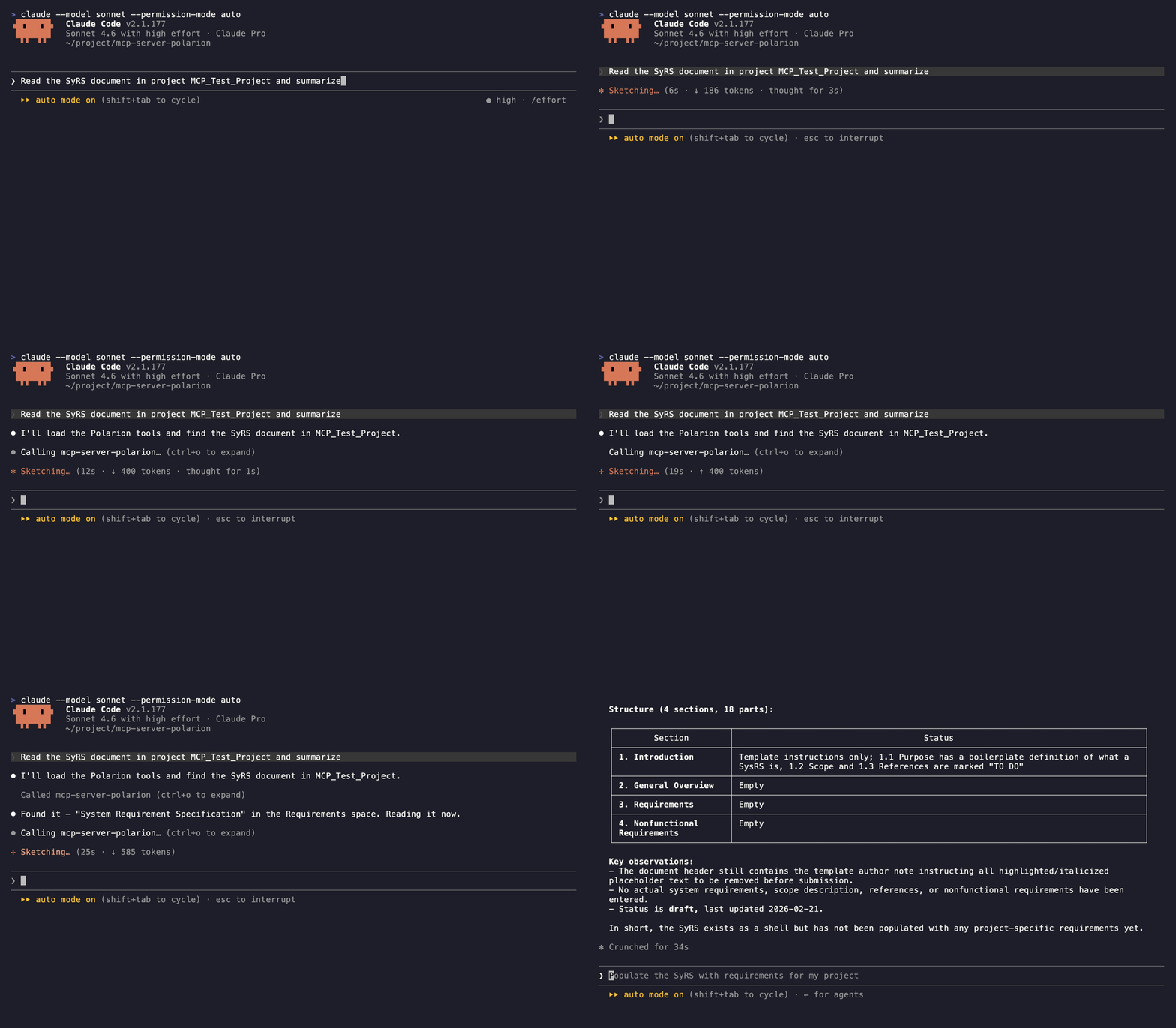
> "Read the SRS document of project MCPT and summarize each open requirement."
> "Show me the structural outline of the SRS document — headings and the work items under each."
> "Read work item MCPT-042 as Markdown and explain what it asks for."
> "Show the outgoing and incoming links for MCPT-042 and flag any child task that is still open."
> "Which requirements in the SRS document have no 'verifies' back link from a test case?"
> "List the open comment threads on the SRS document and who started each."
</details>
<details>
<summary><b>Creating & editing</b></summary>
> "Create a task in project MCPT titled 'Refactor authentication module' and link it to MCPT-042 as 'relates_to'."
> "Create three test-case work items in project MCPT from this checklist and link each one to MCPT-042 as 'verifies'."
> "Add a new requirement under section 3.2 of the SRS document with the body I just drafted."
> "Update the description of MCPT-042 with the revised text I'll paste, keeping the existing formatting."
> "Add a comment on the SRS document asking the owner to clarify section 4, then reply to thread T-12 marking it resolved."
> "Create a test run REG-SPRINT-7 in project MCPT from the 'Regression' template with status 'open'."
</details>
<details>
<summary><b>Workflow & reorganization</b></summary>
> "List the valid status values for a defect in project MCPT, then move MCPT-077 to 'in_review'."
> "Bump MCPT-042's priority to 90, set severity to 'major', and approve the workflow."
> "Change MCPT-201 from a task to a requirement and re-apply its previous status."
> "Move MCPT-201 into the SRS document right after MCPT-150."
> "Detach MCPT-077 from its document so I can rework it as a standalone task."
> "Mark the 'blocks' link from MCPT-042 to MCPT-099 as suspect, then delete the stale 'relates_to' link to MCPT-010."
</details>
## Setup
### Prerequisites
> **Polarion 2506 or higher** is required. Earlier versions lack REST API endpoints this server depends on.
This server is distributed as a Python package and requires [**uv**](https://docs.astral.sh/uv/) to run.
**Install uv** (if not already installed):
```bash
# macOS / Linux
curl -LsSf https://astral.sh/uv/install.sh | sh
# Windows
powershell -ExecutionPolicy ByPass -c "irm https://astral.sh/uv/install.ps1 | iex"
```
Or via pip:
```bash
pip install uv
```
No other installation is needed — `uvx mcp-server-polarion` downloads and runs the server automatically.
### Environment Variables
| Variable | Description | Example |
|---|---|---|
| `POLARION_URL` | Base URL of your Polarion instance | `https://polarion.example.com` |
| `POLARION_TOKEN` | Personal Access Token for authentication | `your-personal-access-token` |
| `POLARION_MAX_REQUESTS_PER_SECOND` | Optional. Client-side request rate cap — raise it to match your deployment's throttle, or set `0` to disable pacing. Writes keep a fixed extra pause regardless (default: `1`) | `1` |
To generate a Personal Access Token, open Polarion, click your user name, and go to **My Account → Personal Access Tokens**.
### Client Configuration
<details>
<summary><b>VS Code (GitHub Copilot)</b></summary>
Add to `.vscode/mcp.json`:
```json
{
"servers": {
"mcp-server-polarion": {
"type": "stdio",
"command": "uvx",
"args": ["mcp-server-polarion"],
"env": {
"POLARION_URL": "https://polarion.example.com",
"POLARION_TOKEN": "your-personal-access-token"
}
}
}
}
```
</details>
<details>
<summary><b>Claude Desktop</b></summary>
Add to `claude_desktop_config.json`:
```json
{
"mcpServers": {
"mcp-server-polarion": {
"command": "uvx",
"args": ["mcp-server-polarion"],
"env": {
"POLARION_URL": "https://polarion.example.com",
"POLARION_TOKEN": "your-personal-access-token"
}
}
}
}
```
</details>
<details>
<summary><b>Cursor</b></summary>
Add to Cursor MCP settings:
```json
{
"mcpServers": {
"mcp-server-polarion": {
"command": "uvx",
"args": ["mcp-server-polarion"],
"env": {
"POLARION_URL": "https://polarion.example.com",
"POLARION_TOKEN": "your-personal-access-token"
}
}
}
}
```
</details>
<details>
<summary><b>Claude Code</b></summary>
Register via the `claude mcp add` command:
```bash
claude mcp add mcp-server-polarion \
-e POLARION_URL=https://polarion.example.com \
-e POLARION_TOKEN=your-personal-access-token \
-- uvx mcp-server-polarion
```
</details>
## Contributing
Bug reports and pull requests are welcome — see [CONTRIBUTING.md](.github/CONTRIBUTING.md) for branch, commit, and review conventions.
## License
[MIT](LICENSE)
TDQS
Scored across 47 tools
Every tool targets a distinct resource and action; where domains overlap (work item vs document vs test record attachments), descriptions explicitly cross-reference their siblings. The read_/get_ split is clearly delineated, and enum/recipe helpers are unambiguously separate.
All tools follow a consistent verb_noun snake_case pattern with clear singular/plural conventions (get single, list/update/create bulk). Prepositional verbs like move_work_item_to_document are used uniformly.
At 47 tools this is far above the well-scoped 3-15 range; even though the tools organize into per-resource families, the sheer number makes selection costly and could overwhelm agents.
Core lifecycle coverage for work items, documents, test runs/records, attachments, comments, and links is solid, with enum lookup and HTML/SQL recipe helpers that close write-path gaps. However, deletion is only available for links; attachments, comments, documents, and work items have no delete tool, which could create dead ends.