
TypeScript
MIT



MCP-сервер, реализованный в Node.js/TypeScript, облегчающий интерактивное общение между LLM и пользователями. Примечание: этот сервер предназначен для локальной работы вместе с клиентом MCP (например, Claude Desktop, VS Code), поскольку ему необходим прямой доступ к операционной системе пользователя для отображения уведомлений и запросов командной строки.
(Примечание: этот проект находится на ранней стадии.)
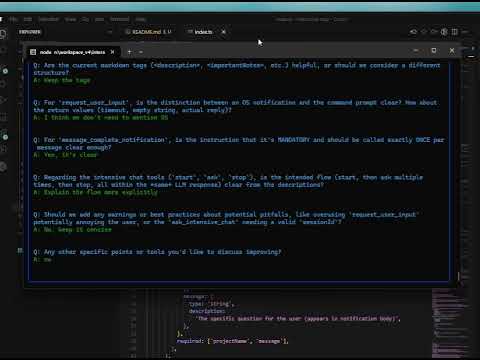
Хотите краткий обзор? Ознакомьтесь с вводной записью в блоге: Stop Your AI Assistant From Guessing — Introducing interactive-mcp
Демонстрационное видео |
|
Этот сервер предоставляет следующие инструменты через протокол контекста модели (MCP):
request_user_input : Задает пользователю вопрос и возвращает его ответ. Может отображать предопределенные параметры.
message_complete_notification : отправляет простое уведомление ОС.
start_intensive_chat : инициирует постоянный сеанс чата в командной строке.
ask_intensive_chat : Задает вопрос в ходе активного сеанса интенсивного чата.
stop_intensive_chat : Закрывает активный сеанс интенсивного чата.
Related MCP server: MCP Server TypeScript Template
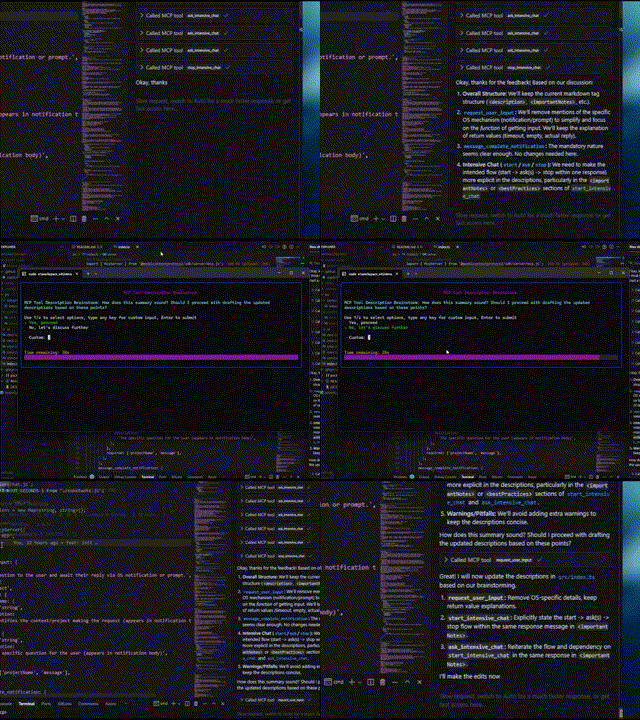
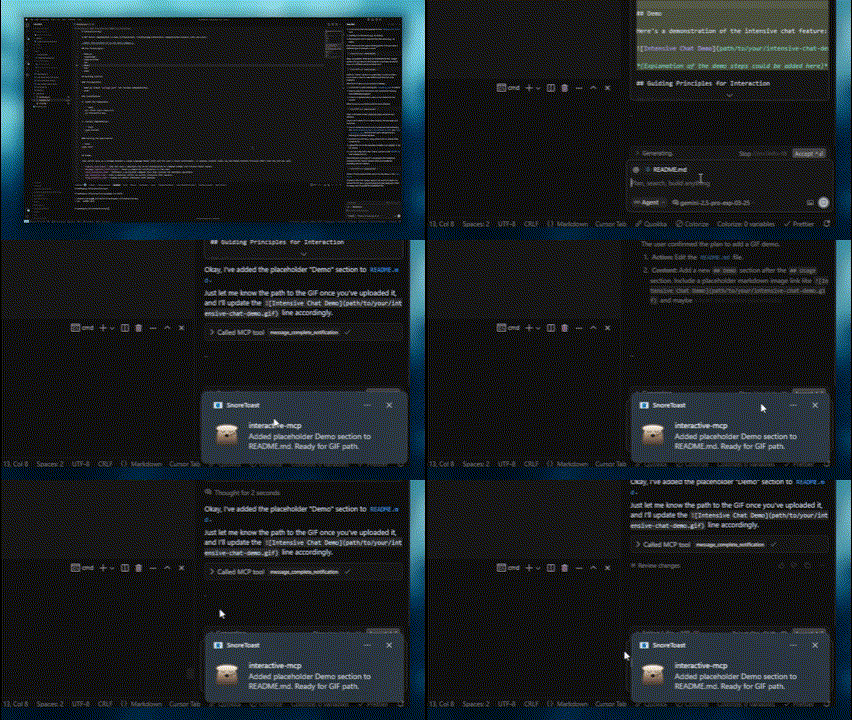
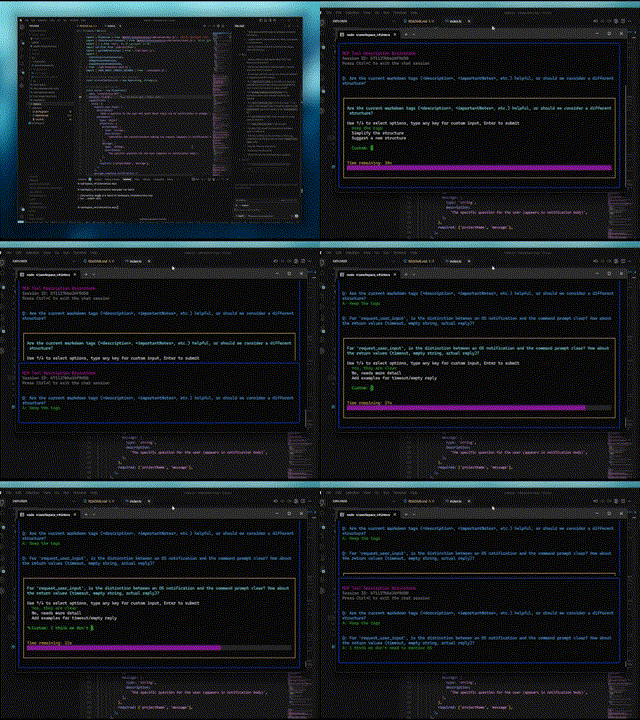
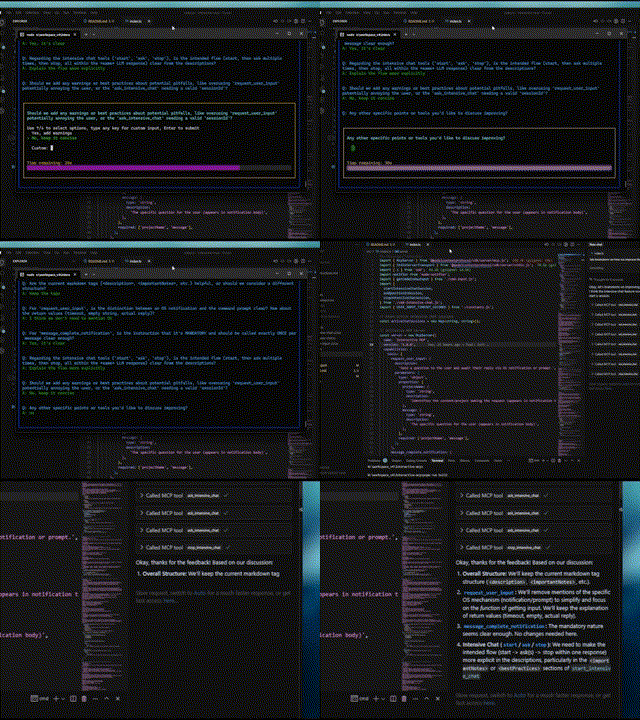
Вот демонстрации интерактивных функций:
Обычный вопрос | Уведомление о завершении |
|
|
Начало интенсивного чата | Конец интенсивного чата |
|
|
Этот сервер идеально подходит для сценариев, в которых LLM необходимо напрямую взаимодействовать с пользователем на его локальном компьютере, например:
Интерактивные процессы настройки или конфигурирования.
Сбор отзывов во время генерации или модификации кода.
Уточнение инструкций или подтверждение действий в парном программировании.
Любой рабочий процесс, требующий ввода данных или подтверждения пользователя во время работы LLM.
В этом разделе объясняется, как настроить клиенты MCP для использования сервера interactive-mcp .
По умолчанию запросы пользователя будут отсутствовать по истечении 30 секунд. Вы можете настроить параметры сервера, такие как тайм-аут или отключенные инструменты, добавив флаги командной строки непосредственно в массив args при настройке клиента.
Убедитесь, что у вас доступна команда npx .
Добавьте следующую минимальную конфигурацию в файл claude_desktop_config.json (Claude Desktop) или mcp.json (Cursor):
{
  "mcpServers": {
    "interactive": {
      "command": "npx",
      "args": ["-y", "interactive-mcp"]
    }
  }
}
Пример с пользовательским тайм-аутом (30 с):
{
  "mcpServers": {
    "interactive": {
      "command": "npx",
      "args": ["-y", "interactive-mcp", "-t", "30"]
    }
  }
}Добавьте следующую минимальную конфигурацию в файл настроек пользователя (JSON) или .vscode/mcp.json :
{
  "mcp": {
    "servers": {
      "interactive-mcp": {
        "command": "npx",
        "args": ["-y", "interactive-mcp"]
      }
    }
  }
}Для более плавной работы на macOS с использованием стандартного Terminal.app рассмотрите следующую настройку профиля:
(Вкладка Shell): В разделе «При выходе из оболочки» ( Терминал > Настройки > Профили > [Ваш профиль] > Shell ) выберите «Закрыть, если оболочка завершилась нормально» или «Закрыть окно» . Это помогает управлять окнами при запуске и остановке сервера MCP.
Этот раздел в первую очередь предназначен для разработчиков, желающих изменить или внести свой вклад в сервер. Если вы просто хотите использовать сервер с клиентом MCP, см. раздел «Конфигурация клиента» выше.
Node.js: Проверьте package.json на совместимость версий.
pnpm: Используется для управления пакетами. Устанавливается через npm install -g pnpm после установки Node.js.
Клонируйте репозиторий:
git clone https://github.com/ttommyth/interactive-mcp.git
cd interactive-mcp
Установите зависимости:
pnpm installpnpm startСервер interactive-mcp принимает следующие параметры командной строки. Обычно их следует настраивать в настройках JSON вашего клиента MCP, добавляя их непосредственно в массив args (см. примеры «Конфигурация клиента»).
Вариант | Псевдоним | Описание |
|
| Устанавливает тайм-аут по умолчанию (в секундах) для запросов на ввод данных пользователем. По умолчанию 30 секунд. |
|
| Отключает определенные инструменты или группы (список, разделенный запятыми). Запрещает серверу рекламировать или регистрировать их. Параметры: |
Пример: установка нескольких параметров в массиве args конфигурации клиента:
// Example combining options in client config's "args":
"args": [
  "-y", "interactive-mcp",
  "-t", "30", // Set timeout to 30 seconds
  "--disable-tools", "message_complete_notification,intensive_chat" // Disable notifications and intensive chat
]Сборка: pnpm build
Линт: pnpm lint
Формат: pnpm format
При взаимодействии с этим сервером MCP (например, в качестве клиента LLM) придерживайтесь следующих принципов, чтобы обеспечить ясность и сократить количество неожиданных изменений:
Отдайте приоритет взаимодействию: регулярно используйте предоставленные инструменты MCP ( request_user_input , start_intensive_chat и т. д.) для взаимодействия с пользователем.
Просите разъяснений: Если требования, инструкции или контекст неясны, всегда задавайте уточняющие вопросы, прежде чем продолжить. Не делайте предположений.
Подтверждение действий: перед выполнением важных действий (например, изменением файлов, запуском сложных команд или принятием архитектурных решений) согласуйте план с пользователем.
Предоставьте варианты: по возможности предоставьте пользователю предопределенные варианты с помощью инструментов MCP, чтобы облегчить принятие быстрых решений.
Вы можете предоставить эти инструкции клиенту LLM следующим образом:
# Interaction

- Please use the interactive MCP tools
- Please provide options to interactive MCP if possible

# Reduce Unexpected Changes

- Do not make assumption.
- Ask more questions before executing, until you think the requirement is clear enough.Вклады приветствуются! Пожалуйста, следуйте стандартным практикам разработки. (Дополнительные подробности могут быть добавлены позже).
MIT (подробности см. в файле LICENSE , если применимо, или укажите лицензию напрямую).
| Name | Required | Description | Default |
|---|---|---|---|
| sessionId | Yes | ID of the intensive chat session | |
| question | Yes | Question to ask the user | |
| predefinedOptions | No | Predefined options for the user to choose from (optional) |
Does the description disclose side effects, auth requirements, rate limits, or destructive behavior?
Despite missing annotations, the description discloses key behaviors: returns user's answer or indicates non-response, maintains chat history, and supports predefined options. However, it lacks details on error cases or rate limits.
Agents need to know what a tool does to the world before calling it. Descriptions should go beyond structured annotations to explain consequences.
Is the description appropriately sized, front-loaded, and free of redundancy?
The description is well-structured with labeled sections and front-loaded summary. However, some repetition exists (e.g., features overlap with usage notes). Could be slightly more concise.
Shorter descriptions cost fewer tokens and are easier for agents to parse. Every sentence should earn its place.
Given the tool's complexity, does the description cover enough for an agent to succeed on first attempt?
Given no output schema, the description explains return behavior. For a tool with 3 parameters and simple interaction, it covers essential aspects: session requirement, repeated use, and optional options. Missing potential edge cases.
Complex tools with many parameters or behaviors need more documentation. Simple tools need less. This dimension scales expectations accordingly.
Does the description clarify parameter syntax, constraints, interactions, or defaults beyond what the schema provides?
Input schema has 100% coverage, but the description adds value with examples and clarifies optional nature of 'predefinedOptions'. This exceeds the baseline 3 by providing practical usage context.
Input schemas describe structure but not intent. Descriptions should explain non-obvious parameter relationships and valid value ranges.
Does the description clearly state what the tool does and how it differs from similar tools?
The description clearly states it asks a new question in an active intensive chat session previously started, with specific verb and resource. It distinguishes from siblings like 'start_intensive_chat' and 'stop_intensive_chat' by focusing on continuation.
Agents choose between tools based on descriptions. A clear purpose with a specific verb and resource helps agents select the right tool.
Does the description explain when to use this tool, when not to, or what alternatives exist?
The 'whenToUseThisTool' section explicitly lists scenarios for use, and importantNotes highlight the prerequisite session ID and repeated usage within the same response. This provides clear guidance on when and how to use vs alternatives.
Agents often have multiple tools that could apply. Explicit usage guidance like "use X instead of Y when Z" prevents misuse.
| Name | Required | Description | Default |
|---|---|---|---|
| projectName | Yes | Notification title | |
| message | Yes | Notification body |
Does the description disclose side effects, auth requirements, rate limits, or destructive behavior?
No annotations provided, so description carries behavioral info. It specifies cross-platform OS notifications and best practices like consistent projectName usage. Lacks details on potential side effects, but for a simple notification tool this is sufficient.
Agents need to know what a tool does to the world before calling it. Descriptions should go beyond structured annotations to explain consequences.
Is the description appropriately sized, front-loaded, and free of redundancy?
The description is well-structured into sections (description, notes, when to use, features, best practices, parameters, examples). It is detailed but each section adds necessary value; no redundancy.
Shorter descriptions cost fewer tokens and are easier for agents to parse. Every sentence should earn its place.
Given the tool's complexity, does the description cover enough for an agent to succeed on first attempt?
For a simple tool with 2 string parameters and no output schema, the description is fully complete: it explains purpose, usage, parameters, examples, and best practices. No gaps remain.
Complex tools with many parameters or behaviors need more documentation. Simple tools need less. This dimension scales expectations accordingly.
Does the description clarify parameter syntax, constraints, interactions, or defaults beyond what the schema provides?
Schema has 100% coverage with concise descriptions. The description adds value by explaining parameter use (title vs body) and providing examples, exceeding the baseline of 3.
Input schemas describe structure but not intent. Descriptions should explain non-obvious parameter relationships and valid value ranges.
Does the description clearly state what the tool does and how it differs from similar tools?
The description clearly states the tool notifies when a response completes and must be used exactly once per message. It distinguishes itself from sibling chat tools by focusing on signaling completion.
Agents choose between tools based on descriptions. A clear purpose with a specific verb and resource helps agents select the right tool.
Does the description explain when to use this tool, when not to, or what alternatives exist?
Explicit 'whenToUseThisTool' and 'importantNotes' provide comprehensive guidance: use at end of query, after tool sequences, or multi-step processes. The mandatory once-per-message rule is emphasized.
Agents often have multiple tools that could apply. Explicit usage guidance like "use X instead of Y when Z" prevents misuse.
| Name | Required | Description | Default |
|---|---|---|---|
| projectName | Yes | Identifies the context/project making the request (used in prompt formatting) | |
| message | Yes | The specific question for the user (appears in the prompt) | |
| predefinedOptions | No | Predefined options for the user to choose from (optional) |
Does the description disclose side effects, auth requirements, rate limits, or destructive behavior?
Without annotations, the description fully discloses behavior: pop-up display, return of user response or timeout after 60 seconds, context maintenance, graceful handling of empty responses, and formatting with project context. No contradictions.
Agents need to know what a tool does to the world before calling it. Descriptions should go beyond structured annotations to explain consequences.
Is the description appropriately sized, front-loaded, and free of redundancy?
The description is well-structured with sections but is lengthy (many sentences). Some redundancy between importantNotes and bestPractices (e.g., both emphasize frequent use). Could be tightened without losing clarity.
Shorter descriptions cost fewer tokens and are easier for agents to parse. Every sentence should earn its place.
Given the tool's complexity, does the description cover enough for an agent to succeed on first attempt?
For a simple 3-parameter tool with no output schema, the description is exceptionally complete: covers purpose, usage guidance, features, best practices, and examples. Leaves no gaps in understanding.
Complex tools with many parameters or behaviors need more documentation. Simple tools need less. This dimension scales expectations accordingly.
Does the description clarify parameter syntax, constraints, interactions, or defaults beyond what the schema provides?
Schema coverage is 100%, so baseline 3. The description's parameters section adds context beyond schema: e.g., projectName is 'used in prompt formatting', predefinedOptions are optional. This adds meaningful value.
Input schemas describe structure but not intent. Descriptions should explain non-obvious parameter relationships and valid value ranges.
Does the description clearly state what the tool does and how it differs from similar tools?
The description clearly states the tool sends a question to the user via a pop-up command prompt, with explicit purpose of clarifying requirements, confirming plans, or resolving ambiguity. It distinguishes from sibling tools like ask_intensive_chat by specifying a pop-up prompt rather than a chat message.
Agents choose between tools based on descriptions. A clear purpose with a specific verb and resource helps agents select the right tool.
Does the description explain when to use this tool, when not to, or what alternatives exist?
A dedicated 'whenToUseThisTool' section provides exhaustive scenarios, and 'bestPractices' explicitly instructs not to use the tool when another tool can answer the question, offering clear alternatives. This provides excellent decision support.
Agents often have multiple tools that could apply. Explicit usage guidance like "use X instead of Y when Z" prevents misuse.
| Name | Required | Description | Default |
|---|---|---|---|
| sessionTitle | Yes | Title for the intensive chat session |
Does the description disclose side effects, auth requirements, rate limits, or destructive behavior?
With no annotations provided, the description fully discloses behaviors: opens persistent console window, returns session ID, must be closed, configurable timeout, maintains chat history, and warns against unnecessary questions. This is comprehensive.
Agents need to know what a tool does to the world before calling it. Descriptions should go beyond structured annotations to explain consequences.
Is the description appropriately sized, front-loaded, and free of redundancy?
The description is well-structured with separate sections but contains some redundancy (e.g., 'Highly recommended' and 'Very useful' are similar). It is thorough but could be slightly more concise.
Shorter descriptions cost fewer tokens and are easier for agents to parse. Every sentence should earn its place.
Given the tool's complexity, does the description cover enough for an agent to succeed on first attempt?
Given the simple parameter list, no output schema, and missing annotations, the description covers all necessary aspects: purpose, usage, important notes, parameters, examples, and best practices. It feels complete for the tool's role.
Complex tools with many parameters or behaviors need more documentation. Simple tools need less. This dimension scales expectations accordingly.
Does the description clarify parameter syntax, constraints, interactions, or defaults beyond what the schema provides?
Only one parameter (sessionTitle) with 100% schema coverage. The description adds context that the title appears at the top of the console, which goes beyond the schema's description. A score of 4 is appropriate for the added value.
Input schemas describe structure but not intent. Descriptions should explain non-obvious parameter relationships and valid value ranges.
Does the description clearly state what the tool does and how it differs from similar tools?
The description clearly states it starts an intensive chat session for gathering multiple answers quickly. It uses specific verbs like 'start', 'gather', 'opens', and distinguishes from sibling tools such as ask_intensive_chat and stop_intensive_chat.
Agents choose between tools based on descriptions. A clear purpose with a specific verb and resource helps agents select the right tool.
Does the description explain when to use this tool, when not to, or what alternatives exist?
The description includes explicit when-to-use scenarios (e.g., collecting series of quick answers, multi-step processes) and when-not-to-use (e.g., prefer other tools if they can answer). It also provides important instructions on using ask_intensive_chat and closing with stop_intensive_chat in the same response.
Agents often have multiple tools that could apply. Explicit usage guidance like "use X instead of Y when Z" prevents misuse.
| Name | Required | Description | Default |
|---|---|---|---|
| sessionId | Yes | ID of the intensive chat session to stop |
Does the description disclose side effects, auth requirements, rate limits, or destructive behavior?
Given no annotations, the description carries full burden and discloses key behaviors: closes console window, frees system resources, marks session complete. It omits potential side effects like idempotency or error handling, but the core behavioral traits are well covered for a termination action.
Agents need to know what a tool does to the world before calling it. Descriptions should go beyond structured annotations to explain consequences.
Is the description appropriately sized, front-loaded, and free of redundancy?
Highly structured with clear sections (description, importantNotes, whenToUseThisTool, etc.). Every sentence adds value, and the core purpose is front-loaded. No unnecessary verbosity.
Shorter descriptions cost fewer tokens and are easier for agents to parse. Every sentence should earn its place.
Given the tool's complexity, does the description cover enough for an agent to succeed on first attempt?
For a tool with one required parameter and no output schema, the description is fully complete. It covers what it does, when to use, how to use (with example), and what to expect. No gaps remain for an agent to select and invoke correctly.
Complex tools with many parameters or behaviors need more documentation. Simple tools need less. This dimension scales expectations accordingly.
Does the description clarify parameter syntax, constraints, interactions, or defaults beyond what the schema provides?
Schema coverage is 100% for the single parameter 'sessionId', with the schema providing a description. The description repeats the same parameter info without adding new semantic meaning, so baseline 3 is appropriate.
Input schemas describe structure but not intent. Descriptions should explain non-obvious parameter relationships and valid value ranges.
Does the description clearly state what the tool does and how it differs from similar tools?
The description explicitly states 'Stop and close an active intensive chat session' with a specific verb and resource. It clearly distinguishes from siblings like 'start_intensive_chat' and 'ask_intensive_chat' by noting it must be called after all questions have been asked.
Agents choose between tools based on descriptions. A clear purpose with a specific verb and resource helps agents select the right tool.
Does the description explain when to use this tool, when not to, or what alternatives exist?
Provides explicit when-to-use conditions: after completing 'ask_intensive_chat', when the multi-step process is complete, and as the final action. Also includes a strong directive that it 'must be called' and 'should always be called', leaving no ambiguity about its role in the workflow.
Agents often have multiple tools that could apply. Explicit usage guidance like "use X instead of Y when Z" prevents misuse.
Recent tool additions, removals, and schema changes observed during successful MCP inspections.
ask_intensive_chatmessage_complete_notificationrequest_user_inputstart_intensive_chatstop_intensive_chatScored across 5 tools
Most tools have distinct purposes: start/stop/ask_intensive_chat form a clear lifecycle for intensive chat sessions, message_complete_notification is for signaling completion, and request_user_input is for general pop-up prompts. However, ask_intensive_chat and request_user_input both ask questions to the user, which could cause some confusion about when to use each, though their contexts differ (session-based vs. standalone).
All tool names follow a consistent snake_case pattern with clear verb_noun structure: start_intensive_chat, ask_intensive_chat, stop_intensive_chat, message_complete_notification, request_user_input. The naming is predictable and readable throughout the set.
With 5 tools, this server is well-scoped for interactive user input scenarios. It covers the core needs: starting, managing, and stopping intensive chat sessions, sending standalone user prompts, and signaling completion. Each tool has a clear role without being overly complex or insufficient.
The tool set provides complete coverage for interactive user input workflows. It supports both intensive chat sessions (with start, ask, and stop tools) and standalone user prompts, plus a notification tool for completion signaling. There are no obvious gaps; agents can handle various interactive scenarios effectively.
A comprehensive Model Context Protocol (MCP) server that enables AI assistants to interact with yo…
MCP server for AI dialogue using various LLM models via AceDataCloud
A TypeScript MCP server for Home Assistant, enabling programmatic management of entities, automati…
Nifty's MCP server — exposes tasks, projects, messages, and files as tools for AI agents.