Glama
marianfoo

SAP Note Search MCP Server

by marianfoo

SAP Note Search MCP Server

IMPORTANT

This repository is being archived. Active development has moved to marianfoo/sap-mcp-servers, where this server now lives in packages/notes. Please open new issues and pull requests there.

MCP server for searching and retrieving SAP Notes / KB articles with full metadata extraction

License: Apache 2.0 Node.js TypeScript

CAUTION

This MCP Server uses private APIs from SAP behind authentication. Please check whether the use violates SAP's ToS. The author assumes no liability for this. Because of this i do not guarantee that the server will always work.

This Model Context Protocol (MCP) server gives AI coding assistants (Cursor, Claude Desktop, VS Code, etc.) direct access to SAP Notes and Knowledge Base articles. It authenticates with SAP via username/password or SAP Passport certificate and uses Playwright browser automation to retrieve actual note content.

Live Preview in Cursor
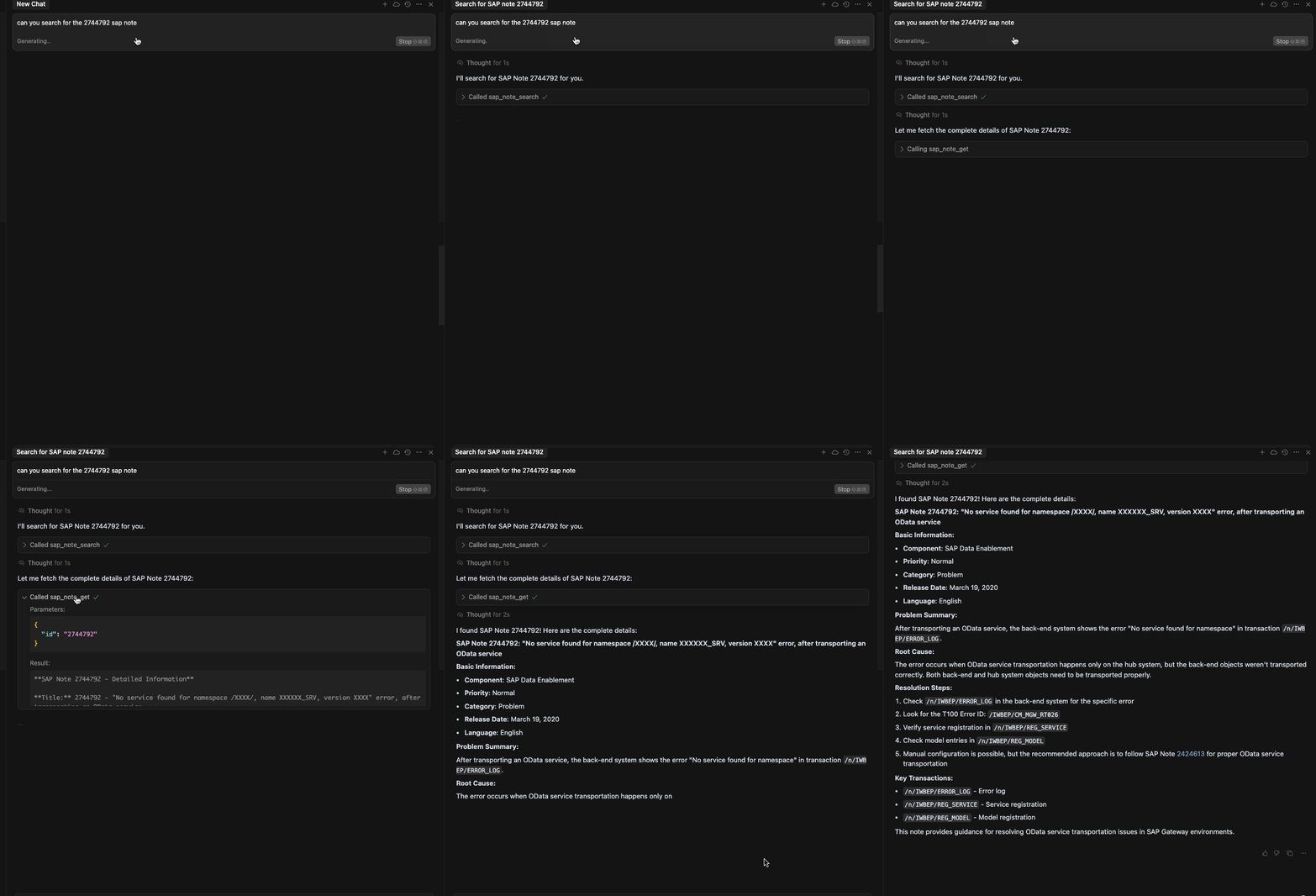
Cursor MCP Server Preview

Related MCP server: BelugaMCP

Features

  • Two MCP toolssearch (find notes) and fetch (retrieve full content + metadata)

  • Enriched metadata — validity ranges, support packages, references, prerequisites, side effects, correction summaries, attachments

  • Optional correction detailsfetch(includeCorrections=true) retrieves detailed ABAP correction instructions (affected objects, per-correction prerequisites) via an additional OData call

  • Two auth methods — username/password (recommended) or SAP Passport certificate

  • MFA/2FA support — manual code entry in headful mode

  • Smart caching — session cookies cached locally (configurable TTL)

  • Docker support — pre-built image with all Playwright dependencies


Quick Start

Prerequisites

Installation

git clone https://github.com/marianfoo/sap-mcp-servers
cd sap-mcp-servers/packages/notes
npm install
npm run build

Authentication

The server supports two methods. Choose whichever is easier for you.

The simplest approach — no certificate management required.

SAP_USERNAME=your.email@company.com
SAP_PASSWORD=your_sap_password

Or pass credentials directly in your MCP client config (no .env file needed):

{
  "mcpServers": {
    "sap-notes": {
      "command": "node",
      "args": ["/path/to/mcp-sap-notes/dist/mcp-server.js"],
      "env": {
        "SAP_USERNAME": "your.email@company.com",
        "SAP_PASSWORD": "your_sap_password"
      }
    }
  }
}

Option 2: SAP Passport Certificate

Uses a .pfx client certificate for TLS-level authentication.

  1. Download your certificate from SAP Passport

  2. Place the .pfx file in certs/:

    mkdir -p certs
    cp ~/Downloads/sap.pfx certs/
  3. Configure:

    PFX_PATH=./certs/sap.pfx
    PFX_PASSPHRASE=your_certificate_passphrase

Auto Mode (Default)

When AUTH_METHOD=auto (the default), the server picks the first available method:

  1. Password — if SAP_USERNAME + SAP_PASSWORD are set

  2. Certificate — if PFX_PATH + PFX_PASSPHRASE are set

  3. Error — if neither is configured

You can force a method with AUTH_METHOD=password or AUTH_METHOD=certificate.

MFA / 2FA

If your SAP account uses two-factor authentication:

HEADFUL=true       # show the browser window so you can enter the code
MFA_TIMEOUT=120000 # wait up to 2 minutes for code entry (ms)

The server detects TOTP, passcode, and verification pages automatically and waits for you to complete the challenge.

Token Caching

After successful login, session cookies are cached to token-cache.json (default TTL: 12 hours, configurable via MAX_JWT_AGE_H). Delete the file to force re-authentication.


Connect to your MCP Client

Cursor / Claude Desktop

Add to your MCP settings (settings.json or claude_desktop_config.json):

With username/password (recommended):

{
  "mcpServers": {
    "sap-notes": {
      "command": "node",
      "args": ["/full/path/to/mcp-sap-notes/dist/mcp-server.js"],
      "env": {
        "SAP_USERNAME": "your.email@company.com",
        "SAP_PASSWORD": "your_sap_password"
      }
    }
  }
}

With certificate (via .env file):

{
  "mcpServers": {
    "sap-notes": {
      "command": "node",
      "args": ["/full/path/to/mcp-sap-notes/dist/mcp-server.js"]
    }
  }
}

Note: Replace the path with your actual absolute path. On Windows use C:\\Users\\you\\..., on macOS/Linux use /Users/you/....

After adding the config, restart your MCP client. The tools will appear in the AI assistant.


Available Tools

Search SAP Notes by keyword, error code, component, or note number.

Parameter

Type

Required

Default

Description

q

string

Yes

Search query (2-200 chars)

lang

EN | DE

No

EN

Language

Examples:

Search for SAP Notes about "OData gateway error 415"
Find SAP Note 2744792

fetch

Retrieve full content and enriched metadata for a specific SAP Note.

Parameter

Type

Required

Default

Description

id

string

Yes

Note ID (alphanumeric)

lang

EN | DE

No

EN

Language

includeCorrections

boolean

No

false

Fetch detailed ABAP correction instructions via OData

Returns (beyond the basic content):

  • Software component validity ranges

  • Support packages and patches

  • Cross-references (to/from other notes)

  • Prerequisites, side effects

  • Correction instruction summaries and counts

  • Manual activity instructions

  • Attachments and SNOTE download URL

  • (with includeCorrections=true) Detailed correction entries with affected ABAP objects (TADIR) and per-correction prerequisites

Examples:

Get the full content of SAP Note 2744792
Show me note 3481252 with correction details

Docker

A Dockerfile is included with all Playwright/Chromium dependencies pre-installed:

docker build -t mcp-sap-notes .
docker run -it \
  -e SAP_USERNAME="your.email@company.com" \
  -e SAP_PASSWORD="your_sap_password" \
  mcp-sap-notes

Configuration Reference

Environment Variables

Variable

Required

Default

Description

SAP_USERNAME

*

SAP login username (email)

SAP_PASSWORD

*

SAP login password

PFX_PATH

*

Path to SAP Passport .pfx certificate

PFX_PASSPHRASE

*

Certificate passphrase

AUTH_METHOD

No

auto

auto, password, or certificate

MFA_TIMEOUT

No

120000

2FA wait timeout in ms

MAX_JWT_AGE_H

No

12

Token cache lifetime in hours

HEADFUL

No

false

Show browser window (for debugging / 2FA)

LOG_LEVEL

No

info

debug, info, warn, error

HTTP_PORT

No

3123

Port for HTTP MCP transport

ACCESS_TOKEN

No

Bearer token for HTTP server auth

* At least one auth pair is required: either SAP_USERNAME + SAP_PASSWORD or PFX_PATH + PFX_PASSPHRASE.

HTTP Server

An HTTP/SSE transport is also available for remote or multi-client setups:

npm run serve:http          # start HTTP server
npm run serve:http:debug    # with debug logging

Protect with a bearer token:

ACCESS_TOKEN=your-secret-token

Clients must then include Authorization: Bearer your-secret-token in every request.


Testing & Development

npm run test:auth         # test authentication flow
npm run test:api          # test SAP Notes API
npm run test:mcp          # test full MCP server
npm run test              # run all tests

Debug mode:

HEADFUL=true LOG_LEVEL=debug npm run test:auth

Project Structure

mcp-sap-notes/
├── src/
│   ├── mcp-server.ts          # Main MCP server (stdio transport)
│   ├── http-mcp-server.ts     # HTTP/SSE MCP transport
│   ├── auth.ts                # SAP authentication (password + certificate)
│   ├── sap-notes-api.ts       # SAP Notes API client + OData corrections
│   ├── html-utils.ts          # HTML-to-text parsing
│   ├── schemas/
│   │   └── sap-notes.ts       # Zod schemas + tool descriptions
│   ├── types.ts               # TypeScript definitions
│   └── logger.ts              # Logging
├── docs/
│   ├── tools.md               # Detailed tool reference
│   ├── authentication.md      # Auth deep dive
│   ├── architecture.md        # Architecture overview
│   └── setup.md               # Setup guide
├── test/                      # Test scripts
├── dist/                      # Compiled JS
├── certs/                     # Certificate directory
├── Dockerfile                 # Docker image
├── env.example                # Environment template
└── README.md

Troubleshooting

Authentication

Symptom

Fix

"Could not find username field"

SAP login page may have changed — try HEADFUL=true to inspect

"Authentication timed out"

Check connectivity; increase MFA_TIMEOUT if using 2FA

"Certificate load failed"

Verify .pfx path + passphrase; check expiry

Browser

Symptom

Fix

"Browser launch failed"

Run npx playwright install chromium

Hangs during auth

Use HEADFUL=true to see what's happening

MCP Client

Symptom

Fix

Tools not showing

Restart client; verify absolute path in config

"MCP server failed to start"

Check npm run build succeeded; check deps with npm install

See docs/authentication.md for detailed troubleshooting.


Contributing

  1. Fork the repository

  2. Create a feature branch: git checkout -b feature/amazing-feature

  3. Commit your changes: git commit -m 'Add amazing feature'

  4. Push to the branch: git push origin feature/amazing-feature

  5. Open a Pull Request

License

Apache 2.0

Available Tools

2 tools
sap_note_getGet SAP Note DetailsA

Fetch complete content and metadata for a specific SAP Note by ID. Returns full HTML content, solution details, and all metadata.

SAP Notes contain: • Detailed problem description • Step-by-step solution instructions • Root cause analysis • Affected releases/versions • Related notes and references • Corrections and patches • Implementation guides

━━━━━━━━━━━━━━━━━━━━━━━━━━━━━━━━━━━━━━━━ USE WHEN: ━━━━━━━━━━━━━━━━━━━━━━━━━━━━━━━━━━━━━━━━ • You have a Note ID from sap_note_search results • User asks for details about a specific note (e.g., "get details for note 2744792") • You need full solution steps, not just the summary • User wants to see the complete note content • You're following the search → get workflow pattern

━━━━━━━━━━━━━━━━━━━━━━━━━━━━━━━━━━━━━━━━ DO NOT USE WHEN: ━━━━━━━━━━━━━━━━━━━━━━━━━━━━━━━━━━━━━━━━ • You don't have a specific Note ID (use sap_note_search first) • User hasn't asked for detailed note content (summaries may suffice) • Note ID is invalid (contains spaces or special characters) • You're just browsing/searching (use sap_note_search instead)

━━━━━━━━━━━━━━━━━━━━━━━━━━━━━━━━━━━━━━━━ PARAMETER REQUIREMENTS: ━━━━━━━━━━━━━━━━━━━━━━━━━━━━━━━━━━━━━━━━ Note ID Format: • Typically alphanumeric characters only • No spaces, no prefixes • Valid examples: "2744792", "438342", "3089413", "123ABC" • Invalid examples: "Note 2744792", "SAP Note 2744792", ""

If user input includes text, extract the ID only: "Note 2744792" → "2744792" "SAP Note 438342" → "438342"

━━━━━━━━━━━━━━━━━━━━━━━━━━━━━━━━━━━━━━━━ WORKFLOW PATTERN: ━━━━━━━━━━━━━━━━━━━━━━━━━━━━━━━━━━━━━━━━ Typical usage flow:

  1. Search for relevant notes: sap_note_search(q="OData 415 error")

  2. Review search results, identify relevant note IDs: Results: [{id: "2744792", ...}, {id: "438342", ...}]

  3. Fetch full content for top 2-3 relevant notes: sap_note_get(id="2744792") sap_note_get(id="438342")

  4. Synthesize solution from full note content

Do NOT fetch all notes - only get details for the most relevant 2-3.

━━━━━━━━━━━━━━━━━━━━━━━━━━━━━━━━━━━━━━━━ ERROR HANDLING: ━━━━━━━━━━━━━━━━━━━━━━━━━━━━━━━━━━━━━━━━ Common errors and solutions:

• "Note ID must contain only alphanumeric characters" → Validate ID format before calling → Extract alphanumeric ID only from user input

• "Note not found" → Note ID doesn't exist or is invalid → Try searching again with different terms

• "Access denied" → Some notes require special S-user permissions → Inform user to access directly on SAP Support Portal

━━━━━━━━━━━━━━━━━━━━━━━━━━━━━━━━━━━━━━━━ BEST PRACTICES: ━━━━━━━━━━━━━━━━━━━━━━━━━━━━━━━━━━━━━━━━

  1. Always validate Note ID format (alphanumeric) before calling

  2. Only fetch notes that are clearly relevant from search results

  3. Limit to 2-3 note fetches per user query

  4. Parse and summarize the HTML content field for users

  5. Include the note URL in your response

  6. Extract key sections: Symptom, Solution, Affected Releases

ParametersJSON Schema
NameRequiredDescriptionDefault
idYesSAP Note ID: Typically 6-8 digits, but may include letters or vary in length. Valid examples: • "2744792" (7 digits) • "438342" (6 digits) • "12345678" (8 digits) • "123ABC" (mixed alphanumeric) Invalid examples: • "Note 2744792" (contains text prefix - extract ID only) • "" (empty) If user input includes text (e.g., "Note 2744792" or "SAP Note 2744792"), extract only the ID portion before calling this tool.
langNoLanguage code for note content. • EN (English) - Default, recommended for most cases • DE (German) - Use if note exists in German and user requests it Note: Not all notes are available in both languages.EN

Output Schema

ParametersJSON Schema
NameRequiredDescription
idYesSAP Note ID (6-8 digits) that was fetched
urlYesDirect URL to view the note on SAP Support Portal. Share this link with users so they can access the official source.
titleYesFull note title describing the issue, error, or topic
contentYesFull HTML content of the SAP Note including all sections: Typical sections in note content: • Symptom - Description of the problem/error • Reason and Prerequisites - Root cause analysis • Solution - Detailed step-by-step instructions to resolve the issue • Affected Releases - Which SAP versions are impacted • Related Notes - Links to other relevant notes • Additional Information - Extra context, warnings, or tips Important: This is raw HTML content. You should: 1. Parse the HTML to extract key sections 2. Summarize the Symptom and Solution for the user 3. Keep technical details but make them readable 4. Preserve any code snippets, configuration steps, or warnings 5. If content is very long (>5000 chars), focus on Symptom and Solution sections Do not return raw HTML to the user - extract and format the relevant information.
summaryYesExecutive summary of the note content (high-level overview of the problem and solution)
categoryYesNote category/type indicating the nature of the note: • "Correction" - Bug fixes, error corrections • "Consulting" - Implementation guidance, best practices • "Performance" - Performance optimization tips • "Security" - Security patches, vulnerability fixes • "Master Data" - Data migration, master data issues • etc. null if category is not specified.
languageYesLanguage of the note content (EN or DE)
priorityYesNote priority level indicating urgency: • "Very High" - Critical issues, security vulnerabilities • "High" - Important fixes, significant bugs • "Medium" - Standard corrections and improvements • "Low" - Minor issues, cosmetic fixes • "Recommendation" - Best practices, optimization tips null if priority is not assigned.
componentYesSAP component code this note relates to (e.g., 'CA-UI5-CTR' for UI5 controls, 'MM-IM' for Inventory Management). Format: [Area]-[Module]-[Submodule] null if not specified.
releaseDateYesDate when note was published or last updated (ISO 8601 format: YYYY-MM-DD or full timestamp)

TDQS

A4.8/5.0
Behavior5/5

Does the description disclose side effects, auth requirements, rate limits, or destructive behavior?

With no annotations provided, the description carries the full burden of behavioral disclosure. It thoroughly describes behavioral traits: it explains the tool's role in a workflow (search → get pattern), provides error handling details (e.g., common errors like 'Note not found' or 'Access denied' with solutions), and includes best practices (e.g., limit fetches to 2-3 notes, validate ID format). This goes beyond basic functionality to cover operational context and constraints.

Agents need to know what a tool does to the world before calling it. Descriptions should go beyond structured annotations to explain consequences.

Conciseness4/5

Is the description appropriately sized, front-loaded, and free of redundancy?

The description is well-structured with clear sections (e.g., USE WHEN, DO NOT USE WHEN, PARAMETER REQUIREMENTS), making it easy to navigate. However, it is lengthy due to extensive details like error handling and best practices. While every section adds value, it could be more concise by integrating some points (e.g., merging parameter examples with schema info). Overall, it's front-loaded with key purpose but includes necessary elaboration.

Shorter descriptions cost fewer tokens and are easier for agents to parse. Every sentence should earn its place.

Completeness5/5

Given the tool's complexity, does the description cover enough for an agent to succeed on first attempt?

Given the tool's complexity (fetching detailed SAP Notes) and the presence of an output schema (which handles return values), the description is highly complete. It covers purpose, usage guidelines, parameter semantics, workflow patterns, error handling, and best practices. With no annotations, it compensates by providing all necessary context for the agent to use the tool effectively, including sibling tool relationships and operational constraints.

Complex tools with many parameters or behaviors need more documentation. Simple tools need less. This dimension scales expectations accordingly.

Parameters4/5

Does the description clarify parameter syntax, constraints, interactions, or defaults beyond what the schema provides?

The schema description coverage is 100%, so the baseline is 3. The description adds significant value beyond the schema: it provides a 'PARAMETER REQUIREMENTS' section with detailed examples of valid and invalid Note IDs, instructions for extracting IDs from user input, and practical guidance on usage. While the schema covers the technical details, the description enhances understanding with real-world context and preprocessing steps.

Input schemas describe structure but not intent. Descriptions should explain non-obvious parameter relationships and valid value ranges.

Purpose5/5

Does the description clearly state what the tool does and how it differs from similar tools?

The description clearly states the tool's purpose: 'Fetch complete content and metadata for a specific SAP Note by ID.' It specifies the verb ('fetch'), resource ('SAP Note'), and distinguishes from its sibling sap_note_search by emphasizing detailed content retrieval versus searching. The description explicitly lists what the note contains, reinforcing the comprehensive nature of the fetch.

Agents choose between tools based on descriptions. A clear purpose with a specific verb and resource helps agents select the right tool.

Usage Guidelines5/5

Does the description explain when to use this tool, when not to, or what alternatives exist?

The description provides explicit guidance with dedicated 'USE WHEN' and 'DO NOT USE WHEN' sections. It clearly states when to use this tool (e.g., after search results, for detailed content) and when not to (e.g., without a Note ID, for browsing). It explicitly names the alternative tool (sap_note_search) and outlines a workflow pattern, ensuring the agent understands the context and prerequisites.

Agents often have multiple tools that could apply. Explicit usage guidance like "use X instead of Y when Z" prevents misuse.

TDQS

A4.6/5.0
Disambiguation5/5

The two tools have perfectly distinct purposes: sap_note_search is for finding relevant SAP Notes based on a query, while sap_note_get is for retrieving detailed content for a specific note ID. Their descriptions clearly differentiate them, with no overlap in functionality, making it impossible for an agent to confuse them.

Naming Consistency5/5

Both tools follow a consistent snake_case naming pattern with the prefix 'sap_note_' followed by a verb (search, get). This uniformity makes the tool set predictable and easy to understand, adhering to a clear convention throughout.

Tool Count3/5

With only two tools, the server feels thin for its domain of SAP Note search and retrieval. While the tools cover the core workflow (search and get), the low count might limit functionality, such as lacking tools for filtering, sorting, or managing notes, which could be expected in a more comprehensive SAP support system.

Completeness4/5

The tool set effectively covers the essential workflow for accessing SAP Notes: searching for notes and retrieving detailed content. However, there are minor gaps, such as no tools for updating, deleting, or listing all notes, which might be less critical here but could enhance completeness for broader note management scenarios.

Maintenance

ActivityInactive
ResponsivenessSyncing

Resources

Unclaimed servers have limited discoverability.

Looking for Admin?

If you are the server author, to access and configure the admin panel.

Related MCP Connectors

Related MCP Servers

Latest Blog Posts

MCP directory API

We provide all the information about MCP servers via our MCP API.

curl -X GET 'https://glama.ai/api/mcp/v1/servers/marianfoo/mcp-sap-notes'

If you have feedback or need assistance with the MCP directory API, please join our Discord server