

A
licenseNot graded
qualityF
maintenanceAn MCP server that provides tools to load and fetch documentation from any llms.txt source, giving users full control over context retrieval for LLMs in IDE agents and applications.
1,033
MIT

systems-mcp ist ein MCP-Server für die Interaktion mit der lethain:systems Bibliothek zur Systemmodellierung.
Es bietet zwei Tools:
run_systems_model führt die systems eines Systemmodells aus. Verwendet zwei Parameter: die Spezifikation und optional die Anzahl der Runden, die das Modell ausgeführt werden soll (Standardwert: 100).
load_systems_documentation lädt Dokumentation und Beispiele in das Kontextfenster. Dies ist nützlich, um Modelle vorzubereiten und sie beim Schreiben von Systemmodellen hilfreicher zu machen.
Es ist für die lokale Ausführung in Verbindung mit Claude Desktop oder einem ähnlichen Tool vorgesehen.
Hier ist ein Beispiel für die Verwendung systems-mcp zum Ausführen und Rendern eines Modells.
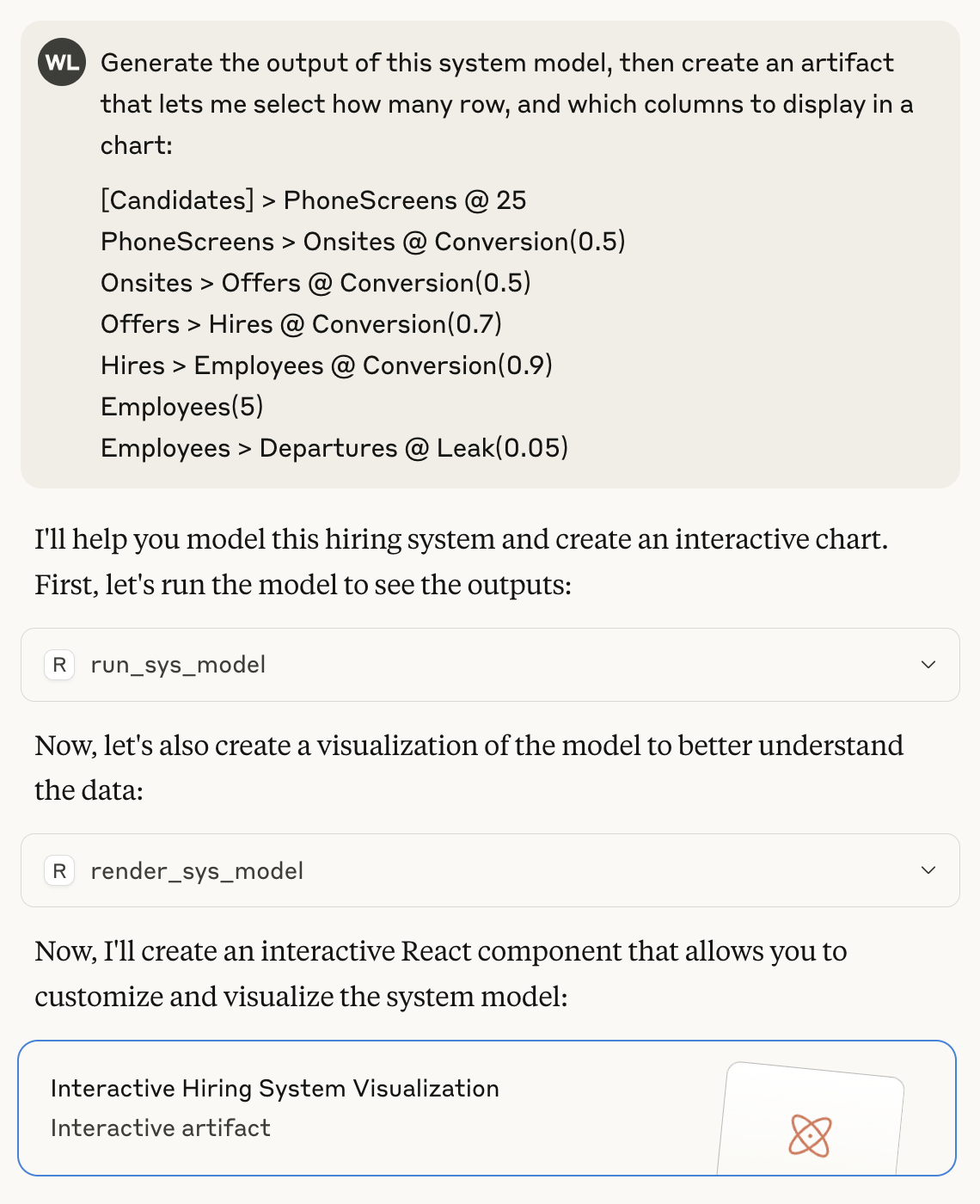
Hier ist das aus dieser Eingabeaufforderung generierte Artefakt, einschließlich der Ausgabe aus der Ausführung des Systemmodells.

Abschließend folgt ein Beispiel für die Verwendung des Tools load_systems_documentation zum Vorbereiten des Kontextfensters und zur Generierung einer Systemspezifikation. Dies entspricht in etwa dem Einbinden lethain:systems/README.md in das Kontextfenster, enthält aber auch einige zusätzliche Beispiele (siehe die enthaltenen Dateien in ./docs/ ).

Anschließend können Sie das Modell wie zuvor rendern.
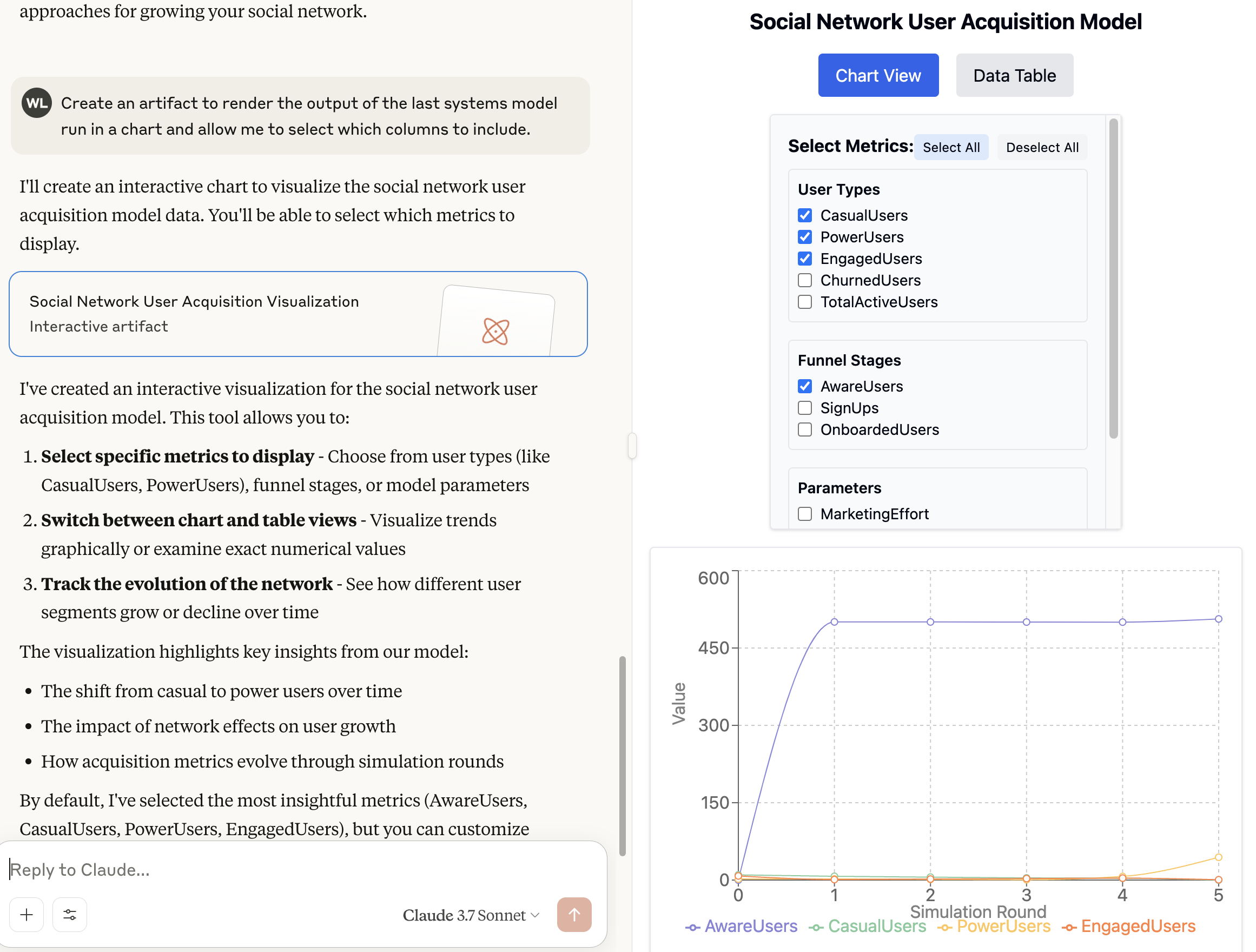
Das Interessanteste dabei ist, dass ich persönlich noch nie systems zur Modellierung eines sozialen Netzwerks verwendet habe, der LLM aber trotzdem in der Lage war, eine bemerkenswert gute Arbeit bei der Erstellung einer Spezifikation zu leisten.
Related MCP server: MCP Server Demo
Diese Anweisungen beschreiben die Installation für Claude Desktop unter OS X. Auf anderen Plattformen sollte es ähnlich funktionieren.
Installieren Sie Claude Desktop .
Klonen Sie systems-mcp an einen geeigneten Ort. Ich gehe davon aus, dass /Users/will/systems-mcp
Stellen Sie sicher, dass Sie uv installiert haben. Sie können diesen Anweisungen folgen
Gehen Sie zu Cladue Desktop, Einstellungen, Entwickler und lassen Sie Ihre MCP-Konfigurationsdatei erstellen. Aktualisieren Sie anschließend Ihre claude_desktop_config.json . (Beachten Sie, dass Sie will durch Ihren Benutzer ersetzen müssen, z. B. die Ausgabe von whoami ).
 cd /Users/will/Library/Application Support/Claude
 vi claude_desktop_config.json
Fügen Sie dann diesen Abschnitt hinzu:
 {
   "mcpServers": {
     "systems": {
       "command": "uv",
       "args": [
         "--directory",
         "/Users/will/systems-mcp",
         "run",
         "main.py"
       ]
     }
   }
 }
Schließen Sie Claude und öffnen Sie es erneut.
Es sollte funktionieren ...
Load systems documentation, examples, and specification details to improve the models ability to generate specifications.
Returns: Documentation and several examples of systems models
| Name | Required | Description | Default |
|---|---|---|---|
No parameters | |||
| Name | Required | Description |
|---|---|---|
| result | Yes |
Does the description disclose side effects, auth requirements, rate limits, or destructive behavior?
No annotations are provided, so the description carries full burden. It discloses that the tool returns 'documentation and several examples of systems models' which describes output behavior. However, it doesn't mention important behavioral traits like whether this is a read-only operation, if it requires authentication, rate limits, or what happens if documentation isn't available. The description adds some behavioral context but leaves significant gaps.
Agents need to know what a tool does to the world before calling it. Descriptions should go beyond structured annotations to explain consequences.
Is the description appropriately sized, front-loaded, and free of redundancy?
The description is appropriately concise with two sentences that each serve a purpose: the first states what the tool does and its purpose, the second describes the return value. It's front-loaded with the main action. There's minimal waste, though the second sentence could be integrated more smoothly.
Shorter descriptions cost fewer tokens and are easier for agents to parse. Every sentence should earn its place.
Given the tool's complexity, does the description cover enough for an agent to succeed on first attempt?
Given the tool has 0 parameters, 100% schema coverage, and an output schema exists, the description is reasonably complete. It explains what the tool does and what it returns. The existence of an output schema means the description doesn't need to detail return values extensively. For a simple parameterless documentation loading tool, this provides adequate context.
Complex tools with many parameters or behaviors need more documentation. Simple tools need less. This dimension scales expectations accordingly.
Does the description clarify parameter syntax, constraints, interactions, or defaults beyond what the schema provides?
The tool has 0 parameters with 100% schema description coverage, so the baseline is 4. The description appropriately doesn't waste space discussing non-existent parameters. No additional parameter information is needed or provided, which is correct for a parameterless tool.
Input schemas describe structure but not intent. Descriptions should explain non-obvious parameter relationships and valid value ranges.
Does the description clearly state what the tool does and how it differs from similar tools?
The description states the tool 'loads systems documentation, examples, and specification details' which is a clear purpose, but it's somewhat vague about what exactly is being loaded. It distinguishes from the sibling tool 'run_systems_model' by focusing on loading documentation rather than executing models, but the distinction could be more explicit. The description doesn't specify verb+resource with precision.
Agents choose between tools based on descriptions. A clear purpose with a specific verb and resource helps agents select the right tool.
Does the description explain when to use this tool, when not to, or what alternatives exist?
The description mentions the tool helps 'improve the models ability to generate specifications' which implies usage context, but provides no explicit guidance on when to use this tool versus alternatives. There's no mention of prerequisites, timing, or comparison with the sibling tool 'run_systems_model'. The usage context is implied rather than clearly stated.
Agents often have multiple tools that could apply. Explicit usage guidance like "use X instead of Y when Z" prevents misuse.
Run a systems model and return output of list of dictionaries in JSON.
Args: spec: The systems model specification rounds: Number of rounds to run (default: 100)
| Name | Required | Description | Default |
|---|---|---|---|
| spec | Yes | ||
| rounds | No |
| Name | Required | Description |
|---|---|---|
| result | Yes |
Does the description disclose side effects, auth requirements, rate limits, or destructive behavior?
With no annotations provided, the description carries the full burden of behavioral disclosure. It states the tool runs a model and returns JSON output, but doesn't describe what 'running a systems model' entails (e.g., computational requirements, execution time, side effects, error conditions, or authentication needs). For a tool that presumably performs computation, this is a significant gap in behavioral context.
Agents need to know what a tool does to the world before calling it. Descriptions should go beyond structured annotations to explain consequences.
Is the description appropriately sized, front-loaded, and free of redundancy?
The description is appropriately concise with two sentences that directly address purpose and parameters. The structure is front-loaded with the core functionality first, followed by parameter details. No wasted words, though it could be slightly more polished in formatting.
Shorter descriptions cost fewer tokens and are easier for agents to parse. Every sentence should earn its place.
Given the tool's complexity, does the description cover enough for an agent to succeed on first attempt?
Given that there's an output schema (which handles return value documentation) but no annotations and incomplete parameter semantics, the description is minimally adequate. It covers the basic purpose and parameters but lacks important behavioral context for a computational tool. The presence of an output schema reduces the need to describe return values, but other gaps remain.
Complex tools with many parameters or behaviors need more documentation. Simple tools need less. This dimension scales expectations accordingly.
Does the description clarify parameter syntax, constraints, interactions, or defaults beyond what the schema provides?
The description adds some semantic context beyond the schema: it explains that 'spec' is 'The systems model specification' and 'rounds' is 'Number of rounds to run (default: 100)'. However, with 0% schema description coverage, the description doesn't fully compensate - it doesn't explain what format the 'spec' should be in (e.g., JSON, YAML, specific syntax) or what 'rounds' means in the context of systems modeling.
Input schemas describe structure but not intent. Descriptions should explain non-obvious parameter relationships and valid value ranges.
Does the description clearly state what the tool does and how it differs from similar tools?
The description clearly states the tool's purpose: 'Run a systems model and return output of list of dictionaries in JSON.' This specifies the verb ('Run'), resource ('a systems model'), and output format. However, it doesn't explicitly differentiate from the sibling tool 'load_systems_documentation', which appears to be a documentation loading function rather than a model execution tool.
Agents choose between tools based on descriptions. A clear purpose with a specific verb and resource helps agents select the right tool.
Does the description explain when to use this tool, when not to, or what alternatives exist?
The description provides no guidance on when to use this tool versus alternatives. It doesn't mention the sibling tool 'load_systems_documentation' or any other context for selection. The only usage hint is the default value for 'rounds', but this doesn't help with tool selection decisions.
Agents often have multiple tools that could apply. Explicit usage guidance like "use X instead of Y when Z" prevents misuse.
Recent tool additions, removals, and schema changes observed during successful MCP inspections.
v1.0.0load_systems_documentation1 field changedOutput schema / (root)Previous value: -nullNew value: +{
+ "properties": {
+ "result": {
+ "title": "Result",
+ "type": "string"
+ }
+ },
+ "required": [
+ "result"
+ ],
+ "title": "load_systems_documentationOutput",
+ "type": "object"
+}run_systems_model1 field changedOutput schema / (root)Previous value: -nullNew value: +{
+ "properties": {
+ "result": {
+ "title": "Result",
+ "type": "string"
+ }
+ },
+ "required": [
+ "result"
+ ],
+ "title": "run_systems_modelOutput",
+ "type": "object"
+}load_systems_documentationrun_systems_modelScored across 2 tools
The two tools have completely distinct purposes: one loads documentation/examples for reference, while the other executes a model with given specifications. There is no overlap in functionality, and an agent would easily differentiate between them based on their clear descriptions.
Both tools follow a consistent verb_noun pattern with snake_case naming: load_systems_documentation and run_systems_model. The naming is predictable and readable, with no deviations in style or convention across the set.
With only 2 tools, the server feels thin for the domain of 'systems modeling,' which typically involves more operations like creating, updating, or analyzing models. This limited set may hinder agents from performing comprehensive tasks, as it lacks tools for specification generation, validation, or result analysis beyond basic execution.
The tool set is severely incomplete for systems modeling. It provides documentation loading and model execution but misses essential operations such as creating or editing specifications, validating models, analyzing outputs in-depth, or managing model versions. This creates significant gaps that will likely cause agent failures in real-world scenarios.
MCP server for building and testing AI agents with multi-model experimentation and insights.
MCP server for generating rough-draft project plans from natural-language prompts.
Hosted MCP server and Agent Skills for specs, engineering threads, and project memory.
MCP Server for Slima - AI Writing IDE for Novel Authors with AI Beta Reader.