Last9 MCP 服务器
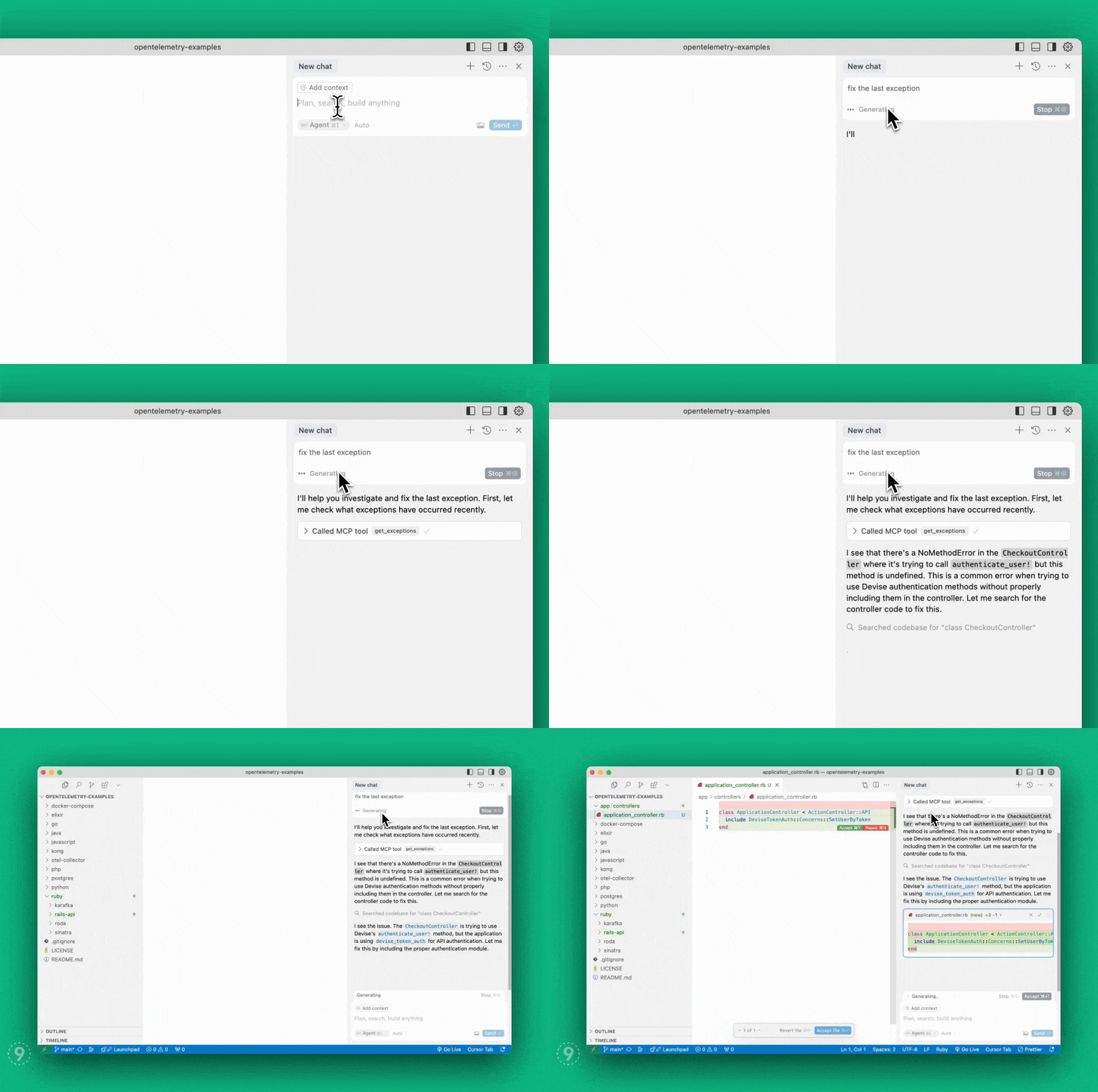
Last9的模型上下文协议服务器实现,使 AI 代理能够将实时生产上下文(日志、指标和跟踪)无缝带入您的本地环境,以更快地自动修复代码。
地位
可与 Claude 桌面应用程序、Cursor、Windsurf 和 VSCode (Github Copilot) IDE 兼容。实现以下 MCP工具:
get_exceptions :获取异常列表。
get_service_graph :从异常中获取端点的服务图。
get_logs :获取按服务名称和/或严重性级别过滤的日志。
get_drop_rules :获取日志的删除规则,确定哪些日志在Last9 控制平面被过滤掉
add_drop_rule :在Last9 控制平面创建日志删除规则
Related MCP server: Error Debugging MCP Server
工具文档
获取异常
检索指定时间范围内的服务器端异常。
参数:
limit (整数,可选):返回的最大异常数量。默认值:20。
lookback_minutes (整数,推荐):从现在开始回溯的分钟数。默认值:60。示例:60、30、15。
start_time_iso (字符串,可选):ISO 格式的开始时间 (YYYY-MM-DD HH:MM:SS)。留空则使用 lookback_minutes。
end_time_iso (字符串,可选):ISO 格式的结束时间 (YYYY-MM-DD HH:MM:SS)。留空则默认为当前时间。
span_name (字符串,可选):要过滤的跨度的名称。
获取服务图
获取给定跨度名称的上游和下游服务,以及每个服务的吞吐量。
参数:
span_name (字符串,必需):要获取依赖项的跨度的名称。
lookback_minutes (整数,推荐):从现在开始回溯的分钟数。默认值:60。示例:60、30、15。
start_time_iso (字符串,可选):ISO 格式的开始时间 (YYYY-MM-DD HH:MM:SS)。留空则使用 lookback_minutes。
获取日志
获取按可选服务名称和/或指定时间范围内的严重性级别过滤的日志。
参数:
service (字符串,可选):获取日志的服务名称。
severity (字符串,可选):要获取的日志的严重性。
lookback_minutes (整数,推荐):从现在开始回溯的分钟数。默认值:60。示例:60、30、15。
start_time_iso (字符串,可选):ISO 格式的开始时间 (YYYY-MM-DD HH:MM:SS)。留空则使用 lookback_minutes。
end_time_iso (字符串,可选):ISO 格式的结束时间 (YYYY-MM-DD HH:MM:SS)。留空则默认为当前时间。
limit (整数,可选):返回日志的最大数量。默认值:20。
获取删除规则
获取日志的删除规则,确定哪些日志被过滤掉而不到达 Last9。
添加删除规则
添加新的丢弃规则以过滤Last9 控制平面上的特定日志
参数:
安装
您可以使用以下任一方式安装 Last9 Observability MCP 服务器:
自制
# Add the Last9 tap
brew tap last9/tap

# Install the Last9 MCP CLI
brew install last9-mcp
新公共管理
# Install globally
npm install -g @last9/mcp-server

# Or run directly with npx
npx @last9/mcp-server
配置
环境变量
该服务需要以下环境变量:
LAST9_AUTH_TOKEN :Last9 MCP 服务器的身份验证令牌(必需)
LAST9_BASE_URL :Last9 API URL(必需)
LAST9_REFRESH_TOKEN :具有写入权限的刷新令牌。用于访问控制平面 API(必需)。
在Last9注册并设置其中一个集成。
从这里获取LAST9_BASE_URL和LAST9_AUTH_TOKEN 。
写入刷新令牌可以从API 访问页面获取。
与 Claude Desktop 一起使用
配置 Claude 应用程序以使用 MCP 服务器:
打开 Claude 桌面应用程序
转到“设置”,然后转到“开发人员”,单击“编辑配置”
打开claude_desktop_config.json文件
将服务器配置复制并粘贴到现有文件中,然后保存
重启克劳德
code ~/Library/Application\ Support/Claude/claude_desktop_config.json
{
  "mcpServers": {
    "last9": {
      "command": "/opt/homebrew/bin/last9-mcp",
      "env": {
        "LAST9_AUTH_TOKEN": "<your_auth_token>",
        "LAST9_BASE_URL": "<last9_otlp_host>",
        "LAST9_REFRESH_TOKEN": "<refresh_token_from_last9_dashboard>"
      }
    }
  }
}
与游标一起使用
配置 Cursor 以使用 MCP 服务器:
导航至“设置”,然后导航至“光标设置”
在左侧选择 MCP
点击右上角的“添加新的全局 MCP 服务器”
将服务器配置复制并粘贴到现有文件中,然后保存
重启光标
{
  "mcpServers": {
    "last9": {
      "command": "/opt/homebrew/bin/last9-mcp",
      "env": {
        "LAST9_AUTH_TOKEN": "<auth_token>",
        "LAST9_BASE_URL": "<last9_otlp_host>",
        "LAST9_REFRESH_TOKEN": "<write_refresh_token>"
      }
    }
  }
}
与 Windsurf 一起使用
配置 Windsurf 以使用 MCP 服务器:
开放式风帆冲浪
转到“设置”,然后转到“开发者”
单击编辑配置
打开windsurf_config.json文件
将服务器配置复制并粘贴到现有文件中,然后保存
重启风帆冲浪
{
  "mcpServers": {
    "last9": {
      "command": "/opt/homebrew/bin/last9-mcp",
      "env": {
        "LAST9_AUTH_TOKEN": "<auth_token>",
        "LAST9_BASE_URL": "<last9_otlp_host>",
        "LAST9_REFRESH_TOKEN": "<refresh_token>"
      }
    }
  }
}
与 VS Code 一起使用
先决条件:
配置 VS Code 以使用 MCP 服务器:
在您的工作区中创建.vscode/mcp.json或使用以下配置添加到 VS Code 用户设置:
{
  "servers": {
    "last9": {
      "type": "stdio",
      "command": "/opt/homebrew/bin/last9-mcp",
      "env": {
        "LAST9_AUTH_TOKEN": "<auth_token>",
        "LAST9_BASE_URL": "<last9_otlp_host>",
        "LAST9_REFRESH_TOKEN": "<write_refresh_token>"
      }
    }
  }
}
打开聊天视图(macOS 上为 ⌃⌘I,Windows/Linux 上为 Ctrl+Alt+I)
从下拉菜单中选择“代理”模式
Last9 MCP 服务器现在可在 VS Code 中使用
注意:用您的实际 Last9 凭证替换占位符值( <auth_token> 、 <last9_otlp_host>和<write_refresh_token> )。
有关高级配置选项和替代设置方法,请参阅官方 VS Code MCP 文档。