
A
licenseNot graded
qualityD
maintenanceMCP Server provides a simpler API to interact with the Model Context Protocol by allowing users to define custom tools and services to streamline workflows and processes.
18
3
MIT

重要提示:为了更好地整合 AI 开发者的工具和服务,我们将项目迁移至Agentico 。建议您使用新软件包并关注Agentico GitHub 仓库的更新。
MCP 服务器是一个简单的服务器,它实现了模型上下文协议(MCP),以提供更简单的 API与模型上下文协议进行交互。
在“ La Rebelion ”中,我们正在开发一套工具和服务,以简化流程和工作流程,从而提供更好、更高效的开发者体验。此服务器是这套工具的一部分。
MCP 很棒,但上手可能会有点困惑。我们创建了一个外观 (Facade) ,以简化创建实现模型上下文协议 (MCP) 的服务器的过程。该模式很简单,您只需使用自己的逻辑创建tools 、注册工具并启动服务器即可。
Related MCP server: Agent Construct
将来我们会提供一个 CLI 来创建一个类似于MCP 创建服务器的新服务器,但现在您可以按照以下步骤根据官方文档来创建服务器。
mkdir -p my-server/src
cd my-server/
yarn init -y
yarn add @modelcontextprotocol/sdk zod zod-to-json-schema
yarn add -D @types/node typescript
# Here lies the magic
yarn add @la-rebelion/mcp-server您需要更新package.json文件并创建tsconfig.json文件。
使用自定义逻辑实现您的工具,并将其注册到 MCPServer 中。以下是一个简单的echo工具示例:
import { Tool, ToolSchema } from "@la-rebelion/mcp-server";

export class EchoTool extends Tool {
  toolSchema: ToolSchema = {
    name: "echo",
    description: "Echoes the input message",
    schema: { // the schema for the parameters needed by the tool
      type: "object",
      properties: {
        message: { type: "string" },
      },
      required: ["message"],
    },
  };

  /**
   * Your logic here, implement the execute method to define the tool behavior
   * @param input The input message - use the schema to define the input type
   * @returns In the example, we are echoing the message
   */
  async execute(input: any): Promise<any> {
    // This is a simple echo tool demo, nothing fancy, just echoing the message
    return Promise.resolve({
      content: [
        {
          type: "text",
          text: `${input.message}`
        }
      ]
      });
  }
}创建一个包含以下内容的index.ts文件:
#!/usr/bin/env node
import { MCPServer } from '@la-rebelion/mcp-server'
import { EchoTool } from "./tools/EchoTool.js";

const myServer = new MCPServer('My MCP Server', '1.0.0');

async function main() {
  // Register tools
  myServer.registerTool("echo", EchoTool);
  await myServer.run();
}

main().catch((error) => {
  console.error("Server error:", error);
  process.exit(1);
});
就这样!您已经创建了一个实现模型上下文协议 (MCP) 的简单服务器。您可以使用Claude Desktop或任何其他支持 MCP 的客户端对其进行测试。
使用以下命令构建项目:
yarn build可以启动服务器,但是还没有任何逻辑,可以用以下命令进行测试:
yarn start
# or
node build/index.js
就是这样,开始创建您自己的工具和服务来简化您的工作流程和流程。
反叛者加油!✊🏻
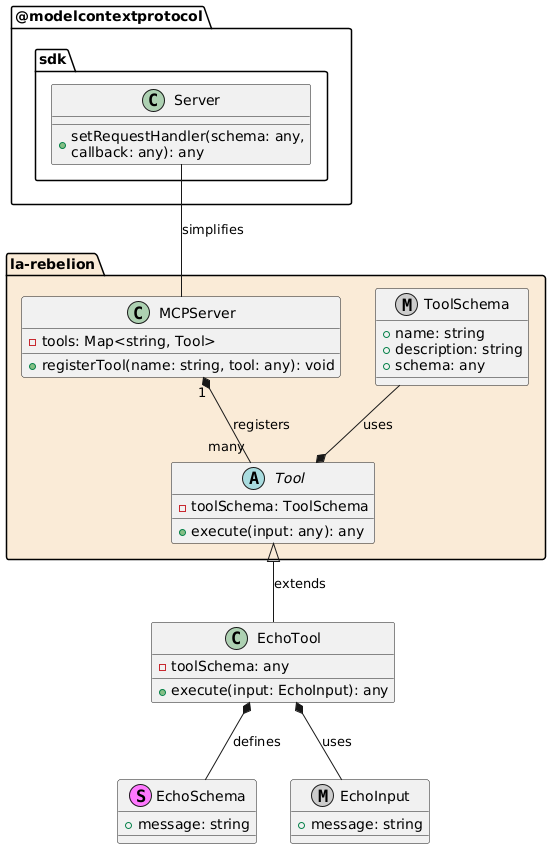
MCPServer :注册服务器将使用的工具。
工具:所有工具的基类,包含通用属性和方法。execute 是在调用工具时将调用的方法execute在此处实现您的逻辑。
EchoTool :工具的具体实现,扩展Tool类并定义自己的模式和初始化逻辑。
EchoSchema :定义 EchoTool 输入的结构。
EchoInput :基于模式的输入类型定义。
此模式允许使用 MCPServer 和 Tool 类以灵活且可扩展的方式管理和实现工具。
如果您发现这有用,请考虑通过为此存储库加注星标、为项目做出贡献或成为赞助商来支持我们。
您可以在La Rebelion GitHub 赞助商页面找到更多关于如何支持我们的信息。此外,请我们喝杯咖啡、使用PayPal以及购买“La Rebelion”周边商品也是支持我们的好方法。
该项目根据 MIT 许可证获得许可 - 有关详细信息,请参阅LICENSE文件。
Recent tool additions, removals, and schema changes observed during successful MCP inspections. Dates show when Glama detected each change.
No tool schema history has been recorded yet.
This server cannot be installed
Unclaimed servers have limited discoverability.
If you are the server author, to access and configure the admin panel.
The Mercado Pago MCP Server implements the Model Context Protocol to provide AI agents and LLMs with access to Mercado Pago's APIs and tools within compatible development environments. It acts as an intermediary that translates Mercado Pago resources into executable functions (tools) that AI applications can invoke to perform actions and automate flows. The server simplifies integration, enables using documentation to implement or improve code, and optimizes operations through natural language interactions without manual implementations.
MCP server for progressive tool usage at any scale (see https://klavis.ai)
We provide all the information about MCP servers via our MCP API.
curl -X GET 'https://glama.ai/api/mcp/v1/servers/la-rebelion/mcp-server'
If you have feedback or need assistance with the MCP directory API, please join our Discord server