
A
licenseNot graded
qualityC
maintenanceMCP Server provides a simpler API to interact with the Model Context Protocol by allowing users to define custom tools and services to streamline workflows and processes.
9 npm
3
MIT

[!IMPORTANTE] Hemos trasladado el proyecto a Agentico para organizar mejor las herramientas y servicios para los desarrolladores de IA. Les recomendamos usar el nuevo paquete y mantenerse al día con las actualizaciones en el repositorio de GitHub de Agentico .
MCP Server es un servidor simple que implementa el Protocolo de Contexto de Modelo (MCP) para proporcionar una API más simple para interactuar con el Protocolo de Contexto de Modelo.
En " La Rebelion ", trabajamos en un conjunto de herramientas y servicios para simplificar los procesos y flujos de trabajo, lo que permite una experiencia de desarrollo mejor y más eficiente. Este servidor forma parte de un conjunto de herramientas.
MCP es increíble, pero puede ser un poco confuso al principio. Hemos creado una fachada para simplificar el proceso de creación de un servidor que implementa el Protocolo de Contexto de Modelo. El patrón es simple: solo necesitas crear las tools con tu propia lógica, registrarlas e iniciar el servidor.
Related MCP server: Agent Construct
En el futuro proporcionaremos una CLI para crear un nuevo servidor similar a MCP create server , pero por ahora puedes seguir los pasos a continuación según la documentación oficial para crear un servidor .
mkdir -p my-server/src
cd my-server/
yarn init -y
yarn add @modelcontextprotocol/sdk zod zod-to-json-schema
yarn add -D @types/node typescript
# Here lies the magic
yarn add @la-rebelion/mcp-server
Debe actualizar el archivo package.json y crear un archivo tsconfig.json .
Implemente sus herramientas con su lógica personalizada y regístrelas en MCPServer. A continuación, se muestra un ejemplo de una herramienta echo sencilla:
import { Tool, ToolSchema } from "@la-rebelion/mcp-server";

export class EchoTool extends Tool {
  toolSchema: ToolSchema = {
    name: "echo",
    description: "Echoes the input message",
    schema: { // the schema for the parameters needed by the tool
      type: "object",
      properties: {
        message: { type: "string" },
      },
      required: ["message"],
    },
  };

  /**
   * Your logic here, implement the execute method to define the tool behavior
   * @param input The input message - use the schema to define the input type
   * @returns In the example, we are echoing the message
   */
  async execute(input: any): Promise<any> {
    // This is a simple echo tool demo, nothing fancy, just echoing the message
    return Promise.resolve({
      content: [
        {
          type: "text",
          text: `${input.message}`
        }
      ]
      });
  }
}
Cree un archivo index.ts con el siguiente contenido:
#!/usr/bin/env node
import { MCPServer } from '@la-rebelion/mcp-server'
import { EchoTool } from "./tools/EchoTool.js";

const myServer = new MCPServer('My MCP Server', '1.0.0');

async function main() {
  // Register tools
  myServer.registerTool("echo", EchoTool);
  await myServer.run();
}

main().catch((error) => {
  console.error("Server error:", error);
  process.exit(1);
});
¡Listo! Has creado un servidor simple que implementa el Protocolo de Contexto de Modelo. Pruébalo con Claude Desktop o cualquier otro cliente compatible con MCP.
Construya el proyecto con el siguiente comando:
yarn buildPuedes iniciar el servidor, pero aún no tiene lógica, puedes probarlo con el siguiente comando:
yarn start
# or
node build/index.js
Eso es todo, empieza a crear tus propias herramientas y servicios para simplificar tus flujos de trabajo y procesos.
¡Vamos Rebeldes! ✊🏻
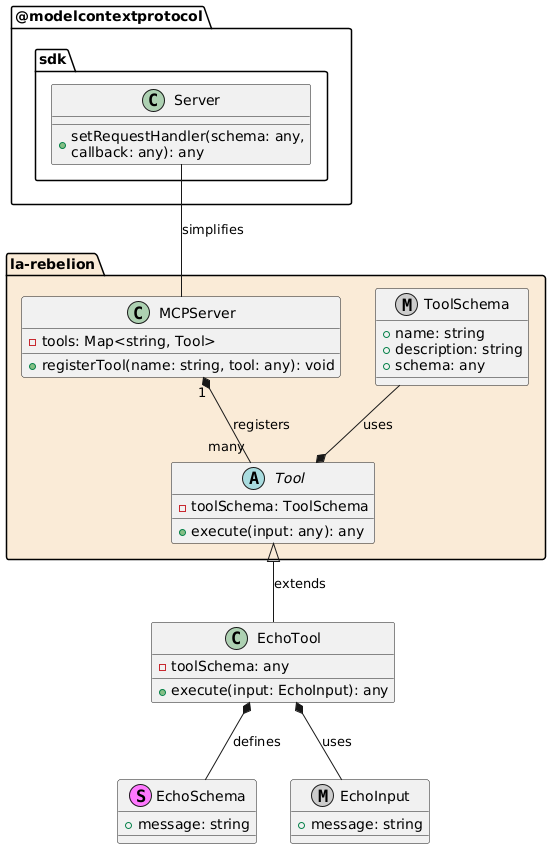
MCPServer : Registra las herramientas que utilizará el servidor.
Herramienta : Clase base para todas las herramientas, que contiene propiedades y métodos comunes. execute es el método que se llamará cuando se invoque la herramienta, implemente su lógica aquí.
EchoTool : Implementación específica de una herramienta, extendiendo la clase Tool y definiendo su propio esquema y lógica de inicialización.
EchoSchema : define la estructura de la entrada para EchoTool.
EchoInput : Definición de tipo para la entrada según el esquema.
Este patrón permite una forma flexible y extensible de administrar e implementar herramientas utilizando las clases MCPServer y Tool.
Si esto le resulta útil, considere apoyarnos marcando este repositorio como favorito, contribuyendo al proyecto o convirtiéndose en patrocinador.
Puedes encontrar más información sobre cómo apoyarnos en la sección de patrocinadores de GitHub de La Rebelion . También puedes invitarnos a un café , usar PayPal o comprar productos de La Rebelion .
Este proyecto está licenciado bajo la licencia MIT: consulte el archivo de LICENCIA para obtener más detalles.
This server cannot be deployed
The Mercado Pago MCP Server implements the Model Context Protocol to provide AI agents and LLMs with access to Mercado Pago's APIs and tools within compatible development environments. It acts as an intermediary that translates Mercado Pago resources into executable functions (tools) that AI applications can invoke to perform actions and automate flows. The server simplifies integration, enables using documentation to implement or improve code, and optimizes operations through natural language interactions without manual implementations.
MCP server for progressive tool usage at any scale (see https://klavis.ai)
MCP server for your apps' tools and custom tools, plus hosted AI agents and approval-gated workflows