Glama

Lighthouse MCP

A Model Context Protocol (MCP) server that enables Claude to interact with your Lighthouse.one portfolio data. This integration allows you to query and analyze your crypto portfolio directly through Claude.

Features

  • Authentication: Securely authenticate with Lighthouse using transfer token URLs

  • Portfolio Overview: Get detailed breakdowns of your portfolio including:

    • Total portfolio value

    • Asset type distribution

    • Major holdings (≥ $1,000)

    • List of connected wallets/accounts

  • Asset Details: View detailed information about specific assets in your portfolio

  • Transaction History: Access your transaction history across wallets

  • Performance Analysis: Get insights on portfolio performance over time

You can ask Claude any form of natural language questions about performance, assets distribution etc and it will try its best to invoke the right tools and generate an asnwer for you.

Related MCP server: Chronos MCP Server

Usage with Claude Desktop

NOTE: You must have at least Node LTS installed to use this MCP server. Try N-Install to quickly install Node on your system.

Add this to your claude_desktop_config.json:

{
  "mcpServers": {
    "lighthouse": {
      "command": "npx",
      "args": ["-y", "mcp-lighthouse"]
    }
  }
}

Then restart the Claude app. If you don't get any errors on startup, then the MCP server is working.

Authentication Walkthrough

You'll be asked for the authentication URL. To get it, follow these steps:

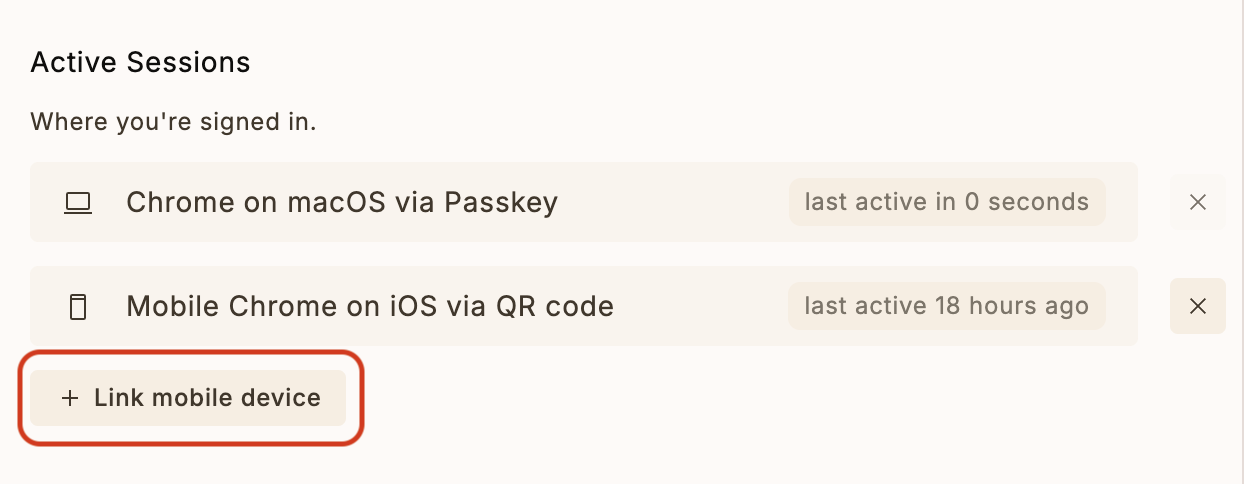
  1. Go to the Settings page on Lighthouse.one

  2. Click on "Link Mobile Device" option

Lighthouse Link Mobile Device

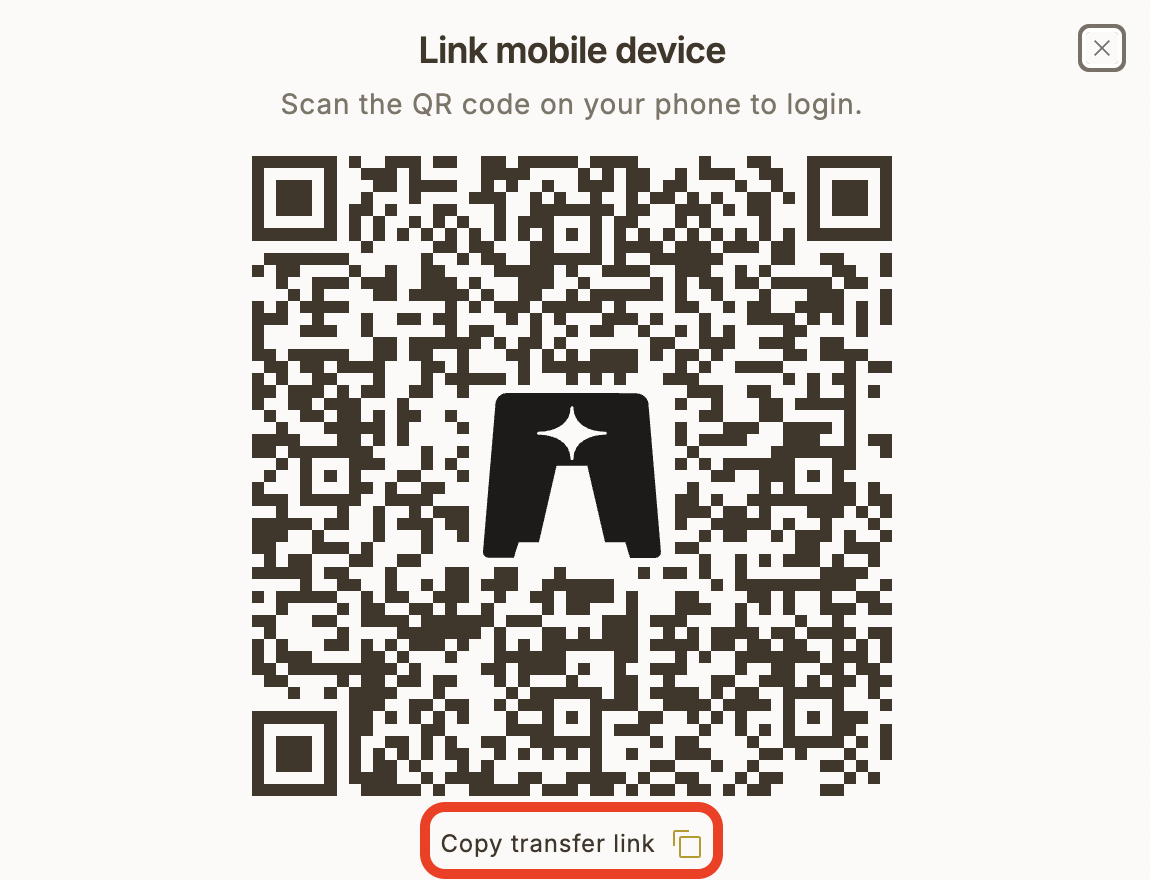
  1. Click on "Copy transfer link"

Mobile Transfer Code

Note: The URL will be in the format of a Lighthouse transfer token URL which Claude can use to authenticate your session.

Available Commands

Once connected, you can use the following commands with Claude:

  1. Authenticate

    Use the authenticate command with a Lighthouse transfer token URL to log in.
  2. List Portfolios

    Use the listLighthousePortfolios command to see all your portfolios and their total values.
  3. Get Portfolio Overview

    Use the getLighthousePortfolio command to view your current portfolio status with detailed breakdowns.
  4. Get Yield Data

    Use the getLighthouseYieldData command to see yield information for your portfolio.
  5. Get Performance Data

    Use the getLighthousePerformanceData command to analyze your portfolio's performance over time.

Session Management

  • The server maintains a session file (.lighthouse_session) to persist your authentication

  • You only need to authenticate once unless you explicitly log out or the session expires

  • Session data is stored securely on your local machine

NOTE: You can always revoke the session key from the Lighthouse dashboard.

Security Note

This MCP server runs locally on your machine and communicates directly with Lighthouse's API. Your authentication credentials are never shared with Claude or any third-party services.

Running Locally

  1. Build the project:

npm install

npm run build
  1. Add the MCP server to Claude

Paste this JSON into the Develop settings of the Claude app. Make sure to point to the correct build output.

{
  "mcpServers": {
    "lighthouse": {
      "command": "path/to/node/installation",
      "args": ["path/to/this/folder/mcp-lighthouse/dist/index.js"]
    }
  }
}

Development

The project is built with TypeScript and uses the FastMCP framework for MCP server implementation. To modify or extend the functionality:

  1. Make changes to index.ts

  2. Rebuild the project: npm run build

  3. Restart the server

Requirements

  • Node.js 16 or higher

  • npm or yarn

  • A Lighthouse.one account

Available Tools

5 tools
authenticateC

Authenticate with Lighthouse using a transfer token URL

Inputs: url (required).

getLighthousePerformanceDataC

Get performance data for a Lighthouse portfolio

Inputs: portfolio, startDate.

getLighthousePortfolioC

Fetch and display a detailed summary of a Lighthouse portfolio with breakdown by asset types and major holdings.

Inputs: portfolio.

getLighthouseYieldDataC

Get yield data for a Lighthouse portfolio

Inputs: portfolio.

listLighthousePortfoliosA

List all Lighthouse portfolios, their total portfolio value, the wallets within each portfolio and their total value

Inputs: no named parameters.

Tool Schema Changelog

Recent tool additions, removals, and schema changes observed during successful MCP inspections.

Loading tool schema changelog…

    TDQS

    B3.3/5.0

    Scored across 5 tools

    Disambiguation5/5

    Each tool has a clearly distinct purpose: authentication, listing portfolios, getting portfolio details, and retrieving performance and yield data. There is no overlap in functionality, making it easy for an agent to select the correct tool for each task.

    Naming Consistency3/5

    The naming is mixed with inconsistent patterns: 'authenticate' uses a verb only, while others use a verb_noun format (e.g., 'getLighthousePerformanceData'). However, all names are readable and follow a general descriptive style, though they lack a uniform convention.

    Tool Count5/5

    With 5 tools, the server is well-scoped for managing Lighthouse portfolios. Each tool serves a specific and necessary function, from authentication to data retrieval, without being overly sparse or bloated.

    Completeness4/5

    The toolset covers core operations for portfolio management, including authentication, listing, and detailed data retrieval. A minor gap exists in update or delete operations for portfolios, but the provided tools support essential workflows effectively.

    Maintenance

    ActivityInactive
    ResponsivenessOutdated data

    Related MCP Connectors

    Related MCP Servers

    • A
      license
      B
      quality
      D
      maintenance
      A Model Context Protocol server for integrating AI assistants like Claude Desktop with the Stellar blockchain, enabling wallet connections, token listings, balance queries, and fund transfers.
      4
      11 npm
      JavaScript
      MIT
    • F
      license
      Not graded
      quality
      D
      maintenance
      A Model Context Protocol server that enables Claude AI to interact with the Solana blockchain, allowing it to execute transactions, query accounts, manage wallets, get price predictions, trade tokens, and access various blockchain data sources.
      4
      -
    • A
      license
      Not graded
      quality
      A
      maintenance
      A Model Context Protocol server that provides AI assistants like Claude with secure, read-only access to MoneyWiz financial data for natural language queries and financial analytics.
      159 PyPI
      16
      MIT