

A
licenseNot graded
qualityD
maintenanceMCP server for posting messages to Slack channels via webhooks or bot API. Supports configurable usernames, emojis, and both webhook and bot token authentication modes.
19 npm
MIT

The Slack MCP server allows integration with Slack Workspaces to fetch channel information and message history without requiring admin permissions or bots. It supports:
Fetching channel lists (channels_list):
Filter by channel types ('mpim', 'im', 'public_channel', 'private_channel')
Sort by popularity (number of members/participants)
Retrieving message history (conversations_history):
Fetch messages from a specific channel using channel_id
Support for pagination with cursors
Limit by number of messages or time range
The server supports both Stdio and SSE transport modes, proxy settings, and secure token-based authentication.
Mentioned as an option for exposing the MCP server to the internet with TLS encryption for the SSE transport method.
Allows interaction with Slack Workspaces, providing tools to retrieve channel histories and list available channels without requiring admin permissions or bot approvals.
Click on "Deploy Server".
Wait a few minutes for the server to deploy. Once ready, it will show a "Started" state.
In the chat, type @ followed by the MCP server name and your instructions, e.g., "@Slack MCP show me the last 10 messages from #general"
That's it! The server will respond to your query, and you can continue using it as needed.
Here is a step-by-step guide with screenshots.
Model Context Protocol (MCP) server for Slack Workspaces. The most powerful MCP Slack server — supports Stdio, SSE and HTTP transports, proxy settings, DMs, Group DMs, Smart History fetch (by date or count), may work via OAuth or in complete stealth mode with no permissions and scopes in Workspace 😏.
We need your support! Each month, over 30,000 engineers visit this repository, and more than 9,000 are already using it.
If you appreciate the work our contributors have put into this project, please consider giving the repository a star.
This feature-rich Slack MCP Server has:
Stealth and OAuth Modes: Run the server without requiring additional permissions or bot installations (stealth mode), or use secure OAuth tokens for access without needing to refresh or extract tokens from the browser (OAuth mode).
Enterprise Workspaces Support: Possibility to integrate with Enterprise Slack setups.
Channel and Thread Support with #Name @Lookup: Fetch messages from channels and threads, including activity messages, and retrieve channels using their names (e.g., #general) as well as their IDs.
Smart History: Fetch messages with pagination by date (d1, 7d, 1m) or message count.
Unread Messages: Get all unread messages across channels efficiently with priority sorting (DMs > partner channels > internal), @mention filtering, and mark-as-read support.
Search Messages: Search messages in channels, threads, and DMs using various filters like date, user, and content.
Safe Message Posting: The conversations_add_message tool is disabled by default for safety. Enable it via an environment variable, with optional channel restrictions.
DM and Group DM support: Retrieve direct messages and group direct messages.
Embedded user information: Embed user information in messages, for better context.
Cache support: Cache users and channels for faster access.
Stdio/SSE/HTTP Transports & Proxy Support: Use the server with any MCP client that supports Stdio, SSE or HTTP transports, and configure it to route outgoing requests through a proxy if needed.
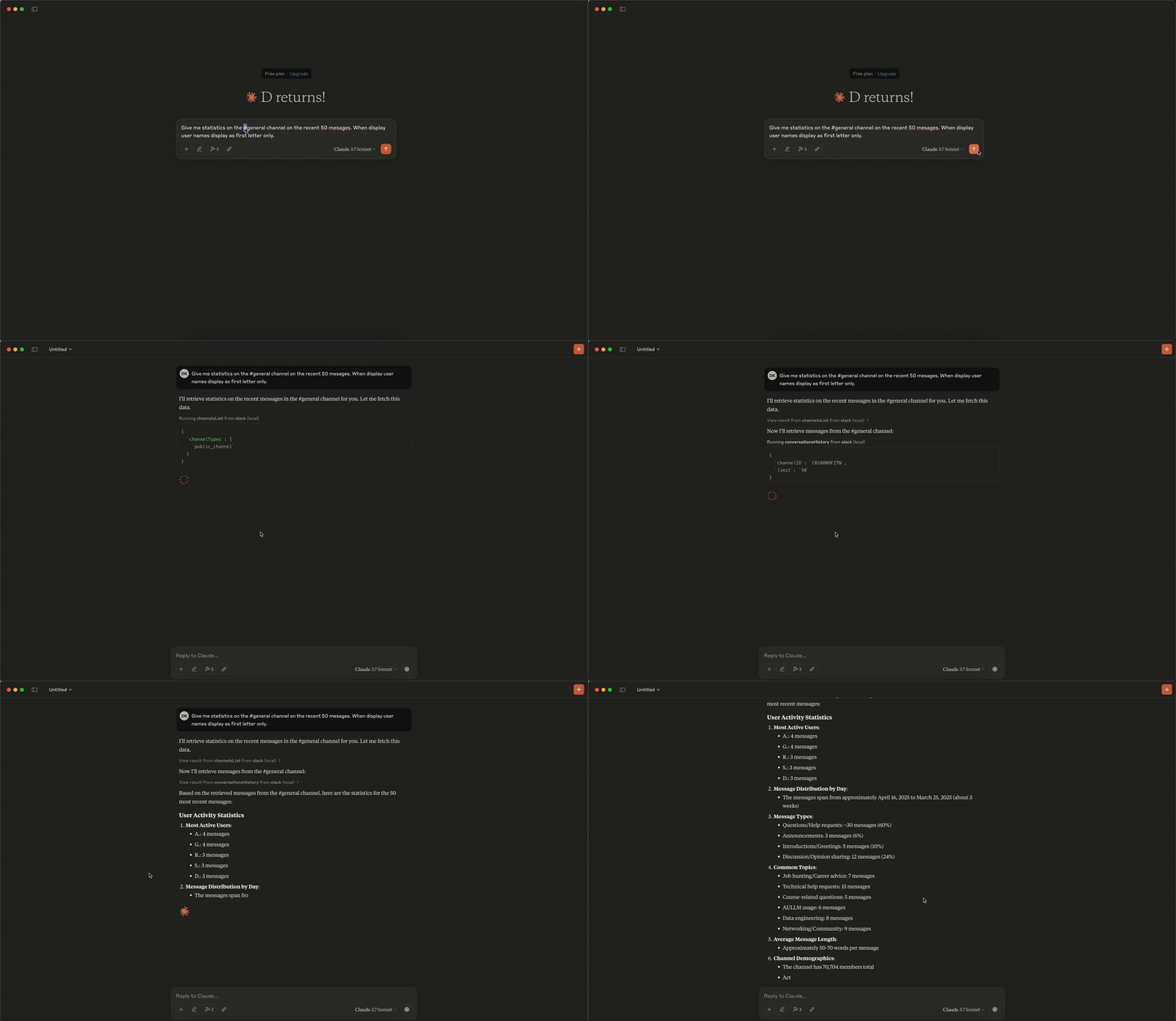
Get messages from the channel (or DM) by channel_id, the last row/column in the response is used as 'cursor' parameter for pagination if not empty
Parameters:
channel_id (string, required): - channel_id (string): ID of the channel in format Cxxxxxxxxxx or its name starting with #... or @... aka #general or @username_dm.
include_activity_messages (boolean, default: false): If true, the response will include activity messages such as channel_join or channel_leave. Default is boolean false.
cursor (string, optional): Cursor for pagination. Use the value of the last row and column in the response as next_cursor field returned from the previous request.
limit (string, default: "1d"): Limit of messages to fetch in format of maximum ranges of time (e.g. 1d - 1 day, 1w - 1 week, 30d - 30 days, 90d - 90 days which is a default limit for free tier history) or number of messages (e.g. 50). Must be empty when 'cursor' is provided.
Get a thread of messages posted to a conversation by channelID and thread_ts, the last row/column in the response is used as cursor parameter for pagination if not empty.
Parameters:
channel_id (string, required): ID of the channel in format Cxxxxxxxxxx or its name starting with #... or @... aka #general or @username_dm.
thread_ts (string, required): Unique identifier of either a thread’s parent message or a message in the thread. ts must be the timestamp in format 1234567890.123456 of an existing message with 0 or more replies.
include_activity_messages (boolean, default: false): If true, the response will include activity messages such as 'channel_join' or 'channel_leave'. Default is boolean false.
cursor (string, optional): Cursor for pagination. Use the value of the last row and column in the response as next_cursor field returned from the previous request.
limit (string, default: "1d"): Limit of messages to fetch in format of maximum ranges of time (e.g. 1d - 1 day, 1w - 1 week, 30d - 30 days, 90d - 90 days which is a default limit for free tier history) or number of messages (e.g. 50). Must be empty when 'cursor' is provided.
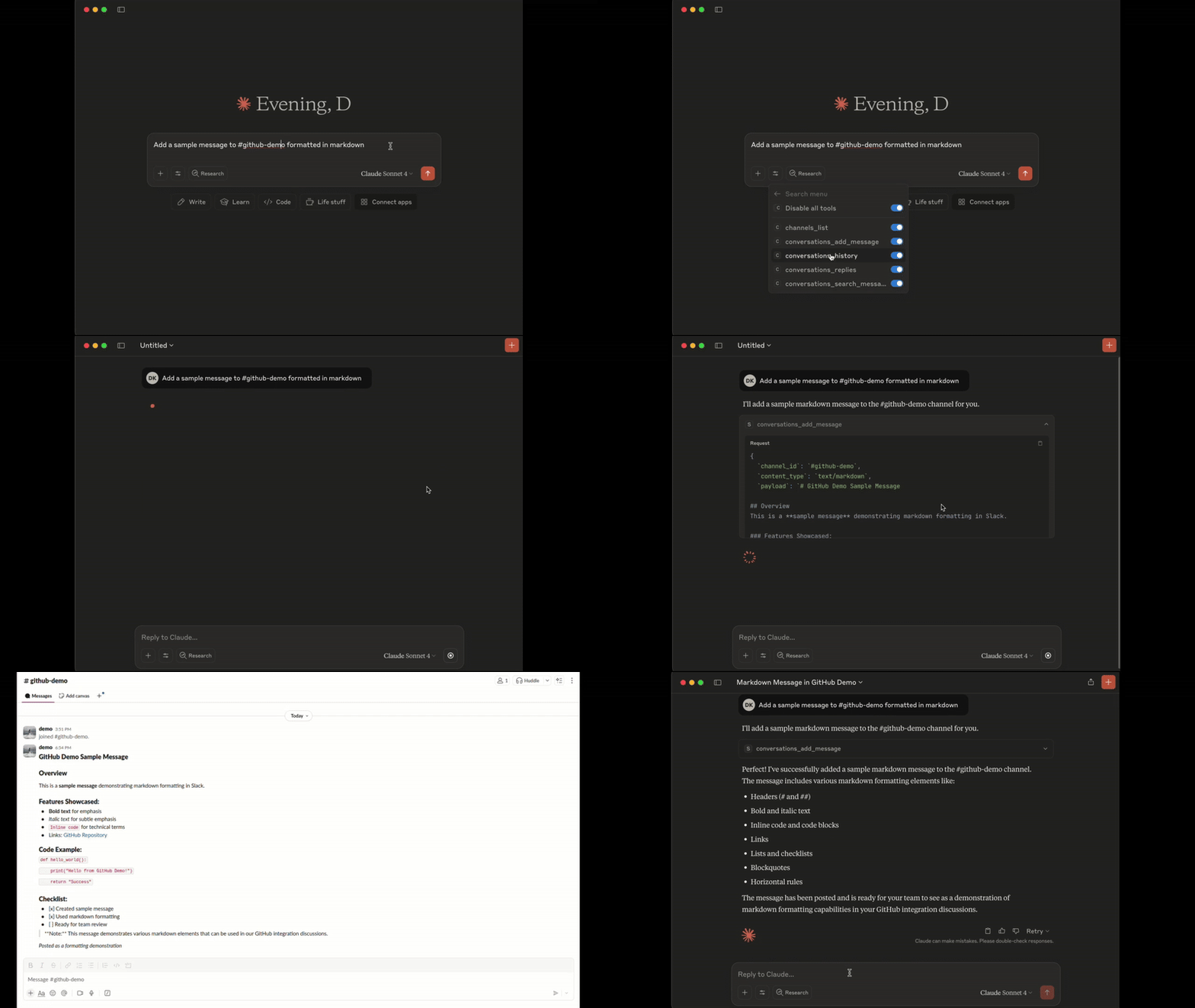
Add a message to a public channel, private channel, or direct message (DM, or IM) conversation by channel_id and thread_ts.
Note: Posting messages is disabled by default for safety. To enable, set the
SLACK_MCP_ADD_MESSAGE_TOOLenvironment variable. If set to a comma-separated list of channel IDs, posting is enabled only for those specific channels. See the Environment Variables section below for details.
Parameters:
channel_id (string, required): ID of the channel in format Cxxxxxxxxxx or its name starting with #... or @... aka #general or @username_dm.
thread_ts (string, optional): Unique identifier of either a thread’s parent message or a message in the thread_ts must be the timestamp in format 1234567890.123456 of an existing message with 0 or more replies. Optional, if not provided the message will be added to the channel itself, otherwise it will be added to the thread.
payload (string, required): Message payload in specified content_type format. Example: 'Hello, world!' for text/plain or '# Hello, world!' for text/markdown.
content_type (string, default: "text/markdown"): Content type of the message. Default is 'text/markdown'. Allowed values: 'text/markdown', 'text/plain'.
Search messages in a public channel, private channel, or direct message (DM, or IM) conversation using filters. All filters are optional, if not provided then search_query is required.
Note: This tool is not available when using bot tokens (
xoxb-*). Bot tokens cannot use thesearch.messagesAPI.
Parameters:
search_query (string, optional): Search query to filter messages. Example: 'marketing report' or full URL of Slack message e.g. 'https://slack.com/archives/C1234567890/p1234567890123456', then the tool will return a single message matching given URL, herewith all other parameters will be ignored.
filter_in_channel (string, optional): Filter messages in a specific channel by its ID or name. Example: C1234567890 or #general. If not provided, all channels will be searched.
filter_in_im_or_mpim (string, optional): Filter messages in a direct message (DM) or multi-person direct message (MPIM) conversation by its ID or name. Example: D1234567890 or @username_dm. If not provided, all DMs and MPIMs will be searched.
filter_users_with (string, optional): Filter messages with a specific user by their ID or display name in threads and DMs. Example: U1234567890 or @username. If not provided, all threads and DMs will be searched.
filter_users_from (string, optional): Filter messages from a specific user by their ID or display name. Example: U1234567890 or @username. If not provided, all users will be searched.
filter_date_before (string, optional): Filter messages sent before a specific date in format YYYY-MM-DD. Example: 2023-10-01, July, Yesterday or Today. If not provided, all dates will be searched.
filter_date_after (string, optional): Filter messages sent after a specific date in format YYYY-MM-DD. Example: 2023-10-01, July, Yesterday or Today. If not provided, all dates will be searched.
filter_date_on (string, optional): Filter messages sent on a specific date in format YYYY-MM-DD. Example: 2023-10-01, July, Yesterday or Today. If not provided, all dates will be searched.
filter_date_during (string, optional): Filter messages sent during a specific period in format YYYY-MM-DD. Example: July, Yesterday or Today. If not provided, all dates will be searched.
filter_threads_only (boolean, default: false): If true, the response will include only messages from threads. Default is boolean false.
cursor (string, default: ""): Cursor for pagination. Use the value of the last row and column in the response as next_cursor field returned from the previous request.
limit (number, default: 20): The maximum number of items to return. Must be an integer between 1 and 100.
Get list of channels
Parameters:
channel_types (string, required): Comma-separated channel types. Allowed values: mpim, im, public_channel, private_channel. Example: public_channel,private_channel,im
sort (string, optional): Type of sorting. Allowed values: popularity - sort by number of members/participants in each channel.
limit (number, default: 100): The maximum number of items to return. Must be an integer between 1 and 1000 (maximum 999).
cursor (string, optional): Cursor for pagination. Use the value of the last row and column in the response as next_cursor field returned from the previous request.
Add an emoji reaction to a message in a public channel, private channel, or direct message (DM, or IM) conversation.
Note: Adding reactions is disabled by default for safety. To enable, set the
SLACK_MCP_REACTION_TOOLenvironment variable. If set to a comma-separated list of channel IDs, reactions are enabled only for those specific channels. See the Environment Variables section below for details.
Parameters:
channel_id (string, required): ID of the channel in format Cxxxxxxxxxx or its name starting with #... or @... aka #general or @username_dm.
timestamp (string, required): Timestamp of the message to add reaction to, in format 1234567890.123456.
emoji (string, required): The name of the emoji to add as a reaction (without colons). Example: thumbsup, heart, rocket.
Remove an emoji reaction from a message in a public channel, private channel, or direct message (DM, or IM) conversation.
Note: Removing reactions follows the same permission model as
reactions_add. To enable, set theSLACK_MCP_REACTION_TOOLenvironment variable.
Parameters:
channel_id (string, required): ID of the channel in format Cxxxxxxxxxx or its name starting with #... or @... aka #general or @username_dm.
timestamp (string, required): Timestamp of the message to remove reaction from, in format 1234567890.123456.
emoji (string, required): The name of the emoji to remove as a reaction (without colons). Example: thumbsup, heart, rocket.
Search for users by name, email, or display name. Returns user details and DM channel ID if available.
Note: For OAuth tokens (
xoxp/xoxb), this tool searches the local users cache using pattern matching. For browser session tokens (xoxc/xoxd), it uses the Slack edge API for real-time search.
Parameters:
query (string, required): Search query - matches against real name, display name, username, or email.
limit (number, default: 10): Maximum number of results to return (1-100).
Returns: CSV with fields:
UserID: User ID (e.g., U1234567890)
UserName: Slack username
RealName: User's real name
DisplayName: User's display name
Email: User's email address
Title: User's job title
DMChannelID: DM channel ID if available in cache (for quick messaging)
List all user groups (subteams) in the workspace.
Parameters:
include_users (boolean, default: false): Include list of user IDs in each group.
include_count (boolean, default: true): Include user count for each group.
include_disabled (boolean, default: false): Include disabled/archived groups.
Returns: CSV with fields: id, name, handle, description, user_count, is_external
Required OAuth scopes:
usergroups:read
Create a new user group in the workspace.
Parameters:
name (string, required): Name of the user group (e.g., "Engineering Team").
handle (string, optional): Mention handle without @ (e.g., "engineering"). If not provided, Slack will auto-generate one.
description (string, optional): Purpose or description of the group.
channels (string, optional): Comma-separated channel IDs for default channels where group mentions will be highlighted.
Returns: JSON with created group details (id, name, handle, description)
Required OAuth scopes:
usergroups:write
Update an existing user group's metadata.
Parameters:
usergroup_id (string, required): ID of the user group (e.g., "S1234567890").
name (string, optional): New name for the group.
handle (string, optional): New mention handle.
description (string, optional): New description.
channels (string, optional): New default channels (comma-separated IDs). This replaces existing default channels.
Returns: JSON with updated group details
Required OAuth scopes:
usergroups:write
Update the members of a user group. This replaces all existing members.
Parameters:
usergroup_id (string, required): ID of the user group (e.g., "S1234567890").
users (string, required): Comma-separated user IDs to set as members (e.g., "U123,U456,U789").
Returns: JSON with updated group details including new user list
Required OAuth scopes:
usergroups:write
Manage your user group membership: list groups you're in, join a group, or leave a group.
Parameters:
action (string, required): Action to perform - list to see your groups, join to add yourself, leave to remove yourself.
usergroup_id (string, optional): ID of the user group (e.g., "S1234567890"). Required for join and leave actions.
Returns:
For list: CSV with groups you're a member of
For join/leave: JSON with result message and updated group info
Required OAuth scopes:
usergroups:read(for list),usergroups:read+usergroups:write(for join/leave)
Get unread messages across all channels efficiently. Uses a single API call to identify channels with unreads, then fetches only those messages. Results are prioritized: DMs > partner channels (Slack Connect) > internal channels.
Note: This tool works best with browser session tokens (
xoxc/xoxd), which use the efficientclient.countsAPI. For standard OAuth tokens (xoxp), a fallback method usingconversations.infois used, which requires one API call per channel and may be slower for large workspaces. Not available with bot tokens (xoxb).
Parameters:
include_messages (boolean, default: true): If true, returns the actual unread messages. If false, returns only a summary of channels with unreads.
channel_types (string, default: "all"): Filter by channel type: all, dm (direct messages), group_dm (group DMs), partner (externally shared channels), internal (regular workspace channels).
max_channels (number, default: 50): Maximum number of channels to fetch unreads from.
max_messages_per_channel (number, default: 10): Maximum messages to fetch per channel.
mentions_only (boolean, default: false): If true, only returns channels where you have @mentions. Note: This filter only works with browser tokens; OAuth tokens will return all unread channels.
Mark a channel or DM as read.
Note: Marking messages as read is disabled by default for safety. To enable, set the
SLACK_MCP_MARK_TOOLenvironment variable totrueor1. See the Environment Variables section below for details.
Parameters:
channel_id (string, required): ID of the channel in format Cxxxxxxxxxx or its name starting with #... or @... (e.g., #general, @username).
ts (string, optional): Timestamp of the message to mark as read up to. If not provided, marks all messages as read.
List saved items from Slack's "Save for Later" panel. Returns items the user has saved, with optional message content. This replaces the deprecated stars.list API (changelog).
Note: This tool requires browser session tokens (
xoxc/xoxd). It is not available with standard OAuth (xoxp) or bot (xoxb) tokens.
Parameters:
filter (string, default "saved"): Filter saved items: "saved" (active/in-progress), "completed" (marked done), "archived".
limit (number, default 50): Maximum number of items to return. Auto-paginates.
include_messages (boolean, default true): If true, fetches the actual saved message content. If false, returns metadata only.
max_messages_per_item (number, default 5): Max messages to fetch per saved item (for thread replies).
Update a saved item: mark as completed, set a due date/reminder, or both. Use item_id and ts values from saved_list output. This replaces the deprecated stars.add/stars.remove APIs.
Note: This tool requires browser session tokens (
xoxc/xoxd). It is not available with standard OAuth (xoxp) or bot (xoxb) tokens.
Parameters:
item_id (string, required): Channel/DM ID where the saved message lives (from saved_list output).
ts (string, required): Message timestamp of the saved item (from saved_list output).
mark (string, optional): Set to "completed" to mark the item as done.
date_due (number, optional): Unix timestamp for due date/reminder. Set to 0 to clear.
Clear all completed saved items from the "Save for Later" panel. This is a bulk operation that removes all items with state="completed".
Note: This tool requires browser session tokens (
xoxc/xoxd). It is not available with standard OAuth (xoxp) or bot (xoxb) tokens.
Parameters: None.
Related MCP server: Slack MCP Server
The Slack MCP Server exposes two special directory resources for easy access to workspace metadata:
slack://<workspace>/channels — Directory of ChannelsFetches a CSV directory of all channels in the workspace, including public channels, private channels, DMs, and group DMs.
URI: slack://<workspace>/channels
Format: text/csv
Fields:
id: Channel ID (e.g., C1234567890)
name: Channel name (e.g., #general, @username_dm)
topic: Channel topic (if any)
purpose: Channel purpose/description
memberCount: Number of members in the channel
slack://<workspace>/users — Directory of UsersFetches a CSV directory of all users in the workspace.
URI: slack://<workspace>/users
Format: text/csv
Fields:
userID: User ID (e.g., U1234567890)
userName: Slack username (e.g., john)
realName: User’s real name (e.g., John Doe)
Variable | Required? | Default | Description |
| Yes* |
| Slack browser token ( |
| Yes* |
| Slack browser cookie |
| Yes* |
| User OAuth token ( |
| Yes* |
| Bot token ( |
| No |
| Port for the MCP server to listen on |
| No |
| Host for the MCP server to listen on |
| No |
| Bearer token for SSE and HTTP transports |
| No |
| Proxy URL for outgoing requests |
| No |
| Custom User-Agent (for Enterprise Slack environments) |
| No |
| Send custom TLS-handshake to Slack servers based on |
| No |
| Path to CA certificate |
| No |
| Inject HTTPToolkit CA certificate to root trust-store for MitM debugging |
| No |
| Trust all insecure requests (NOT RECOMMENDED) |
| No |
| Enable message posting via |
| No |
| When |
| No |
| Enable to let Slack unfurl posted links or set comma-separated list of domains e.g. |
| No |
| Enable |
| No |
| Enable the |
| No |
| Enable the |
| No |
| Path to the users cache file. Used to cache Slack user information to avoid repeated API calls on startup. |
| No |
| Path to the channels cache file. Used to cache Slack channel information to avoid repeated API calls on startup. |
| No |
| Log-level for stdout or stderr. Valid values are: |
| No |
| Set to |
| No |
| Comma-separated list of tools to register. If empty, all read-only tools and usergroups tools are registered; write tools ( |
*You need one of: xoxp (user), xoxb (bot), or both xoxc/xoxd tokens for authentication.
Users Cache | Channels Cache | Limitations |
:x: | :x: | No cache, No LLM context enhancement with user data, tool |
:white_check_mark: | :x: | No channels cache, tool |
:white_check_mark: | :white_check_mark: | No limitations, fully functional Slack MCP Server. |
# Run the inspector with stdio transport
npx @modelcontextprotocol/inspector go run mcp/mcp-server.go --transport stdio

# View logs
tail -n 20 -f ~/Library/Logs/Claude/mcp*.logNever share API tokens
Keep .env files secure and private
Licensed under MIT - see LICENSE file. This is not an official Slack product.
Get list of channels
| Name | Required | Description | Default |
|---|---|---|---|
| channel_types | Yes | Possible channel types. Allowed values: 'mpim', 'im', 'public_channel', 'private_channel'. | |
| sort | No | Type of sorting. Allowed values: 'popularity' - sort by number of members/participants in each channel. |
Does the description disclose side effects, auth requirements, rate limits, or destructive behavior?
With no annotations provided, the description carries the full burden of behavioral disclosure. It only states the action ('Get list') without addressing permissions, rate limits, pagination, or what 'list' entails (e.g., format, completeness). This is inadequate for a tool that likely interacts with a chat system, where such details are critical.
Agents need to know what a tool does to the world before calling it. Descriptions should go beyond structured annotations to explain consequences.
Is the description appropriately sized, front-loaded, and free of redundancy?
The description is extremely concise with just three words, front-loaded with the core action. There's no wasted text, making it efficient for quick understanding, though this brevity contributes to gaps in other dimensions.
Shorter descriptions cost fewer tokens and are easier for agents to parse. Every sentence should earn its place.
Given the tool's complexity, does the description cover enough for an agent to succeed on first attempt?
Given no annotations and no output schema, the description is incomplete. It lacks details on behavioral traits (e.g., safety, performance), output format, and usage context. For a tool with parameters and likely complex interactions in a chat system, this minimal description fails to provide sufficient context for effective agent use.
Complex tools with many parameters or behaviors need more documentation. Simple tools need less. This dimension scales expectations accordingly.
Does the description clarify parameter syntax, constraints, interactions, or defaults beyond what the schema provides?
Schema description coverage is 100%, so the schema fully documents both parameters (channel_types and sort). The description adds no parameter-specific information beyond what's in the schema, meeting the baseline score of 3 for high schema coverage without additional value.
Input schemas describe structure but not intent. Descriptions should explain non-obvious parameter relationships and valid value ranges.
Does the description clearly state what the tool does and how it differs from similar tools?
The description 'Get list of channels' clearly states the verb ('Get') and resource ('channels'), but it's vague about scope and doesn't distinguish from the sibling tool 'conversations_history'. It doesn't specify whether this retrieves all channels, user-accessible channels, or some subset, leaving purpose ambiguous beyond the basic action.
Agents choose between tools based on descriptions. A clear purpose with a specific verb and resource helps agents select the right tool.
Does the description explain when to use this tool, when not to, or what alternatives exist?
No guidance is provided on when to use this tool versus alternatives like 'conversations_history'. The description doesn't mention context, prerequisites, or exclusions, leaving the agent to infer usage based solely on the tool name and parameters.
Agents often have multiple tools that could apply. Explicit usage guidance like "use X instead of Y when Z" prevents misuse.
Get messages from the channel by channel_id, the last row/column in the response is used as 'cursor' parameter for pagination if not empty
| Name | Required | Description | Default |
|---|---|---|---|
| channel_id | Yes | ID of the channel in format Cxxxxxxxxxx | |
| cursor | No | Cursor for pagination. Use the value of the last row and column in the response as next_cursor field returned from the previous request. | |
| limit | No | Limit of messages to fetch in format of maximum ranges of time (e.g. 1d - 1 day, 30d - 30 days, 90d - 90 days which is a default limit for free tier history) or number of messages (e.g. 50). Must be empty when 'cursor' is provided. | 1d |
Does the description disclose side effects, auth requirements, rate limits, or destructive behavior?
No annotations are provided, so the description carries the full burden of behavioral disclosure. It describes pagination behavior and the interaction between 'cursor' and 'limit' parameters, which adds useful context beyond the input schema. However, it doesn't cover other behavioral aspects such as rate limits, authentication requirements, error handling, or what the response format looks like (e.g., structure of returned messages). For a tool with no annotations, this leaves gaps in understanding its full behavior.
Agents need to know what a tool does to the world before calling it. Descriptions should go beyond structured annotations to explain consequences.
Is the description appropriately sized, front-loaded, and free of redundancy?
The description is a single sentence that efficiently conveys the core functionality and key behavioral detail (pagination). It is front-loaded with the main purpose and avoids unnecessary words. However, it could be slightly more structured by separating the pagination explanation into a second sentence for clarity, but overall it's concise and to the point.
Shorter descriptions cost fewer tokens and are easier for agents to parse. Every sentence should earn its place.
Given the tool's complexity, does the description cover enough for an agent to succeed on first attempt?
Given the tool's complexity (3 parameters, no output schema, no annotations), the description is moderately complete. It covers the purpose and pagination behavior but lacks details on response format, error conditions, or broader usage context. Without an output schema, the description doesn't explain what the tool returns (e.g., message structure), which is a significant gap. It's adequate for basic understanding but incomplete for full agent usage.
Complex tools with many parameters or behaviors need more documentation. Simple tools need less. This dimension scales expectations accordingly.
Does the description clarify parameter syntax, constraints, interactions, or defaults beyond what the schema provides?
Schema description coverage is 100%, meaning the input schema already documents all parameters thoroughly. The description adds some semantic context by explaining how pagination works with the cursor and the constraint that 'limit' must be empty when 'cursor' is provided, which clarifies parameter interactions. However, it doesn't provide significant additional meaning beyond what's in the schema descriptions, such as examples or edge cases, so it meets the baseline for high schema coverage.
Input schemas describe structure but not intent. Descriptions should explain non-obvious parameter relationships and valid value ranges.
Does the description clearly state what the tool does and how it differs from similar tools?
The description clearly states the tool's purpose: 'Get messages from the channel by channel_id'. It specifies the resource (messages) and the required parameter (channel_id), making the verb+resource combination explicit. However, it doesn't distinguish this tool from its sibling 'channels_list', which appears to list channels rather than messages, so the differentiation is implied but not explicit.
Agents choose between tools based on descriptions. A clear purpose with a specific verb and resource helps agents select the right tool.
Does the description explain when to use this tool, when not to, or what alternatives exist?
The description provides some usage guidance by explaining pagination with the cursor parameter and noting that 'limit' must be empty when 'cursor' is provided. This gives context for when to use certain parameters. However, it doesn't explicitly state when to use this tool versus alternatives like 'channels_list' or other hypothetical tools, nor does it provide broader context on when this tool is appropriate versus other methods for retrieving messages.
Agents often have multiple tools that could apply. Explicit usage guidance like "use X instead of Y when Z" prevents misuse.
Recent tool additions, removals, and schema changes observed during successful MCP inspections.
v1.0.0channels_listconversations_historyScored across 2 tools
The two tools have clearly distinct purposes: channels_list retrieves a list of channels, while conversations_history fetches messages from a specific channel. There is no overlap in functionality, making it easy for an agent to select the correct tool based on the task.
Both tools follow a consistent snake_case naming convention, but the patterns differ slightly: channels_list uses a noun_verb format, while conversations_history uses a noun_noun format. This minor deviation prevents a perfect score, but the naming is still readable and mostly consistent.
With only 2 tools, this server feels too thin for a Slack integration, as it lacks essential operations like sending messages, managing users, or updating channel settings. The scope is severely limited, making it difficult for agents to perform comprehensive Slack-related tasks.
The tool surface is significantly incomplete for a Slack domain. While it covers listing channels and retrieving message history, it misses critical operations such as posting messages, creating channels, or handling reactions, which are core to Slack workflows and will likely cause agent failures.
Hosted Slack MCP server for Claude, ChatGPT and Cursor, with each action switched per account.
The official MCP Server for the Mux API
One MCP server for all your work accounts: Slack, Teams, Google Chat, Jira, ClickUp, digest, tasks.
An MCP server that let you interact with Cycloid.io Internal Development Portal and Platform