Glama
GHAS MCP server (GitHub Advanced Security)

GHAS MCP server (GitHub Advanced Security)

by rajbos

[!Warning]
The calls in this server have been added to the official GitHub MCP Server, so this repo is archived and for learning purposes only!

ghas-mcp-server

MCP server to make calls to GHAS for GitHub repositories.

Currently this has the following tools that are supported:

  • list_dependabot_alerts: List all dependabot alerts for a repository

  • list_secret_scanning_alerts: List all secret scanning alerts for a repository

  • list_code_scanning_alerts: List all code scanning alerts for a repository

Make sure to add these three scopes (read only) to the configured PAT and for the correct organization as well!

Install in VS Code and VS Code Insiders

Use the buttons to install the server in your VS Code or VS Code Insiders environment. Make sure to read the link before you trust it! The links go to vscode.dev and insiders.vscode.dev and contain instructions to install the server.

VS Code will let you see the configuration before anything happens:
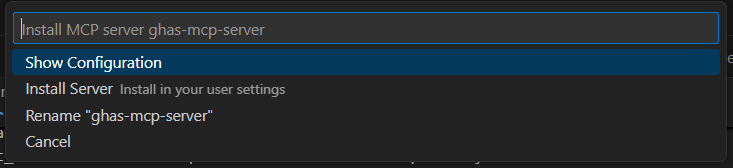
Screenshot of the configuration in VS Code

Example configuration

Add the configurations below to your MCP config in the editor.

Secure option: use the authenticated GitHub CLI

Instead of storing a Personal Access Token (see next section), you can also use the authenticated GitHub CLI. This will use the credentials you have configured in your GitHub CLI. This is useful when you have the GitHub CLI installed and already authenticated.

To use the GitHub CLI for authentication, follow the steps below:

  • Add "GITHUB_PERSONAL_ACCESS_TOKEN_USE_GHCLI": "true" to your environment variables.

  • Ensure you have the GitHub CLI installed and authenticated by running gh auth login.

Configuration:

{
    "mcp": {
        "inputs": [
        ]
    },
    "servers": {
        "ghas-mcp-server": {
            "command": "npx",
            "args": [
                "-y",
                "@rajbos/ghas-mcp-server"
            ],
            "env": {
                "GITHUB_PERSONAL_ACCESS_TOKEN_USE_GHCLI": "true"
            }
        }
    }
  }

Related MCP server: leak-secure-mcp

Configuration with a personal access token

For VS Code it would look like this:

{
    "mcp": {
        "inputs": [
            {
                "id": "github_personal_access_token",
                "description": "GitHub Personal Access Token",
                "type": "promptString",
                "password": true
            }
        ]
    },
    "servers": {
        "ghas-mcp-server": {
            "command": "npx",
            "args": [
                "-y",
                "@rajbos/ghas-mcp-server"
            ],
            "env": {
                "GITHUB_PERSONAL_ACCESS_TOKEN": "${input:github_personal_access_token}"
            }
        }
    }
  }

Results
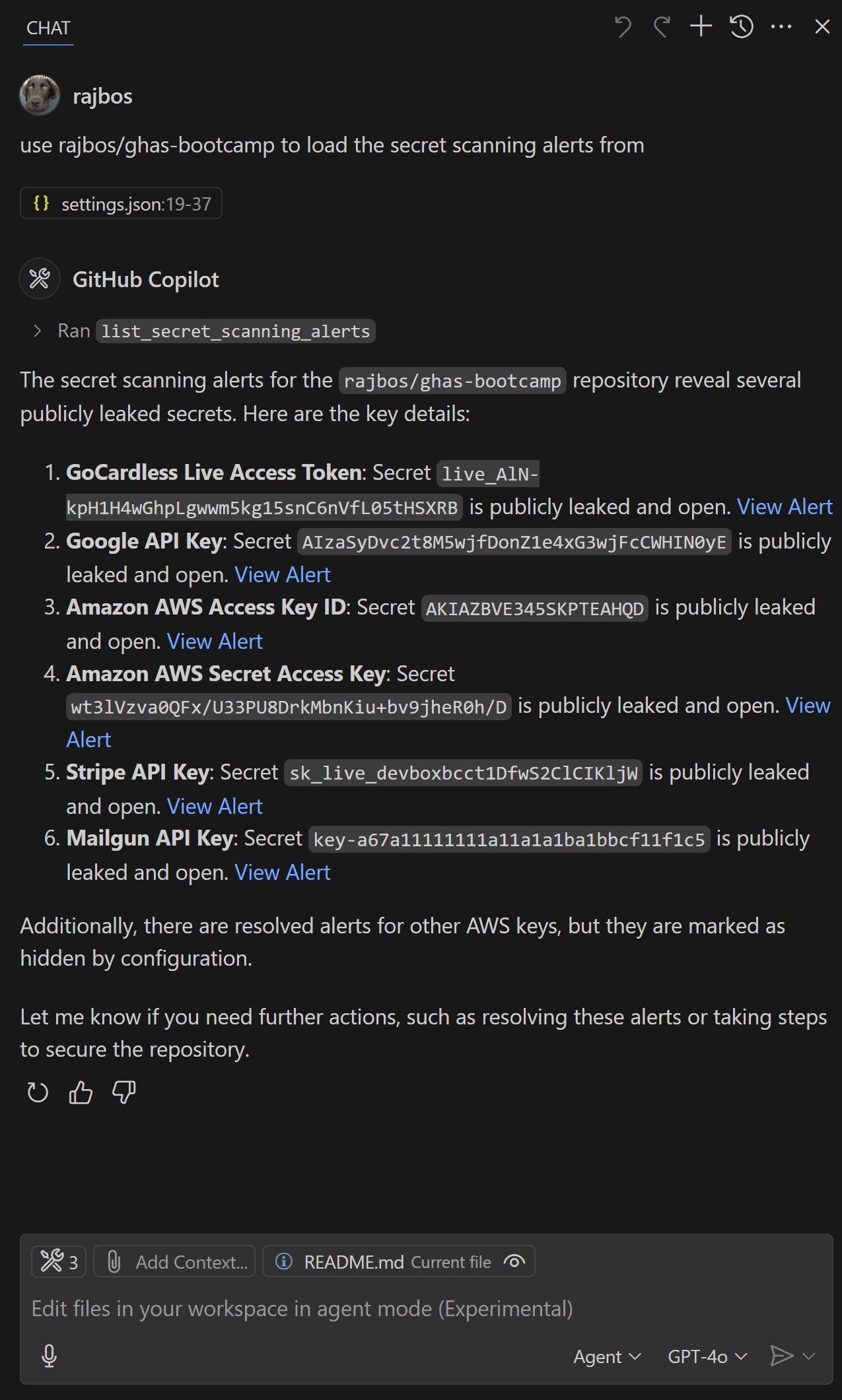
Screenshot of the output inside of VS Code

Contributing

Contributions are welcome! If you have ideas for new tools or improvements, please open an issue or submit a pull request.

Quick Start

# Install dependencies
npm install

# Build the project
npm run build

Project Structure

ghas-mcp-server/
├── src/
│   ├── operations/      # MCP Tools
│   │   └── security.ts
│   └── index.ts         # Server entry point
├── package.json
└── tsconfig.json

Adding Components

The project comes with the GHAS tools in src/operations/security.ts.

Building

  1. Make changes to your tools

  2. Run npm run build to compile

  3. The server will automatically load your tools on startup

Testing the local build

You can test your local build by configuring the locally build version with the following MCP config:

"servers": {
    "ghas-mcp-server": {
        "command": "node",
        "args": [
            "C:/Users/RobBos/Code/Repos/rajbos/ghas-mpc-server/dist/index.js"
        ],
        "env": {
            "GITHUB_PERSONAL_ACCESS_TOKEN_USE_GHCLI": "true"
        }
    }
}

Don't forget to change the path to your local build and build the project first!

Learn More

Available Tools

3 tools
list_code_scanning_alertsC

List the current GitHub Advanced Security code scanning alerts for a repository

Inputs: owner (required), repo (required).

list_dependabot_alertsC

List the current GitHub Dependabot alerts for a repository

Inputs: owner (required), repo (required).

list_secret_scanning_alertsC

List the current GitHub Advanced Security secret scanning alerts for a repository

Inputs: owner (required), repo (required).

Tool Schema Changelog

Recent tool additions, removals, and schema changes observed during successful MCP inspections.

Loading tool schema changelog…

    TDQS

    B3.2/5.0

    Scored across 3 tools

    Disambiguation5/5

    Each tool has a clearly distinct purpose targeting different types of GitHub Advanced Security alerts: code scanning, Dependabot, and secret scanning. The descriptions explicitly differentiate the alert types, leaving no ambiguity about which tool to use for each security domain.

    Naming Consistency5/5

    All tools follow a perfect verb_noun pattern with 'list_' prefix followed by the specific alert type (code_scanning_alerts, dependabot_alerts, secret_scanning_alerts). The naming is completely consistent across all three tools with no deviations in style or structure.

    Tool Count3/5

    With only 3 tools, the server feels quite thin for GitHub Advanced Security's scope, which includes multiple security domains and potential operations beyond just listing alerts. While the tools cover the core alert types, the count is borderline minimal for what could be a more comprehensive security management interface.

    Completeness2/5

    The toolset is severely incomplete for GitHub Advanced Security operations. While it covers listing three types of alerts, there are significant gaps: no ability to create, update, dismiss, or resolve alerts; no access to security overviews or metrics; and no coverage of other GHAS features like code scanning analyses or security advisories. This creates dead ends for agents needing to take action on security findings.

    Maintenance

    ActivityInactive
    ResponsivenessNo recent community issues

    Related MCP Connectors

    Related MCP Servers

    • A
      license
      B
      quality
      B
      maintenance
      Provides comprehensive tools for managing GitHub projects, milestones, tasks, and sprints. This server integrates deeply with GitHub Projects V2, offering features like automated kanban workflows, sprint planning, and custom field management.
      21
      272 npm
      105
      MIT
    • A
      license
      A
      quality
      Not graded
      maintenance
      Enterprise-grade MCP (Model Context Protocol) server for detecting secrets and sensitive information in GitHub repositories. Scans for 35+ types of secrets including API keys, passwords, tokens, and credentials with production-ready reliability features.
      5
      0
      -
    • F
      license
      A
      quality
      D
      maintenance
      Enables searching and analyzing CVEs and vulnerabilities from multiple sources, optimized for PR review scenarios to help developers identify the latest security issues.
      8
      2
      -