English | 한국어 | 日本語 | 中文
MonkeyPlanner
为您的 AI 编程代理提供的本地优先任务记忆库。
一键审批;剩下的交给代理。无云端依赖。无遥测数据。永久免费,永久 MIT 协议。
适用于 Claude Code · Claude Desktop · Cursor · Continue · 以及任何兼容 MCP 的客户端。
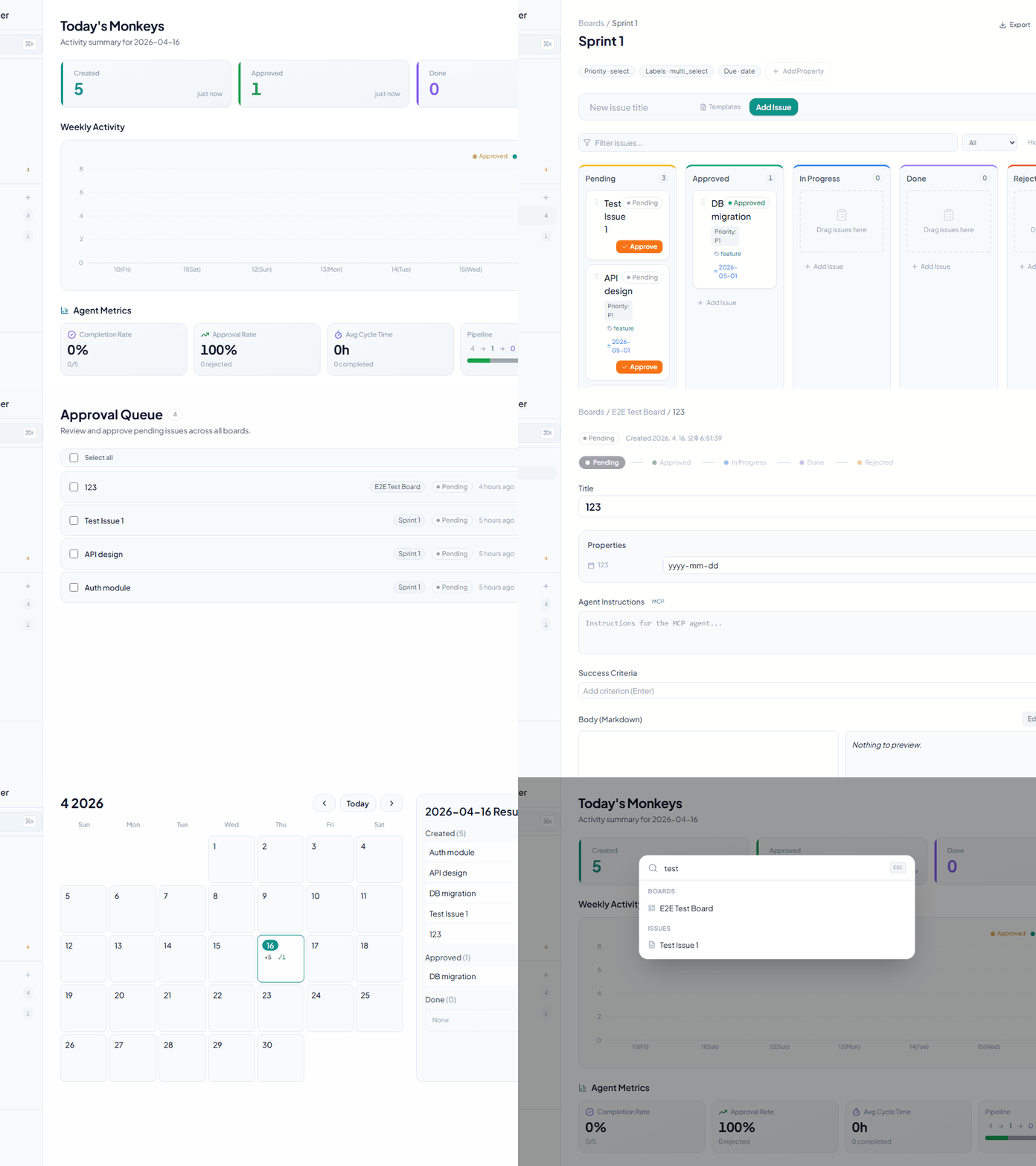
快速开始
# Docker (recommended)
docker run -p 8080:8080 -v $(pwd)/data:/data ghcr.io/kjm99d/monkeyplanner:latest

# then wire up your agent
monkey-planner mcp install --for claude-code     # or --for cursor / --for claude-desktop
打开 http://localhost:8080 — 内置的欢迎看板将引导您完成后续操作。
Related MCP server: mcp-kanban
功能特性
问题与看板管理
审批门控
代理功能
数据可视化
用户体验
全局搜索 — 使用 Cmd+K 进行快速搜索
键盘快捷键
h — 前往仪表盘
a — 前往审批队列
? — 显示快捷键帮助
Cmd+S — 保存
Escape — 关闭模态框/对话框
可折叠侧边栏 — 最大化屏幕空间
深色模式 — 主题切换
国际化 — 支持韩语、英语、日语和中文
自动化与集成
Webhooks — 支持 Discord、Slack 和 Telegram
事件:issue.created, issue.approved, issue.status_changed, issue.updated, issue.deleted, comment.created
实时 UI 同步 (SSE) — 通过 MCP/CLI 进行的更改会自动反映在打开的浏览器标签页中,无需刷新
JSON 导出 — 导出所有问题数据
右键上下文菜单 — 快速操作
问题模板 — 基于看板的 localStorage 持久化
MCP 服务器 (AI 代理集成)
为 AI 代理自动化提供 13 个工具:
list_boards — 列出所有看板
list_issues — 查询问题(按 boardId、状态过滤)
get_issue — 获取问题详情,包括指令、标准和评论
create_issue — 创建新问题
approve_issue — 批准:待处理 → 已批准
claim_issue — 认领:已批准 → 进行中
submit_qa — 提交 QA:进行中 → QA
complete_issue — 完成:QA → 已完成(可选评论)
reject_issue — 拒绝:QA → 进行中(需填写原因)
add_comment — 添加评论
update_criteria — 勾选或取消勾选成功标准
search_issues — 按标题搜索问题
get_version — 获取 MCP 服务器版本(用于诊断)
技术栈
后端
前端
框架: React 18
语言: TypeScript
打包工具: Vite 6
CSS: Tailwind CSS
状态管理: React Query (TanStack)
拖拽: @dnd-kit/core, @dnd-kit/sortable
图标: lucide-react
图表: recharts
国际化: react-i18next
Markdown: react-markdown + rehype-sanitize
MCP
入门指南
要求
Go 1.26 或更高版本
Node.js 18 或更高版本
npm 或 yarn
安装与运行
1. 克隆并初始化
git clone https://github.com/kjm99d/MonkeyPlanner.git
cd monkey-planner
make init
2. 生产构建 (单二进制文件)
make build
./bin/monkey-planner
服务器运行在 http://localhost:8080,前端已嵌入其中。
3. 开发模式 (独立进程)
终端 1 — 后端:
终端 2 — 前端 (Vite 开发服务器, :5173):
前端会自动将 /api 请求代理到 :8080。
环境变量
# Server address (default: :8080)
export MP_ADDR=":8080"

# Database connection string
# SQLite (default: sqlite://./data/monkey.db)
export MP_DSN="sqlite://./data/monkey.db"

# PostgreSQL example
export MP_DSN="postgres://user:password@localhost:5432/monkey_planner"
MCP 服务器设置
推荐:通过 CLI 自动配置
# Claude Code (writes .mcp.json in the current directory)
monkey-planner mcp install --for claude-code

# Claude Desktop (writes the OS-native config file)
monkey-planner mcp install --for claude-desktop

# Cursor (writes .cursor/mcp.json)
monkey-planner mcp install --for cursor
标志:--dry-run 用于预览,--scope user 用于全局条目 (~/.mcp.json),--force 用于覆盖,--base-url <url> 用于指向非默认服务器。
之后重启客户端以重新读取配置。
手动配置
适用于 Claude Code (.mcp.json)、Claude Desktop (操作系统原生配置) 和 Cursor (.cursor/mcp.json):
{
  "mcpServers": {
    "monkey-planner": {
      "command": "/path/to/monkey-planner",
      "args": ["mcp"],
      "env": {
        "MP_BASE_URL": "http://localhost:8080"
      }
    }
  }
}
二进制文件必须能够访问 HTTP 服务器(通过 MP_BASE_URL 设置)。在同一台机器上运行时,保持默认即可。
MCP 工具使用示例
AI: List all boards
→ list_boards()

AI: Find issues related to "authentication"
→ search_issues(query="authentication")

AI: Approve the first pending issue, claim it, work on it, and submit for QA
→ approve_issue() → claim_issue() → submit_qa()
工作流 — 实际使用场景
以下是修复语言切换器 Bug 的真实工作流,展示了人类和 AI 代理如何通过 MonkeyPlanner 协作。
状态流转
Pending → Approved → InProgress → QA → Done
                         ↑              │ (reject with reason)
                         └──────────────┘
分步说明
1. 创建问题 — 人类发现 Bug,要求 AI 登记
Human: "The language selector dropdown doesn't appear when clicking the button. Create an issue."
AI:    create_issue(boardId, title, body, instructions)  →  status: Pending
2. 批准 — 人类审查并批准
Human: (clicks Approve on the board or tells AI)
AI:    approve_issue(issueId)  →  status: Approved
3. 开始工作 — AI 认领问题并开始编码
AI:    claim_issue(issueId)  →  status: InProgress
       - Reads code, identifies root cause
       - Implements fix, runs tests
       - Commits changes
4. 提交 QA — AI 完成工作并提交审查
AI:    submit_qa(issueId, comment: "commit abc1234 — fixed click handler")
       →  status: QA
       add_comment(issueId, "Commit info: ...")
5. 审查 — 人类测试修复结果
Human: Tests in browser, finds the dropdown is clipped by sidebar
       →  reject_issue(issueId, reason: "Dropdown is hidden behind sidebar")
       →  status: InProgress  (back to step 3)

Human: Tests again after fix, everything works
       →  complete_issue(issueId)  →  status: Done
6. 反馈循环 — 全程通过评论进行沟通
Human: add_comment("Dropdown is clipped on the left side, fix it")
AI:    get_issue() → reads comment → fixes → commit → submit_qa()
Human: Tests → complete_issue()  →  Done ✓
关键点
API 参考
OpenAPI 3.0 规范: backend/docs/swagger.yaml
关键端点
看板
GET    /api/boards                  # List boards
POST   /api/boards                  # Create board
PATCH  /api/boards/{id}             # Update board
DELETE /api/boards/{id}             # Delete board
问题
GET    /api/issues                  # List issues (filter: boardId, status, parentId)
POST   /api/issues                  # Create issue
GET    /api/issues/{id}             # Issue detail + child issues
PATCH  /api/issues/{id}             # Update issue (status, properties, title, etc.)
DELETE /api/issues/{id}             # Delete issue
POST   /api/issues/{id}/approve     # Approve issue (Pending → Approved)
评论
GET    /api/issues/{issueId}/comments    # List comments
POST   /api/issues/{issueId}/comments    # Add comment
DELETE /api/comments/{commentId}         # Delete comment
属性 (自定义属性)
GET    /api/boards/{boardId}/properties      # List property definitions
POST   /api/boards/{boardId}/properties      # Create property
PATCH  /api/boards/{boardId}/properties/{propId}  # Update property
DELETE /api/boards/{boardId}/properties/{propId}  # Delete property
Webhooks
GET    /api/boards/{boardId}/webhooks           # List webhooks
POST   /api/boards/{boardId}/webhooks           # Create webhook
PATCH  /api/boards/{boardId}/webhooks/{whId}    # Update webhook
DELETE /api/boards/{boardId}/webhooks/{whId}    # Delete webhook
日历
GET /api/calendar           # Monthly stats (year, month required)
GET /api/calendar/day       # Daily issue list (date required)
有关完整架构详情,请参阅 backend/docs/swagger.yaml。
项目结构
monkey-planner/
├── backend/
│   ├── cmd/monkey-planner/
│   │   ├── main.go              # Entry point (HTTP server)
│   │   └── mcp.go               # MCP server (JSON-RPC stdio)
│   ├── internal/
│   │   ├── domain/              # Domain models (Issue, Board, etc.)
│   │   ├── service/             # Business logic
│   │   ├── storage/             # Database layer (SQLite/PostgreSQL)
│   │   ├── http/                # HTTP handlers & router
│   │   └── migrations/          # goose migration files
│   ├── web/                     # Embedded frontend (embed.FS)
│   ├── docs/
│   │   └── swagger.yaml         # OpenAPI 3.0 spec
│   ├── go.mod
│   └── go.sum
│
├── frontend/
│   ├── src/
│   │   ├── components/          # Reusable components
│   │   ├── features/            # Page & feature components
│   │   │   ├── home/           # Dashboard
│   │   │   ├── board/          # Board & Kanban
│   │   │   ├── issue/          # Issue detail
│   │   │   ├── calendar/       # Calendar
│   │   │   └── approval/       # Approval queue
│   │   ├── api/                 # API hooks & client
│   │   ├── design/              # Tailwind tokens
│   │   ├── i18n/                # Translations (en.json, ko.json, ja.json, zh.json)
│   │   ├── App.tsx              # Router
│   │   ├── index.css            # Global styles
│   │   └── main.tsx
│   ├── package.json
│   ├── vite.config.ts
│   ├── tsconfig.json
│   └── tailwind.config.js
│
├── .mcp.json                    # Claude Code MCP config
├── Makefile                     # Build & dev commands
├── .githooks/                   # Git hooks
└── data/                        # SQLite database (default)
测试
后端测试
前端测试
可访问性测试
所有测试
常用命令
# Initial setup after cloning
make init

# Production build
make build

# Run production server
./bin/monkey-planner

# Development mode
make run-backend        # Terminal 1
make run-frontend       # Terminal 2

# Clean build artifacts
make clean
状态转换规则
Pending
  ↓ (approve endpoint)
Approved
  ↓ (PATCH status)
InProgress
  ↓ (PATCH status)
Done

Pending → Approved: POST /api/issues/{id}/approve (dedicated endpoint only)
Approved ↔ InProgress ↔ Done: Free transitions via PATCH
Pending: Cannot be re-entered from other statuses
Rejected: Separate rejection state with reason tracking
许可证
MIT
贡献
欢迎提交 Issue 和 Pull Request。
联系方式
如有关于项目的问题或反馈,请开启一个 GitHub Issue。
