
A
licenseNot graded
qualityD
maintenanceA local-first Kanban board for AI agents that enables ticket management via MCP tools, with a real-time web UI.
8 npm
4
MIT

AIコーディングエージェントのためのローカルファーストなタスクメモリ。 クリック一つで承認し、あとはエージェントにお任せ。クラウド不要。テレメトリなし。永久無料、MITライセンス。
Claude Code · Claude Desktop · Cursor · Continue · その他MCP互換クライアントで動作します。
# Docker (recommended)
docker run -p 8080:8080 -v $(pwd)/data:/data ghcr.io/kjm99d/monkeyplanner:latest

# then wire up your agent
monkey-planner mcp install --for claude-code     # or --for cursor / --for claude-desktop
http://localhost:8080 を開いてください。組み込みのウェルカムボードが操作方法を案内します。
Related MCP server: Rapiber Ticket Manager
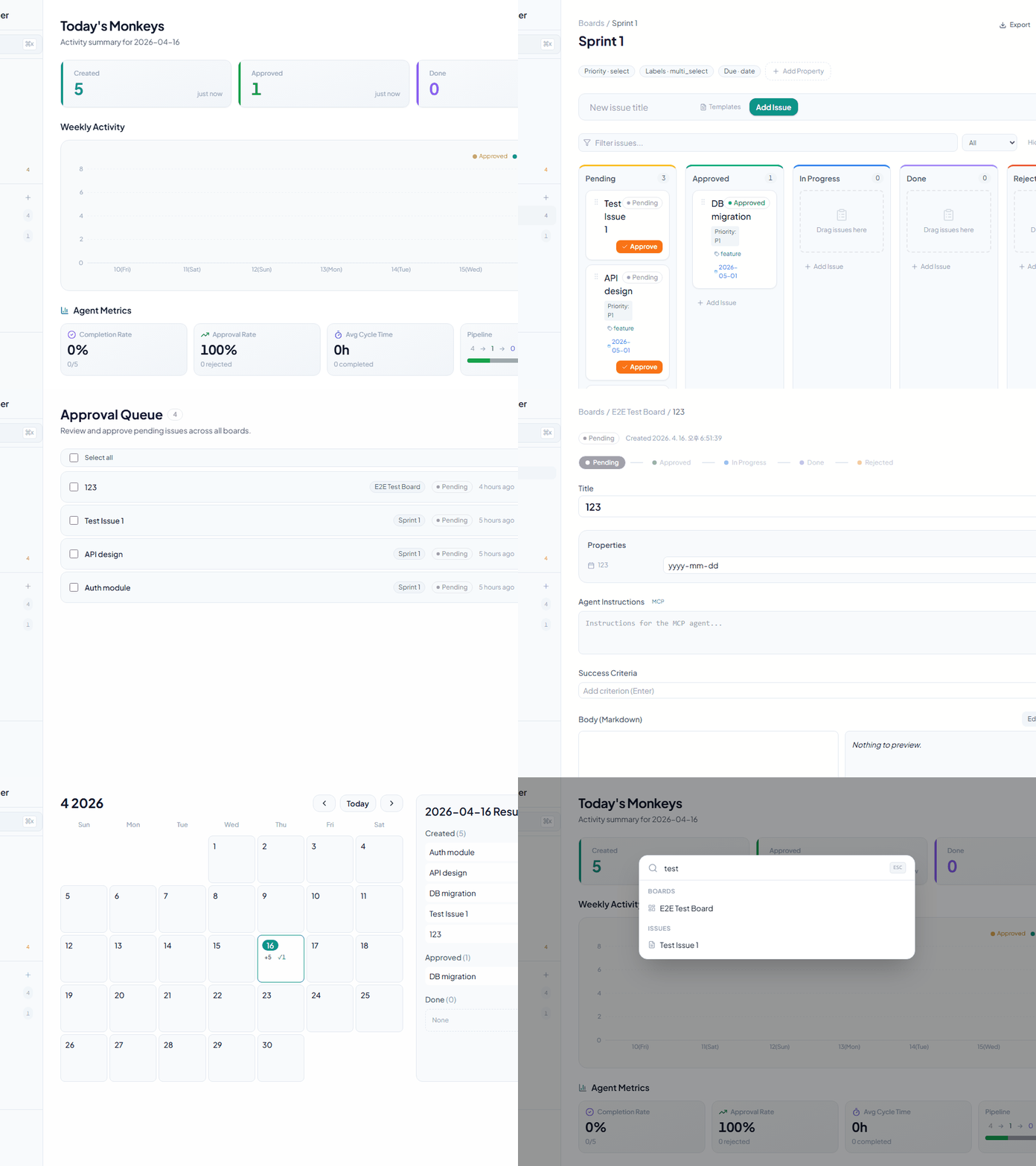
カンバンボード — ドラッグ&ドロップ、水平スクロール、フィルタリング、ソート、テーブル表示切り替え
課題作成 — タイトル、Markdown本文、カスタムプロパティ
カスタムプロパティ — 6つの型をサポート:
テキスト
数値
セレクト
マルチセレクト
日付
チェックボックス
保留中 → 承認済み — 専用の承認エンドポイント経由(汎用的なPATCHでは実行不可)
承認キュー — ボードを横断して保留中の課題を一括承認
承認済み → 進行中 → 完了 — 柔軟なステータス遷移
却下ステータス — 却下理由の記録
エージェント指示フィールド — MCPエージェントが従うべき詳細な指示を提供
成功基準 — チェックリストとして完了条件を管理
コメント — 進捗の記録と課題ごとのコミュニケーション
依存関係 — 課題間のブロック関係を表現
カレンダー — 月間グリッド + 日次アクティビティ(作成、承認、完了数)
ダッシュボード — 統計カード + 週次アクティビティチャート
サイドバー — ボード一覧、課題数、最近のアイテム
グローバル検索 — Cmd+Kによるクイック検索
キーボードショートカット
h — ダッシュボードへ移動
a — 承認キューへ移動
? — ショートカットヘルプを表示
Cmd+S — 保存
Escape — モーダル/ダイアログを閉じる
折りたたみ可能なサイドバー — 画面スペースを最大化
ダークモード — テーマ切り替え
国際化 — 韓国語、英語、日本語、中国語
Webhook — Discord、Slack、Telegramをサポート
イベント: issue.created, issue.approved, issue.status_changed, issue.updated, issue.deleted, comment.created
リアルタイムUI同期 (SSE) — MCP/CLI経由の変更がブラウザタブに自動反映(リロード不要)
JSONエクスポート — すべての課題データのエクスポート
右クリックコンテキストメニュー — クイックアクション
課題テンプレート — ボードごとのlocalStorage永続化
AIエージェント自動化のための13個のツール:
list_boards — 全ボードの一覧表示
list_issues — 課題のクエリ(boardId、ステータスでフィルタリング)
get_issue — 指示、基準、コメントを含む課題の詳細取得
create_issue — 新規課題の作成
approve_issue — 承認: 保留中 → 承認済み
claim_issue — 引き受け: 承認済み → 進行中
submit_qa — QA提出: 進行中 → QA
complete_issue — 完了: QA → 完了(オプションでコメント)
reject_issue — 却下: QA → 進行中(必須の理由付き)
add_comment — 課題へのコメント追加
update_criteria — 成功基準のチェック/チェック解除
search_issues — タイトルによる課題検索
get_version — MCPサーバーバージョンの取得(診断用)
言語: Go 1.26
ルーター: chi/v5
データベース: SQLite / PostgreSQL (設定可能)
マイグレーション: goose/v3
埋め込みファイル: embed.FS (単一バイナリデプロイ)
フレームワーク: React 18
言語: TypeScript
バンドラー: Vite 6
CSS: Tailwind CSS
状態管理: React Query (TanStack)
ドラッグ&ドロップ: @dnd-kit/core, @dnd-kit/sortable
アイコン: lucide-react
チャート: recharts
i18n: react-i18next
Markdown: react-markdown + rehype-sanitize
プロトコル: JSON-RPC 2.0 over stdio
ターゲット: Claude Code, Claude Desktop
Go 1.26 以降
Node.js 18 以降
npm または yarn
git clone https://github.com/kjm99d/MonkeyPlanner.git
cd monkey-planner
make initmake build
./bin/monkey-plannerサーバーは http://localhost:8080 で実行され、フロントエンドが埋め込まれます。
ターミナル 1 — バックエンド:
make run-backendターミナル 2 — フロントエンド (Vite開発サーバー, :5173):
make run-frontendフロントエンドは /api リクエストを自動的に :8080 にプロキシします。
# Server address (default: :8080)
export MP_ADDR=":8080"

# Database connection string
# SQLite (default: sqlite://./data/monkey.db)
export MP_DSN="sqlite://./data/monkey.db"

# PostgreSQL example
export MP_DSN="postgres://user:password@localhost:5432/monkey_planner"# Claude Code (writes .mcp.json in the current directory)
monkey-planner mcp install --for claude-code
# Claude Desktop (writes the OS-native config file)
monkey-planner mcp install --for claude-desktop
# Cursor (writes .cursor/mcp.json)
monkey-planner mcp install --for cursorフラグ: --dry-run でプレビュー、--scope user でグローバル設定 (~/.mcp.json)、--force で上書き、--base-url <url> でデフォルト以外のサーバーを指定。
設定後にクライアントを再起動して設定を再読み込みしてください。
Claude Code (.mcp.json)、Claude Desktop (OSネイティブ設定)、Cursor (.cursor/mcp.json) で同様に動作します:
{
  "mcpServers": {
    "monkey-planner": {
      "command": "/path/to/monkey-planner",
      "args": ["mcp"],
      "env": {
        "MP_BASE_URL": "http://localhost:8080"
      }
    }
  }
}
バイナリはHTTPサーバーに到達できる必要があります (MP_BASE_URL で設定)。同じマシンで実行する場合はデフォルトのままで構いません。
AI: List all boards
→ list_boards()

AI: Find issues related to "authentication"
→ search_issues(query="authentication")

AI: Approve the first pending issue, claim it, work on it, and submit for QA
→ approve_issue() → claim_issue() → submit_qa()以下は、言語切り替えバグを修正する実際のワークフローです。人間とAIエージェントがMonkeyPlannerを通じてどのように協力するかを示しています。
Pending → Approved → InProgress → QA → Done
                         ↑              │ (reject with reason)
└──────────────┘1. 課題作成 — 人間がバグを発見し、AIに登録を依頼
Human: "The language selector dropdown doesn't appear when clicking the button. Create an issue."
AI:    create_issue(boardId, title, body, instructions)  →  status: Pending
2. 承認 — 人間がレビューして承認
Human: (clicks Approve on the board or tells AI)
AI:    approve_issue(issueId)  →  status: Approved
3. 作業開始 — AIが課題を引き受け、コーディングを開始
AI:    claim_issue(issueId)  →  status: InProgress
       - Reads code, identifies root cause
       - Implements fix, runs tests
       - Commits changes
4. QA提出 — AIが完了し、レビューのために提出
AI:    submit_qa(issueId, comment: "commit abc1234 — fixed click handler")
       →  status: QA
       add_comment(issueId, "Commit info: ...")
5. レビュー — 人間が修正をテスト
Human: Tests in browser, finds the dropdown is clipped by sidebar
       →  reject_issue(issueId, reason: "Dropdown is hidden behind sidebar")
       →  status: InProgress  (back to step 3)

Human: Tests again after fix, everything works
       →  complete_issue(issueId)  →  status: Done
6. フィードバックループ — コメントを通じたコミュニケーション
Human: add_comment("Dropdown is clipped on the left side, fix it")
AI:    get_issue() → reads comment → fixes → commit → submit_qa()
Human: Tests → complete_issue() → Done ✓人間がゲートを制御: 承認、QA合格/却下、完了
AIが作業を実行: コード分析、実装、テスト、コミット
コメントがコミュニケーションチャネル: 双方が add_comment を使用してフィードバックを交換
QAループが早すぎる完了を防止: 課題は完了前に人間のレビューを通過する必要がある
OpenAPI 3.0仕様: backend/docs/swagger.yaml
GET    /api/boards                  # List boards
POST   /api/boards                  # Create board
PATCH  /api/boards/{id}             # Update board
DELETE /api/boards/{id} # Delete boardGET /api/issues # List issues (filter: boardId, status, parentId)
POST /api/issues # Create issue
GET /api/issues/{id} # Issue detail + child issues
PATCH /api/issues/{id} # Update issue (status, properties, title, etc.)
DELETE /api/issues/{id} # Delete issue
POST /api/issues/{id}/approve # Approve issue (Pending → Approved)GET /api/issues/{issueId}/comments # List comments
POST /api/issues/{issueId}/comments # Add comment
DELETE /api/comments/{commentId} # Delete commentGET /api/boards/{boardId}/properties # List property definitions
POST /api/boards/{boardId}/properties # Create property
PATCH /api/boards/{boardId}/properties/{propId} # Update property
DELETE /api/boards/{boardId}/properties/{propId} # Delete propertyGET /api/boards/{boardId}/webhooks # List webhooks
POST /api/boards/{boardId}/webhooks # Create webhook
PATCH /api/boards/{boardId}/webhooks/{whId} # Update webhook
DELETE /api/boards/{boardId}/webhooks/{whId} # Delete webhookGET /api/calendar # Monthly stats (year, month required)
GET /api/calendar/day # Daily issue list (date required)スキーマの詳細は backend/docs/swagger.yaml を参照してください。
monkey-planner/
├── backend/
│   ├── cmd/monkey-planner/
│   │   ├── main.go              # Entry point (HTTP server)
│   │   └── mcp.go               # MCP server (JSON-RPC stdio)
│   ├── internal/
│   │   ├── domain/              # Domain models (Issue, Board, etc.)
│   │   ├── service/             # Business logic
│   │   ├── storage/             # Database layer (SQLite/PostgreSQL)
│   │   ├── http/                # HTTP handlers & router
│   │   └── migrations/          # goose migration files
│   ├── web/                     # Embedded frontend (embed.FS)
│   ├── docs/
│   │   └── swagger.yaml         # OpenAPI 3.0 spec
│   ├── go.mod
│   └── go.sum
│
├── frontend/
│   ├── src/
│   │   ├── components/          # Reusable components
│   │   ├── features/            # Page & feature components
│   │   │   ├── home/           # Dashboard
│   │   │   ├── board/          # Board & Kanban
│   │   │   ├── issue/          # Issue detail
│   │   │   ├── calendar/       # Calendar
│   │   │   └── approval/       # Approval queue
│   │   ├── api/                 # API hooks & client
│   │   ├── design/              # Tailwind tokens
│   │   ├── i18n/                # Translations (en.json, ko.json, ja.json, zh.json)
│   │   ├── App.tsx              # Router
│   │   ├── index.css            # Global styles
│   │   └── main.tsx
│   ├── package.json
│   ├── vite.config.ts
│   ├── tsconfig.json
│   └── tailwind.config.js
│
├── .mcp.json                    # Claude Code MCP config
├── Makefile                     # Build & dev commands
├── .githooks/                   # Git hooks
└── data/ # SQLite database (default)make test-backendmake test-frontendmake test-a11ymake test# Initial setup after cloning
make init
# Production build
make build
# Run production server
./bin/monkey-planner
# Development mode
make run-backend # Terminal 1
make run-frontend # Terminal 2
# Clean build artifacts
make cleanPending
↓ (approve endpoint)
Approved
↓ (PATCH status)
InProgress
↓ (PATCH status)
Done
Pending → Approved: POST /api/issues/{id}/approve (dedicated endpoint only)
Approved ↔ InProgress ↔ Done: Free transitions via PATCH
Pending: Cannot be re-entered from other statuses
Rejected: Separate rejection state with reason trackingMIT
Issueやプルリクエストを歓迎します。
プロジェクトに関する質問やフィードバックは、GitHub Issueを開いてください。
This server cannot be deployed
Task & board management for AI agents + humans. Kanban, comments, digests via MCP.
Minimal issue tracker: projects, objectives and trackable plans, written by agents over MCP.
MCP server for your apps' tools and custom tools, plus hosted AI agents and approval-gated workflows
Work management where AI agents are first-class members: tasks, projects, memory over hosted MCP