A
licenseA
qualityD
maintenanceA powerful MCP server for fetching and transforming web content into various formats (HTML, JSON, Markdown, Plain Text) with ease.
4
13,314 npm
42
MIT

The Weaviate MCP Server allows you to create custom tools for Cursor IDE and interact with a cheerful API. You can:
Fetch website content: Retrieve content from any URL using the mcp_fetch endpoint
Check server mood: Ask the server "How are you?" via the mood endpoint to receive a cheerful response with a heart ❤️
Deploy flexibly: Use Heroku, Docker, or traditional Python setup
Integrate seamlessly: Connect to Cursor IDE via SSE or stdio transport methods
Configure as needed: Set environment variables for port, host, and user agent
Extend compatibility: Potentially integrate with Claude Desktop via platforms like Smithery
Allows deployment of the MCP server to Heroku platform with a single click using the 'Deploy to Heroku' button
Click on "Deploy Server".
Wait a few minutes for the server to deploy. Once ready, it will show a "Started" state.
In the chat, type @ followed by the MCP server name and your instructions, e.g., "@Weaviate MCP Server fetch the latest blog post from example.com"
That's it! The server will respond to your query, and you can continue using it as needed.
Here is a step-by-step guide with screenshots.
A simple template for creating custom tools for Cursor IDE using Model Context Protocol (MCP). Create your own repository from this template, modify the tools, and connect them to your Cursor IDE.
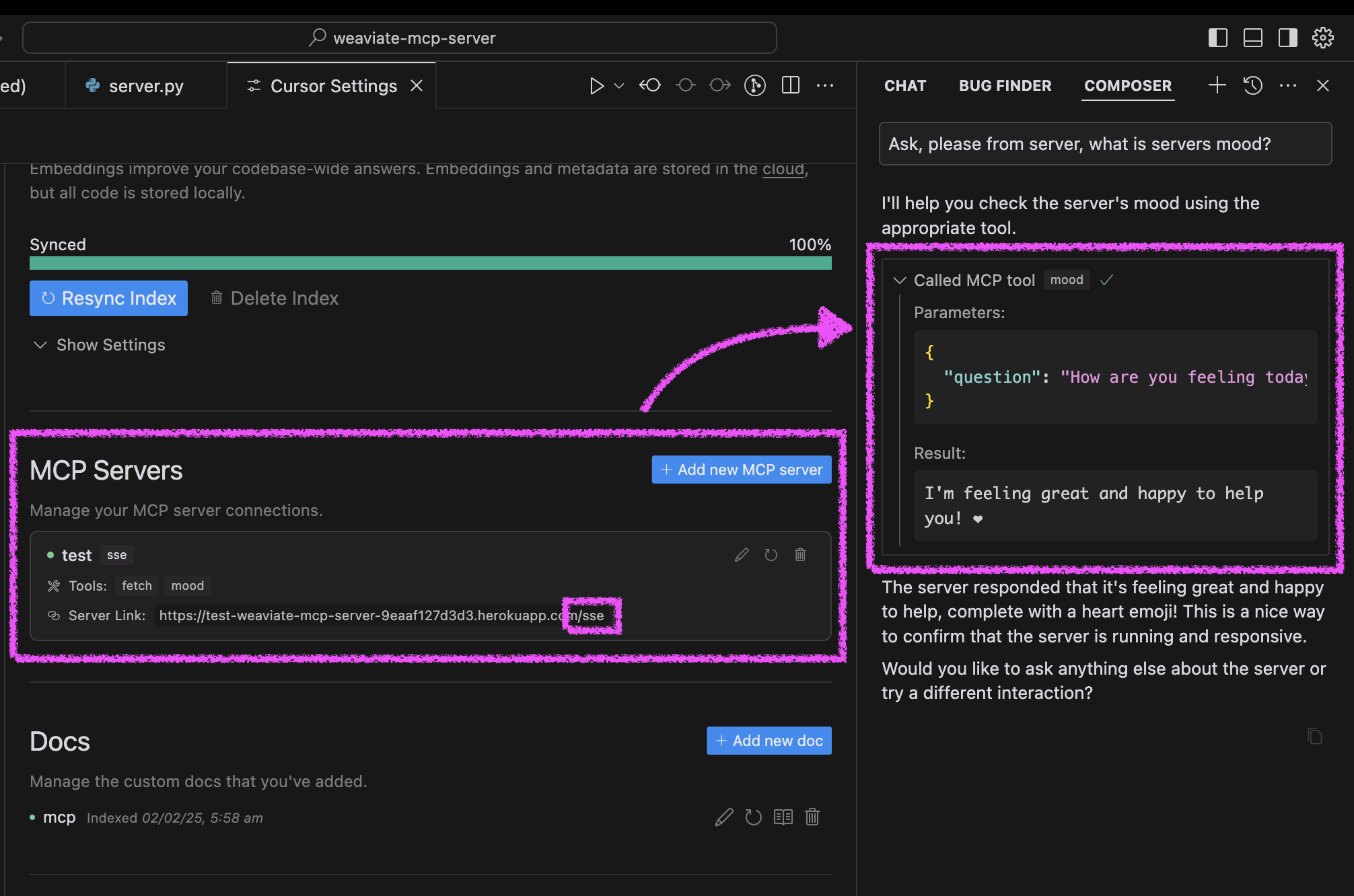
Click "Deploy to Heroku" button

After deployment, configure Cursor:
Open Cursor Settings → Features
Add new MCP server
Use your Heroku URL with /sse path (e.g., https://<your-app-name>.herokuapp.com/sse)
Test your agent's mood in Cursor:
Ask your agent "Please ask about our server mood and let me know how it is."
The server will respond with a cheerful message and a heart ❤️
Related MCP server: pure.md MCP server
You can run the server in three ways: using Docker, traditional Python setup, or directly in Cursor IDE.
The project includes Docker support for easy deployment:
Initial setup:
# Clone the repository
git clone https://github.com/kirill-markin/weaviate-mcp-server.git
cd weaviate-mcp-server

# Create environment file
cp .env.example .env
Build and run using Docker Compose:
# Build and start the server
docker compose up --build -d

# View logs
docker compose logs -f

# Check server status
docker compose ps

# Stop the server
docker compose down
The server will be available at:
SSE endpoint: http://localhost:8000/sse
Quick test:
# Test the server endpoint
curl -i http://localhost:8000/sse
Connect to Cursor IDE:
Open Cursor Settings → Features
Add new MCP server
Type: Select "sse"
URL: Enter http://localhost:8000/sse
First, install the uv package manager:
# Install uv on macOS
brew install uv
# Or install via pip (any OS)
pip install uv
Start the server using either stdio (default) or SSE transport:
# Install the package with development dependencies
uv pip install -e ".[dev]"

# Using stdio transport (default)
uv run mcp-simple-tool

# Using SSE transport on custom port
uv run mcp-simple-tool --transport sse --port 8000

# Run tests
uv run pytest -v
After installation, you can connect the server directly to Cursor IDE:
Right-click on the cursor-run-mcp-server.sh file in Cursor
Select "Copy Path" to copy the absolute path
Open Cursor Settings (gear icon)
Navigate to Features tab
Scroll down to "MCP Servers"
Click "Add new MCP server"
Fill in the form:
Name: Choose any name (e.g., "my-mcp-server-1")
Type: Select "stdio" (not "sse" because we run the server locally)
Command: Paste the absolute path to cursor-run-mcp-server.sh that you copied earlier. For example: /Users/yourname/weaviate-mcp-server/cursor-run-mcp-server.sh
Available environment variables (can be set in .env):
MCP_SERVER_PORT (default: 8000) - Port to run the server on
MCP_SERVER_HOST (default: 0.0.0.0) - Host to bind the server to
DEBUG (default: false) - Enable debug mode
MCP_USER_AGENT - Custom User-Agent for website fetching
To install MCP Server Template for Cursor IDE for Claude Desktop automatically via Smithery:
npx -y @smithery/cli install @kirill-markin/example-mcp-server --client claudeRecent tool additions, removals, and schema changes observed during successful MCP inspections.
Loading tool schema changelog…
Scored across 2 tools
The two tools have completely distinct purposes: mcp_fetch is for fetching website content, while mood is a whimsical interaction unrelated to data operations. There is no overlap or ambiguity between them.
The naming is inconsistent: mcp_fetch follows a verb_noun pattern, but mood is a noun with no action verb. This mixing of conventions reduces predictability and clarity in the tool set.
With only 2 tools, the server feels severely under-scoped for a Weaviate MCP Server, which typically involves vector database operations like querying, indexing, or managing data. The tools provided do not align with the expected domain.
The tool surface is extremely incomplete for a Weaviate server. There are no tools for core vector database functions such as searching, adding data, or managing schemas, leaving significant gaps that would cause agent failures in this domain.
MCP server (stdio): fetch web pages as clean readable markdown via the AgentForge API
Turn any public website into an MCP server for agents to search, read and navigate.
Hosted Web Crawler MCP server for Claude, ChatGPT and Cursor, with each action switched per account.
Docs: https://docs.keenable.ai/mcp-server Keenable is a free, remote MCP server that gives agents access to the web index. Search the web with ranked results and date/site filters, then fetch any indexed page as clean markdown. Works out of the box with no account or API key.