BlenderMCP - Blender Model Context Protocol Integration
BlenderMCP connects Blender to Claude AI through the Model Context Protocol (MCP), allowing Claude to directly interact with and control Blender. This integration enables prompt assisted 3D modeling, scene creation, and manipulation.
We have no official website. Any website you see online is unofficial and has no affiliation with this project. Use them at your own risk.
Full tutorial
Give feedback, get inspired, and build on top of the MCP: Discord
Supporters
CodeRabbit
Satish Goda
All supporters:
Support this project
Release notes (1.4.0)
Previously added features:
View screenshots for Blender viewport to better understand the scene
Search and download Sketchfab models
Support for Poly Haven assets through their API
Support to generate 3D models using Hyper3D Rodin
Run Blender MCP on a remote host
Telemetry for tools executed (completely anonymous)
Installating a new version (existing users)
For newcomers, you can go straight to Installation. For existing users, see the points below
Download the latest addon.py file and replace the older one, then add it to Blender
Delete the MCP server from Claude and add it back again, and you should be good to go!
Related MCP server: ClaudeKit Blender MCP
Features
Two-way communication: Connect Claude AI to Blender through a socket-based server
First-class tools: Common Blender operations are exposed as typed MCP tools (not just Python execution)
DSL allowlist: Execute a validated list of allowlisted operations via execute_ops (safer than arbitrary Python)
Object manipulation: Create, modify, and delete 3D objects in Blender
Material control: Create/assign materials, set PBR params, and wire texture maps
Scene inspection: Get detailed information about the current Blender scene
Code execution: Run arbitrary Python code in Blender from Claude
Components
The system consists of two main components:
Blender Addon (addon.py): A Blender addon that creates a socket server within Blender to receive and execute commands
MCP Server (src/blender_mcp/server.py): A Python server that implements the Model Context Protocol and connects to the Blender addon
Installation
Prerequisites
Blender 3.0 or newer
Python 3.10 or newer
uv package manager:
If you're on Mac, please install uv as
On Windows
powershell -c "irm https://astral.sh/uv/install.ps1 | iex"
and then add uv to the user path in Windows (you may need to restart Claude Desktop after):
$localBin = "$env:USERPROFILE\.local\bin"
$userPath = [Environment]::GetEnvironmentVariable("Path", "User")
[Environment]::SetEnvironmentVariable("Path", "$userPath;$localBin", "User")
Otherwise installation instructions are on their website: Install uv
⚠️ Do not proceed before installing UV
Environment Variables
The following environment variables can be used to configure the Blender connection:
BLENDER_HOST: Host address for Blender socket server (default: "localhost")
BLENDER_PORT: Port number for Blender socket server (default: 9876)
BLENDER_AUTH_TOKEN: Optional shared secret. If set in Blender (Addon Preferences) the MCP server must send the same token.
BLENDER_MCP_TOOL_PROFILE: Controls how many MCP tools are exposed (default: "standard").
Tool profiles:
minimal: Exposes only get_scene_info, get_viewport_screenshot, get_capabilities, execute_ops
standard (default): minimal + common wrappers (create_primitive, set_transform, select_objects, assign_material, render_still)
full: Exposes all tools (including advanced wrappers and the execute_blender_code escape hatch)
Example:
export BLENDER_HOST='host.docker.internal'
export BLENDER_PORT=9876
export BLENDER_AUTH_TOKEN='...'
export BLENDER_MCP_TOOL_PROFILE='standard'
Claude for Desktop Integration
Watch the setup instruction video (Assuming you have already installed uv)
Go to Claude > Settings > Developer > Edit Config > claude_desktop_config.json to include the following:
{
    "mcpServers": {
        "blender": {
            "command": "uvx",
            "args": [
                "blender-mcp"
            ]
        }
    }
}
Cursor integration

For Mac users, go to Settings > MCP and paste the following
To use as a global server, use "add new global MCP server" button and paste
To use as a project specific server, create .cursor/mcp.json in the root of the project and paste
{
    "mcpServers": {
        "blender": {
            "command": "uvx",
            "args": [
                "blender-mcp"
            ]
        }
    }
}
For Windows users, go to Settings > MCP > Add Server, add a new server with the following settings:
{
    "mcpServers": {
        "blender": {
            "command": "cmd",
            "args": [
                "/c",
                "uvx",
                "blender-mcp"
            ]
        }
    }
}
Cursor setup video
⚠️ Only run one instance of the MCP server (either on Cursor or Claude Desktop), not both
Visual Studio Code Integration
Prerequisites: Make sure you have Visual Studio Code installed before proceeding.

Installing the Blender Addon
Download the addon.py file from this repo
Open Blender
Go to Edit > Preferences > Add-ons
Click "Install..." and select the addon.py file
Enable the addon by checking the box next to "Interface: Blender MCP"
Usage
Starting the Connection
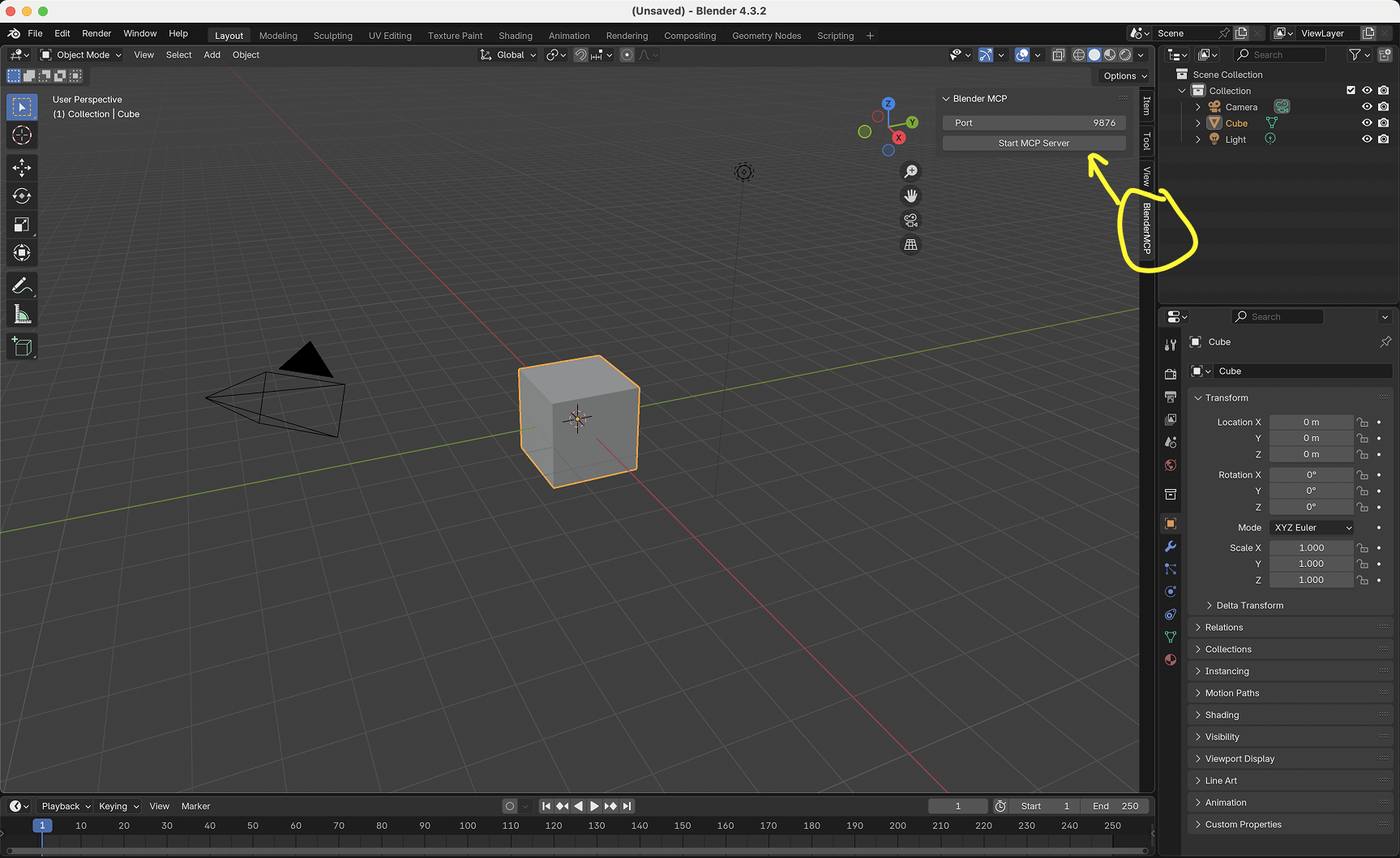
In Blender, go to the 3D View sidebar (press N if not visible)
Find the "BlenderMCP" tab
Turn on the Poly Haven checkbox if you want assets from their API (optional)
Click "Connect to Claude"
Make sure the MCP server is running in your terminal
Using with Claude
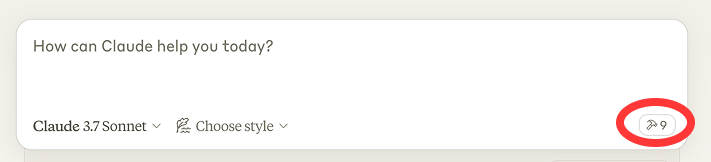
Once the config file has been set on Claude, and the addon is running on Blender, you will see a hammer icon with tools for the Blender MCP.
Capabilities
Get scene and object information
Create, delete and modify shapes
Apply or create materials for objects
Execute any Python code in Blender
Download the right models, assets and HDRIs through Poly Haven
AI generated 3D models through Hyper3D Rodin
Execute allowlisted operations via the DSL (execute_ops) for safer, more structured scene changes
New: DSL + tool surface (v1)
Capability discovery: get_capabilities() returns DSL version, supported ops, formats, and enabled integrations.
DSL execution: execute_ops({dsl_version, transaction, dry_run, ops:[...]})
Example (create a cube, make a material, assign it):
{
  "dsl_version": "1",
  "transaction": "atomic",
  "dry_run": false,
  "ops": [
    {"type": "create_primitive", "primitive": "cube", "name": "Cube_A", "size": 2.0, "location": [0, 0, 1]},
    {"type": "ensure_material", "name": "RedPaint", "model": "pbr"},
    {"type": "set_material_params", "material": "RedPaint", "params": {"baseColor": [1, 0, 0, 1], "roughness": 0.4}},
    {"type": "assign_material", "object": "Cube_A", "material": "RedPaint", "slot": 0}
  ]
}
Example (add & apply a bevel modifier):
{
  "dsl_version": "1",
  "transaction": "atomic",
  "ops": [
    {"type": "add_modifier", "name": "Cube_A", "modifier_type": "bevel", "params": {"width": 0.02, "segments": 3}},
    {"type": "apply_modifier", "name": "Cube_A", "modifier_name": "BEVEL"}
  ]
}
Tool list (v1)
Core:
get_scene_info, get_object_info, get_viewport_screenshot
list_objects, get_selection, select_objects
get_world_info, get_collections
get_capabilities
Objects / transforms:
create_primitive, delete_objects, duplicate_objects, rename_object
set_transform, apply_transform, snap_to_ground, set_origin
set_shading, recalculate_normals, merge_by_distance, triangulate
join_objects, separate_mesh, convert_to_mesh
set_visibility, set_collection_visibility, isolate_objects
ensure_collection, move_to_collection, set_parent, clear_parent
Materials:
list_materials, create_material, set_material_params, assign_material, set_texture_maps
Modifiers:
UV / baking:
Camera / lights / world:
create_camera, set_camera_params, set_active_camera, frame_camera_on_objects
camera_look_at, create_turntable_animation
create_light, set_light_params
set_world_background, set_world_hdri
Import/export:
Rendering:
Project hygiene:
Example Commands
Here are some examples of what you can ask Claude to do:
"Create a low poly scene in a dungeon, with a dragon guarding a pot of gold" Demo
"Create a beach vibe using HDRIs, textures, and models like rocks and vegetation from Poly Haven" Demo
Give a reference image, and create a Blender scene out of it Demo
"Generate a 3D model of a garden gnome through Hyper3D"
"Get information about the current scene, and make a threejs sketch from it" Demo
"Make this car red and metallic"
"Create a sphere and place it above the cube"
"Make the lighting like a studio"
"Point the camera at the scene, and make it isometric"
Hyper3D integration
Hyper3D's free trial key allows you to generate a limited number of models per day. If the daily limit is reached, you can wait for the next day's reset or obtain your own key from hyper3d.ai and fal.ai.
Troubleshooting
Connection issues: Make sure the Blender addon server is running, and the MCP server is configured on Claude, DO NOT run the uvx command in the terminal. Sometimes, the first command won't go through but after that it starts working.
Timeout errors: Try simplifying your requests or breaking them into smaller steps
Poly Haven integration: Claude is sometimes erratic with its behaviour
Have you tried turning it off and on again?: If you're still having connection errors, try restarting both Claude and the Blender server
Technical Details
Communication Protocol
The system uses a simple JSON-based protocol over TCP sockets:
Limitations & Security Considerations
The execute_blender_code tool allows running arbitrary Python code in Blender, which can be powerful but potentially dangerous. Use with caution in production environments. ALWAYS save your work before using it.
Poly Haven requires downloading models, textures, and HDRI images. If you do not want to use it, please turn it off in the checkbox in Blender.
Complex operations might need to be broken down into smaller steps
Contributing
Contributions are welcome! Please feel free to submit a Pull Request.
Disclaimer
This is a third-party integration and not made by Blender. Made by Siddharth


