Glama

BlenderMCP - Blender Model Context Protocol Integration

BlenderMCP connects Blender to Claude AI through the Model Context Protocol (MCP), allowing Claude to directly interact with and control Blender. This integration enables prompt assisted 3D modeling, scene creation, and manipulation.

We have no official website. Any website you see online is unofficial and has no affiliation with this project. Use them at your own risk.

Full tutorial

Join the Community

Give feedback, get inspired, and build on top of the MCP: Discord

Supporters

CodeRabbit

Satish Goda

All supporters:

Support this project

Release notes (1.4.0)

  • Added Hunyuan3D support

Previously added features:

  • View screenshots for Blender viewport to better understand the scene

  • Search and download Sketchfab models

  • Support for Poly Haven assets through their API

  • Support to generate 3D models using Hyper3D Rodin

  • Run Blender MCP on a remote host

  • Telemetry for tools executed (completely anonymous)

Installating a new version (existing users)

  • For newcomers, you can go straight to Installation. For existing users, see the points below

  • Download the latest addon.py file and replace the older one, then add it to Blender

  • Delete the MCP server from Claude and add it back again, and you should be good to go!

Related MCP server: ClaudeKit Blender MCP

Features

  • Two-way communication: Connect Claude AI to Blender through a socket-based server

  • First-class tools: Common Blender operations are exposed as typed MCP tools (not just Python execution)

  • DSL allowlist: Execute a validated list of allowlisted operations via execute_ops (safer than arbitrary Python)

  • Object manipulation: Create, modify, and delete 3D objects in Blender

  • Material control: Create/assign materials, set PBR params, and wire texture maps

  • Scene inspection: Get detailed information about the current Blender scene

  • Code execution: Run arbitrary Python code in Blender from Claude

Components

The system consists of two main components:

  1. Blender Addon (addon.py): A Blender addon that creates a socket server within Blender to receive and execute commands

  2. MCP Server (src/blender_mcp/server.py): A Python server that implements the Model Context Protocol and connects to the Blender addon

Installation

Prerequisites

  • Blender 3.0 or newer

  • Python 3.10 or newer

  • uv package manager:

If you're on Mac, please install uv as

brew install uv

On Windows

powershell -c "irm https://astral.sh/uv/install.ps1 | iex" 

and then add uv to the user path in Windows (you may need to restart Claude Desktop after):

$localBin = "$env:USERPROFILE\.local\bin"
$userPath = [Environment]::GetEnvironmentVariable("Path", "User")
[Environment]::SetEnvironmentVariable("Path", "$userPath;$localBin", "User")

Otherwise installation instructions are on their website: Install uv

⚠️ Do not proceed before installing UV

Environment Variables

The following environment variables can be used to configure the Blender connection:

  • BLENDER_HOST: Host address for Blender socket server (default: "localhost")

  • BLENDER_PORT: Port number for Blender socket server (default: 9876)

  • BLENDER_AUTH_TOKEN: Optional shared secret. If set in Blender (Addon Preferences) the MCP server must send the same token.

  • BLENDER_MCP_TOOL_PROFILE: Controls how many MCP tools are exposed (default: "standard").

Tool profiles:

  • minimal: Exposes only get_scene_info, get_viewport_screenshot, get_capabilities, execute_ops

  • standard (default): minimal + common wrappers (create_primitive, set_transform, select_objects, assign_material, render_still)

    • Integration tools (PolyHaven/Sketchfab/Hyper3D/Hunyuan) are only registered if the Blender add-on reports them enabled at server startup (restart required to re-evaluate).

  • full: Exposes all tools (including advanced wrappers and the execute_blender_code escape hatch)

Example:

export BLENDER_HOST='host.docker.internal'
export BLENDER_PORT=9876
export BLENDER_AUTH_TOKEN='...'
export BLENDER_MCP_TOOL_PROFILE='standard'

Claude for Desktop Integration

Watch the setup instruction video (Assuming you have already installed uv)

Go to Claude > Settings > Developer > Edit Config > claude_desktop_config.json to include the following:

{
    "mcpServers": {
        "blender": {
            "command": "uvx",
            "args": [
                "blender-mcp"
            ]
        }
    }
}

Cursor integration

Install MCP Server

For Mac users, go to Settings > MCP and paste the following

  • To use as a global server, use "add new global MCP server" button and paste

  • To use as a project specific server, create .cursor/mcp.json in the root of the project and paste

{
    "mcpServers": {
        "blender": {
            "command": "uvx",
            "args": [
                "blender-mcp"
            ]
        }
    }
}

For Windows users, go to Settings > MCP > Add Server, add a new server with the following settings:

{
    "mcpServers": {
        "blender": {
            "command": "cmd",
            "args": [
                "/c",
                "uvx",
                "blender-mcp"
            ]
        }
    }
}

Cursor setup video

⚠️ Only run one instance of the MCP server (either on Cursor or Claude Desktop), not both

Visual Studio Code Integration

Prerequisites: Make sure you have Visual Studio Code installed before proceeding.

Install in VS Code

Installing the Blender Addon

  1. Download the addon.py file from this repo

  2. Open Blender

  3. Go to Edit > Preferences > Add-ons

  4. Click "Install..." and select the addon.py file

  5. Enable the addon by checking the box next to "Interface: Blender MCP"

Usage

Starting the Connection
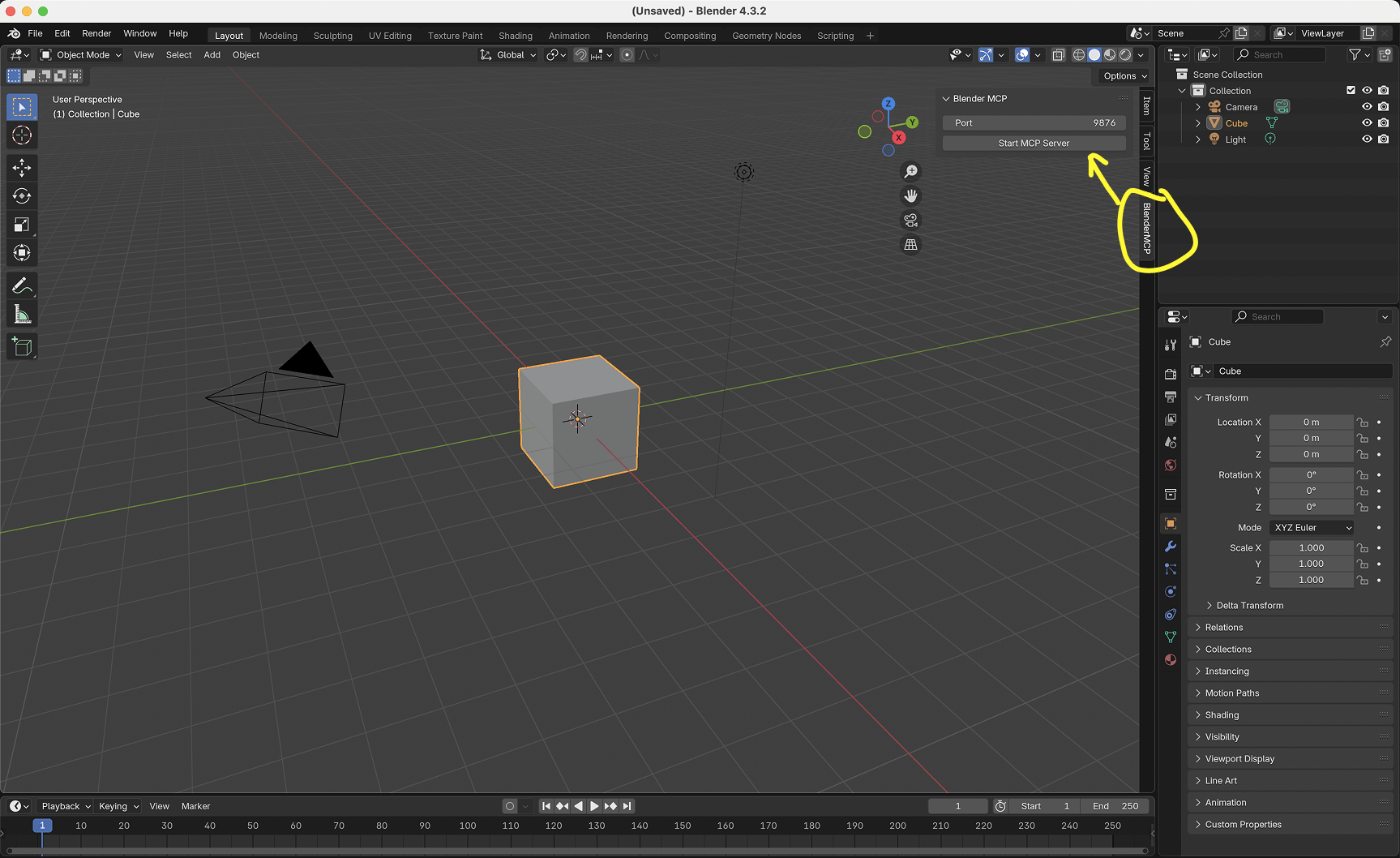
BlenderMCP in the sidebar

  1. In Blender, go to the 3D View sidebar (press N if not visible)

  2. Find the "BlenderMCP" tab

  3. Turn on the Poly Haven checkbox if you want assets from their API (optional)

  4. Click "Connect to Claude"

  5. Make sure the MCP server is running in your terminal

Using with Claude

Once the config file has been set on Claude, and the addon is running on Blender, you will see a hammer icon with tools for the Blender MCP.
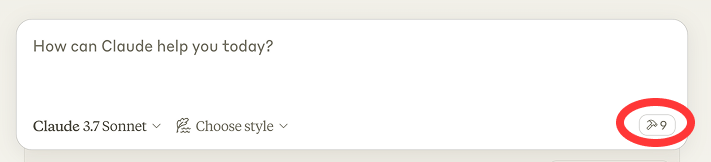
BlenderMCP in the sidebar

Capabilities

  • Get scene and object information

  • Create, delete and modify shapes

  • Apply or create materials for objects

  • Execute any Python code in Blender

  • Download the right models, assets and HDRIs through Poly Haven

  • AI generated 3D models through Hyper3D Rodin

  • Execute allowlisted operations via the DSL (execute_ops) for safer, more structured scene changes

New: DSL + tool surface (v1)

  • Capability discovery: get_capabilities() returns DSL version, supported ops, formats, and enabled integrations.

  • DSL execution: execute_ops({dsl_version, transaction, dry_run, ops:[...]})

    • transaction: "atomic" (default) attempts to rollback on error using Blender undo; "none" executes best-effort.

    • dry_run: validate and return the normalized request without executing.

Example (create a cube, make a material, assign it):

{
  "dsl_version": "1",
  "transaction": "atomic",
  "dry_run": false,
  "ops": [
    {"type": "create_primitive", "primitive": "cube", "name": "Cube_A", "size": 2.0, "location": [0, 0, 1]},
    {"type": "ensure_material", "name": "RedPaint", "model": "pbr"},
    {"type": "set_material_params", "material": "RedPaint", "params": {"baseColor": [1, 0, 0, 1], "roughness": 0.4}},
    {"type": "assign_material", "object": "Cube_A", "material": "RedPaint", "slot": 0}
  ]
}

Example (add & apply a bevel modifier):

{
  "dsl_version": "1",
  "transaction": "atomic",
  "ops": [
    {"type": "add_modifier", "name": "Cube_A", "modifier_type": "bevel", "params": {"width": 0.02, "segments": 3}},
    {"type": "apply_modifier", "name": "Cube_A", "modifier_name": "BEVEL"}
  ]
}

Tool list (v1)

Core:

  • get_scene_info, get_object_info, get_viewport_screenshot

  • list_objects, get_selection, select_objects

  • get_world_info, get_collections

  • get_capabilities

Objects / transforms:

  • create_primitive, delete_objects, duplicate_objects, rename_object

  • set_transform, apply_transform, snap_to_ground, set_origin

  • set_shading, recalculate_normals, merge_by_distance, triangulate

  • join_objects, separate_mesh, convert_to_mesh

  • set_visibility, set_collection_visibility, isolate_objects

  • ensure_collection, move_to_collection, set_parent, clear_parent

Materials:

  • list_materials, create_material, set_material_params, assign_material, set_texture_maps

Modifiers:

  • list_modifiers, add_modifier, apply_modifier, remove_modifier

UV / baking:

  • uv_smart_project, uv_unwrap, uv_pack_islands

  • bake_maps

Camera / lights / world:

  • create_camera, set_camera_params, set_active_camera, frame_camera_on_objects

  • camera_look_at, create_turntable_animation

  • create_light, set_light_params

  • set_world_background, set_world_hdri

Import/export:

  • import_model, export_scene

Rendering:

  • set_render_settings, render_still, render_animation

Project hygiene:

  • purge_orphans, pack_external_data, save_blend

Example Commands

Here are some examples of what you can ask Claude to do:

  • "Create a low poly scene in a dungeon, with a dragon guarding a pot of gold" Demo

  • "Create a beach vibe using HDRIs, textures, and models like rocks and vegetation from Poly Haven" Demo

  • Give a reference image, and create a Blender scene out of it Demo

  • "Generate a 3D model of a garden gnome through Hyper3D"

  • "Get information about the current scene, and make a threejs sketch from it" Demo

  • "Make this car red and metallic"

  • "Create a sphere and place it above the cube"

  • "Make the lighting like a studio"

  • "Point the camera at the scene, and make it isometric"

Hyper3D integration

Hyper3D's free trial key allows you to generate a limited number of models per day. If the daily limit is reached, you can wait for the next day's reset or obtain your own key from hyper3d.ai and fal.ai.

Troubleshooting

  • Connection issues: Make sure the Blender addon server is running, and the MCP server is configured on Claude, DO NOT run the uvx command in the terminal. Sometimes, the first command won't go through but after that it starts working.

  • Timeout errors: Try simplifying your requests or breaking them into smaller steps

  • Poly Haven integration: Claude is sometimes erratic with its behaviour

  • Have you tried turning it off and on again?: If you're still having connection errors, try restarting both Claude and the Blender server

Technical Details

Communication Protocol

The system uses a simple JSON-based protocol over TCP sockets:

  • Commands are sent as JSON objects with a type and optional params

  • Responses are JSON objects with a status and result or message

Limitations & Security Considerations

  • The execute_blender_code tool allows running arbitrary Python code in Blender, which can be powerful but potentially dangerous. Use with caution in production environments. ALWAYS save your work before using it.

  • Poly Haven requires downloading models, textures, and HDRI images. If you do not want to use it, please turn it off in the checkbox in Blender.

  • Complex operations might need to be broken down into smaller steps

Contributing

Contributions are welcome! Please feel free to submit a Pull Request.

Disclaimer

This is a third-party integration and not made by Blender. Made by Siddharth

Available Tools

10 tools
assign_materialC

Assign a material to a mesh object slot.

ParametersJSON Schema
NameRequiredDescriptionDefault
object_nameYes
materialYes
slotNo

Output Schema

ParametersJSON Schema
NameRequiredDescription
resultYes

TDQS

C2.9/5.0
Behavior2/5

Does the description disclose side effects, auth requirements, rate limits, or destructive behavior?

With no annotations provided, the description carries full burden but only states the basic action without behavioral details. It doesn't disclose whether this is a destructive operation, what permissions are needed, how errors are handled, or what the output schema contains, leaving significant gaps in understanding the tool's behavior.

Agents need to know what a tool does to the world before calling it. Descriptions should go beyond structured annotations to explain consequences.

Conciseness5/5

Is the description appropriately sized, front-loaded, and free of redundancy?

The description is a single, efficient sentence with zero waste—it directly states the tool's purpose without unnecessary words. It's appropriately sized and front-loaded, making it easy to parse quickly.

Shorter descriptions cost fewer tokens and are easier for agents to parse. Every sentence should earn its place.

Completeness3/5

Given the tool's complexity, does the description cover enough for an agent to succeed on first attempt?

Given the tool has an output schema (which handles return values) and no annotations, the description is minimally complete for a basic assignment operation. However, it lacks context on complexity (e.g., mutation effects) and doesn't compensate for the 0% schema coverage, making it adequate but with clear gaps in guidance and parameter explanation.

Complex tools with many parameters or behaviors need more documentation. Simple tools need less. This dimension scales expectations accordingly.

Parameters2/5

Does the description clarify parameter syntax, constraints, interactions, or defaults beyond what the schema provides?

Schema description coverage is 0%, so the description must compensate but adds no parameter semantics. It doesn't explain what 'object_name', 'material', or 'slot' represent (e.g., format, valid values, or that 'slot' defaults to 0), failing to provide meaning beyond the bare schema.

Input schemas describe structure but not intent. Descriptions should explain non-obvious parameter relationships and valid value ranges.

Purpose4/5

Does the description clearly state what the tool does and how it differs from similar tools?

The description clearly states the action ('Assign') and target ('material to a mesh object slot'), providing specific verb+resource. However, it doesn't differentiate from sibling tools like 'create_primitive' or 'select_objects', which would require mentioning this is specifically for material assignment rather than object creation or selection.

Agents choose between tools based on descriptions. A clear purpose with a specific verb and resource helps agents select the right tool.

Usage Guidelines2/5

Does the description explain when to use this tool, when not to, or what alternatives exist?

No guidance is provided on when to use this tool versus alternatives. The description doesn't mention prerequisites (e.g., existing objects/materials), exclusions, or comparisons to sibling tools like 'execute_ops' which might handle similar operations, leaving the agent without context for tool selection.

Agents often have multiple tools that could apply. Explicit usage guidance like "use X instead of Y when Z" prevents misuse.

create_primitiveC

Create a primitive mesh object.

ParametersJSON Schema
NameRequiredDescriptionDefault
primitiveYes
nameNo
sizeNo
locationNo
rotationNo
scaleNo

Output Schema

ParametersJSON Schema
NameRequiredDescription
resultYes

TDQS

C2.8/5.0
Behavior2/5

Does the description disclose side effects, auth requirements, rate limits, or destructive behavior?

No annotations are provided, so the description carries full burden for behavioral disclosure. While 'Create' implies a write operation, the description doesn't specify what happens after creation (e.g., whether the object becomes selected, appears in viewport, requires scene context), nor does it mention permissions, error conditions, or rate limits. This leaves significant behavioral gaps for a creation tool.

Agents need to know what a tool does to the world before calling it. Descriptions should go beyond structured annotations to explain consequences.

Conciseness5/5

Is the description appropriately sized, front-loaded, and free of redundancy?

The description is perfectly concise at 5 words, front-loading the essential action and object type with zero wasted words. Every word earns its place, though this conciseness comes at the cost of completeness.

Shorter descriptions cost fewer tokens and are easier for agents to parse. Every sentence should earn its place.

Completeness2/5

Given the tool's complexity, does the description cover enough for an agent to succeed on first attempt?

Given a creation tool with 6 parameters (1 required), 0% schema coverage, no annotations, but with an output schema, the description is inadequate. While the output schema might document return values, the description doesn't address critical context like parameter meanings, creation constraints, or how this tool fits within the Blender workflow alongside sibling tools. For a moderately complex creation operation, more guidance is needed.

Complex tools with many parameters or behaviors need more documentation. Simple tools need less. This dimension scales expectations accordingly.

Parameters2/5

Does the description clarify parameter syntax, constraints, interactions, or defaults beyond what the schema provides?

With 0% schema description coverage for 6 parameters, the description provides no parameter information beyond the tool name implying 'primitive' is a parameter. It doesn't explain what 'primitive' means (e.g., cube, sphere, cylinder), what 'size', 'location', 'rotation', and 'scale' units or formats are, or that 'name' is optional. The description fails to compensate for the complete lack of schema documentation.

Input schemas describe structure but not intent. Descriptions should explain non-obvious parameter relationships and valid value ranges.

Purpose4/5

Does the description clearly state what the tool does and how it differs from similar tools?

The description clearly states the verb ('Create') and resource ('primitive mesh object'), making the purpose immediately understandable. However, it doesn't differentiate from sibling tools like 'execute_ops' or 'select_objects' that might also create or modify objects, leaving some ambiguity about when this specific creation tool should be used versus alternatives.

Agents choose between tools based on descriptions. A clear purpose with a specific verb and resource helps agents select the right tool.

Usage Guidelines2/5

Does the description explain when to use this tool, when not to, or what alternatives exist?

The description provides no guidance on when to use this tool versus alternatives. With siblings like 'execute_ops' (which could execute arbitrary Blender operations) and 'set_transform' (which might modify existing objects), there's no indication whether this is the primary creation method or when other tools might be more appropriate. No exclusions or prerequisites are mentioned.

Agents often have multiple tools that could apply. Explicit usage guidance like "use X instead of Y when Z" prevents misuse.

execute_blender_codeB

Execute arbitrary Python code in Blender. Make sure to do it step-by-step by breaking it into smaller chunks.

Parameters:

  • code: The Python code to execute

ParametersJSON Schema
NameRequiredDescriptionDefault
codeYes

Output Schema

ParametersJSON Schema
NameRequiredDescription
resultYes

TDQS

B3.3/5.0
Behavior2/5

Does the description disclose side effects, auth requirements, rate limits, or destructive behavior?

No annotations are provided, so the description carries the full burden of behavioral disclosure. It mentions executing 'arbitrary Python code' and advises step-by-step execution, but fails to disclose critical traits such as security implications, error handling, execution environment details, or potential side effects (e.g., modifying Blender scenes). This is a significant gap for a tool that runs arbitrary code.

Agents need to know what a tool does to the world before calling it. Descriptions should go beyond structured annotations to explain consequences.

Conciseness4/5

Is the description appropriately sized, front-loaded, and free of redundancy?

The description is appropriately sized and front-loaded, with the core purpose stated first. The two sentences are efficient, though the second sentence could be integrated more smoothly. There's no wasted text, making it easy for an agent to parse quickly.

Shorter descriptions cost fewer tokens and are easier for agents to parse. Every sentence should earn its place.

Completeness3/5

Given the tool's complexity, does the description cover enough for an agent to succeed on first attempt?

Given the complexity of executing arbitrary code and the presence of an output schema (which likely handles return values), the description is minimally adequate. However, it lacks details on execution behavior, error cases, and integration with Blender, which are crucial for safe and effective use. With no annotations and high-stakes functionality, it should do more to guide the agent.

Complex tools with many parameters or behaviors need more documentation. Simple tools need less. This dimension scales expectations accordingly.

Parameters4/5

Does the description clarify parameter syntax, constraints, interactions, or defaults beyond what the schema provides?

The description adds meaningful semantics beyond the input schema: it explains that the 'code' parameter is 'The Python code to execute,' clarifying its purpose. Since schema description coverage is 0% and there's only one parameter, this compensates adequately, though it could provide more detail on code format or constraints.

Input schemas describe structure but not intent. Descriptions should explain non-obvious parameter relationships and valid value ranges.

Purpose4/5

Does the description clearly state what the tool does and how it differs from similar tools?

The description clearly states the tool's purpose: 'Execute arbitrary Python code in Blender.' It specifies the verb ('Execute'), resource ('Python code'), and context ('in Blender'). However, it doesn't explicitly differentiate from sibling tools like 'execute_ops' which might also execute operations in Blender, leaving some ambiguity about when to choose one over the other.

Agents choose between tools based on descriptions. A clear purpose with a specific verb and resource helps agents select the right tool.

Usage Guidelines3/5

Does the description explain when to use this tool, when not to, or what alternatives exist?

The description provides implied usage guidance with 'Make sure to do it step-by-step by breaking it into smaller chunks,' suggesting a best practice for handling complex code. However, it doesn't explicitly state when to use this tool versus alternatives like 'execute_ops' or other siblings, nor does it mention prerequisites or exclusions, leaving the agent to infer context.

Agents often have multiple tools that could apply. Explicit usage guidance like "use X instead of Y when Z" prevents misuse.

execute_opsC

Execute a validated allowlisted ops request (DSL v1) in Blender.

Parameters:

  • request: JSON object with {dsl_version, transaction, dry_run, ops}

ParametersJSON Schema
NameRequiredDescriptionDefault
requestYes

Output Schema

ParametersJSON Schema
NameRequiredDescription
resultYes

TDQS

C2.9/5.0
Behavior2/5

Does the description disclose side effects, auth requirements, rate limits, or destructive behavior?

No annotations are provided, so the description carries the full burden of behavioral disclosure. It mentions 'validated allowlisted ops request' and 'dry_run' in the parameter note, hinting at safety or validation aspects, but doesn't explain what validation entails, what 'allowlisted' means, potential side effects, error handling, or output behavior. For a tool that executes operations in Blender (likely a mutation), this is a significant gap in transparency.

Agents need to know what a tool does to the world before calling it. Descriptions should go beyond structured annotations to explain consequences.

Conciseness4/5

Is the description appropriately sized, front-loaded, and free of redundancy?

The description is appropriately sized and front-loaded: the first sentence states the purpose clearly, followed by a concise parameter note. There's no wasted text, and it's structured for quick understanding. It could be slightly improved by integrating the parameter note more seamlessly, but it's efficient overall.

Shorter descriptions cost fewer tokens and are easier for agents to parse. Every sentence should earn its place.

Completeness3/5

Given the tool's complexity, does the description cover enough for an agent to succeed on first attempt?

Given the complexity (executing operations in Blender, likely mutations), no annotations, and an output schema exists (which reduces the need to describe return values), the description is minimally adequate. It covers the basic purpose and parameter structure but lacks details on validation, safety, and usage context. With the output schema handling return values, it meets a baseline level of completeness but leaves gaps for effective agent use.

Complex tools with many parameters or behaviors need more documentation. Simple tools need less. This dimension scales expectations accordingly.

Parameters3/5

Does the description clarify parameter syntax, constraints, interactions, or defaults beyond what the schema provides?

Schema description coverage is 0%, so the description must compensate. It adds a note explaining the 'request' parameter as a 'JSON object with {dsl_version, transaction, dry_run, ops}', which provides some structure beyond the generic schema. However, it doesn't detail what 'ops' contains, the meaning of 'dsl_version' or 'transaction', or provide examples. This partial compensation earns a baseline score, but more detail would be needed for higher marks.

Input schemas describe structure but not intent. Descriptions should explain non-obvious parameter relationships and valid value ranges.

Purpose4/5

Does the description clearly state what the tool does and how it differs from similar tools?

The description clearly states the tool's purpose: 'Execute a validated allowlisted ops request (DSL v1) in Blender.' It specifies the verb ('Execute'), the resource ('validated allowlisted ops request'), and the context ('in Blender'), making it clear what the tool does. However, it doesn't explicitly differentiate from sibling tools like 'execute_blender_code', which might handle different types of execution.

Agents choose between tools based on descriptions. A clear purpose with a specific verb and resource helps agents select the right tool.

Usage Guidelines2/5

Does the description explain when to use this tool, when not to, or what alternatives exist?

The description provides no guidance on when to use this tool versus alternatives. It doesn't mention prerequisites (e.g., what 'validated allowlisted' means), when not to use it, or how it differs from siblings like 'execute_blender_code'. The agent must infer usage from the name and description alone, which is insufficient for optimal tool selection.

Agents often have multiple tools that could apply. Explicit usage guidance like "use X instead of Y when Z" prevents misuse.

get_capabilitiesA

Return server/addon capabilities: DSL version, enabled integrations, supported ops/formats.

ParametersJSON Schema
NameRequiredDescriptionDefault

No parameters

Output Schema

ParametersJSON Schema
NameRequiredDescription
resultYes

TDQS

A4/5.0
Behavior3/5

Does the description disclose side effects, auth requirements, rate limits, or destructive behavior?

No annotations are provided, so the description carries the full burden. It describes what is returned but lacks behavioral details such as performance characteristics, error handling, or authentication requirements. However, it does disclose the scope of returned data, which adds some context beyond basic purpose.

Agents need to know what a tool does to the world before calling it. Descriptions should go beyond structured annotations to explain consequences.

Conciseness5/5

Is the description appropriately sized, front-loaded, and free of redundancy?

The description is a single, efficient sentence that front-loads the purpose and lists specific return values without any wasted words. Every part of the sentence adds value, making it highly concise and well-structured for quick understanding.

Shorter descriptions cost fewer tokens and are easier for agents to parse. Every sentence should earn its place.

Completeness4/5

Given the tool's complexity, does the description cover enough for an agent to succeed on first attempt?

Given the tool has 0 parameters, 100% schema coverage, and an output schema exists, the description is reasonably complete. It specifies what capabilities are returned, which complements the output schema. However, it could be more complete by including behavioral aspects like rate limits or data freshness, though the output schema may cover return format details.

Complex tools with many parameters or behaviors need more documentation. Simple tools need less. This dimension scales expectations accordingly.

Parameters4/5

Does the description clarify parameter syntax, constraints, interactions, or defaults beyond what the schema provides?

The tool has 0 parameters with 100% schema description coverage, so no parameter documentation is needed. The description does not mention parameters, which is appropriate, and the baseline for 0 parameters is 4, as it avoids unnecessary repetition of schema information.

Input schemas describe structure but not intent. Descriptions should explain non-obvious parameter relationships and valid value ranges.

Purpose5/5

Does the description clearly state what the tool does and how it differs from similar tools?

The description clearly states the specific action ('Return') and resource ('server/addon capabilities'), with explicit details about what is returned (DSL version, enabled integrations, supported ops/formats). It distinguishes this tool from siblings like get_scene_info or execute_ops by focusing on system capabilities rather than scene data or operations.

Agents choose between tools based on descriptions. A clear purpose with a specific verb and resource helps agents select the right tool.

Usage Guidelines3/5

Does the description explain when to use this tool, when not to, or what alternatives exist?

The description implies usage for retrieving system capabilities, but does not explicitly state when to use this tool versus alternatives (e.g., get_scene_info for scene-specific info). No guidance on prerequisites or exclusions is provided, leaving usage context inferred rather than clearly defined.

Agents often have multiple tools that could apply. Explicit usage guidance like "use X instead of Y when Z" prevents misuse.

get_scene_infoB

Get detailed information about the current Blender scene

ParametersJSON Schema
NameRequiredDescriptionDefault

No parameters

Output Schema

ParametersJSON Schema
NameRequiredDescription
resultYes

TDQS

B3.2/5.0
Behavior2/5

Does the description disclose side effects, auth requirements, rate limits, or destructive behavior?

With no annotations provided, the description carries the full burden of behavioral disclosure. It states the tool retrieves 'detailed information' but doesn't specify what that includes (e.g., scene properties, objects, settings), whether it's read-only (implied but not stated), or any performance considerations. The description adds minimal context beyond the basic action.

Agents need to know what a tool does to the world before calling it. Descriptions should go beyond structured annotations to explain consequences.

Conciseness5/5

Is the description appropriately sized, front-loaded, and free of redundancy?

The description is a single, efficient sentence that directly states the tool's function without redundancy. It is front-loaded with the core action ('Get detailed information') and specifies the target ('current Blender scene'). There is zero waste, making it highly concise and well-structured.

Shorter descriptions cost fewer tokens and are easier for agents to parse. Every sentence should earn its place.

Completeness3/5

Given the tool's complexity, does the description cover enough for an agent to succeed on first attempt?

Given the tool has 0 parameters, 100% schema coverage, and an output schema exists, the description is adequate but minimal. It covers the basic purpose but lacks details on what 'detailed information' entails, which could be important for an agent to understand the tool's utility. With no annotations, it doesn't fully compensate for missing behavioral context.

Complex tools with many parameters or behaviors need more documentation. Simple tools need less. This dimension scales expectations accordingly.

Parameters4/5

Does the description clarify parameter syntax, constraints, interactions, or defaults beyond what the schema provides?

The tool has 0 parameters, and schema description coverage is 100% (since there are no parameters to document). The description doesn't need to add parameter semantics, so it meets the baseline of 4 for tools with no parameters. It appropriately focuses on the tool's purpose rather than unnecessary parameter details.

Input schemas describe structure but not intent. Descriptions should explain non-obvious parameter relationships and valid value ranges.

Purpose4/5

Does the description clearly state what the tool does and how it differs from similar tools?

The description clearly states the tool's purpose with a specific verb ('Get') and resource ('detailed information about the current Blender scene'). It distinguishes from siblings like get_capabilities or get_viewport_screenshot by focusing on scene information rather than system capabilities or visual output. However, it doesn't explicitly differentiate from potential scene-related operations in other tools.

Agents choose between tools based on descriptions. A clear purpose with a specific verb and resource helps agents select the right tool.

Usage Guidelines2/5

Does the description explain when to use this tool, when not to, or what alternatives exist?

The description provides no guidance on when to use this tool versus alternatives. It doesn't mention prerequisites (e.g., needing an active Blender scene), exclusions, or comparisons to siblings like get_capabilities (which might provide different types of information). Usage is implied by the name but not explicitly stated.

Agents often have multiple tools that could apply. Explicit usage guidance like "use X instead of Y when Z" prevents misuse.

get_viewport_screenshotA

Capture a screenshot of the current Blender 3D viewport.

Parameters:

  • max_size: Maximum size in pixels for the largest dimension (default: 800)

Returns the screenshot as an Image.

ParametersJSON Schema
NameRequiredDescriptionDefault
max_sizeNo

TDQS

A3.9/5.0
Behavior3/5

Does the description disclose side effects, auth requirements, rate limits, or destructive behavior?

With no annotations provided, the description carries the full burden of behavioral disclosure. It states the action ('Capture') and return type ('Image'), but lacks details on permissions, rate limits, or side effects (e.g., whether it pauses Blender operations). It adds basic context but misses key behavioral traits for a capture tool.

Agents need to know what a tool does to the world before calling it. Descriptions should go beyond structured annotations to explain consequences.

Conciseness5/5

Is the description appropriately sized, front-loaded, and free of redundancy?

The description is front-loaded with the core purpose in the first sentence, followed by a clear parameter explanation and return statement. Every sentence adds value without redundancy, and the structure is logical and efficient for a tool with minimal parameters.

Shorter descriptions cost fewer tokens and are easier for agents to parse. Every sentence should earn its place.

Completeness3/5

Given the tool's complexity, does the description cover enough for an agent to succeed on first attempt?

Given the tool's low complexity (1 parameter, no output schema, no annotations), the description is moderately complete. It covers the purpose, parameter, and return type, but lacks output details (e.g., image format, dimensions) and behavioral context like error handling. It meets minimum viability but has gaps in transparency and guidelines.

Complex tools with many parameters or behaviors need more documentation. Simple tools need less. This dimension scales expectations accordingly.

Parameters4/5

Does the description clarify parameter syntax, constraints, interactions, or defaults beyond what the schema provides?

The description adds meaningful semantics beyond the input schema, which has 0% coverage. It explains that 'max_size' is the 'Maximum size in pixels for the largest dimension' with a default of 800, clarifying its purpose and units. With only one parameter, this adequately compensates for the schema gap, though it doesn't detail constraints like minimum/maximum values.

Input schemas describe structure but not intent. Descriptions should explain non-obvious parameter relationships and valid value ranges.

Purpose5/5

Does the description clearly state what the tool does and how it differs from similar tools?

The description clearly states the specific action ('Capture a screenshot') and target resource ('current Blender 3D viewport'), distinguishing it from siblings like 'render_still' (which renders a full image) or 'get_scene_info' (which retrieves metadata). The verb+resource combination is precise and unambiguous.

Agents choose between tools based on descriptions. A clear purpose with a specific verb and resource helps agents select the right tool.

Usage Guidelines3/5

Does the description explain when to use this tool, when not to, or what alternatives exist?

The description implies usage context (when a screenshot of the viewport is needed) but doesn't explicitly state when to use this tool versus alternatives like 'render_still' for higher-quality renders or 'get_scene_info' for non-visual data. No exclusions or prerequisites are mentioned, leaving usage decisions to inference.

Agents often have multiple tools that could apply. Explicit usage guidance like "use X instead of Y when Z" prevents misuse.

render_stillC

Render a still image to output_path (or temp).

ParametersJSON Schema
NameRequiredDescriptionDefault
output_pathNo
formatNoPNG

Output Schema

ParametersJSON Schema
NameRequiredDescription
resultYes

TDQS

C2.6/5.0
Behavior2/5

Does the description disclose side effects, auth requirements, rate limits, or destructive behavior?

No annotations are provided, so the description carries the full burden. It mentions rendering to an output path or temp, implying a write operation, but doesn't disclose behavioral traits like required permissions, performance impact, file overwriting, or error handling. It lacks critical context for a mutation tool.

Agents need to know what a tool does to the world before calling it. Descriptions should go beyond structured annotations to explain consequences.

Conciseness5/5

Is the description appropriately sized, front-loaded, and free of redundancy?

The description is extremely concise with a single sentence that front-loads the key action. There is no wasted text, making it efficient and easy to parse.

Shorter descriptions cost fewer tokens and are easier for agents to parse. Every sentence should earn its place.

Completeness2/5

Given the tool's complexity, does the description cover enough for an agent to succeed on first attempt?

Given the tool has an output schema, the description doesn't need to explain return values. However, as a mutation tool with no annotations, 0% schema coverage, and two parameters, it lacks completeness. It fails to provide necessary context on what is rendered, usage scenarios, or behavioral details, making it inadequate for safe and effective use.

Complex tools with many parameters or behaviors need more documentation. Simple tools need less. This dimension scales expectations accordingly.

Parameters2/5

Does the description clarify parameter syntax, constraints, interactions, or defaults beyond what the schema provides?

Schema description coverage is 0%, so the description must compensate. It mentions 'output_path' and implies a default to temp, adding some meaning, but doesn't explain the 'format' parameter or its default 'PNG'. It partially addresses one of two parameters, leaving significant gaps.

Input schemas describe structure but not intent. Descriptions should explain non-obvious parameter relationships and valid value ranges.

Purpose3/5

Does the description clearly state what the tool does and how it differs from similar tools?

The description states the tool renders a still image, which is a clear purpose, but it doesn't specify what is being rendered (e.g., a scene, viewport, or specific object) or distinguish it from sibling tools like 'get_viewport_screenshot'. It's vague about the resource being rendered.

Agents choose between tools based on descriptions. A clear purpose with a specific verb and resource helps agents select the right tool.

Usage Guidelines2/5

Does the description explain when to use this tool, when not to, or what alternatives exist?

No guidance is provided on when to use this tool versus alternatives such as 'get_viewport_screenshot' or other rendering-related tools. The description only mentions the action without context or exclusions.

Agents often have multiple tools that could apply. Explicit usage guidance like "use X instead of Y when Z" prevents misuse.

select_objectsC

Select objects by name.

  • mode: replace|add|remove

  • active: optional active object

ParametersJSON Schema
NameRequiredDescriptionDefault
namesYes
modeNoreplace
activeNo

Output Schema

ParametersJSON Schema
NameRequiredDescription
resultYes

TDQS

C2.4/5.0
Behavior2/5

Does the description disclose side effects, auth requirements, rate limits, or destructive behavior?

No annotations are provided, so the description carries full burden. It mentions parameters but doesn't disclose behavioral traits such as whether this is a read-only or mutating operation, what happens to previously selected objects, error conditions, or performance implications. The description is minimal and fails to provide essential context for safe and effective use.

Agents need to know what a tool does to the world before calling it. Descriptions should go beyond structured annotations to explain consequences.

Conciseness4/5

Is the description appropriately sized, front-loaded, and free of redundancy?

The description is very concise with a brief statement followed by bullet points for parameters. It's front-loaded with the main purpose. However, the bullet points are somewhat cryptic and could be more informative, but overall it avoids unnecessary verbosity and is structured efficiently.

Shorter descriptions cost fewer tokens and are easier for agents to parse. Every sentence should earn its place.

Completeness2/5

Given the tool's complexity, does the description cover enough for an agent to succeed on first attempt?

Given 3 parameters with 0% schema coverage, no annotations, and an output schema (which helps but isn't described), the description is incomplete. It lacks details on the tool's domain (e.g., 3D modeling in Blender inferred from sibling tools), behavioral context, and parameter meanings. This makes it inadequate for an agent to use the tool confidently without additional context.

Complex tools with many parameters or behaviors need more documentation. Simple tools need less. This dimension scales expectations accordingly.

Parameters2/5

Does the description clarify parameter syntax, constraints, interactions, or defaults beyond what the schema provides?

Schema description coverage is 0%, so the description must compensate. It lists parameters ('mode: replace|add|remove' and 'active: optional active object') but doesn't explain their semantics beyond basic labels. For example, it doesn't clarify what 'active object' means, how 'names' relate to objects, or the effects of different modes. This adds minimal value over the bare schema.

Input schemas describe structure but not intent. Descriptions should explain non-obvious parameter relationships and valid value ranges.

Purpose3/5

Does the description clearly state what the tool does and how it differs from similar tools?

The description states 'Select objects by name' which provides a basic verb+resource combination, but it's vague about what 'select' means in this context (UI selection, logical selection, etc.). It doesn't distinguish from siblings like 'get_scene_info' or 'set_transform' which might also involve objects. The purpose is understandable but lacks specificity about the selection mechanism or domain.

Agents choose between tools based on descriptions. A clear purpose with a specific verb and resource helps agents select the right tool.

Usage Guidelines2/5

Does the description explain when to use this tool, when not to, or what alternatives exist?

No guidance on when to use this tool versus alternatives is provided. The description lists parameters but doesn't explain context, prerequisites, or exclusions. For example, it doesn't clarify if this is for 3D modeling, UI interaction, or another domain, nor does it mention sibling tools like 'get_scene_info' as alternatives for object information.

Agents often have multiple tools that could apply. Explicit usage guidance like "use X instead of Y when Z" prevents misuse.

set_transformC

Set object transform values.

ParametersJSON Schema
NameRequiredDescriptionDefault
nameYes
locationNo
rotationNo
scaleNo
spaceNoworld

Output Schema

ParametersJSON Schema
NameRequiredDescription
resultYes

TDQS

C2.4/5.0
Behavior2/5

Does the description disclose side effects, auth requirements, rate limits, or destructive behavior?

No annotations are provided, so the description carries full burden for behavioral disclosure. 'Set' implies a mutation operation, but it doesn't specify whether this requires specific permissions, if changes are reversible, what happens to unspecified transform components, or any rate limits. The description lacks critical behavioral context for a mutation tool with zero annotation coverage.

Agents need to know what a tool does to the world before calling it. Descriptions should go beyond structured annotations to explain consequences.

Conciseness4/5

Is the description appropriately sized, front-loaded, and free of redundancy?

The description is extremely concise at four words, with no wasted language. It's front-loaded with the core action and target. However, this brevity borders on under-specification, as it omits necessary details for a tool with multiple parameters and no annotations.

Shorter descriptions cost fewer tokens and are easier for agents to parse. Every sentence should earn its place.

Completeness2/5

Given the tool's complexity, does the description cover enough for an agent to succeed on first attempt?

Given a mutation tool with 5 parameters, 0% schema description coverage, no annotations, and an output schema (which reduces need to describe returns), the description is incomplete. It doesn't clarify the tool's role among siblings, parameter meanings, or behavioral traits, leaving significant gaps for an agent to use it correctly in a 3D/scene manipulation context.

Complex tools with many parameters or behaviors need more documentation. Simple tools need less. This dimension scales expectations accordingly.

Parameters2/5

Does the description clarify parameter syntax, constraints, interactions, or defaults beyond what the schema provides?

With 0% schema description coverage for 5 parameters, the description adds minimal value beyond the schema. It mentions 'transform values', which hints at parameters like location, rotation, and scale, but doesn't explain their semantics (e.g., coordinate systems, units, array formats) or the purpose of 'name' and 'space'. This fails to compensate for the schema's lack of descriptions.

Input schemas describe structure but not intent. Descriptions should explain non-obvious parameter relationships and valid value ranges.

Purpose3/5

Does the description clearly state what the tool does and how it differs from similar tools?

The description 'Set object transform values' clearly states the action (set) and target (object transform values), but it's vague about what 'transform values' specifically entail. It doesn't distinguish this tool from potential siblings like 'select_objects' or 'create_primitive', leaving ambiguity about its specific role in the 3D/scene context.

Agents choose between tools based on descriptions. A clear purpose with a specific verb and resource helps agents select the right tool.

Usage Guidelines2/5

Does the description explain when to use this tool, when not to, or what alternatives exist?

The description provides no guidance on when to use this tool versus alternatives. With siblings like 'select_objects', 'create_primitive', and 'execute_ops', there's no indication of whether this is for modifying existing objects, initializing new ones, or other scenarios. No prerequisites, exclusions, or contextual recommendations are mentioned.

Agents often have multiple tools that could apply. Explicit usage guidance like "use X instead of Y when Z" prevents misuse.

TDQS

B3.2/5.0
Disambiguation4/5

Most tools have distinct purposes targeting different Blender operations like material assignment, primitive creation, code execution, scene info retrieval, and rendering. However, 'execute_blender_code' and 'execute_ops' could cause confusion as both involve executing operations in Blender, though their parameter structures differ.

Naming Consistency4/5

The naming follows a consistent verb_noun pattern throughout (e.g., assign_material, create_primitive, get_scene_info), which is clear and predictable. There are no deviations in style, making it easy to understand each tool's function at a glance.

Tool Count5/5

With 10 tools, the count is well-scoped for a Blender automation server, covering key operations like object manipulation, scene management, rendering, and code execution. Each tool appears to earn its place without feeling excessive or insufficient for the domain.

Completeness3/5

The toolset covers many core Blender workflows, such as object creation, selection, transformation, material assignment, rendering, and scene inspection. However, there are notable gaps, such as the absence of tools for deleting objects, modifying materials, or handling animations, which could limit agents in more complex tasks.

Maintenance

ActivityInactive
ResponsivenessSyncing

Resources

Unclaimed servers have limited discoverability.

Looking for Admin?

If you are the server author, to access and configure the admin panel.

Related MCP Connectors

Related MCP Servers

  • A
    license
    A
    quality
    D
    maintenance
    Connects Claude AI to Blender through the Model Context Protocol, enabling AI-assisted 3D modeling, scene creation, material control, and object manipulation. Supports integration with Poly Haven assets and Hyper3D for AI-generated models.
    13
    MIT
  • F
    license
    A
    quality
    D
    maintenance
    Enables comprehensive control of Blender 3D from Claude Desktop, offering 26 tools for object manipulation, scene management, and material editing. It supports asset integration from platforms like Poly Haven and allows for direct execution of custom Python scripts within the Blender environment.
    26

Latest Blog Posts

MCP directory API

We provide all the information about MCP servers via our MCP API.

curl -X GET 'https://glama.ai/api/mcp/v1/servers/IAmMarcellus/BlenderMCP'

If you have feedback or need assistance with the MCP directory API, please join our Discord server