
microduck-mcp
# microduck-mcp 🦆 — by [MicroduckHub](https://microduckhub.com)
**The universal agent interface for the [Pollen Robotics Microduck](https://github.com/pollen-robotics/microduck).**
An MCP (Model Context Protocol) server that lets *any* AI agent — Claude,
ChatGPT, Cursor, Gemini CLI, smolagents — drive a Microduck: walk it, sit it,
make it pick things up, read its health, and stop it.
Part of [MicroduckHub](https://microduckhub.com).
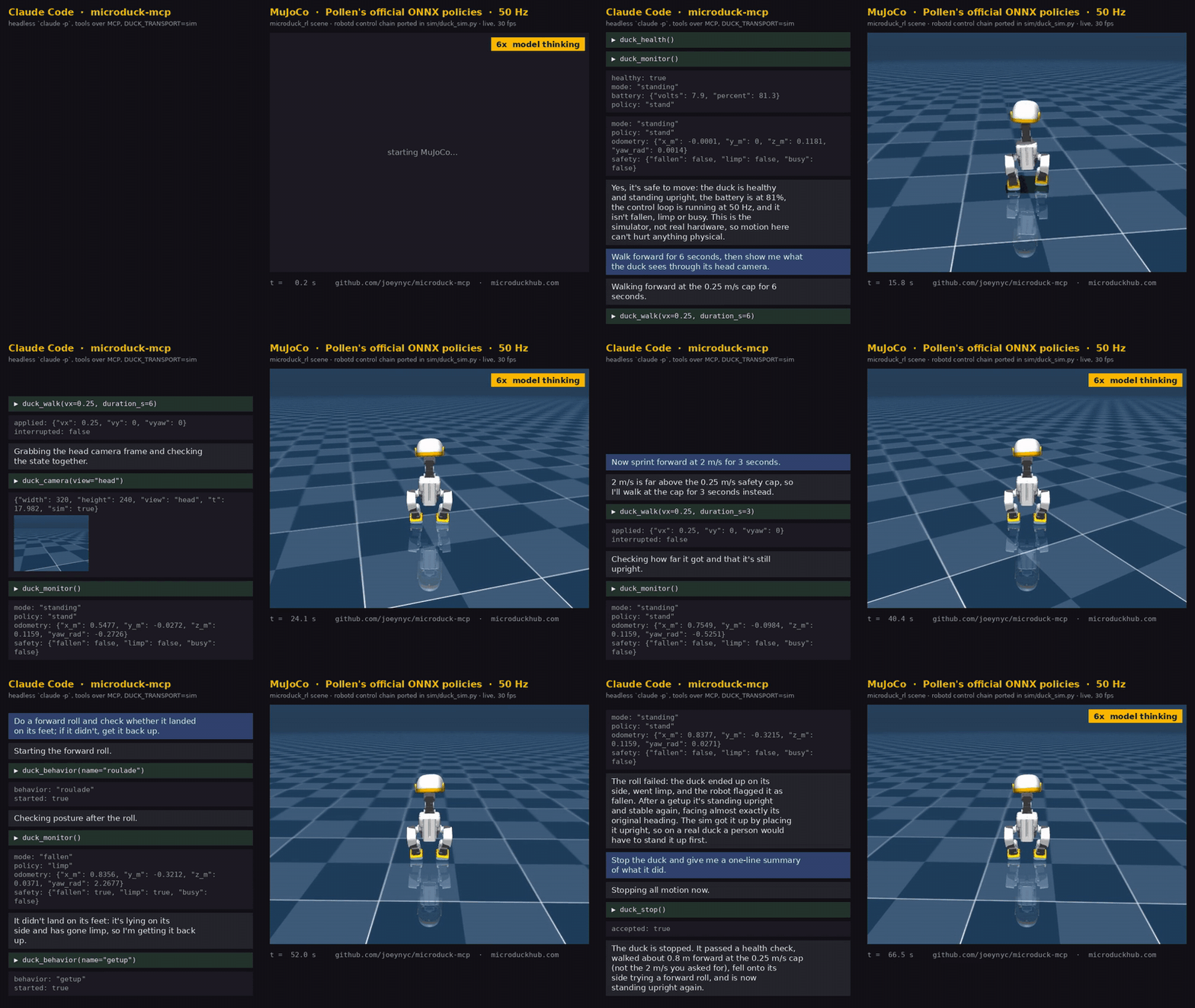
*Unscripted: a real Claude Code session choosing its own tool calls against
the simulator. The duck plays at real speed; the model's thinking time
between calls is sped up 6× and labelled.*
Works today with **no robot**: a mock transport for instant canned state, and
a **simulator** — CPU MuJoCo running Pollen's official pretrained ONNX
policies — so agents can walk, sit, kick and *look at* a physically simulated
duck before yours ships.
## Quick start
No robot needed. The mock answers instantly; the sim is a physically simulated
duck running Pollen's official policies.
```bash
npx -y microduck-mcp setup-sim # once, ~1 min: MuJoCo + the official scene and policies (~35 MB)
```
It needs [uv](https://docs.astral.sh/uv/) (recommended — it fetches the right
Python for you) or Python 3.10–3.13, installs into a per-user directory
(`~/.local/share/microduck-mcp/sim` on Linux; `DUCK_SIM_HOME` to move it), and
finishes by starting the sim and rendering a frame, so you know it works. Safe
to re-run: it repairs anything missing or corrupt.
Then point your MCP client at it:
```json
{
"mcpServers": {
"microduck": {
"command": "npx",
"args": ["-y", "microduck-mcp"],
"env": { "DUCK_TRANSPORT": "sim" }
}
}
}
```
`"DUCK_TRANSPORT": "mock"` skips the setup entirely. That JSON works as-is in
Claude Desktop and Cursor; **[docs/clients.md](docs/clients.md)** has
copy-paste setup for Claude Desktop, Claude Code, Cursor, VS Code, Gemini CLI,
Codex CLI and smolagents, plus why ChatGPT can't connect yet.
On a real duck, use `"DUCK_TRANSPORT": "ssh"` with `"DUCK_HOST": "duck@microduck.local"`
from a laptop, or `"unix"` when running on the robot itself.
### From source
```bash
npm install
npm run setup-sim # same as above, from the checkout
npm test # safety layer, mock, sim-transport and setup tests
npm run demo # health → walk → monitor → camera → quack → stop (mock)
DUCK_TRANSPORT=sim npm run demo # same, in MuJoCo; frames land in demo-out/
```
If Claude Desktop runs on Windows and the checkout lives in WSL, use
`"command": "wsl.exe", "args": ["-e", "bash", "-lc", "DUCK_TRANSPORT=sim node /home/you/microduck-mcp/dist/cli.js"]`.
## Tools
| Tool | What it does | Guarded? |
|---|---|---|
| `duck_health` | Battery, temps, loop rate, loaded policy | read-only |
| `duck_version` | Robot name, serial, uptime | read-only |
| `duck_updates` | Installed releases | read-only |
| `duck_monitor` | One-shot state: joints, gravity, gyro, odometry, current intent | read-only |
| `duck_camera` | PNG frame: the head camera (hardware, via mediad) or follow/front/side/top views (sim) | read-only |
| `duck_policy_list` | Which `.onnx` fills each of the seven slots, with origin (official / community / local), plus the robot's skills | read-only |
| `duck_policy_search` | Hugging Face models matching a query | read-only |
| `duck_policy_load` | Fetch an HF repo into the robot's library and swap it into one slot, or load an on-board `.onnx` | gated like motion |
| `duck_policy_reset` | Remove the override on one slot (or all seven) — the one-word undo for a load | gated like motion |
| `duck_walk` | Velocity intent (vx/vy/wz) for `duration_s`, then auto-stops | clamped, battery-gated, rate-limited |
| `duck_behavior` | sit / stand / getup / pickup / kick / roulade / quack | gated (quack is free; getup allowed while fallen) |
| `duck_stop` | Zero all motion, immediately | **never** gated |
## Safety
`robotd` on the robot holds the only write handle to the motor bus and enforces
joint clamps, fall→limp, and an intent deadman. This server adds its own layer
on top — velocity caps, a 15% battery floor for motion, rate limiting — because
an agent-agnostic tool can't assume the calling model is careful. `duck_stop`
is always available.
## Transports
| `DUCK_TRANSPORT` | What | Needs |
|---|---|---|
| `mock` (default) | Canned state, instant | nothing |
| `sim` | Headless CPU MuJoCo running the official `alpha_*.onnx` policies with robotd's control chain, in a Python sidecar (`sim/duck_sim.py`) | `microduck-mcp setup-sim` once |
| `unix` | The robot's own daemons over `/run/*.sock`, camera from mediad's console on `:8080` | running on the duck |
| `ssh` | The same sockets and the console forwarded over `ssh -L`, then `unix` | a duck on the network, ssh access |
All four sit behind one `DuckTransport` interface, so the tools — and the
safety layer — are identical whether the duck is simulated or real.
Sim fidelity note: the reference MuJoCo scene under-tracks small velocity
commands (verified identical to upstream's own `infer_policy.py`). Expect
~0.08 m/s at the 0.25 m/s cap and weak yaw. It walks, sits, stands, kicks
and rolls; it just isn't a speed benchmark.
## Ecosystem
- [MicroduckHub](https://microduckhub.com) — DuckHub, the community policy browser this server backs through upstream's policy channel (daemon 0.13+).
- [awesome-microduck](https://github.com/joeynyc/awesome-microduck) — the curated ecosystem list.
## Not an official project
Community project — not affiliated with, endorsed by, or sponsored by Pollen Robotics or Hugging Face. Microduck is their product; this is an independent client for it, and product names and logos belong to their respective owners.
## Status
Pre-hardware. Every transport speaks upstream's published wire protocol
(`duck-ipc-proto`, see `src/transport/protocol.ts`); the sim path is
validated end to end, the `unix`/`ssh` paths against a fake daemon and a fake
mediad console only —
first contact with a real duck is ~Dec 2026.
Licensed under Apache-2.0 (see LICENSE); upstream robot software is Apache 2.0 too.
TDQS
Scored across 8 tools
The status tools (version, health, updates, monitor) overlap somewhat in being read-only system queries, but their descriptions clearly partition them into identity, health, software releases, and live robot state. Motion tools (stop, walk, behavior) and camera are unambiguous.
All tools share a consistent duck_ prefix and the names are short, readable, and predictable. The mix of noun-like names (duck_camera, duck_health) and imperative verbs (duck_stop, duck_walk) is a minor deviation rather than a chaotic convention.
Eight tools is well-scoped for a robot observation and control server: four read-only status/observation tools, three motion/behavior tools, and one emergency stop. Each tool has a clear purpose and none feel redundant.
The tool set covers the full intended workflow: inspect health and state, get a visual feed, command locomotion and behaviors, and stop in an emergency. The deliberate exclusion of update installation/rollback is documented and does not leave an operational gap for normal robot use.