
Pandoc Document Conversion
 <a href="https://smithery.ai/server/mcp-pandoc"><img alt="Smithery Badge" src="https://smithery.ai/badge/mcp-pandoc"></a> <a href="https://glama.ai/mcp/servers/xyzzgaj9bk"><img width="380" height="200" src="https://glama.ai/mcp/servers/xyzzgaj9bk/badge" /></a> [](https://mseep.ai/app/vivekvells-mcp-pandoc)
# mcp-pandoc: A Document Conversion MCP Server
> Officially included in the [Model Context Protocol servers](https://github.com/modelcontextprotocol/servers/blob/main/README.md) open-source project. 🎉
## Overview
A Model Context Protocol server for document format conversion using [pandoc](https://pandoc.org/index.html). This server provides tools to transform content between different document formats while preserving formatting and structure.
Please note that mcp-pandoc is currently in early development. PDF support is under development, and the functionality and available tools are subject to change and expansion as we continue to improve the server.
Credit: This project uses the [Pandoc Python package](https://pypi.org/project/pandoc/) for document conversion, forming the foundation for this project.
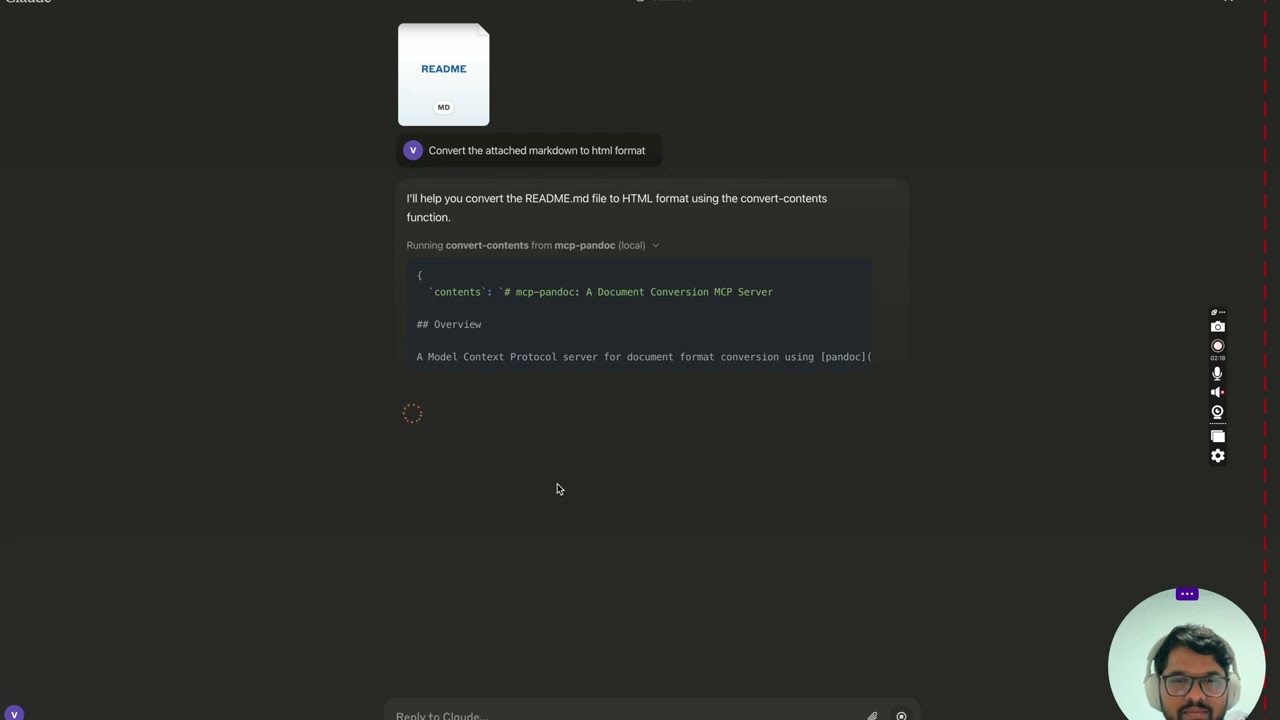
## Demo
[](https://youtu.be/vN3VOb0rygM)
> 🎥 [Watch on YouTube](https://youtu.be/vN3VOb0rygM)
<details>
<summary>Screenshots</summary>
<img width="2407" alt="Screenshot 2024-12-26 at 3 33 54 PM" src="https://github.com/user-attachments/assets/ce3f5396-252a-4bba-84aa-65b2a06b859e" />
<img width="2052" alt="Screenshot 2024-12-26 at 3 38 24 PM" src="https://github.com/user-attachments/assets/8c525ad1-b184-41ca-b068-7dd34b60b85d" />
<img width="1498" alt="Screenshot 2024-12-26 at 3 40 51 PM" src="https://github.com/user-attachments/assets/a1e0682d-fe44-40b6-9988-bf805627beeb" />
<img width="760" alt="Screenshot 2024-12-26 at 3 41 20 PM" src="https://github.com/user-attachments/assets/1d7f5998-6d7f-48fa-adcf-fc37d0521213" />
<img width="1493" alt="Screenshot 2024-12-26 at 3 50 27 PM" src="https://github.com/user-attachments/assets/97992c5d-8efc-40af-a4c3-94c51c392534" />
</details>
More to come...
## Tools
1. `convert-contents`
- Transforms content between supported formats
- Inputs:
- `contents` (string): Source content to convert (required if input_file not provided)
- `input_file` (string): Complete path to input file (required if contents not provided)
- `input_format` (string): Source format of the content (defaults to markdown)
- `output_format` (string): Target format (defaults to markdown)
- `output_file` (string): Complete path for output file (required for pdf, docx, rst, latex, epub formats)
- Supported input/output formats:
- markdown
- html
- pdf
- docx
- rst
- latex
- epub
- txt
- Note: For advanced formats (pdf, docx, rst, latex, epub), an output_file path is required
### Supported Formats
Currently supported formats:
Basic formats (direct conversion):
- Plain text (.txt)
- Markdown (.md)
- HTML (.html)
Advanced formats (requires complete file paths):
- PDF (.pdf) - requires TeX Live installation
- DOCX (.docx)
- RST (.rst)
- LaTeX (.tex)
- EPUB (.epub)
Note: For advanced formats:
1. Complete file paths with filename and extension are required
2. **PDF conversion requires TeX Live installation** (see Critical Requirements section -> For macOS: `brew install texlive`)
3. When no output path is specified:
- Basic formats: Displays converted content in the chat
- Advanced formats: May save in system temp directory (/tmp/ on Unix systems)
## Usage & configuration
**NOTE: Ensure to complete installing required packages mentioned below under "Critical Requirements".**
To use the published one
```bash
{
"mcpServers": {
"mcp-pandoc": {
"command": "uvx",
"args": ["mcp-pandoc"]
}
}
}
```
### ⚠️ Important Notes
#### Critical Requirements
1. **Pandoc Installation**
- **Required**: Install `pandoc` - the core document conversion engine
- Installation:
```bash
# macOS
brew install pandoc
# Ubuntu/Debian
sudo apt-get install pandoc
# Windows
# Download installer from: https://pandoc.org/installing.html
```
- **Verify**: `pandoc --version`
2. **UV package installation**
- **Required**: Install `uv` package (includes `uvx` command)
- Installation:
```bash
# macOS
brew install uv
# Windows/Linux
pip install uv
```
- **Verify**: `uvx --version`
3. **PDF Conversion Prerequisites:** Only needed if you need to convert & save pdf
- TeX Live must be installed before attempting PDF conversion
- Installation commands:
```bash
# Ubuntu/Debian
sudo apt-get install texlive-xetex
# macOS
brew install texlive
# Windows
# Install MiKTeX or TeX Live from:
# https://miktex.org/ or https://tug.org/texlive/
```
4. **File Path Requirements**
- When saving or converting files, you MUST provide complete file paths including filename and extension
- The tool does not automatically generate filenames or extensions
#### Examples
✅ Correct Usage:
```bash
# Converting content to PDF
"Convert this text to PDF and save as /path/to/document.pdf"
# Converting between file formats
"Convert /path/to/input.md to PDF and save as /path/to/output.pdf"
```
❌ Incorrect Usage:
```bash
# Missing filename and extension
"Save this as PDF in /documents/"
# Missing complete path
"Convert this to PDF"
# Missing extension
"Save as /documents/story"
```
#### Common Issues and Solutions
1. **PDF Conversion Fails**
- Error: "xelatex not found"
- Solution: Install TeX Live first (see installation commands above)
2. **File Conversion Fails**
- Error: "Invalid file path"
- Solution: Provide complete path including filename and extension
- Example: `/path/to/document.pdf` instead of just `/path/to/`
3. **Format Conversion Fails**
- Error: "Unsupported format"
- Solution: Use only supported formats:
- Basic: txt, html, markdown
- Advanced: pdf, docx, rst, latex, epub
## Quickstart
### Install
#### Option 1: Installing manually via claude_desktop_config.json config file
- On MacOS: `open ~/Library/Application\ Support/Claude/claude_desktop_config.json`
- On Windows: `%APPDATA%/Claude/claude_desktop_config.json`
a) Only for local development & contribution to this repo
<details>
<summary>Development/Unpublished Servers Configuration</summary>
ℹ️ Replace <DIRECTORY> with your locally cloned project path
```bash
"mcpServers": {
"mcp-pandoc": {
"command": "uv",
"args": [
"--directory",
"<DIRECTORY>/mcp-pandoc",
"run",
"mcp-pandoc"
]
}
}
```
</details>
b) Published Servers Configuration - Consumers should use this config
```bash
"mcpServers": {
"mcp-pandoc": {
"command": "uvx",
"args": [
"mcp-pandoc"
]
}
}
```
#### Option 2: To install Published Servers Configuration automatically via Smithery
Run the following bash command to install **published** [mcp-pandoc pypi](https://pypi.org/project/mcp-pandoc) for Claude Desktop automatically via [Smithery](https://smithery.ai/server/mcp-pandoc):
```bash
npx -y @smithery/cli install mcp-pandoc --client claude
```
- If you face any issue, use the "Published Servers Configuration" above directly instead of this cli.
**Note**: To use locally configured mcp-pandoc, follow "Development/Unpublished Servers Configuration" step above.
## Development
### Building and Publishing
To prepare the package for distribution:
1. Sync dependencies and update lockfile:
```bash
uv sync
```
2. Build package distributions:
```bash
uv build
```
This will create source and wheel distributions in the `dist/` directory.
3. Publish to PyPI:
```bash
uv publish
```
Note: You'll need to set PyPI credentials via environment variables or command flags:
- Token: `--token` or `UV_PUBLISH_TOKEN`
- Or username/password: `--username`/`UV_PUBLISH_USERNAME` and `--password`/`UV_PUBLISH_PASSWORD`
### Debugging
Since MCP servers run over stdio, debugging can be challenging. For the best debugging
experience, we strongly recommend using the [MCP Inspector](https://github.com/modelcontextprotocol/inspector).
You can launch the MCP Inspector via [`npm`](https://docs.npmjs.com/downloading-and-installing-node-js-and-npm) with this command:
```bash
npx @modelcontextprotocol/inspector uv --directory /Users/vivekvells/Desktop/code/ai/mcp-pandoc run mcp-pandoc
```
Upon launching, the Inspector will display a URL that you can access in your browser to begin debugging.
---
## Contributing
We welcome contributions to enhance mcp-pandoc! Here's how you can get involved:
1. **Report Issues**: Found a bug or have a feature request? Open an issue on our [GitHub Issues](https://github.com/vivekVells/mcp-pandoc/issues) page.
2. **Submit Pull Requests**: Improve the codebase or add features by creating a pull request.
---
TDQS
Scored across 1 tool
With only one tool, there is no possibility of ambiguity or overlap between tools. The tool 'convert-contents' has a single, clearly defined purpose: converting content between formats.
Since there is only one tool, naming consistency is inherently perfect. The tool name 'convert-contents' follows a clear verb_noun pattern, but with no other tools to compare, consistency is not an issue.
The server is named 'Pandoc Document Conversion' and has only one tool. For a document conversion domain, a single tool is too few to provide comprehensive coverage, as it lacks specialized tools for different conversion scenarios or formats, making it feel thin and under-scoped.
The tool surface is severely incomplete for the domain of document conversion. While 'convert-contents' handles format conversion, there are obvious gaps such as tools for listing supported formats, validating input, batch processing, or handling metadata, which are common in such systems.