

A
licenseB
qualityD
maintenanceProvides seamless integration with Fastly's Next-Gen Web Application Firewall API, enabling AI assistants to manage web application security through natural language interactions.
29
1
MIT


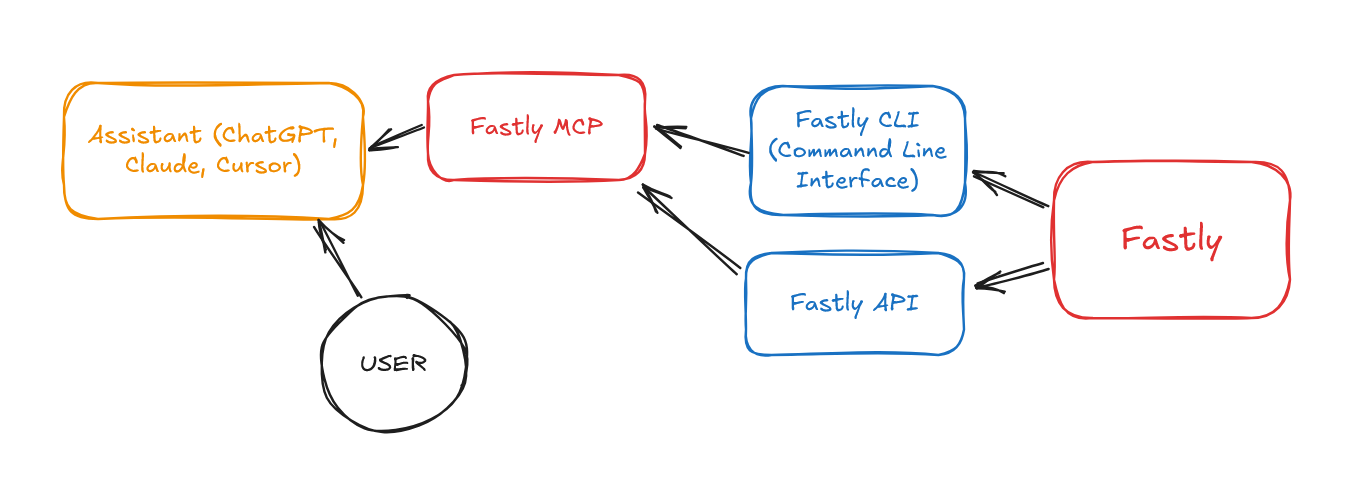
Fastly MCP lleva el poder de la API de Fastly directamente a sus asistentes de IA a través del Protocolo de contexto de modelo (MCP).


La filosofía de diseño API-first de Fastly significa:
Todo es una API : todas las funciones disponibles en la interfaz de usuario de Fastly son accesibles a través de API
Control programático : control total sobre servicios, configuraciones y lógica de borde
Preparado para la automatización : compatibilidad con flujos de trabajo de CI/CD e infraestructura como código
Cambios en tiempo real : los cambios de API se propagan globalmente en segundos, no en minutos ni horas.
La API integral de Fastly te permite:
Administrar servicios CDN : crear, configurar e implementar servicios de entrega de contenido
Controlar el almacenamiento en caché : configure estrategias de caché y realice purgas instantáneas
Configurar la seguridad : administrar WAF, protección DDoS y certificados TLS
Supervisar el rendimiento : acceder a métricas en tiempo real y estadísticas históricas
Implementar Edge Logic : implementar aplicaciones VCL o Compute@Edge personalizadas
Automatice flujos de trabajo : integre con canales de CI/CD y herramientas de infraestructura
El asistente de IA nunca ve tu clave API de Fastly. Se comunica con un asistente local (FastlyMCP) que usa la clave de forma segura.
Con Fastly MCP configurado, puedes hacerle preguntas a tu asistente de IA como:
Lo que quieres hacer | Ejemplo de solicitud de IA |
Enumere sus servicios | "Muéstrame todos mis servicios de Fastly" |
Obtener detalles del dominio | ¿Qué dominios están configurados para mi servicio de comercio electrónico? |
Purgar caché | "Purgar la caché de mi servicio de producto" |
Comprobar el tráfico | "¿Cuál ha sido el patrón de tráfico de mi sitio principal durante la última semana?" |
Ver configuración | "Muéstrame los servidores backend para mi servicio API" |
Comprobar el rendimiento | "¿Cuál es mi tasa de acierto de caché actual?" |
Related MCP server: @fastly/mcp
Una cuenta Fastly y una clave API ( Comience a usar Fastly )
Un asistente de IA compatible con MCP (por ejemplo, Claude, GPT con complementos)
La CLI de Fastly instalada ( Guía de instalación )
Configura tu asistente de IA con:
{
  "mcpServers": {
    "fastly": {
      "command": "node",
      "args": ["path/to/fastly-mcp.mjs"],
      "env": {
        "FASTLY_API_KEY": "your_fastly_api_key"
      }
    }
  }
}Objetivo de la tarea | Ejemplo de solicitud de IA |
Optimizar el servicio en función del tráfico | "Analizar la configuración de |
Configurar para video en vivo | "Configure |
Encontrar conflictos de configuración | "Identifique posibles conflictos de configuración en |
Optimizar el almacenamiento en caché de fragmentos de vídeo | "Optimice el almacenamiento en caché de |
Mejorar la seguridad de WAF | "Revise las reglas de WAF para |
Configurar mTLS de origen | "Configure la autenticación TLS mutua (mTLS) entre Fastly y los servidores de origen para |
Implementar pruebas A/B (Edge) | "Implemente una función Compute@Edge en |
Agregar reescritura dinámica de imágenes (VCL) | "Escriba e implemente VCL para |
Solucionar errores 5xx | "Analizar los registros de |
Este proyecto está licenciado bajo la licencia MIT: consulte el archivo de LICENCIA para obtener más detalles.
Make requests to the Fastly API. Allows accessing all endpoints of the Fastly API with custom paths, methods and parameters.
IMPORTANT USAGE NOTES FOR LLMs:
When making multiple API calls, summarize the results between calls. The user doesn't see raw API responses.
Base URL is automatically added - just provide the path (e.g. '/service').
Authentication is handled automatically - no need to include API keys or know API keys.
Common paths:
List services: GET /service
Get service details: GET /service/{service_id}
Get domains: GET /service/{service_id}/version/{version}/domain
Get backends: GET /service/{service_id}/version/{version}/backend
Purge cache: POST /service/{service_id}/purge_all
Get stats: GET /stats (with params: service_id, from, to)
Always check status codes in responses. Status 200-299 indicates success.
Include simple explanations of what you're doing and what the results mean before and after each API call.
To create a Compute@Edge site, you can use a combination of API calls and terminal commands. The API handles service creation and configuration, while terminal commands handle the local build and deployment process.
Follow these general steps:
Create a new service using the API: POST /service with {"name": "My Site", "type": "wasm"}
Initialize a local Compute project using the Fastly CLI
Build the project using the appropriate build tools
Deploy using the Fastly CLI with the service ID from step 1
DO NOT use --name flag with fastly compute init (use interactive mode or -d -y flags instead)
PowerShell requires semicolons (;) not ampersands (&&) for command chaining
Fastly compute build creates the package archive AFTER you've built the Wasm binary
Build is a TWO-STEP process: first compile to Wasm, then create the package archive
Deploy command needs -d flag to avoid hanging on interactive prompts
NEVER attempt to extract or use the user's API key directly - auth is handled by MCP
To create a service from scratch, you must use API calls for configuration and CLI for local build
Check current directory paths carefully before running commands
Full URL paths aren't needed in API calls - just use the path portion (e.g. '/service')
See the full guide for detailed instructions on handling common errors and PowerShell-specific commands.
| Name | Required | Description | Default |
|---|---|---|---|
| path | Yes | API path (e.g., '/service' or '/service/{service_id}/purge_all'). Don't include base URL. | |
| method | Yes | HTTP method (GET, POST, PUT, DELETE) | |
| body | No | Request body for POST/PUT requests (optional). Will be JSON-encoded automatically. | |
| params | No | URL parameters to add to the request (optional). For filtering, pagination, etc. |
Does the description disclose side effects, auth requirements, rate limits, or destructive behavior?
With no annotations provided, the description carries the full burden of behavioral disclosure and excels at this. It explains authentication handling ('Authentication is handled automatically'), response handling ('summarize the results between calls'), status code interpretation ('Always check status codes'), and important constraints ('Base URL is automatically added', 'Full URL paths aren't needed'). It also provides detailed guidance about what the LLM should do before/after calls.
Agents need to know what a tool does to the world before calling it. Descriptions should go beyond structured annotations to explain consequences.
Is the description appropriately sized, front-loaded, and free of redundancy?
The description is excessively long (over 500 words) with multiple sections that could be streamlined. While the front-loaded 'IMPORTANT USAGE NOTES' is well-structured, the later sections on 'Creating Fastly Compute@Edge Sites' and 'COMMON PITFALLS' contain information that belongs in documentation rather than a tool description. Many sentences don't directly help the agent select/invoke the tool.
Shorter descriptions cost fewer tokens and are easier for agents to parse. Every sentence should earn its place.
Given the tool's complexity, does the description cover enough for an agent to succeed on first attempt?
Given the complexity of a generic API tool with 4 parameters and no output schema, the description provides substantial context about usage patterns, common endpoints, authentication, and response handling. It covers most aspects needed for effective use, though it could benefit from more detail about error responses or rate limits. The absence of an output schema is partially compensated by guidance on interpreting status codes and summarizing results.
Complex tools with many parameters or behaviors need more documentation. Simple tools need less. This dimension scales expectations accordingly.
Does the description clarify parameter syntax, constraints, interactions, or defaults beyond what the schema provides?
Schema description coverage is 100%, so the baseline is 3. The description adds significant value beyond the schema by providing concrete examples of paths ('/service', '/service/{service_id}/purge_all'), explaining how parameters work ('with params: service_id, from, to'), and clarifying that the body is 'JSON-encoded automatically'. However, it doesn't fully explain all parameter nuances like how 'params' object maps to URL parameters.
Input schemas describe structure but not intent. Descriptions should explain non-obvious parameter relationships and valid value ranges.
Does the description clearly state what the tool does and how it differs from similar tools?
The description clearly states the tool 'Make requests to the Fastly API' with access to 'all endpoints', which is specific about the verb (make requests) and resource (Fastly API). It distinguishes from the sibling tool 'fastly_cli' by focusing on API calls rather than CLI commands. However, it doesn't explicitly contrast with the sibling tool beyond mentioning CLI in the usage notes.
Agents choose between tools based on descriptions. A clear purpose with a specific verb and resource helps agents select the right tool.
Does the description explain when to use this tool, when not to, or what alternatives exist?
The description provides extensive usage guidance including explicit when-to-use scenarios (e.g., 'When making multiple API calls', 'To create a service from scratch'), alternatives (CLI for local build/deployment), and exclusions (e.g., 'NEVER attempt to extract or use the user's API key directly'). The 'IMPORTANT USAGE NOTES' section offers comprehensive context for when and how to use this tool versus other approaches.
Agents often have multiple tools that could apply. Explicit usage guidance like "use X instead of Y when Z" prevents misuse.
Execute Fastly CLI commands securely without exposing API keys.
This tool allows you to run Fastly CLI commands while the MCP server handles authentication automatically. The LLM never sees or needs to handle the API key directly.
USAGE EXAMPLES:
Initialize a Compute project: fastly_cli('compute init --language javascript -d -y')
Build a package: fastly_cli('compute build')
Deploy a service: fastly_cli('compute deploy --service-id SERVICE_ID -d -y')
COMMON COMMANDS:
compute init: Initialize a new Compute project
compute build: Build a Compute package
compute deploy: Deploy a Compute package
compute publish: Build and deploy in one step
whoami: Check authentication status
SECURITY NOTE: Authentication is handled automatically. Never attempt to pass API keys in commands.
| Name | Required | Description | Default |
|---|---|---|---|
| command | Yes | The Fastly CLI command to execute (without the 'fastly' prefix) | |
| working_directory | No | Optional working directory for command execution |
Does the description disclose side effects, auth requirements, rate limits, or destructive behavior?
With no annotations provided, the description carries the full burden of behavioral disclosure. It effectively describes key traits: it's a command execution tool with automatic authentication handled server-side, security warnings against passing API keys, and examples of common commands. It doesn't cover all potential behaviors like error handling or output format, but provides substantial context beyond basic purpose.
Agents need to know what a tool does to the world before calling it. Descriptions should go beyond structured annotations to explain consequences.
Is the description appropriately sized, front-loaded, and free of redundancy?
The description is well-structured with clear sections (purpose, usage examples, common commands, security note) and front-loads the core purpose. It's appropriately sized for a CLI tool, though the 'COMMON COMMANDS' section could be slightly more concise as it lists commands already implied by examples.
Shorter descriptions cost fewer tokens and are easier for agents to parse. Every sentence should earn its place.
Given the tool's complexity, does the description cover enough for an agent to succeed on first attempt?
Given the tool's complexity (CLI command execution with security considerations), no annotations, and no output schema, the description does a good job of providing necessary context. It covers purpose, usage, examples, security, and common commands. However, it doesn't describe what the tool returns (output format/behavior), which is a gap since there's no output schema.
Complex tools with many parameters or behaviors need more documentation. Simple tools need less. This dimension scales expectations accordingly.
Does the description clarify parameter syntax, constraints, interactions, or defaults beyond what the schema provides?
The input schema has 100% description coverage, clearly documenting both parameters. The description adds minimal parameter semantics beyond the schema—it implies the 'command' parameter should exclude the 'fastly' prefix through examples, but doesn't explicitly state this. With high schema coverage, the baseline score of 3 is appropriate as the schema does most of the work.
Input schemas describe structure but not intent. Descriptions should explain non-obvious parameter relationships and valid value ranges.
Does the description clearly state what the tool does and how it differs from similar tools?
The description clearly states the tool's purpose: 'Execute Fastly CLI commands securely without exposing API keys.' It specifies the exact action (execute CLI commands) and resource (Fastly CLI), and distinguishes it from the sibling 'fastly_api' tool by focusing on CLI execution rather than API calls.
Agents choose between tools based on descriptions. A clear purpose with a specific verb and resource helps agents select the right tool.
Does the description explain when to use this tool, when not to, or what alternatives exist?
The description provides clear context for when to use this tool (running Fastly CLI commands with automatic authentication) and includes usage examples and common commands. However, it does not explicitly state when NOT to use it or directly compare it to the 'fastly_api' sibling tool, which would be needed for a perfect score.
Agents often have multiple tools that could apply. Explicit usage guidance like "use X instead of Y when Z" prevents misuse.
Recent tool additions, removals, and schema changes observed during successful MCP inspections.
fastly_apifastly_cliScored across 2 tools
The two tools have completely distinct purposes: fastly_api handles direct API calls for service management, configuration, and data retrieval, while fastly_cli executes CLI commands for local project development and deployment. There is no overlap in functionality, making it clear when to use each tool.
Both tools follow a consistent naming pattern with the prefix 'fastly_' followed by a descriptive suffix (_api, _cli). This clear and uniform naming scheme makes it easy to identify the tool's purpose at a glance.
With only 2 tools, the server feels thin for covering Fastly's comprehensive CDN and edge computing platform. While the tools cover API interactions and CLI operations, many domain-specific actions (e.g., cache management, analytics, configuration updates) are deferred to generic API calls, which may require more agent effort to construct properly.
The tool set is severely incomplete for the Fastly domain. While fastly_api provides generic API access, there are no dedicated tools for common operations like purging cache, managing domains/backends, or retrieving statistics—forcing agents to manually construct API paths. The CLI tool helps with Compute@Edge but doesn't cover other Fastly services, leaving significant gaps in coverage.
Context and control for any AI. Agent identity, scoped access, and proof across tools.
Zero-setup MCP gateway securely connecting AI to your tools with authentication and workflows
MCP gateway: one connection for your AI apps, with tool policies, PII redaction and audit logs.
Connect MCP clients to 2,000+ AI models without managing provider API keys.