
A
licenseB
qualityD
maintenanceProvides seamless integration with Fastly's Next-Gen Web Application Firewall API, enabling AI assistants to manage web application security through natural language interactions.
29
1
MIT

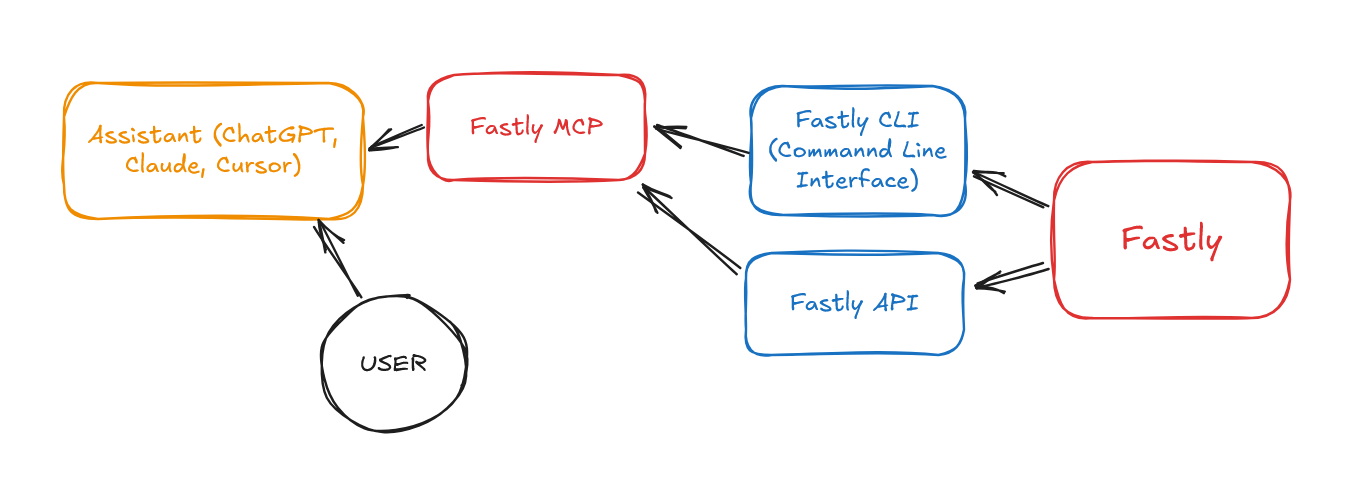
The FastlyMCP server enables integration of Fastly's platform with AI assistants through the Model Context Protocol (MCP), letting you:
Manage Fastly Services: Create, configure, list, and deploy CDN services programmatically
Control Caching: Perform purges and manage cache configurations
Access Analytics: Retrieve service statistics and performance metrics
Execute API Requests: Make custom requests to any Fastly API endpoint
Run CLI Commands: Use Fastly CLI for Compute@Edge projects (initialize, build, deploy)
Secure Authentication: Handle Fastly API keys securely without exposure
Automate Workflows: Integrate with CI/CD pipelines and infrastructure tools
Troubleshoot & Analyze: Examine configurations and implement edge logic
Provides access to Fastly's API for managing CDN services, controlling caching, configuring security, monitoring performance, implementing edge logic, and automating workflows. Enables operations like listing services, viewing domain details, purging cache, checking traffic patterns, viewing configurations, and monitoring performance metrics.
Click on "Deploy Server".
Wait a few minutes for the server to deploy. Once ready, it will show a "Started" state.
In the chat, type @ followed by the MCP server name and your instructions, e.g., "@FastlyMCP show me all my Fastly services"
That's it! The server will respond to your query, and you can continue using it as needed.
Here is a step-by-step guide with screenshots.

Fastly MCP brings the power of Fastly's API directly to your AI assistants through the Model Context Protocol (MCP).


Fastly's API-first design philosophy means:
Everything is an API - Every feature available in the Fastly UI is accessible via API
Programmatic Control - Full control over services, configurations, and edge logic
Automation Ready - Support for CI/CD workflows and infrastructure as code
Real-time Changes - API changes propagate globally in seconds, not minutes or hours
Fastly's comprehensive API allows you to:
Manage CDN Services - Create, configure, and deploy content delivery services
Control Caching - Set up cache strategies and perform instant purges
Configure Security - Manage WAF, DDoS protection, and TLS certificates
Monitor Performance - Access real-time metrics and historical stats
Implement Edge Logic - Deploy custom VCL or Compute@Edge applications
Automate Workflows - Integrate with CI/CD pipelines and infrastructure tools
The AI assistant never sees your Fastly API key. It talks to a local helper (FastlyMCP) which uses the key securely.
With Fastly MCP configured, you can ask your AI assistant questions like:
What You Want To Do | Example AI Request |
List your services | "Show me all my Fastly services" |
Get domain details | "What domains are configured for my e-commerce service?" |
Purge cache | "Purge the cache for my product service" |
Check traffic | "What's the traffic pattern for my main site over the last week?" |
View configuration | "Show me the backend servers for my API service" |
Check performance | "What's my current cache hit ratio?" |
Related MCP server: @fastly/mcp
A Fastly account and API key (Get started with Fastly)
An AI assistant that supports MCP (e.g., Claude, GPT with plugins)
The Fastly CLI installed (Installation Guide)
Configure your AI assistant with:
{
  "mcpServers": {
    "fastly": {
      "command": "node",
      "args": ["path/to/fastly-mcp.mjs"],
      "env": {
        "FASTLY_API_KEY": "your_fastly_api_key"
      }
    }
  }
}Task Goal | Example AI Request |
Optimize service based on traffic | "Analyze the configuration for |
Configure for live video | "Configure |
Find config conflicts | "Identify potential configuration conflicts in |
Optimize video chunk caching | "Optimize caching for |
Enhance WAF security | "Review the WAF rules for |
Set up origin mTLS | "Set up Mutual TLS (mTLS) authentication between Fastly and the origin servers for |
Implement A/B testing (Edge) | "Deploy a Compute@Edge function to |
Add dynamic image rewriting (VCL) | "Write and deploy VCL for |
Troubleshoot 5xx errors | "Analyze logs for |
This project is licensed under the MIT License - see the LICENSE file for details.
Make requests to the Fastly API. Allows accessing all endpoints of the Fastly API with custom paths, methods and parameters.
IMPORTANT USAGE NOTES FOR LLMs:
When making multiple API calls, summarize the results between calls. The user doesn't see raw API responses.
Base URL is automatically added - just provide the path (e.g. '/service').
Authentication is handled automatically - no need to include API keys or know API keys.
Common paths:
List services: GET /service
Get service details: GET /service/{service_id}
Get domains: GET /service/{service_id}/version/{version}/domain
Get backends: GET /service/{service_id}/version/{version}/backend
Purge cache: POST /service/{service_id}/purge_all
Get stats: GET /stats (with params: service_id, from, to)
Always check status codes in responses. Status 200-299 indicates success.
Include simple explanations of what you're doing and what the results mean before and after each API call.
To create a Compute@Edge site, you can use a combination of API calls and terminal commands. The API handles service creation and configuration, while terminal commands handle the local build and deployment process.
Follow these general steps:
Create a new service using the API: POST /service with {"name": "My Site", "type": "wasm"}
Initialize a local Compute project using the Fastly CLI
Build the project using the appropriate build tools
Deploy using the Fastly CLI with the service ID from step 1
DO NOT use --name flag with fastly compute init (use interactive mode or -d -y flags instead)
PowerShell requires semicolons (;) not ampersands (&&) for command chaining
Fastly compute build creates the package archive AFTER you've built the Wasm binary
Build is a TWO-STEP process: first compile to Wasm, then create the package archive
Deploy command needs -d flag to avoid hanging on interactive prompts
NEVER attempt to extract or use the user's API key directly - auth is handled by MCP
To create a service from scratch, you must use API calls for configuration and CLI for local build
Check current directory paths carefully before running commands
Full URL paths aren't needed in API calls - just use the path portion (e.g. '/service')
See the full guide for detailed instructions on handling common errors and PowerShell-specific commands.
Inputs: path (required), method (required), body, params.
Execute Fastly CLI commands securely without exposing API keys.
This tool allows you to run Fastly CLI commands while the MCP server handles authentication automatically. The LLM never sees or needs to handle the API key directly.
USAGE EXAMPLES:
Initialize a Compute project: fastly_cli('compute init --language javascript -d -y')
Build a package: fastly_cli('compute build')
Deploy a service: fastly_cli('compute deploy --service-id SERVICE_ID -d -y')
COMMON COMMANDS:
compute init: Initialize a new Compute project
compute build: Build a Compute package
compute deploy: Deploy a Compute package
compute publish: Build and deploy in one step
whoami: Check authentication status
SECURITY NOTE: Authentication is handled automatically. Never attempt to pass API keys in commands.
Inputs: command (required), working_directory.
Recent tool additions, removals, and schema changes observed during successful MCP inspections.
Loading tool schema changelog…
Scored across 2 tools
The two tools have completely distinct purposes: fastly_api handles direct API calls for service management, configuration, and data retrieval, while fastly_cli executes CLI commands for local project development and deployment. There is no overlap in functionality, making it clear when to use each tool.
Both tools follow a consistent naming pattern with the prefix 'fastly_' followed by a descriptive suffix (_api, _cli). This clear and uniform naming scheme makes it easy to identify the tool's purpose at a glance.
With only 2 tools, the server feels thin for covering Fastly's comprehensive CDN and edge computing platform. While the tools cover API interactions and CLI operations, many domain-specific actions (e.g., cache management, analytics, configuration updates) are deferred to generic API calls, which may require more agent effort to construct properly.
The tool set is severely incomplete for the Fastly domain. While fastly_api provides generic API access, there are no dedicated tools for common operations like purging cache, managing domains/backends, or retrieving statistics—forcing agents to manually construct API paths. The CLI tool helps with Compute@Edge but doesn't cover other Fastly services, leaving significant gaps in coverage.
Context and control for any AI. Agent identity, scoped access, and proof across tools.
Zero-setup MCP gateway securely connecting AI to your tools with authentication and workflows
MCP gateway: one connection for your AI apps, with tool policies, PII redaction and audit logs.
Connect MCP clients to 2,000+ AI models without managing provider API keys.