Glama

All-in-MCP

A FastMCP-based Model Context Protocol (MCP) server providing academic paper search, web search, and PDF processing utilities. Features a modular architecture with both proxy and standalone server capabilities.
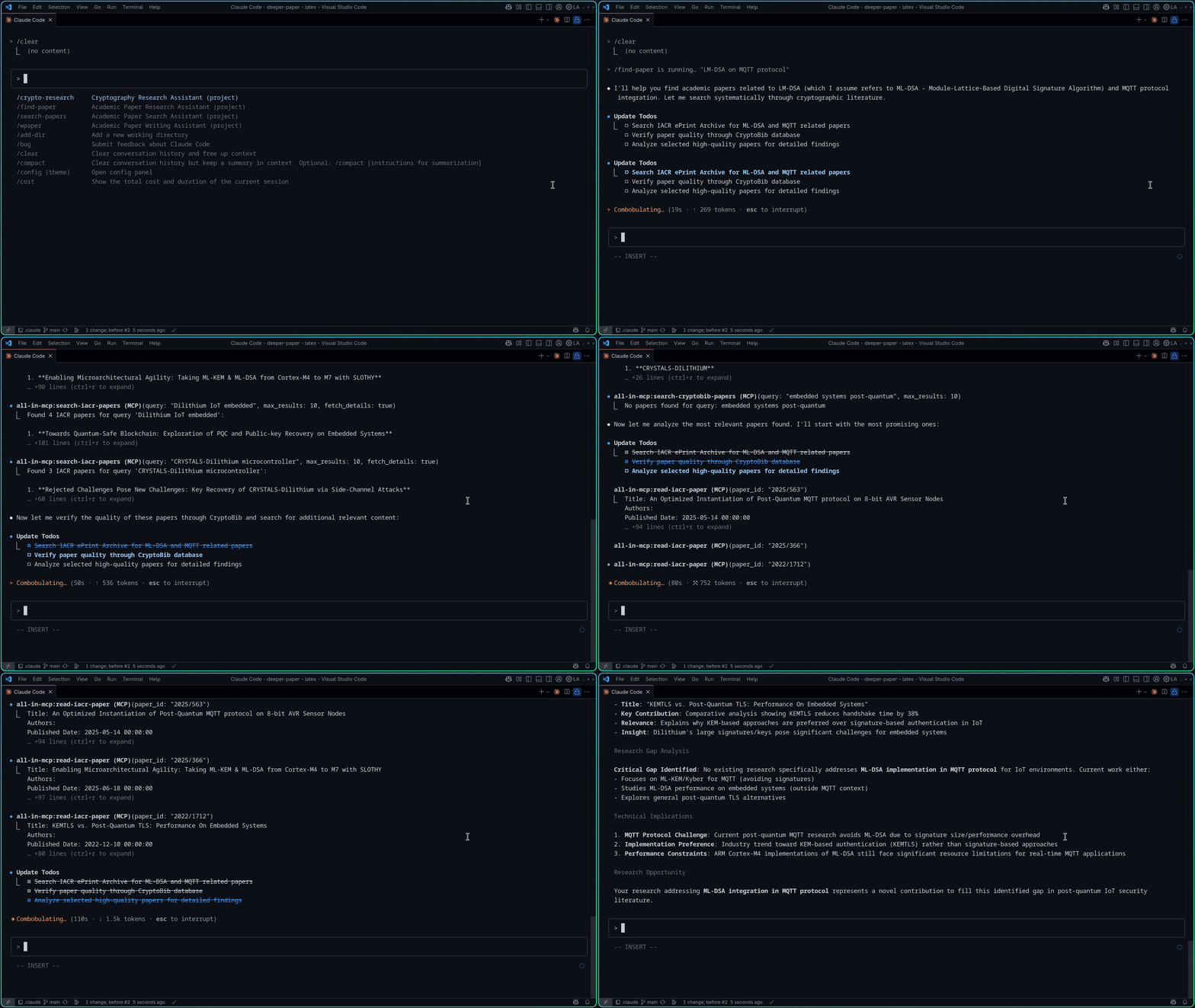
APaper Research Direction

Architecture

All-in-MCP uses a modern FastMCP architecture with three main components:

  1. 🔄 All-in-MCP Proxy Server: Main server that routes requests to academic tools and web search

  2. 📚 APaper Module: Isolated academic research server with specialized paper search tools

  3. 🔍 Qwen Search Module: Web search server powered by Qwen/Dashscope API with SSE-based MCP

This design provides better modularity, performance, and scalability.

Related MCP server: scholar-toolkit-mcp

Features

All servers expose search tools as FastMCP endpoints with automatic tool registration:

Available Tools

Category

Tool Name

Description

Backend

Academic Research

apaper_search_iacr_papers

Search academic papers from IACR ePrint Archive

APaper

apaper_download_iacr_paper

Download PDF of an IACR ePrint paper

APaper

apaper_read_iacr_paper

Read and extract text content from an IACR ePrint paper PDF

APaper

Bibliography Search

apaper_search_dblp_papers

Search DBLP computer science bibliography database

APaper

Cross-platform Search

apaper_search_google_scholar_papers

Search academic papers across disciplines with citation data

APaper

Web Search

qwen_search_web_search

Search the web using Qwen/Dashscope API

Qwen Search

GitHub Repository

github-repo-mcp_getRepoAllDirectories

Get all directories from a GitHub repository

GitHub-Repo-MCP

github-repo-mcp_getRepoDirectories

Get directories from a specific path in GitHub repository

GitHub-Repo-MCP

github-repo-mcp_getRepoFile

Get file content from GitHub repository

GitHub-Repo-MCP

All tools are implemented using FastMCP decorators with automatic registration, built-in validation, and enhanced error handling.

Quick Start

Prerequisites

  • Python 3.10 or higher

  • pipx for Python package installation

  • npx for MCP Inspector (Node.js required)

Integration with MCP Clients

Add the servers to your MCP client configuration:

VSCode Configuration (.vscode/mcp.json)

{
  "servers": {
    "all-in-mcp": {
      "type": "stdio",
      "command": "pipx",
      "args": ["run", "all-in-mcp"],
      "env": {
        "APAPER": "true",
        "QWEN_SEARCH": "true",
        "DASHSCOPE_API_KEY": "your_api_key_here",
        "GITHUB_REPO_MCP": "true"
      }
    }
  }
}

Claude Code Configuration (.mcp.json)

{
  "mcpServers": {
    "all-in-mcp": {
      "type": "stdio",
      "command": "pipx",
      "args": ["run", "all-in-mcp"],
      "env": {
        "APAPER": "true",
        "QWEN_SEARCH": "true",
        "DASHSCOPE_API_KEY": "your_api_key_here",
        "GITHUB_REPO_MCP": "true"
      }
    }
  }
}

Server Options

The main proxy server supports multiple MCP backends through environment variables:

# Run with APaper academic tools enabled
APAPER=true pipx run all-in-mcp

# Run with Qwen Search web search enabled
QWEN_SEARCH=true DASHSCOPE_API_KEY=your_api_key_here pipx run all-in-mcp

# Run with GitHub repository tools enabled
GITHUB_REPO_MCP=true pipx run all-in-mcp

# Run with all backends enabled
APAPER=true QWEN_SEARCH=true DASHSCOPE_API_KEY=your_api_key_here GITHUB_REPO_MCP=true pipx run all-in-mcp

# Run standalone APaper server (academic tools only)
pipx run apaper

# Run standalone Qwen Search server (web search only)
DASHSCOPE_API_KEY=your_api_key_here pipx run qwen-search

Note: If you have the package installed globally, you can also run directly: all-in-mcp or qwen-search

Debugging & Testing

MCP Inspector

Use the official MCP Inspector to debug and test server functionality:

# Debug the main proxy server with APaper tools
APAPER=true npx @modelcontextprotocol/inspector pipx run all-in-mcp

# Debug with all backends enabled
APAPER=true GITHUB_REPO_MCP=true npx @modelcontextprotocol/inspector pipx run all-in-mcp

# Debug standalone APaper server
npx @modelcontextprotocol/inspector pipx run apaper

Local Development with uv

When developing locally, use uv run to debug specific MCP functions:

# Debug APaper server (academic tools)
npx @modelcontextprotocol/inspector uv run apaper

# Debug all-in-mcp proxy with APaper enabled
APAPER=true npx @modelcontextprotocol/inspector uv run all-in-mcp

# Debug all-in-mcp proxy with GitHub repo tools enabled
GITHUB_REPO_MCP=true npx @modelcontextprotocol/inspector uv run all-in-mcp

# Debug all-in-mcp with all backends enabled
APAPER=true QWEN_SEARCH=true DASHSCOPE_API_KEY=your_api_key_here GITHUB_REPO_MCP=true npx @modelcontextprotocol/inspector uv run all-in-mcp

# Debug Qwen Search server
DASHSCOPE_API_KEY=your_api_key_here npx @modelcontextprotocol/inspector uv run qwen-search

The MCP Inspector provides:

  • 🔍 Interactive Tool Testing: Test all available tools with real parameters

  • 📊 Server Information: View server capabilities and tool schemas

  • 🐛 Debug Messages: Monitor server communication and error messages

  • Real-time Testing: Execute tools and see results immediately

Perfect for development, debugging, and understanding how the FastMCP tools work.

For development setup and contribution guidelines, see the Development Guide.

Quick Development Setup

# Clone the repository
git clone https://github.com/jiahaoxiang2000/all-in-mcp.git
cd all-in-mcp

# Install with development dependencies
uv sync --extra dev

# Run tests (now using unittest)
uv run python tests/test_fastmcp_server.py
uv run python tests/test_apaper_iacr.py
uv run python tests/test_apaper_pdf.py
uv run python tests/test_qwen_search.py

Available Tools

7 tools
apaper_download_iacr_paperB

Download PDF of an IACR ePrint paper

Args: paper_id: IACR paper ID (e.g., '2009/101') save_path: Directory to save the PDF (default: './downloads')

ParametersJSON Schema
NameRequiredDescriptionDefault
paper_idYes
save_pathNo./downloads

Output Schema

ParametersJSON Schema
NameRequiredDescription
resultYes

TDQS

B3.4/5.0
Behavior2/5

Does the description disclose side effects, auth requirements, rate limits, or destructive behavior?

With no annotations, the description must fully disclose behavior, but it only mentions downloading a PDF, omitting details like file overwriting, error handling, or network requirements, leaving significant gaps.

Agents need to know what a tool does to the world before calling it. Descriptions should go beyond structured annotations to explain consequences.

Conciseness5/5

Is the description appropriately sized, front-loaded, and free of redundancy?

The description is concise with a front-loaded purpose and a clean 'Args' section. Every sentence is informative and there is no extraneous text.

Shorter descriptions cost fewer tokens and are easier for agents to parse. Every sentence should earn its place.

Completeness4/5

Given the tool's complexity, does the description cover enough for an agent to succeed on first attempt?

Given the low complexity (2 params, an output schema available) and the presence of sibling tools, the description covers the essential purpose and parameters, though it lacks behavioral details that would improve completeness.

Complex tools with many parameters or behaviors need more documentation. Simple tools need less. This dimension scales expectations accordingly.

Parameters3/5

Does the description clarify parameter syntax, constraints, interactions, or defaults beyond what the schema provides?

While schema description coverage is 0%, the description adds minimal meaning by providing an example for paper_id and a default for save_path, but does not elaborate on formats, validation, or constraints beyond the schema.

Input schemas describe structure but not intent. Descriptions should explain non-obvious parameter relationships and valid value ranges.

Purpose5/5

Does the description clearly state what the tool does and how it differs from similar tools?

The description clearly states the tool downloads a PDF of an IACR ePrint paper, using a specific verb and resource, and distinguishes it from sibling search tools like apaper_search_iacr_papers.

Agents choose between tools based on descriptions. A clear purpose with a specific verb and resource helps agents select the right tool.

Usage Guidelines2/5

Does the description explain when to use this tool, when not to, or what alternatives exist?

The description provides no guidance on when to use this tool versus alternatives, such as after finding a paper ID via search. It only describes the action without context for appropriate usage.

Agents often have multiple tools that could apply. Explicit usage guidance like "use X instead of Y when Z" prevents misuse.

apaper_search_dblp_papersA

Search DBLP computer science bibliography database for papers

Args: query: Search query string (supports boolean 'and'/'or' operators) max_results: Maximum number of papers to return (default: 10) year_from: Lower bound for publication year (optional) year_to: Upper bound for publication year (optional) venue_filter: Case-insensitive substring filter for venues (e.g., 'ICLR', 'NeurIPS') include_bibtex: Whether to include BibTeX entries in results (default: False)

ParametersJSON Schema
NameRequiredDescriptionDefault
queryYes
max_resultsNo
year_fromNo
year_toNo
venue_filterNo
include_bibtexNo

Output Schema

ParametersJSON Schema
NameRequiredDescription
resultYes

TDQS

A3.7/5.0
Behavior2/5

Does the description disclose side effects, auth requirements, rate limits, or destructive behavior?

Annotations are absent, so the description must fully disclose behavior. It lists parameters and defaults but does not describe the output format (e.g., fields returned, sorting, pagination), nor does it mention any side effects or constraints like rate limits. The presence of an output schema partially mitigates this, but the description could provide more behavioral context.

Agents need to know what a tool does to the world before calling it. Descriptions should go beyond structured annotations to explain consequences.

Conciseness4/5

Is the description appropriately sized, front-loaded, and free of redundancy?

The description is well-structured with a clear intro and parameter list. It is not overly verbose, though it could be slightly more concise. Every sentence contributes to understanding the tool's usage.

Shorter descriptions cost fewer tokens and are easier for agents to parse. Every sentence should earn its place.

Completeness4/5

Given the tool's complexity, does the description cover enough for an agent to succeed on first attempt?

Given the output schema exists, the description need not detail return values. It covers all parameters, including defaults and parameter-specific behavior. It is complete enough for a search tool, though it lacks information on result ordering or limitations.

Complex tools with many parameters or behaviors need more documentation. Simple tools need less. This dimension scales expectations accordingly.

Parameters4/5

Does the description clarify parameter syntax, constraints, interactions, or defaults beyond what the schema provides?

Schema_description_coverage is 0%, so the description is crucial. It adds meaningful details: query supports boolean operators, venue filter is case-insensitive substring, and defaults for max_results and include_bibtex are explained. However, it could be more specific about allowed values or formats for year_from/year_to.

Input schemas describe structure but not intent. Descriptions should explain non-obvious parameter relationships and valid value ranges.

Purpose5/5

Does the description clearly state what the tool does and how it differs from similar tools?

The description clearly states the tool searches the DBLP computer science bibliography, which is a specific and distinct resource. The verb 'search' and resource 'DBLP' are precise, and the sibling tools for other databases (Google Scholar, IACR) naturally differentiate it.

Agents choose between tools based on descriptions. A clear purpose with a specific verb and resource helps agents select the right tool.

Usage Guidelines3/5

Does the description explain when to use this tool, when not to, or what alternatives exist?

The description implies usage for DBLP searches but provides no explicit guidance on when to prefer this over sibling tools, nor does it mention exclusions or alternatives. Users must infer from the name and context.

Agents often have multiple tools that could apply. Explicit usage guidance like "use X instead of Y when Z" prevents misuse.

apaper_search_google_scholar_papersA

Search academic papers from Google Scholar

Args: query: Search query string (e.g., 'machine learning', 'neural networks') max_results: Maximum number of papers to return (default: 10) year_low: Minimum publication year (optional) year_high: Maximum publication year (optional)

ParametersJSON Schema
NameRequiredDescriptionDefault
queryYes
max_resultsNo
year_lowNo
year_highNo

Output Schema

ParametersJSON Schema
NameRequiredDescription
resultYes

TDQS

A3.7/5.0
Behavior2/5

Does the description disclose side effects, auth requirements, rate limits, or destructive behavior?

With no annotations provided, the description carries the full burden of behavioral disclosure. It only states it 'searches' and lists parameters, but does not mention any behavioral traits such as rate limits, authentication requirements, or potential side effects. The existence of an output schema mitigates some need for return format details, but other behaviors remain opaque.

Agents need to know what a tool does to the world before calling it. Descriptions should go beyond structured annotations to explain consequences.

Conciseness5/5

Is the description appropriately sized, front-loaded, and free of redundancy?

The description is concise, front-loaded with the main purpose, followed by a structured list of parameters. Every sentence serves a purpose and there is no extraneous information.

Shorter descriptions cost fewer tokens and are easier for agents to parse. Every sentence should earn its place.

Completeness4/5

Given the tool's complexity, does the description cover enough for an agent to succeed on first attempt?

Given the tool has 4 parameters and an output schema exists, the description adequately covers input semantics. However, it lacks context about output format, pagination, or potential errors. For a search tool, this is fairly complete but could be improved by adding a note about output structure.

Complex tools with many parameters or behaviors need more documentation. Simple tools need less. This dimension scales expectations accordingly.

Parameters5/5

Does the description clarify parameter syntax, constraints, interactions, or defaults beyond what the schema provides?

The schema description coverage is 0%, meaning the schema provides no parameter descriptions. The description fully compensates by explaining each parameter: query (with example), max_results (default value), year_low, and year_high. It adds meaning beyond the schema's basic type information.

Input schemas describe structure but not intent. Descriptions should explain non-obvious parameter relationships and valid value ranges.

Purpose5/5

Does the description clearly state what the tool does and how it differs from similar tools?

The description clearly states it searches academic papers from Google Scholar, using the verb 'Search' and specifying the resource. It distinguishes from sibling tools like apaper_search_dblp_papers and apaper_search_iacr_papers by indicating the source is Google Scholar.

Agents choose between tools based on descriptions. A clear purpose with a specific verb and resource helps agents select the right tool.

Usage Guidelines2/5

Does the description explain when to use this tool, when not to, or what alternatives exist?

The description provides no guidance on when to use this tool versus other search tools (e.g., DBLP, IACR) or what scenarios are appropriate. It lacks explicit when-to-use or when-not-to-use instructions, leaving the agent without context for selection.

Agents often have multiple tools that could apply. Explicit usage guidance like "use X instead of Y when Z" prevents misuse.

apaper_search_iacr_papersA

Search academic papers from IACR ePrint Archive

Args: query: Search query string (e.g., 'cryptography', 'secret sharing') max_results: Maximum number of papers to return (default: 10) fetch_details: Whether to fetch detailed information for each paper (default: True) year_min: Minimum publication year (revised after) year_max: Maximum publication year (revised before)

ParametersJSON Schema
NameRequiredDescriptionDefault
queryYes
max_resultsNo
fetch_detailsNo
year_minNo
year_maxNo

Output Schema

ParametersJSON Schema
NameRequiredDescription
resultYes

TDQS

A3.6/5.0
Behavior2/5

Does the description disclose side effects, auth requirements, rate limits, or destructive behavior?

No annotations are provided, and the description does not disclose behavioral traits such as read-only nature, authentication needs, rate limits, or side effects. The tool name implies a read operation, but explicit disclosure is missing.

Agents need to know what a tool does to the world before calling it. Descriptions should go beyond structured annotations to explain consequences.

Conciseness5/5

Is the description appropriately sized, front-loaded, and free of redundancy?

The description is concise, using a bullet-like structure for parameters. It front-loads the purpose in one sentence, with no wasted words or redundancy.

Shorter descriptions cost fewer tokens and are easier for agents to parse. Every sentence should earn its place.

Completeness4/5

Given the tool's complexity, does the description cover enough for an agent to succeed on first attempt?

The tool has an output schema, so return value details are not needed. The description covers all parameters and the core function. Minor omissions like pagination or sorting are acceptable given the output schema. The description is complete for a search tool.

Complex tools with many parameters or behaviors need more documentation. Simple tools need less. This dimension scales expectations accordingly.

Parameters4/5

Does the description clarify parameter syntax, constraints, interactions, or defaults beyond what the schema provides?

With 0% schema description coverage, the description adds meaning to all five parameters, including examples for query, defaults for max_results and fetch_details, and explanations for year_min and year_max. This compensates well for the schema gap.

Input schemas describe structure but not intent. Descriptions should explain non-obvious parameter relationships and valid value ranges.

Purpose5/5

Does the description clearly state what the tool does and how it differs from similar tools?

The description clearly states the tool searches academic papers from the IACR ePrint Archive. It distinguishes itself from sibling tools like apaper_download_iacr_paper and other search tools by specifying the source.

Agents choose between tools based on descriptions. A clear purpose with a specific verb and resource helps agents select the right tool.

Usage Guidelines2/5

Does the description explain when to use this tool, when not to, or what alternatives exist?

The description provides no guidance on when to use this tool versus alternatives like apaper_search_dblp_papers or apaper_search_google_scholar_papers. It does not mention exclusions or context for choosing this tool.

Agents often have multiple tools that could apply. Explicit usage guidance like "use X instead of Y when Z" prevents misuse.

github-repo-mcp_getRepoAllDirectoriesD
ParametersJSON Schema
NameRequiredDescriptionDefault
repoUrlYesThe URL of the Github repo

TDQS

D1/5.0
Behavior1/5

Does the description disclose side effects, auth requirements, rate limits, or destructive behavior?

Tool has no description.

Agents need to know what a tool does to the world before calling it. Descriptions should go beyond structured annotations to explain consequences.

Conciseness1/5

Is the description appropriately sized, front-loaded, and free of redundancy?

Tool has no description.

Shorter descriptions cost fewer tokens and are easier for agents to parse. Every sentence should earn its place.

Completeness1/5

Given the tool's complexity, does the description cover enough for an agent to succeed on first attempt?

Tool has no description.

Complex tools with many parameters or behaviors need more documentation. Simple tools need less. This dimension scales expectations accordingly.

Parameters1/5

Does the description clarify parameter syntax, constraints, interactions, or defaults beyond what the schema provides?

Tool has no description.

Input schemas describe structure but not intent. Descriptions should explain non-obvious parameter relationships and valid value ranges.

Purpose1/5

Does the description clearly state what the tool does and how it differs from similar tools?

Tool has no description.

Agents choose between tools based on descriptions. A clear purpose with a specific verb and resource helps agents select the right tool.

Usage Guidelines1/5

Does the description explain when to use this tool, when not to, or what alternatives exist?

Tool has no description.

Agents often have multiple tools that could apply. Explicit usage guidance like "use X instead of Y when Z" prevents misuse.

github-repo-mcp_getRepoDirectoriesD
ParametersJSON Schema
NameRequiredDescriptionDefault
repoUrlYesThe URL of the Github repo
pathYesThe directory path to fetch

TDQS

D1/5.0
Behavior1/5

Does the description disclose side effects, auth requirements, rate limits, or destructive behavior?

Tool has no description.

Agents need to know what a tool does to the world before calling it. Descriptions should go beyond structured annotations to explain consequences.

Conciseness1/5

Is the description appropriately sized, front-loaded, and free of redundancy?

Tool has no description.

Shorter descriptions cost fewer tokens and are easier for agents to parse. Every sentence should earn its place.

Completeness1/5

Given the tool's complexity, does the description cover enough for an agent to succeed on first attempt?

Tool has no description.

Complex tools with many parameters or behaviors need more documentation. Simple tools need less. This dimension scales expectations accordingly.

Parameters1/5

Does the description clarify parameter syntax, constraints, interactions, or defaults beyond what the schema provides?

Tool has no description.

Input schemas describe structure but not intent. Descriptions should explain non-obvious parameter relationships and valid value ranges.

Purpose1/5

Does the description clearly state what the tool does and how it differs from similar tools?

Tool has no description.

Agents choose between tools based on descriptions. A clear purpose with a specific verb and resource helps agents select the right tool.

Usage Guidelines1/5

Does the description explain when to use this tool, when not to, or what alternatives exist?

Tool has no description.

Agents often have multiple tools that could apply. Explicit usage guidance like "use X instead of Y when Z" prevents misuse.

github-repo-mcp_getRepoFileD
ParametersJSON Schema
NameRequiredDescriptionDefault
repoUrlYesThe URL of the Github repo
pathYesThe file path to fetch

TDQS

D1/5.0
Behavior1/5

Does the description disclose side effects, auth requirements, rate limits, or destructive behavior?

Tool has no description.

Agents need to know what a tool does to the world before calling it. Descriptions should go beyond structured annotations to explain consequences.

Conciseness1/5

Is the description appropriately sized, front-loaded, and free of redundancy?

Tool has no description.

Shorter descriptions cost fewer tokens and are easier for agents to parse. Every sentence should earn its place.

Completeness1/5

Given the tool's complexity, does the description cover enough for an agent to succeed on first attempt?

Tool has no description.

Complex tools with many parameters or behaviors need more documentation. Simple tools need less. This dimension scales expectations accordingly.

Parameters1/5

Does the description clarify parameter syntax, constraints, interactions, or defaults beyond what the schema provides?

Tool has no description.

Input schemas describe structure but not intent. Descriptions should explain non-obvious parameter relationships and valid value ranges.

Purpose1/5

Does the description clearly state what the tool does and how it differs from similar tools?

Tool has no description.

Agents choose between tools based on descriptions. A clear purpose with a specific verb and resource helps agents select the right tool.

Usage Guidelines1/5

Does the description explain when to use this tool, when not to, or what alternatives exist?

Tool has no description.

Agents often have multiple tools that could apply. Explicit usage guidance like "use X instead of Y when Z" prevents misuse.

Tool Schema Changelog

Recent tool additions, removals, and schema changes observed during successful MCP inspections. Dates show when Glama detected each change.

  1. 5 tool updatesv0.4.4
    • Removedapaper_read_iacr_paper
    • Removedapaper_read_pdf_file
    • Removedapaper_search_crossref_papers
    • Removedapaper_search_cryptobib_papers
    • Addedapaper_search_dblp_papers
  2. 10 tool updatesv1.0.0
    • First observedapaper_download_iacr_paper
    • First observedapaper_read_iacr_paper
    • First observedapaper_read_pdf_file
    • First observedapaper_search_crossref_papers
    • First observedapaper_search_cryptobib_papers
    • First observedapaper_search_google_scholar_papers
    • First observedapaper_search_iacr_papers
    • First observedgithub-repo-mcp_getRepoAllDirectories
    • First observedgithub-repo-mcp_getRepoDirectories
    • First observedgithub-repo-mcp_getRepoFile

TDQS

C2/5.0
Disambiguation2/5

The tools are split into two distinct domains (academic papers and GitHub), but within the GitHub group, three tools lack descriptions and are ambiguously named (e.g., getRepoAllDirectories vs getRepoDirectories). The apaper tools are well-described and distinct.

Naming Consistency2/5

Tool names follow two different conventions: snake_case with 'apaper_' prefix for academic tools, and camelCase with 'github-repo-mcp_' prefix for GitHub tools. This inconsistency makes it harder for an agent to predict naming patterns.

Tool Count3/5

The total of 7 tools is reasonable, but the server tries to cover two unrelated domains with only a few tools each. The academic part (~4 tools) is appropriately scoped, while the GitHub part (3 tools) feels marginal for a repository toolset.

Completeness2/5

The academic paper tools cover search and download, which is decent. However, the GitHub tools only provide read operations (get directories and file) with no support for listing repositories, searching code, or any write actions, leaving significant gaps for typical repository interactions.

Maintenance

ActivityInactive
ResponsivenessNo issues

Resources

Unclaimed servers have limited discoverability.

Looking for Admin?

If you are the server author, to access and configure the admin panel.

Related MCP Connectors

Related MCP Servers

  • A
    license
    A
    quality
    D
    maintenance
    Unified academic search MCP server that searches open literature (arXiv, bioRxiv, medRxiv, PMC), CNKI, and Web of Science, with browser-backed authentication, local paper library, and export to multiple formats.
    21
    2
    MIT
  • A
    license
    A
    quality
    A
    maintenance
    Comprehensive MCP server for academic research workflows, enabling paper searching across multiple sources, manuscript processing with citation placeholders, search caching, and citation export.
    11
    MIT
  • A
    license
    Not graded
    quality
    Not graded
    maintenance
    Enables searching and retrieving security conference papers from major venues (S&P, USENIX, CCS, NDSS, etc.) using natural language queries through the MCP protocol.
    16
    MIT

Latest Blog Posts

MCP directory API

We provide all the information about MCP servers via our MCP API.

curl -X GET 'https://glama.ai/api/mcp/v1/servers/isomoes/all-in-mcp'

If you have feedback or need assistance with the MCP directory API, please join our Discord server