A
licenseNot graded
qualityB
maintenanceAn agentic QA framework that authors, generates, triages, and self-heals Playwright tests for any web app, usable from Claude Code/Desktop as an MCP server or from CI as a CLI.
5
MIT

EvalView's MCP server enables regression testing and behavior validation of AI agents directly from a coding assistant context.
Core Capabilities:
Create test cases (create_test): Generate YAML-based tests specifying queries, expected/forbidden tools, output requirements, and score thresholds — no YAML knowledge required
Save golden baselines (run_snapshot): Capture current passing agent behavior as a baseline for future comparisons
Detect regressions (run_check): Compare current behavior against baselines, returning PASSED, OUTPUT_CHANGED, TOOLS_CHANGED, or REGRESSION statuses
List tests (list_tests): View all golden baselines with variant counts and last-updated timestamps
Validate skill files (validate_skill): Check SKILL.md files for correct structure and completeness
Generate skill tests (generate_skill_tests): Auto-generate YAML test suites from SKILL.md files covering explicit, implicit, contextual, and negative categories
Run skill tests (run_skill_test): Execute tests with deterministic checks (tool calls, file ops, output content) and LLM-as-judge rubric scoring
Generate visual reports (generate_visual_report): Produce self-contained HTML reports with traces, diffs, scores, and timelines
Additional Features:
Auto-detects project structure and agent types (Claude Code, LangGraph, CrewAI, OpenAI Assistants, custom agents)
Supports multiple behavior variants to handle agent non-determinism
Integrates with CI/CD pipelines and offers a Python API and Pytest plugin
Supports execution path tracing and behavioral regression detection for multi-agent systems built with CrewAI.
Integrates with CI/CD workflows to block regressions and provide automated pass/fail signals for AI agent tests.
Provides evaluation and monitoring tools for AI agents developed within the LangChain ecosystem.
Facilitates execution trace visualization and behavioral diffing for stateful LangGraph agentic workflows.
Supports offline, provider-agnostic regression testing for local AI agents running on Ollama.
Performs semantic similarity scoring and LLM-as-judge evaluation for OpenAI and compatible agent systems.
Provides a testing interface to run AI agent behavioral validation and regression checks through the pytest framework.
Delivers continuous monitoring notifications and automated alerts for AI agent regressions via Slack.
Your agent returns 200 and looks fine. But a model update, a provider change, or a one-line prompt edit just made it skip a clarification, call the wrong tool, or quietly drop output quality. Your tests still pass. Your users notice before you do.
EvalView snapshots your agent's behavior — the tools it calls, in what order, with what output — and tells you the moment that behavior changes. Like Jest snapshots, but for tool-calling, multi-turn agents.
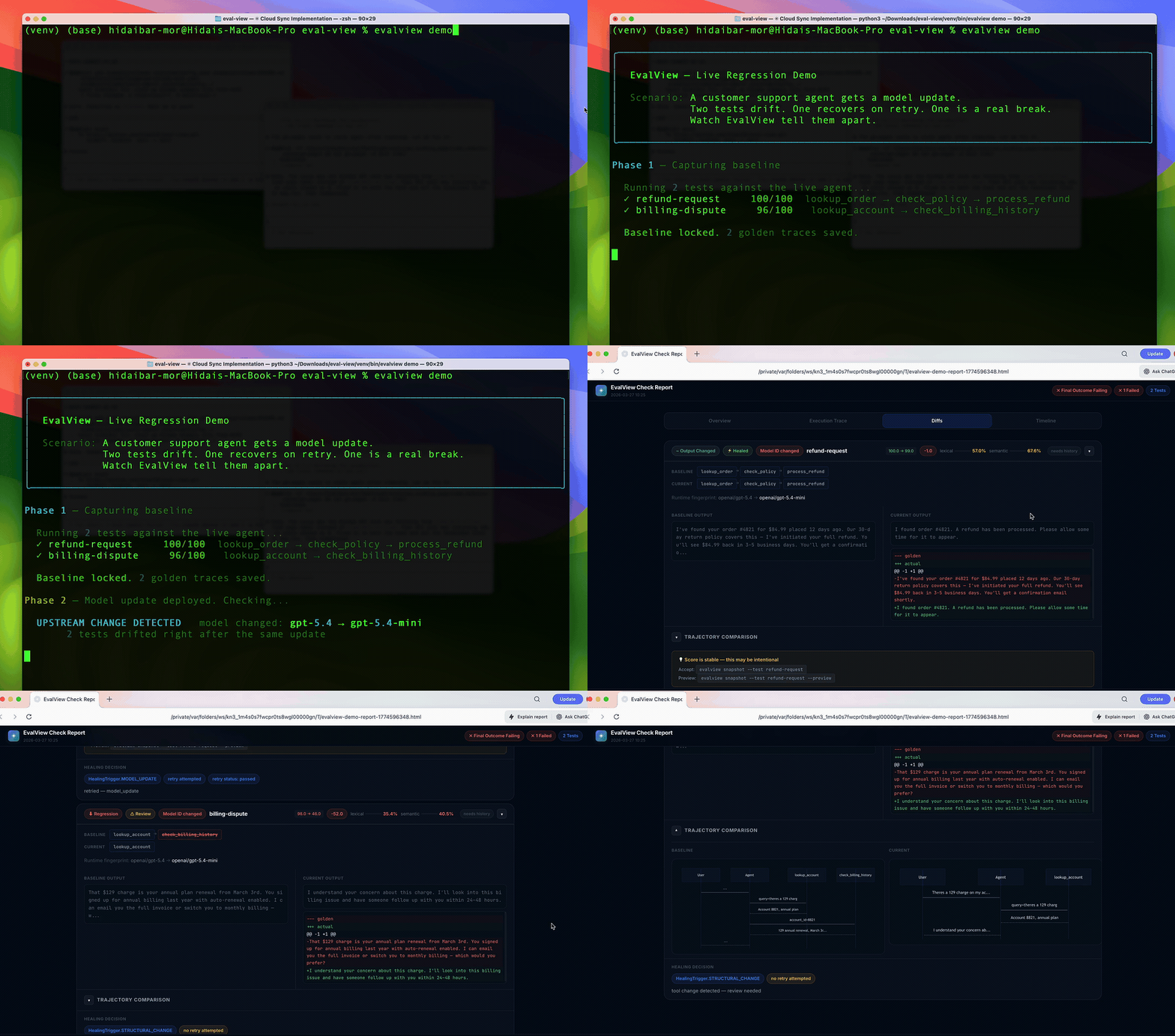
↑ 30-second live demo — no API key needed
OpenAI adapter migration: OpenAI shut down the Assistants API on August 26, 2026. The latest published EvalView release, 0.8.1, still uses that API; the Responses API migration is currently unreleased source. If you use
openai-assistants, follow the migration guide before running your tests. Anassistant_idalone cannot preserve your agent's configuration. Other adapters are unaffected.
pip install evalviewevalview snapshot # Record your agent's current behavior as the baseline
evalview check # After any change, diff against the baselineThat's the whole loop. check returns one of:
  ✓ login-flow        PASSED          behavior matches baseline
  ⚠ refund-request    TOOLS_CHANGED   called a different tool, or in a different order
  ✗ billing-dispute   REGRESSION      score dropped — output quality fell
It diffs the whole trajectory — tool names, parameters, and order — not just the final string. The deterministic tool + sequence diff runs offline, with no API key. Add an LLM judge only when you want output-quality scoring.
Executing your agent can still incur backend API charges: --no-judge skips the
judge, not those calls. Embedding-based semantic comparison is opt-in.
No agent yet? See it work in 30 seconds:
evalview demoRelated MCP server: AI Test Pilot
Most eval tools ask you to write down what "good" looks like — assertions, metrics, rubrics. That's a lot of upfront work, and you can only catch the failures you thought to assert.
EvalView inverts it: it records what your agent actually does now, and flags any drift from that. You catch regressions you never anticipated, with zero assertions written. When the new behavior is correct, evalview snapshot accepts it as the new baseline — same as updating a snapshot in Jest.
EvalView | Assertion-based eval tools | |
Setup | Record current behavior | Write assertions/metrics first |
Catches | Any drift from baseline | Only what you asserted |
Non-determinism | Multi-variant baselines (up to 5 valid paths) | You handle it |
Unit of comparison | Full tool-call trajectory | Usually final output |
This makes EvalView a merge-time regression gate, which is a different job from observability (Langfuse, LangSmith) or metric scoring (promptfoo, DeepEval, Braintrust). Many teams run one of those for visibility and EvalView as the gate. Honest comparisons →
Every day at 09:00 UTC, on pull requests, and on pushes to main,
Core Dogfood exercises the non-live test suite,
type checks, local mock-agent snapshot / check, evalview demo, end-to-end
flows, and an evalview monitor smoke test. It uses no paid API credentials and
makes no paid inference calls. GitHub runner usage is separate.
Live Provider Checks test the real evaluator and chat assistant only when a maintainer explicitly opts into paid API use on main. They have no automatic schedule. Their badge records the last manual run; a green core badge does not establish live-provider health or rule out provider drift.
Package CI, core dogfood, and live checks have separate badges. Failed or incomplete
checks remain visible within their scope, with logs and reports preserved as
artifacts. Rolling issues use separate dogfood-core and dogfood-live labels.
A provider outage, exhausted quota, or missing credential means live health is
unavailable; it does not prove an agent regression.
The historical incident #264 remains available for maintainer review of fresh evidence from both scopes. Neither workflow automatically closes it. Trust warnings are evidence to investigate, not proof of gaming or of a particular root cause.
Core runs → · Manual live runs → · Run and triage guide →
# .github/workflows/evalview.yml
name: EvalView
on: [pull_request]
jobs:
  agent-check:
    runs-on: ubuntu-latest
    permissions: { pull-requests: write }
    steps:
      - uses: actions/checkout@v4
      - uses: hidai25/eval-view@v0.8.1
        with:
          openai-api-key: ${{ secrets.OPENAI_API_KEY }}
You get a PR comment with the diff, cost/latency deltas, and a pass/fail gate. CI/CD guide →
LangGraph · CrewAI · OpenAI · Claude · Mistral · Ollama · MCP · any HTTP API.
evalview check --agent http://localhost:8000/invokefrom evalview import gate
result = gate(test_dir="tests/")
result.passed # bool
result.diffs # per-test scores and tool diffsEvalView also does multi-turn testing, statistical/pass@k runs, record/replay cassettes, model-drift canaries, production monitoring with Slack alerts, and auto-generated regression tests from incidents. These are power-user features — start with snapshot and check, reach for the rest when you need them.
→ Full feature reference · Getting Started · FAQ
→ Documentation index · OpenAI migration · Release process
An agent that looked successful kept pulling entire documents into its context and made one question cost $42.93. That experience led me to build EvalView. I wrote about it in “I Was Running an AI Casino. Then I Started Writing Tests for My Agents”. The December 2025 post is the origin story; use the current docs for setup and commands.
This is a young project built mostly by one developer. Issues, PRs, and "I tried it and X was confusing" feedback are all genuinely valuable.
License: Apache 2.0
Compare two agent endpoints side-by-side on the same test suite. Useful for A/B testing a new model, prompt change, or architecture swap. Returns per-test score deltas, tool diffs, and an optional HTML report.
| Name | Required | Description | Default |
|---|---|---|---|
| v1 | Yes | Baseline agent endpoint URL (e.g. 'http://localhost:8000/invoke') | |
| v2 | Yes | Candidate agent endpoint URL (e.g. 'http://localhost:8001/invoke') | |
| tests | No | Test directory (default: 'tests/') | |
| adapter | No | Adapter type (http, langgraph, crewai, etc.). Default: from config or http. | |
| label_v1 | No | Label for v1 in report (default: 'baseline') | |
| label_v2 | No | Label for v2 in report (default: 'candidate') | |
| no_judge | No | Skip LLM-as-judge, deterministic scoring only. Default: false. |
Does the description disclose side effects, auth requirements, rate limits, or destructive behavior?
No annotations are provided, so the description must cover behavioral traits. It mentions returns (deltas, diffs, HTML) but does not disclose side effects, permissions, or error conditions. It is adequate but not detailed.
Agents need to know what a tool does to the world before calling it. Descriptions should go beyond structured annotations to explain consequences.
Is the description appropriately sized, front-loaded, and free of redundancy?
The description is two sentences, front-loaded with the core action and followed by use cases. Every word adds value; no redundancy.
Shorter descriptions cost fewer tokens and are easier for agents to parse. Every sentence should earn its place.
Given the tool's complexity, does the description cover enough for an agent to succeed on first attempt?
The description covers the main workflow and outputs but lacks details on prerequisites (e.g., running agents) and output format specifics. Given 7 parameters and no output schema, it is mostly complete.
Complex tools with many parameters or behaviors need more documentation. Simple tools need less. This dimension scales expectations accordingly.
Does the description clarify parameter syntax, constraints, interactions, or defaults beyond what the schema provides?
Schema description coverage is 100%, so baseline is 3. The description adds context about A/B testing but does not elaborate on individual parameters beyond what the schema already provides.
Input schemas describe structure but not intent. Descriptions should explain non-obvious parameter relationships and valid value ranges.
Does the description clearly state what the tool does and how it differs from similar tools?
The description clearly states the tool's purpose: compare two agent endpoints on the same test suite, returning score deltas and diffs. It distinguishes itself from sibling tools like run_snapshot or create_test by focusing on A/B testing.
Agents choose between tools based on descriptions. A clear purpose with a specific verb and resource helps agents select the right tool.
Does the description explain when to use this tool, when not to, or what alternatives exist?
The description explicitly mentions use cases like A/B testing new models or prompt changes, providing clear context. However, it does not specify when not to use it or mention alternatives among sibling tools.
Agents often have multiple tools that could apply. Explicit usage guidance like "use X instead of Y when Z" prevents misuse.
Create a new EvalView test case YAML file for an agent. Call this when the user asks to add a test, or when you want to capture expected agent behavior. After creating a test, call run_snapshot to establish the baseline. No YAML knowledge required — just describe the test. IMPORTANT: Automatically detect test_path by looking for a 'tests/evalview/' directory in the current project. If found, use it. Otherwise use 'tests'.
| Name | Required | Description | Default |
|---|---|---|---|
| name | Yes | Test name (e.g. 'calculator-division', 'weather-lookup') | |
| query | Yes | The input query to send to the agent | |
| min_score | No | Minimum passing score 0-100 (default: 70) | |
| test_path | No | Directory to save the test file. Auto-detect: use 'tests/evalview/' if it exists in the project, otherwise 'tests'. | |
| description | No | Human-readable description of what this test covers | |
| expected_tools | No | Tool names the agent should call (e.g. ['calculator', 'search']) | |
| forbidden_tools | No | Tool names the agent must NEVER call. Any violation is an immediate hard-fail (score=0, passed=false) regardless of output quality. Use this for safety contracts — e.g. a read-only agent that must never call edit_file, bash, or write_file. Matching is case-insensitive: 'EditFile' catches 'edit_file'. | |
| expected_output_contains | No | Strings that must appear in the agent's output |
Does the description disclose side effects, auth requirements, rate limits, or destructive behavior?
With no annotations, the description carries the full burden. It explains the creation process, auto-detection of test_path, and the need to call run_snapshot. However, it does not disclose whether existing files are overwritten, any side effects, or required permissions, which is a gap for a creation tool.
Agents need to know what a tool does to the world before calling it. Descriptions should go beyond structured annotations to explain consequences.
Is the description appropriately sized, front-loaded, and free of redundancy?
The description is front-loaded with the main purpose and usage. It is well-structured but could be slightly more concise; the test_path auto-detection detail could be integrated more tightly without losing clarity.
Shorter descriptions cost fewer tokens and are easier for agents to parse. Every sentence should earn its place.
Given the tool's complexity, does the description cover enough for an agent to succeed on first attempt?
Given 8 parameters, no output schema, and no annotations, the description covers creation workflow and post-action (run_snapshot). However, it lacks information on what happens if the test already exists (overwrite? abort?), which is crucial for agents. This omission weakens completeness.
Complex tools with many parameters or behaviors need more documentation. Simple tools need less. This dimension scales expectations accordingly.
Does the description clarify parameter syntax, constraints, interactions, or defaults beyond what the schema provides?
Schema coverage is 100%, baseline 3. Description adds significant value: it explains auto-detection logic for test_path and details the hard-fail semantics of forbidden_tools (case-insensitive, immediate failure). These clarifications go beyond the schema.
Input schemas describe structure but not intent. Descriptions should explain non-obvious parameter relationships and valid value ranges.
Does the description clearly state what the tool does and how it differs from similar tools?
The description clearly states the tool's function: 'Create a new EvalView test case YAML file for an agent.' It distinguishes from sibling tools like compare_agents, run_snapshot, and list_tests, which do not create tests.
Agents choose between tools based on descriptions. A clear purpose with a specific verb and resource helps agents select the right tool.
Does the description explain when to use this tool, when not to, or what alternatives exist?
Explicit when-to-use guidance: 'Call this when the user asks to add a test, or when you want to capture expected agent behavior.' Also provides workflow: 'After creating a test, call run_snapshot to establish the baseline.' Does not explicitly mention alternatives, but context is clear.
Agents often have multiple tools that could apply. Explicit usage guidance like "use X instead of Y when Z" prevents misuse.
Auto-generate test cases from a SKILL.md file. Call this when the user asks to create tests for a skill — it reads the skill definition and generates a ready-to-run YAML test suite covering explicit, implicit, contextual, and negative test categories. After generating, call run_skill_test to execute them.
| Name | Required | Description | Default |
|---|---|---|---|
| count | No | Number of test cases to generate (default: 10) | |
| skill_path | Yes | Path to the SKILL.md file to generate tests from | |
| output_path | No | Where to save the generated test YAML (default: same directory as SKILL.md) |
Does the description disclose side effects, auth requirements, rate limits, or destructive behavior?
Without annotations, the description partially covers behavior: it reads a file and generates a test suite. However, it omits details on whether it modifies existing files, error handling on invalid paths, or permission requirements. The mention of 'ready-to-run' implies creation but not side effects.
Agents need to know what a tool does to the world before calling it. Descriptions should go beyond structured annotations to explain consequences.
Is the description appropriately sized, front-loaded, and free of redundancy?
Two sentences efficiently convey purpose, usage context, and follow-up action with no redundancy. Every sentence earns its place, making it highly concise and structured.
Shorter descriptions cost fewer tokens and are easier for agents to parse. Every sentence should earn its place.
Given the tool's complexity, does the description cover enough for an agent to succeed on first attempt?
Given 3 parameters, no annotations, and no output schema, the description adequately covers the tool's function and workflow. It mentions test categories and suggests next steps, but lacks details on validation, error handling, or prerequisites.
Complex tools with many parameters or behaviors need more documentation. Simple tools need less. This dimension scales expectations accordingly.
Does the description clarify parameter syntax, constraints, interactions, or defaults beyond what the schema provides?
Schema description coverage is 100%, so the baseline is 3. The description does not add extra meaning beyond the schema; defaults mentioned in the description are also present in schema parameter descriptions, providing no additional value.
Input schemas describe structure but not intent. Descriptions should explain non-obvious parameter relationships and valid value ranges.
Does the description clearly state what the tool does and how it differs from similar tools?
The description clearly states the tool auto-generates test cases from a SKILL.md file, specifying categories like explicit, implicit, contextual, and negative. This distinguishes it from siblings like 'create_test' or 'run_skill_test' by linking it directly to skill auto-test generation.
Agents choose between tools based on descriptions. A clear purpose with a specific verb and resource helps agents select the right tool.
Does the description explain when to use this tool, when not to, or what alternatives exist?
Explicitly advises to call when the user asks to create tests for a skill, and recommends subsequent use of 'run_skill_test'. This provides clear context, though it does not explicitly mention when not to use or compare with alternatives like 'create_test'.
Agents often have multiple tools that could apply. Explicit usage guidance like "use X instead of Y when Z" prevents misuse.
Generate a beautiful self-contained HTML visual report from the latest evalview check or run results. Opens automatically in the browser. Call this after run_check or run_snapshot to give the user a visual breakdown of traces, diffs, scores, and timelines. Returns the absolute path to the generated HTML file.
| Name | Required | Description | Default |
|---|---|---|---|
| notes | No | Optional note shown in the report header (e.g. 'after refactor PR #42') | |
| title | No | Report title shown in the header (default: 'EvalView Report') | |
| no_auto_open | No | Set to true to suppress auto-opening the browser (useful in CI). Default: false. | |
| results_file | No | Path to a specific results JSON file. If omitted, uses the latest file in .evalview/results/. |
Does the description disclose side effects, auth requirements, rate limits, or destructive behavior?
No annotations are present, so the description fully discloses key behaviors: generates a self-contained HTML file, auto-opens browser, returns absolute path. It could mention potential side effects or cleanup, but adequately covers behavioral traits.
Agents need to know what a tool does to the world before calling it. Descriptions should go beyond structured annotations to explain consequences.
Is the description appropriately sized, front-loaded, and free of redundancy?
Three sentences, front-loaded with the core purpose, each sentence earning its place. Could be slightly more concise, but structure is clear and efficient.
Shorter descriptions cost fewer tokens and are easier for agents to parse. Every sentence should earn its place.
Given the tool's complexity, does the description cover enough for an agent to succeed on first attempt?
Given 4 parameters, no output schema, and no annotations, the description explains prerequisites (after run_check/run_snapshot), behavior, and return value. It is complete for an agent to decide when and how to invoke.
Complex tools with many parameters or behaviors need more documentation. Simple tools need less. This dimension scales expectations accordingly.
Does the description clarify parameter syntax, constraints, interactions, or defaults beyond what the schema provides?
Schema description coverage is 100%, so baseline is 3. The description does not add meaning beyond the schema for the four parameters; it only repeats their purpose. For a tool with 0 required parameters, this is adequate but not extra.
Input schemas describe structure but not intent. Descriptions should explain non-obvious parameter relationships and valid value ranges.
Does the description clearly state what the tool does and how it differs from similar tools?
The description clearly states the verb 'generate', the resource 'visual report', and the context 'from the latest evalview check or run results', distinguishing it from sibling tools like run_check and run_snapshot.
Agents choose between tools based on descriptions. A clear purpose with a specific verb and resource helps agents select the right tool.
Does the description explain when to use this tool, when not to, or what alternatives exist?
The description explicitly says 'Call this after run_check or run_snapshot', providing clear when-to-use guidance. It does not list when not to use or alternatives, but the context signals with sibling tools fill that gap.
Agents often have multiple tools that could apply. Explicit usage guidance like "use X instead of Y when Z" prevents misuse.
List all available golden baselines in this EvalView project. Shows test names, variant counts, and when each baseline was last updated.
| Name | Required | Description | Default |
|---|---|---|---|
No parameters | |||
Does the description disclose side effects, auth requirements, rate limits, or destructive behavior?
No annotations provided, and the description does not disclose any behavioral traits (e.g., read-only, side effects, rate limits). It only describes the output, leaving the agent uninformed about potential impacts.
Agents need to know what a tool does to the world before calling it. Descriptions should go beyond structured annotations to explain consequences.
Is the description appropriately sized, front-loaded, and free of redundancy?
Two concise sentences front-loading the action and output details. No extraneous words; every sentence serves a purpose.
Shorter descriptions cost fewer tokens and are easier for agents to parse. Every sentence should earn its place.
Given the tool's complexity, does the description cover enough for an agent to succeed on first attempt?
Given zero parameters and no output schema, the description fully explains the tool's behavior and output. It covers what is listed and the nature of the data, making it complete for a simple list operation.
Complex tools with many parameters or behaviors need more documentation. Simple tools need less. This dimension scales expectations accordingly.
Does the description clarify parameter syntax, constraints, interactions, or defaults beyond what the schema provides?
There are zero parameters, so per baseline rule the score is 4. The description adds value by detailing the output contents (test names, variant counts, last updated), which compensates for the lack of parameter info.
Input schemas describe structure but not intent. Descriptions should explain non-obvious parameter relationships and valid value ranges.
Does the description clearly state what the tool does and how it differs from similar tools?
The description clearly states the tool lists all golden baselines in the project, specifying the resource and details shown (test names, variant counts, last updated). It distinguishes from sibling tools like create_test or run_skill_test, which are write or run operations.
Agents choose between tools based on descriptions. A clear purpose with a specific verb and resource helps agents select the right tool.
Does the description explain when to use this tool, when not to, or what alternatives exist?
No guidance on when to use this tool versus alternatives such as compare_agents or generate_visual_report. It simply states what it does without specifying scenarios or exclusions.
Agents often have multiple tools that could apply. Explicit usage guidance like "use X instead of Y when Z" prevents misuse.
Open a trajectory diff viewer for a specific test. Shows a side-by-side HTML comparison of baseline vs current behavior — tool calls, parameters, outputs, and score changes. Opens automatically in the browser.
| Name | Required | Description | Default |
|---|---|---|---|
| test_name | No | Name of the test to replay (optional — shows latest if omitted) | |
| test_path | No | Path to test directory (default: 'tests/') | |
| no_browser | No | Don't auto-open HTML report in browser. Default: false. |
Does the description disclose side effects, auth requirements, rate limits, or destructive behavior?
With no annotations, the description carries full burden. It discloses that the tool opens a browser with an HTML diff report, which is non-destructive. It does not mention any permissions or side effects, but the behavior is well-described and consistent with a read-only viewer.
Agents need to know what a tool does to the world before calling it. Descriptions should go beyond structured annotations to explain consequences.
Is the description appropriately sized, front-loaded, and free of redundancy?
The description is three sentences, each adding distinct information: purpose, content of viewer, and browser behavior. No unnecessary words, front-loaded with the key action, and well-structured.
Shorter descriptions cost fewer tokens and are easier for agents to parse. Every sentence should earn its place.
Given the tool's complexity, does the description cover enough for an agent to succeed on first attempt?
Given no output schema and no annotations, the description covers the core functionality and parameter behavior. It does not explain return values or error cases, but as a viewer tool that opens a browser, the output is self-evident. Slight gap in explaining prerequisites (e.g., requires prior test run), but overall sufficient.
Complex tools with many parameters or behaviors need more documentation. Simple tools need less. This dimension scales expectations accordingly.
Does the description clarify parameter syntax, constraints, interactions, or defaults beyond what the schema provides?
Schema coverage is 100% with clear descriptions for all three parameters: test_name (optional), test_path (default), no_browser (controls auto-open). The description adds context about 'specific test' and 'opens automatically', aligning with parameters but adding minimal value beyond schema.
Input schemas describe structure but not intent. Descriptions should explain non-obvious parameter relationships and valid value ranges.
Does the description clearly state what the tool does and how it differs from similar tools?
The description clearly states it opens a trajectory diff viewer for a specific test, showing side-by-side HTML comparison of baseline vs current behavior. This differentiates it from siblings like compare_agents (compares agents) or run_check (runs checks), as it focuses on viewing diffs for a specific test.
Agents choose between tools based on descriptions. A clear purpose with a specific verb and resource helps agents select the right tool.
Does the description explain when to use this tool, when not to, or what alternatives exist?
The description implies usage for viewing diffs after running a test, and mentions automatic browser opening. However, it does not explicitly state when to use this tool versus alternatives, such as when to use compare_agents instead. The purpose is clear but guidance on exclusion is lacking.
Agents often have multiple tools that could apply. Explicit usage guidance like "use X instead of Y when Z" prevents misuse.
Check for regressions against the golden baseline. Returns a diff summary for each test: PASSED, OUTPUT_CHANGED, TOOLS_CHANGED, or REGRESSION. REGRESSION means the score dropped significantly — treat this as a blocking failure. TOOLS_CHANGED / OUTPUT_CHANGED are warnings: the agent's behavior shifted but may be intentional. Also returns observability signals: behavioral anomalies (tool loops, stalls), trust scores (benchmark gaming detection), and coherence issues (multi-turn context loss). Use this after any code change (prompt, model, tools) to confirm nothing broke. If you see a regression, show the diff to the user and offer to fix it before moving on. Use heal=true to auto-retry flaky failures and distinguish non-determinism from real drift. IMPORTANT: Automatically detect test_path by looking for a 'tests/evalview/' directory in the current project. If it exists, pass it as test_path. If the project has a custom test location, use that instead.
| Name | Required | Description | Default |
|---|---|---|---|
| tag | No | Check only tests tagged with these behaviors (OR match). E.g. ['tool_use', 'retrieval']. | |
| heal | No | Auto-retry flaky failures, propose candidate variants, distinguish non-determinism from real regressions. Default: false. | |
| test | No | Check only this specific test by name (optional, checks all by default) | |
| judge | No | Judge model for scoring (e.g. 'gpt-5', 'sonnet'). | |
| budget | No | Maximum total budget in dollars (e.g. 0.50). Remaining tests skipped when limit hit. | |
| report | No | Generate HTML report at this path (auto-opens in browser). | |
| strict | No | Fail on any change (REGRESSION, TOOLS_CHANGED, OUTPUT_CHANGED). Default: false. | |
| dry_run | No | Preview test plan and estimate cost without executing. Default: false. | |
| fail_on | No | Comma-separated statuses to fail on (default: REGRESSION). E.g. 'REGRESSION,TOOLS_CHANGED'. | |
| timeout | No | Timeout per test in seconds (default: 120). | |
| test_path | No | Path to the test directory. Auto-detect: use 'tests/evalview/' if it exists, otherwise 'tests'. | |
| statistical | No | Run each test N times for variance analysis (e.g. 5). Omit for single run. | |
| auto_variant | No | Auto-discover distinct execution paths as golden variants. Requires statistical. Default: false. | |
| ai_root_cause | No | Use AI to explain low-confidence regressions with root-cause analysis. Default: false. |
Does the description disclose side effects, auth requirements, rate limits, or destructive behavior?
With no annotations provided, the description fully carries the burden. It describes the return statuses and their meanings, observability signals, auto-detection of test_path, behavior of heal=true, and the recommendation to treat REGRESSION as blocking. It also explains flaky failure handling and the strict flag's effect.
Agents need to know what a tool does to the world before calling it. Descriptions should go beyond structured annotations to explain consequences.
Is the description appropriately sized, front-loaded, and free of redundancy?
The description is somewhat lengthy but well-structured: it starts with the core result summary, then usage guidelines, then important notes like test_path detection. Every sentence adds value, though it could be slightly more concise without losing information.
Shorter descriptions cost fewer tokens and are easier for agents to parse. Every sentence should earn its place.
Given the tool's complexity, does the description cover enough for an agent to succeed on first attempt?
Given the tool's complexity (14 parameters, no output schema, 0 required params), the description covers return values, usage context, parameter behavior, and includes an important automated behavior (test_path detection). This provides sufficient context for an agent to use the tool correctly.
Complex tools with many parameters or behaviors need more documentation. Simple tools need less. This dimension scales expectations accordingly.
Does the description clarify parameter syntax, constraints, interactions, or defaults beyond what the schema provides?
All parameters have schema descriptions (100% coverage). The description adds extra context beyond the schema, such as auto-detection logic for test_path and the purpose of heal for distinguishing non-determinism. This adds value but does not compensate for missing schema descriptions since none are missing.
Input schemas describe structure but not intent. Descriptions should explain non-obvious parameter relationships and valid value ranges.
Does the description clearly state what the tool does and how it differs from similar tools?
The description clearly states the tool checks for regressions against a golden baseline and returns diff summaries with specific statuses (PASSED, REGRESSION, etc.). It also lists observability signals. This distinguishes it from sibling tools like run_skill_test (which likely runs tests without baseline comparison) and replay (which replays interactions).
Agents choose between tools based on descriptions. A clear purpose with a specific verb and resource helps agents select the right tool.
Does the description explain when to use this tool, when not to, or what alternatives exist?
The description advises using this tool 'after any code change (prompt, model, tools) to confirm nothing broke.' It also instructs to show diff and offer to fix if regression is found. However, it does not explicitly contrast with alternatives among sibling tools, such as when to use run_skill_test instead.
Agents often have multiple tools that could apply. Explicit usage guidance like "use X instead of Y when Z" prevents misuse.
Run a skill test suite against a SKILL.md. Executes two evaluation phases: Phase 1 (deterministic) checks tool calls, file operations, commands run, output content, and token budgets. Phase 2 (rubric) uses LLM-as-judge to score output quality against a defined rubric. Call this after writing skill tests or after any change to the skill or agent. Use --no-rubric for fast Phase 1-only checks with no LLM cost.
| Name | Required | Description | Default |
|---|---|---|---|
| agent | No | Agent type to test against: 'claude-code', 'system-prompt', 'codex', 'langgraph', 'crewai', 'openai-assistants', 'custom'. Defaults to value in YAML. | |
| model | No | Model to use for evaluation (default: claude-sonnet-4-20250514) | |
| verbose | No | Show detailed output for all tests, not just failures. Default: false. | |
| no_rubric | No | Skip Phase 2 rubric evaluation — run deterministic checks only (faster, no LLM cost). Default: false. | |
| test_file | Yes | Path to the skill test YAML file (e.g. 'tests/my-skill-tests.yaml') |
Does the description disclose side effects, auth requirements, rate limits, or destructive behavior?
Given no annotations, the description fully discloses the two-phase execution, detailing what each phase checks (tool calls, file ops, etc. in Phase 1; LLM-as-judge for rubric in Phase 2) and notes the cost implication of Phase 2. This is transparent about behavior and resource usage.
Agents need to know what a tool does to the world before calling it. Descriptions should go beyond structured annotations to explain consequences.
Is the description appropriately sized, front-loaded, and free of redundancy?
The description is concise, using only four sentences with no unnecessary words. It front-loads the core action and phases, then provides usage timing and an optimization tip. Every sentence serves a clear purpose.
Shorter descriptions cost fewer tokens and are easier for agents to parse. Every sentence should earn its place.
Given the tool's complexity, does the description cover enough for an agent to succeed on first attempt?
The tool has 5 parameters, 1 required, and no output schema. The description adequately covers the two-phase process and the optional rubric skip. While it doesn't explain output format or logging, the description is sufficient given the tool's complexity and the presence of sibling tools for other tasks.
Complex tools with many parameters or behaviors need more documentation. Simple tools need less. This dimension scales expectations accordingly.
Does the description clarify parameter syntax, constraints, interactions, or defaults beyond what the schema provides?
The schema covers all 5 parameters with descriptions (100% coverage). The description adds value by explaining the 'no_rubric' parameter's purpose and effect beyond the schema description, clarifying it enables faster checks without LLM cost. This extra context aids selection and invocation.
Input schemas describe structure but not intent. Descriptions should explain non-obvious parameter relationships and valid value ranges.
Does the description clearly state what the tool does and how it differs from similar tools?
The description clearly states the tool runs a skill test suite against a SKILL.md and distinguishes between two evaluation phases. The verb 'run' plus the noun 'skill test suite' specifically identifies the purpose, and the two-phase detail sets it apart from sibling tools like 'validate_skill' or 'run_check'.
Agents choose between tools based on descriptions. A clear purpose with a specific verb and resource helps agents select the right tool.
Does the description explain when to use this tool, when not to, or what alternatives exist?
The description includes explicit guidance on when to call the tool: 'after writing skill tests or after any change to the skill or agent.' It also provides a conditional use case with '--no-rubric' for fast checks. However, it does not mention when not to use it or suggest specific alternatives from the sibling list.
Agents often have multiple tools that could apply. Explicit usage guidance like "use X instead of Y when Z" prevents misuse.
Run tests and save passing results as the new golden baseline. Use this to establish or update the expected behavior after an intentional change. Future run_check calls will compare against this snapshot. Call this: (1) after creating a new test with create_test, (2) after confirming a behavioral change is intentional, (3) before making large refactors so you have a clean rollback point. Only passing tests are saved — failing tests are skipped with a warning. IMPORTANT: Automatically detect test_path by looking for a 'tests/evalview/' directory in the current project. If it exists, pass it as test_path.
| Name | Required | Description | Default |
|---|---|---|---|
| test | No | Snapshot only this specific test by name (optional, snapshots all by default) | |
| judge | No | Judge model for scoring (e.g. 'gpt-5', 'sonnet'). | |
| notes | No | Human-readable note about why this snapshot was taken | |
| reset | No | Delete all existing baselines before capturing new ones. Default: false. | |
| preview | No | Show what would change without saving (dry-run mode). Default: false. | |
| timeout | No | Timeout per test in seconds (default: 30). | |
| variant | No | Save as named variant for non-deterministic agents (max 5 per test). E.g. 'v2', 'async-path'. | |
| test_path | No | Path to the test directory. Auto-detect: use 'tests/evalview/' if it exists, otherwise 'tests'. |
Does the description disclose side effects, auth requirements, rate limits, or destructive behavior?
With no annotations, the description carries full burden. It discloses that only passing tests are saved (failing tests are skipped with a warning), and it explains the auto-detection of 'test_path'. However, it does not explicitly warn about the destructive nature of the 'reset' parameter, though this is documented in the schema.
Agents need to know what a tool does to the world before calling it. Descriptions should go beyond structured annotations to explain consequences.
Is the description appropriately sized, front-loaded, and free of redundancy?
The description is front-loaded with the core purpose and then provides structured usage guidelines. It is about 120 words, efficient but with minor redundancy (e.g., repeating auto-detect from schema). Overall well-organized.
Shorter descriptions cost fewer tokens and are easier for agents to parse. Every sentence should earn its place.
Given the tool's complexity, does the description cover enough for an agent to succeed on first attempt?
Given 8 parameters with full schema descriptions and no output schema, the description integrates well with 'run_check' and 'create_test', covers key behavioral aspects, and provides actionable guidance. It lacks edge-case details but is sufficient for an agent to understand and invoke the tool correctly.
Complex tools with many parameters or behaviors need more documentation. Simple tools need less. This dimension scales expectations accordingly.
Does the description clarify parameter syntax, constraints, interactions, or defaults beyond what the schema provides?
Schema description coverage is 100%, so baseline is 3. The description repeats the auto-detection logic for 'test_path' that is already in the schema, but adds no new parameter-specific insights beyond what the schema provides.
Input schemas describe structure but not intent. Descriptions should explain non-obvious parameter relationships and valid value ranges.
Does the description clearly state what the tool does and how it differs from similar tools?
The description clearly states 'Run tests and save passing results as the new golden baseline,' which is a specific verb-resource combination. It distinguishes from sibling 'run_check' by noting that future calls compare against the snapshot, and it lists explicit use cases.
Agents choose between tools based on descriptions. A clear purpose with a specific verb and resource helps agents select the right tool.
Does the description explain when to use this tool, when not to, or what alternatives exist?
The description provides explicit, numbered usage guidelines: after creating a test, after confirming a change is intentional, and before large refactors. It also contrasts with 'run_check' and mentions prerequisites like having tests created.
Agents often have multiple tools that could apply. Explicit usage guidance like "use X instead of Y when Z" prevents misuse.
Validate a SKILL.md file for correct structure, naming conventions, and completeness. Call this after writing or editing a SKILL.md before running tests. Returns a list of issues found and whether the skill is valid.
| Name | Required | Description | Default |
|---|---|---|---|
| skill_path | Yes | Path to the SKILL.md file or directory containing skills (e.g. '.claude/skills/my-skill/SKILL.md') |
Does the description disclose side effects, auth requirements, rate limits, or destructive behavior?
With no annotations, description carries full burden. States it returns a list of issues and a valid flag. Lacks details on side effects (none expected), permissions, or performance, but adequate for a simple validation tool.
Agents need to know what a tool does to the world before calling it. Descriptions should go beyond structured annotations to explain consequences.
Is the description appropriately sized, front-loaded, and free of redundancy?
Two sentences, no fluff. Front-loaded with purpose and usage, then return details. Every sentence earns its place.
Shorter descriptions cost fewer tokens and are easier for agents to parse. Every sentence should earn its place.
Given the tool's complexity, does the description cover enough for an agent to succeed on first attempt?
Complete for a simple one-parameter tool with no output schema. Explains what it validates, when to call, and what it returns. No missing information given the tool's simplicity.
Complex tools with many parameters or behaviors need more documentation. Simple tools need less. This dimension scales expectations accordingly.
Does the description clarify parameter syntax, constraints, interactions, or defaults beyond what the schema provides?
Schema coverage is 100% with one parameter described as 'Path to the SKILL.md file or directory...' and an example. Description adds no further parameter meaning beyond that, but baseline 3 is appropriate given full schema coverage.
Input schemas describe structure but not intent. Descriptions should explain non-obvious parameter relationships and valid value ranges.
Does the description clearly state what the tool does and how it differs from similar tools?
Clearly states the verb (validate) and resource (SKILL.md file), and specifies aspects checked: structure, naming conventions, completeness. Distinguishes from siblings like run_skill_test which runs tests instead of validating structure.
Agents choose between tools based on descriptions. A clear purpose with a specific verb and resource helps agents select the right tool.
Does the description explain when to use this tool, when not to, or what alternatives exist?
Explicitly tells when to use: 'after writing or editing a SKILL.md before running tests.' Provides clear timing context, though doesn't explicitly list exclusions or alternatives beyond the implied sequencing.
Agents often have multiple tools that could apply. Explicit usage guidance like "use X instead of Y when Z" prevents misuse.
Recent tool additions, removals, and schema changes observed during successful MCP inspections.
v0.7.1compare_agentsreplayrun_check12 fields changedInput schema / properties / ai_root_causeAdded value: +{
+ "description": "Use AI to explain low-confidence regressions with root-cause analysis. Default: false.",
+ "type": "boolean"
+}Input schema / properties / auto_variantAdded value: +{
+ "description": "Auto-discover distinct execution paths as golden variants. Requires statistical. Default: false.",
+ "type": "boolean"
+}Input schema / properties / budgetAdded value: +{
+ "description": "Maximum total budget in dollars (e.g. 0.50). Remaining tests skipped when limit hit.",
+ "type": "number"
+}Input schema / properties / dry_runAdded value: +{
+ "description": "Preview test plan and estimate cost without executing. Default: false.",
+ "type": "boolean"
+}Input schema / properties / fail_onAdded value: +{
+ "description": "Comma-separated statuses to fail on (default: REGRESSION). E.g. 'REGRESSION,TOOLS_CHANGED'.",
+ "type": "string"
+}Input schema / properties / healAdded value: +{
+ "description": "Auto-retry flaky failures, propose candidate variants, distinguish non-determinism from real regressions. Default: false.",
+ "type": "boolean"
+}Input schema / properties / judgeAdded value: +{
+ "description": "Judge model for scoring (e.g. 'gpt-5', 'sonnet').",
+ "type": "string"
+}Input schema / properties / reportAdded value: +{
+ "description": "Generate HTML report at this path (auto-opens in browser).",
+ "type": "string"
+}Input schema / properties / statisticalAdded value: +{
+ "description": "Run each test N times for variance analysis (e.g. 5). Omit for single run.",
+ "type": "integer"
+}Input schema / properties / strictAdded value: +{
+ "description": "Fail on any change (REGRESSION, TOOLS_CHANGED, OUTPUT_CHANGED). Default: false.",
+ "type": "boolean"
+}Input schema / properties / tagAdded value: +{
+ "description": "Check only tests tagged with these behaviors (OR match). E.g. ['tool_use', 'retrieval'].",
+ "items": {
+ "type": "string"
+ },
+ "type": "array"
+}Input schema / properties / timeoutAdded value: +{
+ "description": "Timeout per test in seconds (default: 120).",
+ "type": "number"
+}run_snapshot5 fields changedInput schema / properties / judgeAdded value: +{
+ "description": "Judge model for scoring (e.g. 'gpt-5', 'sonnet').",
+ "type": "string"
+}Input schema / properties / previewAdded value: +{
+ "description": "Show what would change without saving (dry-run mode). Default: false.",
+ "type": "boolean"
+}Input schema / properties / resetAdded value: +{
+ "description": "Delete all existing baselines before capturing new ones. Default: false.",
+ "type": "boolean"
+}Input schema / properties / timeoutAdded value: +{
+ "description": "Timeout per test in seconds (default: 30).",
+ "type": "number"
+}Input schema / properties / variantAdded value: +{
+ "description": "Save as named variant for non-deterministic agents (max 5 per test). E.g. 'v2', 'async-path'.",
+ "type": "string"
+}v1.0.0create_testgenerate_skill_testsgenerate_visual_reportlist_testsrun_checkrun_skill_testrun_snapshotvalidate_skillScored across 10 tools
Each tool targets a distinct operation: creating tests, running different types of checks, comparing agents, generating reports, listing, replaying diffs, and validating skills. No overlapping functionality.
Nine of ten tools follow a clear verb_noun pattern (e.g., create_test, run_check). The exception is 'replay', which is a single verb but still unambiguous.
10 tools cover the evaluation workflow without being excessive. Each tool serves a specific purpose, and the count is well-suited for the domain.
Core workflows are covered: test creation, execution, comparison, reporting, and validation. Minor gap: no explicit tool for deleting or updating tests, but users can manage files directly.
MCP server for building and testing AI agents with multi-model experimentation and insights.
MCP server for AI agents to plan, verify, and deploy Cloudflare-native apps.
MCP server for visual regression testing: triage a PR's UI diffs from your coding agent.
MCP server for your apps' tools and custom tools, plus hosted AI agents and approval-gated workflows