Backlog MCP Server
# backlog-mcp
**Context & memory engineering for AI agents.** A markdown-backed storage engine your agents write to and humans read — **one core, many consumers:** any MCP client (Claude, Cursor, Codex, Kiro, …), the CLI, the web viewer, and external orchestrators all read and write the same store.
**Your backlog is your agent's memory.** Agents orient at session start (`wakeup`), recall past decisions, remember what's durable, and expand any entity's neighborhood on demand — alongside the working backlog of tasks, epics, artifacts, and more. Every item is a plain markdown file with YAML frontmatter, so a human can read, edit, and diff everything with no tool installed.
This is **agent-first**, and that is the whole difference. Agents mutate the store through tools; the human steers the agents and edits the files directly; the real-time web viewer is **read-only — a window into agent memory, never an editor.** It is not a human-facing notes app an agent happens to poke at — it is agent memory you can *see*, including the agent's own contradictions.
Three ideas do the work:
- **Substrates** — one declaration per type drives its schema, validation, storage, UI, and agent hints. Most durable knowledge in a project is expressible this way — tasks, memories, crons, ADRs, requirements, prompts, references, agents. A project can even **declare its own substrate types as data** — a JSON definition plus a bounded JSON Schema, no code — validated and stored through the same registry.
- **Progressive disclosure** — agent context expands like a filesystem: names first, shape on demand, full content only when opened. A dense ~600-token wakeup briefing → memory stubs → `backlog_get` hydration.
- **Docs-native, local-first** — plain markdown on your disk, in your git. Your files, local hybrid (BM25 + vector) search and embeddings — no cloud required.
Local-first *is* the architecture; remoteness is meant to be reached by **syncing local stores**, not by a remote database. A legacy Cloudflare Workers + D1 mode still exists but is descoped — retained, not evolved (see [Self-hosting](#self-hosting-legacy-descoped)).
> **Quick start**: Tell your LLM: `Add backlog-mcp to .mcp.json and use it to track tasks`
> **Live demo**: [backlog-mcp-viewer.pages.dev](https://backlog-mcp-viewer.pages.dev/) — the viewer UI connected to a real hosted instance

## Engineering record
[117 Pull Requests Later, It Wasn’t a Task Manager Anymore](https://gkoreli.com/one-hundred-pull-requests)
traces how this repository grew from a small task backlog into local-first context
and memory infrastructure for agents. It is the maintainer's transformation story
— including what stopped working as the system approached 1,000 tasks and
artifacts — not independent product validation.
## What's Inside
This is a monorepo with 4 packages:
| Package | npm | What it does |
|---------|-----|-------------|
| [`packages/server`](packages/server) | [`backlog-mcp`](https://www.npmjs.com/package/backlog-mcp) | MCP server, HTTP API, CLI |
| [`packages/memory`](packages/memory) | — | Hybrid search (Orama BM25 + vector) and memory retrieval/ranking |
| [`packages/viewer`](packages/viewer) | — | Web UI built on [`@nisli/core`](https://github.com/gkoreli/nisli) |
| [`packages/shared`](packages/shared) | — | Shared entity types and ID utilities |
The viewer is built with [Nisli](https://github.com/gkoreli/nisli), a zero-dependency reactive Web Component framework published as [`@nisli/core`](https://www.npmjs.com/package/@nisli/core). Nisli started in this repo and now lives separately.
## Installation
Add to your MCP config (`.mcp.json` or your MCP client config):
```json
{
"mcpServers": {
"backlog": {
"command": "npx",
"args": ["-y", "backlog-mcp"]
}
}
}
```
### Install by telling your agent
The whole setup is one message to your agent:
> Read https://raw.githubusercontent.com/gkoreli/backlog-mcp/main/SKILL.md and follow it to install backlog-mcp.
[SKILL.md](SKILL.md) is written for the agent, not for you: it detects the host harness (Claude Code, Cursor, Codex, any MCP client, or plain CLI), registers the server, runs the first `wakeup` against your repo, and verifies that git stayed clean and the briefing stayed under budget.
## Self-hosting (legacy, descoped)
A Cloudflare Workers + D1 build exists for an always-on remote endpoint, but it is **descoped** — retained, not evolved. It lacks local embeddings, hybrid-search/RAG parity, and agentic memory, and no new capability targets it. Local-first is the architecture; remoteness is meant to be reached by **syncing local stores**, not by promoting a remote database to the source of truth.
If you specifically need the legacy remote mode, its Workers config lives in `packages/server/wrangler.jsonc` and its schema in `packages/server/migrations/`. Deploy with `npx wrangler deploy` from `packages/server`, then point an MCP client at it via `mcp-remote https://<your-worker>.workers.dev/mcp`.
---
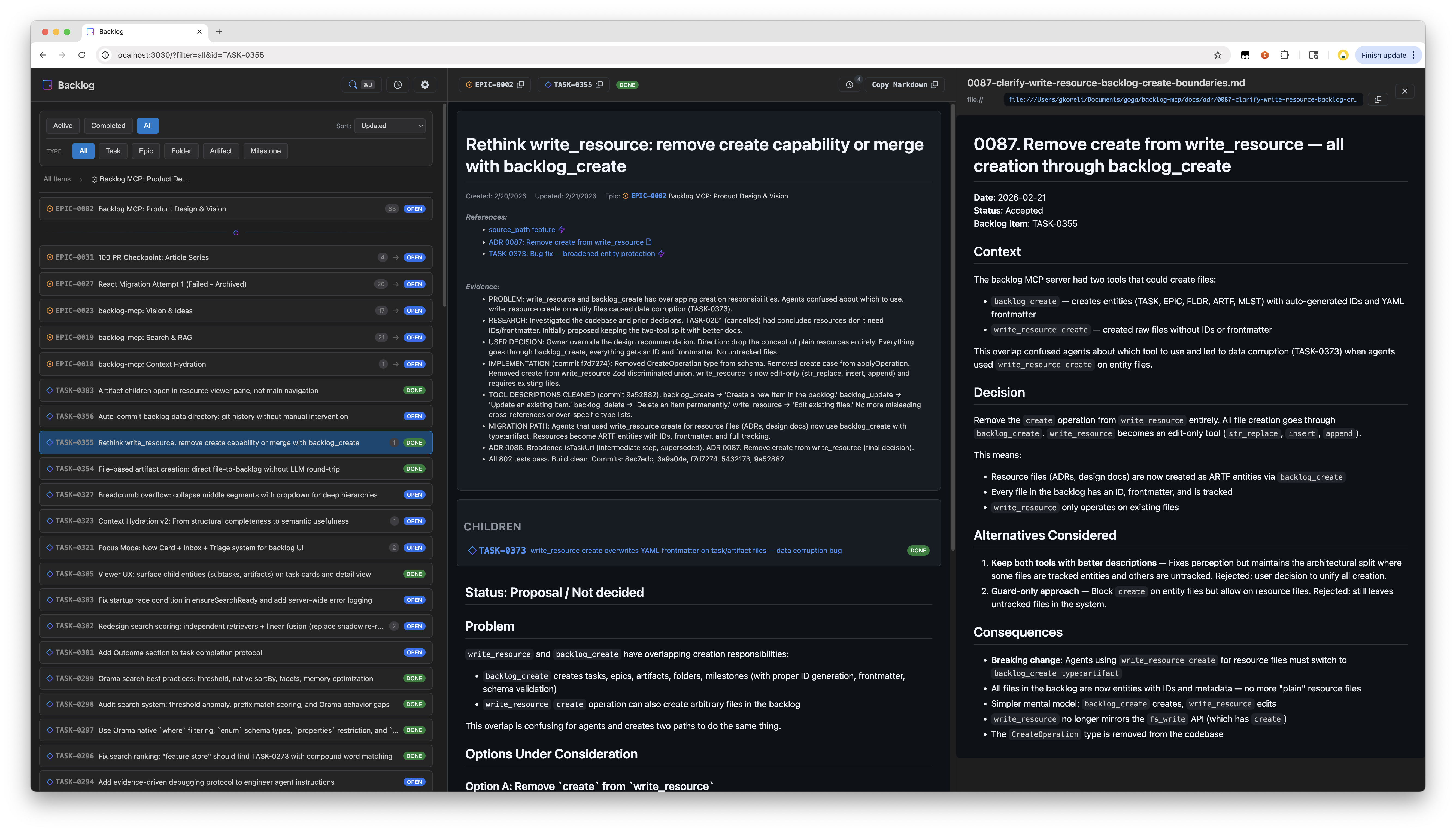
## Web Viewer
Open `http://localhost:3030` — always available when the server is running.
**The Desk** — `http://localhost:3030/desk` — is the viewer's attention page: one server-composed briefing answering *"what should I look at, read, review and judge right now."* At most 7 items above the fold, worst-first, across four classes (JUDGE / REVIEW / READ / HEALTH); every item says why it surfaced, carries provenance chips (home, author, worktree), and offers a copy-ready instruction to hand your agent. Read-only by law — verdicts flow through your agent, never through the UI.
Features:
- Split pane layout with task list and detail view
- Spotlight search with hybrid text + semantic matching
- Real-time updates via SSE
- Activity timeline
- Filter by status, type, epic
- Dark/light theme toggle (Tsa design system)
- Syntax highlighting via [Shiki](https://shiki.style) (VS Code-quality, dual-theme CSS variables)
- GitHub-flavored markdown rendering with Mermaid diagrams
- URL state persistence
The viewer UI is built with [Nisli](https://github.com/gkoreli/nisli) (`@nisli/core`) and styled with **Tsa** (ცა, Georgian for "sky") — our design system that pairs with Nisli.
## Substrates (Entity Types)
7 built-in substrate types, each declared once and stored as markdown files with YAML frontmatter. New types cost one declaration — the catalog is open-ended by design.
| Type | Prefix | Purpose |
|------|--------|---------|
| Task | `TASK-0001` | Work items |
| Epic | `EPIC-0001` | Groups of related tasks |
| Folder | `FLDR-0001` | Organizational containers |
| Artifact | `ARTF-0001` | Attached outputs (research, designs, logs) |
| Milestone | `MLST-0001` | Time-bound targets with due dates |
| Cron | `CRON-0001` | Scheduled-intake descriptors (executed by an external scheduler) |
| Memory | `MEMO-0001` | Durable agent memories — recalled, decayed, superseded, ranked by usage |
**Status values:** `open`, `in_progress`, `blocked`, `done`, `cancelled`
Beyond the built-ins, a project can **declare its own substrate types as data** — a versioned JSON definition plus a bounded JSON Schema (Draft 2020-12), never executable code. Built-in and project-defined types share one project-scoped registry, so the catalog grows without touching storage, search, or the viewer (ADR 0113).
Example task file:
```markdown
---
id: TASK-0001
title: Fix authentication flow
status: open
parent_id: EPIC-0002
references:
- url: https://github.com/org/repo/issues/123
title: Related issue
evidence:
- Fixed in PR #45
---
The authentication flow has an issue where...
```
## MCP Tools
### Memory (the core loop)
Four verbs, zero ceremony — orient, ask, keep, correct. Memories are first-class entities (`MEMO-` ids), hidden from plain `list`/`search` by design; `recall` is their dedicated read surface.
```
backlog_wakeup # Orient: one dense briefing (active work, top knowledge)
backlog_wakeup operation="OP-0001" # Orient mid-flight: that operation's live state leads the briefing (goal, next action, constraints)
backlog_recall query="how do we release?" # Ask: hybrid-ranked recall, returns stubs to expand
backlog_remember content="..." layer="procedural" # Keep: one durable, atomic fact
backlog_forget id="MEMO-0042" # Correct: soft-expire (stays auditable in the viewer)
```
The briefing ends with a two-line memory protocol (when to recall, when to remember) and enforces a hard byte ceiling with a deterministic yield ladder — constraints never yield.
Retrieval is one language: **orient** (`wakeup`) → **ask** (`recall` / `search`) → **expand** (`backlog_get id=… context=true`).
### backlog_list
```
backlog_list # Active tasks (open, in_progress, blocked)
backlog_list status=["done"] # Completed tasks
backlog_list type="epic" # Only epics
backlog_list parent_id="EPIC-0002" # Tasks in an epic
backlog_list parent_id="FLDR-0001" # Items in a folder
backlog_list query="authentication" # Search across all fields
backlog_list counts=true # Include counts by status/type
backlog_list limit=50 # Limit results
```
### backlog_get
```
backlog_get id="TASK-0001" # Single item
backlog_get id=["TASK-0001","EPIC-0002"] # Batch get
backlog_get id="TASK-0001" context=true # Item + neighborhood stubs (parent/children/siblings/refs/referenced_by/related)
```
### Intent writes
```
backlog_create_work title="Fix bug" content="Details..." parent_id="EPIC-0002"
backlog_start_task id="TASK-0001"
backlog_complete_task id="TASK-0001" evidence=["Fixed in PR #45"]
backlog_block_task id="TASK-0001" blocked_reason=["Waiting on API"]
backlog_plan_epic title="Q1 Goals" content="Quarterly outcomes"
backlog_organize_folder title="Research"
backlog_attach_artifact title="Findings" content="..." parent_id="TASK-0001"
backlog_target_milestone title="v2.0 Release" due_date="2026-03-01"
backlog_schedule_cron title="Weekly review" schedule="0 9 * * 1" command="..."
backlog_propose_adr title="Choose storage" content="..."
backlog_capture_requirement title="Local-first" content="No cloud dependency"
backlog_capture_prompt title="Founder directive" content="..."
```
Transitions have matching narrow verbs (`backlog_pause_cron`,
`backlog_resume_cron`, `backlog_accept_adr`, and `backlog_supersede_adr`). The
MCP surface intentionally has no generic create/update dialect: the active
substrate registry exposes only declared semantic intents. Operators retain
the low-level `backlog create` / `backlog update` CLI escape hatch for rare or
undeclared substrates.
### backlog_delete
```
backlog_delete id="TASK-0001" # Permanent delete
```
### backlog_search
Full-text + semantic hybrid search with relevance scoring:
```
backlog_search query="authentication bug"
backlog_search query="design decisions" types=["artifact"]
backlog_search query="blocked tasks" status=["blocked"] limit=10
backlog_search query="framework" sort="recent"
backlog_search query="search ranking" include_content=true
```
### write_resource
Edit the Markdown body of an existing entity. Create and transition entities
through the substrate-declared intent verbs above.
```
# Edit task body (use str_replace — protects frontmatter)
write_resource uri="mcp://backlog/tasks/TASK-0001.md" \
operation={type: "str_replace", old_str: "old text", new_str: "new text"}
# Insert after a specific line
write_resource uri="mcp://backlog/tasks/TASK-0001.md" \
operation={type: "insert", insert_line: 5, new_str: "inserted line"}
# Append to a file
write_resource uri="mcp://backlog/resources/log.md" \
operation={type: "append", new_str: "New entry"}
```
Operations: `str_replace` (exact match, must be unique), `insert` (after line number), `append` (end of file).
## How It Works
Running `npx -y backlog-mcp` (the default MCP config) does the following:
1. **Starts a persistent HTTP server** as a detached background process — serves both the MCP endpoint (`/mcp`) and the web viewer (`/`) on port 3030
2. **Bridges stdio to it** — your MCP client communicates via stdio, which gets forwarded to the HTTP server via `mcp-remote`
3. **Auto-updates**: `npx -y` always pulls the latest published version. If the running server is an older version, it's automatically shut down and restarted with the new one
4. **Resilient recovery**: If the bridge loses connection, a supervisor restarts it with exponential backoff (up to 10 retries). Connection errors like `ECONNREFUSED` are detected and handled automatically
The HTTP server persists across agent sessions — multiple MCP clients can share
it. Each request selects its own backlog home, so one daemon can serve the
global `~/.backlog/docs/` and several projects without mixing their state. From
a repository, the bridge selects that project's `docs/`; outside one, it
selects global. The web viewer is always available at
`http://localhost:3030`.
## CLI
All commands via npx:
```bash
npx backlog-mcp # Start stdio bridge + auto-spawn HTTP server (default)
npx backlog-mcp status # Check server status
npx backlog-mcp stop # Stop the server
npx backlog-mcp version # Show version
npx backlog-mcp serve # Run HTTP server in foreground (optional, see below)
npx backlog-mcp --home global migrate docs-native --dry-run
```
Sample outputs:
```
$ npx backlog-mcp status
Server is running on port 3030
Version: 0.65.0
Data directory: /Users/you/.backlog/docs
Task count: 451
Uptime: 3515s
Viewer: http://localhost:3030/
MCP endpoint: http://localhost:3030/mcp
$ npx backlog-mcp stop
Stopping server on port 3030...
Server stopped
$ npx backlog-mcp status
Server is not running
```
The CLI exists for humans to inspect and manage the background server that agents use. Since the default mode spawns a detached process, you need `status` to check it and `stop` to shut it down.
`serve` runs the HTTP server in the foreground instead of detached — useful
for local debugging or running without an MCP client. The daemon binds to
loopback because project-root selection is a trusted local capability; it is
not a network-facing filesystem API. In normal usage you never need `serve`;
the default command handles everything.
### One-shot migration
Stop the detached server before migrating an existing global backlog:
```bash
npx backlog-mcp stop
npx backlog-mcp --home global migrate docs-native --dry-run
npx backlog-mcp --home global migrate docs-native
```
This routes the old flat `~/.backlog/tasks/` Markdown into
`~/.backlog/docs/`, moves tool-owned state, and rebuilds derived caches. A
retired custom root can be supplied for this command only:
```bash
BACKLOG_DATA_DIR=/path/to/old/backlog \
npx backlog-mcp --home global migrate docs-native
```
For a project that already has the old control directory, migrate only its
tool-owned state; committed `docs/` is never touched:
```bash
npx backlog-mcp --home project --project-root /path/to/repo \
migrate docs-native
```
Both commands are idempotent and fail closed when old and new control layouts
are both present.
## Claude Code session hooks (the memory protocol)
Every wakeup briefing ends with a two-line **memory protocol**: a *recall*
rubric (when to reach for prior knowledge instead of re-deriving it) and its
session-end twin, a *remember* rubric (the three conditions worth writing
down, in your own words, before the session ends). The rubric is policy, not
retrieved data — the briefing stays bounded by a hard 3,072-byte ceiling with
the rubric as non-droppable content
([ADR 0118.1](docs/adr/0118.1-intent-gated-recall-lifecycle-hooks.md)).
The client owns the hooks; the server never automates recall or memory writes
([ADR 0117](docs/adr/0117-the-write-boundary.md), 0118.1 R1). To mount the
briefing in Claude Code, add a `SessionStart` command hook to
`.claude/settings.json`:
```json
{
"hooks": {
"SessionStart": [
{
"matcher": "startup|resume|clear|compact",
"hooks": [
{
"type": "command",
"command": "npx backlog-mcp --home project --project-root \"$CLAUDE_PROJECT_DIR\" wakeup --max-knowledge 0 --max-constraints 3 --max-completions 3 --max-activity 3 | jq -Rs '{hookSpecificOutput:{hookEventName:\"SessionStart\",additionalContext:.}}'",
"timeout": 10
}
]
}
]
}
}
```
Notes on the recipe:
- **`--max-knowledge 0` is load-bearing.** Session start injects policy, not
retrieved memories; the agent recalls when its intent warrants it
(0118.1 R2). Everything else stays at recipe defaults.
- **The `jq` wrapper is the current hook contract**: Claude Code injects
`hookSpecificOutput.additionalContext`, not raw stdout.
- **Fail-open**: if the command fails, the session starts with no briefing
and no error stops the agent. Never wire this hook to block.
- A command hook (not an MCP-tool hook) is intentional — `SessionStart`
often fires before MCP servers connect.
**The remember half needs no second hook.** Claude Code's `SessionEnd` and
`PreCompact` events cannot deliver text to the model (they are cleanup and
receipt boundaries), so the remember prompt is delivered by the briefing
itself and re-delivered at every compaction boundary through the `compact`
matcher above: the re-primed session reads the protocol again while its
context is fresh. This is by design, not limitation — the capture law
([PROMPT 0006](docs/prompts/0006-first-person-memory-capture-law.md)) wants
the *doer* writing at its *own* checkpoint, in its own words, not an external
event squeezing a summary out of a dying session. Clients that own continuity
(e.g. an orchestrator harness) may attach their own `PreCompact`/`SessionEnd`
receipt hooks; those record lifecycle facts, never memory payloads
(0118.1 R3).
If you want a mechanical end-of-turn nudge anyway, a `Stop` hook can inject
`additionalContext` — but it fires on every turn and pays permanent context
tax, which is exactly what the protocol design avoids. Prefer the rubric.
## Configuration
```bash
BACKLOG_VIEWER_PORT=3030 # HTTP server port
BACKLOG_HOME=project # Optional caller default: project or global
BACKLOG_PROJECT_ROOT=/path # Optional explicit project root
BACKLOG_CONTEXT=FLDR-0001 # Optional entity context inside the home
```
Create a `.env` file for local development — see `.env.example`.
### Agent identity (the attribution ladder)
Writes attribute to an agent identity — an `AGENT-` doc id or a declared
principal like `aime:granite` — configured **once** at the scope it belongs
to, exactly like git identity itself
([ADR 0119.1](docs/adr/0119.1-implicit-identity-capture.md)):
```bash
git config extensions.worktreeConfig true # once per repo: enables worktree stamps
git config --worktree backlog.agent aime:granite # this delegation worktree IS this agent
BACKLOG_AGENT=aime:granite # this harness session (settings env block)
git config backlog.agent aime:granite # this checkout — single-agent checkouts only
git config --global backlog.agent goga # machine-wide standing default
```
First present rung wins, most deliberate first: explicit `--as` / MCP `as` →
worktree config → `BACKLOG_AGENT` → checkout config → user config → absent.
The worktree stamp deliberately beats the environment: a spawned agent
inherits its parent's env through no choice of its own, while the stamp was
placed for it at delegation time. The wakeup meta line always names the
winning rung — `identity: granite (worktree config)` — and stays an honest
`identity: absent` when nothing is configured. One anti-pattern: never stamp
a **shared** checkout (a directory both you and an agent work in) — identity
there belongs to the session env, which scopes to the session, not the
directory.
## Development
```bash
git clone https://github.com/gkoreli/backlog-mcp.git
cd backlog-mcp
pnpm install
pnpm build # Build all packages
pnpm test # Run all workspace tests
pnpm dev # Vite dev server (SPA + API on one port, HMR)
```
`pnpm dev` runs a single Vite process that serves the viewer (with granular component HMR) and the Hono backend (API, SSE, MCP) on one origin — edit a component and it hot-swaps in the browser without a page reload. The architecture mirrors prod: one server, one port, same dispatch.
## Architecture
```
packages/
├── server/ # MCP server, substrates, memory, storage
├── memory/ # Hybrid search (Orama BM25 + vector), memory retrieval/ranking
├── viewer/ # Web UI built with @nisli/core
└── shared/ # Entity types, ID utilities
docs/
└── adr/ # backlog-mcp architecture decision records
```
Backlog ADRs document significant design decisions. See [docs/adr/README.md](docs/adr/README.md) for the full index. Nisli ADRs live in the [Nisli repository](https://github.com/gkoreli/nisli/tree/main/docs/adr).
## License
MIT
<a href="https://glama.ai/mcp/servers/@gkoreli/backlog-mcp">
<img width="380" height="200" src="https://glama.ai/mcp/servers/@gkoreli/backlog-mcp/badge" alt="backlog-mcp MCP server" />
</a>
TDQS
Scored across 23 tools
Some tools are clearly distinct (backlog_get, backlog_delete, backlog_search), but overlap exists among 'capture' tools (backlog_capture_prompt, backlog_capture_reference, backlog_capture_requirement) and 'create' tools (backlog_create_work, backlog_organize_folder, backlog_schedule_cron) that may confuse selection. Also, backlog_wakeup and backlog_recall both serve retrieval purposes, but their contexts differ; the descriptions do help to differentiate these.
All tool names are lowercase with underscores, but the verb style varies: some use verb_noun (backlog_get, backlog_delete), others use verb_object (backlog_complete_task, backlog_attach_artifact), and some lack a clear verb-object structure (backlog_consolidation_candidates, backlog_contradictions). The consistent prefix 'backlog_' helps, but patterns like 'create' vs 'capture' and 'organize' are not uniform.
23 tools is a fairly large set, but it covers the domain of a project management/knowledge memory server well. Each tool serves a distinct function — CRUD for work items, ADR management, memory operations, scheduling, and organization. Slightly heavy, but justified given the breadth of features (tasks, ADRs, memories, scheduling).
The tool surface is extensive, covering work item lifecycle (create, get, delete, complete, block), ADR handling (accept, supersede), memory management (remember, recall, forget, consolidation), and project organization (folders, attachments, requirements). Minor gaps include no explicit 'update_work' or 'unblock_task', but these may be handled via write_resource or other mechanisms.