
phabricator-mcp
# phabricator-mcp
An [MCP (Model Context Protocol)](https://modelcontextprotocol.io/) server that wraps Phabricator's Conduit API, enabling any MCP client to interact with Phabricator tasks, code reviews, repositories, and more.
## Star History
[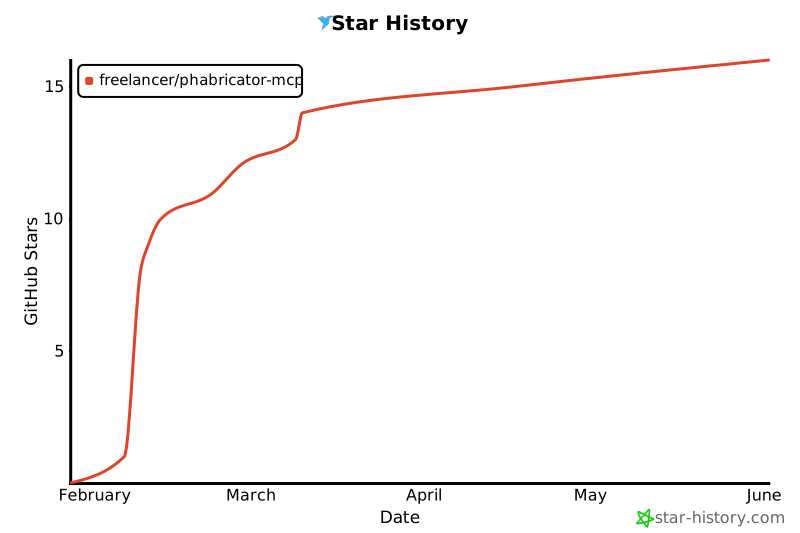](https://star-history.com/#freelancer/phabricator-mcp&Date)
## Installation
### Claude Code (CLI)
```bash
claude mcp add --scope user phabricator -- npx @freelancercom/phabricator-mcp@latest
```
Or with environment variables (if not using `~/.arcrc`):
```bash
claude mcp add --scope user phabricator \
-e PHABRICATOR_URL=https://phabricator.example.com \
-e PHABRICATOR_API_TOKEN=api-xxxxx \
-- npx @freelancercom/phabricator-mcp@latest
```
The `--scope user` flag installs the server globally, making it available in all projects.
### Codex (OpenAI CLI)
Add to your Codex config (`~/.codex/config.json`):
```json
{
"mcpServers": {
"phabricator": {
"command": "npx",
"args": ["@freelancercom/phabricator-mcp@latest"],
"env": {
"PHABRICATOR_URL": "https://phabricator.example.com",
"PHABRICATOR_API_TOKEN": "api-xxxxxxxxxxxxx"
}
}
}
}
```
### opencode
Add to your opencode config (`~/.config/opencode/config.json`):
```json
{
"mcp": {
"servers": {
"phabricator": {
"command": "npx",
"args": ["@freelancercom/phabricator-mcp@latest"],
"env": {
"PHABRICATOR_URL": "https://phabricator.example.com",
"PHABRICATOR_API_TOKEN": "api-xxxxxxxxxxxxx"
}
}
}
}
}
```
### VS Code with Claude Extension
Add to your VS Code `settings.json`:
```json
{
"claude.mcpServers": {
"phabricator": {
"command": "npx",
"args": ["@freelancercom/phabricator-mcp@latest"],
"env": {
"PHABRICATOR_URL": "https://phabricator.example.com",
"PHABRICATOR_API_TOKEN": "api-xxxxxxxxxxxxx"
}
}
}
}
```
### Cursor
Add to your Cursor MCP config (`~/.cursor/mcp.json`):
```json
{
"mcpServers": {
"phabricator": {
"command": "npx",
"args": ["@freelancercom/phabricator-mcp@latest"],
"env": {
"PHABRICATOR_URL": "https://phabricator.example.com",
"PHABRICATOR_API_TOKEN": "api-xxxxxxxxxxxxx"
}
}
}
}
```
### GitHub Copilot (VS Code)
Add to your VS Code `settings.json`:
```json
{
"github.copilot.chat.mcp.servers": {
"phabricator": {
"command": "npx",
"args": ["@freelancercom/phabricator-mcp@latest"],
"env": {
"PHABRICATOR_URL": "https://phabricator.example.com",
"PHABRICATOR_API_TOKEN": "api-xxxxxxxxxxxxx"
}
}
}
}
```
## Upgrading
The default install uses `@freelancercom/phabricator-mcp@latest`, which tells npx to check for updates on each run. No action needed.
If you pinned a specific version (e.g. `@freelancercom/phabricator-mcp@1.0.0`) or omitted the version suffix, npx caches the package and won't pick up new versions. To upgrade:
```bash
npx clear-npx-cache
```
Then restart your MCP client.
### Migrating from `github:freelancer/phabricator-mcp`
If you previously installed using the GitHub URL, update your config to use the npm package instead:
```bash
# Remove old server
claude mcp remove phabricator -s user
# Add new one
claude mcp add --scope user phabricator -- npx @freelancercom/phabricator-mcp@latest
```
For JSON configs, replace `["github:freelancer/phabricator-mcp"]` with `["@freelancercom/phabricator-mcp@latest"]` in your args.
## Configuration
The server automatically reads configuration from `~/.arcrc` (created by [Arcanist](https://secure.phabricator.com/book/phabricator/article/arcanist/)). No additional configuration is needed if you've already set up `arc`.
Alternatively, set environment variables (which take precedence over `.arcrc`):
- `PHABRICATOR_URL` - Phabricator instance URL
- `PHABRICATOR_API_TOKEN` - Conduit API token
You can get an API token from your Phabricator instance at: **Settings > Conduit API Tokens**
### Recommended: Allow Read-Only Tool Permissions
By default, Claude Code will prompt you for permission each time a Phabricator tool is called. It's recommended to allowlist the read-only tools so they run without prompts, while keeping write operations (create, edit, comment) behind a confirmation step.
Add to your `~/.claude/settings.json`:
```json
{
"permissions": {
"allow": [
"mcp__phabricator__phabricator_task_search",
"mcp__phabricator__phabricator_task_status_search",
"mcp__phabricator__phabricator_task_priority_search",
"mcp__phabricator__phabricator_revision_search",
"mcp__phabricator__phabricator_diff_search",
"mcp__phabricator__phabricator_diff_raw",
"mcp__phabricator__phabricator_revision_paths",
"mcp__phabricator__phabricator_revision_inline_search",
"mcp__phabricator__phabricator_repository_search",
"mcp__phabricator__phabricator_commit_search",
"mcp__phabricator__phabricator_repository_browse",
"mcp__phabricator__phabricator_repository_file_content",
"mcp__phabricator__phabricator_branch_search",
"mcp__phabricator__phabricator_tag_search",
"mcp__phabricator__phabricator_repository_file_history",
"mcp__phabricator__phabricator_repository_code_search",
"mcp__phabricator__phabricator_user_whoami",
"mcp__phabricator__phabricator_user_search",
"mcp__phabricator__phabricator_project_search",
"mcp__phabricator__phabricator_column_search",
"mcp__phabricator__phabricator_paste_search",
"mcp__phabricator__phabricator_document_search",
"mcp__phabricator__phabricator_blog_search",
"mcp__phabricator__phabricator_blog_post_search",
"mcp__phabricator__phabricator_file_search",
"mcp__phabricator__phabricator_file_info",
"mcp__phabricator__phabricator_buildable_search",
"mcp__phabricator__phabricator_build_search",
"mcp__phabricator__phabricator_build_target_search",
"mcp__phabricator__phabricator_build_log_search",
"mcp__phabricator__phabricator_build_plan_search",
"mcp__phabricator__phabricator_owners_search",
"mcp__phabricator__phabricator_feed_query",
"mcp__phabricator__phabricator_conpherence_read",
"mcp__phabricator__phabricator_audit_query",
"mcp__phabricator__phabricator_phid_lookup",
"mcp__phabricator__phabricator_phid_query",
"mcp__phabricator__phabricator_transaction_search",
"mcp__phabricator__phabricator_version"
]
}
}
```
To allowlist all tools including write operations, use `"mcp__phabricator__*"` instead.
## Available Tools
The server hides tools that Phabricator cannot serve, such as the Conpherence tools when Conpherence is not installed. It learns which Conduit methods the instance offers from `conduit.query` and caches the list in `~/.cache/phabricator-mcp/`, so later starts don't wait for Phabricator. Each start refreshes the cache in the background, and if the list has changed, for example after an upgrade, the server tells the client its tool list changed. On the first start the server waits up to 5 seconds for the list; if it gets no answer, every tool is listed.
### Task Management (Maniphest)
| Tool | Description |
|------|-------------|
| `phabricator_task_search` | Search tasks with filters (status, assignee, project, etc.) |
| `phabricator_task_create` | Create a new task |
| `phabricator_task_edit` | Edit an existing task |
| `phabricator_task_add_comment` | Add a comment to a task |
| `phabricator_task_status_search` | List all available task statuses on the instance |
| `phabricator_task_priority_search` | List all available task priorities on the instance |
### Code Reviews (Differential)
| Tool | Description |
|------|-------------|
| `phabricator_revision_search` | Search code review revisions |
| `phabricator_revision_edit` | Edit a revision (accept, reject, abandon, add reviewers, comment, etc.) |
| `phabricator_revision_inline_comment` | Create a draft inline comment on a line or character range, optionally with a suggested edit |
| `phabricator_revision_inline_search` | List a revision's inline comments with side, range, suggested edit and Done state |
| `phabricator_revision_inline_publish` | Publish your draft inline comments as one review, like "Submit" in the web UI |
| `phabricator_revision_inline_done` | Check or uncheck "Done" on an inline comment |
| `phabricator_revision_inline_edit` | Replace the text and suggested edit of your draft inline comment |
| `phabricator_revision_inline_delete` | Delete your draft inline comment |
| `phabricator_diff_raw` | Get the raw diff/patch content for a diff by ID |
| `phabricator_diff_search` | Search diffs (code change snapshots within a revision) |
| `phabricator_revision_paths` | Get the list of changed file paths for a revision |
The `phabricator_revision_inline_*` tools call the `differential.inline.*` Conduit methods, which stock Phabricator does not ship. Without them, `phabricator_revision_inline_comment` still creates plain line comments through `differential.createinline`, but those drafts cannot be published through Conduit.
### Repositories (Diffusion)
| Tool | Description |
|------|-------------|
| `phabricator_repository_search` | Search repositories |
| `phabricator_commit_search` | Search commits |
| `phabricator_repository_browse` | Browse a repository directory tree |
| `phabricator_repository_file_content` | Read a file's text from a repository, whole or by line range |
| `phabricator_branch_search` | List branches in a repository |
| `phabricator_tag_search` | List tags in a repository |
| `phabricator_repository_file_history` | Get commit history for a file path |
| `phabricator_repository_code_search` | Search (grep) file contents within a repository |
| `phabricator_repository_edit` | Create or edit a Diffusion repository |
### Users
| Tool | Description |
|------|-------------|
| `phabricator_user_whoami` | Get current authenticated user |
| `phabricator_user_search` | Search users |
### Projects
| Tool | Description |
|------|-------------|
| `phabricator_project_search` | Search projects |
| `phabricator_project_edit` | Create or edit a project |
| `phabricator_column_search` | Search workboard columns |
### Pastes
| Tool | Description |
|------|-------------|
| `phabricator_paste_search` | Search pastes |
| `phabricator_paste_create` | Create a paste |
| `phabricator_paste_edit` | Edit an existing paste |
### Wiki (Phriction)
| Tool | Description |
|------|-------------|
| `phabricator_document_search` | Search wiki documents |
| `phabricator_document_create` | Create a new wiki document |
| `phabricator_document_edit` | Edit a wiki document title or content |
| `phabricator_document_add_comment` | Add a comment to a wiki document |
### Blogs (Phame)
| Tool | Description |
|------|-------------|
| `phabricator_blog_search` | Search Phame blogs |
| `phabricator_blog_edit` | Create or edit a Phame blog |
| `phabricator_blog_post_search` | Search blog posts |
| `phabricator_blog_post_create` | Create a new blog post |
| `phabricator_blog_post_edit` | Edit an existing blog post |
| `phabricator_blog_post_add_comment` | Add a comment to a blog post |
### Transactions
| Tool | Description |
|------|-------------|
| `phabricator_transaction_search` | Search transactions (comments, status changes, etc.) on any object |
### Files
| Tool | Description |
|------|-------------|
| `phabricator_file_upload` | Upload a file and get an ID for embedding in descriptions/comments via `{F<id>}` |
| `phabricator_file_search` | Search for files |
| `phabricator_file_info` | Get file metadata (name, size, MIME type, URI) |
### Builds (Harbormaster)
| Tool | Description |
|------|-------------|
| `phabricator_buildable_search` | Search buildables (revisions/commits with builds) |
| `phabricator_build_search` | Search builds (CI/build results) |
| `phabricator_build_target_search` | Search build targets (individual build steps) |
| `phabricator_build_log_search` | Search build logs (output from build steps) |
| `phabricator_build_command` | Report build status to Harbormaster (pass, fail, work) |
| `phabricator_build_plan_search` | Search build plans (CI pipeline configurations) |
### Code Ownership (Owners)
| Tool | Description |
|------|-------------|
| `phabricator_owners_search` | Search code ownership packages |
### Activity Feed
| Tool | Description |
|------|-------------|
| `phabricator_feed_query` | Query the activity feed (recent task updates, revision changes, commits, etc.) |
### Chat (Conpherence)
| Tool | Description |
|------|-------------|
| `phabricator_conpherence_create` | Create a new chat room/thread, with you as a participant |
| `phabricator_conpherence_edit` | Edit a chat room (rename, manage participants) |
| `phabricator_conpherence_read` | Read messages from a chat thread |
| `phabricator_conpherence_send` | Send a message to a chat thread |
### Audits
| Tool | Description |
|------|-------------|
| `phabricator_audit_query` | Search commit audit requests |
### PHID Utilities
| Tool | Description |
|------|-------------|
| `phabricator_phid_lookup` | Look up PHIDs by name (e.g., "T123", "@username") |
| `phabricator_phid_query` | Get details about PHIDs |
### Server
| Tool | Description |
|------|-------------|
| `phabricator_version` | Get the version of the running phabricator-mcp server |
## Usage
Once connected, just ask your AI assistant to perform Phabricator tasks in natural language:
**Tasks**
- "Show my assigned tasks"
- "Create a task titled 'Fix login bug' in project Backend"
- "Add a comment to T12345 saying the fix is ready for review"
- "Close task T12345"
- "What custom fields are available for incident tasks?"
- "Set the start date and root cause category on T12345"
- "Make T456 a subtask of T123"
- "Upload this screenshot and add it to the description of T789"
**Code Reviews**
- "Show my open diffs"
- "What's the status of D6789?"
- "Review the code changes in D6789"
- "Add @alice as a reviewer to D6789"
- "Accept D6789"
- "Leave an inline comment on line 42 of src/index.ts in D6789"
- "Suggest an edit for lines 10-12 of src/config.ts in D6789, then publish my review"
- "Reword my draft inline comment on src/config.ts in D6789, and delete the one on line 12"
- "Address the unresolved inline comments on D6789"
**Repositories & Builds**
- "Show me the contents of src/config.ts in repo Backend"
- "Browse the /src directory in the main repo"
- "Is the build passing on D6789?"
- "Show me the build logs for D6789"
- "Who owns the code in /src/auth/?"
**Search & Lookup**
- "Find user john.doe"
- "Search for projects with 'backend' in the name"
- "Search commits by author alice"
- "Look up T123 and D456"
- "Show me the comments on D6789"
**Wiki & Pastes**
- "Find wiki pages about deployment"
- "Create a paste with this error log"
**Blogs**
- "Search for blog posts about release notes"
- "Create a new draft blog post titled 'Q1 Update' on the engineering blog"
- "Publish blog post J42"
- "Add a comment to blog post J15"
The appropriate tools are called automatically based on your request.
## Development
```bash
git clone https://github.com/freelancer/phabricator-mcp.git
cd phabricator-mcp
npm install
npm run build
npm test
npm run dev # watch mode
```
See [CONTRIBUTING.md](CONTRIBUTING.md) for how to check a change against a real Phabricator before opening a pull request.
### Architecture
- `src/index.ts` - Entry point, MCP server with stdio transport
- `src/config.ts` - Config loader (reads `~/.arcrc` or env vars)
- `src/client/conduit.ts` - Phabricator Conduit API client
- `src/tools/*.ts` - Tool implementations per Phabricator application
## License
MIT
TDQS
Scored across 64 tools
Most tools target a clearly distinct resource+action, and descriptions actively steer between near-neighbors (e.g. phid_lookup vs phid_query, audit_query vs commit_search). The weak spots are dense clusters: six phabricator_revision_inline_* tools and six Harbormaster search tools (buildable/build/target/log/plan) are individually documented but easy to misselect at a glance.
The dominant pattern is phabricator_<resource>_<verb> (task_create, paste_edit, document_search) and it holds across almost the whole surface. Minor deviations: phabricator_version has no resource/verb, phabricator_revision_inline_comment is a create operation named as a noun, and phabricator_diff_raw uses an adjective rather than a verb.
64 tools is heavy for any single server, even though Phabricator genuinely spans many applications (Maniphest, Differential, Diffusion, Phriction, Phame, Harbormaster, Conpherence, Files, Owners). Several clusters look consolidatable — the inline-comment lifecycle and the five Harbormaster *_search tools could collapse into fewer parameterized tools.
Coverage is broad and mostly lifecycle-complete per resource: tasks, pastes, documents, blogs, projects, and posts all have search/create/edit, and revisions have a full inline-review workflow. Gaps remain — there is no revision_create (only revision_edit with actions), and workboard columns have search but no create/edit, so some workflows dead-end.