
iRacing Data MCP Server
# iRacing Data MCP Server 🏎️
A Node.js Model Context Protocol (MCP) server that provides seamless access to iRacing's racing simulation data API. This project serves as both a standalone CLI tool and an MCP server for AI assistant integration.
[](https://badge.fury.io/js/iracing-data-mcp-server)
[](https://opensource.org/licenses/MIT)
## 🌟 Features
### 🤖 MCP Server Integration
- **AI Assistant Ready**: Seamlessly integrate with Claude, ChatGPT, and other AI assistants
- **Real-time Data Access**: Live access to iRacing's comprehensive racing data
- **Automatic Authentication**: Handles login and session management automatically
- **Type-safe Operations**: Full TypeScript support with Zod schema validation
### 📊 Data Access
- **Member Profiles**: Detailed driver information including licenses and ratings
- **Team Information**: Comprehensive team data and statistics
- **Career Statistics**: Complete racing career history and achievements
- **Season Recaps**: Detailed season performance and progression
- **Driver Lookup**: Search and find drivers by name
- **API Documentation**: Built-in access to iRacing's API documentation
### 🛠️ Dual Interface
- **MCP Server**: For AI assistant integration
- **CLI Tool**: For direct command-line access and automation
## 📖 Usage
### As MCP Server
#### Configuration for LLM Clients
To use this MCP server with AI assistants like Claude Desktop, add the following configuration to your MCP settings file:
**For Claude Desktop** (`~/Library/Application Support/Claude/claude_desktop_config.json` on macOS):
```json
{
"mcpServers": {
"iracing-data-mcp-server": {
"command": "npx",
"args": [
"iracing-data-mcp-server@latest",
"@modelcontextprotocol/server-filesystem",
"/path/to/your/cookie-jar-file"
]
"env": {
"COOKIE_JAR": "/path/to/your/cookie-jar-file",
"EMAIL": "your.email@example.com",
"API_KEY": "your_api_key_here"
}
}
}
}
```
#### Available MCP Tools
The server will run and provide the following tools to AI assistants:
| Tool | Description | Parameters |
|------|-------------|------------|
| `login` | Authenticate with iRacing | None |
| `get_members_profile` | Get member profile data | `member_ids: number[]` |
| `get_team` | Retrieve team information | `team_id: string` |
| `get_member_recap` | Get season recap data | `member_id: number`, `year?: number`, `season?: number` |
| `get_member_career` | Get career statistics | `member_id: number` |
| `driver_lookup` | Search for drivers | `driver_name: string` |
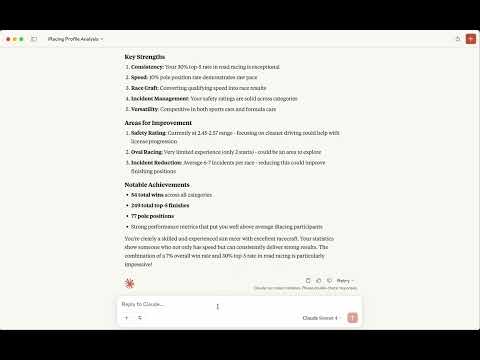
### 📹 Watch the video
[](https://www.youtube.com/watch?v=wW0vFJqwk7w)
### As CLI Tool
#### Environment Setup
Create a `.env` file in your project directory:
```env
# Required: Path to store authentication cookies
COOKIE_JAR=./cookies.txt
# Required: Your iRacing account credentials
EMAIL=your.email@example.com
# Option 1: Use your iRacing password
PASSWORD=your_password
# Option 2: Use pre-generated API key (recommended for security)
# API_KEY=your_api_key_here
```
#### Initial Authentication
Before using the cli, authenticate with iRacing:
```bash
npm run login
```
Use the command-line interface for direct data access:
#### Get Member Profile
```bash
# Single member
npm run api member 123456
# Multiple members
npm run api member 123456,789012
```
#### Get Team Information
```bash
npm run api team 123456
```
#### Get Member Career Data
```bash
npm run api member-career 123456
```
#### Get Season Recap
```bash
# Current season recap
npm run api member-recap --member-id 123456
# Specific year and season
npm run api member-recap --member-id 123456 --year 2024 --season 1
```
#### Driver Lookup
```bash
npm run api driver-lookup "Max Verstappen"
```
#### API Documentation
```bash
npm run api documentation
```
## 🔧 Development Setup
### Prerequisites
- Node.js 24+
- npm
- iRacing account with active subscription
### Clone and Install
```bash
git clone https://github.com/yourusername/iracing-data-mcp-server.git
cd iracing-data-mcp-server
npm install
```
## 🔐 Authentication & Security
### API Key vs Password
**Recommended**: Use an API key for enhanced security:
1. **Generate API Key**:
```javascript
const crypto = require('crypto');
const apiKey = crypto.createHash('sha256')
.update(password + email)
.digest('base64');
```
2. **Set in Environment**:
```env
API_KEY=your_generated_api_key
# Remove PASSWORD variable when using API_KEY
```
### Cookie Management
The server automatically manages authentication cookies:
- Stores cookies in the path specified by `COOKIE_JAR`
- Automatically refreshes expired sessions
- Handles authentication errors gracefully
<p align="center">
<strong>Built with ❤️ for the racing community</strong>
</p>
<p align="center">
<a href="https://www.buymeacoffee.com/emiliosp" target="_blank">
<img src="https://cdn.buymeacoffee.com/buttons/v2/default-yellow.png" alt="Buy Me A Coffee" style="height: 60px !important;width: 217px !important;" >
</a>
</p>
TDQS
Scored across 6 tools
The tools are mostly distinct in purpose (e.g., driver_lookup vs. get_team vs. login), but there is some overlap between get_member_career, get_member_recap, and get_members_profile, which all seem to retrieve member-related data with unclear boundaries. Without descriptions, it's ambiguous whether these tools serve different aspects of member information or could be consolidated.
The naming follows a consistent snake_case pattern throughout, with a mix of verb_noun (e.g., driver_lookup, get_member_career) and noun-only (e.g., login) styles. While not perfectly uniform in verb usage, the structure is readable and predictable, with only minor deviations from a strict convention.
With 6 tools, the count is reasonable for a data server focused on iRacing, covering key operations like login, member data retrieval, and team info. It's slightly lean but not overly sparse, as it includes essential functions without obvious bloat, though more tools might be expected for a comprehensive racing data service.
The tool set is significantly incomplete for an iRacing data server, lacking obvious gaps such as tools for race results, standings, schedules, or car/track data. It focuses narrowly on member and team profiles without covering broader racing data, which will likely cause agent failures when trying to perform common tasks like fetching race outcomes or event details.