
Glama
JJVvV

SP Database MCP Server

by JJVvV

SP Database MCP Server

一个用于实时获取数据库表结构信息的 Model Context Protocol (MCP) 服务器。通过 MCP 协议,可以让 AI 助手实时获取数据库的表结构信息,解决信息不及时更新的问题。

alt text

功能特性

  • 智能表结构查询:支持两种查询模式

    • 低代码系统 Schema 查询:通过 da_logic_entityda_entity_attribute 表获取详细的业务字段信息

    • 传统数据库元数据查询:直接从数据库系统表获取技术字段信息

  • 🔄 实时获取数据库表结构信息

  • 📊 支持多种数据库类型 (MySQL, PostgreSQL)

  • 🚀 通过 API 接口动态获取最新的表字段信息

  • 🔍 支持表信息查询和字段详情获取

  • 📝 自动生成表结构文档

Related MCP server: Metabase MCP Server

安装

从 PyPI 安装(推荐)

# 安装(包含 PostgreSQL 支持)
pip install "sp-database-mcp[postgresql]"

# 或使用 uv
uv add "sp-database-mcp[postgresql]"

# 安装特定数据库支持
pip install sp-database-mcp[mysql]
pip install sp-database-mcp[postgresql]

从源码安装

# 克隆仓库
git clone https://github.com/alexliu/sp-enterprise-mcp.git
cd sp-enterprise-mcp

# 安装依赖
uv sync

# 或使用 pip
pip install -e .

配置

环境变量

# 数据库连接配置
DATABASE_URL="postgresql://user:password@host:port/database"
# 或者
DATABASE_URL="mysql://user:password@host:port/database"

# API 接口配置(如果通过 API 获取)
API_BASE_URL="http://your-api-server.com"

MCP 客户端配置

Claude Desktop 配置(使用 uvx)

{
  "mcpServers": {
    "sp-database-mcp": {
      "command": "uvx",
      "args": ["sp-database-mcp[postgresql]"],
      "env": {
        "DATABASE_URL": "postgresql://user:password@host:port/database"
      }
    }
  }
}

Windsurf 配置

{
  "mcpServers": {
    "sp-database-mcp": {
      "command": "uvx",
      "args": ["sp-database-mcp[postgresql]"],
      "env": {
        "DATABASE_URL": "postgresql://user:password@host:port/database"
      }
    }
  }
}

开发版本配置

如果你想使用本地开发版本,可以使用以下配置:

{
  "mcpServers": {
    "sp-database-mcp-dev": {
      "command": "uv",
      "args": [
        "--directory",
        "/path/to/sp-database-mcp",
        "run",
        "python",
        "-m",
        "sp_database_mcp.server"
      ],
      "env": {
        "DATABASE_URL": "postgresql://user:password@host:port/database"
      }
    }
  }
}

使用方式

启动 MCP 服务器

uv run sp-database-mcp[postgresql]

使用示例

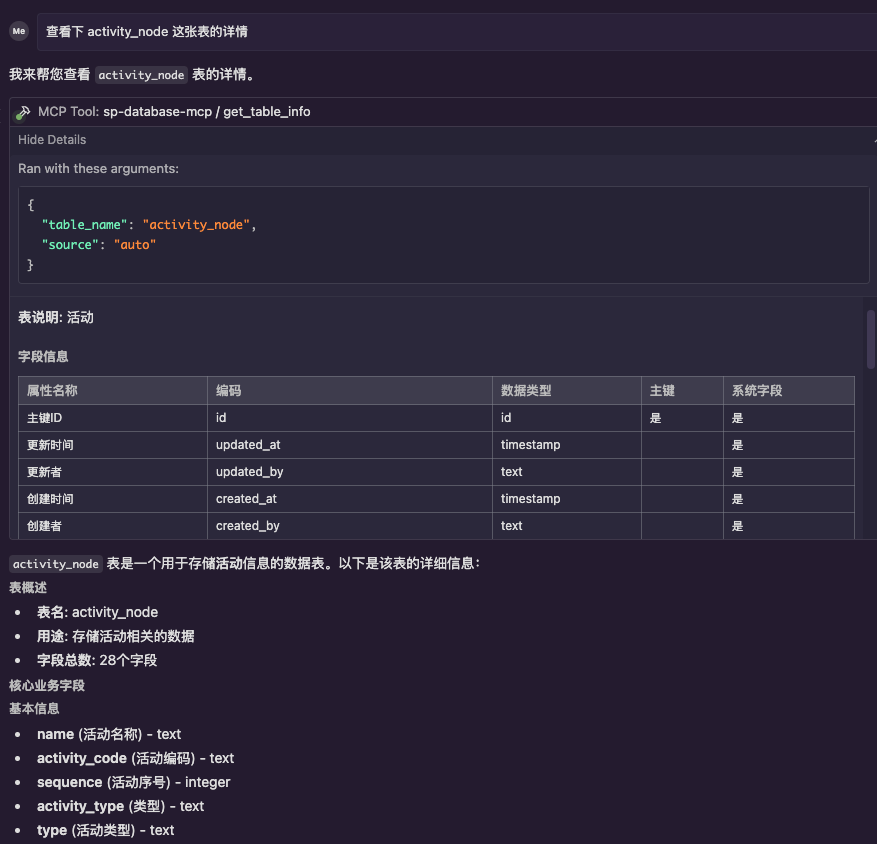
查询表结构信息

现在支持两种查询模式,系统会自动优先使用低代码系统的 schema 查询:

# 通过 MCP 工具查询表信息
# 输入:请获取 activity_node 表的详细信息

# 输出示例(低代码系统 schema 查询结果):
# activity_node 表结构信息
# 
# **表说明**: 活动
# 
# ## 字段信息
# 
# | 字段名 | 类型 | 可空 | 默认值 | 主键 | 说明 |
# |--------|------|------|--------|------|---------|
# | id | BIGINT | 否 | - | 是 | 主键ID |
# | name | VARCHAR(1000) | 是 | - | 否 | 活动名称 |
# | activity_code | VARCHAR(64) | 是 | - | 否 | 活动编码 |
# | business_object_id | BIGINT | 是 | - | 否 | 业务对象id |
# | ... | ... | ... | ... | ... | ... |

查询模式说明

  1. 低代码系统 Schema 查询(优先)

    • 查询 da_logic_entity 表获取实体基本信息

    • 查询 da_entity_attribute 表获取字段详细信息

    • 提供中文字段名、业务描述、数据类型等丰富信息

    • 支持外键关系解析

  2. 传统数据库元数据查询(回退)

    • 当低代码系统查询失败时自动回退

    • 直接从数据库系统表获取技术字段信息

    • 提供基础的字段类型、约束等信息

项目结构

sp-database-mcp/
├── sp_database_mcp/
│       ├── __init__.py
│       ├── server.py          # MCP 服务器主文件
│       ├── database.py        # 数据库连接和查询
│       ├── api_client.py      # API 客户端
│       └── models.py          # 数据模型
├── tests/
├── .env.example
├── pyproject.toml
└── README.md

开发

# 安装开发依赖
uv sync --dev

# 运行测试
uv run pytest

# 代码格式化
uv run black .
uv run isort .

# 类型检查
uv run mypy .
Install Server
A
security – no known vulnerabilities
A
license - permissive license
A
quality - confirmed to work

Resources

Unclaimed servers have limited discoverability.

Looking for Admin?

If you are the server author, to access and configure the admin panel.

Latest Blog Posts

MCP directory API

We provide all the information about MCP servers via our MCP API.

curl -X GET 'https://glama.ai/api/mcp/v1/servers/JJVvV/sp-enterprise-mcp'

If you have feedback or need assistance with the MCP directory API, please join our Discord server
