F
licenseNot graded
qualityD
maintenanceA simple MCP server that provides basic calculator functionality for performing mathematical operations. Built with FastMCP and demonstrates fundamental MCP server implementation patterns.
-

Click on "Deploy Server".
Wait a few minutes for the server to deploy. Once ready, it will show a "Started" state.
In the chat, type @ followed by the MCP server name and your instructions, e.g., "@Test FastMCP calculate 156 plus 243"
That's it! The server will respond to your query, and you can continue using it as needed.
Here is a step-by-step guide with screenshots.
一个使用 FastMCP 框架构建的 MCP 服务器,提供基本的数学运算功能。
加法运算 (add) - 计算两个整数的和
减法运算 (subtract) - 计算两个整数的差
乘法运算 (multiply) - 计算两个整数的积
除法运算 (divide) - 计算两个整数的商
Related MCP server: Fast MCP Local
Python 3.12+
uv 包管理器
Cursor IDE (用于MCP集成)
如果你还没有安装 uv,请先安装:
# macOS/Linux
curl -LsSf https://astral.sh/uv/install.sh | sh

# 或者使用 pip
pip install uv克隆项目:
git clone <repository-url>
cd test_fast_mcp安装依赖:
uv sync激活虚拟环境:
uv shell运行服务器:
uv run python main.py启动开发服务器:
uv run dev运行测试:
uv run test代码格式化:
uv run format代码检查:
uv run lint导入排序:
uv run sort# 添加生产依赖
uv add package-name
# 添加开发依赖
uv add --dev package-nameuv lock --upgrade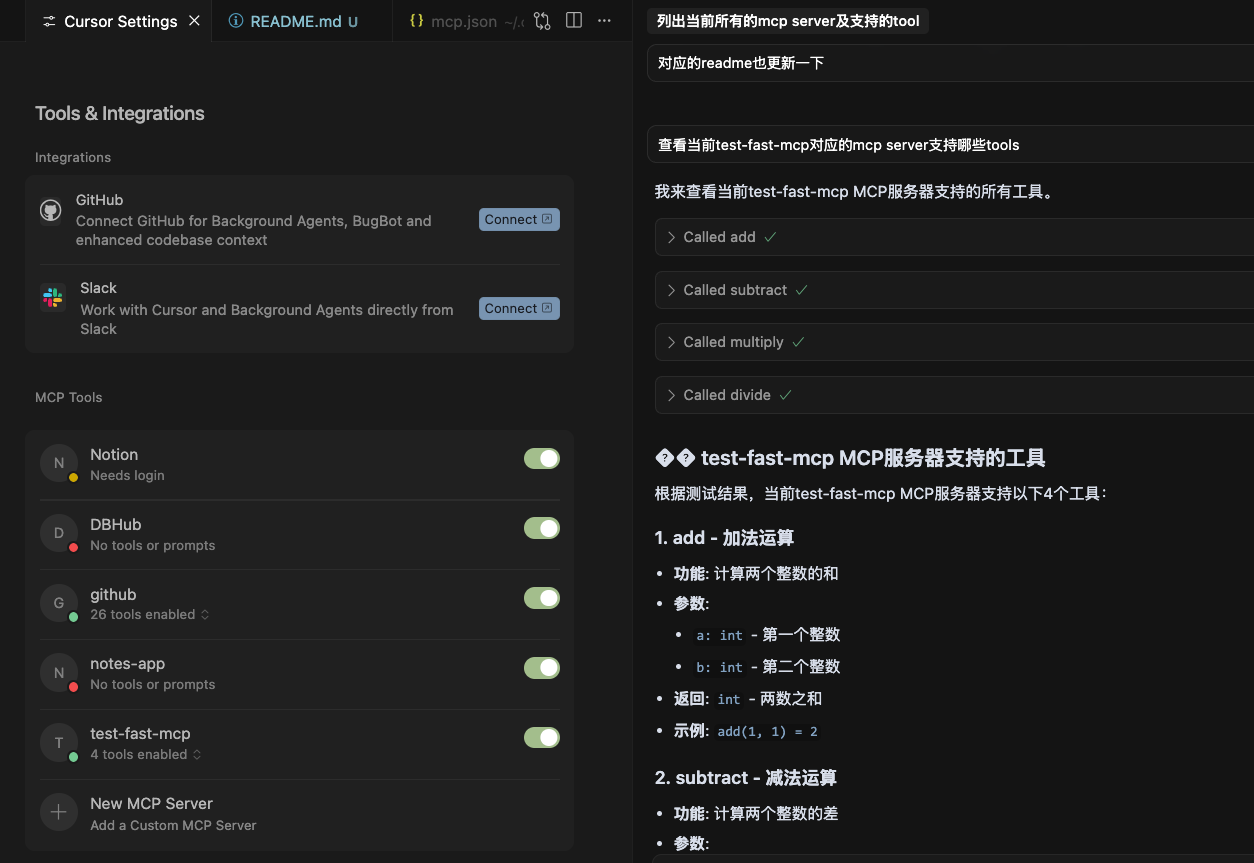
将以下配置添加到你的 Cursor MCP 配置文件 (~/.cursor/mcp.json) 中:
{
  "mcpServers": {
    "test-fast-mcp": {
      "command": "uv",
      "args": ["run", "python", "/Users/guosong/Desktop/Sina/Code/test_fast_mcp/main.py"],
      "env": {
        "PYTHONPATH": ".",
        "TRANSPORT": "stdio"
      }
    }
  }
}
重要配置说明:
使用绝对路径指向 main.py 文件
添加 "TRANSPORT": "stdio" 环境变量
确保 PYTHONPATH 设置正确
重启 Cursor IDE
检查 MCP 服务器状态(应该显示 "4 tools enabled")
测试工具调用
test_fast_mcp/
├── main.py          # 主服务器文件,包含所有工具定义
├── pyproject.toml   # 项目配置和依赖管理
├── uv.lock         # 依赖锁定文件
├── mcp.json        # Cursor MCP 配置示例
├── test_tools.py   # 工具测试文件
└── README.md # 项目说明文档运行测试脚本来验证数学函数:
python test_tools.py预期输出:
Testing math functions:
add(5, 4) = 9
subtract(10, 3) = 7
multiply(6, 7) = 42
divide(15, 3) = 5.0"No tools or prompts" 错误
确保使用绝对路径配置
添加 TRANSPORT: "stdio" 环境变量
重启 Cursor IDE
构建错误
运行 uv sync 重新安装依赖
检查 pyproject.toml 配置
工具无法调用
确认 MCP 服务器正在运行
检查工具名称格式:mcp_test-fast-mcp_<tool_name>
检查服务器状态:
ps aux | grep "python main.py"查看服务器日志:
uv run python main.py测试工具功能:
python -c "from main import add; print(add(5, 4))"这个项目使用 FastMCP 框架,它简化了 MCP 服务器的创建过程。
在 main.py 中定义新函数
使用 @mcp.tool 装饰器
添加详细的文档字符串
重启服务器
示例:
@mcp.tool
def new_tool(param: str) -> str:
    """Tool description.

    Args:
        param: Parameter description

    Returns:
        Return value description
    """
return f"Processed: {param}"使用小写字母和下划线
提供清晰的参数类型注解
包含详细的文档字符串
添加适当的错误处理
MIT License
欢迎提交 Issue 和 Pull Request!
如果遇到问题,请:
检查故障排除部分
查看项目 Issues
提交新的 Issue
Add two integers together.
Args: a: First integer b: Second integer
Returns: The sum of a and b
| Name | Required | Description | Default |
|---|---|---|---|
| a | Yes | ||
| b | Yes |
| Name | Required | Description |
|---|---|---|
| result | Yes |
Does the description disclose side effects, auth requirements, rate limits, or destructive behavior?
No annotations are provided, so the description carries full burden. It discloses the basic behavior (addition operation) and return value, but lacks details on error handling, integer overflow behavior, or performance characteristics that would be useful for an agent.
Agents need to know what a tool does to the world before calling it. Descriptions should go beyond structured annotations to explain consequences.
Is the description appropriately sized, front-loaded, and free of redundancy?
The description is perfectly structured and front-loaded with the core purpose, followed by clear sections for arguments and return value. Every sentence earns its place with zero wasted words.
Shorter descriptions cost fewer tokens and are easier for agents to parse. Every sentence should earn its place.
Given the tool's complexity, does the description cover enough for an agent to succeed on first attempt?
Given the tool's simplicity (basic arithmetic operation), 2 parameters, and the presence of an output schema that handles return values, the description is complete enough for an agent to understand and use the tool correctly.
Complex tools with many parameters or behaviors need more documentation. Simple tools need less. This dimension scales expectations accordingly.
Does the description clarify parameter syntax, constraints, interactions, or defaults beyond what the schema provides?
Schema description coverage is 0%, so the description must compensate. It provides clear semantic meaning for both parameters ('First integer', 'Second integer') beyond what the bare schema offers, though it doesn't specify constraints like range or special values.
Input schemas describe structure but not intent. Descriptions should explain non-obvious parameter relationships and valid value ranges.
Does the description clearly state what the tool does and how it differs from similar tools?
The description states a specific verb ('Add') and resource ('two integers together'), clearly distinguishing this tool from its siblings (divide, multiply, subtract) by specifying the exact mathematical operation performed.
Agents choose between tools based on descriptions. A clear purpose with a specific verb and resource helps agents select the right tool.
Does the description explain when to use this tool, when not to, or what alternatives exist?
The description explicitly states when to use this tool ('Add two integers together') and implicitly distinguishes it from alternatives by naming the operation, making it clear this is for addition versus division, multiplication, or subtraction provided by sibling tools.
Agents often have multiple tools that could apply. Explicit usage guidance like "use X instead of Y when Z" prevents misuse.
Divide the first integer by the second.
Args: a: First integer (dividend) b: Second integer (divisor)
Returns: The quotient of a divided by b
| Name | Required | Description | Default |
|---|---|---|---|
| a | Yes | ||
| b | Yes |
| Name | Required | Description |
|---|---|---|
| result | Yes |
Does the description disclose side effects, auth requirements, rate limits, or destructive behavior?
With no annotations provided, the description carries full burden but only states the basic operation. It doesn't disclose behavioral traits like error handling (e.g., division by zero), performance characteristics, or any constraints beyond what's implied by the operation itself.
Agents need to know what a tool does to the world before calling it. Descriptions should go beyond structured annotations to explain consequences.
Is the description appropriately sized, front-loaded, and free of redundancy?
The description is appropriately sized and front-loaded with the core purpose in the first sentence. The Args and Returns sections are structured efficiently with no wasted words, making it easy to parse.
Shorter descriptions cost fewer tokens and are easier for agents to parse. Every sentence should earn its place.
Given the tool's complexity, does the description cover enough for an agent to succeed on first attempt?
Given the tool's low complexity and the presence of an output schema (which handles return values), the description is mostly complete. It covers purpose and parameters adequately, though it lacks error-handling details which would be helpful for a division operation.
Complex tools with many parameters or behaviors need more documentation. Simple tools need less. This dimension scales expectations accordingly.
Does the description clarify parameter syntax, constraints, interactions, or defaults beyond what the schema provides?
Schema description coverage is 0%, so the description must compensate. It adds clear meaning by specifying 'a' as the dividend and 'b' as the divisor, which goes beyond the schema's generic titles ('A', 'B'). However, it doesn't detail constraints like non-zero divisor or integer-specific behavior.
Input schemas describe structure but not intent. Descriptions should explain non-obvious parameter relationships and valid value ranges.
Does the description clearly state what the tool does and how it differs from similar tools?
The description clearly states the specific action ('Divide') with the resource ('first integer by the second'), and distinguishes from sibling tools (add, multiply, subtract) by specifying division rather than other arithmetic operations.
Agents choose between tools based on descriptions. A clear purpose with a specific verb and resource helps agents select the right tool.
Does the description explain when to use this tool, when not to, or what alternatives exist?
The description implies usage for integer division but doesn't explicitly state when to use this vs. alternatives like 'multiply' or 'subtract'. It provides basic context (dividing integers) but lacks explicit guidance on exclusions or comparisons to sibling tools.
Agents often have multiple tools that could apply. Explicit usage guidance like "use X instead of Y when Z" prevents misuse.
Multiply two integers together.
Args: a: First integer b: Second integer
Returns: The product of a and b
| Name | Required | Description | Default |
|---|---|---|---|
| a | Yes | ||
| b | Yes |
| Name | Required | Description |
|---|---|---|
| result | Yes |
Does the description disclose side effects, auth requirements, rate limits, or destructive behavior?
No annotations are provided, so the description carries full burden. While it states the basic operation, it doesn't disclose important behavioral traits like overflow handling, performance characteristics, error conditions, or whether it's idempotent. The description is minimal beyond stating the core function.
Agents need to know what a tool does to the world before calling it. Descriptions should go beyond structured annotations to explain consequences.
Is the description appropriately sized, front-loaded, and free of redundancy?
The description is perfectly structured and front-loaded with the core purpose, followed by clear parameter and return value sections. Every sentence earns its place with zero wasted words, making it easy to scan and understand.
Shorter descriptions cost fewer tokens and are easier for agents to parse. Every sentence should earn its place.
Given the tool's complexity, does the description cover enough for an agent to succeed on first attempt?
Given the tool's simplicity (basic arithmetic), 2 parameters, and the presence of an output schema (which handles return value documentation), the description is reasonably complete. It covers the essential what and how, though additional behavioral context would be beneficial for a production tool.
Complex tools with many parameters or behaviors need more documentation. Simple tools need less. This dimension scales expectations accordingly.
Does the description clarify parameter syntax, constraints, interactions, or defaults beyond what the schema provides?
With 0% schema description coverage, the description compensates by clearly explaining both parameters ('First integer' and 'Second integer'). It adds meaningful semantic context beyond the bare schema, though it doesn't specify constraints like range limits or special values.
Input schemas describe structure but not intent. Descriptions should explain non-obvious parameter relationships and valid value ranges.
Does the description clearly state what the tool does and how it differs from similar tools?
The description clearly states the specific action ('Multiply two integers together') and identifies the resource (integers). It distinguishes from sibling tools (add, divide, subtract) by specifying multiplication rather than other arithmetic operations.
Agents choose between tools based on descriptions. A clear purpose with a specific verb and resource helps agents select the right tool.
Does the description explain when to use this tool, when not to, or what alternatives exist?
The description implies usage for integer multiplication but doesn't explicitly state when to use this tool versus alternatives like 'add' or 'divide'. No guidance is provided about edge cases, limitations, or prerequisites for use.
Agents often have multiple tools that could apply. Explicit usage guidance like "use X instead of Y when Z" prevents misuse.
Subtract the second integer from the first.
Args: a: First integer b: Second integer
Returns: The difference of a and b
| Name | Required | Description | Default |
|---|---|---|---|
| a | Yes | ||
| b | Yes |
| Name | Required | Description |
|---|---|---|
| result | Yes |
Does the description disclose side effects, auth requirements, rate limits, or destructive behavior?
No annotations are provided, so the description carries the full burden of behavioral disclosure. While it correctly describes the mathematical operation, it doesn't address important behavioral aspects like error handling (e.g., overflow, underflow), performance characteristics, or whether this is a pure function. For a tool with no annotation coverage, this represents a significant gap in behavioral transparency.
Agents need to know what a tool does to the world before calling it. Descriptions should go beyond structured annotations to explain consequences.
Is the description appropriately sized, front-loaded, and free of redundancy?
The description is perfectly structured and concise. It begins with a clear purpose statement, then provides organized sections for Args and Returns. Every sentence earns its place - the first sentence states the operation, the Args section documents parameters, and the Returns section specifies the output. No wasted words or redundant information.
Shorter descriptions cost fewer tokens and are easier for agents to parse. Every sentence should earn its place.
Given the tool's complexity, does the description cover enough for an agent to succeed on first attempt?
Given the tool's simplicity (basic arithmetic operation), 2 parameters, and the existence of an output schema (which handles return value documentation), the description is reasonably complete. It covers the operation, parameters, and return value. However, it could benefit from mentioning sibling tools for context and addressing potential edge cases like integer overflow, which would make it fully complete for this mathematical tool.
Complex tools with many parameters or behaviors need more documentation. Simple tools need less. This dimension scales expectations accordingly.
Does the description clarify parameter syntax, constraints, interactions, or defaults beyond what the schema provides?
With 0% schema description coverage, the description fully compensates by clearly explaining both parameters in the Args section: 'a: First integer' and 'b: Second integer'. It adds essential meaning beyond the bare schema by specifying the order of operation ('subtract the second integer from the first') and clarifying which parameter is subtracted from which. This is exactly what's needed when schema coverage is low.
Input schemas describe structure but not intent. Descriptions should explain non-obvious parameter relationships and valid value ranges.
Does the description clearly state what the tool does and how it differs from similar tools?
The description clearly states the tool's purpose with a specific verb ('subtract') and resource ('the second integer from the first'), making it immediately understandable. It distinguishes from siblings by specifying the subtraction operation rather than addition, multiplication, or division. However, it doesn't explicitly mention the sibling tools or how it differs from them beyond the mathematical operation.
Agents choose between tools based on descriptions. A clear purpose with a specific verb and resource helps agents select the right tool.
Does the description explain when to use this tool, when not to, or what alternatives exist?
The description provides no guidance on when to use this tool versus alternatives like 'add', 'divide', or 'multiply'. It simply states what the tool does mathematically without any context about appropriate use cases, prerequisites, or comparisons to sibling tools. The agent must infer usage from the mathematical operation alone.
Agents often have multiple tools that could apply. Explicit usage guidance like "use X instead of Y when Z" prevents misuse.
Recent tool additions, removals, and schema changes observed during successful MCP inspections.
v0.1.0adddividemultiplysubtractScored across 4 tools
Each tool has a clearly distinct mathematical operation: addition, division, multiplication, and subtraction. There is no overlap in purpose, and the descriptions make it immediately obvious which tool to use for each basic arithmetic operation.
All tool names follow a consistent pattern of simple, single-word verbs describing the mathematical operation (add, divide, multiply, subtract). There is no mixing of naming conventions or styles, making the set highly predictable and readable.
With exactly four tools covering the four basic arithmetic operations, this server is perfectly scoped for its purpose. Each tool earns its place with no redundancy or missing core functionality, making it an ideal minimal set for arithmetic calculations.
For a server focused on basic arithmetic, this tool set is complete with full coverage of addition, subtraction, multiplication, and division. There are no gaps in the core operations, and agents can perform all fundamental calculations without dead ends.
This MCP server enables users to perform scientific computations regarding linear algebra and vect…
A simple MCP server built with FastMCP and python
Math MCP server for primality, factorization, Java templates, and integer multiplication.