YokTez MCP
Click on "Deploy Server".
Wait a few minutes for the server to deploy. Once ready, it will show a "Started" state.
In the chat, type
@followed by the MCP server name and your instructions, e.g., "@YokTez MCPSearch for machine learning theses from Istanbul Technical University"
That's it! The server will respond to your query, and you can continue using it as needed.
Here is a step-by-step guide with screenshots.
YokTez MCP: YÖK Ulusal Tez Merkezi için MCP Sunucusu
Bu proje, Yükseköğretim Kurulu (YÖK) Ulusal Tez Merkezi'ne erişimi kolaylaştıran bir FastMCP sunucusu oluşturur. Bu sayede, YÖK Tez Merkezi'nden tez arama ve tezlerin PDF içeriklerini Markdown formatında getirme işlemleri, Model Context Protocol (MCP) destekleyen LLM (Büyük Dil Modeli) uygulamaları (örneğin Claude Desktop veya 5ire) ve diğer istemciler tarafından araç (tool) olarak kullanılabilir hale gelir.
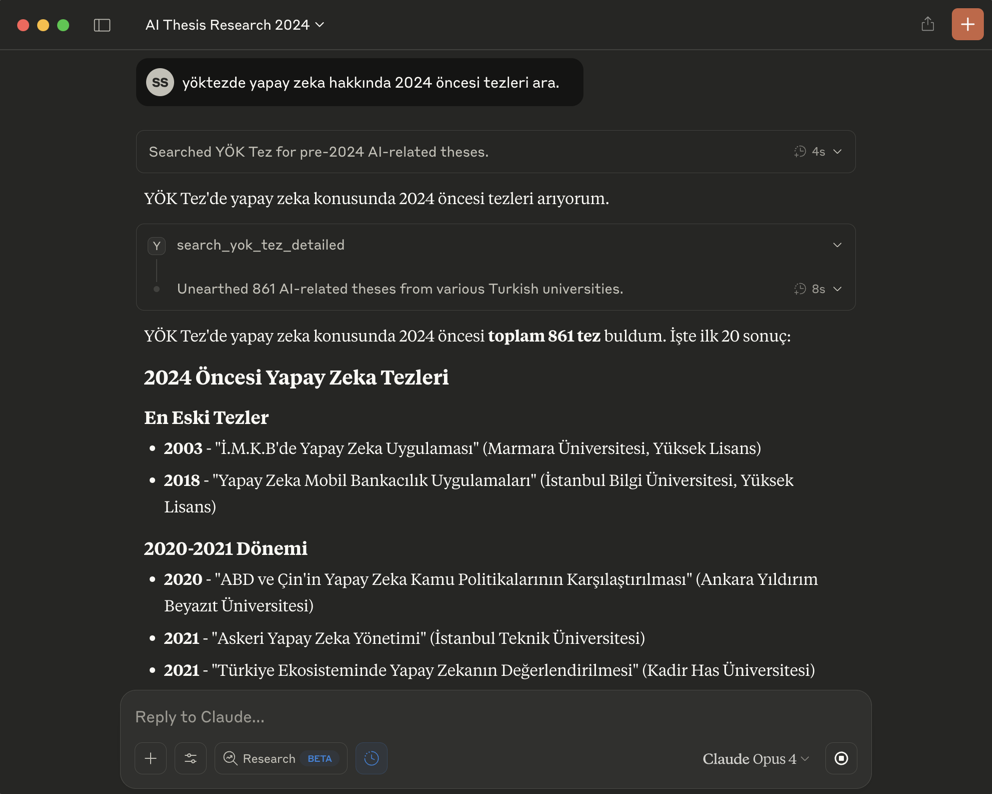
🎯 Temel Özellikler
YÖK Ulusal Tez Merkezi'ne programatik erişim için standart bir MCP arayüzü.
Aşağıdaki yetenekler:
Detaylı Tez Arama: Başlık, yazar, danışman, üniversite, enstitü, anabilim/bilim dalı, tez türü, yıl aralığı, izin durumu, tez numarası, konu, dizin ve özet metni gibi çeşitli kriterlere göre tez arama.
Tez Belgesi Getirme: Belirli bir tezin PDF içeriğini, PDF sayfa bazında, işlenmiş Markdown formatında getirme.
Metadata Çıkarımı: Tez detay sayfalarından başlık, yazar, yıl, özet gibi önemli üst verilerin çıkarılması.
PDF İzin Kontrolü: Erişilemeyen veya yayın izni olmayan tezler için uygun bildirim.
Karar metinlerinin LLM'ler tarafından daha kolay işlenebilmesi için Markdown formatına çevrilmesi.
Claude Desktop uygulaması ile
fastmcp installkomutu (veya manuel yapılandırma) kullanılarak kolay entegrasyon.YokTez MCP 5ire gibi Claude Desktop haricindeki MCP istemcilerini de destekler.
🚀 5 Dakikada Başla (Remote MCP)
✅ Kurulum Gerektirmez! Hemen Kullan!
🔗 Remote MCP Adresi: https://yoktezmcp.fastmcp.app/mcp
Claude Desktop ile Kullanım
Claude Desktop'ı açın
Settings → Connectors → Add Custom Connector
Bilgileri girin:
Name:
YokTez MCPURL:
https://yoktezmcp.fastmcp.app/mcp
Add butonuna tıklayın
Hemen kullanmaya başlayın! 🎉
Google Antigravity ile Kullanım
Agent session açın ve editörün yan panelindeki "…" dropdown menüsüne tıklayın
MCP Servers seçeneğini seçin - MCP Store açılacak
Üstteki Manage MCP Servers butonuna tıklayın
View raw config seçeneğine tıklayın
mcp_config.jsondosyasına aşağıdaki yapılandırmayı ekleyin:
{
"mcpServers": {
"yoktez-mcp": {
"serverUrl": "https://yoktezmcp.fastmcp.app/mcp/",
"headers": {
"Content-Type": "application/json"
}
}
}
}💡 İpucu: Remote MCP sayesinde Python, uv veya herhangi bir kurulum yapmadan doğrudan Claude Desktop üzerinden YÖK Ulusal Tez Merkezi'ne erişebilirsiniz!
🚀 Claude Haricindeki Modellerle Kullanmak İçin Çok Kolay Kurulum (Örnek: 5ire için)
Bu bölüm, YokTez MCP aracını 5ire gibi Claude Desktop dışındaki MCP istemcileriyle kullanmak isteyenler içindir.
Python Kurulumu: Sisteminizde Python 3.11 kurulu olmalıdır. Kurulum sırasında "Add Python to PATH" (Python'ı PATH'e ekle) seçeneğini işaretlemeyi unutmayın. Buradan 3.11 sürümünü indirebilirsiniz.
Git Kurulumu (Windows): Bilgisayarınıza git yazılımını indirip kurun. "Git for Windows/x64 Setup" seçeneğini indirmelisiniz.
uvKurulumu:Windows Kullanıcıları (PowerShell): Bir CMD ekranı açın ve bu kodu çalıştırın:
powershell -ExecutionPolicy ByPass -c "irm https://astral.sh/uv/install.ps1 | iex"Mac/Linux Kullanıcıları (Terminal): Bir Terminal ekranı açın ve bu kodu çalıştırın:
curl -LsSf https://astral.sh/uv/install.sh | sh
Microsoft Visual C++ Redistributable (Windows): Bazı Python paketlerinin doğru çalışması için gereklidir. Buradan indirip kurun.
İşletim sisteminize uygun 5ire MCP istemcisini indirip kurun.
5ire'ı açın. Workspace -> Providers menüsünden kullanmak istediğiniz LLM servisinin API anahtarını girin.
Tools menüsüne girin. +Local veya New yazan butona basın.
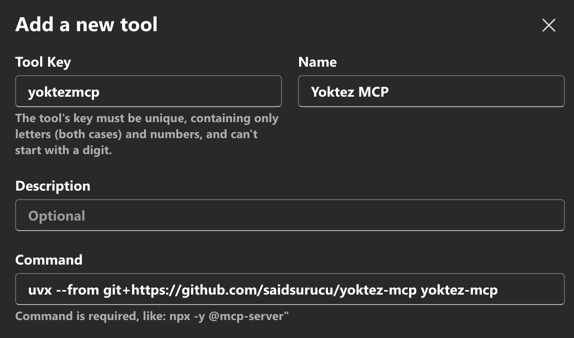
Tool Key:
yoktezmcpName:
YokTez MCPCommand:
uvx --from git+https://github.com/saidsurucu/yoktez-mcp yoktez-mcpSave butonuna basarak kaydedin.

Şimdi Tools altında YokTez MCP'yi görüyor olmalısınız. Üstüne geldiğinizde sağda çıkan butona tıklayıp etkinleştirin (yeşil ışık yanmalı).
Artık YokTez MCP ile konuşabilirsiniz.
⚙️ Claude Desktop Manuel Kurulumu
Ön Gereksinimler: Python,
uv, (Windows için) Microsoft Visual C++ Redistributable'ın sisteminizde kurulu olduğundan emin olun. Detaylı bilgi için yukarıdaki "5ire için Kurulum" bölümündeki ilgili adımlara bakabilirsiniz.Claude Desktop Settings -> Developer -> Edit Config.
Açılan
claude_desktop_config.jsondosyasınamcpServersaltına ekleyin:{ "mcpServers": { // ... (varsa diğer sunucularınız) ... "YokTez MCP": { "command": "uvx", "args": [ "--from", "git+https://github.com/saidsurucu/yoktez-mcp", "yoktez-mcp" ] } } }Claude Desktop'ı kapatıp yeniden başlatın.
🛠️ Kullanılabilir Araçlar (MCP Tools)
Bu FastMCP sunucusu LLM modelleri için aşağıdaki araçları sunar:
search_yok_tez_detailed: YÖK Ulusal Tez Merkezi'nde çeşitli detaylı kriterleri kullanarak tez araması yapar.Parametreler:
thesis_title,author_name,advisor_name,university_name,institute_name,department_name,discipline_name,thesis_number,subject_headings,index_terms,abstract_text,thesis_type,permission_status,thesis_status,language,institute_group,year_start,year_end,page,results_per_page.Döndürdüğü Değer:
YokTezSearchResult(sayfalanmış tez özeti listesi, toplam sonuç sayısı vb. içerir)
get_yok_tez_document_markdown: Belirli bir YÖK tezinin PDF içeriğini, istenen PDF sayfasına göre Markdown formatında getirir.Parametreler:
detail_page_url(tez detay sayfası URL'si),page_number(istenen PDF sayfa numarası).Döndürdüğü Değer:
YokTezDocumentMarkdown(sayfanın Markdown içeriği, toplam sayfa sayısı, metadata vb. içerir)
📜 Lisans
Bu proje MIT Lisansı altında lisanslanmıştır. Detaylar için LICENSE dosyasına bakınız.
Available Tools
6 toolsget_yok_tez_document_markdownGet Yok Tez Document MarkdownA
Retrieves a specific YÖK thesis PDF using its detail page URL. It fetches metadata from the detail page, downloads the PDF (if permissible and not cached), isolates the specified PDF page, converts that page to Markdown, and returns the content.
| Name | Required | Description | Default |
|---|---|---|---|
| page_number | No | The PDF page number (1-based) for which to retrieve Markdown content. Default is 1. | |
| detail_page_url | Yes | The detail page URL of the thesis on YÖK Tez Merkezi. This URL is usually obtained from the 'search_yok_tez_detailed' tool results. |
Output Schema
| Name | Required | Description |
|---|---|---|
| is_paginated | Yes | True if the PDF has more than one page. |
| thesis_title | No | Title of the thesis (Turkish), extracted from the detail page. |
| error_message | No | Error message if document retrieval or processing failed. |
| thesis_author | No | Author of the thesis, extracted from the detail page. |
| total_pdf_pages | Yes | Total number of pages in the original PDF. |
| current_pdf_page | Yes | The PDF page number returned. |
| retrieved_pdf_url | No | The actual URL the PDF was downloaded from. |
| characters_on_page | No | Number of characters in the page's Markdown content. |
| page_markdown_content | No | Markdown content of the requested PDF page. Null if extraction failed. |
| source_detail_page_url | Yes | The source YÖK Tez detail page URL the PDF was processed from. |
TDQS
Does the description disclose side effects, auth requirements, rate limits, or destructive behavior?
With no annotations provided, the description carries the transparency burden and reveals the pipeline: fetch metadata, download PDF if permissible and not cached, isolate the page, and convert to Markdown. It does not mention failure modes or side effects, but the read-only, network-dependent behavior is reasonably disclosed.
Agents need to know what a tool does to the world before calling it. Descriptions should go beyond structured annotations to explain consequences.
Is the description appropriately sized, front-loaded, and free of redundancy?
The description is two sentences and directly states the action and process without irrelevant detail. Parameter descriptions are also concise and tied to usage.
Shorter descriptions cost fewer tokens and are easier for agents to parse. Every sentence should earn its place.
Given the tool's complexity, does the description cover enough for an agent to succeed on first attempt?
The description includes the required input source and the output concept (Markdown content of a specific page), which is sufficient given that an output schema is indicated. It could be slightly more explicit about what happens when the PDF is not permissible or not found, but that is not necessary for invocation.
Complex tools with many parameters or behaviors need more documentation. Simple tools need less. This dimension scales expectations accordingly.
Does the description clarify parameter syntax, constraints, interactions, or defaults beyond what the schema provides?
Both parameters have descriptions that add context beyond the schema: page_number is 1-based with a default, and detail_page_url explains its source and format. Schema description coverage is 100%.
Input schemas describe structure but not intent. Descriptions should explain non-obvious parameter relationships and valid value ranges.
Does the description clearly state what the tool does and how it differs from similar tools?
The description states a specific action: retrieving a YÖK thesis PDF page via its detail page URL and returning Markdown content. It distinguishes from sibling tools by focusing on document page content rather than search or thesis metadata.
Agents choose between tools based on descriptions. A clear purpose with a specific verb and resource helps agents select the right tool.
Does the description explain when to use this tool, when not to, or what alternatives exist?
It explains that the detail_page_url should come from search_yok_tez_detailed and that page_number selects the page, giving clear usage context. It does not explicitly name alternatives such as get_yok_tez_thesis_details for metadata, so exclusions are only implied.
Agents often have multiple tools that could apply. Explicit usage guidance like "use X instead of Y when Z" prevents misuse.
get_yok_tez_thesis_detailsGet Yok Tez Thesis DetailsA
Fetch rich thesis metadata WITHOUT downloading the PDF.
Returns:
Advisor name
Full hierarchical location (University / Institute / Department / Discipline)
Turkish abstract (full text)
English abstract (full text)
Turkish keywords (parsed bilingual pairs)
English keywords (parsed bilingual pairs)
Citations in APA, IEEE, MLA, Chicago, and Harvard formats
Much cheaper than get_yok_tez_document_markdown — calls a single JSON endpoint instead of downloading the full PDF. Ideal for surveying or citing theses without needing their body text.
| Name | Required | Description | Default |
|---|---|---|---|
| thesis_key | No | YÖK kayitNo. Required if 'detail_page_url' is not provided. | |
| encrypted_no | No | YÖK tezNo. Required if 'detail_page_url' is not provided. | |
| detail_page_url | No | Detail page URL from a prior search result (preferred). The thesis_key and encrypted_no are extracted from its query string. |
Output Schema
| Name | Required | Description |
|---|---|---|
| advisor | No | Thesis advisor (e.g. 'PROF. DR. AYŞE YILMAZ'). |
| abstract_en | No | English abstract (full text). |
| abstract_tr | No | Turkish abstract (full text). |
| keywords_en | No | English keywords with their Turkish glosses, as parsed pairs. |
| keywords_tr | No | Turkish keywords with their English glosses, as parsed pairs. |
| citation_apa | No | APA-style citation string (HTML). |
| citation_mla | No | MLA-style citation string (HTML). |
| citation_ieee | No | IEEE-style citation string. |
| error_message | No | Error message if fetching or parsing failed. |
| location_full | No | Full hierarchical location: University / Institute / Department / Discipline. |
| citation_chicago | No | Chicago-style citation string. |
| citation_harvard | No | Harvard-style citation string (HTML). |
| source_detail_page_url | No | The detail page URL these details were fetched for. |
TDQS
Does the description disclose side effects, auth requirements, rate limits, or destructive behavior?
No annotations are provided, so the description must carry the full burden. The description implies a read-only operation ('Fetch', 'calls a single JSON endpoint') and notes a cost advantage, but it does not explicitly state that no data is modified, nor does it mention any rate limits, authentication, or error behavior. While the read-only nature is strongly implied, the lack of explicit side-effect disclosure leaves room for improvement given the absence of annotations.
Agents need to know what a tool does to the world before calling it. Descriptions should go beyond structured annotations to explain consequences.
Is the description appropriately sized, front-loaded, and free of redundancy?
The description is concise and well-structured. It begins with a one-sentence summary, lists the return fields in a clear bulleted format, and ends with a cost/usage note. There is no redundant or filler text, and the most critical information is front-loaded.
Shorter descriptions cost fewer tokens and are easier for agents to parse. Every sentence should earn its place.
Given the tool's complexity, does the description cover enough for an agent to succeed on first attempt?
The tool has an output schema (indicated in context), and the description explicitly lists the key return fields, so an agent knows exactly what to expect. It also explains the cost difference and typical use case, making the description complete for decision-making and correct invocation. Missing error handling details are not critical for this metadata-fetch tool.
Complex tools with many parameters or behaviors need more documentation. Simple tools need less. This dimension scales expectations accordingly.
Does the description clarify parameter syntax, constraints, interactions, or defaults beyond what the schema provides?
The input schema already provides full descriptions for all three parameters (100% coverage), including the mutual exclusivity and preference for detail_page_url. The tool description does not add any additional meaning beyond what the schema provides, so it meets the baseline for high schema coverage without adding extra value.
Input schemas describe structure but not intent. Descriptions should explain non-obvious parameter relationships and valid value ranges.
Does the description clearly state what the tool does and how it differs from similar tools?
The description clearly states the tool 'Fetches rich thesis metadata WITHOUT downloading the PDF', using a specific verb (fetch) and resource (thesis metadata). It explicitly distinguishes itself from the sibling get_yok_tez_document_markdown by stating it does not download the PDF, making the tool's purpose unambiguous.
Agents choose between tools based on descriptions. A clear purpose with a specific verb and resource helps agents select the right tool.
Does the description explain when to use this tool, when not to, or what alternatives exist?
The description provides explicit usage guidance: 'Much cheaper than get_yok_tez_document_markdown' and 'Ideal for surveying or citing theses without needing their body text.' It names the alternative tool directly, allowing an agent to choose correctly between the two based on the need for body text vs. metadata.
Agents often have multiple tools that could apply. Explicit usage guidance like "use X instead of Y when Z" prevents misuse.
list_recent_yok_tezList Recent Yok TezA
List recent YÖK theses without a search keyword.
Calls YÖK's TezIslemleri endpoint (islem=7 or islem=8) and returns the same result shape as search_yok_tez_detailed. This is the ONLY way to enumerate recent theses since the regular search endpoint requires a keyword.
Useful for:
Monitoring new theses added to YÖK each week (SON_15_GUN)
Browsing the current year's full corpus (BU_YIL)
| Name | Required | Description | Default |
|---|---|---|---|
| mode | No | Which curated list to fetch. SON_15_GUN: ~2-3K theses uploaded to YÖK in the last 15 days (useful for monitoring new additions; thesis publication year can vary). BU_YIL: all theses with the current publication year (e.g. ~100K+ for 2026, but YÖK caps the visible batch at ~2000). | 7 |
| page | No | Page number of the results. | |
| results_per_page | No | Maximum number of results per page. |
Output Schema
| Name | Required | Description |
|---|---|---|
| theses | No | List of found theses summaries. |
| total_pages | No | Total number of pages available based on results_in_batch and limit_per_page. |
| current_page | Yes | The current page number of the search results. |
| error_message | No | Error message if the search failed or no results were found. |
| results_in_batch | No | Number of results actually returned in the current HTML batch. YÖK caps this at ~2000 even when total_results_found is larger. |
| total_results_found | No | Total number of results found as reported by YÖK. |
| query_used_parameters | No | The parameters used for this search. |
TDQS
Does the description disclose side effects, auth requirements, rate limits, or destructive behavior?
No annotations are provided, so the description carries the transparency burden. It discloses the actual endpoints called, the result shape relative to another tool, and the visible batch cap in the mode parameter. It does not explicitly state side effects or auth requirements, but the listing operation is clearly non-destructive.
Agents need to know what a tool does to the world before calling it. Descriptions should go beyond structured annotations to explain consequences.
Is the description appropriately sized, front-loaded, and free of redundancy?
The description is well-structured and concise, using short paragraphs and bullet points to convey purpose, endpoint information, and use cases without unnecessary fluff.
Shorter descriptions cost fewer tokens and are easier for agents to parse. Every sentence should earn its place.
Given the tool's complexity, does the description cover enough for an agent to succeed on first attempt?
Given that an output schema exists, the description appropriately focuses on invocation context, endpoint behavior, and use cases. It also clarifies important caveats like the result shape and batch cap, making it complete for an agent to decide when to call this tool.
Complex tools with many parameters or behaviors need more documentation. Simple tools need less. This dimension scales expectations accordingly.
Does the description clarify parameter syntax, constraints, interactions, or defaults beyond what the schema provides?
The input schema already covers all parameters, and the description enriches each one meaningfully: mode explains SON_15_GUN vs BU_YIL and the ~2000 cap, while page and results_per_page are clearly defined with defaults and limits.
Input schemas describe structure but not intent. Descriptions should explain non-obvious parameter relationships and valid value ranges.
Does the description clearly state what the tool does and how it differs from similar tools?
The description clearly states that the tool lists recent YÖK theses without a search keyword, using a specific verb and resource. It also distinguishes itself from search_yok_tez_detailed by noting the regular search endpoint requires a keyword.
Agents choose between tools based on descriptions. A clear purpose with a specific verb and resource helps agents select the right tool.
Does the description explain when to use this tool, when not to, or what alternatives exist?
The description explicitly explains when to use the tool, names the underlying endpoints (islem=7/8), states it is the only way to enumerate recent theses, and provides concrete use cases (SON_15_GUN and BU_YIL).
Agents often have multiple tools that could apply. Explicit usage guidance like "use X instead of Y when Z" prevents misuse.
list_yok_tez_anabilim_daliList Yok Tez Anabilim DaliA
Find YÖK departments (Anabilim Dalı) whose name contains a keyword.
YÖK's regular keyword search canNOT search inside department names. Use this tool first to discover the relevant departments and their codes, then pass the codes you want to 'search_yok_tez_by_anabilim_dali' to retrieve theses from those departments.
Example: keyword='hukuk' returns departments like 'KAMU HUKUKU ANABİLİM DALI' (code 41), 'TİCARET HUKUKU ANABİLİM DALI' (code 906), etc. The LLM can then pick one or several codes to search.
| Name | Required | Description | Default |
|---|---|---|---|
| keyword | Yes | A word to look for inside department (anabilim dalı) names, e.g. 'hukuk', 'bilgisayar', 'tarih'. Matching is case-insensitive and Turkish-aware. | |
| max_results | No | Maximum number of matching departments to return. |
Output Schema
| Name | Required | Description |
|---|---|---|
| keyword | No | The keyword that was matched against department names. |
| matches | No | Departments whose name contains the keyword (name + code pairs). |
| returned | No | Number of matches actually returned (may be capped by max_results). |
| error_message | No | Error message if the list could not be fetched or no match was found. |
| total_matches | No | Total number of departments matching the keyword. |
TDQS
Does the description disclose side effects, auth requirements, rate limits, or destructive behavior?
No annotations are provided, but the description and schema make the read-only lookup behavior clear: name matching is case-insensitive and Turkish-aware, with max_results capping results. It does not explicitly say 'read-only' or describe data freshness, but this is a simple list/search operation.
Agents need to know what a tool does to the world before calling it. Descriptions should go beyond structured annotations to explain consequences.
Is the description appropriately sized, front-loaded, and free of redundancy?
Three short paragraphs: purpose, workflow, concrete example. No redundant or filler content.
Shorter descriptions cost fewer tokens and are easier for agents to parse. Every sentence should earn its place.
Given the tool's complexity, does the description cover enough for an agent to succeed on first attempt?
The tool is simple and the description is complete: how the keyword match works, how to bound results, and how to proceed to the next step using the returned codes. The output schema, if present, can define exact result fields.
Complex tools with many parameters or behaviors need more documentation. Simple tools need less. This dimension scales expectations accordingly.
Does the description clarify parameter syntax, constraints, interactions, or defaults beyond what the schema provides?
Schema coverage is 100% and both parameters have meaningful descriptions. The description adds value by giving an example and clarifying Turkish-aware matching, going beyond the schema text.
Input schemas describe structure but not intent. Descriptions should explain non-obvious parameter relationships and valid value ranges.
Does the description clearly state what the tool does and how it differs from similar tools?
The description states a specific action and resource: finding YÖK departments by keyword. It also distinguishes itself from sibling search tools by explaining that regular keyword search cannot search inside department names.
Agents choose between tools based on descriptions. A clear purpose with a specific verb and resource helps agents select the right tool.
Does the description explain when to use this tool, when not to, or what alternatives exist?
Clear when to use: use this first to discover department codes, then pass those codes to search_yok_tez_by_anabilim_dali. The example with 'hukuk' makes the workflow concrete.
Agents often have multiple tools that could apply. Explicit usage guidance like "use X instead of Y when Z" prevents misuse.
search_yok_tez_by_anabilim_daliSearch Yok Tez By Anabilim DaliA
Search YÖK theses filtered by department (Anabilim Dalı) code(s).
This uses YÖK's advanced search path, which filters by department. Unlike 'search_yok_tez_detailed', it does NOT support a free full-text/abstract keyword — but it DOES support filtering by thesis title, author, advisor and index terms, plus the usual type/language/permission/status/year filters.
Workflow:
Call 'list_yok_tez_anabilim_dali' with a keyword (e.g. 'hukuk') to get codes.
Pass the chosen code(s) here. Multiple codes are searched and merged.
Note: YÖK caps each department's result batch at ~2000; 'total_results_found' reflects YÖK's reported totals while 'results_in_batch' is what was actually fetched.
| Name | Required | Description | Default |
|---|---|---|---|
| page | No | Page number of the merged results. | |
| language | No | Filter by thesis language. | 0 |
| year_end | No | End year (e.g. '2025'). '0' = no upper bound. | 0 |
| year_start | No | Start year (e.g. '2020'). '0' = no lower bound. | 0 |
| author_name | No | Optional: filter by author name. | |
| index_terms | No | Optional: filter by index/keyword terms. | |
| thesis_type | No | Filter by thesis type. | 0 |
| advisor_name | No | Optional: filter by advisor name. | |
| thesis_title | No | Optional: only theses whose title contains these words. | |
| thesis_status | No | Filter by approval status. Defaults to 'Onaylandı' (approved). | 3 |
| results_per_page | No | Number of results to display per page. | |
| permission_status | No | Filter by PDF access permission (İzinli / İzinsiz). | 0 |
| anabilim_dali_codes | Yes | One or more department codes obtained from 'list_yok_tez_anabilim_dali'. Each code is searched and the results are merged and deduplicated. At most 15 codes per call. |
Output Schema
| Name | Required | Description |
|---|---|---|
| theses | No | List of found theses summaries. |
| total_pages | No | Total number of pages available based on results_in_batch and limit_per_page. |
| current_page | Yes | The current page number of the search results. |
| error_message | No | Error message if the search failed or no results were found. |
| results_in_batch | No | Number of results actually returned in the current HTML batch. YÖK caps this at ~2000 even when total_results_found is larger. |
| total_results_found | No | Total number of results found as reported by YÖK. |
| query_used_parameters | No | The parameters used for this search. |
TDQS
Does the description disclose side effects, auth requirements, rate limits, or destructive behavior?
With no annotations provided, the description carries the full behavioral burden. It discloses several critical traits: the lack of full-text/abstract keyword support, the support for specific filters, the ~2000 result cap per department, and the distinction between 'total_results_found' and 'results_in_batch'. It also explains the merge/deduplication behavior. This goes well beyond what an agent could infer from the schema alone.
Agents need to know what a tool does to the world before calling it. Descriptions should go beyond structured annotations to explain consequences.
Is the description appropriately sized, front-loaded, and free of redundancy?
The description is well-structured and front-loaded. The first sentence states the core purpose. The following paragraph distinguishes from a sibling, the workflow is clearly numbered, and the note about result caps is placed last. Every sentence adds necessary information; there is no redundancy or filler. It is concise despite covering multiple nuanced aspects.
Shorter descriptions cost fewer tokens and are easier for agents to parse. Every sentence should earn its place.
Given the tool's complexity, does the description cover enough for an agent to succeed on first attempt?
Given the tool's complexity (13 parameters, an output schema, and a non-trivial workflow), the description is remarkably complete. It covers the essential workflow (getting codes first), the merging/deduplication, the result cap limitation, and the meaning of the output fields. The output schema is present, so the description doesn't need to describe return values. Nothing an agent needs to call it correctly is missing.
Complex tools with many parameters or behaviors need more documentation. Simple tools need less. This dimension scales expectations accordingly.
Does the description clarify parameter syntax, constraints, interactions, or defaults beyond what the schema provides?
Schema description coverage is 100%, so the baseline is 3. The description adds significant value for the key parameter 'anabilim_dali_codes' by explaining its origin (from 'list_yok_tez_anabilim_dali') and the merge/deduplication behavior. It also summarizes the filter types ('thesis title, author, advisor and index terms, plus the usual type/language/permission/status/year filters'), which complements the schema without duplicating it. However, it doesn't elaborate on each parameter individually, which is acceptable given the schema's completeness.
Input schemas describe structure but not intent. Descriptions should explain non-obvious parameter relationships and valid value ranges.
Does the description clearly state what the tool does and how it differs from similar tools?
The description clearly states the tool's purpose: 'Search YÖK theses filtered by department (Anabilim Dalı) code(s).' It uses a specific verb and resource, and immediately differentiates from the sibling 'search_yok_tez_detailed' by noting the lack of full-text keyword support but presence of title/author/advisor filters. This allows an agent to distinguish it from other search tools without opening schemas.
Agents choose between tools based on descriptions. A clear purpose with a specific verb and resource helps agents select the right tool.
Does the description explain when to use this tool, when not to, or what alternatives exist?
The description provides explicit usage guidance: it contrasts with 'search_yok_tez_detailed' on capabilities, and outlines a concrete workflow (call 'list_yok_tez_anabilim_dali' first to obtain codes, then pass them here). It also states that multiple codes are merged and deduplicated, which is essential for correct usage. No ambiguity about when to use this tool.
Agents often have multiple tools that could apply. Explicit usage guidance like "use X instead of Y when Z" prevents misuse.
search_yok_tez_detailedSearch Yok Tez DetailedA
Search the YÖK National Thesis Center.
YÖK's API was redesigned in 2026: searches are now keyword-based against ONE field type at a time (with optional additional keyword slots joined by AND/OR), plus a small set of filter dropdowns (type, language, permission, status, years).
University/institute/department text filters are no longer respected by YÖK and have been removed from this tool. The 'thesis_number' parameter has also been removed since YÖK no longer supports direct lookup by thesis number through this endpoint.
Provide either:
'keyword' (preferred — combine with 'search_field' if you need to restrict the search to a specific field like title or author), or
one of the legacy aliases (thesis_title, author_name, advisor_name, subject_headings, index_terms, abstract_text) which auto-set 'search_field'.
| Name | Required | Description | Default |
|---|---|---|---|
| page | No | Page number of the search results. | |
| keyword | No | Primary search term — what to look for in YÖK theses. E.g. 'yapay zeka', 'machine learning', 'AHMET YILMAZ'. Either this or one of the legacy field-specific parameters (thesis_title, author_name, advisor_name, subject_headings, index_terms, abstract_text) must be provided. | |
| language | No | Filter by thesis language. | 0 |
| year_end | No | End year for the search range (e.g. '2025'). '0' = no upper bound. | 0 |
| keyword_2 | No | Second search term (optional). Combined with 'keyword' via 'operator_1'. | |
| keyword_3 | No | Third search term (optional). Combined with 'keyword_2' via 'operator_2'. | |
| match_type | No | ICERSIN = keyword appears anywhere (default). TAM_IFADE = exact phrase match. | 2 |
| operator_1 | No | Boolean operator between 'keyword' and 'keyword_2'. | and |
| operator_2 | No | Boolean operator between 'keyword_2' and 'keyword_3'. | and |
| year_start | No | Start year for the search range (e.g. '2020'). '0' = no lower bound. | 0 |
| author_name | No | DEPRECATED legacy alias. If provided, search_field is set to YAZAR. | |
| index_terms | No | DEPRECATED legacy alias. If provided, search_field is set to ANAHTAR_KELIME. | |
| thesis_type | No | Filter by thesis type. | 0 |
| advisor_name | No | DEPRECATED legacy alias. If provided, search_field is set to DANISMAN. | |
| search_field | No | Which field to search the keyword(s) in. TUMU = all fields (default), TEZ_ADI = title, YAZAR = author, DANISMAN = advisor, KONU = subject, ANAHTAR_KELIME = index/keyword terms, OZET = abstract. | 7 |
| thesis_title | No | DEPRECATED legacy alias. If provided, search_field is set to TEZ_ADI and 'keyword' is filled from this. | |
| abstract_text | No | DEPRECATED legacy alias. If provided, search_field is set to OZET. | |
| thesis_status | No | Filter by approval status. Defaults to 'Onaylandı' (approved). | 3 |
| results_per_page | No | Number of results to display per page. | |
| subject_headings | No | DEPRECATED legacy alias. If provided, search_field is set to KONU. | |
| permission_status | No | Filter by PDF access permission (İzinli / İzinsiz). | 0 |
Output Schema
| Name | Required | Description |
|---|---|---|
| theses | No | List of found theses summaries. |
| total_pages | No | Total number of pages available based on results_in_batch and limit_per_page. |
| current_page | Yes | The current page number of the search results. |
| error_message | No | Error message if the search failed or no results were found. |
| results_in_batch | No | Number of results actually returned in the current HTML batch. YÖK caps this at ~2000 even when total_results_found is larger. |
| total_results_found | No | Total number of results found as reported by YÖK. |
| query_used_parameters | No | The parameters used for this search. |
TDQS
Does the description disclose side effects, auth requirements, rate limits, or destructive behavior?
No annotations were supplied, but the description discloses important behaviors: the 2026 API redesign, removed thesis_number lookup, legacy aliases auto-setting search_field, and AND/OR combining. It does not mention rate limits or output behavior, but output schema covers result shape.
Agents need to know what a tool does to the world before calling it. Descriptions should go beyond structured annotations to explain consequences.
Is the description appropriately sized, front-loaded, and free of redundancy?
Well organized with lead rationale, then explicit 'Provide either' bullet structure. Slightly long due to repeated legacy-alias detail, but each sentence adds necessary migration/usage context.
Shorter descriptions cost fewer tokens and are easier for agents to parse. Every sentence should earn its place.
Given the tool's complexity, does the description cover enough for an agent to succeed on first attempt?
Covers the changed API behavior, required input options, filters, and pagination. Since output schema exists but is not shown here, the description appropriately focuses on invocation semantics rather than return shape.
Complex tools with many parameters or behaviors need more documentation. Simple tools need less. This dimension scales expectations accordingly.
Does the description clarify parameter syntax, constraints, interactions, or defaults beyond what the schema provides?
Schema covers all 21 parameters with descriptions; the description adds cross-parameter constraints and preferred usage (keyword vs legacy aliases, operator chaining, removed fields). This raises it above the schema-alone baseline.
Input schemas describe structure but not intent. Descriptions should explain non-obvious parameter relationships and valid value ranges.
Does the description clearly state what the tool does and how it differs from similar tools?
Clearly states it searches the YÖK National Thesis Center with keyword-based search and filters. The 'detailed' scope and legacy-alias behavior distinguish it from sibling listing/detail tools.
Agents choose between tools based on descriptions. A clear purpose with a specific verb and resource helps agents select the right tool.
Does the description explain when to use this tool, when not to, or what alternatives exist?
Provides explicit guidance to prefer 'keyword', combine with 'search_field', and explains legacy aliases and removed parameters. It does not explicitly contrast with sibling search-by-anabilim-dali, but the usage instructions are otherwise strong.
Agents often have multiple tools that could apply. Explicit usage guidance like "use X instead of Y when Z" prevents misuse.
Tool Schema Changelog
Recent tool additions, removals, and schema changes observed during successful MCP inspections.
6 tool updates
v0.1.0- First observed
get_yok_tez_document_markdown - First observed
get_yok_tez_thesis_details - First observed
list_recent_yok_tez - First observed
list_yok_tez_anabilim_dali - First observed
search_yok_tez_by_anabilim_dali - First observed
search_yok_tez_detailed
TDQS
Scored across 6 tools
The tools have distinct purposes: search by keyword, list recent, list departments, search by departments, get details, and get document markdown. However, list_recent_yok_tez and search_yok_tez_detailed both return the same result shape, and there is a slight overlap between the search tool and the department-based search tool, even though the descriptions clarify the distinction.
Naming is mostly consistent with a verb_noun pattern (search_, list_, get_), but the verbs vary (search vs list vs get) and the noun phrases are inconsistent in length and specificity (e.g., 'search_yok_tez_detailed' vs 'get_yok_tez_document_markdown'). Also, one tool uses 'yok_tez' and another uses 'yok_tez_by_anabilim_dali' which is a bit unpredictable.
With only 6 tools, the set is tightly scoped for the domain of searching and retrieving YÖK theses. Each tool covers a distinct functionality: search, list recent, discover departments, search by department, get metadata, and get full text. This is well within the ideal range (3-15) and there is no bloat.
The tool set covers the main workflows: keyword search, recent listings, department discovery and search, rich metadata retrieval, and full-text PDF-to-Markdown conversion. However, there is no direct lookup by thesis number (removed by YÖK) and no apparent way to download the PDF itself, which could be a minor gap for users needing the original file.
Maintenance
Related MCP Connectors
Web search, URL content extraction to Markdown, site mapping, and recursive web crawler.
Search arXiv/Semantic Scholar/OpenAlex + medical evidence (PubMed/Europe PMC) + LaTeX/PDF tools.
Web search, fetch, extract, and research for AI agents. Markdown output + AI-synthesized answers.
Search and download academic papers from arXiv, PubMed, bioRxiv, medRxiv, Google Scholar, Semantic…
Related MCP Servers
- AlicenseAqualityCmaintenanceProvides an MCP interface for accessing YOKATLAS (Turkish Higher Education Council Atlas) data, enabling LLM applications like Claude to search and retrieve details about undergraduate and associate degree programs in Turkey.471MIT
- AlicenseNot gradedqualityDmaintenanceProvides programmatic access to Turkey's Ministry of Justice Legislation Information System (mevzuat.gov.tr), enabling users to search legislation, retrieve article hierarchies, and fetch article contents in Markdown format through natural language.MIT
- AlicenseNot gradedqualityNot gradedmaintenanceProvides programmatic access to the Turkish Ministry of Justice Legislation Information System (mevzuat.gov.tr). It enables searching for legislation, navigating hierarchical article structures, and retrieving article content in Markdown format.1MIT
- AlicenseNot gradedqualityDmaintenanceEnables searching, PDF conversion, and reference extraction for Turkish academic articles on DergiPark via MCP tools.41MIT