Cisco NSO MCP Server
A Model Context Protocol (MCP) server implementation for Cisco NSO (Network Services Orchestrator) that exposes NSO data and operations as MCP primitives (Tools, Resources, etc.) that can be consumed by an MCP-compatible client, enabling AI-powered network automation through natural language interactions.
Sample Custom Client
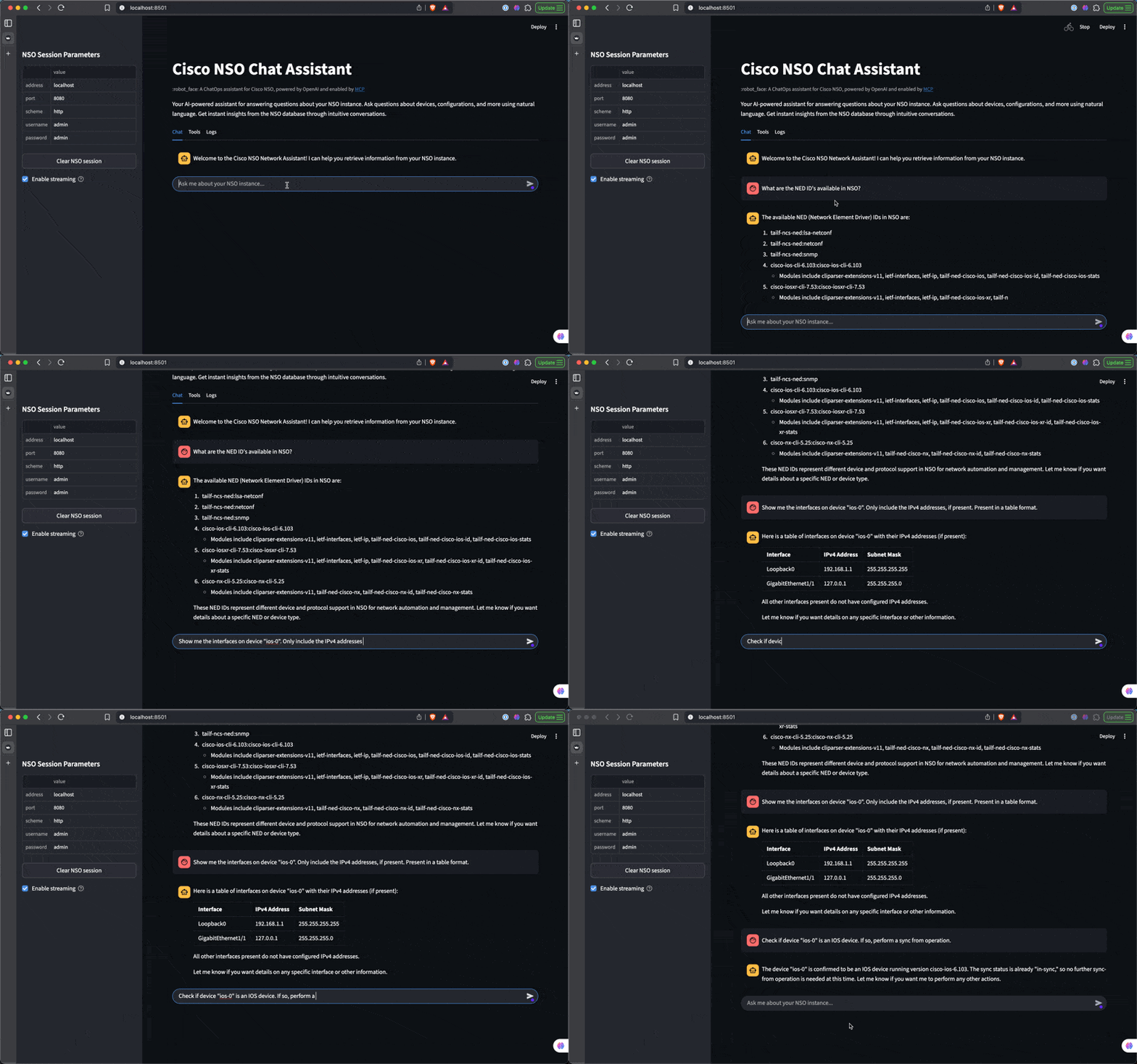
Related MCP server: Cisco SD-WAN MCP Server
What is MCP?
Model Context Protocol (MCP) is an open protocol that standardizes how AI models interact with external tools and services. MCP enables:
Tool Definition: Structured way to define tools that AI models can use
Tool Discovery: Mechanism for models to discover available tools
Tool Execution: Standardized method for models to call tools and receive results
Context Management: Efficient passing of context between tools and models
Framework Agnostic: Works across multiple AI frameworks including OpenAI, Anthropic, Google Gemini, and others
Interoperability: Provides a common language for AI systems to communicate with external tools
Features
Stdio Transport: By default, this MCP server uses stdio transport for process-bound communication
Tool-First Design: Network operations are defined as discrete tools with clear interfaces
Asynchronous Processing: All network operations are implemented asynchronously for better performance
Structured Responses: Consistent response format with status, data, and metadata sections
Environment Resources: Provides contextual information about the NSO environment
NSO Integration: Uses cisco-nso-restconf library for a clean, Pythonic interface to NSO's RESTCONF API
Flexible Logging: Configurable logging to stdout and/or file via environment variables. When the LOG_FILE environment variable is set, logs are sent to both stdout and the specified file. If the log file cannot be created or written to, the server falls back to stdout-only logging with an error message
Multiple Client Support: Works with any MCP-compatible client including Windsurf Cascade and custom Python applications
Available Tools and Resources
Tools
Tool Name | Description | Inputs | Returns |
get_device_ned_ids
| Retrieves Network Element Driver (NED) IDs from Cisco NSO | | A dictionary with a list of NED IDs |
get_device_groups
| Retrieves device groups from Cisco NSO | | A dictionary with a list of device groups |
get_device_platform
| Gets platform information for a specific device in Cisco NSO | 'device_name' (string) | A dictionary with platform information for the specified device |
get_device_config
| Gets full configuration for a specific device in Cisco NSO | 'device_name' (string) | A dictionary with configuration for the specified device |
get_device_state
| Gets state for a specific device in Cisco NSO | 'device_name' (string) | A dictionary with state for the specified device |
check_device_sync
| Checks sync status for a specific device in Cisco NSO | 'device_name' (string) | A dictionary with sync status for the specified device |
sync_from_device
| Syncs from a specific device in Cisco NSO | 'device_name' (string) | A dictionary with sync status for the specified device |
get_service_types
| Gets service types in Cisco NSO | | A dictionary with service types |
get_services
| Gets services for a specific service type in Cisco NSO | 'service_type' (string) | A dictionary with services for the specified service type |
Resources
Requirements
Configuration Options
You can configure the server using command-line arguments or environment variables:
NSO Connection Parameters
Command-line Argument | Environment Variable | Default | Description |
--nso-scheme
| NSO_SCHEME
| http | NSO connection scheme (http/https) |
--nso-address
| NSO_ADDRESS
| localhost | NSO server address |
--nso-port
| NSO_PORT
| 8080 | NSO server port |
--nso-timeout
| NSO_TIMEOUT
| 10 | Connection timeout in seconds |
--nso-username
| NSO_USERNAME
| admin | NSO username |
--nso-password
| NSO_PASSWORD
| admin | NSO password |
--nso-verify
| NSO_VERIFY
| True | Verify NSO HTTPS certificate (default: True). Use --no-nso-verify for self-signed certs (dev only). |
--nso-ca-bundle
| NSO_CA_BUNDLE
| None | Path to a CA bundle file to trust for NSO HTTPS. Applicable when -nso-verify is True. |
MCP Server Parameters
Command-line Argument | Environment Variable | Default | Description |
--transport
| MCP_TRANSPORT
| stdio | MCP transport type (stdio/http) |
HTTP Transport Options (only used when --transport=http)
FastMCP HTTP Server reference: https://gofastmcp.com/deployment/http#http-deployment
Command-line Argument | Environment Variable | Default | Description |
--host
| MCP_HOST
| 0.0.0.0 | Host to bind to when using HTTP transport |
--port
| MCP_PORT
| 8000 | Port to bind to when using HTTP transport |
Logging Configuration
Environment Variable | Default | Description |
LOG_FILE
| None | Path to log file. If not set, logs will be sent to stdout only |
Environment variables take precedence over default values but are overridden by command-line arguments.
Connecting to the Server with MCP Clients
You can connect to the server using any MCP client that supports the selected transport type. A few options are:
Windsurf Cascade
Windsurf Cascade supports MCP servers through a configuration file. To use the Cisco NSO MCP server with Windsurf, add it to your mcp_config.json file.
Using uv (recommended)
When using uv, no specific installation is needed. You can use uvx to directly run the package:
{
  "mcpServers": {
    "nso": {
      "command": "uvx",
      "args": [
        "cisco-nso-mcp-server",
        "--nso-address=127.0.0.1",
        "--nso-port=8080",
        "--nso-username=admin",
        "--nso-password=admin"
      ],
      "env": {
        "LOG_FILE": "/path/to/your/logs/nso-mcp.log"
      }
    }
  }
}
Using with pip installation
Alternatively, you can install cisco-nso-mcp-server via pip:
pip install cisco-nso-mcp-server
Now you can use the direct path to the executable:
{
  "mcpServers": {
    "nso": {
      "command": "/path/to/your/env/bin/cisco-nso-mcp-server",
      "args": [
        "--nso-address=127.0.0.1",
        "--nso-port=8080",
        "--nso-username=admin",
        "--nso-password=admin"
      ],
      "env": {
        "LOG_FILE": "/path/to/your/logs/nso-mcp.log"
      }
    }
  }
}
Replace /path/to/your/env/bin/cisco-nso-mcp-server with the actual path where you installed the package with pip. You can find this by running which cisco-nso-mcp-server if you installed it in your main environment, or by locating it in your virtual environment's bin directory.
In either case, the env section is optional. If you include it, you can specify the LOG_FILE environment variable to enable file logging.
Using in a custom MCP client Python application with stdio transport
A sample Python application is provided in sample_stdio_client.py that demonstrates how to connect to the MCP server locally and execute a tool.
Running the Server as Standalone
While the server is typically used with an MCP client, you can also run it directly as a standalone process:
# Run with default NSO connection and MCP settings (see Configuration Options above for details)
cisco-nso-mcp-server

# Run with custom NSO connection parameters
cisco-nso-mcp-server --nso-scheme=http --nso-address=127.0.0.1 --nso-port=8080 --nso-username=admin --nso-password=admin
When running as a standalone process with stdio transport, you'll need to pipe input/output to the process or use it with an MCP client that supports stdio transport.
License
This project is licensed under the MIT License. This means you can use, modify, and distribute the code, subject to the terms and conditions of the MIT License.
