
A
licenseA
qualityB
maintenanceA comprehensive Model Context Protocol server that integrates with the Scryfall API to provide Magic: The Gathering card data to AI assistants like Claude.
14
77 npm
1
MIT

The Scryfall MCP Server is a tool for interacting with the Scryfall API to access Magic: The Gathering card information:
Search for cards: Perform text-based searches to find matching cards
Retrieve card details: Get specific card information by Scryfall UUID or exact English name
Fetch random card: Obtain a random card from the Scryfall database
Access card rulings: View official rulings for a card by its Scryfall or Oracle ID
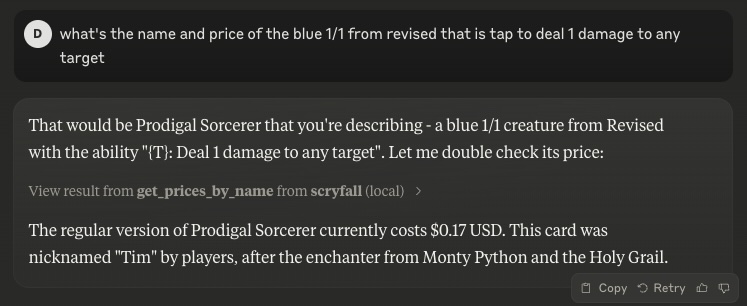
Get pricing information: Retrieve current price details (USD, USD foil, EUR, TIX) for cards by ID or exact name
Provides tools for accessing the Scryfall API to look up Magic: The Gathering card details, perform card searches, retrieve official rulings, and get current pricing information across different marketplaces.
Click on "Deploy Server".
Wait a few minutes for the server to deploy. Once ready, it will show a "Started" state.
In the chat, type @ followed by the MCP server name and your instructions, e.g., "@Scryfall MCP Server search for cards with 'dragon' in the name"
That's it! The server will respond to your query, and you can continue using it as needed.
Here is a step-by-step guide with screenshots.
A Model Context Protocol (MCP) server for interacting with the Scryfall API. It provides tools to look up Magic: The Gathering card details, card rulings, and price information.
search_cards
Perform a text-based search on Scryfall. Returns a list of matching cards.
get_card_by_id
Retrieve a card directly via its Scryfall UUID.
get_card_by_name
Retrieve a card by exact English name.
random_card
Get a random card from the entire Scryfall database.
get_rulings
Retrieve official rulings for a card, which may clarify card interactions or rules.
get_prices_by_id
Retrieve current pricing information (USD, USD foil, EUR, TIX) for a given card by Scryfall ID.
get_prices_by_name
Retrieve current pricing information (USD, USD foil, EUR, TIX) for a given card by exact name.
Related MCP server: Scryfall MCP Server
The server can be run in two modes:
Standard stdio mode (default)
Server-Sent Events (SSE) mode with HTTP endpoints
If you have Node.js installed locally:
# Stdio mode
npx scryfall-mcp-server

# SSE mode
npx scryfall-mcp-server --sseYour application or environment (like Claude Desktop) can communicate directly via stdio with the server.
When running in SSE mode (with --sse), you can connect using the MCP CLI:
npx @wong2/mcp-cli --sse http://localhost:3000/sseThe server will be available at:
SSE endpoint: http://localhost:3000/sse
Message endpoint: http://localhost:3000/messages
Example snippet for stdio mode:
{
  "mcpServers": {
    "scryfall": {
      "command": "docker",
      "args": ["run", "-i", "--rm", "mcp/scryfall"]
    }
  }
}
Or with npx:
{
  "mcpServers": {
    "scryfall": {
      "command": "npx",
      "args": ["scryfall-mcp-server"]
    }
  }
}docker build -t mcp/scryfall .Then you can run in stdio mode:
docker run -i --rm mcp/scryfallOr in SSE mode:
docker run -i --rm -p 3000:3000 mcp/scryfall --sseLicensed under the MIT License.
Retrieve a card by its Scryfall ID (a 36-char UUID). Returns the card data in JSON.
| Name | Required | Description | Default |
|---|---|---|---|
| id | Yes | The Scryfall UUID, e.g. 'c09c71fb-7acb-4ffb-a47b-8961a0cf4990' |
Does the description disclose side effects, auth requirements, rate limits, or destructive behavior?
With no annotations provided, the description carries the full burden. It discloses the return format ('JSON') and ID format requirement ('36-char UUID'), which is useful context. However, it doesn't mention error behavior, rate limits, authentication needs, or what happens with invalid IDs - significant gaps for a tool with zero annotation coverage.
Agents need to know what a tool does to the world before calling it. Descriptions should go beyond structured annotations to explain consequences.
Is the description appropriately sized, front-loaded, and free of redundancy?
The description is perfectly concise - two sentences that each earn their place. The first sentence states the complete purpose and method, the second specifies the return format. No wasted words, front-loaded with the core functionality.
Shorter descriptions cost fewer tokens and are easier for agents to parse. Every sentence should earn its place.
Given the tool's complexity, does the description cover enough for an agent to succeed on first attempt?
For a simple read operation with one parameter and no output schema, the description covers the basics but has gaps. It explains what the tool does and returns, but lacks information about error cases, response structure details, or performance characteristics. Without annotations, it should provide more behavioral context for a complete understanding.
Complex tools with many parameters or behaviors need more documentation. Simple tools need less. This dimension scales expectations accordingly.
Does the description clarify parameter syntax, constraints, interactions, or defaults beyond what the schema provides?
With 100% schema description coverage and only one parameter, the schema already fully documents the 'id' parameter. The description adds minimal value by reinforcing the ID format ('36-char UUID') and calling it a 'Scryfall ID', but doesn't provide additional semantic context beyond what the schema offers. Baseline for high schema coverage with single parameter is 4.
Input schemas describe structure but not intent. Descriptions should explain non-obvious parameter relationships and valid value ranges.
Does the description clearly state what the tool does and how it differs from similar tools?
The description clearly states the specific action ('Retrieve'), resource ('a card'), and method ('by its Scryfall ID'), distinguishing it from siblings like get_card_by_name (name-based) and get_prices_by_id (price-focused). It provides complete purpose information in a single sentence.
Agents choose between tools based on descriptions. A clear purpose with a specific verb and resource helps agents select the right tool.
Does the description explain when to use this tool, when not to, or what alternatives exist?
The description implies usage when you have a Scryfall UUID, but doesn't explicitly state when to use this tool versus alternatives like get_card_by_name (for name lookups) or search_cards (for broader searches). No explicit exclusions or alternative recommendations are provided.
Agents often have multiple tools that could apply. Explicit usage guidance like "use X instead of Y when Z" prevents misuse.
Retrieve a card by its exact English name, e.g. 'Black Lotus'. Returns the card data in JSON. If multiple cards share that exact name, Scryfall returns one (usually the most relevant printing).
| Name | Required | Description | Default |
|---|---|---|---|
| name | Yes | Exact name of the card, e.g. 'Lightning Bolt' |
Does the description disclose side effects, auth requirements, rate limits, or destructive behavior?
With no annotations provided, the description carries the full burden of behavioral disclosure. It effectively describes key behaviors: the exact-name matching requirement, the JSON return format, and the handling of multiple matches (returns one, usually most relevant printing). It doesn't cover error cases like non-existent names or rate limits, but provides solid operational context.
Agents need to know what a tool does to the world before calling it. Descriptions should go beyond structured annotations to explain consequences.
Is the description appropriately sized, front-loaded, and free of redundancy?
The description is perfectly concise and front-loaded: the first sentence states the core purpose, the second adds crucial behavioral details (return format and multi-match handling). Every sentence earns its place with no wasted words, making it easy for an agent to parse quickly.
Shorter descriptions cost fewer tokens and are easier for agents to parse. Every sentence should earn its place.
Given the tool's complexity, does the description cover enough for an agent to succeed on first attempt?
Given the tool's moderate complexity (single parameter lookup), no annotations, and no output schema, the description does well by explaining the exact-name requirement, return format, and multi-match behavior. It could be more complete by mentioning error cases or authentication needs, but covers the essential context for correct usage.
Complex tools with many parameters or behaviors need more documentation. Simple tools need less. This dimension scales expectations accordingly.
Does the description clarify parameter syntax, constraints, interactions, or defaults beyond what the schema provides?
Schema description coverage is 100%, so the schema already fully documents the single 'name' parameter. The description adds minimal value beyond the schema by reinforcing the exact-name requirement with examples, but doesn't provide additional syntax or format details. This meets the baseline for high schema coverage.
Input schemas describe structure but not intent. Descriptions should explain non-obvious parameter relationships and valid value ranges.
Does the description clearly state what the tool does and how it differs from similar tools?
The description clearly states the specific action ('Retrieve a card') and resource ('by its exact English name'), distinguishing it from siblings like get_card_by_id (which uses ID) and search_cards (which likely handles broader queries). It provides concrete examples ('Black Lotus', 'Lightning Bolt') that reinforce the exact-name requirement.
Agents choose between tools based on descriptions. A clear purpose with a specific verb and resource helps agents select the right tool.
Does the description explain when to use this tool, when not to, or what alternatives exist?
The description explicitly states when to use this tool ('by its exact English name') and implies when not to use it (e.g., for non-exact names or IDs). It distinguishes from siblings by specifying the exact-name lookup method, contrasting with get_card_by_id (ID-based) and search_cards (likely fuzzy or broader search).
Agents often have multiple tools that could apply. Explicit usage guidance like "use X instead of Y when Z" prevents misuse.
Retrieve price information for a card by its Scryfall ID. Returns JSON with usd, usd_foil, eur, tix, etc.
| Name | Required | Description | Default |
|---|---|---|---|
| id | Yes | Scryfall ID of the card |
Does the description disclose side effects, auth requirements, rate limits, or destructive behavior?
With no annotations provided, the description carries the full burden of behavioral disclosure. It mentions the return format ('Returns JSON with usd, usd_foil, eur, tix, etc.') which is helpful, but doesn't cover other aspects like error handling, rate limits, or authentication needs. The description adds some value but lacks comprehensive behavioral context.
Agents need to know what a tool does to the world before calling it. Descriptions should go beyond structured annotations to explain consequences.
Is the description appropriately sized, front-loaded, and free of redundancy?
The description is two concise sentences with zero waste: the first states the purpose and input, the second specifies the output format. It's front-loaded with the core functionality and appropriately sized for a simple tool.
Shorter descriptions cost fewer tokens and are easier for agents to parse. Every sentence should earn its place.
Given the tool's complexity, does the description cover enough for an agent to succeed on first attempt?
For a simple read operation with one parameter and no output schema, the description is reasonably complete: it covers what the tool does, the input requirement, and the output format. However, without annotations or output schema, it could benefit from more behavioral details like error cases or data freshness, slightly limiting completeness.
Complex tools with many parameters or behaviors need more documentation. Simple tools need less. This dimension scales expectations accordingly.
Does the description clarify parameter syntax, constraints, interactions, or defaults beyond what the schema provides?
Schema description coverage is 100%, with the single parameter 'id' fully documented in the schema as 'Scryfall ID of the card.' The description adds no additional parameter details beyond what the schema provides, so it meets the baseline of 3 for adequate but not enhanced parameter semantics.
Input schemas describe structure but not intent. Descriptions should explain non-obvious parameter relationships and valid value ranges.
Does the description clearly state what the tool does and how it differs from similar tools?
The description clearly states the specific action ('Retrieve price information') and resource ('for a card by its Scryfall ID'), distinguishing it from siblings like get_card_by_id (general card info) and get_prices_by_name (price by name instead of ID). The verb+resource combination is precise and unambiguous.
Agents choose between tools based on descriptions. A clear purpose with a specific verb and resource helps agents select the right tool.
Does the description explain when to use this tool, when not to, or what alternatives exist?
The description implies usage context by specifying 'by its Scryfall ID,' suggesting this tool should be used when you have the ID rather than the card name. However, it doesn't explicitly state when NOT to use it or name alternatives like get_prices_by_name, leaving some room for improvement in sibling differentiation.
Agents often have multiple tools that could apply. Explicit usage guidance like "use X instead of Y when Z" prevents misuse.
Retrieve price information for a card by its exact name. Returns JSON with usd, usd_foil, eur, tix, etc.
| Name | Required | Description | Default |
|---|---|---|---|
| name | Yes | Exact card name |
Does the description disclose side effects, auth requirements, rate limits, or destructive behavior?
With no annotations provided, the description carries the full burden. It discloses the return format ('Returns JSON with usd, usd_foil, eur, tix, etc.'), which is useful behavioral context. However, it lacks details on error handling, rate limits, or authentication needs, which are important for a retrieval tool.
Agents need to know what a tool does to the world before calling it. Descriptions should go beyond structured annotations to explain consequences.
Is the description appropriately sized, front-loaded, and free of redundancy?
The description is two sentences that are front-loaded with the core purpose and efficiently add return format details. Every sentence earns its place with no wasted words, making it highly concise and well-structured for quick understanding.
Shorter descriptions cost fewer tokens and are easier for agents to parse. Every sentence should earn its place.
Given the tool's complexity, does the description cover enough for an agent to succeed on first attempt?
Given the tool's low complexity (single parameter, no annotations, no output schema), the description is mostly complete. It covers purpose, parameter hint, and return format, but lacks output schema details (e.g., full JSON structure) and behavioral aspects like errors, which could enhance completeness for the agent.
Complex tools with many parameters or behaviors need more documentation. Simple tools need less. This dimension scales expectations accordingly.
Does the description clarify parameter syntax, constraints, interactions, or defaults beyond what the schema provides?
Schema description coverage is 100%, so the schema already documents the single parameter 'name' with its description. The description adds no additional meaning beyond what the schema provides, such as examples or constraints, but does not contradict it, meeting the baseline for high coverage.
Input schemas describe structure but not intent. Descriptions should explain non-obvious parameter relationships and valid value ranges.
Does the description clearly state what the tool does and how it differs from similar tools?
The description clearly states the verb 'Retrieve' and the resource 'price information for a card by its exact name', making the purpose specific and actionable. It distinguishes from siblings like get_card_by_name (which likely returns card details) and get_prices_by_id (which uses ID instead of name), enhancing clarity.
Agents choose between tools based on descriptions. A clear purpose with a specific verb and resource helps agents select the right tool.
Does the description explain when to use this tool, when not to, or what alternatives exist?
The description implies usage by specifying 'by its exact name', which suggests when to use this tool over alternatives like get_prices_by_id. However, it does not explicitly state when-not to use it or name specific alternatives, leaving some ambiguity for the agent in selecting between similar tools.
Agents often have multiple tools that could apply. Explicit usage guidance like "use X instead of Y when Z" prevents misuse.
Retrieve official rulings for a specified card by Scryfall ID or Oracle ID. Returns an array of rulings. Each ruling has a 'published_at' date and a 'comment' field.
| Name | Required | Description | Default |
|---|---|---|---|
| id | Yes | A Scryfall ID or Oracle ID. Example: 'c09c71fb-7acb-4ffb-a47b-8961a0cf4990' |
Does the description disclose side effects, auth requirements, rate limits, or destructive behavior?
No annotations are provided, so the description carries the full burden. It discloses the return format (array of rulings with 'published_at' and 'comment' fields), which is helpful. However, it lacks details on error handling, rate limits, authentication needs, or whether this is a read-only operation (though 'retrieve' implies safe read). More behavioral context would improve transparency.
Agents need to know what a tool does to the world before calling it. Descriptions should go beyond structured annotations to explain consequences.
Is the description appropriately sized, front-loaded, and free of redundancy?
The description is concise and front-loaded: the first sentence states the core purpose, and the second adds return details. Every sentence earns its place with no wasted words, making it efficient and well-structured for quick understanding.
Shorter descriptions cost fewer tokens and are easier for agents to parse. Every sentence should earn its place.
Given the tool's complexity, does the description cover enough for an agent to succeed on first attempt?
Given no annotations, no output schema, and a simple input schema, the description is moderately complete. It covers purpose and return format, but lacks details on errors, pagination, or behavioral traits. For a retrieval tool with minimal structured data, it could be more comprehensive to aid the agent fully.
Complex tools with many parameters or behaviors need more documentation. Simple tools need less. This dimension scales expectations accordingly.
Does the description clarify parameter syntax, constraints, interactions, or defaults beyond what the schema provides?
Schema description coverage is 100%, so the schema already documents the 'id' parameter with examples. The description adds marginal value by specifying the parameter accepts Scryfall ID or Oracle ID, but doesn't provide additional semantics beyond what the schema states. Baseline 3 is appropriate as the schema does the heavy lifting.
Input schemas describe structure but not intent. Descriptions should explain non-obvious parameter relationships and valid value ranges.
Does the description clearly state what the tool does and how it differs from similar tools?
The description clearly states the tool's purpose: 'Retrieve official rulings for a specified card' with specific resources (rulings) and identifiers (Scryfall ID or Oracle ID). It distinguishes from siblings like get_card_by_id or get_prices_by_id by focusing on rulings rather than card data or prices. However, it doesn't explicitly differentiate from all siblings (e.g., search_cards might also return rulings).
Agents choose between tools based on descriptions. A clear purpose with a specific verb and resource helps agents select the right tool.
Does the description explain when to use this tool, when not to, or what alternatives exist?
The description implies usage when rulings are needed for a card, but provides no explicit guidance on when to use this tool versus alternatives like get_card_by_id (which might include rulings) or search_cards. No exclusions or prerequisites are mentioned, leaving usage context inferred rather than clearly defined.
Agents often have multiple tools that could apply. Explicit usage guidance like "use X instead of Y when Z" prevents misuse.
Retrieve a random Magic card from Scryfall. Returns JSON data for that random card.
| Name | Required | Description | Default |
|---|---|---|---|
No parameters | |||
Does the description disclose side effects, auth requirements, rate limits, or destructive behavior?
With no annotations provided, the description carries the full burden. It discloses the return format ('JSON data') and the source ('Scryfall'), but lacks details on behavioral traits like rate limits, error handling, or whether the randomness is truly uniform. It adds some context but misses key operational aspects.
Agents need to know what a tool does to the world before calling it. Descriptions should go beyond structured annotations to explain consequences.
Is the description appropriately sized, front-loaded, and free of redundancy?
The description is front-loaded and highly efficient, using two sentences that directly state the action, source, and output without any wasted words. Every sentence adds essential information, making it easy to understand at a glance.
Shorter descriptions cost fewer tokens and are easier for agents to parse. Every sentence should earn its place.
Given the tool's complexity, does the description cover enough for an agent to succeed on first attempt?
Given the tool's simplicity (0 parameters, no output schema, no annotations), the description is nearly complete for its purpose. It covers what the tool does and the return format, but could improve by mentioning potential limitations like network dependencies or example use cases, slightly reducing completeness.
Complex tools with many parameters or behaviors need more documentation. Simple tools need less. This dimension scales expectations accordingly.
Does the description clarify parameter syntax, constraints, interactions, or defaults beyond what the schema provides?
The input schema has 0 parameters with 100% coverage, so no parameter documentation is needed. The description appropriately does not discuss parameters, maintaining focus on the tool's purpose. A baseline of 4 is applied as it compensates well for the lack of parameters by clarifying the action.
Input schemas describe structure but not intent. Descriptions should explain non-obvious parameter relationships and valid value ranges.
Does the description clearly state what the tool does and how it differs from similar tools?
The description clearly states the specific action ('Retrieve a random Magic card') and resource ('from Scryfall'), distinguishing it from siblings like get_card_by_id or search_cards by emphasizing randomness. It directly communicates the tool's unique function without ambiguity.
Agents choose between tools based on descriptions. A clear purpose with a specific verb and resource helps agents select the right tool.
Does the description explain when to use this tool, when not to, or what alternatives exist?
The description implies usage context by specifying 'random' retrieval, which suggests it should be used when a non-specific card is needed versus siblings that target specific cards. However, it lacks explicit guidance on when not to use it or direct alternatives, such as preferring search_cards for filtered results.
Agents often have multiple tools that could apply. Explicit usage guidance like "use X instead of Y when Z" prevents misuse.
Search for MTG cards by a text query, e.g. 'oracle text includes: draw cards'. Returns a list of matching cards (with basic fields: name, set, collector_number, ID). If no matches are found, returns an error message from Scryfall.
| Name | Required | Description | Default |
|---|---|---|---|
| query | Yes | A full text query, e.g. 't:goblin pow=2 o:haste' |
Does the description disclose side effects, auth requirements, rate limits, or destructive behavior?
With no annotations provided, the description carries the full burden. It discloses key behavioral traits: it returns a list of matching cards with specified basic fields, and returns an error message from Scryfall if no matches are found. However, it does not cover other important aspects like rate limits, pagination, or authentication requirements, leaving gaps for a search tool.
Agents need to know what a tool does to the world before calling it. Descriptions should go beyond structured annotations to explain consequences.
Is the description appropriately sized, front-loaded, and free of redundancy?
The description is front-loaded with the core purpose, followed by return details and error handling in two efficient sentences. Every sentence adds value without redundancy, making it appropriately sized and easy to parse for an AI agent.
Shorter descriptions cost fewer tokens and are easier for agents to parse. Every sentence should earn its place.
Given the tool's complexity, does the description cover enough for an agent to succeed on first attempt?
Given the tool's moderate complexity (search with one parameter), no annotations, and no output schema, the description does well by specifying return fields and error behavior. However, it could improve by mentioning limitations (e.g., result limits) or linking to sibling tools for more specific queries, keeping it from a perfect score.
Complex tools with many parameters or behaviors need more documentation. Simple tools need less. This dimension scales expectations accordingly.
Does the description clarify parameter syntax, constraints, interactions, or defaults beyond what the schema provides?
Schema description coverage is 100%, so the schema already documents the single 'query' parameter with an example. The description adds marginal value by providing a different example ('oracle text includes: draw cards') that illustrates semantic usage, but does not significantly expand beyond what the schema provides. Baseline 3 is appropriate given high schema coverage.
Input schemas describe structure but not intent. Descriptions should explain non-obvious parameter relationships and valid value ranges.
Does the description clearly state what the tool does and how it differs from similar tools?
The description clearly states the specific action ('Search for MTG cards by a text query'), identifies the resource ('MTG cards'), and distinguishes it from siblings like 'get_card_by_id' or 'get_card_by_name' by emphasizing text-based search rather than direct lookup. It provides concrete examples ('oracle text includes: draw cards') that reinforce the purpose.
Agents choose between tools based on descriptions. A clear purpose with a specific verb and resource helps agents select the right tool.
Does the description explain when to use this tool, when not to, or what alternatives exist?
The description implies usage context through the query example and mentions error handling for no matches, but does not explicitly state when to use this tool versus alternatives like 'get_card_by_name' for exact name matches or 'random_card' for non-search purposes. It provides clear operational context but lacks explicit sibling differentiation.
Agents often have multiple tools that could apply. Explicit usage guidance like "use X instead of Y when Z" prevents misuse.
Recent tool additions, removals, and schema changes observed during successful MCP inspections.
get_card_by_idget_card_by_nameget_prices_by_idget_prices_by_nameget_rulingsrandom_cardsearch_cardsScored across 7 tools
Every tool has a clearly distinct purpose with no ambiguity: get_card_by_id and get_card_by_name are for retrieving card data by different identifiers, get_prices_by_id and get_prices_by_name are for price data by different identifiers, get_rulings is for rulings, random_card is for random cards, and search_cards is for text-based searches. There is no overlap in functionality.
All tool names follow a consistent verb_noun pattern with underscores (snake_case), such as get_card_by_id, get_prices_by_name, and search_cards. The naming is predictable and uniform throughout the set.
With 7 tools, the count is well-scoped for a Scryfall server, covering core operations like retrieving cards by ID/name, getting prices, accessing rulings, fetching random cards, and searching. Each tool earns its place without being excessive or insufficient.
The tool set provides comprehensive coverage for card lookup, pricing, rulings, and search, with no dead ends. A minor gap exists in lacking update/delete operations, but this is reasonable as Scryfall is a read-only API, and agents can work around this for typical query tasks.
BGG MCP provides access to the BoardGameGeek API through the Model Context Protocol, enabling retr…
Enable secure connectivity between Sentry issues and debugging data, and LLM clients, using a Model Context Protocol (MCP) server.
Provide detailed Pokémon data and information through a standardized MCP interface. Enable LLMs an…
A Model Context Protocol server for Wix AI tools