
A
licenseB
qualityB
maintenanceA Model Context Protocol server that retrieves information from Wikipedia to provide context to LLMs, allowing users to search articles, get summaries, full content, sections, and links from Wikipedia.
22
294
MIT

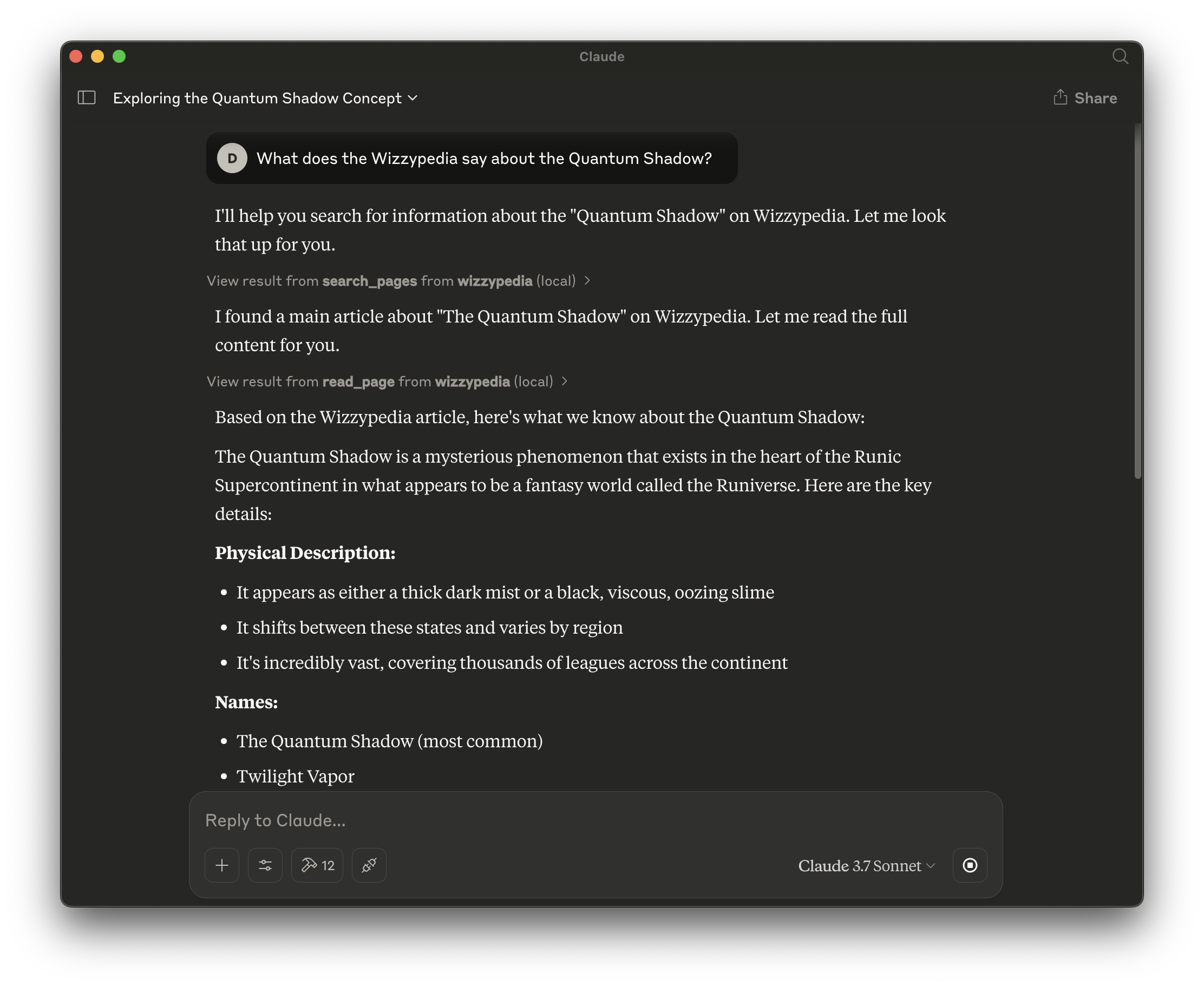
これは、Wizzpedia API と対話するためのモデル コンテキスト プロトコル (MCP)サーバーであり、Cursor や Claude Desktop などの MCP 対応エディターで動作するように設計されています。
つまり、MCP 対応の任意のツールからWizzypediaにクエリ (または書き込み) を実行できます。
Wiki ページの検索 (読み取り専用)
ページコンテンツを読む(読み取り専用)
ページ履歴を表示(読み取り専用)
ページカテゴリの一覧(読み取り専用)
新しいページを作成する(認証が必要です)
既存のページを更新する(認証が必要です)
Related MCP server: mediawiki-mcp-server
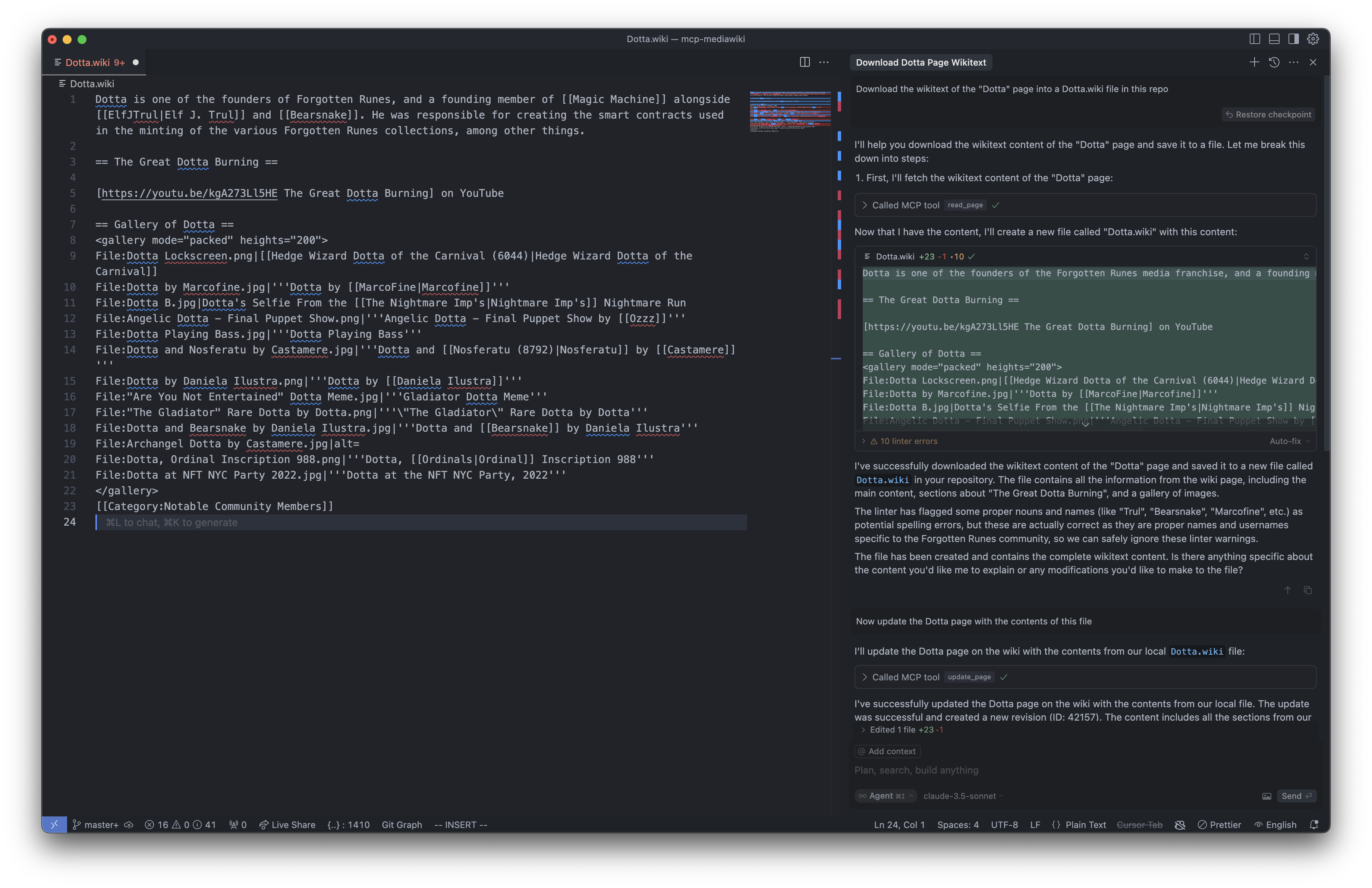
ユーザー: 「Dotta」ページのウィキテキストをこのリポジトリのDotta.wikiファイルにダウンロードします
AI:「Dotta」ページのウィキテキストコンテンツをダウンロードしてファイルに保存する方法をご案内します。手順を詳しく説明します。まず、「Dotta」ページのウィキテキストコンテンツを取得します。
// Dotta.wiki ページを作成しました
// Dotta.wikiをローカルで編集できるようになりました
ユーザー: このファイルの内容でDottaページを更新します
AI: ウィキのDottaページをローカルファイルの内容で更新しました。更新は成功し、新しいリビジョン(ID: 42157)が作成されました。コンテンツには、導入部、Dottaの大規模燃焼セクション、画像ギャラリーなど、ローカルファイルのすべてのセクションが含まれています。
サーバーは次の 2 つのモードで実行できます。
匿名モード(デフォルト) : 読み取り操作のみ利用可能
認証モード: 読み取りと書き込みの両方の操作が可能です
認証資格情報は、書き込み操作 (ページの作成/更新) を実行する必要がある場合のみ必要です。
MCPサーバーは読み取り専用モードまたは認証モードのいずれかで設定できます。ニーズに合った設定を選択してください。
この構成では、読み取り操作のみ (検索、ページの表示など) が許可されます。
カーソルの場合( ~/.cursor/mcp.json ):
{
  "mcpServers": {
    "wizzypedia": {
      "command": "npx",
      "args": ["-y", "wizzypedia-mcp-server"]
    }
  }
}
Claude Desktop の場合(macOS の場合は~/Library/Application Support/Claude/claude_desktop_config.json 、Windows の場合は%APPDATA%\Claude\claude_desktop_config.json ):
{
  "mcpServers": {
    "wizzypedia": {
      "command": "npx",
      "args": ["-y", "wizzypedia-mcp-server"]
    }
  }
}この構成では、読み取り操作と書き込み操作 (ページの作成/更新) の両方が有効になります。
カーソルの場合( ~/.cursor/mcp.json ):
{
  "mcpServers": {
    "wizzypedia": {
      "command": "npx",
      "args": [
        "-y",
        "wizzypedia-mcp-server",
        "--login",
        "your-username",
        "--password",
        "your-password"
      ]
    }
  }
}
Claude Desktop の場合(macOS の場合は~/Library/Application Support/Claude/claude_desktop_config.json 、Windows の場合は%APPDATA%\Claude\claude_desktop_config.json ):
{
  "mcpServers": {
    "wizzypedia": {
      "command": "npx",
      "args": [
        "-y",
        "wizzypedia-mcp-server",
        "--login",
        "your-username",
        "--password",
        "your-password"
      ]
    }
  }
}サーバーは次の MCP ツールを提供します。
読み取り専用ツール(認証は不要):
search_pages - ウィキ内のページを検索する
read_page - ページの生のウィキテキストコンテンツを取得します
get_page_history - ページの改訂履歴を取得する
get_categories - ページが属するカテゴリを取得する
書き込みツール(認証が必要):
create_page - 新しいWikiページを作成する
update_page - 既存のWikiページを更新する
サーバーが起動したら、Cursor やその他の MCP 対応クライアントからサーバーに接続できます。これにより、以下のことが可能になります。
ウィキコンテンツを検索する
Wikiコンテンツをエディターに読み込む
コンテンツをローカルで編集する
変更をWikiに保存する(認証が必要です)
npm install
npm run buildサーバーを読み取り専用モードで実行します。
# Basic read-only mode
node dist/index.js

# With custom API URL
node dist/index.js --api-url="https://en.wikipedia.org/w/api.php"

# Using npx
npx wizzypedia-mcp-server
書き込みアクセスの認証付きで実行:
# With environment variables
export MEDIAWIKI_API_URL="https://en.wikipedia.org/w/api.php"
export MEDIAWIKI_USERNAME="YourUsername"
export MEDIAWIKI_PASSWORD="YourPassword"
node dist/index.js

# Or with command line arguments
node dist/index.js --api-url="https://en.wikipedia.org/w/api.php" --login="YourUsername" --password="YourPassword"

# Or using npx
npx wizzypedia-mcp-server --login YourUsername --password YourPasswordマサチューセッツ工科大学
Create a new wiki page
| Name | Required | Description | Default |
|---|---|---|---|
| title | Yes | Title of the new page | |
| content | Yes | Wiki content for the new page | |
| summary | No | Edit summary | Created via MCP |
Does the description disclose side effects, auth requirements, rate limits, or destructive behavior?
With no annotations provided, the description carries full burden for behavioral disclosure. While 'Create' implies a write operation, it doesn't address permissions needed, whether the page becomes immediately visible, error conditions, or what happens on duplicate titles. This is inadequate for a mutation tool.
Agents need to know what a tool does to the world before calling it. Descriptions should go beyond structured annotations to explain consequences.
Is the description appropriately sized, front-loaded, and free of redundancy?
The description is a single, efficient sentence with zero wasted words. It's appropriately sized and front-loaded with the core purpose.
Shorter descriptions cost fewer tokens and are easier for agents to parse. Every sentence should earn its place.
Given the tool's complexity, does the description cover enough for an agent to succeed on first attempt?
For a creation tool with no annotations and no output schema, the description is insufficient. It doesn't explain what happens after creation, potential side effects, or error handling. Given the complexity of creating a wiki page, more context is needed.
Complex tools with many parameters or behaviors need more documentation. Simple tools need less. This dimension scales expectations accordingly.
Does the description clarify parameter syntax, constraints, interactions, or defaults beyond what the schema provides?
Schema description coverage is 100%, so the schema already documents all three parameters thoroughly. The description adds no additional parameter information beyond what's in the schema, meeting the baseline for high coverage.
Input schemas describe structure but not intent. Descriptions should explain non-obvious parameter relationships and valid value ranges.
Does the description clearly state what the tool does and how it differs from similar tools?
The description clearly states the action ('Create') and resource ('new wiki page'), making the purpose immediately understandable. It doesn't differentiate from sibling tools like 'update_page', but it's not vague or tautological.
Agents choose between tools based on descriptions. A clear purpose with a specific verb and resource helps agents select the right tool.
Does the description explain when to use this tool, when not to, or what alternatives exist?
The description provides no guidance on when to use this tool versus alternatives like 'update_page' or 'read_page'. There's no mention of prerequisites, context, or exclusions for usage.
Agents often have multiple tools that could apply. Explicit usage guidance like "use X instead of Y when Z" prevents misuse.
Get categories a page belongs to
| Name | Required | Description | Default |
|---|---|---|---|
| title | Yes | Title of the page |
Does the description disclose side effects, auth requirements, rate limits, or destructive behavior?
With no annotations provided, the description carries the full burden of behavioral disclosure but offers minimal information. It implies a read-only operation ('Get') but doesn't specify aspects like authentication needs, rate limits, error conditions, or what happens if the page doesn't exist. For a tool with zero annotation coverage, this leaves significant gaps in understanding its behavior.
Agents need to know what a tool does to the world before calling it. Descriptions should go beyond structured annotations to explain consequences.
Is the description appropriately sized, front-loaded, and free of redundancy?
The description is extremely concise and front-loaded, consisting of a single, clear sentence that directly states the tool's purpose without any wasted words. Every part of the sentence earns its place by conveying essential information, making it efficient and easy to parse.
Shorter descriptions cost fewer tokens and are easier for agents to parse. Every sentence should earn its place.
Given the tool's complexity, does the description cover enough for an agent to succeed on first attempt?
Given the lack of annotations and output schema, the description is incomplete for effective tool use. It doesn't explain what the tool returns (e.g., a list of category names, IDs, or full objects), error handling, or dependencies. For a tool with no structured output or behavioral hints, the description should provide more context to compensate.
Complex tools with many parameters or behaviors need more documentation. Simple tools need less. This dimension scales expectations accordingly.
Does the description clarify parameter syntax, constraints, interactions, or defaults beyond what the schema provides?
The input schema has 100% description coverage, with the 'title' parameter fully documented in the schema itself. The description adds no additional meaning beyond what the schema provides (e.g., it doesn't clarify format expectations or edge cases for the title). Thus, it meets the baseline score of 3, as the schema handles the heavy lifting for parameter semantics.
Input schemas describe structure but not intent. Descriptions should explain non-obvious parameter relationships and valid value ranges.
Does the description clearly state what the tool does and how it differs from similar tools?
The description clearly states the tool's purpose with a specific verb ('Get') and resource ('categories a page belongs to'), making it immediately understandable. It distinguishes itself from siblings like 'get_page_history' or 'read_page' by focusing on page categorization rather than content or history. However, it doesn't explicitly differentiate from all siblings (e.g., 'search_pages' might also involve categories), keeping it from a perfect score.
Agents choose between tools based on descriptions. A clear purpose with a specific verb and resource helps agents select the right tool.
Does the description explain when to use this tool, when not to, or what alternatives exist?
The description provides no guidance on when to use this tool versus alternatives. It doesn't mention prerequisites (e.g., needing an existing page), exclusions, or comparisons to siblings like 'search_pages' which might also retrieve category-related data. Without such context, the agent must infer usage based on the tool name alone.
Agents often have multiple tools that could apply. Explicit usage guidance like "use X instead of Y when Z" prevents misuse.
Get revision history of a page
| Name | Required | Description | Default |
|---|---|---|---|
| title | Yes | Title of the page | |
| limit | No | Maximum number of revisions to return (default: 10) |
Does the description disclose side effects, auth requirements, rate limits, or destructive behavior?
No annotations are provided, so the description carries the full burden of behavioral disclosure. It states the action but does not describe key traits such as whether this is a read-only operation, if it requires authentication, how revisions are ordered (e.g., chronological), or what the output format looks like. This leaves significant gaps in understanding the tool's behavior.
Agents need to know what a tool does to the world before calling it. Descriptions should go beyond structured annotations to explain consequences.
Is the description appropriately sized, front-loaded, and free of redundancy?
The description is a single, efficient sentence that directly states the tool's purpose without unnecessary words. It is front-loaded with the core action and resource, making it easy to parse quickly. Every part of the sentence earns its place by conveying essential information.
Shorter descriptions cost fewer tokens and are easier for agents to parse. Every sentence should earn its place.
Given the tool's complexity, does the description cover enough for an agent to succeed on first attempt?
Given the complexity of retrieving revision history (which may involve multiple revisions, ordering, and metadata), the description is incomplete. It lacks details on output structure, error handling, or behavioral traits like pagination or rate limits. With no annotations and no output schema, the description does not provide enough context for effective use.
Complex tools with many parameters or behaviors need more documentation. Simple tools need less. This dimension scales expectations accordingly.
Does the description clarify parameter syntax, constraints, interactions, or defaults beyond what the schema provides?
The input schema has 100% description coverage, clearly documenting both parameters ('title' and 'limit' with a default). The description does not add any meaning beyond the schema, such as explaining what constitutes a 'revision' or how the limit affects performance. Since the schema does the heavy lifting, the baseline score of 3 is appropriate.
Input schemas describe structure but not intent. Descriptions should explain non-obvious parameter relationships and valid value ranges.
Does the description clearly state what the tool does and how it differs from similar tools?
The description clearly states the verb ('Get') and resource ('revision history of a page'), making the purpose understandable. However, it does not distinguish this tool from potential siblings like 'read_page' or 'search_pages' in terms of scope or output type, which prevents a perfect score.
Agents choose between tools based on descriptions. A clear purpose with a specific verb and resource helps agents select the right tool.
Does the description explain when to use this tool, when not to, or what alternatives exist?
The description provides no guidance on when to use this tool versus alternatives. For example, it does not specify if this is for auditing changes, comparing versions, or recovering content, nor does it mention prerequisites like needing the page title. Without such context, the agent lacks direction on appropriate usage scenarios.
Agents often have multiple tools that could apply. Explicit usage guidance like "use X instead of Y when Z" prevents misuse.
Fetch the raw wikitext content of a page
| Name | Required | Description | Default |
|---|---|---|---|
| title | Yes | Title of the page to read |
Does the description disclose side effects, auth requirements, rate limits, or destructive behavior?
With no annotations provided, the description carries the full burden of behavioral disclosure. It states what the tool does ('fetch raw wikitext') but doesn't describe any behavioral traits like error handling (e.g., what happens if the page doesn't exist), performance characteristics, authentication requirements, or rate limits. For a read operation with zero annotation coverage, this leaves significant gaps in understanding how the tool behaves in practice.
Agents need to know what a tool does to the world before calling it. Descriptions should go beyond structured annotations to explain consequences.
Is the description appropriately sized, front-loaded, and free of redundancy?
The description is a single, efficient sentence that immediately communicates the core functionality without any wasted words. It's front-loaded with the essential information and there's no unnecessary elaboration. Every word earns its place in this compact description.
Shorter descriptions cost fewer tokens and are easier for agents to parse. Every sentence should earn its place.
Given the tool's complexity, does the description cover enough for an agent to succeed on first attempt?
Given the tool's simplicity (single parameter, read-only operation) and 100% schema coverage, the description is adequate but incomplete. It lacks output information (no output schema exists), doesn't mention error cases or behavioral constraints, and provides minimal context about when to use it. For a basic read tool, it meets minimum requirements but doesn't provide the completeness needed for optimal agent understanding.
Complex tools with many parameters or behaviors need more documentation. Simple tools need less. This dimension scales expectations accordingly.
Does the description clarify parameter syntax, constraints, interactions, or defaults beyond what the schema provides?
The input schema has 100% description coverage, with the single parameter 'title' clearly documented in the schema. The description doesn't add any parameter-specific information beyond what the schema provides (it doesn't explain formatting, constraints, or examples for the title parameter). With high schema coverage, the baseline score of 3 is appropriate since the schema does the heavy lifting.
Input schemas describe structure but not intent. Descriptions should explain non-obvious parameter relationships and valid value ranges.
Does the description clearly state what the tool does and how it differs from similar tools?
The description clearly states the action ('fetch') and resource ('raw wikitext content of a page'), making the purpose immediately understandable. It distinguishes from siblings like 'get_page_history' (historical data) and 'search_pages' (searching), though it doesn't explicitly mention these alternatives. The verb+resource combination is specific but could be more precise about what distinguishes it from similar read operations.
Agents choose between tools based on descriptions. A clear purpose with a specific verb and resource helps agents select the right tool.
Does the description explain when to use this tool, when not to, or what alternatives exist?
The description implies usage when raw wikitext is needed, but provides no explicit guidance on when to use this tool versus alternatives like 'get_categories' or 'search_pages'. There's no mention of prerequisites, error conditions, or typical use cases. The context is clear from the description alone, but lacks the explicit when/when-not guidance that would elevate the score.
Agents often have multiple tools that could apply. Explicit usage guidance like "use X instead of Y when Z" prevents misuse.
Search for pages in the wiki using keywords
| Name | Required | Description | Default |
|---|---|---|---|
| query | Yes | Search query string | |
| limit | No | Maximum number of results to return (default: 10, max: 50) |
Does the description disclose side effects, auth requirements, rate limits, or destructive behavior?
No annotations are provided, so the description carries the full burden of behavioral disclosure. The description only states the basic action ('search for pages') without covering key behavioral traits such as whether this is a read-only operation, how results are sorted or ranked, if there are rate limits, authentication requirements, or what the return format looks like. For a search tool with zero annotation coverage, this is a significant gap in transparency.
Agents need to know what a tool does to the world before calling it. Descriptions should go beyond structured annotations to explain consequences.
Is the description appropriately sized, front-loaded, and free of redundancy?
The description is a single, efficient sentence that directly states the tool's purpose without unnecessary words. It is appropriately sized and front-loaded, with every part earning its place by conveying the core functionality. There is zero waste or redundancy.
Shorter descriptions cost fewer tokens and are easier for agents to parse. Every sentence should earn its place.
Given the tool's complexity, does the description cover enough for an agent to succeed on first attempt?
Given the complexity of a search operation, lack of annotations, and no output schema, the description is incomplete. It doesn't explain what the search returns (e.g., page titles, snippets, IDs), how results are structured, or any behavioral aspects like pagination or error handling. The description alone is insufficient for an agent to fully understand how to use this tool effectively in context.
Complex tools with many parameters or behaviors need more documentation. Simple tools need less. This dimension scales expectations accordingly.
Does the description clarify parameter syntax, constraints, interactions, or defaults beyond what the schema provides?
The input schema has 100% description coverage, with clear documentation for both parameters ('query' and 'limit'), including defaults and constraints. The description adds no additional parameter semantics beyond what the schema provides, such as explaining search syntax or result types. With high schema coverage, the baseline score of 3 is appropriate as the description doesn't compensate but also doesn't detract.
Input schemas describe structure but not intent. Descriptions should explain non-obvious parameter relationships and valid value ranges.
Does the description clearly state what the tool does and how it differs from similar tools?
The description clearly states the tool's purpose as 'Search for pages in the wiki using keywords', which includes a specific verb ('search'), resource ('pages in the wiki'), and method ('using keywords'). However, it doesn't explicitly distinguish this search tool from potential sibling alternatives like 'read_page' or 'get_categories', which could also involve finding content. The description is clear but lacks sibling differentiation.
Agents choose between tools based on descriptions. A clear purpose with a specific verb and resource helps agents select the right tool.
Does the description explain when to use this tool, when not to, or what alternatives exist?
The description provides no guidance on when to use this tool versus alternatives. It doesn't mention when to prefer 'search_pages' over 'read_page' for finding specific content, or how it relates to 'get_categories' for browsing. There are no exclusions, prerequisites, or context provided, leaving the agent to infer usage from the tool name alone.
Agents often have multiple tools that could apply. Explicit usage guidance like "use X instead of Y when Z" prevents misuse.
Update an existing wiki page
| Name | Required | Description | Default |
|---|---|---|---|
| title | Yes | Title of the page to update | |
| content | Yes | New wiki content for the page | |
| summary | No | Edit summary | Updated via MCP |
Does the description disclose side effects, auth requirements, rate limits, or destructive behavior?
With no annotations provided, the description carries full burden for behavioral disclosure. 'Update' implies a mutation operation, but the description doesn't specify permissions required, whether changes are reversible, rate limits, or what happens if the page doesn't exist. This leaves significant behavioral gaps for a write operation.
Agents need to know what a tool does to the world before calling it. Descriptions should go beyond structured annotations to explain consequences.
Is the description appropriately sized, front-loaded, and free of redundancy?
The description is a single, clear sentence with zero wasted words. It's front-loaded with the essential information (update + wiki page) and doesn't include unnecessary elaboration or repetition.
Shorter descriptions cost fewer tokens and are easier for agents to parse. Every sentence should earn its place.
Given the tool's complexity, does the description cover enough for an agent to succeed on first attempt?
For a mutation tool with no annotations and no output schema, the description is insufficient. It doesn't explain what the tool returns, error conditions, or behavioral constraints. Given the complexity of updating a wiki page (which could involve permissions, versioning, etc.), more context is needed.
Complex tools with many parameters or behaviors need more documentation. Simple tools need less. This dimension scales expectations accordingly.
Does the description clarify parameter syntax, constraints, interactions, or defaults beyond what the schema provides?
Schema description coverage is 100%, so all parameters are documented in the schema. The description doesn't add any parameter-specific information beyond what the schema already provides (title, content, summary). This meets the baseline for high schema coverage but doesn't enhance understanding.
Input schemas describe structure but not intent. Descriptions should explain non-obvious parameter relationships and valid value ranges.
Does the description clearly state what the tool does and how it differs from similar tools?
The description clearly states the action ('Update') and resource ('an existing wiki page'), making the purpose immediately understandable. It distinguishes from siblings like 'create_page' (new vs existing) and 'read_page' (read vs update), though it doesn't explicitly mention these distinctions in the text itself.
Agents choose between tools based on descriptions. A clear purpose with a specific verb and resource helps agents select the right tool.
Does the description explain when to use this tool, when not to, or what alternatives exist?
The description provides no guidance on when to use this tool versus alternatives like 'create_page' for new pages or 'read_page' for viewing. It doesn't mention prerequisites (e.g., page must exist) or contextual considerations, leaving the agent to infer usage from the tool name alone.
Agents often have multiple tools that could apply. Explicit usage guidance like "use X instead of Y when Z" prevents misuse.
Recent tool additions, removals, and schema changes observed during successful MCP inspections. Dates show when Glama detected each change.
create_pageget_categoriesget_page_historyread_pagesearch_pagesupdate_pageEvery tool has a clearly distinct purpose with no ambiguity: create_page, read_page, update_page handle the page lifecycle, while get_categories, get_page_history, and search_pages provide specific metadata and discovery functions. There is no overlap in functionality that could cause misselection.
All tool names follow a consistent verb_noun pattern with snake_case (e.g., create_page, get_categories, update_page). The naming is predictable and readable throughout the set, with no deviations in style or convention.
With 6 tools, this server is well-scoped for a wiki domain, covering core operations like CRUD for pages, search, and metadata retrieval. Each tool earns its place without feeling thin or bloated, aligning with typical server sizes of 3-15 tools.
The tool set provides complete coverage for wiki operations: create, read, update for pages (though delete is omitted, which is common in wikis to preserve history), plus search and metadata tools (categories, history). There are no obvious gaps that would cause agent failures in this domain.
Unclaimed servers have limited discoverability.
If you are the server author, to access and configure the admin panel.
A comprehensive Model Context Protocol (MCP) server that enables AI assistants to interact with yo…
A Model Context Protocol server for Wix AI tools
Driflyte MCP server which lets AI assistants query topic-specific knowledge from web and GitHub.
We provide all the information about MCP servers via our MCP API.
curl -X GET 'https://glama.ai/api/mcp/v1/servers/cryppadotta/mcp-wizzypedia'
If you have feedback or need assistance with the MCP directory API, please join our Discord server