

F
licenseB
qualityD
maintenanceA simple TypeScript-based MCP server that implements a notes system, allowing users to create, list, and generate summaries of text notes via Claude.
1
3
-

Click on "Deploy Server".
Wait a few minutes for the server to deploy. Once ready, it will show a "Started" state.
In the chat, type @ followed by the MCP server name and your instructions, e.g., "@MCP Server Flomo write a note about the meeting agenda for tomorrow"
That's it! The server will respond to your query, and you can continue using it as needed.
Here is a step-by-step guide with screenshots.
write notes to Flomo.
This is a TypeScript-based MCP server help you write notes to Flomo.
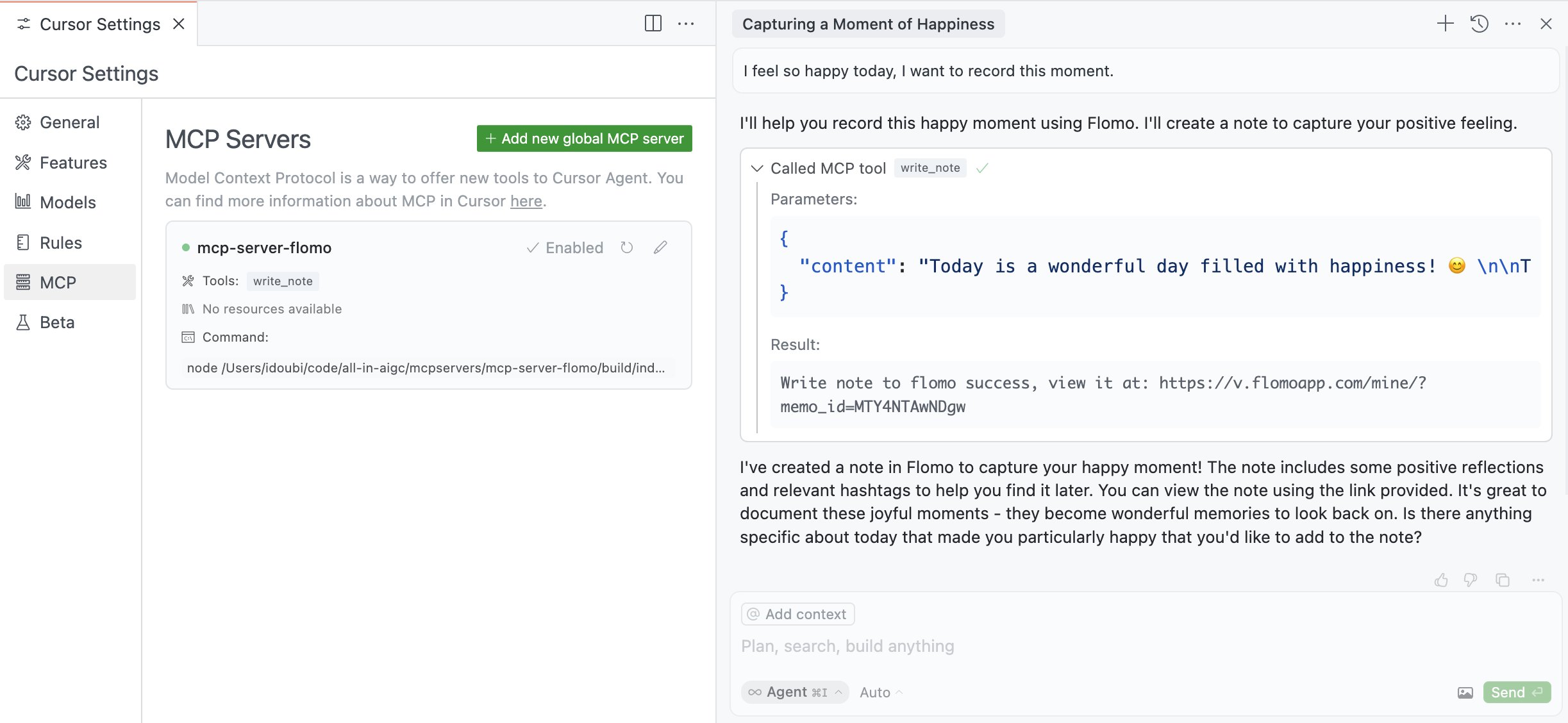
write_note - Write text notes to Flomo
Takes content as required parameters
Related MCP server: Browser-use MCP Server
Install dependencies:
npm installBuild the server:
npm run buildFor development with auto-rebuild:
npm run watchTo use with Claude Desktop, add the server config:
On MacOS: ~/Library/Application Support/Claude/claude_desktop_config.json
On Windows: %APPDATA%/Claude/claude_desktop_config.json
{
  "mcpServers": {
    "mcp-server-flomo": {
      "command": "npx",
      "args": ["-y", "@chatmcp/mcp-server-flomo"],
      "env": {
        "FLOMO_API_URL": "https://flomoapp.com/iwh/xxx/xxx/"
      }
    }
  }
}
Find Your Flomo_API_URL here
Since MCP servers communicate over stdio, debugging can be challenging. We recommend using the MCP Inspector, which is available as a package script:
npm run inspectorThe Inspector will provide a URL to access debugging tools in your browser.
Write note to flomo
| Name | Required | Description | Default |
|---|---|---|---|
| content | Yes | Text content of the note with markdown format |
Does the description disclose side effects, auth requirements, rate limits, or destructive behavior?
With no annotations provided, the description carries full burden for behavioral disclosure. It mentions 'write' which implies a mutation operation, but doesn't specify authentication requirements, rate limits, side effects, or what happens on success/failure. This leaves significant gaps for a tool that creates content.
Agents need to know what a tool does to the world before calling it. Descriptions should go beyond structured annotations to explain consequences.
Is the description appropriately sized, front-loaded, and free of redundancy?
The description is extremely concise at just three words, front-loading the essential information with zero wasted words. It efficiently communicates the core purpose without unnecessary elaboration.
Shorter descriptions cost fewer tokens and are easier for agents to parse. Every sentence should earn its place.
Given the tool's complexity, does the description cover enough for an agent to succeed on first attempt?
For a write operation tool with no annotations and no output schema, the description is insufficiently complete. It doesn't address behavioral aspects like authentication, error handling, or what the tool returns, leaving the agent with significant uncertainty about how to properly use this mutation tool.
Complex tools with many parameters or behaviors need more documentation. Simple tools need less. This dimension scales expectations accordingly.
Does the description clarify parameter syntax, constraints, interactions, or defaults beyond what the schema provides?
The schema has 100% description coverage, with the single parameter 'content' clearly documented as 'Text content of the note with markdown format'. The description adds no additional parameter information beyond what the schema provides, meeting the baseline for high schema coverage.
Input schemas describe structure but not intent. Descriptions should explain non-obvious parameter relationships and valid value ranges.
Does the description clearly state what the tool does and how it differs from similar tools?
The description clearly states the action ('write') and target resource ('note to flomo'), providing a specific verb+resource combination. However, with no sibling tools mentioned, there's no opportunity to distinguish from alternatives, preventing a perfect score.
Agents choose between tools based on descriptions. A clear purpose with a specific verb and resource helps agents select the right tool.
Does the description explain when to use this tool, when not to, or what alternatives exist?
The description provides no guidance on when to use this tool versus alternatives, prerequisites, or contextual constraints. It simply states what the tool does without offering usage instructions.
Agents often have multiple tools that could apply. Explicit usage guidance like "use X instead of Y when Z" prevents misuse.
Recent tool additions, removals, and schema changes observed during successful MCP inspections.
v1.0.0write_noteScored across 1 tool
With only one tool, there is no possibility of ambiguity or overlap between tools. The tool 'write_note' has a single, clear purpose that cannot be confused with any other tool in this set.
The naming follows a consistent verb_noun pattern ('write_note'), and with only one tool, there is no inconsistency to evaluate. The pattern is clear and predictable.
A single tool is too few for a note-taking server, as it lacks basic operations like reading, updating, deleting, or searching notes. This minimal set severely limits functionality and will likely cause agent failures in typical workflows.
The tool surface is severely incomplete for a note-taking domain. It only provides write capability, missing essential operations such as get_note, list_notes, update_note, delete_note, and search_notes, which are critical for full lifecycle management.
Hosted Notion MCP server for Claude, ChatGPT and Cursor, with each action switched per account.
Markdown-based note-taking with a hosted MCP server. Your notes serve you and your AI.
Connect AI to your flomo notes. Search, create, edit notes and manage tags via MCP.
Hosted X (Twitter) MCP server for Claude, ChatGPT and Cursor, with each action switched per account.