mcp-server-chatsum
Click on "Install Server".
Wait a few minutes for the server to deploy. Once ready, it will show a "Started" state.
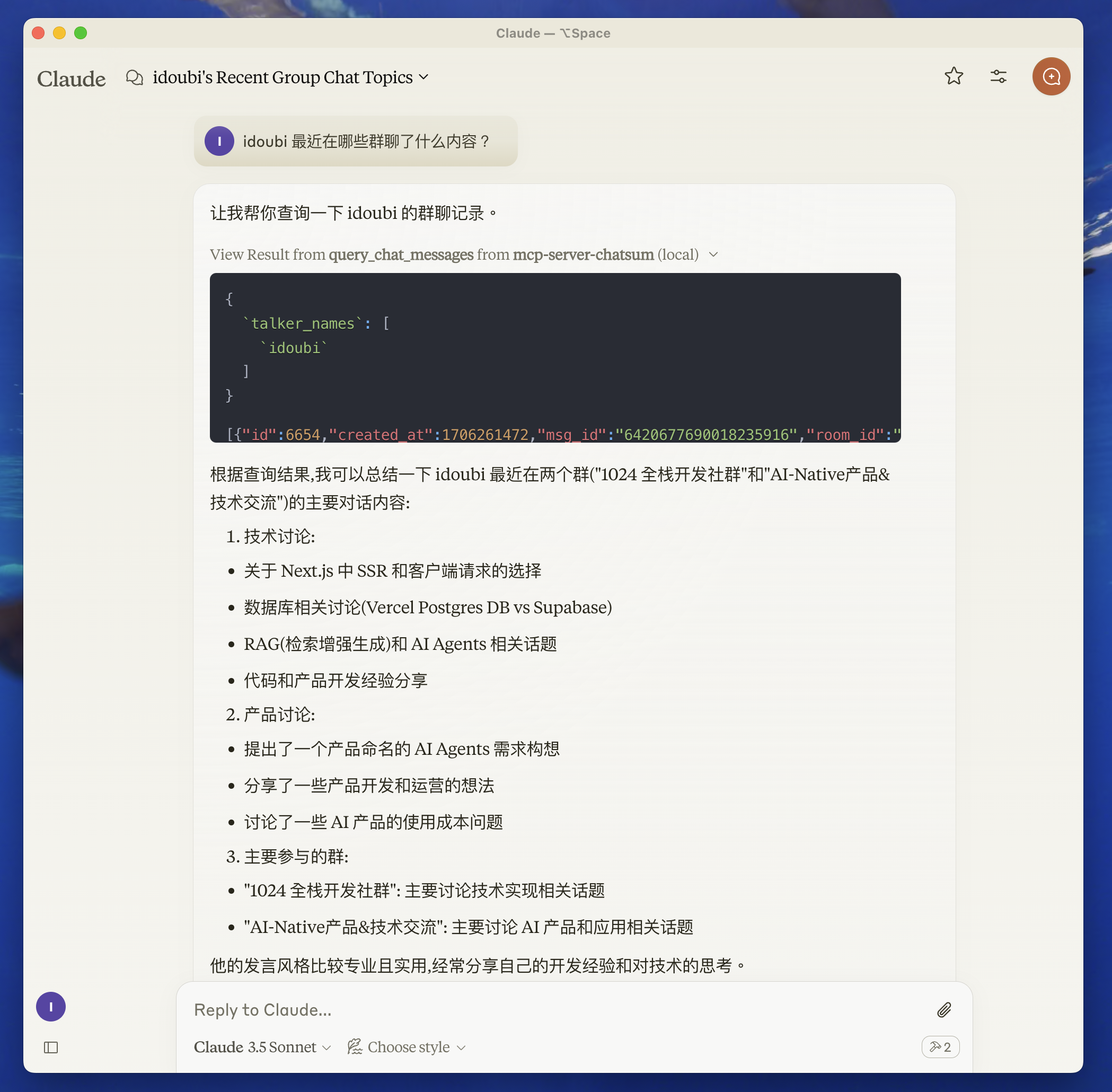
In the chat, type
@followed by the MCP server name and your instructions, e.g., "@mcp-server-chatsumsummarize my conversations from yesterday"
That's it! The server will respond to your query, and you can continue using it as needed.
Here is a step-by-step guide with screenshots.
mcp-server-chatsum
This MCP Server is used to summarize your chat messages.

Before you start
move to chatbot directory, follow the README to setup the chat database.
start chatbot to save your chat messages.
Features
Resources
Tools
query_chat_messages- Query chat messagesQuery chat messages with given parameters
Summarize chat messages based on the query prompt
Prompts
Related MCP server: IDE Chat Summarizer
Development
Set up environment variables:
create .env file in the root directory, and set your chat database path.
CHAT_DB_PATH=path-to/chatbot/data/chat.dbInstall dependencies:
pnpm installBuild the server:
pnpm buildFor development with auto-rebuild:
pnpm watchInstallation
To use with Claude Desktop, add the server config:
On MacOS: ~/Library/Application Support/Claude/claude_desktop_config.json
On Windows: %APPDATA%/Claude/claude_desktop_config.json
{
"mcpServers": {
"mcp-server-chatsum": {
"command": "path-to/bin/node",
"args": ["path-to/mcp-server-chatsum/build/index.js"],
"env": {
"CHAT_DB_PATH": "path-to/mcp-server-chatsum/chatbot/data/chat.db"
}
}
}
}Debugging
Since MCP servers communicate over stdio, debugging can be challenging. We recommend using the MCP Inspector, which is available as a package script:
pnpm inspectorThe Inspector will provide a URL to access debugging tools in your browser.
Community
About the author
This server cannot be installed
Maintenance
Resources
Unclaimed servers have limited discoverability.
Looking for Admin?
If you are the server author, to access and configure the admin panel.
Related MCP Servers
- AlicenseBqualityDmaintenanceEnables automatic conversation summarization by typing -sun command, which analyzes the current chat session and saves structured summaries as .mdc files with key insights, outcomes, and next steps.312Apache 2.0
- FlicenseAqualityDmaintenanceTransforms chat conversations with AI into structured markdown summaries and automatically saves them to organized files in your notes directory. Supports different summary styles, handles large conversations through chunking, and provides tools to manage your saved summaries.24
- Flicense-qualityDmaintenanceSummarizes Slack activity and GitLab merge requests with OpenAI to help generate daily standups, weekly reports, or quarterly check-ins.
- Alicense-qualityCmaintenanceReads your local WhatsApp chat history and exposes tools to retrieve messages and chat lists, enabling querying and summarization of your conversations entirely offline.MIT
Related MCP Connectors
LLM chat, text summarization and AI image generation
Search your AI chat history (ChatGPT, Claude, Codex) from any MCP client. Remote, private, read-only
Catch up on Slack without reading it. Unreads, threads, search. Browser-session or hosted OAuth.
Latest Blog Posts
- Who's Calling? MCP Hosts Are an Identity Blind Spot (And the Spec Knows It)By Om-Shree-0709 on .mcpAgent IdentityOAuth 2.1
- Your AI Chatbot Just Exposed Your CEO's Salary to an InternBy Om-Shree-0709 on .Agent IdentityMCP SecurityOAuth Delegation
- Why MCP Servers Need Execution Sandboxing (And Why Your Current Stack Isn't Enough)By Om-Shree-0709 on .Agentic AiPrompt InjectionWebAssembly
MCP directory API
We provide all the information about MCP servers via our MCP API.
curl -X GET 'https://glama.ai/api/mcp/v1/servers/chatmcp/mcp-server-chatsum'
If you have feedback or need assistance with the MCP directory API, please join our Discord server