Glama
call518

MCP PostgreSQL Operations

by call518

MCP Server for PostgreSQL Operations and Monitoring

MCPVault: claimed

MCP Toplist

License: MIT Python Docker Pulls PostgreSQL BuyMeACoffee

Deploy to PyPI with tag PyPI PyPI - Downloads


Architecture & Internal (DeepWiki)

Ask DeepWiki


Related MCP server: MCP-PostgreSQL-Ops

Overview

MCP-PostgreSQL-Ops is a professional MCP server for PostgreSQL database operations, monitoring, and management. Supports PostgreSQL 12-18 with comprehensive database analysis, performance monitoring, and intelligent maintenance recommendations through natural language queries. Most features work independently, but advanced query analysis capabilities are enhanced when pg_stat_statements and (optionally) pg_stat_monitor extensions are installed.


Features

  • ✅ Zero Configuration: Works with PostgreSQL 12-18 out-of-the-box with automatic version detection.

  • ✅ Natural Language: Ask questions like "Show me slow queries" or "Analyze table bloat."

  • ✅ Production Safe: Read-only operations, RDS/Aurora compatible with regular user permissions.

  • ✅ Extension Enhanced: Optional pg_stat_statements and pg_stat_monitor for advanced query analytics.

  • ✅ Comprehensive Database Monitoring: Performance analysis, bloat detection, and maintenance recommendations.

  • ✅ Smart Query Analysis: Slow query identification with pg_stat_statements and pg_stat_monitor integration.

  • ✅ Schema & Relationship Discovery: Database structure exploration with detailed relationship mapping.

  • ✅ VACUUM & Autovacuum Intelligence: Real-time maintenance monitoring and effectiveness analysis.

  • ✅ Multi-Database Operations: Seamless cross-database analysis and monitoring.

  • ✅ Enterprise-Ready: Safe read-only operations with RDS/Aurora compatibility.

  • ✅ Developer-Friendly: Simple codebase for easy customization and tool extension.

🔧 Advanced Capabilities

  • Version-aware I/O statistics (enhanced on PostgreSQL 16+, byte columns on PG 18+).

  • Real-time connection and lock monitoring.

  • Background process and checkpoint analysis.

  • Replication status and WAL monitoring.

  • Database capacity and bloat analysis.

  • Wait event catalog with descriptions (PG 17+).

  • WAL summarizer monitoring for incremental backups (PG 17+).

  • Async I/O subsystem monitoring (PG 18+).

  • Per-backend I/O and WAL statistics (PG 18+).

Tool Usage Examples
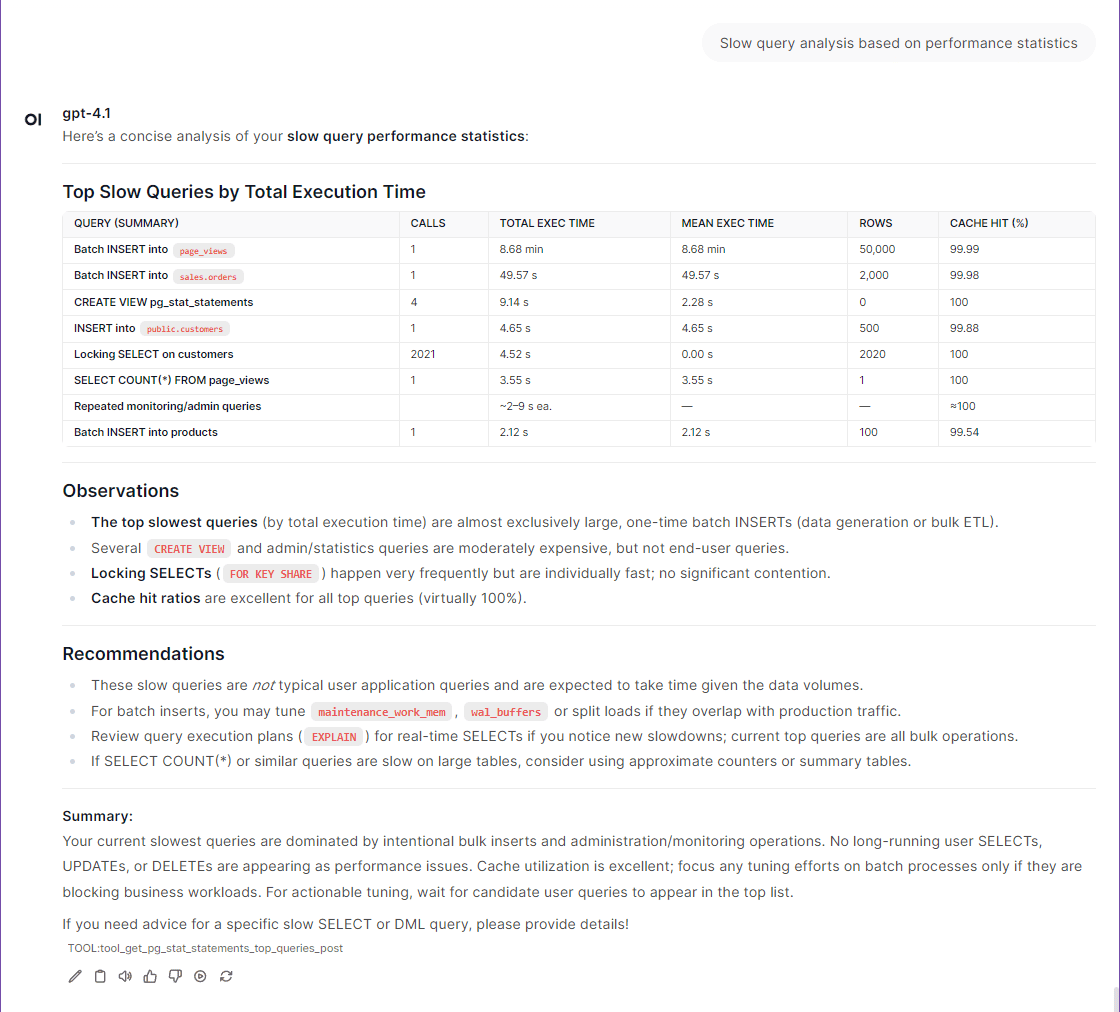
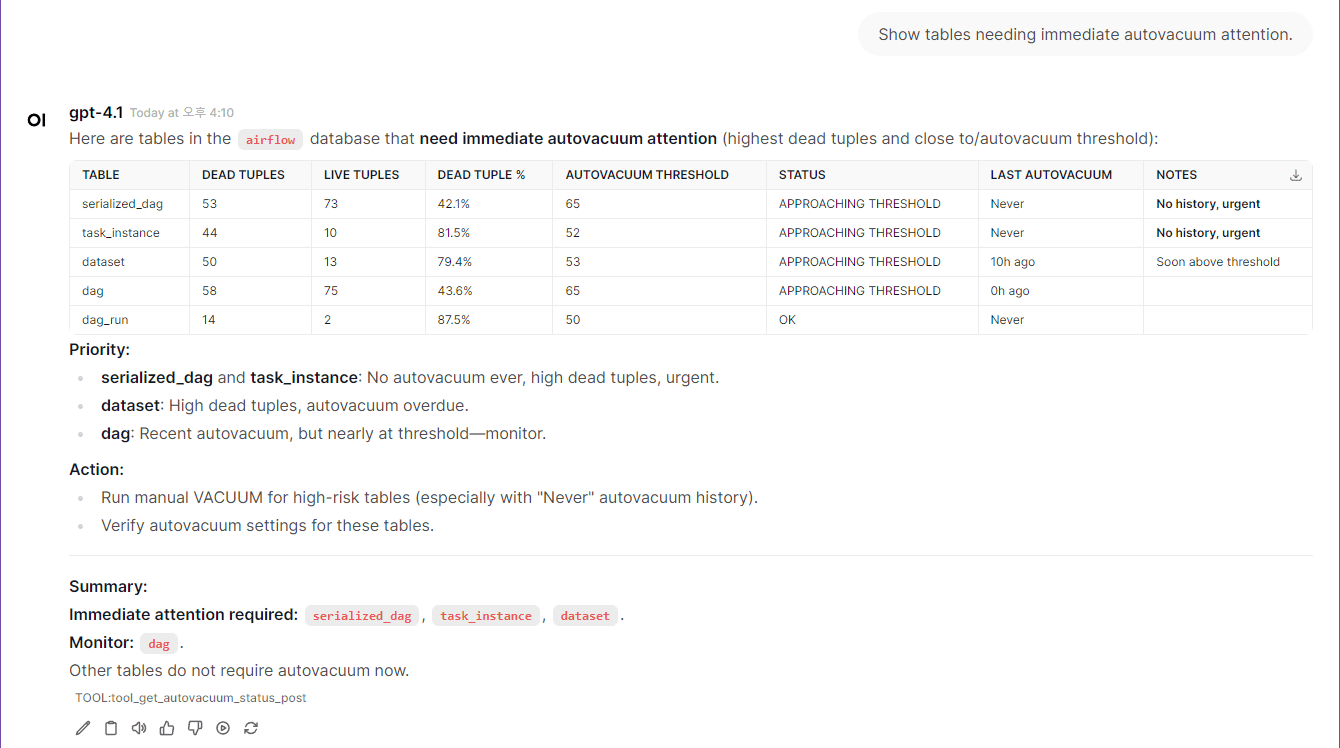
📸 More Examples with Screenshots →


MCP-PostgreSQL-Ops Usage Screenshot


MCP-PostgreSQL-Ops Usage Screenshot


⭐ Quickstart (5 minutes)

Note: The postgresql container included in docker-compose.yml is intended for quickstart testing purposes only. You can connect to your own PostgreSQL instance by adjusting the environment variables as needed.

If you want to use your own PostgreSQL instance instead of the built-in test container:

  • Update the target PostgreSQL connection information in your .env file (see POSTGRES_HOST, POSTGRES_PORT, POSTGRES_USER, POSTGRES_PASSWORD, POSTGRES_DB).

  • In docker-compose.yml, comment out (disable) the postgres and postgres-init-extensions containers to avoid starting the built-in test database.

Flow Diagram of Quickstart/Tutorial
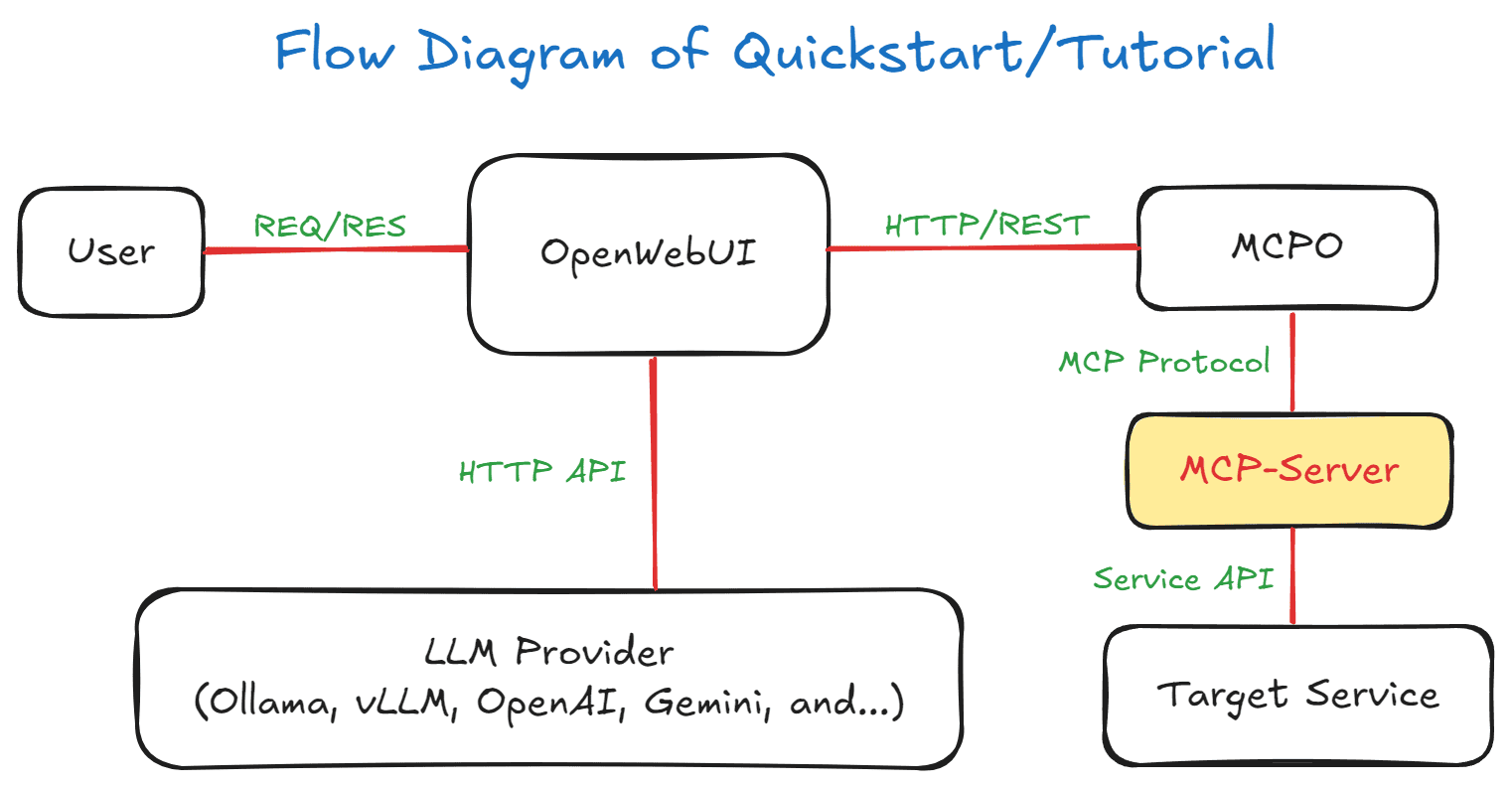
Flow Diagram of Quickstart/Tutorial

1. Environment Setup

Note: While superuser privileges provide access to all databases and system information, the MCP server also works with regular user permissions for basic monitoring tasks.

git clone https://github.com/call518/MCP-PostgreSQL-Ops.git
cd MCP-PostgreSQL-Ops

### Check and modify .env file
cp .env.example .env
vim .env
### No need to modify defaults, but if using your own PostgreSQL server, edit below:
POSTGRES_HOST=host.docker.internal
POSTGRES_PORT=15432  # External port for host access (mapped to internal 5432)
POSTGRES_USER=postgres
POSTGRES_PASSWORD=changeme!@34
POSTGRES_DB=ecommerce # Default connection DB. Superusers can access all DBs.

Note: PGDATA=/data/db is preconfigured for the Percona PostgreSQL Docker image, which requires this specific path for proper write permissions.

2. Start Demo Containers

# Start all containers including built-in PostgreSQL for testing
docker-compose up -d

# Alternative: If using your own PostgreSQL instance
# Comment out postgres and postgres-init-extensions services in docker-compose.yml
# Then use the custom configuration:
# docker-compose -f docker-compose.custom-db.yml up -d

⏰ Wait for Environment Setup: The initial environment setup takes a few minutes as containers are started in sequence:

  1. PostgreSQL container starts first with database initialization

  2. PostgreSQL Extensions container installs extensions and creates comprehensive test data (~83K records)

  3. MCP Server and MCPO Proxy containers start after PostgreSQL is ready

  4. OpenWebUI container starts last and may take additional time to load the web interface

💡 Tip: Wait 2-3 minutes after running docker-compose up -d before accessing OpenWebUI to ensure all services are fully initialized.

🔍 Check Container Status (Optional):

# Monitor container startup progress
docker-compose logs -f

# Check if all containers are running
docker-compose ps

# Verify PostgreSQL is ready
docker compose exec -T postgres sh -c \
  'pg_isready -h 127.0.0.1 -p 5432 -U "$POSTGRES_USER" -d "$POSTGRES_DB"'

3. Access to OpenWebUI

http://localhost:3003/

  • The list of MCP tool features provided by swagger can be found in the MCPO API Docs URL.

    • e.g: http://localhost:8003/docs

4. Registering the Tool in OpenWebUI

📌 Note: Web-UI configuration instructions are based on OpenWebUI v0.6.22. Menu locations and settings may differ in newer versions.

  1. logging in to OpenWebUI with an admin account

  2. go to "Settings" → "Tools" from the top menu.

  3. Enter the postgresql-ops Tool address (e.g., http://localhost:8003/postgresql-ops) to connect MCP Tools.

  4. Setup Ollama or OpenAI.

5. Complete!

Congratulations! Your MCP PostgreSQL Operations server is now ready for use. You can start exploring your databases with natural language queries.

🚀 Try These Example Queries:

  • "Show me the current active connections"

  • "What are the slowest queries in the system?"

  • "Analyze table bloat across all databases"

  • "Show me database size information"

  • "What tables need VACUUM maintenance?"

📖 Next Steps:


(NOTE) Sample Test Data Overview

The create-test-data.sql script is executed by the postgres-init-extensions container (defined in docker-compose.yml) on first startup, automatically generating comprehensive test databases for MCP tool testing:

Database

Purpose

Schema & Tables

Scale

ecommerce

E-commerce system

public: categories, products, customers, orders, order_items

10 categories, 500 products, 100 customers, 200 orders, 400 order items

analytics

Analytics & reporting

public: page_views, sales_summary

1,000 page views, 30 sales summaries

inventory

Warehouse management

public: suppliers, inventory_items, purchase_orders

10 suppliers, 100 items, 50 purchase orders

hr_system

HR management

public: departments, employees, payroll

5 departments, 50 employees, 150 payroll records

Test users created: app_readonly, app_readwrite, analytics_user, backup_user

Optimized for testing: Intentional table bloat, various indexes (used/unused), time-series data, complex relationships


Tool Compatibility Matrix

Automatic Adaptation: All tools work transparently across supported versions - no configuration needed!

🟢 Extension-Independent Tools (No Extensions Required)

Tool Name

Extensions Required

PG 12

PG 13

PG 14

PG 15

PG 16

PG 17

PG 18

System Views/Tables Used

get_server_info

❌ None

✅

✅

✅

✅

✅

✅

✅

version(), pg_extension

get_active_connections

❌ None

✅

✅

✅

✅

✅

✅

✅

pg_stat_activity

get_postgresql_config

❌ None

✅

✅

✅

✅

✅

✅

✅

pg_settings

get_database_list

❌ None

✅

✅

✅

✅

✅

✅

✅

pg_database

get_table_list

❌ None

✅

✅

✅

✅

✅

✅

✅

information_schema.tables

get_table_schema_info

❌ None

✅

✅

✅

✅

✅

✅

✅

information_schema.*, pg_indexes

get_database_schema_info

❌ None

✅

✅

✅

✅

✅

✅

✅

pg_namespace, pg_class, pg_proc

get_table_relationships

❌ None

✅

✅

✅

✅

✅

✅

✅

information_schema.* (constraints)

get_user_list

❌ None

✅

✅

✅

✅

✅

✅

✅

pg_user, pg_roles

get_index_usage_stats

❌ None

✅

✅

✅

✅

✅

✅

✅

pg_stat_user_indexes

get_database_size_info

❌ None

✅

✅

✅

✅

✅

✅

✅

pg_database_size()

get_table_size_info

❌ None

✅

✅

✅

✅

✅

✅

✅

pg_total_relation_size()

get_vacuum_analyze_stats

❌ None

✅

✅

✅

✅

✅

✅

✅ Enhanced

pg_stat_user_tables

get_current_database_info

❌ None

✅

✅

✅

✅

✅

✅

✅

pg_database, current_database()

get_table_bloat_analysis

❌ None

✅

✅

✅

✅

✅

✅

✅

pg_stat_user_tables

get_database_bloat_overview

❌ None

✅

✅

✅

✅

✅

✅

✅

pg_stat_user_tables

get_autovacuum_status

❌ None

✅

✅

✅

✅

✅

✅

✅

pg_stat_user_tables

get_autovacuum_activity

❌ None

✅

✅

✅

✅

✅

✅

✅

pg_stat_user_tables

get_running_vacuum_operations

❌ None

✅

✅

✅

✅

✅

✅

✅

pg_stat_activity

get_vacuum_effectiveness_analysis

❌ None

✅

✅

✅

✅

✅

✅

✅

pg_stat_user_tables

get_lock_monitoring

❌ None

✅

✅

✅

✅

✅

✅

✅

pg_locks, pg_stat_activity

get_wal_status

❌ None

✅

✅

✅

✅

✅

✅

✅

pg_current_wal_lsn()

get_database_stats

❌ None

✅

✅

✅

✅

✅

✅

✅ Enhanced

pg_stat_database

get_table_io_stats

❌ None

✅

✅

✅

✅

✅

✅

✅

pg_statio_user_tables

get_index_io_stats

❌ None

✅

✅

✅

✅

✅

✅

✅

pg_statio_user_indexes

get_database_conflicts_stats

❌ None

✅

✅

✅

✅

✅

✅

✅

pg_stat_database_conflicts

🚀 Version-Aware Tools (Auto-Adapting)

Tool Name

Extensions Required

PG 12

PG 13

PG 14

PG 15

PG 16

PG 17

PG 18

Special Features

get_io_stats

❌ None

✅ Basic

✅ Basic

✅ Basic

✅ Basic

✅ Enhanced

✅ Enhanced

✅ Enhanced

PG16+: pg_stat_io support; PG18+: byte columns

get_bgwriter_stats

❌ None

✅

✅

✅

✅

✅

✅ Special

✅ Enhanced

PG17: Separate checkpointer stats; PG18+: num_done, slru_written

get_replication_status

❌ None

✅ Compatible

✅ Enhanced

✅ Enhanced

✅ Enhanced

✅ Enhanced

✅ Enhanced

✅ Enhanced

PG13+: wal_status, safe_wal_size; PG16+: enhanced WAL receiver; PG17+: invalidation_reason, inactive_since

get_all_tables_stats

❌ None

✅ Compatible

✅ Enhanced

✅ Enhanced

✅ Enhanced

✅ Enhanced

✅ Enhanced

✅ Enhanced

PG13+: n_ins_since_vacuum tracking for vacuum maintenance optimization

get_user_functions_stats

⚙️ Config Required

✅

✅

✅

✅

✅

✅

✅

Requires track_functions=pl

get_wait_events

❌ None

✅ Fallback

✅ Fallback

✅ Fallback

✅ Fallback

✅ Fallback

✅ Native

✅ Native

PG17+: pg_wait_events catalog; PG12-16: fallback to pg_stat_activity current waits

get_wal_summarizer_status

❌ None

❌

❌

❌

❌

❌

✅

✅

PG17+: WAL summarizer monitoring for incremental backups

get_async_io_status

❌ None

❌

❌

❌

❌

❌

❌

✅

PG18+: pg_aios async I/O subsystem monitoring

get_per_backend_io_stats

❌ None

❌

❌

❌

❌

❌

❌

✅

PG18+: Per-backend I/O and WAL statistics

🟡 Extension-Dependent Tools (Extensions Required)

Tool Name

Required Extension

PG 12

PG 13

PG 14

PG 15

PG 16

PG 17

PG 18

Notes

get_pg_stat_statements_top_queries

pg_stat_statements

✅ Compatible

✅ Enhanced

✅ Enhanced

✅ Enhanced

✅ Enhanced

✅ Enhanced

✅ Enhanced

PG12: total_time → total_exec_time; PG13+: native total_exec_time; PG17+: stats_since

get_pg_stat_monitor_recent_queries

pg_stat_monitor

✅ Compatible

✅ Enhanced

✅ Enhanced

✅ Enhanced

✅ Enhanced

✅ Enhanced

✅ Enhanced

PG12: total_time → total_exec_time; PG13+: native total_exec_time

🆕 Version-Specific Features

PostgreSQL 17

  • pg_wait_events view: Native wait event catalog with descriptions (used by get_wait_events)

  • WAL summarizer: Monitoring for incremental backup support (used by get_wal_summarizer_status)

  • Replication slot enhancements: invalidation_reason and inactive_since columns (used by get_replication_status)

  • pg_stat_statements stats_since: Track when statistics were last reset (used by get_pg_stat_statements_top_queries)

  • VACUUM progress: Index vacuum tracking in progress views (future enhancement for get_running_vacuum_operations)

PostgreSQL 18

  • pg_aios view: Async I/O subsystem monitoring (used by get_async_io_status)

  • Per-backend I/O stats: Individual backend I/O and WAL statistics (used by get_per_backend_io_stats)

  • VACUUM/ANALYZE time columns: total_vacuum_time, total_autovacuum_time, total_analyze_time, total_autoanalyze_time cumulative timing (used by get_vacuum_analyze_stats)

  • pg_stat_io byte columns: read_bytes, write_bytes, extend_bytes (used by get_io_stats)

  • Parallel worker stats: parallel_workers_launched, parallel_workers_to_launch (used by get_database_stats)

  • Checkpointer enhancements: num_done, slru_written columns (used by get_bgwriter_stats)


Usage Examples

Claude Desktop Integration

(Recommended) Add to your Claude Desktop configuration file:

{
  "mcpServers": {
    "mcp-postgresql-ops": {
      "command": "uvx",
      "args": ["--python", "3.12", "mcp-postgresql-ops"],
      "env": {
        "POSTGRES_HOST": "127.0.0.1",
        "POSTGRES_PORT": "15432",
        "POSTGRES_USER": "postgres",
        "POSTGRES_PASSWORD": "changeme!@34",
        "POSTGRES_DB": "ecommerce"
      }
    }
  }
}

"Show all active connections in a clear and readable html table format." Claude Desktop Integration

"Show all relationships for customers table in ecommerce database as a Mermaid diagram." Claude Desktop Integration


Installation

# Install the package
pip install mcp-postgresql-ops

# Or with uv (faster)
uv add mcp-postgresql-ops

# Verify installation
mcp-postgresql-ops --help

From Source

# Clone the repository
git clone https://github.com/call518/MCP-PostgreSQL-Ops.git
cd MCP-PostgreSQL-Ops

# Install with uv (recommended)
uv sync
uv run mcp-postgresql-ops --help

# Or with pip
pip install -e .
mcp-postgresql-ops --help

MCP Configuration

Claude Desktop Configuration

(Optional) Run with Local Source:

{
  "mcpServers": {
    "mcp-postgresql-ops": {
      "command": "uv",
      "args": ["run", "python", "-m", "mcp_postgresql_ops"],
      "env": {
        "POSTGRES_HOST": "127.0.0.1",
        "POSTGRES_PORT": "15432",
        "POSTGRES_USER": "postgres",
        "POSTGRES_PASSWORD": "changeme!@34",
        "POSTGRES_DB": "ecommerce"
      }
    }
  }
}

Run MCP-Server as Standalon

# Stdio mode
uvx --python 3.12 mcp-postgresql-ops \
  --type stdio

# HTTP mode
uvx --python 3.12 mcp-postgresql-ops
  --type streamable-http \
  --host 127.0.0.1 \
  --port 8000 \
  --log-level DEBUG

(Option) Configure Multiple PostgreSQL Instances

{
  "mcpServers": {
    "Postgresql-A": {
      "command": "uvx",
      "args": ["--python", "3.12", "mcp-postgresql-ops"],
      "env": {
        "POSTGRES_HOST": "a.foo.com",
        "POSTGRES_PORT": "5432",
        "POSTGRES_USER": "postgres",
        "POSTGRES_PASSWORD": "postgres",
        "POSTGRES_DB": "postgres"
      }
    },
    "Postgresql-B": {
      "command": "uvx",
      "args": ["--python", "3.12", "mcp-postgresql-ops"],
      "env": {
        "POSTGRES_HOST": "b.bar.com",
        "POSTGRES_PORT": "5432",
        "POSTGRES_USER": "postgres",
        "POSTGRES_PASSWORD": "postgres",
        "POSTGRES_DB": "postgres"
      }
    }
  }
}

/w Local Source

# Method 1: Module execution (for development, requires PYTHONPATH)
PYTHONPATH=/path/to/MCP-PostgreSQL-Ops/src
python -m mcp_postgresql_ops \
  --type stdio

# Method 2: Direct script (after uv installation in project directory)
uv run mcp-postgresql-ops \
  --type stdio

# Method 3: Installed package script (after pip/uv install)
mcp-postgresql-ops \
  --type stdio

# HTTP mode examples:
# Development mode
PYTHONPATH=/path/to/MCP-PostgreSQL-Ops/src
python -m mcp_postgresql_ops \
  --type streamable-http \
  --host 127.0.0.1 \
  --port 8000 \
  --log-level DEBUG

# Production mode (after installation)
mcp-postgresql-ops \
  --type streamable-http \
  --host 127.0.0.1 \
  --port 8000 \
  --log-level DEBUG

CLI Arguments

  • --type: Transport type (stdio or streamable-http) - Default: stdio

  • --host: Host address for HTTP transport - Default: 127.0.0.1

  • --port: Port number for HTTP transport - Default: 8000

  • --auth-enable: Enable Bearer token authentication for streamable-http mode - Default: false

  • --secret-key: Secret key for Bearer token authentication (required when auth enabled)

  • --log-level: Logging level (DEBUG, INFO, WARNING, ERROR, CRITICAL) - Default: INFO


Environment Variables

Variable

Description

Default

Project Default

PYTHONPATH

Python module search path (only needed for development mode)

-

/app/src

MCP_LOG_LEVEL

Server logging verbosity (DEBUG, INFO, WARNING, ERROR)

INFO

INFO

FASTMCP_TYPE

MCP transport protocol (stdio for CLI, streamable-http for web)

stdio

streamable-http

FASTMCP_HOST

HTTP server bind address (0.0.0.0 for all interfaces)

127.0.0.1

0.0.0.0

FASTMCP_PORT

HTTP server port for MCP communication

8000

8000

REMOTE_AUTH_ENABLE

Enable Bearer token authentication for streamable-http mode (Default: false if undefined/null/empty)

false

false

REMOTE_SECRET_KEY

Secret key for Bearer token authentication (required when auth enabled)

-

your-secret-key-here

PGSQL_VERSION

PostgreSQL major version for Docker image selection

17

17

PGDATA

PostgreSQL data directory inside Docker container (Do not modify)

/var/lib/postgresql/data

/data/db

POSTGRES_HOST

PostgreSQL server hostname or IP address

127.0.0.1

host.docker.internal

POSTGRES_PORT

PostgreSQL server port number

5432

15432

POSTGRES_USER

PostgreSQL connection username (needs read permissions)

postgres

postgres

POSTGRES_PASSWORD

PostgreSQL user password (supports special characters)

changeme!@34

changeme!@34

POSTGRES_DB

Default database name for connections

testdb

ecommerce

POSTGRES_MAX_CONNECTIONS

PostgreSQL max_connections configuration parameter

200

200

DOCKER_EXTERNAL_PORT_OPENWEBUI

Host port mapping for Open WebUI container

8080

3003

DOCKER_EXTERNAL_PORT_MCP_SERVER

Host port mapping for MCP server container

8080

18003

DOCKER_EXTERNAL_PORT_MCPO_PROXY

Host port mapping for MCPO proxy container

8000

8003

DOCKER_INTERNAL_PORT_POSTGRESQL

PostgreSQL container internal port

5432

5432

Note: POSTGRES_DB serves as the default target database for operations when no specific database is specified. In Docker environments, if set to a non-default name, this database will be automatically created during initial PostgreSQL startup.

Port Configuration: The built-in PostgreSQL container uses port mapping 15432:5432 where:

  • POSTGRES_PORT=15432: External port for host access and MCP server connections

  • DOCKER_INTERNAL_PORT_POSTGRESQL=5432: Internal container port (PostgreSQL default)

  • When using external PostgreSQL servers, set POSTGRES_PORT to match your server's actual port


Prerequisites

Required PostgreSQL Extensions

For more details, see the ## Tool Compatibility Matrix

Note: Most MCP tools work without any PostgreSQL extensions. section below. Some advanced performance analysis tools require the following extensions:

-- Query performance statistics (required only for get_pg_stat_statements_top_queries)
CREATE EXTENSION IF NOT EXISTS pg_stat_statements;

-- Advanced monitoring (optional, used by get_pg_stat_monitor_recent_queries)
CREATE EXTENSION IF NOT EXISTS pg_stat_monitor;

Quick Setup: For new PostgreSQL installations, add to postgresql.conf:

shared_preload_libraries = 'pg_stat_statements'

Then restart PostgreSQL and run the CREATE EXTENSION commands above.

  • pg_stat_statements is required only for slow query analysis tools.

  • pg_stat_monitor is optional and used for real-time query monitoring.

  • All other tools work without these extensions.

Minimum Requirements

  • PostgreSQL 12+ (tested with PostgreSQL 17 and 18)

  • Python 3.12

  • Network access to PostgreSQL server

  • Read permissions on system catalogs

Required PostgreSQL Configuration

⚠️ Statistics Collection Settings: Some MCP tools require specific PostgreSQL configuration parameters to collect statistics. Choose one of the following configuration methods:

Tools affected by these settings:

  • get_user_functions_stats: Requires track_functions = pl or track_functions = all

  • get_table_io_stats & get_index_io_stats: More accurate timing with track_io_timing = on

  • get_database_stats: Enhanced I/O timing with track_io_timing = on

Verification: After applying any method, verify the settings:

SELECT name, setting, context FROM pg_settings WHERE name IN ('track_activities', 'track_counts', 'track_io_timing', 'track_functions') ORDER BY name;

       name       | setting |  context  
------------------+---------+-----------
 track_activities | on      | superuser
 track_counts     | on      | superuser
 track_functions  | pl      | superuser
 track_io_timing  | on      | superuser
(4 rows)

Add the following to your postgresql.conf:

# Basic statistics collection (usually enabled by default)
track_activities = on
track_counts = on

# Required for function statistics tools
track_functions = pl    # Enables PL/pgSQL function statistics collection

# Optional but recommended for accurate I/O timing
track_io_timing = on    # Enables I/O timing statistics collection

Then restart PostgreSQL server.

Method 2: PostgreSQL Startup Parameters

For Docker or command-line PostgreSQL startup:

# Docker example
docker run -d \
  -e POSTGRES_PASSWORD=mypassword \
  postgres:17 \
  -c track_activities=on \
  -c track_counts=on \
  -c track_functions=pl \
  -c track_io_timing=on

# Direct postgres command
postgres -D /data \
  -c track_activities=on \
  -c track_counts=on \
  -c track_functions=pl \
  -c track_io_timing=on

Method 3: Dynamic Configuration (AWS RDS, Azure, GCP, Managed Services)

For managed PostgreSQL services where you cannot modify postgresql.conf, use SQL commands to change settings dynamically:

-- Enable basic statistics collection (usually enabled by default)
ALTER SYSTEM SET track_activities = 'on';
ALTER SYSTEM SET track_counts = 'on';

-- Enable function statistics collection (requires superuser privileges)
ALTER SYSTEM SET track_functions = 'pl';

-- Enable I/O timing statistics (optional but recommended)
ALTER SYSTEM SET track_io_timing = 'on';

-- Reload configuration without restart (run separately)
SELECT pg_reload_conf();

Alternative for session-level testing:

-- Set for current session only (temporary)
SET track_activities = 'on';
SET track_counts = 'on';
SET track_functions = 'pl';
SET track_io_timing = 'on';

Note: When using command-line tools, run each SQL statement separately to avoid transaction block errors.


RDS/Aurora Compatibility

  • This server is read-only and works with regular roles on RDS/Aurora. For advanced analysis enable pg_stat_statements; pg_stat_monitor is not available on managed engines.

  • On RDS/Aurora, prefer DB Parameter Group over ALTER SYSTEM for persistent settings.

    -- Verify preload setting
    SHOW shared_preload_libraries;
    
    -- Enable extension in target DB
    CREATE EXTENSION IF NOT EXISTS pg_stat_statements;
    
    -- Recommended visibility for monitoring
    GRANT pg_read_all_stats TO <app_user>;

Example Queries

🟢 Extension-Independent Tools (Always Available)

  • get_server_info

    • "Show PostgreSQL server version and extension status."

    • "Check if pg_stat_statements is installed."

  • get_active_connections

    • "Show all active connections."

    • "List current sessions with database and user."

  • get_postgresql_config

    • "Show all PostgreSQL configuration parameters."

    • "Find all memory-related configuration settings."

  • get_database_list

    • "List all databases and their sizes."

    • "Show database list with owner information."

  • get_table_list

    • "List all tables in the ecommerce database."

    • "Show table sizes in the public schema."

  • get_table_schema_info

    • "Show detailed schema information for the customers table in ecommerce database."

    • "Get column details and constraints for products table in ecommerce database."

    • "Analyze table structure with indexes and foreign keys for orders table in sales schema of ecommerce database."

    • "Show schema overview for all tables in public schema of inventory database."

    • 📋 Features: Column types, constraints, indexes, foreign keys, table metadata

    • ⚠️ Required: database_name parameter must be specified

  • get_database_schema_info

    • "Show all schemas in ecommerce database with their contents."

    • "Get detailed information about sales schema in ecommerce database."

    • "Analyze schema structure and permissions for inventory database."

    • "Show schema overview with table counts and sizes for hr_system database."

    • 📋 Features: Schema owners, permissions, object counts, sizes, contents

    • ⚠️ Required: database_name parameter must be specified

  • get_table_relationships

    • "Show all relationships for customers table in ecommerce database."

    • "Analyze foreign key relationships for orders table in sales schema of ecommerce database."

    • "Get database-wide relationship overview for ecommerce database."

    • "Find all tables that reference products table in ecommerce database."

    • "Show cross-schema relationships in inventory database."

    • 📋 Features: Foreign key relationships (inbound/outbound), cross-schema dependencies, constraint details

    • ⚠️ Required: database_name parameter must be specified

    • 💡 Usage: Leave table_name empty for database-wide relationship analysis

  • get_user_list

    • "List all database users and their roles."

    • "Show user permissions for a specific database."

  • get_index_usage_stats

    • "Analyze index usage efficiency."

    • "Find unused indexes in the current database."

  • get_database_size_info

    • "Show database capacity analysis."

    • "Find the largest databases by size."

  • get_table_size_info

    • "Show table and index size analysis."

    • "Find largest tables in a specific schema."

  • get_vacuum_analyze_stats

    • "Show recent VACUUM and ANALYZE operations."

    • "List tables needing VACUUM."

  • get_current_database_info

    • "What database am I connected to?"

    • "Show current database information and connection details."

    • "Display database encoding, collation, and size information."

    • 📋 Features: Database name, encoding, collation, size, connection limits

    • 🔧 PostgreSQL 12-18: Fully compatible, no extensions required

  • get_table_bloat_analysis

    • "Analyze table bloat in the current database."

    • "Show dead tuple ratios and bloat estimates for user_logs table pattern."

    • "Find tables with high bloat that need VACUUM maintenance."

    • "Analyze bloat in specific schema with minimum 100 dead tuples."

    • 📋 Features: Dead tuple ratios, bloat size estimates, VACUUM recommendations, pattern filtering

    • 🔧 PostgreSQL 12-18: Fully compatible, no extensions required

    • 💡 Usage: Extension-Independent approach using pg_stat_user_tables

  • get_database_bloat_overview

    • "Show database-wide bloat summary by schema."

    • "Get high-level view of storage efficiency across all schemas."

    • "Identify schemas requiring maintenance attention."

    • 📋 Features: Schema-level aggregation, total bloat estimates, maintenance status

    • 🔧 PostgreSQL 12-18: Fully compatible, no extensions required

  • get_autovacuum_status

    • "Check autovacuum configuration and trigger conditions."

    • "Show tables needing immediate autovacuum attention."

    • "Analyze autovacuum threshold percentages for public schema."

    • "Find tables approaching autovacuum trigger points."

    • 📋 Features: Trigger threshold analysis, urgency classification, configuration status

    • 🔧 PostgreSQL 12-18: Fully compatible, no extensions required

    • 💡 Usage: Extension-Independent autovacuum monitoring using pg_stat_user_tables

  • get_autovacuum_activity

    • "Show autovacuum activity patterns for the last 48 hours."

    • "Monitor autovacuum execution frequency and timing."

    • "Find tables with irregular autovacuum patterns."

    • "Analyze recent autovacuum and autoanalyze history."

    • 📋 Features: Activity patterns, execution frequency, timing analysis

    • 🔧 PostgreSQL 12-18: Fully compatible, no extensions required

    • 💡 Usage: Historical autovacuum pattern analysis

  • get_running_vacuum_operations

    • "Show currently running VACUUM and ANALYZE operations."

    • "Monitor active maintenance operations and their progress."

    • "Check if any VACUUM operations are blocking queries."

    • "Find long-running maintenance operations."

    • 📋 Features: Real-time operation status, elapsed time, impact level, process details

    • 🔧 PostgreSQL 12-18: Fully compatible, no extensions required

    • 💡 Usage: Real-time maintenance monitoring using pg_stat_activity

  • get_vacuum_effectiveness_analysis

    • "Analyze VACUUM effectiveness and maintenance patterns."

    • "Compare manual VACUUM vs autovacuum efficiency."

    • "Find tables with suboptimal maintenance patterns."

    • "Check VACUUM frequency vs table activity ratios."

    • 📋 Features: Maintenance pattern analysis, effectiveness assessment, DML-to-VACUUM ratios

    • 🔧 PostgreSQL 12-18: Fully compatible, no extensions required

    • 💡 Usage: Strategic VACUUM analysis using existing statistics

  • get_lock_monitoring

    • "Show all current locks and blocked sessions."

    • "Show only blocked sessions with granted=false filter."

    • "Monitor locks by specific user with username filter."

    • "Check exclusive locks with mode filter."

  • get_wal_status

    • "Show WAL status and archiving information."

    • "Monitor WAL generation and current LSN position."

  • get_replication_status

    • "Check replication connections and lag status."

    • "Monitor replication slots and WAL receiver status."

  • get_database_stats

    • "Show comprehensive database performance metrics."

    • "Analyze transaction commit ratios and I/O statistics."

    • "Monitor buffer cache hit ratios and temporary file usage."

  • get_bgwriter_stats

    • "Analyze checkpoint performance and timing."

    • "Show me checkpoint performance."

    • "Show background writer efficiency statistics."

    • "Monitor buffer allocation and fsync patterns."

  • get_user_functions_stats

    • "Analyze user-defined function performance."

    • "Show function call counts and execution times."

    • "Identify performance bottlenecks in custom functions."

    • ⚠️ Requires: track_functions = pl in postgresql.conf

  • get_table_io_stats

    • "Analyze table I/O performance and buffer hit ratios."

    • "Identify tables with poor buffer cache performance."

    • "Monitor TOAST table I/O statistics."

    • 💡 Enhanced with: track_io_timing = on for accurate timing

  • get_index_io_stats

    • "Show index I/O performance and buffer efficiency."

    • "Identify indexes causing excessive disk I/O."

    • "Monitor index cache-friendliness patterns."

    • 💡 Enhanced with: track_io_timing = on for accurate timing

  • get_database_conflicts_stats

    • "Check replication conflicts on standby servers."

    • "Analyze conflict types and resolution statistics."

    • "Monitor standby server query cancellation patterns."

    • "Monitor WAL generation and current LSN position."

  • get_replication_status

    • "Check replication connections and lag status."

    • "Monitor replication slots and WAL receiver status."

🚀 Version-Aware Tools (Auto-Adapting)

  • get_io_stats (New!)

    • "Show comprehensive I/O statistics." (PostgreSQL 16+ provides detailed breakdown)

    • "Analyze I/O statistics."

    • "Analyze buffer cache efficiency and I/O timing."

    • "Monitor I/O patterns by backend type and context."

    • 📈 PG16+: Full pg_stat_io with timing, backend types, and contexts

    • 📊 PG12-15: Basic pg_statio_* fallback with buffer hit ratios

  • get_bgwriter_stats (Enhanced!)

    • "Show background writer and checkpoint performance."

    • 📈 PG17+: Separate checkpointer and bgwriter statistics via pg_stat_checkpointer

    • 📊 PG12-16: Combined bgwriter stats (includes checkpointer data)

  • get_server_info (Enhanced!)

    • "Show server version and compatibility features."

    • "Check server compatibility."

    • "Check what MCP tools are available on this PostgreSQL version."

    • "Displays feature availability matrix and upgrade recommendations."

  • get_all_tables_stats (Enhanced!)

    • "Show comprehensive statistics for all tables." (version-compatible for PG12-18)

    • "Include system tables with include_system=true parameter."

    • "Analyze table access patterns and maintenance needs."

    • 📈 PG13+: Tracks insertions since vacuum (n_ins_since_vacuum) for optimal maintenance scheduling

    • 📊 PG12: Compatible mode with NULL for unsupported columns

  • get_wait_events (New!)

    • "Show wait event types and descriptions."

    • "What wait events are available on this PostgreSQL version?"

    • 📈 PG17+: Native pg_wait_events catalog with full descriptions

    • 📊 PG12-16: Fallback to pg_stat_activity current waits grouped by type

  • get_wal_summarizer_status (New! PG 17+)

    • "Show WAL summarizer status for incremental backups."

    • "Monitor WAL summarization progress."

    • 📈 PG17+: WAL summarizer monitoring via pg_get_wal_summarizer_state()

    • ❌ PG12-16: Not available (returns informational message)

  • get_async_io_status (New! PG 18+)

    • "Show async I/O subsystem status."

    • "Monitor pg_aios for async I/O operations."

    • 📈 PG18+: pg_aios view for async I/O monitoring

    • ❌ PG12-17: Not available (returns informational message)

  • get_per_backend_io_stats (New! PG 18+)

    • "Show per-backend I/O and WAL statistics."

    • "Analyze I/O patterns by individual backend process."

    • 📈 PG18+: Per-backend I/O stats with WAL statistics

    • ❌ PG12-17: Not available (returns informational message)

🟡 Extension-Dependent Tools

  • get_pg_stat_statements_top_queries (Requires pg_stat_statements)

    • "Show top 10 slowest queries."

    • "Analyze slow queries in the inventory database."

    • 📈 Version-Compatible: PG12 uses total_time → total_exec_time mapping; PG13+ uses native columns

    • 💡 Cross-Version: Automatically adapts query structure for PostgreSQL 12-18 compatibility

  • get_pg_stat_monitor_recent_queries (Optional, uses pg_stat_monitor)

    • "Show recent queries in real time."

    • "Monitor query activity for the last 5 minutes."

    • 📈 Version-Compatible: PG12 uses total_time → total_exec_time mapping; PG13+ uses native columns

    • 💡 Cross-Version: Automatically adapts query structure for PostgreSQL 12-18 compatibility

💡 Pro Tip: All tools support multi-database operations using the database_name parameter. This allows PostgreSQL superusers to analyze and monitor multiple databases from a single MCP server instance.


Troubleshooting

Connection Issues

  1. Check PostgreSQL server status

  2. Verify connection parameters in .env file

  3. Ensure network connectivity

  4. Check user permissions

Extension Errors

  1. Run get_server_info to check extension status

  2. Install missing extensions:

    CREATE EXTENSION pg_stat_statements;
    CREATE EXTENSION pg_stat_monitor;
  3. Restart PostgreSQL if needed

Configuration Issues

  1. "No data found" for function statistics: Check track_functions setting

    SHOW track_functions;  -- Should be 'pl' or 'all'

    Quick fix for managed services (AWS RDS, etc.):

    ALTER SYSTEM SET track_functions = 'pl';
    SELECT pg_reload_conf();
  2. Missing I/O timing data: Enable timing collection

    SHOW track_io_timing;  -- Should be 'on'

    Quick fix:

    ALTER SYSTEM SET track_io_timing = 'on';
    SELECT pg_reload_conf();
  3. Apply configuration changes:

    • Self-managed: Add settings to postgresql.conf and restart server

    • Managed services: Use ALTER SYSTEM SET + SELECT pg_reload_conf()

    • Temporary testing: Use SET parameter = value for current session

    • Generate some database activity to populate statistics

Performance Issues

  1. Use limit parameters to reduce result size

  2. Run monitoring during off-peak hours

  3. Check database load before running analysis

Version Compatibility Issues

For more details, see the ## Tool Compatibility Matrix

  1. Run compatibility check first:

    # "Use get_server_info to check version and available features"
  2. Understanding feature availability:

    • PostgreSQL 18: All features including async I/O, VACUUM timing, per-backend stats

    • PostgreSQL 17: Separate checkpointer stats, wait events, WAL summarizer

    • PostgreSQL 16: pg_stat_io view

    • PostgreSQL 14+: Parallel query tracking

    • PostgreSQL 12-13: Core functionality only

  3. If a tool shows "Not Available":

    • Feature requires newer PostgreSQL version

    • Tool will automatically use best available alternative

    • Consider upgrading PostgreSQL for enhanced monitoring


Development

Testing & Development

# Clone and setup for development
git clone https://github.com/call518/MCP-PostgreSQL-Ops.git
cd MCP-PostgreSQL-Ops
uv sync

# Test with MCP Inspector (loads .env automatically)
./run-mcp-inspector-local.sh

# Direct execution methods:
# 1. Using uv run (recommended for development)
uv run mcp-postgresql-ops --log-level DEBUG

# 2. Module execution (requires PYTHONPATH)
PYTHONPATH=src python -m mcp_postgresql_ops --log-level DEBUG

# 3. After installation
mcp-postgresql-ops --log-level DEBUG

# Test version compatibility (requires different PostgreSQL versions)
# Modify POSTGRES_HOST in .env to point to different versions

Running Tests

The following test suites are available:

Suite

File

Requires Docker

Unit tests (version compatibility logic)

tests/test_version_compat.py

No

Unit tests (null-default tool argument schemas)

tests/test_tool_schema_null_defaults.py

No

Integration tests (all tools × PG 12–18)

tests/test_tools_integration.py

Yes

uv run pytest automatically starts the Docker test containers (PG 12–18), waits for them to be fully initialized, runs all tests, then tears everything down.

# Run all tests (unit + integration) — Docker is managed automatically
uv run pytest -v

# Unit tests only (no Docker or PostgreSQL needed)
uv run pytest tests/test_version_compat.py tests/test_tool_schema_null_defaults.py -v

# Tool argument schema tests only (no Docker or PostgreSQL needed)
uv run pytest tests/test_tool_schema_null_defaults.py -v

# Integration tests only
uv run pytest tests/test_tools_integration.py -v

Note: Docker must be running for integration tests. The test stack uses ports 5412–5418 (PG 12–18).

Version Compatibility Testing

The MCP server automatically adapts to PostgreSQL versions 12-18. To test across versions:

  1. Set up test databases: Different PostgreSQL versions (12, 14, 15, 16, 17, 18)

  2. Run compatibility tests: Point to each version and verify tool behavior

  3. Check feature detection: Ensure proper version detection and feature availability

  4. Verify fallback behavior: Confirm graceful degradation on older versions


Security Notes

  • All tools are read-only - no data modification capabilities

  • Sensitive information (passwords) are masked in outputs

  • No direct SQL execution - only predefined queries

  • Follows principle of least privilege


Contributing

🤝 Got ideas? Found bugs? Want to add cool features?

We're always excited to welcome new contributors! Whether you're fixing a typo, adding a new monitoring tool, or improving documentation - every contribution makes this project better.

Ways to contribute:

  • 🐛 Report issues or bugs

  • 💡 Suggest new PostgreSQL monitoring features

  • 📝 Improve documentation

  • 🚀 Submit pull requests

  • ⭐ Star the repo if you find it useful!

Pro tip: The codebase is designed to be super friendly for adding new tools. Check out the existing @mcp.tool() functions in mcp_main.py.


MCPO Swagger Docs

[MCPO Swagger URL] http://localhost:8003/postgresql-ops/docs
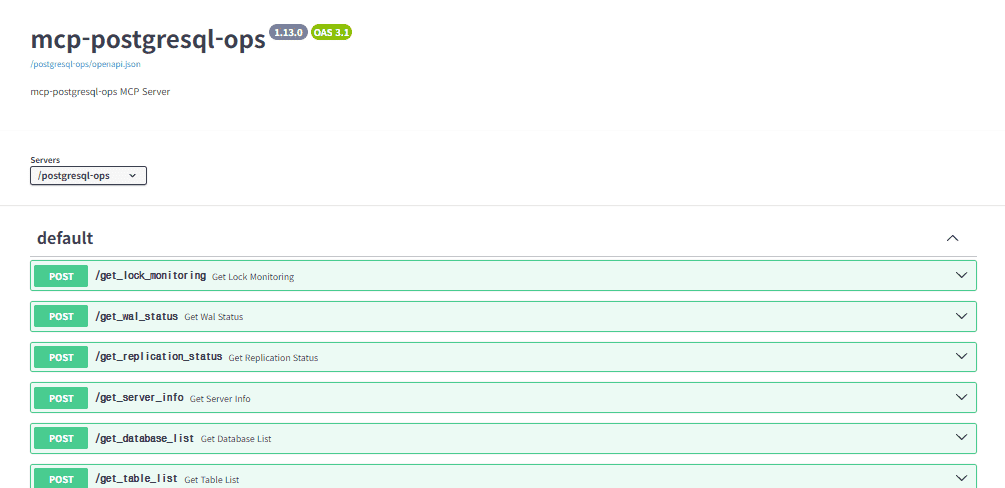
MCPO Swagger APIs


🔐 Security & Authentication

Bearer Token Authentication

For streamable-http mode, this MCP server supports Bearer token authentication to secure remote access. This is especially important when running the server in production environments.

Default Policy: REMOTE_AUTH_ENABLE defaults to false if undefined, null, or empty. This ensures backward compatibility and prevents startup errors when the variable is not set.

Configuration

Enable Authentication:

# In .env file
REMOTE_AUTH_ENABLE=true
REMOTE_SECRET_KEY=my-test-secret-key-12345

Or via CLI:

# Module method
python -m mcp_postgresql_ops --type streamable-http --auth-enable --secret-key my-test-secret-key-12345

# Script method
mcp-postgresql-ops --type streamable-http --auth-enable --secret-key my-test-secret-key-12345

Security Levels

  1. stdio mode (Default): Local-only access, no authentication needed

  2. streamable-http + REMOTE_AUTH_ENABLE=false: Remote access without authentication ⚠️ NOT RECOMMENDED for production

  3. streamable-http + REMOTE_AUTH_ENABLE=true: Remote access with Bearer token authentication ✅ RECOMMENDED for production

Client Configuration

When authentication is enabled, MCP clients must include the Bearer token in the Authorization header:

{
  "mcpServers": {
    "mcp-postgresql-ops": {
      "type": "streamable-http",
      "url": "http://your-server:8000/mcp",
      "headers": {
        "Authorization": "Bearer my-test-secret-key-12345"
      }
    }
  }
}

Security Best Practices

  • Always enable authentication when using streamable-http mode in production

  • Use strong, randomly generated secret keys (32+ characters recommended)

  • Use HTTPS when possible (configure reverse proxy with SSL/TLS)

  • Restrict network access using firewalls or network policies

  • Rotate secret keys regularly for enhanced security

  • Monitor access logs for unauthorized access attempts

Error Handling

When authentication fails, the server returns:

  • 401 Unauthorized for missing or invalid tokens

  • Detailed error messages in JSON format for debugging


🚀 Adding Custom Tools

This MCP server is designed for easy extensibility. Follow these 4 simple steps to add your own custom tools:

Step-by-Step Guide

1. Add Helper Functions (Optional)

Add reusable data functions to src/mcp_postgresql_ops/functions.py:

async def get_your_custom_data(target_database: str = None, limit: int = 20) -> List[Dict[str, Any]]:
    """Your custom data retrieval function."""
    try:
        # Example implementation - adapt to your PostgreSQL needs
        query = """
        SELECT 
            schemaname,
            tablename,
            attname as column_name,
            n_distinct,
            most_common_vals,
            most_common_freqs
        FROM pg_stats 
        WHERE schemaname NOT IN ('information_schema', 'pg_catalog')
        ORDER BY schemaname, tablename, attname
        LIMIT $1
        """
        
        results = await execute_query(query, [limit], database=target_database)
        return results
        
    except Exception as e:
        logger.error(f"Failed to get custom data: {e}")
        raise

2. Create Your MCP Tool

Add your tool function to src/mcp_postgresql_ops/mcp_main.py:

@mcp.tool()
async def get_your_custom_analysis(limit: int = 50, database_name: Optional[str] = None) -> str:
    """
    [Tool Purpose]: Brief description of what your tool does
    
    [Exact Functionality]:
    - Feature 1: Data aggregation and analysis
    - Feature 2: Database monitoring and insights
    - Feature 3: Performance metrics and reporting
    
    [Required Use Cases]:
    - When user asks "your specific analysis request"
    - Your PostgreSQL-specific monitoring needs
    
    Args:
        limit: Maximum results (1-100)
        database_name: Target database name (optional, uses default if not specified)
    
    Returns:
        Formatted analysis results
    """
    try:
        # Always validate input limits
        limit = max(1, min(limit, 100))
        
        # Get your custom data
        results = await get_your_custom_data(target_database=database_name, limit=limit)
        
        if not results:
            return "No data found for custom analysis."
        
        # Format and return results
        return format_table_data(results, f"Custom Analysis Results (Top {len(results)})")
        
    except Exception as e:
        logger.error(f"Failed to get custom analysis: {e}")
        return f"Error: {str(e)}"

3. Update Imports

Add your helper function to the imports section in src/mcp_postgresql_ops/mcp_main.py (around line 30):

from .functions import (
    execute_query,
    execute_single_query,
    format_table_data,
    format_bytes,
    format_duration,
    get_server_version,
    check_extension_exists,
    get_pg_stat_statements_data,
    get_pg_stat_monitor_data,
    sanitize_connection_info,
    read_prompt_template,
    parse_prompt_sections,
    get_current_database_name,
    POSTGRES_CONFIG,
    get_your_custom_data,  # Add your new function here
)

4. Update Prompt Template (Recommended)

Add your tool description to src/mcp_postgresql_ops/prompt_template.md for better natural language recognition:

### **Your Custom Analysis Tool**

### X. **get_your_custom_analysis**
**Purpose**: Brief description of what your tool does
**Usage**: "Show me your custom analysis" or "Get custom analysis for database_name"
**Features**: Data aggregation, database monitoring, performance metrics
**Optional**: `database_name` parameter for specific database analysis
**Limit**: Results limited to 1-100 records for performance

5. Test Your Tool

# Local testing with MCP Inspector
./run-mcp-inspector-local.sh

# Or test with Docker stack
docker-compose up -d
docker-compose logs -f mcp-server

# Test with natural language queries:
# "Show me your custom analysis"
# "Get custom analysis for ecommerce database"
# "Analyze custom data with limit 25"

Important Notes

  • Multi-Database Support: All tools support the optional database_name parameter to target specific databases

  • Input Validation: Always validate limit parameters with max(1, min(limit, 100))

  • Error Handling: Return user-friendly error messages instead of raising exceptions

  • Logging: Use logger.error() for debugging while returning clean error messages to users

  • PostgreSQL Compatibility: Your custom queries should work across PostgreSQL 12-18

  • Extension Dependencies: If your tool requires specific extensions, check availability with check_extension_exists()

Advanced Patterns

For version-aware queries or extension-dependent features, see existing tools like get_pg_stat_statements_top_queries for reference patterns.

That's it! Your custom tool is ready to use with natural language queries through any MCP client.


License

Freely use, modify, and distribute under the MIT License.


⭐ Other Projects

Other MCP servers by the same author:

Available Tools

38 tools
get_active_connectionsA

[Tool Purpose]: Retrieve all active connections and session information on current PostgreSQL server

[Exact Functionality]:

  • Retrieve list of all currently active connected sessions

  • Display user, database, and client address for each connection

  • Include session status and currently executing query information

[Required Use Cases]:

  • When user requests "active connections", "current sessions", "connection status", etc.

  • When server load or performance problem diagnosis is needed

  • When checking connection status of specific users or applications

[Strictly Prohibited Use Cases]:

  • Requests for forceful connection termination or session management

  • Requests for detailed query history of specific sessions

  • Requests for connection security or authentication-related changes

Returns: Information including PID, username, database name, client address, status, and current query

NameRequiredDescriptionDefault

No parameters

Output Schema

NameRequiredDescription
resultYes

TDQS

A4.1/5.0
Behavior3/5

Does the description disclose side effects, auth requirements, rate limits, or destructive behavior?

No annotations are provided, so the description carries the full behavioral burden. It clearly implies a read-only retrieval and enumerates the returned fields (PID, username, database, client address, status, current query), but it does not disclose permission requirements, visibility limits for non-superusers querying pg_stat_activity, or whether results are paginated or truncated on busy servers.

Agents need to know what a tool does to the world before calling it. Descriptions should go beyond structured annotations to explain consequences.

Conciseness4/5

Is the description appropriately sized, front-loaded, and free of redundancy?

The content is organized into labeled sections with the purpose front-loaded, making it easy to scan. It is slightly longer than necessary: the 'Returns' line largely repeats the display fields already listed under 'Exact Functionality,' which is minor redundancy rather than a structural flaw.

Shorter descriptions cost fewer tokens and are easier for agents to parse. Every sentence should earn its place.

Completeness4/5

Given the tool's complexity, does the description cover enough for an agent to succeed on first attempt?

An output schema exists, so the description does not need to explain return values, yet it helpfully names the key fields anyway. For a zero-parameter read-only monitoring tool, the description is nearly complete; the notable gap is the absence of permission or visibility caveats when reading active sessions.

Complex tools with many parameters or behaviors need more documentation. Simple tools need less. This dimension scales expectations accordingly.

Parameters4/5

Does the description clarify parameter syntax, constraints, interactions, or defaults beyond what the schema provides?

The tool takes zero parameters and the schema has no properties, so there is nothing for the description to disambiguate. Baseline for a parameterless tool is 4; the description adds no misleading parameter information.

Input schemas describe structure but not intent. Descriptions should explain non-obvious parameter relationships and valid value ranges.

Purpose5/5

Does the description clearly state what the tool does and how it differs from similar tools?

The description opens with a specific verb and resource: 'Retrieve all active connections and session information on current PostgreSQL server.' It scopes the tool to the current server and enumerates the returned fields (user, database, client address, status, current query), which clearly separates it from sibling monitoring tools like get_wait_events, get_lock_monitoring, or get_pg_stat_statements_top_queries that cover different diagnostic domains.

Agents choose between tools based on descriptions. A clear purpose with a specific verb and resource helps agents select the right tool.

Usage Guidelines4/5

Does the description explain when to use this tool, when not to, or what alternatives exist?

The description provides explicit when-to-use triggers ('active connections', 'current sessions', 'connection status', server load/performance diagnosis, checking specific users or applications) and a 'Strictly Prohibited Use Cases' section excluding termination, query history, and auth changes. However, it does not name the specific sibling tools an agent should invoke instead for those prohibited needs, leaving alternative routing implicit.

Agents often have multiple tools that could apply. Explicit usage guidance like "use X instead of Y when Z" prevents misuse.

get_all_tables_statsA

[Tool Purpose]: Get comprehensive statistics for all tables (including system tables if requested)

[Exact Functionality]:

  • Show detailed access statistics for all tables in database

  • Include sequential scans, index scans, and tuple operations

  • Provide live/dead tuple estimates and maintenance history

  • Option to include system catalog tables

[Required Use Cases]:

  • When user requests "all tables stats", "complete table statistics", etc.

  • When analyzing overall table usage patterns

  • When investigating table maintenance needs across the database

  • When getting comprehensive database activity overview

[Strictly Prohibited Use Cases]:

  • Requests for table maintenance operations (VACUUM, ANALYZE)

  • Requests for statistics reset or modification

  • Requests for table optimization actions

NameRequiredDescriptionDefault
database_nameNoDatabase name to analyze (uses default database if omitted)
include_systemNoInclude system tables in results (default: False)

Output Schema

NameRequiredDescription
resultYes

TDQS

A4.1/5.0
Behavior4/5

Does the description disclose side effects, auth requirements, rate limits, or destructive behavior?

With no annotations present, the description must carry the disclosure burden and it largely does: it makes clear this is a read-only retrieval, enumerates the content of the returned statistics, and explicitly rules out any mutation (reset, maintenance, optimization). What it omits is operational context — that scanning all tables can be expensive on a large catalog, and any permission requirements — which is the one remaining gap for a no-annotation tool.

Agents need to know what a tool does to the world before calling it. Descriptions should go beyond structured annotations to explain consequences.

Conciseness4/5

Is the description appropriately sized, front-loaded, and free of redundancy?

The bracketed headings make the content easy to scan and it is front-loaded with purpose. The three prohibited-use bullets are near-synonyms (maintenance / reset / optimization are all 'not a mutation tool'), which is minor redundancy that keeps it from a 5.

Shorter descriptions cost fewer tokens and are easier for agents to parse. Every sentence should earn its place.

Completeness4/5

Given the tool's complexity, does the description cover enough for an agent to succeed on first attempt?

With only two optional parameters and an output schema in place, the description needn't explain return values, and it covers purpose, content, triggers, and exclusions thoroughly. The only missing element is cost/scale caveat for a whole-catalog scan, a modest gap for this complexity level.

Complex tools with many parameters or behaviors need more documentation. Simple tools need less. This dimension scales expectations accordingly.

Parameters3/5

Does the description clarify parameter syntax, constraints, interactions, or defaults beyond what the schema provides?

Schema description coverage is 100%, so the schema already documents both database_name and include_system; the description only echoes the system-tables option ('including system tables if requested'). That echo is consistent and mildly reinforcing but adds no syntax or default behavior beyond the structured fields, so baseline 3 applies.

Input schemas describe structure but not intent. Descriptions should explain non-obvious parameter relationships and valid value ranges.

Purpose4/5

Does the description clearly state what the tool does and how it differs from similar tools?

The description states a specific verb and resource — 'get comprehensive statistics for all tables' — and the functionality list pins down exactly which statistics (sequential scans, index scans, tuple operations, live/dead tuples). The 'all tables' scope implicitly separates it from single-table siblings like get_table_size_info or get_index_usage_stats, though it never names an alternative explicitly.

Agents choose between tools based on descriptions. A clear purpose with a specific verb and resource helps agents select the right tool.

Usage Guidelines5/5

Does the description explain when to use this tool, when not to, or what alternatives exist?

It provides both a 'Required Use Cases' list and a 'Strictly Prohibited Use Cases' list, telling the agent exactly which phrasings should route here and which requests (VACUUM, ANALYZE, stats reset, optimization) belong elsewhere. That is the full when/when-not pattern.

Agents often have multiple tools that could apply. Explicit usage guidance like "use X instead of Y when Z" prevents misuse.

get_async_io_statusA

[Tool Purpose]: Monitor asynchronous I/O subsystem status (PostgreSQL 18+)

[Exact Functionality]:

  • Show active async I/O operations from pg_aios view

  • Display I/O method configuration and concurrency settings

  • Report async I/O file handle usage

  • Falls back to I/O configuration info on PG < 18

[Required Use Cases]:

  • When user requests "async I/O status", "AIO monitoring", "I/O subsystem"

  • When investigating I/O performance and concurrency

  • When checking async I/O configuration

[Strictly Prohibited Use Cases]:

  • Requests for I/O configuration changes

  • Requests for storage modifications

NameRequiredDescriptionDefault
database_nameNoDatabase name (uses default if omitted)

Output Schema

NameRequiredDescription
resultYes

TDQS

A4.1/5.0
Behavior4/5

Does the description disclose side effects, auth requirements, rate limits, or destructive behavior?

No annotations are supplied, so the description carries the full burden; it discloses the key non-obvious behavior — graceful degradation to configuration-only output on PostgreSQL versions below 18 — plus the underlying source view. It never explicitly states that the tool is read-only and side-effect free, though 'Monitor' and 'Show' strongly imply it, and no permission prerequisites are mentioned.

Agents need to know what a tool does to the world before calling it. Descriptions should go beyond structured annotations to explain consequences.

Conciseness4/5

Is the description appropriately sized, front-loaded, and free of redundancy?

Content is front-loaded and every block earns its place, with the version caveat placed near the top where it matters. The bracketed section headers and bullet scaffolding are somewhat heavier than needed for a one-parameter read tool, but nothing is padded or redundant.

Shorter descriptions cost fewer tokens and are easier for agents to parse. Every sentence should earn its place.

Completeness4/5

Given the tool's complexity, does the description cover enough for an agent to succeed on first attempt?

An output schema exists, so return formatting need not be explained, and the version-fallback behavior plus the enum of covered data make this callable without further reading. The only real omission is read-only/safety framing and any note on how the async-I/O view relates to the other I/O stats tools.

Complex tools with many parameters or behaviors need more documentation. Simple tools need less. This dimension scales expectations accordingly.

Parameters3/5

Does the description clarify parameter syntax, constraints, interactions, or defaults beyond what the schema provides?

Schema coverage is 100% and the single optional parameter (database_name) is fully documented in the schema, so the baseline of 3 applies. The description adds nothing about database scoping — notably, it does not say whether pg_aios statistics are cluster-wide or per-database when database_name is supplied.

Input schemas describe structure but not intent. Descriptions should explain non-obvious parameter relationships and valid value ranges.

Purpose5/5

Does the description clearly state what the tool does and how it differs from similar tools?

States a specific verb and resource — monitoring the asynchronous I/O subsystem — and scopes it to PostgreSQL 18+ with a documented fallback. The three bullet points concretely enumerate what is shown (active operations from pg_aios, configuration/concurrency, file handle usage), which is far more than a restatement of the name.

Agents choose between tools based on descriptions. A clear purpose with a specific verb and resource helps agents select the right tool.

Usage Guidelines4/5

Does the description explain when to use this tool, when not to, or what alternatives exist?

Provides explicit 'Required Use Cases' with quoted trigger phrases and an explicit 'Strictly Prohibited Use Cases' section covering configuration and storage changes. What is missing is sibling differentiation: the toolset contains get_io_stats, get_table_io_stats, get_index_io_stats and get_per_backend_io_stats, and the description never says when to prefer the async-I/O view over those.

Agents often have multiple tools that could apply. Explicit usage guidance like "use X instead of Y when Z" prevents misuse.

get_autovacuum_activityA

[Tool Purpose]: Monitor recent autovacuum and autoanalyze activity patterns and execution history

[Exact Functionality]:

  • Track recent autovacuum and autoanalyze execution patterns

  • Analyze autovacuum frequency and timing intervals

  • Show tables with most/least autovacuum activity

  • Calculate average time between autovacuum executions

  • Identify tables with irregular autovacuum patterns

[Required Use Cases]:

  • When user requests "autovacuum activity", "autovacuum history", "vacuum patterns", etc.

  • When monitoring autovacuum performance and effectiveness

  • When troubleshooting autovacuum scheduling issues

  • When analyzing autovacuum workload distribution

[Strictly Prohibited Use Cases]:

  • Requests for autovacuum process control or restart

  • Requests for autovacuum configuration modifications

  • Requests for manual vacuum scheduling

NameRequiredDescriptionDefault
limitNoMaximum number of tables to show (1-100, default: 50)
hours_backNoTime period to analyze in hours (default: 24, max: 168 for 7 days)
schema_nameNoSchema to analyze (analyzes all user schemas if omitted)
database_nameNoTarget database name (uses default database from POSTGRES_DB env var if omitted)

Output Schema

NameRequiredDescription
resultYes

TDQS

A3.6/5.0
Behavior3/5

Does the description disclose side effects, auth requirements, rate limits, or destructive behavior?

With no annotations, the description carries the full behavioral burden. The prohibited-use list does implicitly establish this as an observational, read-only tool that cannot control or reconfigure autovacuum, which is valuable. But it says nothing about data provenance or limits (e.g. dependence on pg_stat_* counters, stats reset behavior, required privileges), which matters for an activity-history tool.

Agents need to know what a tool does to the world before calling it. Descriptions should go beyond structured annotations to explain consequences.

Conciseness3/5

Is the description appropriately sized, front-loaded, and free of redundancy?

The bracketed sections make it scannable and front-loaded, which helps. But there is overlap: 'Track recent autovacuum and autoanalyze execution patterns' in Functionality merely restates the purpose line, and several Functionality bullets and Use Case bullets cover the same ground (frequency/timing vs. monitoring performance).

Shorter descriptions cost fewer tokens and are easier for agents to parse. Every sentence should earn its place.

Completeness4/5

Given the tool's complexity, does the description cover enough for an agent to succeed on first attempt?

An output schema exists, so return values need no explanation, and all parameters are optional and schema-documented. The description covers what it does, when to invoke it, and what it refuses to do. The main omission is sibling disambiguation against the multiple other vacuum-related tools in this server.

Complex tools with many parameters or behaviors need more documentation. Simple tools need less. This dimension scales expectations accordingly.

Parameters3/5

Does the description clarify parameter syntax, constraints, interactions, or defaults beyond what the schema provides?

Schema description coverage is 100%, so all four optional parameters (limit, hours_back, schema_name, database_name) are already fully documented in the schema, including ranges and defaults. The description adds no additional meaning about their interaction, such as whether hours_back bounds the interval calculations. Baseline 3 applies when the schema does the heavy lifting.

Input schemas describe structure but not intent. Descriptions should explain non-obvious parameter relationships and valid value ranges.

Purpose4/5

Does the description clearly state what the tool does and how it differs from similar tools?

The description opens with a specific verb and resource: monitoring recent autovacuum and autoanalyze activity patterns and execution history. That is materially clearer than the name alone and separates it from control operations. However, it never distinguishes itself from close siblings such as get_autovacuum_status, get_running_vacuum_operations, or get_vacuum_effectiveness_analysis, so an agent cannot route confidently between them.

Agents choose between tools based on descriptions. A clear purpose with a specific verb and resource helps agents select the right tool.

Usage Guidelines4/5

Does the description explain when to use this tool, when not to, or what alternatives exist?

It provides explicit trigger phrases ('autovacuum activity', 'autovacuum history') plus three concrete scenarios (performance monitoring, scheduling troubleshooting, workload distribution). The prohibited-use section usefully rules out control/config/mutation requests. The gap is that no alternative tool is ever named for the excluded or adjacent cases.

Agents often have multiple tools that could apply. Explicit usage guidance like "use X instead of Y when Z" prevents misuse.

get_autovacuum_statusA

[Tool Purpose]: Analyze autovacuum configuration and current maintenance status for tables

[Exact Functionality]:

  • Analyze autovacuum trigger conditions based on dead tuple thresholds

  • Calculate current dead tuple ratios vs autovacuum trigger points

  • Show autovacuum configuration settings per table

  • Identify tables requiring immediate autovacuum attention

  • Estimate next autovacuum execution likelihood

[Required Use Cases]:

  • When user requests "autovacuum status", "autovacuum configuration", "vacuum trigger analysis", etc.

  • When planning autovacuum optimization and tuning

  • When troubleshooting autovacuum performance issues

  • When identifying tables with autovacuum problems

[Strictly Prohibited Use Cases]:

  • Requests for autovacuum configuration changes

  • Requests for manual VACUUM execution

  • Requests for autovacuum process restart or control

NameRequiredDescriptionDefault
limitNoMaximum number of tables to analyze (1-100, default: 50)
schema_nameNoSchema to analyze (analyzes all user schemas if omitted)
database_nameNoTarget database name (uses default database from POSTGRES_DB env var if omitted)
table_patternNoTable name pattern to filter (SQL LIKE pattern, e.g., 'user%', '%log%', 'temp_*')

Output Schema

NameRequiredDescription
resultYes

TDQS

A3.9/5.0
Behavior4/5

Does the description disclose side effects, auth requirements, rate limits, or destructive behavior?

With no annotations, the description carries the full disclosure burden and does well: it makes clear the tool only reads/analyzes and never mutates, and it specifies what the analysis covers (trigger conditions, current ratios, per-table settings, tables needing attention). It omits operational traits such as cost on large catalogs or any permission requirements, which is why it isn't a 5.

Agents need to know what a tool does to the world before calling it. Descriptions should go beyond structured annotations to explain consequences.

Conciseness4/5

Is the description appropriately sized, front-loaded, and free of redundancy?

Bracketed headers make it front-loaded and scannable, and the use-case sections are the highest-value content. It is slightly padded — the 'Exact Functionality' bullets overlap with the purpose line and with each other (trigger conditions vs dead tuple ratios vs next execution likelihood).

Shorter descriptions cost fewer tokens and are easier for agents to parse. Every sentence should earn its place.

Completeness4/5

Given the tool's complexity, does the description cover enough for an agent to succeed on first attempt?

An output schema exists, so return shape needn't be explained, and all four parameters are schema-documented; use cases and exclusions are thorough. The remaining gap is sibling differentiation inside a 40-tool namespace, where get_autovacuum_activity and get_running_vacuum_operations sit closest to this one.

Complex tools with many parameters or behaviors need more documentation. Simple tools need less. This dimension scales expectations accordingly.

Parameters3/5

Does the description clarify parameter syntax, constraints, interactions, or defaults beyond what the schema provides?

Schema description coverage is 100%, so limit, schema_name, database_name, and table_pattern are already fully documented in structured fields. The description adds no filtering syntax hints or defaults beyond the schema ('per table', 'tables requiring attention'), which is the expected baseline for a fully-covered schema.

Input schemas describe structure but not intent. Descriptions should explain non-obvious parameter relationships and valid value ranges.

Purpose4/5

Does the description clearly state what the tool does and how it differs from similar tools?

States a specific verb and resource ('Analyze autovacuum configuration and current maintenance status for tables') and enumerates concrete computations (dead tuple ratios vs trigger points, per-table settings, next-run likelihood). An agent can tell this is a read-only configuration/threshold analysis tool. However, it never names the closely overlapping siblings (get_autovacuum_activity, get_running_vacuum_operations, get_vacuum_analyze_stats, get_vacuum_effectiveness_analysis), so the boundary must be inferred from the prohibited list.

Agents choose between tools based on descriptions. A clear purpose with a specific verb and resource helps agents select the right tool.

Usage Guidelines4/5

Does the description explain when to use this tool, when not to, or what alternatives exist?

The 'Required Use Cases' section gives explicit trigger phrases and scenarios, and 'Strictly Prohibited Use Cases' cleanly rules out config changes, manual VACUUM, and process control. What it lacks is routing to a specific alternative tool for those excluded needs — it describes the boundaries but does not point the agent at a sibling.

Agents often have multiple tools that could apply. Explicit usage guidance like "use X instead of Y when Z" prevents misuse.

get_bgwriter_statsA

[Tool Purpose]: Analyze background writer and checkpoint performance statistics with version compatibility

[Exact Functionality]:

  • Show checkpoint execution statistics (timed vs requested)

  • Display checkpoint timing information (write and sync times)

  • Provide buffer writing statistics by different processes

  • Analyze background writer performance and efficiency

  • Automatically adapts to PostgreSQL version (17+ uses separate checkpointer view)

[Required Use Cases]:

  • When user requests "checkpoint stats", "bgwriter performance", "buffer stats", etc.

  • When analyzing I/O performance and checkpoint impact

  • When investigating background writer efficiency

  • When troubleshooting checkpoint-related performance issues

[Strictly Prohibited Use Cases]:

  • Requests for checkpoint execution or configuration changes

  • Requests for background writer parameter modifications

  • Requests for statistics reset

Returns: Background writer and checkpoint performance statistics with version-appropriate data

NameRequiredDescriptionDefault

No parameters

Output Schema

NameRequiredDescription
resultYes

TDQS

A4.2/5.0
Behavior4/5

Does the description disclose side effects, auth requirements, rate limits, or destructive behavior?

With no annotations, the description carries the burden and mostly succeeds: the prohibited-use list makes clear this is a read-only observation tool, and it discloses real behavior beyond the name — automatic version adaptation, with PostgreSQL 17+ reading a separate checkpointer view. It stops short of stating required privileges or whether the stats are cumulative since reset.

Agents need to know what a tool does to the world before calling it. Descriptions should go beyond structured annotations to explain consequences.

Conciseness4/5

Is the description appropriately sized, front-loaded, and free of redundancy?

Section headers front-load purpose, functionality, and use cases, so an agent can scan it quickly. It is somewhat longer than needed — the bracketed section headers and the closing 'Returns' sentence largely restate points already made and duplicate the existing output schema.

Shorter descriptions cost fewer tokens and are easier for agents to parse. Every sentence should earn its place.

Completeness4/5

Given the tool's complexity, does the description cover enough for an agent to succeed on first attempt?

For a no-param, read-only stats tool with an output schema present, the description supplies what the schema cannot: what the numbers mean, version-dependent behavior, and negative scope. Return-value detail is correctly left to the output schema, so no meaningful gap remains.

Complex tools with many parameters or behaviors need more documentation. Simple tools need less. This dimension scales expectations accordingly.

Parameters4/5

Does the description clarify parameter syntax, constraints, interactions, or defaults beyond what the schema provides?

The tool takes zero parameters, so there is no parameter semantics to explain; the baseline for a no-arg tool applies. Nothing in the description misrepresents the empty schema.

Input schemas describe structure but not intent. Descriptions should explain non-obvious parameter relationships and valid value ranges.

Purpose4/5

Does the description clearly state what the tool does and how it differs from similar tools?

The description names a concrete verb+resource pair (analyze background writer and checkpoint statistics) and enumerates the exact statistics exposed (checkpoint timed vs requested, write/sync timing, per-process buffer writes). This clearly separates it from siblings like get_io_stats or get_database_stats, though it never names those alternatives directly.

Agents choose between tools based on descriptions. A clear purpose with a specific verb and resource helps agents select the right tool.

Usage Guidelines5/5

Does the description explain when to use this tool, when not to, or what alternatives exist?

It gives explicit trigger phrases ("checkpoint stats", "bgwriter performance", "buffer stats"), three concrete diagnostic scenarios, and a dedicated 'Strictly Prohibited Use Cases' block excluding checkpoint execution, parameter changes, and stats resets. This is the full when/when-not/alternative pattern.

Agents often have multiple tools that could apply. Explicit usage guidance like "use X instead of Y when Z" prevents misuse.

get_current_database_infoA

[Tool Purpose]: Get information about the current database connection

[Exact Functionality]:

  • Show the name of the currently connected database

  • Display database-specific information like encoding, locale, and size

  • Provide connection context for clarity in multi-database environments

[Required Use Cases]:

  • When user asks "what database am I connected to?", "current database", etc.

  • When clarifying database context for analysis operations

  • When troubleshooting connection issues or confirming target database

[Strictly Prohibited Use Cases]:

  • Requests for database structure changes or creation/deletion

  • Requests for user authentication or permission changes

  • Requests for configuration modifications

NameRequiredDescriptionDefault
database_nameNoTarget database to get info for (uses default connection if omitted)

Output Schema

NameRequiredDescription
resultYes

TDQS

A3.8/5.0
Behavior4/5

Does the description disclose side effects, auth requirements, rate limits, or destructive behavior?

With no annotations, the description carries the full burden and does so reasonably: 'Get/Show/Display' make clear this is a read-only, non-destructive introspection call, and the multi-database/connection-context framing explains why it exists. It stops short of stating permission requirements or what happens when the target database is unreachable.

Agents need to know what a tool does to the world before calling it. Descriptions should go beyond structured annotations to explain consequences.

Conciseness3/5

Is the description appropriately sized, front-loaded, and free of redundancy?

The bracketed section headers make it scannable and purpose is front-loaded, but the functionality bullets largely restate the opening sentence, and several prohibited use cases (auth changes, config modifications) are things no sane agent would attempt with this tool, so they are low-value padding.

Shorter descriptions cost fewer tokens and are easier for agents to parse. Every sentence should earn its place.

Completeness4/5

Given the tool's complexity, does the description cover enough for an agent to succeed on first attempt?

The tool is simple, has an output schema documenting return values, and one fully documented optional parameter; the description covers purpose, scope, and triggers adequately. The only real gap is the unmentioned ability to target a different database via the parameter.

Complex tools with many parameters or behaviors need more documentation. Simple tools need less. This dimension scales expectations accordingly.

Parameters3/5

Does the description clarify parameter syntax, constraints, interactions, or defaults beyond what the schema provides?

Schema description coverage is 100%, so the single optional database_name parameter is already documented in the schema. The description never mentions that a non-default database can be targeted, but with full schema coverage the baseline of 3 applies.

Input schemas describe structure but not intent. Descriptions should explain non-obvious parameter relationships and valid value ranges.

Purpose4/5

Does the description clearly state what the tool does and how it differs from similar tools?

The description names a specific verb and resource ('Get information about the current database connection') and enumerates exactly what is returned (name, encoding, locale, size). It implicitly distinguishes itself from sibling get_database_list by scoping to the *current* connection, but it never names that sibling explicitly.

Agents choose between tools based on descriptions. A clear purpose with a specific verb and resource helps agents select the right tool.

Usage Guidelines4/5

Does the description explain when to use this tool, when not to, or what alternatives exist?

It gives concrete trigger phrases ('what database am I connected to?') and explicit prohibited categories, which is well above typical. The exclusions, however, are out-of-scope mutating operations rather than real alternatives, and no sibling tool is offered as a substitute for overlapping cases like database size.

Agents often have multiple tools that could apply. Explicit usage guidance like "use X instead of Y when Z" prevents misuse.

get_database_bloat_overviewA

[Tool Purpose]: Provide database-wide bloat overview and summary statistics

[Exact Functionality]:

  • Summarize bloat statistics across all schemas

  • Identify schemas and tables with highest bloat ratios

  • Calculate total estimated bloat size per schema

  • Show aggregate dead tuple counts and maintenance status

[Required Use Cases]:

  • When user requests "database bloat overview", "bloat summary", etc.

  • When getting high-level view of database storage efficiency

  • When planning database maintenance activities

  • When investigating overall database performance issues

[Strictly Prohibited Use Cases]:

  • Requests for automatic maintenance operations

  • Requests for bloat cleanup or removal

  • Requests for schema or database restructuring

NameRequiredDescriptionDefault
limitNoMaximum number of schemas to show (1-50, default: 10)
database_nameNoTarget database name (uses default database from POSTGRES_DB env var if omitted)

Output Schema

NameRequiredDescription
resultYes

TDQS

A4.2/5.0
Behavior4/5

Does the description disclose side effects, auth requirements, rate limits, or destructive behavior?

With no annotations, the description carries the full behavioral burden, and it does clarify that the tool summarizes and reports rather than performing maintenance, cleanup, or restructuring. It does not explicitly state read-only status, permissions, or rate limits, but its prohibited-use section meaningfully reduces ambiguity about side effects.

Agents need to know what a tool does to the world before calling it. Descriptions should go beyond structured annotations to explain consequences.

Conciseness4/5

Is the description appropriately sized, front-loaded, and free of redundancy?

The description is well structured and front-loads the purpose, functionality, and usage constraints. It is somewhat verbose with labeled sections and repetitive prohibited-use bullets, but the structure remains useful rather than bloated.

Shorter descriptions cost fewer tokens and are easier for agents to parse. Every sentence should earn its place.

Completeness5/5

Given the tool's complexity, does the description cover enough for an agent to succeed on first attempt?

Given the low complexity, only two optional parameters, full schema description coverage, and an output schema, the description is complete enough for correct invocation. It covers purpose, scope, use cases, and exclusions without needing to explain return values in detail.

Complex tools with many parameters or behaviors need more documentation. Simple tools need less. This dimension scales expectations accordingly.

Parameters3/5

Does the description clarify parameter syntax, constraints, interactions, or defaults beyond what the schema provides?

Schema description coverage is 100%, so the schema already documents both parameters, including limit and database_name. The description adds no parameter-specific guidance beyond the schema, so the baseline score of 3 is appropriate.

Input schemas describe structure but not intent. Descriptions should explain non-obvious parameter relationships and valid value ranges.

Purpose5/5

Does the description clearly state what the tool does and how it differs from similar tools?

The description states a specific verb and resource: provide a database-wide bloat overview and summary statistics. It clarifies scope with 'across all schemas', 'per schema', and aggregate dead tuple counts, which distinguishes it from table-level siblings such as get_table_bloat_analysis.

Agents choose between tools based on descriptions. A clear purpose with a specific verb and resource helps agents select the right tool.

Usage Guidelines4/5

Does the description explain when to use this tool, when not to, or what alternatives exist?

It gives explicit required use cases and strictly prohibited use cases, including when to use it for high-level storage efficiency or maintenance planning. It does not explicitly name alternative sibling tools for more granular analysis, so it stops short of a full when/when-not/alternatives routing statement.

Agents often have multiple tools that could apply. Explicit usage guidance like "use X instead of Y when Z" prevents misuse.

get_database_conflicts_statsA

[Tool Purpose]: Analyze query conflicts in standby/replica database environments

[Exact Functionality]:

  • Show conflict statistics for standby servers (only relevant on replicas)

  • Display conflicts by type (tablespace, lock, snapshot, bufferpin, deadlock)

  • Help diagnose replication-related performance issues

  • Provide conflict resolution statistics

[Required Use Cases]:

  • When user requests "replication conflicts", "standby conflicts", etc.

  • When analyzing replica server performance issues

  • When troubleshooting replication lag or conflicts

  • When monitoring standby server health

[Strictly Prohibited Use Cases]:

  • Requests for conflict resolution actions

  • Requests for replication configuration changes

  • Requests for statistics reset

NameRequiredDescriptionDefault
database_nameNoDatabase name to analyze (uses default database if omitted)

Output Schema

NameRequiredDescription
resultYes

TDQS

A4.3/5.0
Behavior4/5

Does the description disclose side effects, auth requirements, rate limits, or destructive behavior?

No annotations, so the description carries the burden: verbs like "Show/Display/Provide" plus the prohibition on resolution actions and statistics reset signal a purely read-only, side-effect-free diagnostic. It also discloses the key constraint that it is only relevant on replicas. It does not mention permission requirements, but that is minor for a stats-read tool.

Agents need to know what a tool does to the world before calling it. Descriptions should go beyond structured annotations to explain consequences.

Conciseness4/5

Is the description appropriately sized, front-loaded, and free of redundancy?

Bracketed section headers front-load purpose and functionality before use cases, making it easy to scan. Slightly verbose with some overlap between "Exact Functionality" and "Required Use Cases", but no sentence is truly wasted.

Shorter descriptions cost fewer tokens and are easier for agents to parse. Every sentence should earn its place.

Completeness4/5

Given the tool's complexity, does the description cover enough for an agent to succeed on first attempt?

With an output schema present, return values need not be explained, and the single optional parameter is documented in the schema. The description covers use cases, exclusions, and the replica-only constraint, leaving only minor gaps around permissions/limits.

Complex tools with many parameters or behaviors need more documentation. Simple tools need less. This dimension scales expectations accordingly.

Parameters3/5

Does the description clarify parameter syntax, constraints, interactions, or defaults beyond what the schema provides?

One optional parameter with 100% schema description coverage, so the schema already explains database_name and its default behavior. The description adds no format or selection guidance beyond what the schema states, so baseline 3 applies.

Input schemas describe structure but not intent. Descriptions should explain non-obvious parameter relationships and valid value ranges.

Purpose5/5

Does the description clearly state what the tool does and how it differs from similar tools?

States a specific verb+resource ("Analyze query conflicts") and scopes it to standby/replica environments, which cleanly separates it from siblings like get_replication_status or get_wal_status. The enumerated conflict types (tablespace, lock, snapshot, bufferpin, deadlock) make the resource concrete.

Agents choose between tools based on descriptions. A clear purpose with a specific verb and resource helps agents select the right tool.

Usage Guidelines5/5

Does the description explain when to use this tool, when not to, or what alternatives exist?

Provides both positive triggers ("replication conflicts", "standby conflicts", replica performance troubleshooting) and a strictly prohibited list (conflict resolution actions, replication configuration changes, statistics reset). The agent knows exactly when to select this tool and when not to.

Agents often have multiple tools that could apply. Explicit usage guidance like "use X instead of Y when Z" prevents misuse.

get_database_listA

[Tool Purpose]: Retrieve list of all databases and their basic information on PostgreSQL server

[Exact Functionality]:

  • Retrieve list of all databases on the server

  • Display owner, encoding, and size information for each database

  • Include database connection limit information

[Required Use Cases]:

  • When user requests "database list", "DB list", "database info", etc.

  • When need to check what databases exist on the server

  • When database size or owner information is needed

[Strictly Prohibited Use Cases]:

  • Requests for tables or schemas inside specific databases

  • Requests for database creation or deletion

  • Requests related to user permissions or security

Returns: Table-format information including database name, owner, encoding, size, and connection limit

NameRequiredDescriptionDefault

No parameters

Output Schema

NameRequiredDescription
resultYes

TDQS

A4.3/5.0
Behavior4/5

Does the description disclose side effects, auth requirements, rate limits, or destructive behavior?

With no annotations, the description carries the disclosure burden and does state this is a read-only listing plus the exact attributes surfaced (owner, encoding, size, connection limit), which is meaningful behavioral context. It omits operational traits such as whether elevated privileges are needed to see all databases or the cost of enumerating a large cluster.

Agents need to know what a tool does to the world before calling it. Descriptions should go beyond structured annotations to explain consequences.

Conciseness4/5

Is the description appropriately sized, front-loaded, and free of redundancy?

Bracketed section headers make it scannable and the purpose is front-loaded in the first line. There is mild redundancy between the Exact Functionality bullets and the trailing Returns block, which restates the same fields, but no sentence is truly wasteful.

Shorter descriptions cost fewer tokens and are easier for agents to parse. Every sentence should earn its place.

Completeness4/5

Given the tool's complexity, does the description cover enough for an agent to succeed on first attempt?

For a zero-parameter read tool with an output schema declared, the description covers purpose, invocation triggers, exclusions and the shape of results, which is essentially everything an agent needs. The only shortfall is the absence of privilege/performance notes, which matter little given the output schema already defines the return values.

Complex tools with many parameters or behaviors need more documentation. Simple tools need less. This dimension scales expectations accordingly.

Parameters4/5

Does the description clarify parameter syntax, constraints, interactions, or defaults beyond what the schema provides?

The tool takes zero parameters and the schema is closed (additionalProperties: false), so there is nothing to disambiguate; baseline is 4. The description correctly signals the tool is unfiltered ('all databases') and takes no arguments.

Input schemas describe structure but not intent. Descriptions should explain non-obvious parameter relationships and valid value ranges.

Purpose5/5

Does the description clearly state what the tool does and how it differs from similar tools?

States a specific verb and resource ('Retrieve list of all databases and their basic information on PostgreSQL server') and scopes it to the whole server rather than a single database, which separates it from siblings like get_database_schema_info or get_table_list. The Exact Functionality block enumerates the returned attributes, so an agent knows exactly what this tool answers.

Agents choose between tools based on descriptions. A clear purpose with a specific verb and resource helps agents select the right tool.

Usage Guidelines4/5

Does the description explain when to use this tool, when not to, or what alternatives exist?

Provides explicit positive triggers ('database list', 'DB list', checking what databases exist, size/owner needs) and a Strictly Prohibited list that steers away from tables, schemas, DDL and permissions work. It never names the alternative sibling tools (e.g. get_table_list, get_database_size_info) that should be picked instead, so the routing is implied rather than explicit.

Agents often have multiple tools that could apply. Explicit usage guidance like "use X instead of Y when Z" prevents misuse.

get_database_schema_infoA

[Tool Purpose]: Retrieve detailed information about database schemas (namespaces) and their contents

[Exact Functionality]:

  • Show all schemas in a database with their owners and permissions

  • Display schema-level statistics including table count and total size

  • List all objects (tables, views, functions) within specific schema

  • Show schema access privileges and usage patterns

[Required Use Cases]:

  • When user requests "database schema info", "schema overview", "namespace structure", etc.

  • When analyzing database organization and schema-level permissions

  • When exploring multi-schema database architecture

[Strictly Prohibited Use Cases]:

  • Requests for actual data inside tables

  • Requests for schema structure changes or DDL operations

  • Requests for individual table details (use get_table_schema_info for that)

NameRequiredDescriptionDefault
schema_nameNoSpecific schema name to analyze (if None, shows all schemas)
database_nameYesDatabase name to query (REQUIRED - specify which database to analyze)

Output Schema

NameRequiredDescription
resultYes

TDQS

A4.3/5.0
Behavior4/5

Does the description disclose side effects, auth requirements, rate limits, or destructive behavior?

No annotations are supplied, so the description carries the load; it does so reasonably by framing the tool as a pure read/introspection call and enumerating the categories of metadata surfaced (owners, privileges, statistics, objects). It stops short of stating explicitly that the call is read-only and side-effect free, and says nothing about cost or permission requirements for reading schema metadata.

Agents need to know what a tool does to the world before calling it. Descriptions should go beyond structured annotations to explain consequences.

Conciseness4/5

Is the description appropriately sized, front-loaded, and free of redundancy?

Front-loaded with the purpose and organized under labeled sections, so an agent can skim to the relevant block. It is somewhat over-formatted and repetitive — 'Exact Functionality' bullets overlap the 'Required Use Cases' bullets, and 'usage patterns' is vague filler — but nothing is seriously off-topic.

Shorter descriptions cost fewer tokens and are easier for agents to parse. Every sentence should earn its place.

Completeness4/5

Given the tool's complexity, does the description cover enough for an agent to succeed on first attempt?

For a two-parameter introspection tool with a full output schema, the description covers scope, contents, and boundaries well enough to call it correctly. The only real gap, given zero annotations, is the absence of an explicit read-only/no-side-effects statement and any note on the permissions needed to view schema metadata.

Complex tools with many parameters or behaviors need more documentation. Simple tools need less. This dimension scales expectations accordingly.

Parameters3/5

Does the description clarify parameter syntax, constraints, interactions, or defaults beyond what the schema provides?

Schema description coverage is 100%, so both parameters are already documented in the schema, including the null-means-all-schemas default. The description confirms the all-vs-specific scope behavior in prose but adds no format, syntax, or naming details beyond what the schema supplies.

Input schemas describe structure but not intent. Descriptions should explain non-obvious parameter relationships and valid value ranges.

Purpose5/5

Does the description clearly state what the tool does and how it differs from similar tools?

The description opens with a specific verb+resource (retrieve schema/namespace info and their contents) and enumerates exactly what is returned: schemas, owners, permissions, table counts, sizes, contained objects. It explicitly separates itself from get_table_schema_info, so an agent can distinguish it from that sibling without opening either schema.

Agents choose between tools based on descriptions. A clear purpose with a specific verb and resource helps agents select the right tool.

Usage Guidelines5/5

Does the description explain when to use this tool, when not to, or what alternatives exist?

Provides explicit 'Required Use Cases' (schema overview, namespace structure, org/permission analysis) and explicit 'Strictly Prohibited Use Cases', including a named alternative for table-level detail. This is the when-to-use/when-not/alternative triad stated outright.

Agents often have multiple tools that could apply. Explicit usage guidance like "use X instead of Y when Z" prevents misuse.

get_database_size_infoA

[Tool Purpose]: Analyze size information and storage usage status of all databases in PostgreSQL server

[Exact Functionality]:

  • Retrieve disk usage for each database

  • Analyze overall server storage usage status

  • Provide database list sorted by size

[Required Use Cases]:

  • When user requests "database size", "disk usage", "storage space", etc.

  • When capacity management or cleanup is needed

  • When resource usage status by database needs to be identified

[Strictly Prohibited Use Cases]:

  • Requests for data deletion or cleanup operations

  • Requests for storage configuration changes

  • Requests related to backup or restore

Returns: Table-format information with database names and size information sorted by size

NameRequiredDescriptionDefault

No parameters

Output Schema

NameRequiredDescription
resultYes

TDQS

A4/5.0
Behavior4/5

Does the description disclose side effects, auth requirements, rate limits, or destructive behavior?

With no annotations, the description carries the full burden and discloses that the tool retrieves and analyzes disk usage rather than mutating data, explicitly prohibiting deletion, configuration changes, and backup/restore. It also states the return format as table-format, sorted by size. It does not mention read-only status or permission requirements, but the behavioral boundaries are largely covered.

Agents need to know what a tool does to the world before calling it. Descriptions should go beyond structured annotations to explain consequences.

Conciseness4/5

Is the description appropriately sized, front-loaded, and free of redundancy?

The description is organized into clear sections and front-loads the purpose. It is appropriately sized, though slightly verbose with repeated mentions of storage usage and sorting.

Shorter descriptions cost fewer tokens and are easier for agents to parse. Every sentence should earn its place.

Completeness4/5

Given the tool's complexity, does the description cover enough for an agent to succeed on first attempt?

Given zero parameters, an existing output schema, and no annotations, the description is nearly complete: it covers purpose, usage contexts, prohibited contexts, and return shape. It could better distinguish itself from look-alike siblings such as get_database_stats, but an agent has enough to select it correctly.

Complex tools with many parameters or behaviors need more documentation. Simple tools need less. This dimension scales expectations accordingly.

Parameters4/5

Does the description clarify parameter syntax, constraints, interactions, or defaults beyond what the schema provides?

The tool has zero parameters, so parameter semantics are not a concern. The description correctly implies no input is needed; baseline for zero parameters is 4.

Input schemas describe structure but not intent. Descriptions should explain non-obvious parameter relationships and valid value ranges.

Purpose4/5

Does the description clearly state what the tool does and how it differs from similar tools?

The description states a specific verb and resource: analyze size and storage usage of all databases in a PostgreSQL server. It distinguishes the scope as server-wide database size rather than table size, but it does not explicitly name or contrast with close siblings such as get_table_size_info or get_database_stats.

Agents choose between tools based on descriptions. A clear purpose with a specific verb and resource helps agents select the right tool.

Usage Guidelines4/5

Does the description explain when to use this tool, when not to, or what alternatives exist?

It provides explicit required use cases (database size, disk usage, storage space, capacity management, cleanup needs) and strictly prohibited use cases (deletion, configuration changes, backup/restore). It lacks explicit alternatives, but the when/when-not guidance is clear.

Agents often have multiple tools that could apply. Explicit usage guidance like "use X instead of Y when Z" prevents misuse.

get_database_statsA

[Tool Purpose]: Get comprehensive database-wide statistics and performance metrics

[Exact Functionality]:

  • Show database-wide transaction statistics (commits, rollbacks)

  • Display block I/O statistics (disk reads vs buffer hits)

  • Provide tuple operation statistics (returned, fetched, inserted, updated, deleted)

  • Show temporary file usage and deadlock counts

  • Include checksum failure information and I/O timing data

[Required Use Cases]:

  • When user requests "database statistics", "database performance", "transaction stats", etc.

  • When analyzing overall database performance and activity

  • When investigating I/O performance or buffer cache efficiency

  • When checking for deadlocks or temporary file usage

[Strictly Prohibited Use Cases]:

  • Requests for statistics reset or modification

  • Requests for database configuration changes

  • Requests for performance tuning actions

Returns: Comprehensive database statistics including transactions, I/O, tuples, and performance metrics

NameRequiredDescriptionDefault

No parameters

Output Schema

NameRequiredDescription
resultYes

TDQS

A4.4/5.0
Behavior4/5

Does the description disclose side effects, auth requirements, rate limits, or destructive behavior?

With no annotations present, the description carries the full burden and does disclose the returned metric families and implicitly establishes read-only behavior via the prohibited-use list (no reset/modification). It stops short of stating which database instance/scope is covered, whether it aggregates across all databases, or the cost/latency of the query.

Agents need to know what a tool does to the world before calling it. Descriptions should go beyond structured annotations to explain consequences.

Conciseness3/5

Is the description appropriately sized, front-loaded, and free of redundancy?

Front-loaded with a clear purpose line and bracketed sections, but the '[Exact Functionality]' bullet list is substantially restated by the closing 'Returns:' paragraph, so several sentences do not earn their place. The header scaffolding is heavier than the content requires.

Shorter descriptions cost fewer tokens and are easier for agents to parse. Every sentence should earn its place.

Completeness4/5

Given the tool's complexity, does the description cover enough for an agent to succeed on first attempt?

An output schema exists, so return values need no further explanation, and with zero parameters and no annotations the remaining burden is modest. The one real gap is scope ambiguity: it never says whether 'database-wide' means the connected database only or all databases, which matters given the get_database_list and get_current_database_info siblings.

Complex tools with many parameters or behaviors need more documentation. Simple tools need less. This dimension scales expectations accordingly.

Parameters4/5

Does the description clarify parameter syntax, constraints, interactions, or defaults beyond what the schema provides?

The tool takes zero parameters, so the baseline is 4; there is no parameter semantics to add and the description correctly does not invent any. Schema coverage is 100% for the empty object, leaving nothing unaddressed.

Input schemas describe structure but not intent. Descriptions should explain non-obvious parameter relationships and valid value ranges.

Purpose5/5

Does the description clearly state what the tool does and how it differs from similar tools?

States a specific verb and resource ('Get comprehensive database-wide statistics and performance metrics') and enumerates the exact statistic families returned (transactions, block I/O, tuples, temp files, deadlocks, checksums, I/O timing). The scope word 'database-wide' distinguishes it from the many per-table, per-index, and per-backend I/O siblings in the tool list.

Agents choose between tools based on descriptions. A clear purpose with a specific verb and resource helps agents select the right tool.

Usage Guidelines5/5

Does the description explain when to use this tool, when not to, or what alternatives exist?

Provides explicit '[Required Use Cases]' with trigger phrases ('database statistics', 'transaction stats') and an explicit '[Strictly Prohibited Use Cases]' section excluding reset, configuration change, and tuning requests. This is the when/when-not pattern at full strength, though it never names a specific sibling as the alternative.

Agents often have multiple tools that could apply. Explicit usage guidance like "use X instead of Y when Z" prevents misuse.

get_index_io_statsA

[Tool Purpose]: Analyze I/O performance statistics for indexes (disk reads vs buffer cache hits)

[Exact Functionality]:

  • Show index-level I/O statistics and buffer hit ratios

  • Identify indexes with poor buffer cache performance

  • Provide detailed I/O performance metrics per index

  • Help optimize index and buffer cache usage

[Required Use Cases]:

  • When user requests "index I/O stats", "index buffer performance", etc.

  • When analyzing index-level I/O performance

  • When identifying indexes causing excessive disk I/O

  • When optimizing index buffer cache efficiency

[Strictly Prohibited Use Cases]:

  • Requests for index optimization actions

  • Requests for buffer cache configuration changes

  • Requests for statistics reset

NameRequiredDescriptionDefault
schema_nameNoSchema name to filter (default: public)public
database_nameNoDatabase name to analyze (uses default database if omitted)

Output Schema

NameRequiredDescription
resultYes

TDQS

A3.6/5.0
Behavior3/5

Does the description disclose side effects, auth requirements, rate limits, or destructive behavior?

With no annotations, the description implies a read-oriented analysis tool through verbs like 'Show', 'Identify', and 'Provide', and the prohibited use cases reinforce that it does not perform optimization or configuration changes. However, it does not explicitly state side-effect behavior, permissions, or execution characteristics beyond that implication.

Agents need to know what a tool does to the world before calling it. Descriptions should go beyond structured annotations to explain consequences.

Conciseness4/5

Is the description appropriately sized, front-loaded, and free of redundancy?

The description is front-loaded and organized into purpose, functionality, use cases, and prohibited use cases. It is somewhat repetitive between the purpose and functionality sections, but the structure makes selection easy and there is little wasted text.

Shorter descriptions cost fewer tokens and are easier for agents to parse. Every sentence should earn its place.

Completeness4/5

Given the tool's complexity, does the description cover enough for an agent to succeed on first attempt?

Given a moderate-complexity read-only analysis tool with two fully documented parameters and an output schema, the description covers purpose, selection guidance, and exclusions adequately. It could be more complete by naming sibling alternatives or explicitly confirming read-only behavior, but no critical invocation information is missing.

Complex tools with many parameters or behaviors need more documentation. Simple tools need less. This dimension scales expectations accordingly.

Parameters3/5

Does the description clarify parameter syntax, constraints, interactions, or defaults beyond what the schema provides?

Schema coverage is 100%, so both schema_name and database_name are already documented in the input schema. The description adds no parameter-specific meaning beyond the schema, which is acceptable but not value-adding at the parameter level.

Input schemas describe structure but not intent. Descriptions should explain non-obvious parameter relationships and valid value ranges.

Purpose4/5

Does the description clearly state what the tool does and how it differs from similar tools?

The description states a specific resource and scope: index-level I/O performance statistics including disk reads versus buffer cache hits. It clearly separates index I/O from general or table I/O by repeated use of 'index-level' and 'per index', though it does not explicitly name sibling alternatives.

Agents choose between tools based on descriptions. A clear purpose with a specific verb and resource helps agents select the right tool.

Usage Guidelines4/5

Does the description explain when to use this tool, when not to, or what alternatives exist?

It provides explicit use cases such as analyzing index-level I/O performance and identifying indexes causing excessive disk I/O, plus prohibited cases like optimization actions, buffer cache configuration changes, and statistics reset. Alternatives among sibling tools are not explicitly named, so it falls short of full when-versus-which guidance.

Agents often have multiple tools that could apply. Explicit usage guidance like "use X instead of Y when Z" prevents misuse.

get_index_usage_statsA

[Tool Purpose]: Analyze usage rate and performance statistics of all indexes in database

[Exact Functionality]:

  • Analyze usage frequency and efficiency of all indexes

  • Identify unused indexes

  • Provide scan count and tuple return statistics per index

[Required Use Cases]:

  • When user requests "index usage rate", "index performance", "unnecessary indexes", etc.

  • When database performance optimization is needed

  • When index cleanup or reorganization is required

[Strictly Prohibited Use Cases]:

  • Requests for index creation or deletion

  • Requests for index reorganization or REINDEX execution

  • Requests for statistics reset

NameRequiredDescriptionDefault
database_nameNoDatabase name to analyze (uses default database if omitted)

Output Schema

NameRequiredDescription
resultYes

TDQS

A4.1/5.0
Behavior4/5

Does the description disclose side effects, auth requirements, rate limits, or destructive behavior?

With no annotations, the description carries the full burden. It discloses that the tool analyzes all indexes, identifies unused indexes, and returns scan count and tuple return statistics. It implicitly describes a read-only analysis operation but does not explicitly state that it is non-destructive or mention any performance impact of scanning statistics, leaving a minor gap.

Agents need to know what a tool does to the world before calling it. Descriptions should go beyond structured annotations to explain consequences.

Conciseness4/5

Is the description appropriately sized, front-loaded, and free of redundancy?

The description is organized with clear bracketed sections and front-loads purpose and functionality. It is appropriately sized, though the repeated 'Requests for...' phrasing in the prohibited section adds mild redundancy. Every section earns its place, and no critical information is buried.

Shorter descriptions cost fewer tokens and are easier for agents to parse. Every sentence should earn its place.

Completeness4/5

Given the tool's complexity, does the description cover enough for an agent to succeed on first attempt?

The tool has an output schema, so return values needn't be explained. The single parameter is fully documented in the schema and mentioned in context ('all indexes in database'). The description covers purpose, behavior, and usage constraints well; only explicit read-only/non-destructive confirmation is missing due to the absence of annotations.

Complex tools with many parameters or behaviors need more documentation. Simple tools need less. This dimension scales expectations accordingly.

Parameters3/5

Does the description clarify parameter syntax, constraints, interactions, or defaults beyond what the schema provides?

Schema description coverage is 100% for the single optional database_name parameter, and the schema already states it 'uses default database if omitted.' The description adds no additional parameter semantics beyond what the schema provides, so the baseline of 3 applies.

Input schemas describe structure but not intent. Descriptions should explain non-obvious parameter relationships and valid value ranges.

Purpose4/5

Does the description clearly state what the tool does and how it differs from similar tools?

The description states a specific verb and resource: 'Analyze usage rate and performance statistics of all indexes in database.' The bulleted functionality clarifies scope (usage frequency, unused indexes, scan counts, tuple returns). It does not explicitly distinguish itself from the sibling tool get_index_io_stats, so it falls short of a 5.

Agents choose between tools based on descriptions. A clear purpose with a specific verb and resource helps agents select the right tool.

Usage Guidelines5/5

Does the description explain when to use this tool, when not to, or what alternatives exist?

The description provides explicit 'Required Use Cases' and 'Strictly Prohibited Use Cases.' It tells the agent exactly when to invoke the tool (index usage rate, performance optimization, cleanup) and when not to (creation/deletion, REINDEX, statistics reset). This is precise routing guidance.

Agents often have multiple tools that could apply. Explicit usage guidance like "use X instead of Y when Z" prevents misuse.

get_io_statsA

[Tool Purpose]: Analyze comprehensive I/O statistics across all database operations with version compatibility

[Exact Functionality]:

  • PostgreSQL 16+: Shows detailed I/O statistics from pg_stat_io (reads, writes, hits, timing)

  • PostgreSQL 12-15: Falls back to pg_statio_* views with basic I/O information

  • Provides buffer cache efficiency analysis and I/O timing when available

  • Identifies I/O patterns and performance bottlenecks

[Required Use Cases]:

  • When user requests "I/O stats", "I/O performance", "buffer cache analysis", etc.

  • When analyzing storage performance and buffer efficiency

  • When identifying I/O bottlenecks across different backend types

  • When comparing I/O patterns between relation types

[Strictly Prohibited Use Cases]:

  • Requests for I/O configuration changes or buffer tuning

  • Requests for storage or filesystem modifications

  • Requests for I/O statistics reset

NameRequiredDescriptionDefault
limitNoMaximum number of results to return (1-100, default 20)
database_nameNoTarget database name (optional)

Output Schema

NameRequiredDescription
resultYes

TDQS

A3.9/5.0
Behavior4/5

Does the description disclose side effects, auth requirements, rate limits, or destructive behavior?

No annotations are provided, so the description carries the full burden, and it does substantial work: it discloses version-gated behavior and a fallback path (pg_stat_io vs pg_statio_*), which materially changes what the agent will get, and it clarifies the operation is read-only by prohibiting tuning/reset actions. It stops short of stating permissions or cost/latency expectations for a stats scan.

Agents need to know what a tool does to the world before calling it. Descriptions should go beyond structured annotations to explain consequences.

Conciseness4/5

Is the description appropriately sized, front-loaded, and free of redundancy?

Clearly front-loaded with purpose first, then mechanics, then usage gates — good information ordering. The bracketed section labels ([Tool Purpose], [Exact Functionality], [Strictly Prohibited Use Cases]) and some restated phrasing add mild overhead, but no sentence is genuinely wasteful.

Shorter descriptions cost fewer tokens and are easier for agents to parse. Every sentence should earn its place.

Completeness4/5

Given the tool's complexity, does the description cover enough for an agent to succeed on first attempt?

With an output schema present, return values needn't be explained, and both parameters are fully documented in the schema, so the remaining burden is behavioral and routing context — which the version fallback and use-case gates largely cover. The one real gap is disambiguation from the four I/O-focused siblings, which an agent would need in order to pick this tool correctly.

Complex tools with many parameters or behaviors need more documentation. Simple tools need less. This dimension scales expectations accordingly.

Parameters3/5

Does the description clarify parameter syntax, constraints, interactions, or defaults beyond what the schema provides?

Schema description coverage is 100% — both 'limit' (1-100, default 20) and 'database_name' are fully documented in the schema. The description adds nothing about what limiting means here (top-N by what?) or how database scoping interacts with instance-level pg_stat_io, so the baseline 3 applies.

Input schemas describe structure but not intent. Descriptions should explain non-obvious parameter relationships and valid value ranges.

Purpose4/5

Does the description clearly state what the tool does and how it differs from similar tools?

The description gives a specific verb+resource ('Analyze comprehensive I/O statistics across all database operations') and even discloses version-dependent implementation (pg_stat_io for 16+, pg_statio_* for 12-15). It does not, however, explicitly distinguish itself from close siblings like get_table_io_stats, get_index_io_stats, or get_per_backend_io_stats, so the agent must infer the scope difference from 'across all database operations'.

Agents choose between tools based on descriptions. A clear purpose with a specific verb and resource helps agents select the right tool.

Usage Guidelines4/5

Does the description explain when to use this tool, when not to, or what alternatives exist?

Strong explicit context: enumerated trigger phrases ('I/O stats', 'buffer cache analysis'), four use cases, and three strictly prohibited cases (config changes, storage modification, stats reset). What it lacks is named alternatives — it never says to use get_table_io_stats or get_per_backend_io_stats for the narrower scopes, which is the main ambiguity among these siblings.

Agents often have multiple tools that could apply. Explicit usage guidance like "use X instead of Y when Z" prevents misuse.

get_lock_monitoringA

[Tool Purpose]: Monitor current locks and potential deadlocks in PostgreSQL

[Exact Functionality]:

  • List all current locks held and waited for by sessions

  • Show blocked and blocking sessions, lock types, and wait status

  • Help diagnose lock contention and deadlock risk

  • Filter results by granted status, state, mode, lock type, or username

[Required Use Cases]:

  • When user requests "lock monitoring", "deadlock check", "blocked sessions", etc.

  • When diagnosing performance issues due to locking

  • When checking for blocked or waiting queries

  • When filtering specific types of locks or users

[Strictly Prohibited Use Cases]:

  • Requests for killing sessions or force-unlocking

  • Requests for lock configuration changes

  • Requests for historical lock data (only current state is shown)

NameRequiredDescriptionDefault
modeNoFilter by lock mode ("AccessShareLock", "ExclusiveLock", etc.)
stateNoFilter by session state ("active", "idle", "idle in transaction", etc.)
grantedNoFilter by granted status ("true" or "false")
locktypeNoFilter by lock type ("relation", "transactionid", "virtualxid", etc.)
usernameNoFilter by specific username
database_nameNoDatabase name to analyze (uses default database if omitted)

Output Schema

NameRequiredDescription
resultYes

TDQS

A4.3/5.0
Behavior4/5

Does the description disclose side effects, auth requirements, rate limits, or destructive behavior?

With no annotations, the description carries the full burden and does well: it makes clear this is a read-only listing of current state (explicitly not historical), and that it cannot kill sessions or alter configuration. It does not mention required privileges or the cost of scanning pg_locks on a busy server, which would matter for a diagnostic query.

Agents need to know what a tool does to the world before calling it. Descriptions should go beyond structured annotations to explain consequences.

Conciseness4/5

Is the description appropriately sized, front-loaded, and free of redundancy?

The bracketed sections front-load purpose, functionality, and use cases, which is easy to scan. It is somewhat verbose and the 'Required Use Cases' bullets partially repeat the 'Exact Functionality' bullets, but no section is pure filler.

Shorter descriptions cost fewer tokens and are easier for agents to parse. Every sentence should earn its place.

Completeness4/5

Given the tool's complexity, does the description cover enough for an agent to succeed on first attempt?

For a six-parameter, read-only diagnostic tool with full schema coverage and an output schema, the description covers purpose, exclusions, and result scope (current state only). The only meaningful omissions are permission requirements and any caveat about how the filters combine.

Complex tools with many parameters or behaviors need more documentation. Simple tools need less. This dimension scales expectations accordingly.

Parameters3/5

Does the description clarify parameter syntax, constraints, interactions, or defaults beyond what the schema provides?

Schema description coverage is 100%, so each filter is already documented with examples in the schema; baseline 3 applies. The description's filter list ('granted status, state, mode, lock type, or username') largely restates the schema and even omits the database_name parameter, adding no syntax or interaction guidance.

Input schemas describe structure but not intent. Descriptions should explain non-obvious parameter relationships and valid value ranges.

Purpose5/5

Does the description clearly state what the tool does and how it differs from similar tools?

The description states a specific verb and resource ('Monitor current locks and potential deadlocks in PostgreSQL') and then enumerates exactly what is returned: held/waited locks, blocked and blocking sessions, lock types, wait status. This clearly separates it from siblings like get_wait_events or get_active_connections, which do not report lock-level contention.

Agents choose between tools based on descriptions. A clear purpose with a specific verb and resource helps agents select the right tool.

Usage Guidelines5/5

Does the description explain when to use this tool, when not to, or what alternatives exist?

It gives explicit required use cases (lock monitoring, deadlock check, blocked sessions, lock-contention performance diagnosis) and an explicit 'Strictly Prohibited' list (killing sessions, changing config, historical data). An agent knows both when to pick this tool and when to look elsewhere.

Agents often have multiple tools that could apply. Explicit usage guidance like "use X instead of Y when Z" prevents misuse.

get_per_backend_io_statsA

[Tool Purpose]: Analyze per-backend I/O and WAL statistics (PostgreSQL 18+)

Note: Uses pg_stat_get_backend_io() and pg_stat_get_backend_wal() which are new in PG 18.

[Exact Functionality]:

  • Show I/O statistics broken down by individual backend process

  • Display per-backend WAL generation statistics

  • Identify backends with highest I/O activity

  • Falls back to version notice on PG < 18

[Required Use Cases]:

  • When user requests "per-backend I/O", "backend I/O stats", "which backend is doing most I/O"

  • When diagnosing I/O hotspots at the process level

  • When analyzing per-connection I/O patterns

[Strictly Prohibited Use Cases]:

  • Requests for backend termination

  • Requests for I/O configuration changes

NameRequiredDescriptionDefault
limitNoMaximum results (1-100, default 20)
database_nameNoDatabase name (uses default if omitted)

Output Schema

NameRequiredDescription
resultYes

TDQS

A4/5.0
Behavior4/5

Does the description disclose side effects, auth requirements, rate limits, or destructive behavior?

With no annotations, the description carries the full burden and does well: it discloses the PG 18 dependency, the underlying pg_stat_get_backend_io()/pg_stat_get_backend_wal() functions, and that it degrades to a version notice on older servers. It never explicitly states read-only/non-mutating, but 'Analyze... statistics' plus the prohibited-mutation note makes it clear.

Agents need to know what a tool does to the world before calling it. Descriptions should go beyond structured annotations to explain consequences.

Conciseness3/5

Is the description appropriately sized, front-loaded, and free of redundancy?

Purpose is front-loaded and the bracketed section headers aid scanning, but the bracketed labels, stray quotes, and repeated note about the underlying functions add bulk. The quoted example phrases are useful for matching; the duplication of the PG 18 note is not.

Shorter descriptions cost fewer tokens and are easier for agents to parse. Every sentence should earn its place.

Completeness4/5

Given the tool's complexity, does the description cover enough for an agent to succeed on first attempt?

An output schema exists so return values need not be described, and the version gate plus parameter defaults are covered. What an agent needs to call this correctly is present; only the explicit read-only nature and any result-ordering (e.g., does limit return the top I/O backends?) are implicit.

Complex tools with many parameters or behaviors need more documentation. Simple tools need less. This dimension scales expectations accordingly.

Parameters3/5

Does the description clarify parameter syntax, constraints, interactions, or defaults beyond what the schema provides?

Schema description coverage is 100%, with limit (range and default) and database_name fully documented in the schema. The description adds no meaning beyond that, so the baseline 3 applies.

Input schemas describe structure but not intent. Descriptions should explain non-obvious parameter relationships and valid value ranges.

Purpose5/5

Does the description clearly state what the tool does and how it differs from similar tools?

States a specific verb and resource: 'Analyze per-backend I/O and WAL statistics', and names the exact PG 18 functions used. The per-backend scope distinguishes it clearly from siblings like get_io_stats, get_table_io_stats and get_index_io_stats that aggregate at other levels.

Agents choose between tools based on descriptions. A clear purpose with a specific verb and resource helps agents select the right tool.

Usage Guidelines4/5

Does the description explain when to use this tool, when not to, or what alternatives exist?

Provides explicit required use cases (per-backend I/O hotspots, per-connection patterns) and explicit exclusions (backend termination, I/O config changes). The PG 18+ constraint is stated up front with fallback behavior. It stops short of naming sibling tools to redirect to, which keeps it from a 5.

Agents often have multiple tools that could apply. Explicit usage guidance like "use X instead of Y when Z" prevents misuse.

get_pg_stat_monitor_recent_queriesA

[Tool Purpose]: Analyze recently executed queries and detailed monitoring information using pg_stat_monitor extension

[Exact Functionality]:

  • Retrieve detailed performance information of recently executed queries

  • Display client IP and time bucket information by execution period

  • Provide more detailed monitoring data than pg_stat_statements

[Required Use Cases]:

  • When user requests "recent queries", "detailed monitoring", "pg_stat_monitor", etc.

  • When real-time query performance monitoring is needed

  • When client-specific or time-based query analysis is required

[Strictly Prohibited Use Cases]:

  • When pg_stat_monitor extension is not installed

  • Requests for query execution or data modification

  • Requests for monitoring configuration changes or data reset

NameRequiredDescriptionDefault
limitNoNumber of recent queries to retrieve (default: 20, max: 100)
database_nameNoDatabase name to analyze (uses default database if omitted)

Output Schema

NameRequiredDescription
resultYes

TDQS

A4.2/5.0
Behavior4/5

Does the description disclose side effects, auth requirements, rate limits, or destructive behavior?

No annotations are provided, so the description carries the behavioral burden. It clearly describes a retrieval/analysis operation and explicitly prohibits use for query execution, data modification, configuration changes, or data reset, effectively signaling read-only monitoring behavior. It does not mention permission requirements, rate limits, or other operational constraints, so it is strong but not complete.

Agents need to know what a tool does to the world before calling it. Descriptions should go beyond structured annotations to explain consequences.

Conciseness4/5

Is the description appropriately sized, front-loaded, and free of redundancy?

The description is front-loaded and organized into clear sections for purpose, functionality, required cases, and prohibited cases. It is somewhat repetitive across those sections, repeating 'recently executed queries' and 'detailed monitoring', which keeps it from being maximally concise.

Shorter descriptions cost fewer tokens and are easier for agents to parse. Every sentence should earn its place.

Completeness5/5

Given the tool's complexity, does the description cover enough for an agent to succeed on first attempt?

Given the tool's complexity, lack of annotations, complete parameter schema, and existence of an output schema, the description provides enough context to call it correctly. It covers purpose, functionality, appropriate use, prohibited use, and the prerequisite that pg_stat_monitor be installed.

Complex tools with many parameters or behaviors need more documentation. Simple tools need less. This dimension scales expectations accordingly.

Parameters3/5

Does the description clarify parameter syntax, constraints, interactions, or defaults beyond what the schema provides?

Schema description coverage is 100%, so both parameters are fully documented in the schema. The description does not add any parameter-specific semantics such as guidance on choosing limit values or using database_name. With the schema doing all parameter documentation, the baseline of 3 is appropriate.

Input schemas describe structure but not intent. Descriptions should explain non-obvious parameter relationships and valid value ranges.

Purpose5/5

Does the description clearly state what the tool does and how it differs from similar tools?

The description states a specific verb and resource: analyze recently executed queries using pg_stat_monitor. It distinguishes itself from pg_stat_statements by noting it provides more detailed monitoring including client IP and time bucket information. This is enough for an agent to understand the tool's purpose without opening the schema.

Agents choose between tools based on descriptions. A clear purpose with a specific verb and resource helps agents select the right tool.

Usage Guidelines4/5

Does the description explain when to use this tool, when not to, or what alternatives exist?

The description has explicit Required Use Cases and Strictly Prohibited Use Cases, including requests for recent queries, detailed monitoring, and pg_stat_monitor, plus exclusions for missing extension, execution/modification, and configuration/reset requests. It does not explicitly name the sibling alternative get_pg_stat_statements_top_queries or state when to choose it instead, which keeps this below a 5.

Agents often have multiple tools that could apply. Explicit usage guidance like "use X instead of Y when Z" prevents misuse.

get_pg_stat_statements_top_queriesA

[Tool Purpose]: Analyze top queries that consumed the most time using pg_stat_statements extension

[Exact Functionality]:

  • Retrieve top query list based on total execution time

  • Display call count, average execution time, and cache hit rate for each query

  • Support identification of queries requiring performance optimization

[Required Use Cases]:

  • When user requests "slow queries", "performance analysis", "top queries", etc.

  • When database performance optimization is needed

  • When query performance monitoring or tuning is required

[Strictly Prohibited Use Cases]:

  • When pg_stat_statements extension is not installed

  • Requests for query execution or data modification

  • Requests for statistics data reset or configuration changes

NameRequiredDescriptionDefault
limitNoNumber of top queries to retrieve (default: 20, max: 100)
database_nameNoDatabase name to analyze (uses default database if omitted)

Output Schema

NameRequiredDescription
resultYes

TDQS

A4.1/5.0
Behavior4/5

Does the description disclose side effects, auth requirements, rate limits, or destructive behavior?

With no annotations, the description carries the burden well: it names the prerequisite (pg_stat_statements installed), lists the metrics returned (call count, average execution time, cache hit rate), and the prohibited list implies a read-only nature. It does not explicitly declare read-only semantics or any limits, leaving a small gap.

Agents need to know what a tool does to the world before calling it. Descriptions should go beyond structured annotations to explain consequences.

Conciseness4/5

Is the description appropriately sized, front-loaded, and free of redundancy?

Bracketed section headings front-load purpose, functionality and usage, and every section carries useful content. Slightly verbose formatting but no filler sentences.

Shorter descriptions cost fewer tokens and are easier for agents to parse. Every sentence should earn its place.

Completeness4/5

Given the tool's complexity, does the description cover enough for an agent to succeed on first attempt?

An output schema exists so return values need not be explained, and the description covers prerequisites, metrics, and scope. Complete enough to call correctly; only read-only semantics and any result-size caveats are unstated.

Complex tools with many parameters or behaviors need more documentation. Simple tools need less. This dimension scales expectations accordingly.

Parameters3/5

Does the description clarify parameter syntax, constraints, interactions, or defaults beyond what the schema provides?

Schema description coverage is 100%, so both 'limit' and 'database_name' are fully documented in the schema including default and max. The description adds no parameter-level detail beyond that, so baseline 3 applies.

Input schemas describe structure but not intent. Descriptions should explain non-obvious parameter relationships and valid value ranges.

Purpose4/5

Does the description clearly state what the tool does and how it differs from similar tools?

States a specific verb and resource ('Analyze top queries that consumed the most time') and scopes it to the pg_stat_statements extension, which implicitly separates it from the pg_stat_monitor sibling. It stops short of naming an alternative tool explicitly, so it is clear but not fully differentiated.

Agents choose between tools based on descriptions. A clear purpose with a specific verb and resource helps agents select the right tool.

Usage Guidelines5/5

Does the description explain when to use this tool, when not to, or what alternatives exist?

Provides explicit 'Required Use Cases' (slow queries, performance analysis, tuning) and 'Strictly Prohibited Use Cases' (extension absent, query execution, reset/config changes). An agent has concrete trigger phrases and clear exclusions.

Agents often have multiple tools that could apply. Explicit usage guidance like "use X instead of Y when Z" prevents misuse.

get_postgresql_configA

[Tool Purpose]: Retrieve and analyze PostgreSQL server configuration parameter values

[Exact Functionality]:

  • Retrieve all PostgreSQL configuration parameters (when config_name is not specified)

  • Retrieve current value and description of specific configuration parameter

  • Filter configurations by text pattern (when filter_text is specified)

  • Display whether configuration can be changed and if restart is required

[Required Use Cases]:

  • When user requests "PostgreSQL config", "config", "parameters", etc.

  • When checking specific configuration values is needed

  • When searching for configurations containing specific text

  • When configuration status identification is needed for performance tuning

[Strictly Prohibited Use Cases]:

  • Requests for configuration value changes or modifications

  • Requests for PostgreSQL restart or reload

  • Requests for system-level configuration changes

NameRequiredDescriptionDefault
config_nameNoSpecific configuration parameter name to retrieve (shows all configs if omitted)
filter_textNoText to filter configuration names or descriptions (optional)

Output Schema

NameRequiredDescription
resultYes

TDQS

A4.4/5.0
Behavior4/5

Does the description disclose side effects, auth requirements, rate limits, or destructive behavior?

With no annotations, the description carries the burden and does well: the prohibited-use section makes clear this is a read-only tool that cannot change or restart anything, and it discloses that output includes changeability and restart-required flags. It stops short of stating the response format or pagination/limits, so not a full 5.

Agents need to know what a tool does to the world before calling it. Descriptions should go beyond structured annotations to explain consequences.

Conciseness4/5

Is the description appropriately sized, front-loaded, and free of redundancy?

The bracketed section headers front-load purpose, functionality, and use cases, and each bullet is a discrete fact. It is somewhat verbose and the functionality bullets partially duplicate the use-case bullets, keeping it below a 5.

Shorter descriptions cost fewer tokens and are easier for agents to parse. Every sentence should earn its place.

Completeness5/5

Given the tool's complexity, does the description cover enough for an agent to succeed on first attempt?

An output schema exists, so return values need not be explained, and the description already covers modes, filtering, and safety boundaries. For a two-optional-parameter read tool, nothing an agent needs to call it correctly is missing.

Complex tools with many parameters or behaviors need more documentation. Simple tools need less. This dimension scales expectations accordingly.

Parameters3/5

Does the description clarify parameter syntax, constraints, interactions, or defaults beyond what the schema provides?

Schema coverage is 100%, so both parameters are already documented in the input schema. The description restates the same behavior (all configs when config_name omitted, text filtering with filter_text) without adding syntax, matching rules, or format details beyond the schema, so baseline 3 applies.

Input schemas describe structure but not intent. Descriptions should explain non-obvious parameter relationships and valid value ranges.

Purpose5/5

Does the description clearly state what the tool does and how it differs from similar tools?

The description opens with a specific verb+resource ('Retrieve and analyze PostgreSQL server configuration parameter values') and enumerates exactly what is returned in each mode. An agent can distinguish this from the many sibling stats/monitoring tools because it is explicitly about configuration parameters.

Agents choose between tools based on descriptions. A clear purpose with a specific verb and resource helps agents select the right tool.

Usage Guidelines5/5

Does the description explain when to use this tool, when not to, or what alternatives exist?

It provides both a '[Required Use Cases]' list of triggering scenarios and a '[Strictly Prohibited Use Cases]' list that rules out mutation, restart, and system-level changes. This is explicit when-to-use and when-not-to-use guidance, leaving little to inference.

Agents often have multiple tools that could apply. Explicit usage guidance like "use X instead of Y when Z" prevents misuse.

get_prompt_templateC

Returns the MCP prompt template (full, headings, or specific section). Args: section: Section number or keyword (optional) mode: 'full', 'headings', or None (optional)

NameRequiredDescriptionDefault
modeNo
sectionNo

Output Schema

NameRequiredDescription
resultYes

TDQS

C2.7/5.0
Behavior2/5

Does the description disclose side effects, auth requirements, rate limits, or destructive behavior?

No annotations are provided, so the description carries the full disclosure burden, and it discloses very little. 'Returns' implies a read-only operation, but the description never says what happens when both parameters are omitted (presumably full), whether section overrides mode, or what the returned template contains. The three output shapes are named but not characterized.

Agents need to know what a tool does to the world before calling it. Descriptions should go beyond structured annotations to explain consequences.

Conciseness4/5

Is the description appropriately sized, front-loaded, and free of redundancy?

The purpose sentence is front-loaded and short, and the two argument lines are tight. The raw 'Args:' block is functional though slightly less polished than prose, and each line does add information. Little waste overall.

Shorter descriptions cost fewer tokens and are easier for agents to parse. Every sentence should earn its place.

Completeness3/5

Given the tool's complexity, does the description cover enough for an agent to succeed on first attempt?

An output schema exists, so return-value documentation is not required, and the description correctly focuses on inputs. However, with zero schema coverage and no annotations, the brief argument list is not quite enough—an agent still cannot predict the default behavior or the section/mode interaction before calling.

Complex tools with many parameters or behaviors need more documentation. Simple tools need less. This dimension scales expectations accordingly.

Parameters3/5

Does the description clarify parameter syntax, constraints, interactions, or defaults beyond what the schema provides?

Schema description coverage is 0%, so the description must compensate, and it does partially: 'section' is clarified as 'section number or keyword' and 'mode' enumerates 'full', 'headings', or None. Crucially, it never explains the interaction between the two—what a section means under 'headings' mode, or what mode=None defaults to. This rescues it from a 1 but falls short of full compensation.

Input schemas describe structure but not intent. Descriptions should explain non-obvious parameter relationships and valid value ranges.

Purpose3/5

Does the description clearly state what the tool does and how it differs from similar tools?

The description names a verb ('Returns') and a resource ('the MCP prompt template'), which is enough to grasp the general shape. But 'MCP prompt template' is never anchored to anything concrete—which template, whose prompt, or what content—and nothing distinguishes this tool from its long list of database-inspection siblings. An agent knows it retrieves something template-like but not what.

Agents choose between tools based on descriptions. A clear purpose with a specific verb and resource helps agents select the right tool.

Usage Guidelines2/5

Does the description explain when to use this tool, when not to, or what alternatives exist?

There is no statement of when to call this versus alternatives, and no explanation of when to use 'headings' mode versus 'full' versus a section lookup. The optionality of both parameters leaves the agent to guess at the intended call patterns. Nothing is misleading, but no routing guidance is offered at all.

Agents often have multiple tools that could apply. Explicit usage guidance like "use X instead of Y when Z" prevents misuse.

get_replication_statusA

[Tool Purpose]: Monitor PostgreSQL replication status and statistics

[Exact Functionality]:

  • Show current replication connections and their status

  • Display replication lag information for standbys

  • Monitor WAL sender and receiver processes

  • Provide replication slot information and statistics

[Required Use Cases]:

  • When user requests "replication status", "standby lag", "replication monitoring", etc.

  • When diagnosing replication issues or performance problems

  • When checking replication slot usage and lag

[Strictly Prohibited Use Cases]:

  • Requests for replication configuration changes

  • Requests for replication slot creation or deletion

  • Requests for failover or switchover operations

Returns: Replication status including connections, lag information, slots, and statistics

NameRequiredDescriptionDefault

No parameters

Output Schema

NameRequiredDescription
resultYes

TDQS

A4/5.0
Behavior4/5

Does the description disclose side effects, auth requirements, rate limits, or destructive behavior?

No annotations are provided, so the description carries the behavioral burden; the word 'Monitor' and the prohibited mutation use cases make the read-only nature clear, and the return summary lists the status categories. It does not explicitly state permission requirements, rate limits, or a formal no-side-effects guarantee, but the behavioral profile is sufficiently clear for a zero-parameter status tool.

Agents need to know what a tool does to the world before calling it. Descriptions should go beyond structured annotations to explain consequences.

Conciseness4/5

Is the description appropriately sized, front-loaded, and free of redundancy?

The purpose is front-loaded and the bracketed sections are easy to scan. However, the functionality and returns sections repeat status/statistics content, and the structured headings add some verbosity. It remains appropriately sized for a monitoring tool.

Shorter descriptions cost fewer tokens and are easier for agents to parse. Every sentence should earn its place.

Completeness4/5

Given the tool's complexity, does the description cover enough for an agent to succeed on first attempt?

With an output schema present and zero parameters, the description supplies the needed purpose, usage boundaries, and return categories. It omits explicit routing guidance versus the sibling get_wal_status tool, leaving a small gap in context completeness.

Complex tools with many parameters or behaviors need more documentation. Simple tools need less. This dimension scales expectations accordingly.

Parameters4/5

Does the description clarify parameter syntax, constraints, interactions, or defaults beyond what the schema provides?

The tool accepts zero parameters, so the baseline is 4. The description appropriately adds no parameter semantics because there are no inputs to explain.

Input schemas describe structure but not intent. Descriptions should explain non-obvious parameter relationships and valid value ranges.

Purpose4/5

Does the description clearly state what the tool does and how it differs from similar tools?

The description names a specific verb and resource: monitor PostgreSQL replication status and statistics. The functionality list scopes this to replication connections, lag, WAL sender/receiver processes, and slots. It is clear, but it does not explicitly distinguish itself from the related sibling tool get_wal_status.

Agents choose between tools based on descriptions. A clear purpose with a specific verb and resource helps agents select the right tool.

Usage Guidelines4/5

Does the description explain when to use this tool, when not to, or what alternatives exist?

It enumerates concrete required use cases such as replication status, standby lag, replication monitoring, diagnosing replication issues, and checking replication slot usage. It also gives strict prohibited use cases covering configuration changes, slot creation/deletion, and failover/switchover. The guidance is explicit, though it does not name a sibling alternative.

Agents often have multiple tools that could apply. Explicit usage guidance like "use X instead of Y when Z" prevents misuse.

get_running_vacuum_operationsA

[Tool Purpose]: Monitor currently running VACUUM and ANALYZE operations in real-time

[Exact Functionality]:

  • Show all currently active VACUUM, ANALYZE, and REINDEX operations

  • Display operation progress, elapsed time, and process details

  • Identify blocking or long-running maintenance operations

  • Provide process IDs for operation tracking

[Required Use Cases]:

  • When user requests "running VACUUM", "active maintenance", "current VACUUM status", etc.

  • When troubleshooting slow or stuck VACUUM operations

  • When monitoring maintenance operation progress

  • When identifying maintenance operations that may be affecting performance

[Strictly Prohibited Use Cases]:

  • Requests for terminating or controlling VACUUM processes

  • Requests for starting new VACUUM operations

  • Requests for changing VACUUM parameters or configuration

NameRequiredDescriptionDefault
database_nameNoTarget database name (shows operations in all databases if omitted)

Output Schema

NameRequiredDescription
resultYes

TDQS

A4.4/5.0
Behavior4/5

Does the description disclose side effects, auth requirements, rate limits, or destructive behavior?

No annotations are provided, so the description carries the behavioral burden. It makes clear that this is a monitoring/read-oriented tool by stating that it shows and identifies running operations and explicitly prohibits starting, terminating, or changing VACUUM processes. It does not mention privilege requirements or potential monitoring overhead.

Agents need to know what a tool does to the world before calling it. Descriptions should go beyond structured annotations to explain consequences.

Conciseness4/5

Is the description appropriately sized, front-loaded, and free of redundancy?

The description is front-loaded with purpose and functionality, then use cases and exclusions. The bracketed section headers make it slightly verbose, but the structure is clear and each section contributes useful guidance.

Shorter descriptions cost fewer tokens and are easier for agents to parse. Every sentence should earn its place.

Completeness5/5

Given the tool's complexity, does the description cover enough for an agent to succeed on first attempt?

With an output schema present and full schema description coverage, the description does not need to explain return values or parameter details. It supplies the missing behavioral context by describing what is monitored, when to use it, and what it must not be used for.

Complex tools with many parameters or behaviors need more documentation. Simple tools need less. This dimension scales expectations accordingly.

Parameters3/5

Does the description clarify parameter syntax, constraints, interactions, or defaults beyond what the schema provides?

Schema coverage is 100%, and the single optional database_name parameter is fully described in the schema. The description does not add filter syntax or behavior beyond the schema's note that omitting the database shows operations across all databases.

Input schemas describe structure but not intent. Descriptions should explain non-obvious parameter relationships and valid value ranges.

Purpose5/5

Does the description clearly state what the tool does and how it differs from similar tools?

The description states a specific monitoring action and resource: currently running VACUUM, ANALYZE, and REINDEX operations in real-time. The real-time, currently-active scope distinguishes it from sibling tools focused on historical vacuum/analyze statistics or autovacuum status.

Agents choose between tools based on descriptions. A clear purpose with a specific verb and resource helps agents select the right tool.

Usage Guidelines5/5

Does the description explain when to use this tool, when not to, or what alternatives exist?

It gives explicit trigger phrases and use cases such as checking running VACUUM, troubleshooting stuck operations, and monitoring progress. It also clearly lists prohibited use cases, including terminating, starting, or configuring VACUUM operations, which prevents misuse.

Agents often have multiple tools that could apply. Explicit usage guidance like "use X instead of Y when Z" prevents misuse.

get_server_infoA

[Tool Purpose]: Check basic information and connection status of PostgreSQL server

[Exact Functionality]:

  • Retrieve PostgreSQL server version information

  • Display connection settings (with password masking)

  • Verify server accessibility

  • Check installation status of extensions (pg_stat_statements, pg_stat_monitor)

[Required Use Cases]:

  • When user requests "server info", "PostgreSQL status", "connection check", etc.

  • When basic database server information is needed

  • When preliminary check is needed before using monitoring tools

[Strictly Prohibited Use Cases]:

  • Requests for specific data or table information

  • Requests for performance statistics or monitoring data

  • Requests for configuration changes or administrative tasks

Returns: Comprehensive information including server version, connection info, and extension status

NameRequiredDescriptionDefault

No parameters

Output Schema

NameRequiredDescription
resultYes

TDQS

A4.6/5.0
Behavior4/5

Does the description disclose side effects, auth requirements, rate limits, or destructive behavior?

With no annotations, the description carries the full burden and does well: it discloses that only retrieval occurs, that connection settings are password-masked, and that extension availability is checked. It stops short of stating permission requirements or behavior when the server is unreachable (e.g., error vs. partial result), which keeps it from a 5.

Agents need to know what a tool does to the world before calling it. Descriptions should go beyond structured annotations to explain consequences.

Conciseness4/5

Is the description appropriately sized, front-loaded, and free of redundancy?

Bracketed section headers front-load purpose, functionality, use cases, and prohibitions in a scannable order with no filler sentences. It is somewhat longer than strictly necessary for a zero-argument status tool, but every section carries routing or scoping information.

Shorter descriptions cost fewer tokens and are easier for agents to parse. Every sentence should earn its place.

Completeness5/5

Given the tool's complexity, does the description cover enough for an agent to succeed on first attempt?

For a no-parameter read-only status tool, the description covers what it returns, when to call it, and when not to, and an output schema exists to carry return-value detail. An agent has everything needed to select and invoke it correctly.

Complex tools with many parameters or behaviors need more documentation. Simple tools need less. This dimension scales expectations accordingly.

Parameters4/5

Does the description clarify parameter syntax, constraints, interactions, or defaults beyond what the schema provides?

The tool takes zero parameters, so the baseline is 4; the description correctly implies no inputs are needed and adds nothing misleading about arguments.

Input schemas describe structure but not intent. Descriptions should explain non-obvious parameter relationships and valid value ranges.

Purpose5/5

Does the description clearly state what the tool does and how it differs from similar tools?

States a specific verb and resource ("Check basic information and connection status of PostgreSQL server") and enumerates exactly what it retrieves: version, connection settings, accessibility, extension install status. That scope is clearly distinct from siblings like get_postgresql_config, get_database_stats, or get_active_connections.

Agents choose between tools based on descriptions. A clear purpose with a specific verb and resource helps agents select the right tool.

Usage Guidelines5/5

Does the description explain when to use this tool, when not to, or what alternatives exist?

Provides explicit trigger phrases ("server info", "PostgreSQL status", "connection check"), contextual triggers (preliminary check before monitoring tools), and a 'Strictly Prohibited' list that routes performance stats, table data, and config changes to the correct sibling tools.

Agents often have multiple tools that could apply. Explicit usage guidance like "use X instead of Y when Z" prevents misuse.

get_table_bloat_analysisA

[Tool Purpose]: Analyze table bloat based on dead tuple statistics and size information

[Exact Functionality]:

  • Calculate bloat ratio based on dead tuples vs total tuples

  • Estimate bloat size in bytes and human-readable format

  • Show last VACUUM/AUTOVACUUM timestamps for maintenance tracking

  • Identify tables requiring VACUUM maintenance

  • Filter tables by name pattern using SQL LIKE or ILIKE matching

  • Sort results by bloat severity (dead tuple ratio and count)

[Required Use Cases]:

  • When user requests "table bloat", "bloat analysis", "dead tuples", etc.

  • When identifying tables that need VACUUM maintenance

  • When investigating database storage efficiency and space usage

  • When troubleshooting performance issues related to table bloat

  • When analyzing specific table groups (e.g., tables with "user", "log", "temp" in names)

[Strictly Prohibited Use Cases]:

  • Requests for automatic VACUUM execution

  • Requests for bloat removal or cleanup operations

  • Requests for table restructuring or data modification

NameRequiredDescriptionDefault
limitNoMaximum number of results to return (1-100, default: 20)
schema_nameNoSchema to analyze (analyzes all user schemas if omitted)
database_nameNoTarget database name (uses default database from POSTGRES_DB env var if omitted)
table_patternNoTable name pattern to filter (SQL LIKE pattern, e.g., 'user%', '%log%', 'temp_*')
min_dead_tuplesNoMinimum dead tuples to include in results (default: 1, shows all tables with any bloat)

Output Schema

NameRequiredDescription
resultYes

TDQS

A4.2/5.0
Behavior4/5

Does the description disclose side effects, auth requirements, rate limits, or destructive behavior?

With no annotations, the description carries the full burden, and it does most of the work: it makes clear this is a read-only analysis that never executes VACUUM or modifies data, and explains that results are derived from dead tuple statistics and sorted by severity. It does not disclose cost/performance on large catalogs or the scope of scanning when schema_name is omitted, which are the remaining behavioral gaps.

Agents need to know what a tool does to the world before calling it. Descriptions should go beyond structured annotations to explain consequences.

Conciseness4/5

Is the description appropriately sized, front-loaded, and free of redundancy?

Headers (Purpose / Exact Functionality / Use Cases / Prohibited) make it front-loaded and skimmable, and each bullet is a distinct fact rather than filler. It is longer than strictly necessary for a single filtered-read tool, with some redundancy between the purpose line and the functionality bullets.

Shorter descriptions cost fewer tokens and are easier for agents to parse. Every sentence should earn its place.

Completeness4/5

Given the tool's complexity, does the description cover enough for an agent to succeed on first attempt?

An output schema exists, so return values need no explanation, and all five parameters are optional and schema-documented; the description fills in the analysis semantics and the safety boundaries an agent needs. The one missing piece is how to choose between this tool and get_database_bloat_overview or get_vacuum_analyze_stats when the user's intent is ambiguous.

Complex tools with many parameters or behaviors need more documentation. Simple tools need less. This dimension scales expectations accordingly.

Parameters4/5

Does the description clarify parameter syntax, constraints, interactions, or defaults beyond what the schema provides?

Schema coverage is 100%, so baseline is 3; the description adds real value by specifying that table_pattern supports SQL LIKE or ILIKE matching and by stating that schema_name omitted means 'all user schemas' and that database_name falls back to POSTGRES_DB. It does not elaborate on limit or min_dead_tuples beyond the schema text, so it stops short of a 5.

Input schemas describe structure but not intent. Descriptions should explain non-obvious parameter relationships and valid value ranges.

Purpose4/5

Does the description clearly state what the tool does and how it differs from similar tools?

The description names a specific verb and resource ('Analyze table bloat based on dead tuple statistics and size information') and enumerates exactly what is computed (bloat ratio, bloat size, last VACUUM timestamps, severity sorting). It is clear what the tool does, but it never distinguishes itself from the closely-related siblings get_database_bloat_overview or get_table_size_info, so an agent must infer the split.

Agents choose between tools based on descriptions. A clear purpose with a specific verb and resource helps agents select the right tool.

Usage Guidelines5/5

Does the description explain when to use this tool, when not to, or what alternatives exist?

It provides explicit 'Required Use Cases' with literal trigger phrases ('table bloat', 'dead tuples') and an explicit 'Strictly Prohibited Use Cases' block ruling out VACUUM execution, cleanup, and data modification. This is a full when-to-use / when-not-to-use contract, with only the sibling routing left implicit.

Agents often have multiple tools that could apply. Explicit usage guidance like "use X instead of Y when Z" prevents misuse.

get_table_io_statsA

[Tool Purpose]: Analyze I/O performance statistics for tables (disk reads vs buffer cache hits)

[Exact Functionality]:

  • Show heap, index, and TOAST table I/O statistics

  • Calculate buffer hit ratios for performance analysis

  • Identify tables with poor buffer cache performance

  • Provide detailed I/O breakdown by table component

[Required Use Cases]:

  • When user requests "table I/O stats", "buffer performance", "disk vs cache", etc.

  • When analyzing table-level I/O performance

  • When identifying tables causing excessive disk I/O

  • When optimizing buffer cache efficiency

[Strictly Prohibited Use Cases]:

  • Requests for I/O optimization actions

  • Requests for buffer cache configuration changes

  • Requests for statistics reset

NameRequiredDescriptionDefault
schema_nameNoSchema name to filter (default: public)public
database_nameNoDatabase name to analyze (uses default database if omitted)

Output Schema

NameRequiredDescription
resultYes

TDQS

A3.6/5.0
Behavior3/5

Does the description disclose side effects, auth requirements, rate limits, or destructive behavior?

No annotations are provided, so the description carries the full behavioral burden. It implies a read-only analytical operation and explicitly prohibits optimization actions, configuration changes, and resets, but it does not explicitly state read-only behavior, permissions, performance impact, or any rate/scope limits.

Agents need to know what a tool does to the world before calling it. Descriptions should go beyond structured annotations to explain consequences.

Conciseness4/5

Is the description appropriately sized, front-loaded, and free of redundancy?

The description is front-loaded with the purpose and organized into useful sections. It is somewhat over-structured with bracketed headings, but each section adds practical guidance and avoids true redundancy.

Shorter descriptions cost fewer tokens and are easier for agents to parse. Every sentence should earn its place.

Completeness4/5

Given the tool's complexity, does the description cover enough for an agent to succeed on first attempt?

With an output schema present and only two optional parameters, the description covers purpose, functionality, and use-case boundaries adequately. It still lacks explicit alternative routing among the many I/O-related sibling tools and explicit read-only behavioral disclosure.

Complex tools with many parameters or behaviors need more documentation. Simple tools need less. This dimension scales expectations accordingly.

Parameters3/5

Does the description clarify parameter syntax, constraints, interactions, or defaults beyond what the schema provides?

Schema description coverage is 100%, so the parameters are already documented in the schema. The description does not add meaning about schema_name or database_name beyond what the schema provides, so the baseline of 3 is appropriate.

Input schemas describe structure but not intent. Descriptions should explain non-obvious parameter relationships and valid value ranges.

Purpose4/5

Does the description clearly state what the tool does and how it differs from similar tools?

The description states a specific verb and resource: analyze table-level I/O performance statistics, including heap, index, and TOAST components. It is clear, but it does not explicitly differentiate itself from close siblings such as get_io_stats or get_index_io_stats.

Agents choose between tools based on descriptions. A clear purpose with a specific verb and resource helps agents select the right tool.

Usage Guidelines4/5

Does the description explain when to use this tool, when not to, or what alternatives exist?

It gives explicit required use cases and a strict prohibited-use list, so the agent knows when to call it and when not to. It does not name alternative sibling tools for related I/O requests, which keeps it just short of a 5.

Agents often have multiple tools that could apply. Explicit usage guidance like "use X instead of Y when Z" prevents misuse.

get_table_listA

[Tool Purpose]: Retrieve list of all tables and their information from specified database (or current DB)

[Exact Functionality]:

  • Retrieve list of all tables in specified database

  • Display schema, owner, and size information for each table

  • Distinguish table types (regular tables, views, etc.)

[Required Use Cases]:

  • When user requests "table list", "table listing", "schema info", etc.

  • When need to understand structure of specific database

  • When table size or owner information is needed

[Strictly Prohibited Use Cases]:

  • Requests for data inside tables

  • Requests for table structure changes or creation/deletion

  • Requests for detailed column information of specific tables

NameRequiredDescriptionDefault
database_nameNoDatabase name to query (uses currently connected database if omitted)

Output Schema

NameRequiredDescription
resultYes

TDQS

A3.6/5.0
Behavior3/5

Does the description disclose side effects, auth requirements, rate limits, or destructive behavior?

No annotations exist, so the description carries the full burden. It discloses what is returned (schema, owner, size, table-type distinction) and that read-only intent, but says nothing about privilege requirements, cost on large catalogs, or how views/foreign tables are labeled in output. Adequate but with real gaps for an unannotated tool.

Agents need to know what a tool does to the world before calling it. Descriptions should go beyond structured annotations to explain consequences.

Conciseness4/5

Is the description appropriately sized, front-loaded, and free of redundancy?

Bracketed section headers make the content scannable and front-loaded, with purpose stated before details. The formatting is slightly heavy for a one-parameter list operation, but each block carries distinct information and nothing is redundant filler.

Shorter descriptions cost fewer tokens and are easier for agents to parse. Every sentence should earn its place.

Completeness4/5

Given the tool's complexity, does the description cover enough for an agent to succeed on first attempt?

An output schema exists, so return-value shape need not be spelled out, and the description still summarizes the key fields. Combined with explicit scope and exclusions, an agent has what it needs to invoke correctly; only privilege and performance behavior are unaddressed.

Complex tools with many parameters or behaviors need more documentation. Simple tools need less. This dimension scales expectations accordingly.

Parameters3/5

Does the description clarify parameter syntax, constraints, interactions, or defaults beyond what the schema provides?

Schema description coverage is 100% and the single parameter already documents that omitting it uses the current database. The description's parenthetical '(or current DB)' merely repeats that, adding no new meaning beyond the schema. Baseline 3 applies.

Input schemas describe structure but not intent. Descriptions should explain non-obvious parameter relationships and valid value ranges.

Purpose4/5

Does the description clearly state what the tool does and how it differs from similar tools?

States a specific verb and resource: retrieve the list of all tables plus schema, owner, and size, from a named or current database. It also implicitly separates itself from get_table_schema_info by prohibiting 'detailed column information of specific tables'. It does not name those siblings directly, so a 4 rather than a 5.

Agents choose between tools based on descriptions. A clear purpose with a specific verb and resource helps agents select the right tool.

Usage Guidelines4/5

Does the description explain when to use this tool, when not to, or what alternatives exist?

Gives both a 'Required Use Cases' list and a 'Strictly Prohibited Use Cases' list, which is stronger than most definitions. The exclusions route the agent away from data queries, DDL, and detailed column lookups, but they are phrased as categories rather than naming the actual sibling tools (get_table_schema_info, get_all_tables_stats), so the routing is inferential.

Agents often have multiple tools that could apply. Explicit usage guidance like "use X instead of Y when Z" prevents misuse.

get_table_relationshipsA

[Tool Purpose]: Analyze table relationships including foreign keys, dependencies, and inheritance

[Exact Functionality]:

  • Show foreign key relationships (inbound and outbound)

  • Display view dependencies and table references

  • Analyze inheritance and partition relationships

  • Identify orphaned tables and relationship patterns

[Required Use Cases]:

  • When user requests "table relationships", "foreign keys", "dependencies", etc.

  • When analyzing database schema design and data model

  • When planning data migration or schema changes

[Strictly Prohibited Use Cases]:

  • Requests for actual data inside tables

  • Requests for relationship modifications or DDL operations

  • Requests for performance statistics (use other tools for that)

NameRequiredDescriptionDefault
table_nameNoSpecific table name to analyze (if None, shows database-wide relationship overview)
schema_nameNoSchema name to search in (default: "public")public
database_nameYesDatabase name to query (REQUIRED - specify which database to analyze)
relationship_typeNoType of relationships to show ("all", "foreign_keys", "dependencies", "inheritance")all

Output Schema

NameRequiredDescription
resultYes

TDQS

A4.4/5.0
Behavior4/5

Does the description disclose side effects, auth requirements, rate limits, or destructive behavior?

With no annotations, the description must carry the behavioral burden, and it largely does: it makes clear the tool is a read-only analysis (modification/DDL is prohibited), discloses the categories of output (inbound/outbound FKs, dependencies, inheritance, orphans), and sets scope (database-wide vs. single table). It does not mention cost/latency on large schemas or required privileges, which keeps it from a 5.

Agents need to know what a tool does to the world before calling it. Descriptions should go beyond structured annotations to explain consequences.

Conciseness4/5

Is the description appropriately sized, front-loaded, and free of redundancy?

The bracketed section headers make it highly scannable and front-load purpose before use cases. It is slightly verbose with some redundancy between the functionality list and the use-case examples, but every block contributes actionable information.

Shorter descriptions cost fewer tokens and are easier for agents to parse. Every sentence should earn its place.

Completeness5/5

Given the tool's complexity, does the description cover enough for an agent to succeed on first attempt?

An output schema exists, so return-value description is unnecessary, and the description fully covers purpose, scope (database-wide vs. table-specific), allowed and disallowed scenarios. Nothing an agent needs to decide to call this tool and pass correct arguments is missing.

Complex tools with many parameters or behaviors need more documentation. Simple tools need less. This dimension scales expectations accordingly.

Parameters3/5

Does the description clarify parameter syntax, constraints, interactions, or defaults beyond what the schema provides?

Schema description coverage is 100%, so all four parameters (including the optional table_name and the relationship_type filter) are already documented in the schema. The description adds no syntax, format, or behavioral nuance about these parameters beyond what the schema states, so the baseline 3 applies.

Input schemas describe structure but not intent. Descriptions should explain non-obvious parameter relationships and valid value ranges.

Purpose5/5

Does the description clearly state what the tool does and how it differs from similar tools?

The description opens with a specific verb+resource ('Analyze table relationships') and enumerates the exact relationship classes covered (foreign keys, view dependencies, inheritance/partitions, orphaned tables). This clearly separates it from neighbors like get_table_schema_info or get_table_list, which deal with structure and inventory rather than relational topology.

Agents choose between tools based on descriptions. A clear purpose with a specific verb and resource helps agents select the right tool.

Usage Guidelines5/5

Does the description explain when to use this tool, when not to, or what alternatives exist?

It provides explicit 'Required Use Cases' with trigger phrases ("table relationships", "foreign keys", "dependencies") and an explicit 'Strictly Prohibited Use Cases' block excluding data retrieval, DDL/modification, and performance statistics. This is the strongest form of when/when-not guidance, and it routes the agent away from misuse.

Agents often have multiple tools that could apply. Explicit usage guidance like "use X instead of Y when Z" prevents misuse.

get_table_schema_infoA

[Tool Purpose]: Retrieve detailed schema information for specific table or all tables in a database

[Exact Functionality]:

  • Retrieve detailed column information including data types, constraints, defaults

  • Display primary keys, foreign keys, indexes, and other table constraints

  • Show table-level metadata such as size, row count estimates

[Required Use Cases]:

  • When user requests "table schema", "column info", "table structure", etc.

  • When detailed table design information is needed for development

  • When analyzing database structure and relationships

[Strictly Prohibited Use Cases]:

  • Requests for actual data inside tables

  • Requests for table structure changes or DDL operations

  • Requests for performance statistics (use other tools for that)

NameRequiredDescriptionDefault
table_nameNoSpecific table name to analyze (if None, shows all tables)
schema_nameNoSchema name to search in (default: "public")public
database_nameYesDatabase name to query (REQUIRED - specify which database to analyze)

Output Schema

NameRequiredDescription
resultYes

TDQS

A3.9/5.0
Behavior4/5

Does the description disclose side effects, auth requirements, rate limits, or destructive behavior?

No annotations exist, so the description carries the full burden, and it does disclose the read-only analytical nature of the call plus what categories of metadata come back (constraints, indexes, size, row-count estimates). It omits cost/latency characteristics and any permission prerequisites, which matter for a catalog scan across all tables when table_name is null.

Agents need to know what a tool does to the world before calling it. Descriptions should go beyond structured annotations to explain consequences.

Conciseness4/5

Is the description appropriately sized, front-loaded, and free of redundancy?

The bracketed section headers front-load purpose, then functionality, then use cases, making it easy to scan. There is some redundancy between the opening sentence and the first functionality bullet ('detailed schema information' vs 'detailed column information'), which costs it a point.

Shorter descriptions cost fewer tokens and are easier for agents to parse. Every sentence should earn its place.

Completeness4/5

Given the tool's complexity, does the description cover enough for an agent to succeed on first attempt?

An output schema exists, so return-value explanation is a bonus rather than a requirement, yet the description still characterizes the payload well. Combined with clear prohibitions, an agent has enough to call this correctly; only the sibling disambiguation and null-table_name cost implications are missing.

Complex tools with many parameters or behaviors need more documentation. Simple tools need less. This dimension scales expectations accordingly.

Parameters3/5

Does the description clarify parameter syntax, constraints, interactions, or defaults beyond what the schema provides?

Schema description coverage is 100%, with each parameter documented in the schema itself (including the null-means-all-tables semantics for table_name and the 'public' default for schema_name). The description adds only the high-level 'specific table or all tables' framing and does not discuss schema_name or the database_name requirement, so baseline 3 applies.

Input schemas describe structure but not intent. Descriptions should explain non-obvious parameter relationships and valid value ranges.

Purpose4/5

Does the description clearly state what the tool does and how it differs from similar tools?

States a specific verb and resource ('Retrieve detailed schema information for specific table or all tables in a database') and the functionality bullets enumerate exactly what is returned (columns, types, constraints, keys, indexes, size). It does not name or differentiate from the near-identical sibling get_database_schema_info, so an agent must infer the scope boundary itself.

Agents choose between tools based on descriptions. A clear purpose with a specific verb and resource helps agents select the right tool.

Usage Guidelines4/5

Does the description explain when to use this tool, when not to, or what alternatives exist?

Explicit 'Required Use Cases' with concrete trigger phrases ('table schema', 'column info', 'table structure') plus a 'Strictly Prohibited Use Cases' block that rules out data reads, DDL, and performance stats. The exclusions are real routing guidance, but the alternatives are only gestured at ('use other tools for that') rather than named, even though siblings like get_table_size_info and get_index_usage_stats exist.

Agents often have multiple tools that could apply. Explicit usage guidance like "use X instead of Y when Z" prevents misuse.

get_table_size_infoA

[Tool Purpose]: Analyze size information and index usage of all tables in specified schema

[Exact Functionality]:

  • Retrieve size information of all tables within schema

  • Analyze index size and total size per table

  • Provide table list sorted by size

[Required Use Cases]:

  • When user requests "table size", "schema capacity", "index usage", etc.

  • When storage analysis of specific schema is needed

  • When resource usage status per table needs to be identified

[Strictly Prohibited Use Cases]:

  • Requests for table data deletion or cleanup operations

  • Requests for index creation or deletion

  • Requests for table structure changes

NameRequiredDescriptionDefault
schema_nameNoSchema name to analyze (default: "public")public
database_nameNoDatabase name to analyze (uses default database if omitted)

Output Schema

NameRequiredDescription
resultYes

TDQS

A3.8/5.0
Behavior3/5

Does the description disclose side effects, auth requirements, rate limits, or destructive behavior?

No annotations are provided, so the description carries the full behavioral burden. It implies a read-only analysis tool through prohibited use cases and describes sorted output, but it does not explicitly state side-effect safety, required permissions, or performance/rate-limit characteristics.

Agents need to know what a tool does to the world before calling it. Descriptions should go beyond structured annotations to explain consequences.

Conciseness3/5

Is the description appropriately sized, front-loaded, and free of redundancy?

The purpose is front-loaded and the sectioned structure is clear, but it is more verbose than needed for a two-parameter read-only tool. The purpose statement and functionality bullets overlap, and the prohibited-use section is somewhat repetitive for the task.

Shorter descriptions cost fewer tokens and are easier for agents to parse. Every sentence should earn its place.

Completeness4/5

Given the tool's complexity, does the description cover enough for an agent to succeed on first attempt?

For a read-only analysis tool with high schema coverage and an output schema, the description is largely complete: it defines scope, functionality, and exclusions. The main missing context is explicit confirmation that the operation is safe/read-only and any privilege requirements.

Complex tools with many parameters or behaviors need more documentation. Simple tools need less. This dimension scales expectations accordingly.

Parameters3/5

Does the description clarify parameter syntax, constraints, interactions, or defaults beyond what the schema provides?

Schema description coverage is 100%, so both parameters are already documented with defaults and meanings in the schema. The description adds schema-level scope but does not add syntax or format details beyond what the schema provides, making the baseline 3 appropriate.

Input schemas describe structure but not intent. Descriptions should explain non-obvious parameter relationships and valid value ranges.

Purpose5/5

Does the description clearly state what the tool does and how it differs from similar tools?

The description states a specific verb and resource: analyze size information and index usage for all tables in a specified schema. It also specifies sorted-by-size output and scope, which makes it distinguishable from siblings such as get_table_list or get_index_usage_stats.

Agents choose between tools based on descriptions. A clear purpose with a specific verb and resource helps agents select the right tool.

Usage Guidelines4/5

Does the description explain when to use this tool, when not to, or what alternatives exist?

It gives explicit required use cases, including 'table size', 'schema capacity', and 'index usage', plus strictly prohibited cases such as deletion, index changes, and table structure changes. It does not name alternative sibling tools, so it falls short of full when-to-use-vs-alternatives guidance.

Agents often have multiple tools that could apply. Explicit usage guidance like "use X instead of Y when Z" prevents misuse.

get_user_functions_statsA

[Tool Purpose]: Analyze performance statistics for user-defined functions

[Exact Functionality]:

  • Show execution count and timing statistics for user functions

  • Calculate average execution time per function call

  • Identify performance bottlenecks in user-defined functions

  • Provide total and self execution time breakdown

[Required Use Cases]:

  • When user requests "function stats", "function performance", etc.

  • When analyzing user-defined function performance

  • When identifying slow or frequently called functions

  • When optimizing application function usage

[Strictly Prohibited Use Cases]:

  • Requests for function modification or optimization

  • Requests for statistics reset

  • Requests for function execution or testing

NameRequiredDescriptionDefault
database_nameNoDatabase name to analyze (uses default database if omitted)

Output Schema

NameRequiredDescription
resultYes

TDQS

A4.4/5.0
Behavior4/5

Does the description disclose side effects, auth requirements, rate limits, or destructive behavior?

With no annotations provided, the description carries the full burden and makes clear this is a read-only statistics tool by listing prohibited actions like modification, reset, and execution. It explains what statistics are produced, though it does not explicitly state permission requirements or side-effect-free behavior beyond the prohibited-use section.

Agents need to know what a tool does to the world before calling it. Descriptions should go beyond structured annotations to explain consequences.

Conciseness4/5

Is the description appropriately sized, front-loaded, and free of redundancy?

The description is front-loaded with purpose and organized into helpful sections, with each section contributing to correct tool selection. It is somewhat verbose due to multiple headings and bullet lists, but there is little wasted content.

Shorter descriptions cost fewer tokens and are easier for agents to parse. Every sentence should earn its place.

Completeness5/5

Given the tool's complexity, does the description cover enough for an agent to succeed on first attempt?

Given one optional parameter, full schema description coverage, and an available output schema, the description provides enough context about purpose, expected use, and exclusions for an agent to call the tool correctly. Return-value details are appropriately left to the output schema.

Complex tools with many parameters or behaviors need more documentation. Simple tools need less. This dimension scales expectations accordingly.

Parameters3/5

Does the description clarify parameter syntax, constraints, interactions, or defaults beyond what the schema provides?

Schema coverage is 100%, and the single optional parameter database_name is fully described in the schema. The description does not add parameter-specific semantics beyond what the schema already provides, so baseline 3 is appropriate.

Input schemas describe structure but not intent. Descriptions should explain non-obvious parameter relationships and valid value ranges.

Purpose5/5

Does the description clearly state what the tool does and how it differs from similar tools?

The description states a specific verb and resource: analyzing performance statistics for user-defined functions. It distinguishes the scope from sibling database/table/query statistics tools by focusing explicitly on user-defined functions.

Agents choose between tools based on descriptions. A clear purpose with a specific verb and resource helps agents select the right tool.

Usage Guidelines5/5

Does the description explain when to use this tool, when not to, or what alternatives exist?

The description gives explicit required use cases such as requests for "function stats" or "function performance" and identifying slow or frequently called functions. It also lists strictly prohibited use cases, including modification, reset, and execution/testing, which clearly routes the agent.

Agents often have multiple tools that could apply. Explicit usage guidance like "use X instead of Y when Z" prevents misuse.

get_user_listA

[Tool Purpose]: Retrieve list of all user accounts and permission information on PostgreSQL server

[Exact Functionality]:

  • Retrieve list of all database user accounts

  • Display permission information for each user (superuser, database creation rights, etc.)

  • Include account creation date and expiration date information

[Required Use Cases]:

  • When user requests "user list", "account info", "permission check", etc.

  • When user permission management or security inspection is needed

  • When account status overview is needed

[Strictly Prohibited Use Cases]:

  • Requests for user password information

  • Requests for user creation, deletion, or permission changes

  • Requests for specific user sessions or activity history

Returns: Table-format information including username, superuser status, permissions, and account status

NameRequiredDescriptionDefault

No parameters

Output Schema

NameRequiredDescription
resultYes

TDQS

A4.5/5.0
Behavior4/5

Does the description disclose side effects, auth requirements, rate limits, or destructive behavior?

No annotations are present, so the description carries the full burden: it makes clear this is a read-only retrieval, defines output shape as a table, and explicitly scopes out mutations. It omits whether elevated privileges (e.g. pg_read_all_settings / superuser) are required to see all rows, which is the main remaining behavioral gap.

Agents need to know what a tool does to the world before calling it. Descriptions should go beyond structured annotations to explain consequences.

Conciseness4/5

Is the description appropriately sized, front-loaded, and free of redundancy?

Bracketed section headers keep purpose, functionality, use cases, and exclusions front-loaded and scannable. Slightly verbose: the functionality bullets and the Returns line restate what the output schema already defines.

Shorter descriptions cost fewer tokens and are easier for agents to parse. Every sentence should earn its place.

Completeness4/5

Given the tool's complexity, does the description cover enough for an agent to succeed on first attempt?

Covers purpose, scope, inclusions, exclusions, and return contents for a zero-parameter read tool that also has an output schema. Only privilege/visibility requirements for non-superusers are unstated.

Complex tools with many parameters or behaviors need more documentation. Simple tools need less. This dimension scales expectations accordingly.

Parameters4/5

Does the description clarify parameter syntax, constraints, interactions, or defaults beyond what the schema provides?

The tool takes zero parameters, so the baseline is 4; there is nothing to mis-specify. The description correctly implies a server-wide, unfiltered scope rather than a per-user lookup.

Input schemas describe structure but not intent. Descriptions should explain non-obvious parameter relationships and valid value ranges.

Purpose5/5

Does the description clearly state what the tool does and how it differs from similar tools?

States a specific verb and resource (retrieve list of all user accounts plus permission info on the PostgreSQL server) and enumerates exactly what is returned (superuser status, DB creation rights, creation/expiration dates). The prohibited-use section implicitly separates it from session/activity siblings like get_active_connections.

Agents choose between tools based on descriptions. A clear purpose with a specific verb and resource helps agents select the right tool.

Usage Guidelines5/5

Does the description explain when to use this tool, when not to, or what alternatives exist?

Explicitly lists trigger phrases and scenarios ("user list", "account info", "permission check", permission management, security inspection, account status overview) and an explicit prohibited set (passwords, create/drop/alter, session history). This is the strongest possible when/when-not framing.

Agents often have multiple tools that could apply. Explicit usage guidance like "use X instead of Y when Z" prevents misuse.

get_vacuum_analyze_statsA

[Tool Purpose]: Analyze VACUUM and ANALYZE execution history and statistics per table

[Exact Functionality]:

  • Retrieve last VACUUM/ANALYZE execution time for each table

  • Provide Auto VACUUM/ANALYZE execution count statistics

  • Analyze table activity with tuple insert/update/delete statistics

[Required Use Cases]:

  • When user requests "VACUUM status", "ANALYZE history", "table statistics", etc.

  • When database maintenance status overview is needed

  • When performance issues or statistics update status verification is required

[Strictly Prohibited Use Cases]:

  • Requests for VACUUM or ANALYZE execution

  • Requests for Auto VACUUM configuration changes

  • Requests for forced statistics update

NameRequiredDescriptionDefault
database_nameNoDatabase name to analyze (uses default database if omitted)

Output Schema

NameRequiredDescription
resultYes

TDQS

A3.9/5.0
Behavior4/5

Does the description disclose side effects, auth requirements, rate limits, or destructive behavior?

With no annotations, the description carries the burden and does well: it makes clear this is a read-only inspection of history, explicitly excluding execution and configuration changes. It also discloses what data is returned per table. It does not state permissions, cost, or result volume for large catalogs, keeping it below 5.

Agents need to know what a tool does to the world before calling it. Descriptions should go beyond structured annotations to explain consequences.

Conciseness4/5

Is the description appropriately sized, front-loaded, and free of redundancy?

Bracketed section headings make the purpose front-loaded and highly scannable, and every section carries real content. The header scaffolding is slightly heavy for a one-parameter read tool, but no sentence is filler.

Shorter descriptions cost fewer tokens and are easier for agents to parse. Every sentence should earn its place.

Completeness4/5

Given the tool's complexity, does the description cover enough for an agent to succeed on first attempt?

Purpose, data returned, triggers, and exclusions are all covered, and an output schema handles return-value detail. What remains unsaid is how the history is bounded (time window, retention), which matters for interpreting 'last execution time'.

Complex tools with many parameters or behaviors need more documentation. Simple tools need less. This dimension scales expectations accordingly.

Parameters3/5

Does the description clarify parameter syntax, constraints, interactions, or defaults beyond what the schema provides?

Single optional parameter with 100% schema description coverage; the schema already explains database_name and its default. The description adds nothing about scoping behavior beyond the schema, so the baseline 3 applies.

Input schemas describe structure but not intent. Descriptions should explain non-obvious parameter relationships and valid value ranges.

Purpose4/5

Does the description clearly state what the tool does and how it differs from similar tools?

The description states a specific verb and resource — analyze VACUUM/ANALYZE execution history and per-table statistics — and enumerates the concrete outputs (last execution time, autovacuum counts, tuple insert/update/delete stats). It does not name or differentiate itself from near-siblings like get_autovacuum_status or get_vacuum_effectiveness_analysis, so an agent must infer the boundary.

Agents choose between tools based on descriptions. A clear purpose with a specific verb and resource helps agents select the right tool.

Usage Guidelines4/5

Does the description explain when to use this tool, when not to, or what alternatives exist?

Unusually explicit: it lists required use cases (user asks for 'VACUUM status', maintenance overview, performance troubleshooting) and strictly prohibited use cases (executing VACUUM/ANALYZE, changing autovacuum config, forcing stats update). It stops short of naming the alternative tools to use for those prohibited actions, which would be the 5-level behavior.

Agents often have multiple tools that could apply. Explicit usage guidance like "use X instead of Y when Z" prevents misuse.

get_vacuum_effectiveness_analysisA

[Tool Purpose]: Analyze VACUUM effectiveness and maintenance patterns using existing statistics

[Exact Functionality]:

  • Compare manual VACUUM vs autovacuum effectiveness patterns

  • Analyze VACUUM frequency vs table activity (DML operations)

  • Identify tables with suboptimal VACUUM patterns

  • Calculate maintenance efficiency ratios without performance impact

  • Show VACUUM coverage analysis across all tables

[Required Use Cases]:

  • When user requests "VACUUM effectiveness", "maintenance efficiency", "VACUUM analysis", etc.

  • When planning manual VACUUM schedules or autovacuum tuning

  • When identifying tables with poor maintenance patterns

  • When analyzing overall database maintenance health

[Strictly Prohibited Use Cases]:

  • Requests for VACUUM execution or scheduling

  • Requests for autovacuum configuration changes

  • Requests for maintenance operation control

NameRequiredDescriptionDefault
limitNoMaximum number of tables to analyze (1-100, default: 30)
schema_nameNoSchema to analyze (analyzes all user schemas if omitted)
database_nameNoTarget database name (uses default database from POSTGRES_DB env var if omitted)

Output Schema

NameRequiredDescription
resultYes

TDQS

A4.2/5.0
Behavior4/5

Does the description disclose side effects, auth requirements, rate limits, or destructive behavior?

With no annotations, the description carries the burden and does disclose key behavior: it uses existing statistics, avoids performance impact, and explicitly does not execute or control maintenance operations. It does not state permissions or return format, but the output schema covers returns.

Agents need to know what a tool does to the world before calling it. Descriptions should go beyond structured annotations to explain consequences.

Conciseness4/5

Is the description appropriately sized, front-loaded, and free of redundancy?

The description is front-loaded and organized into purpose, functionality, required use cases, and prohibited use cases. It is somewhat verbose with bracketed section headers, but every section contributes useful selection guidance.

Shorter descriptions cost fewer tokens and are easier for agents to parse. Every sentence should earn its place.

Completeness5/5

Given the tool's complexity, does the description cover enough for an agent to succeed on first attempt?

Given an output schema, fully described parameters, and no annotations, the description provides enough context to select and invoke the tool correctly. It covers purpose, scope, non-execution behavior, and explicit prohibited scenarios.

Complex tools with many parameters or behaviors need more documentation. Simple tools need less. This dimension scales expectations accordingly.

Parameters3/5

Does the description clarify parameter syntax, constraints, interactions, or defaults beyond what the schema provides?

Schema coverage is 100%, so all three parameters are already documented in the schema. The description does not add parameter-specific meaning beyond describing analysis scope, so the baseline of 3 is appropriate.

Input schemas describe structure but not intent. Descriptions should explain non-obvious parameter relationships and valid value ranges.

Purpose5/5

Does the description clearly state what the tool does and how it differs from similar tools?

The description states a specific verb and resource: analyze VACUUM effectiveness and maintenance patterns using existing statistics. The functionality bullets clearly distinguish it from raw vacuum-stat tools by focusing on effectiveness comparison, frequency vs DML activity, and maintenance efficiency ratios.

Agents choose between tools based on descriptions. A clear purpose with a specific verb and resource helps agents select the right tool.

Usage Guidelines4/5

Does the description explain when to use this tool, when not to, or what alternatives exist?

It gives explicit required use cases and strictly prohibited use cases, including VACUUM execution, scheduling, and autovacuum configuration changes. Alternatives are not named, but the when-to-use and when-not-to-use guidance is unusually clear.

Agents often have multiple tools that could apply. Explicit usage guidance like "use X instead of Y when Z" prevents misuse.

get_wait_eventsA

[Tool Purpose]: List available wait event types and their descriptions (PostgreSQL 17+)

[Exact Functionality]:

  • Show all wait event types with human-readable descriptions from pg_wait_events catalog

  • Correlate with current active sessions waiting on events

  • Filter by specific wait event type

  • Falls back to basic pg_stat_activity wait info on PG < 17

[Required Use Cases]:

  • When user requests "wait events", "wait event descriptions", "what are sessions waiting on"

  • When diagnosing session waits and understanding wait event meanings

  • When analyzing wait patterns across the database

[Strictly Prohibited Use Cases]:

  • Requests for session termination or wait resolution

  • Requests for configuration changes

NameRequiredDescriptionDefault
database_nameNoDatabase name to analyze (uses default if omitted)
wait_event_typeNoFilter by wait event type (e.g., "Lock", "IO", "LWLock")

Output Schema

NameRequiredDescription
resultYes

TDQS

A4/5.0
Behavior4/5

Does the description disclose side effects, auth requirements, rate limits, or destructive behavior?

With no annotations, the description carries the burden and discloses meaningful behavior: it queries pg_wait_events catalog, correlates with active sessions, and falls back to basic pg_stat_activity on PostgreSQL versions below 17. It does not state whether the operation is read-only or list performance characteristics, but the 'List'/'Show' language implies safety.

Agents need to know what a tool does to the world before calling it. Descriptions should go beyond structured annotations to explain consequences.

Conciseness4/5

Is the description appropriately sized, front-loaded, and free of redundancy?

The description is front-loaded with purpose and uses clear headings, though the bracketed section labels ([Tool Purpose], [Exact Functionality], etc.) add slight verbosity. Every sentence contributes useful information.

Shorter descriptions cost fewer tokens and are easier for agents to parse. Every sentence should earn its place.

Completeness5/5

Given the tool's complexity, does the description cover enough for an agent to succeed on first attempt?

Given the output schema exists and annotations are absent, the description covers all essential context: data sources, version fallback, use cases, and prohibitions. An agent has enough to invoke the tool correctly.

Complex tools with many parameters or behaviors need more documentation. Simple tools need less. This dimension scales expectations accordingly.

Parameters3/5

Does the description clarify parameter syntax, constraints, interactions, or defaults beyond what the schema provides?

Schema coverage is 100%, so both parameters (database_name, wait_event_type) are already documented in the input schema. The description mentions filtering by wait event type but adds no syntax or format details beyond what the schema provides.

Input schemas describe structure but not intent. Descriptions should explain non-obvious parameter relationships and valid value ranges.

Purpose4/5

Does the description clearly state what the tool does and how it differs from similar tools?

States a specific verb and resource: 'List available wait event types and their descriptions' and adds correlation with active sessions. It clearly identifies the PG 17+ catalog scope, but does not explicitly distinguish itself from related siblings like get_active_connections or get_lock_monitoring.

Agents choose between tools based on descriptions. A clear purpose with a specific verb and resource helps agents select the right tool.

Usage Guidelines4/5

Does the description explain when to use this tool, when not to, or what alternatives exist?

Provides explicit required use cases (e.g., user requests 'wait events', diagnosing session waits) and strictly prohibited use cases (session termination, config changes). It does not name alternative tools for overlapping scenarios, so it falls short of a 5.

Agents often have multiple tools that could apply. Explicit usage guidance like "use X instead of Y when Z" prevents misuse.

get_wal_statusA

[Tool Purpose]: Monitor WAL (Write Ahead Log) status and statistics

[Exact Functionality]:

  • Show current WAL location and LSN information

  • Display WAL file generation rate and size statistics

  • Monitor WAL archiving status and lag

  • Provide WAL-related configuration and activity metrics

[Required Use Cases]:

  • When user requests "WAL status", "WAL monitoring", "log shipping status", etc.

  • When diagnosing replication lag or WAL archiving issues

  • When monitoring database write activity and WAL generation

[Strictly Prohibited Use Cases]:

  • Requests for WAL configuration changes

  • Requests for manual WAL switching or archiving

  • Requests for WAL file manipulation or cleanup

Returns: WAL status information including current LSN, WAL files, archiving status, and statistics

NameRequiredDescriptionDefault

No parameters

Output Schema

NameRequiredDescription
resultYes

TDQS

A4.1/5.0
Behavior3/5

Does the description disclose side effects, auth requirements, rate limits, or destructive behavior?

With no annotations, the description must carry the full behavioral burden; it does communicate indirectly that the tool is a read-only monitor by explicitly prohibiting config changes, WAL switching/archiving, and file manipulation. However it never states permissions required, expected cost/overhead of sampling WAL directories, or whether results are point-in-time snapshots versus cumulative counters.

Agents need to know what a tool does to the world before calling it. Descriptions should go beyond structured annotations to explain consequences.

Conciseness4/5

Is the description appropriately sized, front-loaded, and free of redundancy?

Bracketed section headers keep it scannable and the purpose and functionality are front-loaded before the use-case lists. Slightly verbose — the 'Returns' block largely restates the functionality bullets and duplicates the output schema.

Shorter descriptions cost fewer tokens and are easier for agents to parse. Every sentence should earn its place.

Completeness4/5

Given the tool's complexity, does the description cover enough for an agent to succeed on first attempt?

For a zero-parameter, read-only monitoring tool with an output schema, the description covers purpose, scope, and boundaries well enough to invoke correctly. Missing behavioral notes (snapshot vs. cumulative, overhead, permissions) keep it short of complete.

Complex tools with many parameters or behaviors need more documentation. Simple tools need less. This dimension scales expectations accordingly.

Parameters4/5

Does the description clarify parameter syntax, constraints, interactions, or defaults beyond what the schema provides?

The tool takes zero parameters, so there is nothing to disambiguate and the baseline of 4 applies. The description correctly avoids inventing parameter semantics.

Input schemas describe structure but not intent. Descriptions should explain non-obvious parameter relationships and valid value ranges.

Purpose5/5

Does the description clearly state what the tool does and how it differs from similar tools?

The description opens with a specific verb+resource ('Monitor WAL (Write Ahead Log) status and statistics') and then enumerates exactly what is covered: LSN/location, generation rate and size, archiving status and lag, configuration and activity metrics. This is clearly separable from siblings such as get_wal_summarizer_status, get_bgwriter_stats, or get_replication_status.

Agents choose between tools based on descriptions. A clear purpose with a specific verb and resource helps agents select the right tool.

Usage Guidelines4/5

Does the description explain when to use this tool, when not to, or what alternatives exist?

It gives explicit trigger phrases ('WAL status', 'WAL monitoring', 'log shipping status') plus scenario-based guidance (diagnosing replication lag, archiving issues) and a strict prohibition list. The only gap is that it never names an alternative tool for overlapping cases such as replication diagnosis or config inspection.

Agents often have multiple tools that could apply. Explicit usage guidance like "use X instead of Y when Z" prevents misuse.

get_wal_summarizer_statusA

[Tool Purpose]: Monitor WAL summarizer status for incremental backup support (PostgreSQL 17+)

[Exact Functionality]:

  • Show WAL summarizer process state and progress

  • Display available WAL summaries for incremental backups

  • Report summarize_wal configuration status

  • Falls back to version notice on PG < 17

[Required Use Cases]:

  • When user requests "WAL summarizer", "incremental backup status", "WAL summary"

  • When checking incremental backup readiness

  • When monitoring WAL summarization progress

[Strictly Prohibited Use Cases]:

  • Requests for WAL summarizer configuration changes

  • Requests for backup execution

NameRequiredDescriptionDefault
database_nameNoDatabase name (uses default if omitted)

Output Schema

NameRequiredDescription
resultYes

TDQS

A4.3/5.0
Behavior4/5

Does the description disclose side effects, auth requirements, rate limits, or destructive behavior?

With no annotations, the description carries the load and does disclose a real behavioral trait: it degrades gracefully with a version notice on PG < 17 rather than erroring. The read-only nature is implied by 'Show/Display/Report' but never stated outright, and there is no mention of permissions or cost. Strong but not complete.

Agents need to know what a tool does to the world before calling it. Descriptions should go beyond structured annotations to explain consequences.

Conciseness4/5

Is the description appropriately sized, front-loaded, and free of redundancy?

The bracketed section headers make it easy to scan and the prohibitions are front-loaded at the end where they are still visible. It is somewhat verbose — multiple bullets restate the same 'monitor status' idea — but no sentence is pure filler.

Shorter descriptions cost fewer tokens and are easier for agents to parse. Every sentence should earn its place.

Completeness4/5

Given the tool's complexity, does the description cover enough for an agent to succeed on first attempt?

With an output schema present and only one optional parameter, the description does not need to explain return values, and it covers version gating and the fallback path. The one gap is that the prohibited use cases name no alternative tool, leaving the agent to guess where to route config-change or backup-execution requests.

Complex tools with many parameters or behaviors need more documentation. Simple tools need less. This dimension scales expectations accordingly.

Parameters3/5

Does the description clarify parameter syntax, constraints, interactions, or defaults beyond what the schema provides?

Schema coverage is 100% and the single optional database_name parameter is documented in the schema itself, so the baseline of 3 applies. The description never mentions the parameter, so it adds no meaning beyond what the schema already provides (e.g. that omission targets the connected default database).

Input schemas describe structure but not intent. Descriptions should explain non-obvious parameter relationships and valid value ranges.

Purpose5/5

Does the description clearly state what the tool does and how it differs from similar tools?

The description names a specific verb+resource ('monitor WAL summarizer status') and scopes it to incremental backup support on PostgreSQL 17+, which clearly separates it from the sibling get_wal_status and get_replication_status. The enumerated functionality (process state, available summaries, summarize_wal config) makes the tool's identity unambiguous.

Agents choose between tools based on descriptions. A clear purpose with a specific verb and resource helps agents select the right tool.

Usage Guidelines5/5

Does the description explain when to use this tool, when not to, or what alternatives exist?

It gives explicit trigger phrases ('WAL summarizer', 'incremental backup status'), three concrete use cases, and a 'Strictly Prohibited Use Cases' block excluding configuration changes and backup execution. This is exactly the when-to-use / when-not-to-use framing an agent needs.

Agents often have multiple tools that could apply. Explicit usage guidance like "use X instead of Y when Z" prevents misuse.

Tool Schema Changelog

Recent tool additions, removals, and schema changes observed during successful MCP inspections.

  1. 28 tool updatesv3.4.3
    • Changedget_all_tables_stats2 fields changed
      • addedInput schema / properties / database_name / description
        Added value: +"Database name to analyze (uses default database if omitted)"
      • addedInput schema / properties / include_system / description
        Added value: +"Include system tables in results (default: False)"
    • Changedget_async_io_status1 field changed
      • addedInput schema / properties / database_name / description
        Added value: +"Database name (uses default if omitted)"
    • Changedget_autovacuum_activity4 fields changed
      • addedInput schema / properties / database_name / description
        Added value: +"Target database name (uses default database from POSTGRES_DB env var if omitted)"
      • addedInput schema / properties / hours_back / description
        Added value: +"Time period to analyze in hours (default: 24, max: 168 for 7 days)"
      • addedInput schema / properties / limit / description
        Added value: +"Maximum number of tables to show (1-100, default: 50)"
      • addedInput schema / properties / schema_name / description
        Added value: +"Schema to analyze (analyzes all user schemas if omitted)"
    • Changedget_autovacuum_status4 fields changed
      • addedInput schema / properties / database_name / description
        Added value: +"Target database name (uses default database from POSTGRES_DB env var if omitted)"
      • addedInput schema / properties / limit / description
        Added value: +"Maximum number of tables to analyze (1-100, default: 50)"
      • addedInput schema / properties / schema_name / description
        Added value: +"Schema to analyze (analyzes all user schemas if omitted)"
      • addedInput schema / properties / table_pattern / description
        Added value: +"Table name pattern to filter (SQL LIKE pattern, e.g., 'user%', '%log%', 'temp_*')"
    • Changedget_current_database_info1 field changed
      • addedInput schema / properties / database_name / description
        Added value: +"Target database to get info for (uses default connection if omitted)"
    • Changedget_database_bloat_overview2 fields changed
      • addedInput schema / properties / database_name / description
        Added value: +"Target database name (uses default database from POSTGRES_DB env var if omitted)"
      • addedInput schema / properties / limit / description
        Added value: +"Maximum number of schemas to show (1-50, default: 10)"
    • Changedget_database_conflicts_stats1 field changed
      • addedInput schema / properties / database_name / description
        Added value: +"Database name to analyze (uses default database if omitted)"
    • Changedget_database_schema_info2 fields changed
      • addedInput schema / properties / database_name / description
        Added value: +"Database name to query (REQUIRED - specify which database to analyze)"
      • addedInput schema / properties / schema_name / description
        Added value: +"Specific schema name to analyze (if None, shows all schemas)"
    • Changedget_index_io_stats2 fields changed
      • addedInput schema / properties / database_name / description
        Added value: +"Database name to analyze (uses default database if omitted)"
      • addedInput schema / properties / schema_name / description
        Added value: +"Schema name to filter (default: public)"
    • Changedget_index_usage_stats1 field changed
      • addedInput schema / properties / database_name / description
        Added value: +"Database name to analyze (uses default database if omitted)"
    • Changedget_io_stats2 fields changed
      • addedInput schema / properties / database_name / description
        Added value: +"Target database name (optional)"
      • addedInput schema / properties / limit / description
        Added value: +"Maximum number of results to return (1-100, default 20)"
    • Changedget_lock_monitoring6 fields changed
      • addedInput schema / properties / database_name / description
        Added value: +"Database name to analyze (uses default database if omitted)"
      • addedInput schema / properties / granted / description
        Added value: +"Filter by granted status (\"true\" or \"false\")"
      • addedInput schema / properties / locktype / description
        Added value: +"Filter by lock type (\"relation\", \"transactionid\", \"virtualxid\", etc.)"
      • addedInput schema / properties / mode / description
        Added value: +"Filter by lock mode (\"AccessShareLock\", \"ExclusiveLock\", etc.)"
      • addedInput schema / properties / state / description
        Added value: +"Filter by session state (\"active\", \"idle\", \"idle in transaction\", etc.)"
      • addedInput schema / properties / username / description
        Added value: +"Filter by specific username"
    • Changedget_per_backend_io_stats2 fields changed
      • addedInput schema / properties / database_name / description
        Added value: +"Database name (uses default if omitted)"
      • addedInput schema / properties / limit / description
        Added value: +"Maximum results (1-100, default 20)"
    • Changedget_pg_stat_monitor_recent_queries2 fields changed
      • addedInput schema / properties / database_name / description
        Added value: +"Database name to analyze (uses default database if omitted)"
      • addedInput schema / properties / limit / description
        Added value: +"Number of recent queries to retrieve (default: 20, max: 100)"
    • Changedget_pg_stat_statements_top_queries2 fields changed
      • addedInput schema / properties / database_name / description
        Added value: +"Database name to analyze (uses default database if omitted)"
      • addedInput schema / properties / limit / description
        Added value: +"Number of top queries to retrieve (default: 20, max: 100)"
    • Changedget_postgresql_config2 fields changed
      • addedInput schema / properties / config_name / description
        Added value: +"Specific configuration parameter name to retrieve (shows all configs if omitted)"
      • addedInput schema / properties / filter_text / description
        Added value: +"Text to filter configuration names or descriptions (optional)"
    • Changedget_running_vacuum_operations1 field changed
      • addedInput schema / properties / database_name / description
        Added value: +"Target database name (shows operations in all databases if omitted)"
    • Changedget_table_bloat_analysis5 fields changed
      • addedInput schema / properties / database_name / description
        Added value: +"Target database name (uses default database from POSTGRES_DB env var if omitted)"
      • addedInput schema / properties / limit / description
        Added value: +"Maximum number of results to return (1-100, default: 20)"
      • addedInput schema / properties / min_dead_tuples / description
        Added value: +"Minimum dead tuples to include in results (default: 1, shows all tables with any bloat)"
      • addedInput schema / properties / schema_name / description
        Added value: +"Schema to analyze (analyzes all user schemas if omitted)"
      • addedInput schema / properties / table_pattern / description
        Added value: +"Table name pattern to filter (SQL LIKE pattern, e.g., 'user%', '%log%', 'temp_*')"
    • Changedget_table_io_stats2 fields changed
      • addedInput schema / properties / database_name / description
        Added value: +"Database name to analyze (uses default database if omitted)"
      • addedInput schema / properties / schema_name / description
        Added value: +"Schema name to filter (default: public)"
    • Changedget_table_list1 field changed
      • addedInput schema / properties / database_name / description
        Added value: +"Database name to query (uses currently connected database if omitted)"
    • Changedget_table_relationships4 fields changed
      • addedInput schema / properties / database_name / description
        Added value: +"Database name to query (REQUIRED - specify which database to analyze)"
      • addedInput schema / properties / relationship_type / description
        Added value: +"Type of relationships to show (\"all\", \"foreign_keys\", \"dependencies\", \"inheritance\")"
      • addedInput schema / properties / schema_name / description
        Added value: +"Schema name to search in (default: \"public\")"
      • addedInput schema / properties / table_name / description
        Added value: +"Specific table name to analyze (if None, shows database-wide relationship overview)"
    • Changedget_table_schema_info3 fields changed
      • addedInput schema / properties / database_name / description
        Added value: +"Database name to query (REQUIRED - specify which database to analyze)"
      • addedInput schema / properties / schema_name / description
        Added value: +"Schema name to search in (default: \"public\")"
      • addedInput schema / properties / table_name / description
        Added value: +"Specific table name to analyze (if None, shows all tables)"
    • Changedget_table_size_info2 fields changed
      • addedInput schema / properties / database_name / description
        Added value: +"Database name to analyze (uses default database if omitted)"
      • addedInput schema / properties / schema_name / description
        Added value: +"Schema name to analyze (default: \"public\")"
    • Changedget_user_functions_stats1 field changed
      • addedInput schema / properties / database_name / description
        Added value: +"Database name to analyze (uses default database if omitted)"
    • Changedget_vacuum_analyze_stats1 field changed
      • addedInput schema / properties / database_name / description
        Added value: +"Database name to analyze (uses default database if omitted)"
    • Changedget_vacuum_effectiveness_analysis3 fields changed
      • addedInput schema / properties / database_name / description
        Added value: +"Target database name (uses default database from POSTGRES_DB env var if omitted)"
      • addedInput schema / properties / limit / description
        Added value: +"Maximum number of tables to analyze (1-100, default: 30)"
      • addedInput schema / properties / schema_name / description
        Added value: +"Schema to analyze (analyzes all user schemas if omitted)"
    • Changedget_wait_events2 fields changed
      • addedInput schema / properties / database_name / description
        Added value: +"Database name to analyze (uses default if omitted)"
      • addedInput schema / properties / wait_event_type / description
        Added value: +"Filter by wait event type (e.g., \"Lock\", \"IO\", \"LWLock\")"
    • Changedget_wal_summarizer_status1 field changed
      • addedInput schema / properties / database_name / description
        Added value: +"Database name (uses default if omitted)"
  2. 38 tool updatesv3.4.2
    • Changedget_active_connections3 fields changed
      • addedInput schema / additionalProperties
        Added value: +false
      • removedOutput schema / properties / result / title
        Removed value: -"Result"
      • removedOutput schema / title
        Removed value: -"_WrappedResult"
    • Changedget_all_tables_stats7 fields changed
      • addedInput schema / additionalProperties
        Added value: +false
      • addedInput schema / properties / database_name / anyOf
        Added value: +[
        +  {
        +    "type": "string"
        +  },
        +  {
        +    "type": "null"
        +  }
        +]
      • removedInput schema / properties / database_name / title
        Removed value: -"Database Name"
      • removedInput schema / properties / database_name / type
        Removed value: -"string"
      • removedInput schema / properties / include_system / title
        Removed value: -"Include System"
      • removedOutput schema / properties / result / title
        Removed value: -"Result"
      • removedOutput schema / title
        Removed value: -"_WrappedResult"
    • Addedget_async_io_status
    • Changedget_autovacuum_activity11 fields changed
      • addedInput schema / additionalProperties
        Added value: +false
      • addedInput schema / properties / database_name / anyOf
        Added value: +[
        +  {
        +    "type": "string"
        +  },
        +  {
        +    "type": "null"
        +  }
        +]
      • removedInput schema / properties / database_name / title
        Removed value: -"Database Name"
      • removedInput schema / properties / database_name / type
        Removed value: -"string"
      • removedInput schema / properties / hours_back / title
        Removed value: -"Hours Back"
      • removedInput schema / properties / limit / title
        Removed value: -"Limit"
      • addedInput schema / properties / schema_name / anyOf
        Added value: +[
        +  {
        +    "type": "string"
        +  },
        +  {
        +    "type": "null"
        +  }
        +]
      • removedInput schema / properties / schema_name / title
        Removed value: -"Schema Name"
      • removedInput schema / properties / schema_name / type
        Removed value: -"string"
      • removedOutput schema / properties / result / title
        Removed value: -"Result"
      • removedOutput schema / title
        Removed value: -"_WrappedResult"
    • Changedget_autovacuum_status13 fields changed
      • addedInput schema / additionalProperties
        Added value: +false
      • addedInput schema / properties / database_name / anyOf
        Added value: +[
        +  {
        +    "type": "string"
        +  },
        +  {
        +    "type": "null"
        +  }
        +]
      • removedInput schema / properties / database_name / title
        Removed value: -"Database Name"
      • removedInput schema / properties / database_name / type
        Removed value: -"string"
      • removedInput schema / properties / limit / title
        Removed value: -"Limit"
      • addedInput schema / properties / schema_name / anyOf
        Added value: +[
        +  {
        +    "type": "string"
        +  },
        +  {
        +    "type": "null"
        +  }
        +]
      • removedInput schema / properties / schema_name / title
        Removed value: -"Schema Name"
      • removedInput schema / properties / schema_name / type
        Removed value: -"string"
      • addedInput schema / properties / table_pattern / anyOf
        Added value: +[
        +  {
        +    "type": "string"
        +  },
        +  {
        +    "type": "null"
        +  }
        +]
      • removedInput schema / properties / table_pattern / title
        Removed value: -"Table Pattern"
      • removedInput schema / properties / table_pattern / type
        Removed value: -"string"
      • removedOutput schema / properties / result / title
        Removed value: -"Result"
      • removedOutput schema / title
        Removed value: -"_WrappedResult"
    • Changedget_bgwriter_stats3 fields changed
      • addedInput schema / additionalProperties
        Added value: +false
      • removedOutput schema / properties / result / title
        Removed value: -"Result"
      • removedOutput schema / title
        Removed value: -"_WrappedResult"
    • Changedget_current_database_info6 fields changed
      • addedInput schema / additionalProperties
        Added value: +false
      • addedInput schema / properties / database_name / anyOf
        Added value: +[
        +  {
        +    "type": "string"
        +  },
        +  {
        +    "type": "null"
        +  }
        +]
      • removedInput schema / properties / database_name / title
        Removed value: -"Database Name"
      • removedInput schema / properties / database_name / type
        Removed value: -"string"
      • removedOutput schema / properties / result / title
        Removed value: -"Result"
      • removedOutput schema / title
        Removed value: -"_WrappedResult"
    • Changedget_database_bloat_overview7 fields changed
      • addedInput schema / additionalProperties
        Added value: +false
      • addedInput schema / properties / database_name / anyOf
        Added value: +[
        +  {
        +    "type": "string"
        +  },
        +  {
        +    "type": "null"
        +  }
        +]
      • removedInput schema / properties / database_name / title
        Removed value: -"Database Name"
      • removedInput schema / properties / database_name / type
        Removed value: -"string"
      • removedInput schema / properties / limit / title
        Removed value: -"Limit"
      • removedOutput schema / properties / result / title
        Removed value: -"Result"
      • removedOutput schema / title
        Removed value: -"_WrappedResult"
    • Changedget_database_conflicts_stats6 fields changed
      • addedInput schema / additionalProperties
        Added value: +false
      • addedInput schema / properties / database_name / anyOf
        Added value: +[
        +  {
        +    "type": "string"
        +  },
        +  {
        +    "type": "null"
        +  }
        +]
      • removedInput schema / properties / database_name / title
        Removed value: -"Database Name"
      • removedInput schema / properties / database_name / type
        Removed value: -"string"
      • removedOutput schema / properties / result / title
        Removed value: -"Result"
      • removedOutput schema / title
        Removed value: -"_WrappedResult"
    • Changedget_database_list3 fields changed
      • addedInput schema / additionalProperties
        Added value: +false
      • removedOutput schema / properties / result / title
        Removed value: -"Result"
      • removedOutput schema / title
        Removed value: -"_WrappedResult"
    • Changedget_database_schema_info7 fields changed
      • addedInput schema / additionalProperties
        Added value: +false
      • removedInput schema / properties / database_name / title
        Removed value: -"Database Name"
      • addedInput schema / properties / schema_name / anyOf
        Added value: +[
        +  {
        +    "type": "string"
        +  },
        +  {
        +    "type": "null"
        +  }
        +]
      • removedInput schema / properties / schema_name / title
        Removed value: -"Schema Name"
      • removedInput schema / properties / schema_name / type
        Removed value: -"string"
      • removedOutput schema / properties / result / title
        Removed value: -"Result"
      • removedOutput schema / title
        Removed value: -"_WrappedResult"
    • Changedget_database_size_info3 fields changed
      • addedInput schema / additionalProperties
        Added value: +false
      • removedOutput schema / properties / result / title
        Removed value: -"Result"
      • removedOutput schema / title
        Removed value: -"_WrappedResult"
    • Changedget_database_stats3 fields changed
      • addedInput schema / additionalProperties
        Added value: +false
      • removedOutput schema / properties / result / title
        Removed value: -"Result"
      • removedOutput schema / title
        Removed value: -"_WrappedResult"
    • Changedget_index_io_stats7 fields changed
      • addedInput schema / additionalProperties
        Added value: +false
      • addedInput schema / properties / database_name / anyOf
        Added value: +[
        +  {
        +    "type": "string"
        +  },
        +  {
        +    "type": "null"
        +  }
        +]
      • removedInput schema / properties / database_name / title
        Removed value: -"Database Name"
      • removedInput schema / properties / database_name / type
        Removed value: -"string"
      • removedInput schema / properties / schema_name / title
        Removed value: -"Schema Name"
      • removedOutput schema / properties / result / title
        Removed value: -"Result"
      • removedOutput schema / title
        Removed value: -"_WrappedResult"
    • Changedget_index_usage_stats6 fields changed
      • addedInput schema / additionalProperties
        Added value: +false
      • addedInput schema / properties / database_name / anyOf
        Added value: +[
        +  {
        +    "type": "string"
        +  },
        +  {
        +    "type": "null"
        +  }
        +]
      • removedInput schema / properties / database_name / title
        Removed value: -"Database Name"
      • removedInput schema / properties / database_name / type
        Removed value: -"string"
      • removedOutput schema / properties / result / title
        Removed value: -"Result"
      • removedOutput schema / title
        Removed value: -"_WrappedResult"
    • Changedget_io_stats7 fields changed
      • addedInput schema / additionalProperties
        Added value: +false
      • addedInput schema / properties / database_name / anyOf
        Added value: +[
        +  {
        +    "type": "string"
        +  },
        +  {
        +    "type": "null"
        +  }
        +]
      • removedInput schema / properties / database_name / title
        Removed value: -"Database Name"
      • removedInput schema / properties / database_name / type
        Removed value: -"string"
      • removedInput schema / properties / limit / title
        Removed value: -"Limit"
      • removedOutput schema / properties / result / title
        Removed value: -"Result"
      • removedOutput schema / title
        Removed value: -"_WrappedResult"
    • Changedget_lock_monitoring21 fields changed
      • addedInput schema / additionalProperties
        Added value: +false
      • addedInput schema / properties / database_name / anyOf
        Added value: +[
        +  {
        +    "type": "string"
        +  },
        +  {
        +    "type": "null"
        +  }
        +]
      • removedInput schema / properties / database_name / title
        Removed value: -"Database Name"
      • removedInput schema / properties / database_name / type
        Removed value: -"string"
      • addedInput schema / properties / granted / anyOf
        Added value: +[
        +  {
        +    "type": "string"
        +  },
        +  {
        +    "type": "null"
        +  }
        +]
      • removedInput schema / properties / granted / title
        Removed value: -"Granted"
      • removedInput schema / properties / granted / type
        Removed value: -"string"
      • addedInput schema / properties / locktype / anyOf
        Added value: +[
        +  {
        +    "type": "string"
        +  },
        +  {
        +    "type": "null"
        +  }
        +]
      • removedInput schema / properties / locktype / title
        Removed value: -"Locktype"
      • removedInput schema / properties / locktype / type
        Removed value: -"string"
      • addedInput schema / properties / mode / anyOf
        Added value: +[
        +  {
        +    "type": "string"
        +  },
        +  {
        +    "type": "null"
        +  }
        +]
      • removedInput schema / properties / mode / title
        Removed value: -"Mode"
      • removedInput schema / properties / mode / type
        Removed value: -"string"
      • addedInput schema / properties / state / anyOf
        Added value: +[
        +  {
        +    "type": "string"
        +  },
        +  {
        +    "type": "null"
        +  }
        +]
      • removedInput schema / properties / state / title
        Removed value: -"State"
      • removedInput schema / properties / state / type
        Removed value: -"string"
      • addedInput schema / properties / username / anyOf
        Added value: +[
        +  {
        +    "type": "string"
        +  },
        +  {
        +    "type": "null"
        +  }
        +]
      • removedInput schema / properties / username / title
        Removed value: -"Username"
      • removedInput schema / properties / username / type
        Removed value: -"string"
      • removedOutput schema / properties / result / title
        Removed value: -"Result"
      • removedOutput schema / title
        Removed value: -"_WrappedResult"
    • Addedget_per_backend_io_stats
    • Changedget_pg_stat_monitor_recent_queries7 fields changed
      • addedInput schema / additionalProperties
        Added value: +false
      • addedInput schema / properties / database_name / anyOf
        Added value: +[
        +  {
        +    "type": "string"
        +  },
        +  {
        +    "type": "null"
        +  }
        +]
      • removedInput schema / properties / database_name / title
        Removed value: -"Database Name"
      • removedInput schema / properties / database_name / type
        Removed value: -"string"
      • removedInput schema / properties / limit / title
        Removed value: -"Limit"
      • removedOutput schema / properties / result / title
        Removed value: -"Result"
      • removedOutput schema / title
        Removed value: -"_WrappedResult"
    • Changedget_pg_stat_statements_top_queries7 fields changed
      • addedInput schema / additionalProperties
        Added value: +false
      • addedInput schema / properties / database_name / anyOf
        Added value: +[
        +  {
        +    "type": "string"
        +  },
        +  {
        +    "type": "null"
        +  }
        +]
      • removedInput schema / properties / database_name / title
        Removed value: -"Database Name"
      • removedInput schema / properties / database_name / type
        Removed value: -"string"
      • removedInput schema / properties / limit / title
        Removed value: -"Limit"
      • removedOutput schema / properties / result / title
        Removed value: -"Result"
      • removedOutput schema / title
        Removed value: -"_WrappedResult"
    • Changedget_postgresql_config9 fields changed
      • addedInput schema / additionalProperties
        Added value: +false
      • addedInput schema / properties / config_name / anyOf
        Added value: +[
        +  {
        +    "type": "string"
        +  },
        +  {
        +    "type": "null"
        +  }
        +]
      • removedInput schema / properties / config_name / title
        Removed value: -"Config Name"
      • removedInput schema / properties / config_name / type
        Removed value: -"string"
      • addedInput schema / properties / filter_text / anyOf
        Added value: +[
        +  {
        +    "type": "string"
        +  },
        +  {
        +    "type": "null"
        +  }
        +]
      • removedInput schema / properties / filter_text / title
        Removed value: -"Filter Text"
      • removedInput schema / properties / filter_text / type
        Removed value: -"string"
      • removedOutput schema / properties / result / title
        Removed value: -"Result"
      • removedOutput schema / title
        Removed value: -"_WrappedResult"
    • Changedget_prompt_template5 fields changed
      • addedInput schema / additionalProperties
        Added value: +false
      • removedInput schema / properties / mode / title
        Removed value: -"Mode"
      • removedInput schema / properties / section / title
        Removed value: -"Section"
      • removedOutput schema / properties / result / title
        Removed value: -"Result"
      • removedOutput schema / title
        Removed value: -"_WrappedResult"
    • Changedget_replication_status3 fields changed
      • addedInput schema / additionalProperties
        Added value: +false
      • removedOutput schema / properties / result / title
        Removed value: -"Result"
      • removedOutput schema / title
        Removed value: -"_WrappedResult"
    • Changedget_running_vacuum_operations6 fields changed
      • addedInput schema / additionalProperties
        Added value: +false
      • addedInput schema / properties / database_name / anyOf
        Added value: +[
        +  {
        +    "type": "string"
        +  },
        +  {
        +    "type": "null"
        +  }
        +]
      • removedInput schema / properties / database_name / title
        Removed value: -"Database Name"
      • removedInput schema / properties / database_name / type
        Removed value: -"string"
      • removedOutput schema / properties / result / title
        Removed value: -"Result"
      • removedOutput schema / title
        Removed value: -"_WrappedResult"
    • Changedget_server_info3 fields changed
      • addedInput schema / additionalProperties
        Added value: +false
      • removedOutput schema / properties / result / title
        Removed value: -"Result"
      • removedOutput schema / title
        Removed value: -"_WrappedResult"
    • Changedget_table_bloat_analysis14 fields changed
      • addedInput schema / additionalProperties
        Added value: +false
      • addedInput schema / properties / database_name / anyOf
        Added value: +[
        +  {
        +    "type": "string"
        +  },
        +  {
        +    "type": "null"
        +  }
        +]
      • removedInput schema / properties / database_name / title
        Removed value: -"Database Name"
      • removedInput schema / properties / database_name / type
        Removed value: -"string"
      • removedInput schema / properties / limit / title
        Removed value: -"Limit"
      • removedInput schema / properties / min_dead_tuples / title
        Removed value: -"Min Dead Tuples"
      • addedInput schema / properties / schema_name / anyOf
        Added value: +[
        +  {
        +    "type": "string"
        +  },
        +  {
        +    "type": "null"
        +  }
        +]
      • removedInput schema / properties / schema_name / title
        Removed value: -"Schema Name"
      • removedInput schema / properties / schema_name / type
        Removed value: -"string"
      • addedInput schema / properties / table_pattern / anyOf
        Added value: +[
        +  {
        +    "type": "string"
        +  },
        +  {
        +    "type": "null"
        +  }
        +]
      • removedInput schema / properties / table_pattern / title
        Removed value: -"Table Pattern"
      • removedInput schema / properties / table_pattern / type
        Removed value: -"string"
      • removedOutput schema / properties / result / title
        Removed value: -"Result"
      • removedOutput schema / title
        Removed value: -"_WrappedResult"
    • Changedget_table_io_stats7 fields changed
      • addedInput schema / additionalProperties
        Added value: +false
      • addedInput schema / properties / database_name / anyOf
        Added value: +[
        +  {
        +    "type": "string"
        +  },
        +  {
        +    "type": "null"
        +  }
        +]
      • removedInput schema / properties / database_name / title
        Removed value: -"Database Name"
      • removedInput schema / properties / database_name / type
        Removed value: -"string"
      • removedInput schema / properties / schema_name / title
        Removed value: -"Schema Name"
      • removedOutput schema / properties / result / title
        Removed value: -"Result"
      • removedOutput schema / title
        Removed value: -"_WrappedResult"
    • Changedget_table_list6 fields changed
      • addedInput schema / additionalProperties
        Added value: +false
      • addedInput schema / properties / database_name / anyOf
        Added value: +[
        +  {
        +    "type": "string"
        +  },
        +  {
        +    "type": "null"
        +  }
        +]
      • removedInput schema / properties / database_name / title
        Removed value: -"Database Name"
      • removedInput schema / properties / database_name / type
        Removed value: -"string"
      • removedOutput schema / properties / result / title
        Removed value: -"Result"
      • removedOutput schema / title
        Removed value: -"_WrappedResult"
    • Changedget_table_relationships9 fields changed
      • addedInput schema / additionalProperties
        Added value: +false
      • removedInput schema / properties / database_name / title
        Removed value: -"Database Name"
      • removedInput schema / properties / relationship_type / title
        Removed value: -"Relationship Type"
      • removedInput schema / properties / schema_name / title
        Removed value: -"Schema Name"
      • addedInput schema / properties / table_name / anyOf
        Added value: +[
        +  {
        +    "type": "string"
        +  },
        +  {
        +    "type": "null"
        +  }
        +]
      • removedInput schema / properties / table_name / title
        Removed value: -"Table Name"
      • removedInput schema / properties / table_name / type
        Removed value: -"string"
      • removedOutput schema / properties / result / title
        Removed value: -"Result"
      • removedOutput schema / title
        Removed value: -"_WrappedResult"
    • Changedget_table_schema_info8 fields changed
      • addedInput schema / additionalProperties
        Added value: +false
      • removedInput schema / properties / database_name / title
        Removed value: -"Database Name"
      • removedInput schema / properties / schema_name / title
        Removed value: -"Schema Name"
      • addedInput schema / properties / table_name / anyOf
        Added value: +[
        +  {
        +    "type": "string"
        +  },
        +  {
        +    "type": "null"
        +  }
        +]
      • removedInput schema / properties / table_name / title
        Removed value: -"Table Name"
      • removedInput schema / properties / table_name / type
        Removed value: -"string"
      • removedOutput schema / properties / result / title
        Removed value: -"Result"
      • removedOutput schema / title
        Removed value: -"_WrappedResult"
    • Changedget_table_size_info7 fields changed
      • addedInput schema / additionalProperties
        Added value: +false
      • addedInput schema / properties / database_name / anyOf
        Added value: +[
        +  {
        +    "type": "string"
        +  },
        +  {
        +    "type": "null"
        +  }
        +]
      • removedInput schema / properties / database_name / title
        Removed value: -"Database Name"
      • removedInput schema / properties / database_name / type
        Removed value: -"string"
      • removedInput schema / properties / schema_name / title
        Removed value: -"Schema Name"
      • removedOutput schema / properties / result / title
        Removed value: -"Result"
      • removedOutput schema / title
        Removed value: -"_WrappedResult"
    • Changedget_user_functions_stats6 fields changed
      • addedInput schema / additionalProperties
        Added value: +false
      • addedInput schema / properties / database_name / anyOf
        Added value: +[
        +  {
        +    "type": "string"
        +  },
        +  {
        +    "type": "null"
        +  }
        +]
      • removedInput schema / properties / database_name / title
        Removed value: -"Database Name"
      • removedInput schema / properties / database_name / type
        Removed value: -"string"
      • removedOutput schema / properties / result / title
        Removed value: -"Result"
      • removedOutput schema / title
        Removed value: -"_WrappedResult"
    • Changedget_user_list3 fields changed
      • addedInput schema / additionalProperties
        Added value: +false
      • removedOutput schema / properties / result / title
        Removed value: -"Result"
      • removedOutput schema / title
        Removed value: -"_WrappedResult"
    • Changedget_vacuum_analyze_stats6 fields changed
      • addedInput schema / additionalProperties
        Added value: +false
      • addedInput schema / properties / database_name / anyOf
        Added value: +[
        +  {
        +    "type": "string"
        +  },
        +  {
        +    "type": "null"
        +  }
        +]
      • removedInput schema / properties / database_name / title
        Removed value: -"Database Name"
      • removedInput schema / properties / database_name / type
        Removed value: -"string"
      • removedOutput schema / properties / result / title
        Removed value: -"Result"
      • removedOutput schema / title
        Removed value: -"_WrappedResult"
    • Changedget_vacuum_effectiveness_analysis10 fields changed
      • addedInput schema / additionalProperties
        Added value: +false
      • addedInput schema / properties / database_name / anyOf
        Added value: +[
        +  {
        +    "type": "string"
        +  },
        +  {
        +    "type": "null"
        +  }
        +]
      • removedInput schema / properties / database_name / title
        Removed value: -"Database Name"
      • removedInput schema / properties / database_name / type
        Removed value: -"string"
      • removedInput schema / properties / limit / title
        Removed value: -"Limit"
      • addedInput schema / properties / schema_name / anyOf
        Added value: +[
        +  {
        +    "type": "string"
        +  },
        +  {
        +    "type": "null"
        +  }
        +]
      • removedInput schema / properties / schema_name / title
        Removed value: -"Schema Name"
      • removedInput schema / properties / schema_name / type
        Removed value: -"string"
      • removedOutput schema / properties / result / title
        Removed value: -"Result"
      • removedOutput schema / title
        Removed value: -"_WrappedResult"
    • Addedget_wait_events
    • Changedget_wal_status3 fields changed
      • addedInput schema / additionalProperties
        Added value: +false
      • removedOutput schema / properties / result / title
        Removed value: -"Result"
      • removedOutput schema / title
        Removed value: -"_WrappedResult"
    • Addedget_wal_summarizer_status
  3. 34 tool updatesv1.0.0
    • Addedget_active_connections
    • Addedget_all_tables_stats
    • Addedget_autovacuum_activity
    • Addedget_autovacuum_status
    • Addedget_bgwriter_stats
    • Addedget_current_database_info
    • Addedget_database_bloat_overview
    • Addedget_database_conflicts_stats
    • Addedget_database_list
    • Addedget_database_schema_info
    • Addedget_database_size_info
    • Addedget_database_stats
    • Addedget_index_io_stats
    • Addedget_index_usage_stats
    • Addedget_io_stats
    • Addedget_lock_monitoring
    • Addedget_pg_stat_monitor_recent_queries
    • Addedget_pg_stat_statements_top_queries
    • Addedget_postgresql_config
    • Addedget_prompt_template
    • Addedget_replication_status
    • Addedget_running_vacuum_operations
    • Addedget_server_info
    • Addedget_table_bloat_analysis
    • Addedget_table_io_stats
    • Addedget_table_list
    • Addedget_table_relationships
    • Addedget_table_schema_info
    • Addedget_table_size_info
    • Addedget_user_functions_stats
    • Addedget_user_list
    • Addedget_vacuum_analyze_stats
    • Addedget_vacuum_effectiveness_analysis
    • Addedget_wal_status

TDQS

A3.5/5.0

Scored across 38 tools

Disambiguation4/5

Most tools are cleanly scoped by object+scope (table vs index vs database vs per-backend I/O; table vs database bloat), and the detailed required/prohibited use cases help agents choose correctly. However, the five vacuum tools (get_vacuum_analyze_stats, get_vacuum_effectiveness_analysis, get_autovacuum_status, get_autovacuum_activity, get_running_vacuum_operations) overlap enough that misselection is likely for 'vacuum status'-style requests.

Naming Consistency4/5

Nearly all 37 monitoring tools follow a consistent get_<noun>_<qualifier> snake_case pattern that is easy to predict. The lone outlier get_prompt_template breaks both the prefix and the domain convention, and a few names are verbose but still readable.

Tool Count2/5

At 38 tools the surface is well beyond a comfortable range for a monitoring server and includes a crowded maintenance cluster that could be consolidated into a single parameterized tool. Several version-specific tools (async I/O, per-backend I/O, wait events, WAL summarizer) further inflate the count for narrow PG 17/18 use cases.

Completeness4/5

For a read-only monitoring server the coverage is strong: schema objects, tables, indexes, functions, bloat, vacuum/autovacuum, I/O, WAL, replication, locks, connections, users, and configuration are all reachable. Minor gaps remain, such as no index listing tool and no ability to inspect a query plan or run/diagnose an actual query, and get_prompt_template is unrelated dead weight.

Maintenance

ActivityMaintained
ResponsivenessUnresponsive

Related MCP Connectors

Related MCP Servers

  • F
    license
    Not graded
    quality
    A
    maintenance
    Enables AI assistants to inspect and monitor PostgreSQL databases using natural language, covering performance analysis, bloat detection, lock/deadlock monitoring, autovacuum, schema inspection, and maintenance recommendations across PostgreSQL 12–18 without requiring extensions.
    -
  • F
    license
    Not graded
    quality
    A
    maintenance
    Enables natural-language monitoring and administration of PostgreSQL databases, covering performance analysis, bloat detection, lock and deadlock monitoring, autovacuum intelligence, and schema inspection. It works with PostgreSQL 12-18 and can run without extensions, with optional extensions for advanced query analytics.
    -
  • F
    license
    Not graded
    quality
    A
    maintenance
    Enables AI assistants to perform PostgreSQL database operations, monitoring, and management through natural language, including performance analysis, bloat detection, lock/deadlock monitoring, autovacuum and schema inspection, and maintenance recommendations across PostgreSQL 12-18.
    -
  • F
    license
    Not graded
    quality
    A
    maintenance
    Enables AI assistants to monitor and administer PostgreSQL 12-18 databases through natural language, covering performance and slow-query analysis, table bloat detection, connection and lock monitoring, autovacuum and maintenance recommendations, and schema discovery. All operations are read-only and work with regular user permissions, requiring no extensions unless optional query-analytics features are desired.
    -