

F
licenseNot graded
qualityD
maintenanceA Model Context Protocol server for ingesting, chunking and semantically searching documentation files, with support for markdown, Python, OpenAPI, HTML files and URLs.
-

Runs as a Node.js application with built-in support for scraping, indexing and searching Node.js packages and libraries.
Uses OpenAI's embedding capabilities to generate vector embeddings for documentation chunks, enabling semantic searching of documentation content.
Enables scraping, indexing, and searching React documentation with version-specific support, allowing users to search across different React versions.
Uses semantic-release to automate the release process based on commit messages, handling version bumping and changelog generation.
Supports scraping and indexing SemVer documentation, with examples showing how to fetch and search through the node-semver documentation.
Leverages SQLite with sqlite-vec for efficient vector similarity search and FTS5 for full-text search capabilities when indexing documentation.
Click on "Deploy Server".
Wait a few minutes for the server to deploy. Once ready, it will show a "Started" state.
In the chat, type @ followed by the MCP server name and your instructions, e.g., "@docs-mcp-server search for React hooks documentation, version 18.2.0"
That's it! The server will respond to your query, and you can continue using it as needed.
Here is a step-by-step guide with screenshots.
Docs MCP Server solves the problem of AI hallucinations and outdated knowledge by providing a personal, always-current documentation index for your AI coding assistant. It fetches official docs from websites, GitHub, npm, PyPI, and local files, allowing your AI to query the exact version you are using.
The open-source alternative to Context7, Nia, and Ref.Tools.
✅ Up-to-Date Context: Fetches documentation directly from official sources on demand.
🎯 Version-Specific: Queries target the exact library versions in your project.
💡 Reduces Hallucinations: Grounds LLMs in real documentation.
🔒 Private & Local: Runs entirely on your machine; your code never leaves your network.
🧩 Broad Compatibility: Works with any MCP-compatible client (Claude, Cline, etc.).
📁 Multiple Sources: Index websites, GitHub repositories, local folders, and zip archives.
📄 Rich File Support: Processes HTML, Markdown, PDF, Office documents (Word, Excel, PowerPoint), OpenDocument, RTF, EPUB, Jupyter Notebooks, and 90+ source code languages.
Related MCP server: Documentation Search MCP Server
Category | Formats |
Documents | PDF, Word (.docx/.doc), Excel (.xlsx/.xls), PowerPoint (.pptx/.ppt), OpenDocument (.odt/.ods/.odp), RTF, EPUB, FictionBook, Jupyter Notebooks |
Archives | ZIP, TAR, gzipped TAR (contents are extracted and processed individually) |
Web | HTML, XHTML |
Markup | Markdown, MDX, reStructuredText, AsciiDoc, Org Mode, Textile, R Markdown |
Source Code | TypeScript, JavaScript, Python, Go, Rust, C/C++, Java, Kotlin, Ruby, PHP, Swift, C#, and many more |
Data | JSON, YAML, TOML, CSV, XML, SQL, GraphQL, Protocol Buffers |
Config | Dockerfile, Makefile, Terraform/HCL, INI, dotenv, Bazel |
See Supported Formats for the complete reference including MIME types and processing details.
For agents and scripts, the CLI is usually the simplest way to use Grounded Docs.
1. Index documentation (requires Node.js 22+):
npx @arabold/docs-mcp-server@latest scrape react https://react.dev/reference/reactScraping a library version that already exists fails rather than overwriting it. Re-index it with --replace, or update it in place with refresh:
npx @arabold/docs-mcp-server@latest scrape react https://react.dev/reference/react --replaceFor hash-routed SPA docs sites, enable hash preservation explicitly:
npx @arabold/docs-mcp-server@latest scrape my-spa https://docs.example.com/#/guide --preserve-hashes2. Query the index:
npx @arabold/docs-mcp-server@latest search react "useEffect cleanup" --output yaml3. Fetch a single page as Markdown:
npx @arabold/docs-mcp-server@latest fetch-url https://react.dev/reference/react/useEffectStructured commands default to clean JSON on stdout in non-interactive runs.
Use --output json|yaml|toon to pick a structured format.
Plain-text commands such as fetch-url keep their text payload on stdout.
Diagnostics go through the shared logger and are kept off stdout in non-interactive runs.
Use --quiet to suppress non-error diagnostics or --verbose to enable debug output.
The skills/ directory contains Agent Skills that teach AI coding assistants how to use the CLI — covering documentation search, index management, and URL fetching.
If you want a long-running MCP endpoint for Claude, Cline, Copilot, Gemini CLI, or other MCP clients:
1. Start the server:
npx @arabold/docs-mcp-server@latest2. Open the Web UI at http://localhost:6280 to add documentation.
3. Connect your AI client by adding this to your MCP settings (e.g., claude_desktop_config.json):
{
  "mcpServers": {
    "docs-mcp-server": {
      "type": "http",
      "url": "http://localhost:6280/mcp"
    }
  }
}
The HTTP endpoint speaks MCP over Streamable HTTP, for protocol revision 2026-07-28 as well as earlier revisions. See Connecting Clients for VS Code (Cline, Roo) and other setup options, and Reverse Proxy Deployment to serve it under a path such as https://example.com/docs.
scrape_docs also accepts preserveHashes: true for documentation sites that use hash-based client-side routing.
Use it only for hash-routed SPAs; normal sites typically use hash fragments for in-page anchors.
scrape_docs rejects a library version that already exists (including one still queued or that failed); pass replace: true to rebuild it, or use refresh_version to update it in place.
docker run --rm \
  -v docs-mcp-data:/data \
  -v docs-mcp-config:/config \
  -p 6280:6280 \
  ghcr.io/arabold/docs-mcp-server:latest
The Docker image defaults to HTTP on 0.0.0.0:6280, serving the Web UI, API, and MCP endpoint. For stdio clients, use docker run --rm -i ghcr.io/arabold/docs-mcp-server:latest --protocol stdio. See Installation for configuration overrides.
Using an embedding model is optional but dramatically improves search quality by enabling semantic vector search.
Example: Enable OpenAI Embeddings
OPENAI_API_KEY="sk-proj-..." npx @arabold/docs-mcp-server@latestSee Embedding Models for configuring Ollama, Gemini, Azure, and others.
Installation: Detailed setup guides for Docker, Node.js (npx), and Embedded mode.
Connecting Clients: How to connect Claude, VS Code (Cline/Roo), and other MCP clients.
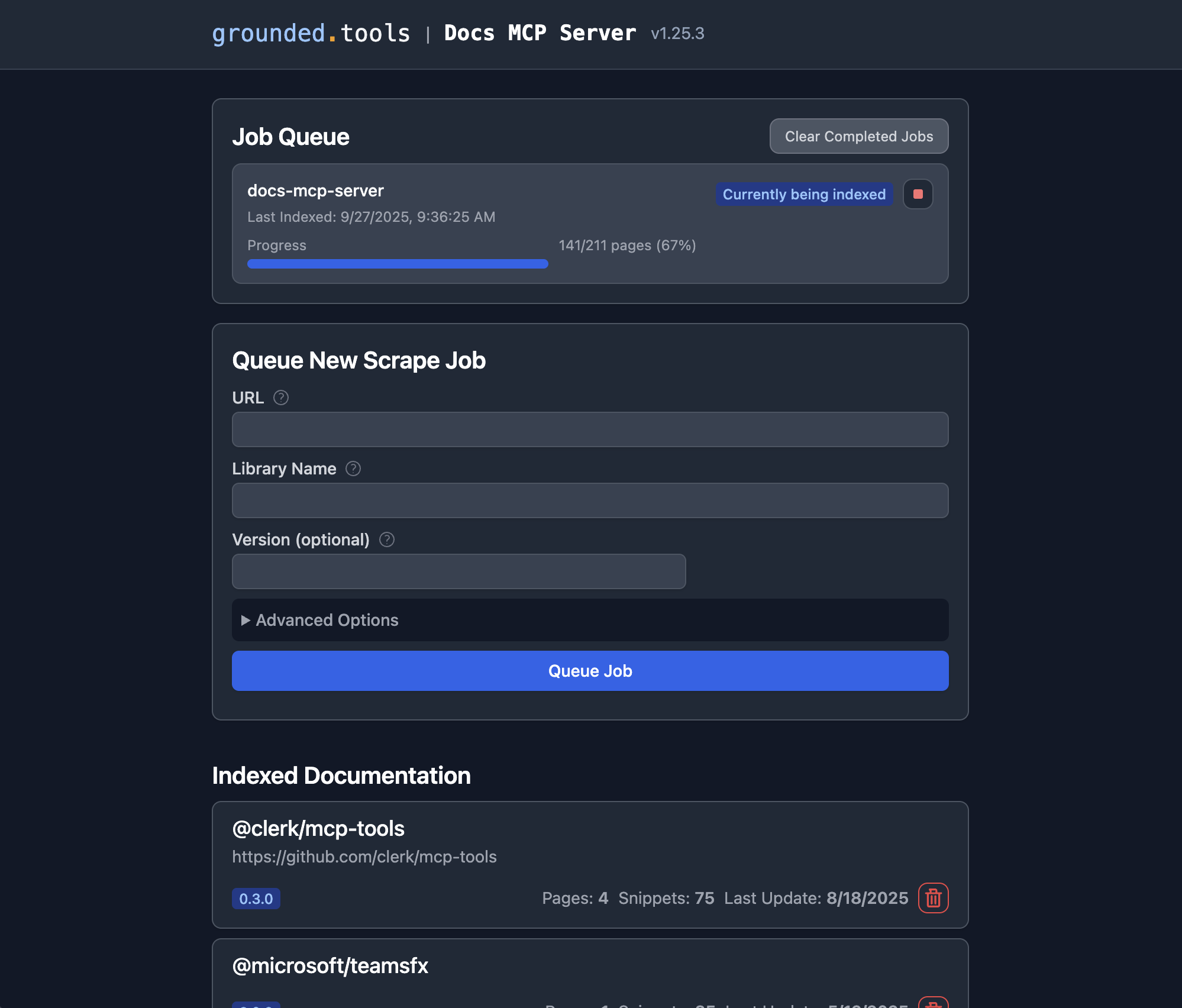
Basic Usage: Using the Web UI, CLI, and scraping local files.
Configuration: Full reference for config files and environment variables.
Supported Formats: Complete file format and MIME type reference.
Embedding Models: Configure OpenAI, Ollama, Gemini, and other providers.
Search Quality Benchmark: Measure retrieval quality with IR metrics + LLM-judged scores; prerequisites, how to run, how to interpret results.
Use --preserve-hashes, MCP preserveHashes, or the Web UI "Preserve Hash Routes" checkbox only for docs sites that route with URLs like #/guide.
When enabled with scrapeMode=fetch, the scraper automatically upgrades the job to Playwright because plain fetch cannot evaluate client-side hash routes.
Refresh reuses the stored preserveHashes setting by default, and CLI/Web refresh entrypoints can override it explicitly.
Web scrapes and refreshes automatically probe for llms.txt at the documentation subpath and site root before normal crawling. When found, the curated links become additional crawl seeds, and pages discovered this way prefer .md URL variants such as /guide/index.html.md or /page.html.md before falling back to the original page.
Web requests send Accept: text/markdown, text/html;q=0.9, */*;q=0.8 by default. Servers that support Markdown content negotiation, including Cloudflare Markdown for Agents, can return Markdown directly so the scraper bypasses HTML-to-Markdown conversion for cleaner output.
This behavior is automatic and requires no configuration. Custom Accept headers are preserved when provided.
Deployment Modes: Standalone vs. Distributed (Docker Compose).
Authentication: Securing your server with OAuth2/OIDC.
Security: Trust boundaries, deployment hardening, and outbound access controls.
Telemetry: Privacy-first usage data collection.
Architecture: Deep dive into the system design.
We welcome contributions! Please see CONTRIBUTING.md for development guidelines and setup instructions.
This project is licensed under the MIT License. See LICENSE for details.
This server cannot be deployed
MCP server for querying Forkast documentation
Versioned documentation registry and semantic search for AI tools and coding assistants.
A comprehensive Model Context Protocol (MCP) server that enables AI assistants to interact with yo…