
Glama

ant-09-banner-night-03

mac-use-mcp

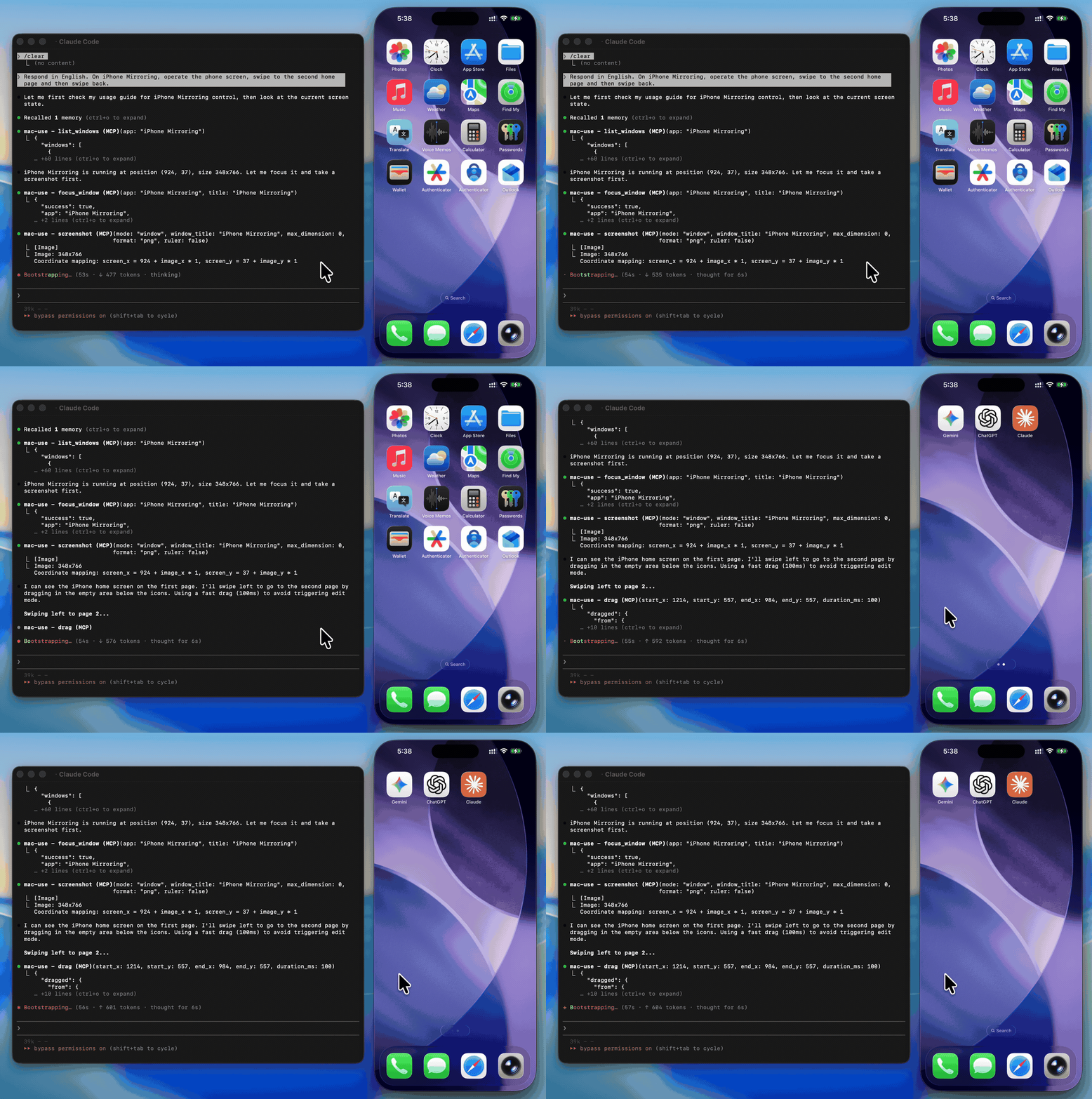
demo

WARNING

This tool has full control over mouse, keyboard, and screen. Please use in a sandboxed environment to protect your privacy and avoid accidental data loss by your agents. You are responsible for any actions performed through this tool.

Zero-native-dependency macOS desktop automation via MCP.

Give AI agents eyes and hands on macOS — click, type, screenshot, and inspect any application.

CI npm version npm downloads license TypeScript macOS 13+ Node 22+

Use Cases

  • Automated UI testing — click buttons, verify element states with get_ui_elements, validate screen content via screenshot

  • Desktop workflow automation — launch apps with open_application, fill forms with type_text, navigate menus via click_menu

  • Screenshot-based monitoring — capture screen regions periodically with screenshot for visual diffing or alerting

  • Accessibility inspection — query UI element trees with get_ui_elements for QA and compliance checks

  • AI agent computer use — give LLMs eyes and hands on macOS via screenshot, click, type_text, and more

Related MCP server: MacWright

Why mac-use-mcp?

  • Just worksnpx mac-use-mcp and grant two macOS permissions. No node-gyp, no Xcode tools, no build step.

  • 18 tools, one server — screenshots, clicks, keystrokes, window management, accessibility inspection, and clipboard.

  • macOS 13+ on Intel and Apple Silicon — no native addons, no architecture headaches.

Install

Requirements: macOS 13+ and Node.js 22+. The server communicates over stdio transport.

This package only works on macOS. It will refuse to install on other operating systems.

No build steps. No native dependencies. Just run:

npx mac-use-mcp

npx will prompt to install the package on first run. Use npx -y mac-use-mcp to skip the confirmation.

TIP

Model selection matters. Desktop automation involves screenshot–action loops that add up in token usage. A fast model with solid reasoning, good vision, and reliable tool calling is recommended:

Model

Provider

Gemini 3 Flash

Google

Claude Sonnet 4.6

Anthropic

GPT-5 mini

OpenAI

MiniMax-M2.5

MiniMax

Kimi K2.5

Moonshot AI

Qwen3.5

Alibaba

GLM-4.7

Zhipu AI

Permission Setup

mac-use-mcp requires two macOS permissions to function. Grant them once and you're set.

Accessibility

Required for mouse and keyboard control.

  1. Open System Settings > Privacy & Security > Accessibility

  2. Click the + button

  3. Add your MCP client application (e.g., Claude Desktop, your terminal emulator)

  4. Ensure the toggle is enabled

Screen Recording

Required for screenshots.

  1. Open System Settings > Privacy & Security > Screen Recording

  2. Click the + button

  3. Add your MCP client application

  4. Ensure the toggle is enabled

  5. Restart the application if prompted

Verify permissions

After granting both permissions and configuring your MCP client (see next section), use the check_permissions tool to confirm everything is working:

> check_permissions
✓ Accessibility: granted
✓ Screen Recording: granted

MCP Client Configuration

claude mcp add mac-use-mcp -- npx mac-use-mcp

Add to ~/Library/Application Support/Claude/claude_desktop_config.json:

{
  "mcpServers": {
    "mac-use-mcp": {
      "command": "npx",
      "args": ["mac-use-mcp"]
    }
  }
}

Add to ~/.codex/config.toml:

[mcp_servers.mac-use]
command = "npx"
args = ["-y", "mac-use-mcp"]

Or via CLI:

codex mcp add mac-use -- npx -y mac-use-mcp

Add to ~/.gemini/antigravity/mcp_config.json:

{
  "mcpServers": {
    "mac-use-mcp": {
      "command": "npx",
      "args": ["mac-use-mcp"]
    }
  }
}

Add to ~/.gemini/settings.json:

{
  "mcpServers": {
    "mac-use-mcp": {
      "command": "npx",
      "args": ["mac-use-mcp"]
    }
  }
}

Add to .vscode/mcp.json in your workspace (or open the Command Palette and run MCP: Open User Configuration for global setup):

{
  "servers": {
    "mac-use-mcp": {
      "command": "npx",
      "args": ["mac-use-mcp"]
    }
  }
}

Add to ~/.cursor/mcp.json (global) or .cursor/mcp.json (project-level):

{
  "mcpServers": {
    "mac-use-mcp": {
      "command": "npx",
      "args": ["mac-use-mcp"]
    }
  }
}

Add to ~/.codeium/windsurf/mcp_config.json:

{
  "mcpServers": {
    "mac-use-mcp": {
      "command": "npx",
      "args": ["mac-use-mcp"]
    }
  }
}

Open Cline's MCP settings (in the Cline extension panel, click the MCP servers icon), then add:

{
  "mcpServers": {
    "mac-use-mcp": {
      "command": "npx",
      "args": ["mac-use-mcp"]
    }
  }
}

Add to ~/.aws/amazonq/mcp.json:

{
  "mcpServers": {
    "mac-use-mcp": {
      "command": "npx",
      "args": ["mac-use-mcp"]
    }
  }
}

Tools

This Node.js MCP server exposes 18 tools for mouse, keyboard, and screen control to any MCP-compatible client.

Screen

Tool

Description

screenshot

Capture the screen, a region, or a window by title (PNG or JPEG)

get_screen_info

Get display count, resolution, origin, and scale factor for each display

get_cursor_position

Get current cursor coordinates

Input

Tool

Description

click

Click at screen coordinates with button, click count, and modifier options

move_mouse

Move the cursor to a position

scroll

Scroll up, down, left, or right at a position

drag

Drag from one point to another over a configurable duration

type_text

Type text at the cursor position (supports Unicode, CJK, and emoji)

press_key

Press a key or key combination (e.g., "cmd+c", "Return")

Window & App

Tool

Description

list_windows

List all visible windows with positions and sizes

focus_window

Activate an app and bring a specific window to the front

open_application

Launch an application by name

click_menu

Click a menu bar item by path (e.g., "File > Save As...")

App names support fuzzy matching — "chrome" resolves to "Google Chrome", "code" to "Code", etc.

Accessibility

Tool

Description

get_ui_elements

Query UI elements via Accessibility API — find buttons, text fields, and other controls by role or title

Clipboard

Tool

Description

clipboard_read

Read the current system clipboard as plain text

clipboard_write

Write text to the system clipboard

Utility

Tool

Description

wait

Pause for a specified duration (in milliseconds, 0–10 000, default 500)

check_permissions

Verify Accessibility and Screen Recording access

Examples

Common workflow patterns using mac-use-mcp tools:

Screenshot a specific window

1. focus_window({ app: "Safari" })
2. screenshot({ mode: "window", window_title: "Safari" })

Click a button in a dialog

1. get_ui_elements({ app: "Finder", role: "AXButton" })
   → finds "OK" button at position (500, 300)
2. click({ x: 500, y: 300 })

Automate a menu action

1. open_application({ name: "TextEdit" })
2. click_menu({ app: "TextEdit", path: "Format > Make Plain Text" })

Copy text between apps

1. focus_window({ app: "Safari" })
2. press_key({ key: "cmd+a" })       # select all
3. press_key({ key: "cmd+c" })       # copy
4. focus_window({ app: "Notes" })
5. press_key({ key: "cmd+v" })       # paste

How It Works

  • Swift binary handles mouse input (CGEvent), screen capture (CGWindowListCreateImage), window enumeration (CGWindowListCopyWindowInfo), and UI element queries (Accessibility API)

  • AppleScript handles keyboard input (System Events key code), window focus, and menu clicks

  • Node.js MCP server orchestrates everything over stdio, translating MCP tool calls into system operations

  • No native Node.js addons — the Swift binary is pre-compiled and ships with the npm package

  • Serial execution queue prevents race conditions between system operations

Known Limitations

  • Screen Recording prompt on Sequoia: macOS 15 shows a monthly system prompt asking to reconfirm Screen Recording access. This is an OS-level behavior and cannot be suppressed.

  • Secure input fields: Password fields and other secure text inputs block synthetic keyboard events. This is a macOS security feature.

  • Keyboard input on macOS 26+: CGEvent keyboard synthesis is silently blocked. Keyboard input uses AppleScript (System Events key code) as a workaround, which may behave differently in some edge cases.

  • System dialogs: Some system-level dialogs (e.g., FileVault unlock, Login Window) cannot be interacted with programmatically due to macOS security restrictions.

  • Headless / CI: Requires a graphical session. Headless macOS environments (e.g., standard GitHub Actions runners) are not supported.

Troubleshooting

Grant Accessibility and Screen Recording permissions to your terminal app in System Settings > Privacy & Security. A restart of the terminal may be required.

macOS 15 (Sequoia) introduced stricter permission prompts. Allow the prompts when they appear. The check_permissions tool can verify your current permission status.

Some password fields and secure text inputs block programmatic key events. This is a macOS security feature. Use clipboard_write + press_key("cmd+v") as a workaround.

Ensure Screen Recording permission is granted to your terminal app (not just Accessibility). Restart the terminal after granting.

  • Playwright MCP — Browser automation via accessibility tree. Complements mac-use-mcp for web-only tasks.

  • Peekaboo — macOS screen automation with ScreenCaptureKit. Requires macOS 15+ and a Swift build.

  • awesome-mcp-servers — Curated list of MCP servers across the ecosystem.

Contributing

See CONTRIBUTING.md for development setup and guidelines.

Changelog

Security

To report a vulnerability, see SECURITY.md.

Support

  • Found a bug? Open an issue

  • Have a feature idea? Open an issue

  • Like the project? Give it a star — it helps others discover mac-use-mcp.

License

MIT © 2026 antbotlab


macOS is a trademark of Apple Inc., registered in the U.S. and other countries and regions.

Available Tools

18 tools
check_permissionsA
Read-only

Check whether macOS Accessibility and Screen Recording permissions are granted. Returns status for each permission and instructions for any that are missing.

ParametersJSON Schema
NameRequiredDescriptionDefault

No parameters

TDQS

A4.2/5.0
Behavior4/5

Does the description disclose side effects, auth requirements, rate limits, or destructive behavior?

Annotations indicate read-only and non-destructive behavior, which the description aligns with by describing a check operation. The description adds value beyond annotations by specifying the return content ('status for each permission and instructions for any that are missing'), providing useful context about output behavior that annotations do not cover.

Agents need to know what a tool does to the world before calling it. Descriptions should go beyond structured annotations to explain consequences.

Conciseness5/5

Is the description appropriately sized, front-loaded, and free of redundancy?

The description is a single, well-structured sentence that efficiently conveys the tool's purpose, action, and return value without any wasted words. It is front-loaded with the core function and provides complete information in a concise manner.

Shorter descriptions cost fewer tokens and are easier for agents to parse. Every sentence should earn its place.

Completeness4/5

Given the tool's complexity, does the description cover enough for an agent to succeed on first attempt?

Given the tool's simplicity (0 parameters, read-only, non-destructive) and lack of an output schema, the description is nearly complete. It explains what the tool does and what it returns, though it could slightly enhance completeness by mentioning potential error cases or system dependencies, but this is minor.

Complex tools with many parameters or behaviors need more documentation. Simple tools need less. This dimension scales expectations accordingly.

Parameters4/5

Does the description clarify parameter syntax, constraints, interactions, or defaults beyond what the schema provides?

With 0 parameters and 100% schema description coverage, the baseline is 4. The description does not need to explain parameters, and it appropriately focuses on the tool's function and output, adding no unnecessary parameter information.

Input schemas describe structure but not intent. Descriptions should explain non-obvious parameter relationships and valid value ranges.

Purpose5/5

Does the description clearly state what the tool does and how it differs from similar tools?

The description clearly states the specific action ('Check') and target resources ('macOS Accessibility and Screen Recording permissions'), distinguishing it from sibling tools that perform UI automation or system interaction tasks. It explicitly mentions what is returned ('status for each permission and instructions for any that are missing'), making the purpose unambiguous.

Agents choose between tools based on descriptions. A clear purpose with a specific verb and resource helps agents select the right tool.

Usage Guidelines3/5

Does the description explain when to use this tool, when not to, or what alternatives exist?

The description implies usage in contexts where permission status is needed, such as before performing actions that require these permissions. However, it does not explicitly state when to use this tool versus alternatives (e.g., which sibling tools might depend on these permissions) or provide exclusions, leaving some guidance to inference.

Agents often have multiple tools that could apply. Explicit usage guidance like "use X instead of Y when Z" prevents misuse.

clickA
Destructive

Click at the specified screen coordinates. Supports left/right/middle button, single/double/triple click, and modifier keys. Do not narrate visual observations or coordinate calculations. Brief task progress updates are acceptable.

ParametersJSON Schema
NameRequiredDescriptionDefault
xYesX coordinate in screen pixels (may be negative for secondary displays)
yYesY coordinate in screen pixels (may be negative for secondary displays)
buttonYesMouse button to click (default: left)left
click_countYesNumber of clicks: 1 (single), 2 (double), or 3 (triple)
modifiersNoModifier keys to hold during click

TDQS

A4.2/5.0
Behavior4/5

Does the description disclose side effects, auth requirements, rate limits, or destructive behavior?

The annotations indicate destructiveHint=true and readOnlyHint=false, which the description aligns with by describing a click action. The description adds valuable behavioral context beyond annotations: it specifies what not to do (narrate observations/calculations) and what's acceptable (brief progress updates), providing important usage constraints that aren't captured in the structured annotations.

Agents need to know what a tool does to the world before calling it. Descriptions should go beyond structured annotations to explain consequences.

Conciseness5/5

Is the description appropriately sized, front-loaded, and free of redundancy?

The description is perfectly concise with two sentences that each serve distinct purposes: the first explains the tool's capabilities, the second provides critical behavioral guidance. There's zero wasted language, and the most important information (what the tool does) is front-loaded.

Shorter descriptions cost fewer tokens and are easier for agents to parse. Every sentence should earn its place.

Completeness4/5

Given the tool's complexity, does the description cover enough for an agent to succeed on first attempt?

For a destructive action tool with comprehensive schema coverage but no output schema, the description provides good context about the action and behavioral constraints. It could be more complete by mentioning potential side effects or error conditions, but given the annotations cover the destructive nature and the schema documents parameters thoroughly, this is reasonably complete.

Complex tools with many parameters or behaviors need more documentation. Simple tools need less. This dimension scales expectations accordingly.

Parameters3/5

Does the description clarify parameter syntax, constraints, interactions, or defaults beyond what the schema provides?

With 100% schema description coverage, the input schema already provides comprehensive parameter documentation. The description mentions the parameter capabilities ('Supports left/right/middle button, single/double/triple click, and modifier keys') but doesn't add significant semantic meaning beyond what's already in the schema descriptions. This meets the baseline for high schema coverage.

Input schemas describe structure but not intent. Descriptions should explain non-obvious parameter relationships and valid value ranges.

Purpose5/5

Does the description clearly state what the tool does and how it differs from similar tools?

The description clearly states the tool's purpose: 'Click at the specified screen coordinates' with specific capabilities like button selection, click count, and modifier keys. It distinguishes from siblings like 'move_mouse', 'drag', or 'press_key' by focusing specifically on clicking actions at coordinates.

Agents choose between tools based on descriptions. A clear purpose with a specific verb and resource helps agents select the right tool.

Usage Guidelines4/5

Does the description explain when to use this tool, when not to, or what alternatives exist?

The description provides clear context about when to use this tool (clicking at coordinates with various options) and includes explicit behavioral guidance: 'Do not narrate visual observations or coordinate calculations. Brief task progress updates are acceptable.' However, it doesn't explicitly state when NOT to use it or name specific alternative tools for related actions.

Agents often have multiple tools that could apply. Explicit usage guidance like "use X instead of Y when Z" prevents misuse.

click_menuA
Destructive

Click a menu bar item in an application. Specify the menu path as "Menu > Submenu > Item" (e.g., "File > Save As...", "View > Sort By > Name").

ParametersJSON Schema
NameRequiredDescriptionDefault
appYesApplication name
pathYesMenu path, e.g. "File > Save As..."

TDQS

A4.2/5.0
Behavior4/5

Does the description disclose side effects, auth requirements, rate limits, or destructive behavior?

Annotations indicate destructiveHint=true and readOnlyHint=false, which the description aligns with by implying a click action that may change application state. The description adds valuable context beyond annotations by specifying the menu path format and providing examples, though it does not detail potential side effects like dialog openings or data loss risks.

Agents need to know what a tool does to the world before calling it. Descriptions should go beyond structured annotations to explain consequences.

Conciseness5/5

Is the description appropriately sized, front-loaded, and free of redundancy?

The description is front-loaded with the core action, followed by a concise syntax specification and relevant examples. Every sentence adds necessary information without redundancy, making it highly efficient and well-structured for quick understanding.

Shorter descriptions cost fewer tokens and are easier for agents to parse. Every sentence should earn its place.

Completeness4/5

Given the tool's complexity, does the description cover enough for an agent to succeed on first attempt?

Given the tool's moderate complexity (destructive UI interaction), no output schema, and rich annotations, the description is mostly complete. It covers the action, syntax, and examples, but lacks details on error conditions or return values. However, it provides sufficient context for basic usage in the given automation toolset.

Complex tools with many parameters or behaviors need more documentation. Simple tools need less. This dimension scales expectations accordingly.

Parameters3/5

Does the description clarify parameter syntax, constraints, interactions, or defaults beyond what the schema provides?

Schema description coverage is 100%, with clear parameter descriptions. The description adds minimal semantic value beyond the schema by reinforcing the path format with examples, but does not explain parameter interactions or edge cases. Baseline 3 is appropriate as the schema adequately documents parameters.

Input schemas describe structure but not intent. Descriptions should explain non-obvious parameter relationships and valid value ranges.

Purpose5/5

Does the description clearly state what the tool does and how it differs from similar tools?

The description clearly states the specific action ('Click a menu bar item') and resource ('in an application'), with explicit syntax guidance. It distinguishes from sibling tools like 'click' (general) by specifying the menu context, making the purpose highly specific and unambiguous.

Agents choose between tools based on descriptions. A clear purpose with a specific verb and resource helps agents select the right tool.

Usage Guidelines4/5

Does the description explain when to use this tool, when not to, or what alternatives exist?

The description provides clear context for when to use this tool (to interact with application menus) and includes a syntax example. However, it does not explicitly state when not to use it (e.g., vs. 'click' for non-menu items) or name alternatives, though the context is sufficiently clear for typical UI automation scenarios.

Agents often have multiple tools that could apply. Explicit usage guidance like "use X instead of Y when Z" prevents misuse.

clipboard_readA
Read-only

Read the current contents of the macOS clipboard as plain text.

ParametersJSON Schema
NameRequiredDescriptionDefault

No parameters

TDQS

A4.4/5.0
Behavior4/5

Does the description disclose side effects, auth requirements, rate limits, or destructive behavior?

Annotations already declare readOnlyHint=true and destructiveHint=false, indicating a safe read operation. The description adds valuable context by specifying 'macOS clipboard' and 'plain text', which are not covered by annotations. It does not contradict annotations and provides useful platform and format details.

Agents need to know what a tool does to the world before calling it. Descriptions should go beyond structured annotations to explain consequences.

Conciseness5/5

Is the description appropriately sized, front-loaded, and free of redundancy?

The description is a single, efficient sentence with zero waste. It is front-loaded with the core action and resource, making it highly concise and well-structured for quick understanding.

Shorter descriptions cost fewer tokens and are easier for agents to parse. Every sentence should earn its place.

Completeness4/5

Given the tool's complexity, does the description cover enough for an agent to succeed on first attempt?

Given the tool's simplicity (0 parameters, no output schema, and clear annotations), the description is mostly complete. It specifies the platform (macOS) and output format (plain text), but could note potential limitations like empty clipboard or non-text content handling. However, for a read-only tool, it covers essential context adequately.

Complex tools with many parameters or behaviors need more documentation. Simple tools need less. This dimension scales expectations accordingly.

Parameters4/5

Does the description clarify parameter syntax, constraints, interactions, or defaults beyond what the schema provides?

With 0 parameters and 100% schema description coverage, the baseline is 4. The description adds no parameter information (as there are none), which is appropriate and does not detract from the schema's completeness.

Input schemas describe structure but not intent. Descriptions should explain non-obvious parameter relationships and valid value ranges.

Purpose5/5

Does the description clearly state what the tool does and how it differs from similar tools?

The description clearly states the specific action ('Read') and resource ('contents of the macOS clipboard as plain text'), distinguishing it from sibling tools like clipboard_write. It precisely defines the tool's function without ambiguity.

Agents choose between tools based on descriptions. A clear purpose with a specific verb and resource helps agents select the right tool.

Usage Guidelines4/5

Does the description explain when to use this tool, when not to, or what alternatives exist?

The description implies usage context (when you need clipboard contents), but does not explicitly state when to use this tool versus alternatives like type_text or press_key. It provides clear intent but lacks explicit guidance on exclusions or comparisons with siblings.

Agents often have multiple tools that could apply. Explicit usage guidance like "use X instead of Y when Z" prevents misuse.

clipboard_writeA

Write text to the macOS clipboard.

ParametersJSON Schema
NameRequiredDescriptionDefault
textYesText to write to the clipboard.

TDQS

A4/5.0
Behavior3/5

Does the description disclose side effects, auth requirements, rate limits, or destructive behavior?

Annotations indicate this is not read-only and not destructive, which the description doesn't contradict. The description adds context about the target platform (macOS) and the action (writing text), but doesn't provide additional behavioral details like whether it overwrites existing clipboard content, requires specific permissions, or has rate limits. With annotations covering basic safety, this earns a baseline score.

Agents need to know what a tool does to the world before calling it. Descriptions should go beyond structured annotations to explain consequences.

Conciseness5/5

Is the description appropriately sized, front-loaded, and free of redundancy?

The description is a single, efficient sentence with zero wasted words. It's front-loaded with the core action and resource, making it immediately understandable without unnecessary elaboration.

Shorter descriptions cost fewer tokens and are easier for agents to parse. Every sentence should earn its place.

Completeness4/5

Given the tool's complexity, does the description cover enough for an agent to succeed on first attempt?

Given the tool's simplicity (one parameter, no output schema, annotations present), the description is mostly complete. It specifies the platform (macOS) and action, but could benefit from mentioning what happens to existing clipboard content or any system dependencies. However, for a basic write operation, it's sufficient.

Complex tools with many parameters or behaviors need more documentation. Simple tools need less. This dimension scales expectations accordingly.

Parameters3/5

Does the description clarify parameter syntax, constraints, interactions, or defaults beyond what the schema provides?

Schema description coverage is 100%, with the single parameter 'text' fully documented in the schema. The description doesn't add any parameter-specific details beyond what the schema provides, such as examples or constraints beyond maxLength. This meets the baseline for high schema coverage.

Input schemas describe structure but not intent. Descriptions should explain non-obvious parameter relationships and valid value ranges.

Purpose5/5

Does the description clearly state what the tool does and how it differs from similar tools?

The description clearly states the specific action ('write text') and target resource ('macOS clipboard'), distinguishing it from sibling tools like clipboard_read (which reads) and type_text (which types). It uses a precise verb+resource combination that leaves no ambiguity about its function.

Agents choose between tools based on descriptions. A clear purpose with a specific verb and resource helps agents select the right tool.

Usage Guidelines4/5

Does the description explain when to use this tool, when not to, or what alternatives exist?

The description implies usage context by specifying 'macOS clipboard', which suggests this tool is for clipboard operations on macOS systems. However, it doesn't explicitly state when to use this versus alternatives like type_text for direct text input or when clipboard operations might fail due to permissions or system constraints.

Agents often have multiple tools that could apply. Explicit usage guidance like "use X instead of Y when Z" prevents misuse.

dragA
Destructive

Drag from one screen coordinate to another over a specified duration.

Best practices for window dragging:

  • Always call focus_window on the target app immediately BEFORE dragging to ensure the window is frontmost. Without this, the drag may land on a different overlapping window and silently fail.

  • Start coordinates must land on the window's title bar — use the far-right edge of the title bar to avoid traffic-light buttons and any center toolbar icons.

  • Use a duration of 600–1000 ms. Too short and macOS may not recognize it as a drag gesture.

Do not narrate visual observations or coordinate calculations. Brief task progress updates are acceptable.

ParametersJSON Schema
NameRequiredDescriptionDefault
start_xYesStart X coordinate in screen pixels (may be negative for secondary displays)
start_yYesStart Y coordinate in screen pixels (may be negative for secondary displays)
end_xYesEnd X coordinate in screen pixels (may be negative for secondary displays)
end_yYesEnd Y coordinate in screen pixels (may be negative for secondary displays)
duration_msYesDrag duration in milliseconds (default: 600)

TDQS

A4.3/5.0
Behavior4/5

Does the description disclose side effects, auth requirements, rate limits, or destructive behavior?

The description adds significant behavioral context beyond annotations, such as the risk of silent failure if focus_window isn't called, macOS-specific gesture recognition requirements, and practical constraints like avoiding UI elements. While annotations indicate it's destructive and not read-only, the description elaborates on these traits with real-world implications, though it doesn't cover all possible edge cases like error handling.

Agents need to know what a tool does to the world before calling it. Descriptions should go beyond structured annotations to explain consequences.

Conciseness4/5

Is the description appropriately sized, front-loaded, and free of redundancy?

The description is well-structured and front-loaded with the core purpose, followed by best practices and usage notes. Each sentence adds value, but it could be slightly more concise by integrating some of the detailed tips into bullet points or reducing redundancy in the coordinate guidance.

Shorter descriptions cost fewer tokens and are easier for agents to parse. Every sentence should earn its place.

Completeness4/5

Given the tool's complexity, does the description cover enough for an agent to succeed on first attempt?

Given the tool's complexity (destructive, macOS-specific behavior) and lack of output schema, the description is largely complete, covering purpose, usage, risks, and best practices. However, it doesn't explicitly describe the return value or error conditions, which could leave gaps for an AI agent in handling failures or interpreting results.

Complex tools with many parameters or behaviors need more documentation. Simple tools need less. This dimension scales expectations accordingly.

Parameters3/5

Does the description clarify parameter syntax, constraints, interactions, or defaults beyond what the schema provides?

With 100% schema description coverage, the input schema already documents all parameters thoroughly. The description adds minimal parameter semantics beyond the schema, such as recommending duration ranges (600–1000 ms) and coordinate placement tips, but doesn't fundamentally enhance understanding of the parameters' roles or interactions beyond what the schema provides.

Input schemas describe structure but not intent. Descriptions should explain non-obvious parameter relationships and valid value ranges.

Purpose5/5

Does the description clearly state what the tool does and how it differs from similar tools?

The description clearly states the tool's purpose with specific verbs ('drag from one screen coordinate to another') and resource ('screen coordinate'), distinguishing it from sibling tools like move_mouse or click. It precisely defines the action as a drag gesture over a specified duration, making its function unambiguous.

Agents choose between tools based on descriptions. A clear purpose with a specific verb and resource helps agents select the right tool.

Usage Guidelines5/5

Does the description explain when to use this tool, when not to, or what alternatives exist?

The description provides explicit guidance on when and how to use this tool, including prerequisites ('Always call focus_window on the target app immediately BEFORE dragging'), best practices ('Start coordinates must land on the window's title bar'), and alternatives ('Do not narrate visual observations or coordinate calculations'). It clearly distinguishes usage from other tools by specifying the drag context.

Agents often have multiple tools that could apply. Explicit usage guidance like "use X instead of Y when Z" prevents misuse.

focus_windowA

Activate an application and optionally raise a specific window by title. App name supports fuzzy matching.

ParametersJSON Schema
NameRequiredDescriptionDefault
appYesApplication name to activate.
titleNoWindow title to raise. If omitted, the frontmost window of the application is activated.

TDQS

A4/5.0
Behavior3/5

Does the description disclose side effects, auth requirements, rate limits, or destructive behavior?

Annotations indicate this is not read-only and not destructive, which the description doesn't contradict. The description adds useful context beyond annotations: it explains the fuzzy matching behavior and clarifies that omitting 'title' activates the frontmost window. However, it lacks details on error handling, permissions, or system impacts.

Agents need to know what a tool does to the world before calling it. Descriptions should go beyond structured annotations to explain consequences.

Conciseness5/5

Is the description appropriately sized, front-loaded, and free of redundancy?

The description is a single, well-structured sentence that front-loads the core purpose and efficiently adds key details (fuzzy matching). Every word earns its place with zero waste.

Shorter descriptions cost fewer tokens and are easier for agents to parse. Every sentence should earn its place.

Completeness4/5

Given the tool's complexity, does the description cover enough for an agent to succeed on first attempt?

Given the tool's moderate complexity (activating windows), no output schema, and rich annotations, the description is mostly complete. It covers the main functionality and parameters well but could benefit from mentioning potential side effects or error cases to reach a 5.

Complex tools with many parameters or behaviors need more documentation. Simple tools need less. This dimension scales expectations accordingly.

Parameters3/5

Does the description clarify parameter syntax, constraints, interactions, or defaults beyond what the schema provides?

Schema description coverage is 100%, so the schema already fully documents both parameters. The description adds minimal value beyond the schema—it mentions fuzzy matching for 'app' and implies the optional nature of 'title', but doesn't provide additional syntax or format details. Baseline 3 is appropriate here.

Input schemas describe structure but not intent. Descriptions should explain non-obvious parameter relationships and valid value ranges.

Purpose5/5

Does the description clearly state what the tool does and how it differs from similar tools?

The description clearly states the specific action ('Activate an application and optionally raise a specific window by title') and distinguishes it from siblings like 'open_application' (which likely launches apps) and 'list_windows' (which only lists). It also mentions the unique 'fuzzy matching' feature for app names.

Agents choose between tools based on descriptions. A clear purpose with a specific verb and resource helps agents select the right tool.

Usage Guidelines4/5

Does the description explain when to use this tool, when not to, or what alternatives exist?

The description provides clear context for when to use it (activating apps/windows) and implies when not to use it (e.g., use 'open_application' for launching, 'list_windows' for listing). However, it doesn't explicitly name alternatives or state exclusions, so it falls short of a perfect 5.

Agents often have multiple tools that could apply. Explicit usage guidance like "use X instead of Y when Z" prevents misuse.

get_cursor_positionA
Read-only

Get the current mouse cursor position in screen coordinates.

ParametersJSON Schema
NameRequiredDescriptionDefault

No parameters

TDQS

A4.2/5.0
Behavior4/5

Does the description disclose side effects, auth requirements, rate limits, or destructive behavior?

Annotations already declare readOnlyHint=true and destructiveHint=false, indicating a safe read operation. The description adds useful context by specifying 'screen coordinates' as the output format, which isn't covered by annotations. It doesn't mention rate limits or authentication needs, but this is acceptable given the tool's simplicity and annotation coverage.

Agents need to know what a tool does to the world before calling it. Descriptions should go beyond structured annotations to explain consequences.

Conciseness5/5

Is the description appropriately sized, front-loaded, and free of redundancy?

The description is a single, efficient sentence that front-loads the core purpose ('Get the current mouse cursor position') and adds essential detail ('in screen coordinates') without any wasted words. It's appropriately sized for a simple, parameter-less tool.

Shorter descriptions cost fewer tokens and are easier for agents to parse. Every sentence should earn its place.

Completeness4/5

Given the tool's complexity, does the description cover enough for an agent to succeed on first attempt?

Given the tool's low complexity (0 parameters, no output schema) and good annotations, the description is mostly complete. It clearly states what the tool does and the output format. A minor gap is the lack of explicit return value details (e.g., coordinate structure), but this is reasonable for such a straightforward tool.

Complex tools with many parameters or behaviors need more documentation. Simple tools need less. This dimension scales expectations accordingly.

Parameters4/5

Does the description clarify parameter syntax, constraints, interactions, or defaults beyond what the schema provides?

With 0 parameters and 100% schema description coverage, the baseline is 4. The description appropriately states there are no inputs needed ('Get the current...'), aligning with the empty schema and avoiding unnecessary parameter explanations.

Input schemas describe structure but not intent. Descriptions should explain non-obvious parameter relationships and valid value ranges.

Purpose5/5

Does the description clearly state what the tool does and how it differs from similar tools?

The description clearly states the specific action ('Get') and resource ('current mouse cursor position in screen coordinates'), distinguishing it from siblings like move_mouse, click, or get_screen_info by focusing solely on cursor position retrieval without any additional functionality.

Agents choose between tools based on descriptions. A clear purpose with a specific verb and resource helps agents select the right tool.

Usage Guidelines3/5

Does the description explain when to use this tool, when not to, or what alternatives exist?

The description implies usage for obtaining cursor coordinates, but provides no explicit guidance on when to use this tool versus alternatives like get_screen_info (which might include cursor data) or move_mouse (which involves cursor manipulation). It lacks clear when-not-to-use scenarios or prerequisites.

Agents often have multiple tools that could apply. Explicit usage guidance like "use X instead of Y when Z" prevents misuse.

get_screen_infoA
Read-only

Retrieve display configuration: number of displays, per-display resolution, origin, and scale factor.

ParametersJSON Schema
NameRequiredDescriptionDefault

No parameters

TDQS

A4.2/5.0
Behavior4/5

Does the description disclose side effects, auth requirements, rate limits, or destructive behavior?

Annotations already declare readOnlyHint=true and destructiveHint=false, covering safety. The description adds useful context about what specific display attributes are retrieved (resolution, origin, scale factor), which helps the agent understand the return format. However, it doesn't mention potential platform-specific behavior, refresh rates, or multi-monitor edge cases.

Agents need to know what a tool does to the world before calling it. Descriptions should go beyond structured annotations to explain consequences.

Conciseness5/5

Is the description appropriately sized, front-loaded, and free of redundancy?

A single, dense sentence with zero waste—every word contributes to understanding the tool's purpose and output. It's front-loaded with the core action ('Retrieve display configuration') followed by specific attributes, making it efficient and scannable.

Shorter descriptions cost fewer tokens and are easier for agents to parse. Every sentence should earn its place.

Completeness4/5

Given the tool's complexity, does the description cover enough for an agent to succeed on first attempt?

For a zero-parameter read-only tool with annotations covering safety, the description is nearly complete—it clearly states what data is returned. A minor gap is the lack of output schema or details on return format (e.g., structured object vs. raw text), but given the simplicity and annotations, this is acceptable.

Complex tools with many parameters or behaviors need more documentation. Simple tools need less. This dimension scales expectations accordingly.

Parameters4/5

Does the description clarify parameter syntax, constraints, interactions, or defaults beyond what the schema provides?

With 0 parameters and 100% schema description coverage, the baseline is 4. The description appropriately omits parameter details since none exist, focusing instead on the return value semantics (what display configuration data is retrieved).

Input schemas describe structure but not intent. Descriptions should explain non-obvious parameter relationships and valid value ranges.

Purpose5/5

Does the description clearly state what the tool does and how it differs from similar tools?

The description clearly states the specific action ('Retrieve') and resource ('display configuration'), listing exact attributes returned (number of displays, resolution, origin, scale factor). It distinguishes itself from sibling tools like 'screenshot' or 'get_cursor_position' by focusing on hardware/OS-level display metadata rather than visual capture or pointer location.

Agents choose between tools based on descriptions. A clear purpose with a specific verb and resource helps agents select the right tool.

Usage Guidelines3/5

Does the description explain when to use this tool, when not to, or what alternatives exist?

The description implies usage for obtaining display hardware/software configuration details, but provides no explicit guidance on when to choose this over alternatives like 'screenshot' (for visual data) or 'get_ui_elements' (for UI component details). No prerequisites, exclusions, or comparative context with siblings are mentioned.

Agents often have multiple tools that could apply. Explicit usage guidance like "use X instead of Y when Z" prevents misuse.

get_ui_elementsA
Read-only

Query visible UI elements of an application via macOS Accessibility API. Returns element roles, titles, positions (screen coordinates), sizes, and states. May return text content from visible UI elements including sensitive data (passwords in non-secure fields, messages, etc.). Positions are in logical screen coordinates — pass directly to click tool. Coverage varies: native apps expose rich trees; Electron/web apps may expose partial trees; games/custom UIs may expose nothing. Requires Accessibility permission.

ParametersJSON Schema
NameRequiredDescriptionDefault
appNoTarget application name. Default: frontmost app. Supports fuzzy matching.
roleNoFilter by AX role: "AXButton", "AXTextField", "AXStaticText", etc.
titleNoFilter by element title (substring, case-insensitive).
max_depthYesMax tree traversal depth (default: 5).

TDQS

A4.5/5.0
Behavior4/5

Does the description disclose side effects, auth requirements, rate limits, or destructive behavior?

Annotations declare readOnlyHint=true and destructiveHint=false, which the description aligns with by describing a query operation. The description adds valuable context beyond annotations: security implications ('May return text content from visible UI elements including sensitive data'), coordinate system details ('Positions are in logical screen coordinates — pass directly to click tool'), and coverage limitations across different app types.

Agents need to know what a tool does to the world before calling it. Descriptions should go beyond structured annotations to explain consequences.

Conciseness5/5

Is the description appropriately sized, front-loaded, and free of redundancy?

The description is efficiently structured with zero wasted sentences. It front-loads the core purpose, then sequentially covers output details, security notes, coordinate usage, coverage variability, and permission requirements—all in a compact, logical flow.

Shorter descriptions cost fewer tokens and are easier for agents to parse. Every sentence should earn its place.

Completeness5/5

Given the tool's complexity, does the description cover enough for an agent to succeed on first attempt?

Given the tool's complexity (UI element querying with security and coverage nuances), the description is complete despite no output schema. It explains what data is returned (roles, titles, positions, sizes, states, text content), how to use outputs (coordinates for 'click' tool), limitations, and prerequisites. No critical gaps remain for agent understanding.

Complex tools with many parameters or behaviors need more documentation. Simple tools need less. This dimension scales expectations accordingly.

Parameters3/5

Does the description clarify parameter syntax, constraints, interactions, or defaults beyond what the schema provides?

Schema description coverage is 100%, so the schema fully documents all parameters. The description does not add any parameter-specific information beyond what the schema provides, such as explaining 'app' fuzzy matching details or 'role' filter examples. Baseline 3 is appropriate when the schema handles parameter documentation.

Input schemas describe structure but not intent. Descriptions should explain non-obvious parameter relationships and valid value ranges.

Purpose5/5

Does the description clearly state what the tool does and how it differs from similar tools?

The description clearly states the specific action ('Query visible UI elements') and resource ('via macOS Accessibility API'), with detailed output information. It distinguishes itself from siblings like 'screenshot' or 'list_windows' by focusing on UI element properties rather than screenshots or window lists.

Agents choose between tools based on descriptions. A clear purpose with a specific verb and resource helps agents select the right tool.

Usage Guidelines5/5

Does the description explain when to use this tool, when not to, or what alternatives exist?

Explicitly states when to use ('Query visible UI elements') and when not to use ('Coverage varies: native apps expose rich trees; Electron/web apps may expose partial trees; games/custom UIs may expose nothing'). It also mentions prerequisites ('Requires Accessibility permission') and implies alternatives like 'screenshot' for visual capture instead of element data.

Agents often have multiple tools that could apply. Explicit usage guidance like "use X instead of Y when Z" prevents misuse.

list_windowsA
Read-only

List visible windows with their app name, title, ID, position, size, and minimized state. Optionally filter by application name. App name supports fuzzy matching (case-insensitive, partial names like 'chrome' for 'Google Chrome').

ParametersJSON Schema
NameRequiredDescriptionDefault
appNoApplication name to filter by. If omitted, list windows from all applications.

TDQS

A4.2/5.0
Behavior4/5

Does the description disclose side effects, auth requirements, rate limits, or destructive behavior?

Annotations already declare readOnlyHint=true and destructiveHint=false, covering safety. The description adds valuable behavioral context beyond annotations: it specifies what data is returned (app name, title, ID, position, size, minimized state), explains the optional filtering capability, and details the fuzzy matching behavior (case-insensitive, partial name matching).

Agents need to know what a tool does to the world before calling it. Descriptions should go beyond structured annotations to explain consequences.

Conciseness5/5

Is the description appropriately sized, front-loaded, and free of redundancy?

Two sentences with zero waste. The first sentence front-loads the core purpose and data returned. The second sentence efficiently explains the optional filtering and fuzzy matching behavior. Every word earns its place.

Shorter descriptions cost fewer tokens and are easier for agents to parse. Every sentence should earn its place.

Completeness4/5

Given the tool's complexity, does the description cover enough for an agent to succeed on first attempt?

For a read-only list tool with good annotations and full schema coverage, the description is nearly complete. It explains what data is returned and filtering behavior. The main gap is lack of output schema, so the description doesn't specify return format structure, but this is reasonable given the tool's simplicity.

Complex tools with many parameters or behaviors need more documentation. Simple tools need less. This dimension scales expectations accordingly.

Parameters3/5

Does the description clarify parameter syntax, constraints, interactions, or defaults beyond what the schema provides?

Schema description coverage is 100%, so the schema already fully documents the single parameter 'app'. The description adds marginal value by mentioning 'Optionally filter by application name' and explaining fuzzy matching, but doesn't provide additional semantic context beyond what's in the schema description field.

Input schemas describe structure but not intent. Descriptions should explain non-obvious parameter relationships and valid value ranges.

Purpose5/5

Does the description clearly state what the tool does and how it differs from similar tools?

The description clearly states the verb ('List') and resource ('visible windows') with specific attributes returned (app name, title, ID, position, size, minimized state). It distinguishes from siblings like 'focus_window' or 'get_ui_elements' by focusing on window enumeration rather than interaction or element retrieval.

Agents choose between tools based on descriptions. A clear purpose with a specific verb and resource helps agents select the right tool.

Usage Guidelines4/5

Does the description explain when to use this tool, when not to, or what alternatives exist?

The description provides clear context for when to use the optional filter ('Optionally filter by application name') and explains fuzzy matching behavior. However, it doesn't explicitly state when NOT to use this tool versus alternatives like 'get_ui_elements' or 'focus_window' for different window-related tasks.

Agents often have multiple tools that could apply. Explicit usage guidance like "use X instead of Y when Z" prevents misuse.

move_mouseA

Move the mouse cursor to the specified screen coordinates without clicking. Do not narrate visual observations or coordinate calculations. Brief task progress updates are acceptable.

ParametersJSON Schema
NameRequiredDescriptionDefault
xYesX coordinate in screen pixels (may be negative for secondary displays)
yYesY coordinate in screen pixels (may be negative for secondary displays)

TDQS

A4/5.0
Behavior3/5

Does the description disclose side effects, auth requirements, rate limits, or destructive behavior?

Annotations already indicate this is not read-only and not destructive, which aligns with the description's implication of a non-destructive action. The description adds behavioral context about not narrating observations and allowing brief progress updates, but does not disclose other traits like performance, side effects, or system dependencies beyond what annotations cover.

Agents need to know what a tool does to the world before calling it. Descriptions should go beyond structured annotations to explain consequences.

Conciseness5/5

Is the description appropriately sized, front-loaded, and free of redundancy?

The description is front-loaded with the core purpose in the first sentence, followed by two concise behavioral directives. Every sentence adds value without redundancy, making it efficient and well-structured.

Shorter descriptions cost fewer tokens and are easier for agents to parse. Every sentence should earn its place.

Completeness4/5

Given the tool's complexity, does the description cover enough for an agent to succeed on first attempt?

Given the tool's low complexity (simple action with two parameters), 100% schema coverage, and no output schema, the description is mostly complete. It covers purpose, behavioral constraints, and usage context, but lacks details on error handling or coordinate system specifics that could enhance completeness.

Complex tools with many parameters or behaviors need more documentation. Simple tools need less. This dimension scales expectations accordingly.

Parameters3/5

Does the description clarify parameter syntax, constraints, interactions, or defaults beyond what the schema provides?

The input schema has 100% description coverage, fully documenting the x and y parameters. The description does not add any parameter-specific semantics beyond what the schema provides, such as coordinate system details or usage examples, so it meets the baseline of 3.

Input schemas describe structure but not intent. Descriptions should explain non-obvious parameter relationships and valid value ranges.

Purpose5/5

Does the description clearly state what the tool does and how it differs from similar tools?

The description clearly states the specific action ('Move the mouse cursor'), the target ('to the specified screen coordinates'), and what it does not do ('without clicking'). It distinguishes from sibling tools like 'click', 'drag', and 'get_cursor_position' by specifying no clicking occurs.

Agents choose between tools based on descriptions. A clear purpose with a specific verb and resource helps agents select the right tool.

Usage Guidelines4/5

Does the description explain when to use this tool, when not to, or what alternatives exist?

The description provides clear context on when to use this tool (to move the cursor without clicking) and implicitly distinguishes it from alternatives like 'click' or 'drag'. However, it does not explicitly state when not to use it or name specific alternatives, which prevents a score of 5.

Agents often have multiple tools that could apply. Explicit usage guidance like "use X instead of Y when Z" prevents misuse.

open_applicationA
Destructive

Launch an application by name or bundle identifier. App name supports fuzzy matching (e.g. 'chrome' → 'Google Chrome').

ParametersJSON Schema
NameRequiredDescriptionDefault
nameYesApplication name (e.g. "Safari") or bundle identifier (e.g. "com.apple.Safari").

TDQS

A4.2/5.0
Behavior4/5

Does the description disclose side effects, auth requirements, rate limits, or destructive behavior?

The description adds valuable behavioral context beyond annotations by explaining the fuzzy matching feature and providing concrete examples. While annotations already indicate this is a destructive operation (destructiveHint: true), the description clarifies what 'destructive' means in this context - launching applications which changes system state. No contradiction with annotations exists.

Agents need to know what a tool does to the world before calling it. Descriptions should go beyond structured annotations to explain consequences.

Conciseness5/5

Is the description appropriately sized, front-loaded, and free of redundancy?

The description is perfectly concise with two sentences that each earn their place. The first sentence states the core functionality, and the second provides important behavioral detail about fuzzy matching with a helpful example. No wasted words.

Shorter descriptions cost fewer tokens and are easier for agents to parse. Every sentence should earn its place.

Completeness4/5

Given the tool's complexity, does the description cover enough for an agent to succeed on first attempt?

For a single-parameter tool with good annotations and no output schema, the description is reasonably complete. It explains what the tool does, how to use it, and includes important behavioral details. However, it could benefit from mentioning potential failure modes or system requirements.

Complex tools with many parameters or behaviors need more documentation. Simple tools need less. This dimension scales expectations accordingly.

Parameters3/5

Does the description clarify parameter syntax, constraints, interactions, or defaults beyond what the schema provides?

With 100% schema description coverage, the input schema already fully documents the single parameter. The description adds minimal value beyond the schema by mentioning fuzzy matching, but doesn't provide additional semantic context about parameter constraints, format requirements, or edge cases.

Input schemas describe structure but not intent. Descriptions should explain non-obvious parameter relationships and valid value ranges.

Purpose5/5

Does the description clearly state what the tool does and how it differs from similar tools?

The description clearly states the tool's purpose with a specific verb ('Launch') and resource ('application'), and distinguishes it from siblings by focusing on application launching rather than UI automation or system queries. It provides concrete examples of what can be launched.

Agents choose between tools based on descriptions. A clear purpose with a specific verb and resource helps agents select the right tool.

Usage Guidelines4/5

Does the description explain when to use this tool, when not to, or what alternatives exist?

The description provides clear context about when to use this tool (to launch applications by name or bundle ID) and mentions fuzzy matching capability. However, it doesn't explicitly state when NOT to use it or name specific alternatives among the sibling tools for different scenarios.

Agents often have multiple tools that could apply. Explicit usage guidance like "use X instead of Y when Z" prevents misuse.

press_keyA
Destructive

Simulate a key press with optional modifiers. Accepts a key combo string like "cmd+c", "ctrl+shift+F5", or "Return". Modifiers: cmd, ctrl, shift, opt/alt.

ParametersJSON Schema
NameRequiredDescriptionDefault
keyYesKey combo string. Examples: "Return", "cmd+c", "ctrl+shift+F5", "alt+Tab".

TDQS

A4/5.0
Behavior3/5

Does the description disclose side effects, auth requirements, rate limits, or destructive behavior?

Annotations indicate destructiveHint=true and readOnlyHint=false, which the description does not contradict. However, the description adds value by explaining the format of key combos and listing modifiers, though it lacks details on system-wide effects, permissions needed, or error conditions beyond what annotations provide.

Agents need to know what a tool does to the world before calling it. Descriptions should go beyond structured annotations to explain consequences.

Conciseness5/5

Is the description appropriately sized, front-loaded, and free of redundancy?

The description is front-loaded with the core purpose, followed by concise details on input format and modifiers in two efficient sentences. Every sentence adds necessary information without waste.

Shorter descriptions cost fewer tokens and are easier for agents to parse. Every sentence should earn its place.

Completeness4/5

Given the tool's complexity, does the description cover enough for an agent to succeed on first attempt?

Given the tool's moderate complexity (simulating key presses with modifiers), no output schema, and annotations covering safety, the description is mostly complete. It explains the input format well but could benefit from mentioning potential side effects or system dependencies for a destructive operation.

Complex tools with many parameters or behaviors need more documentation. Simple tools need less. This dimension scales expectations accordingly.

Parameters3/5

Does the description clarify parameter syntax, constraints, interactions, or defaults beyond what the schema provides?

Schema description coverage is 100%, so the schema already documents the 'key' parameter with examples. The description adds marginal value by listing modifiers (cmd, ctrl, shift, opt/alt) but does not provide additional syntax or format details beyond what the schema specifies.

Input schemas describe structure but not intent. Descriptions should explain non-obvious parameter relationships and valid value ranges.

Purpose5/5

Does the description clearly state what the tool does and how it differs from similar tools?

The description clearly states the specific action ('Simulate a key press') and resource ('key combo string'), distinguishing it from siblings like 'type_text' (continuous typing) or 'click' (mouse actions). It explicitly mentions modifiers (cmd, ctrl, shift, opt/alt) to clarify scope.

Agents choose between tools based on descriptions. A clear purpose with a specific verb and resource helps agents select the right tool.

Usage Guidelines4/5

Does the description explain when to use this tool, when not to, or what alternatives exist?

The description provides clear context by specifying it accepts key combo strings with examples, but does not explicitly state when to use this versus alternatives like 'type_text' for text input or 'click' for mouse interactions. It implies usage for single key presses with modifiers.

Agents often have multiple tools that could apply. Explicit usage guidance like "use X instead of Y when Z" prevents misuse.

screenshotA
Read-only

Capture a screenshot of the macOS screen. Supports full screen, a rectangular region, or a specific window by title. Returns a base64-encoded image with dimension metadata. Do not narrate visual observations or coordinate calculations. Brief task progress updates are acceptable.

ParametersJSON Schema
NameRequiredDescriptionDefault
modeYesCapture mode: "full" (entire screen), "region" (rectangular area), or "window" (specific window)full
xNoLeft edge x-coordinate in screen pixels (may be negative for secondary displays; required when mode is region)
yNoTop edge y-coordinate in screen pixels (may be negative for secondary displays; required when mode is region)
widthNoRegion width in screen pixels (required when mode is region)
heightNoRegion height in screen pixels (required when mode is region)
window_titleNoWindow title to capture (required when mode is window)
max_dimensionYesMaximum width or height of the returned image. 0 means no resize (default). When set, must be 256–4096.
formatYesOutput image format: "png" (default) or "jpeg"png
rulerYesWhen true, overlay coordinate rulers on the top and left edges of the screenshot. Tick labels show screen coordinates for precise positioning.

TDQS

A4.2/5.0
Behavior4/5

Does the description disclose side effects, auth requirements, rate limits, or destructive behavior?

Annotations already declare readOnlyHint=true and destructiveHint=false, establishing this as a safe read operation. The description adds valuable behavioral context beyond annotations: it specifies the return format ('base64-encoded image with dimension metadata') and provides important usage constraints about narration and progress updates. No contradictions with annotations exist.

Agents need to know what a tool does to the world before calling it. Descriptions should go beyond structured annotations to explain consequences.

Conciseness5/5

Is the description appropriately sized, front-loaded, and free of redundancy?

The description is perfectly front-loaded with the core purpose, followed by mode options, return format, and behavioral constraints. Every sentence earns its place with zero wasted words, making it highly efficient while remaining comprehensive.

Shorter descriptions cost fewer tokens and are easier for agents to parse. Every sentence should earn its place.

Completeness4/5

Given the tool's complexity, does the description cover enough for an agent to succeed on first attempt?

For a tool with 9 parameters, no output schema, and read-only annotations, the description provides excellent context about what the tool does, behavioral constraints, and return format. The main gap is lack of explicit output schema documentation, but the description compensates well by specifying the return format and metadata.

Complex tools with many parameters or behaviors need more documentation. Simple tools need less. This dimension scales expectations accordingly.

Parameters3/5

Does the description clarify parameter syntax, constraints, interactions, or defaults beyond what the schema provides?

With 100% schema description coverage, the input schema already thoroughly documents all 9 parameters. The description mentions the three capture modes but doesn't add significant parameter semantics beyond what's in the schema. It meets the baseline for high schema coverage without compensating with extra parameter insights.

Input schemas describe structure but not intent. Descriptions should explain non-obvious parameter relationships and valid value ranges.

Purpose5/5

Does the description clearly state what the tool does and how it differs from similar tools?

The description clearly states the specific action ('Capture a screenshot') and resource ('macOS screen'), with precise scope details ('full screen, a rectangular region, or a specific window by title'). It effectively distinguishes this tool from siblings like 'get_screen_info' or 'get_ui_elements' by focusing on image capture rather than information retrieval.

Agents choose between tools based on descriptions. A clear purpose with a specific verb and resource helps agents select the right tool.

Usage Guidelines4/5

Does the description explain when to use this tool, when not to, or what alternatives exist?

The description provides clear context about when to use this tool (for capturing screenshots with various modes) and includes behavioral guidance ('Do not narrate visual observations or coordinate calculations. Brief task progress updates are acceptable.'). However, it doesn't explicitly mention when NOT to use it or name specific alternatives among sibling tools.

Agents often have multiple tools that could apply. Explicit usage guidance like "use X instead of Y when Z" prevents misuse.

scrollB

Scroll at the specified screen coordinates in the given direction. Do not narrate visual observations or coordinate calculations. Brief task progress updates are acceptable.

ParametersJSON Schema
NameRequiredDescriptionDefault
xYesX coordinate in screen pixels (may be negative for secondary displays)
yYesY coordinate in screen pixels (may be negative for secondary displays)
directionYesScroll direction
amountYesScroll amount in discrete steps (default: 3)

TDQS

B3.2/5.0
Behavior3/5

Does the description disclose side effects, auth requirements, rate limits, or destructive behavior?

Annotations indicate readOnlyHint=false and destructiveHint=false, covering basic safety. The description adds behavioral context about output constraints ('Do not narrate visual observations...'), which is valuable beyond annotations. However, it doesn't disclose other traits like performance implications, error conditions, or side effects. With annotations providing safety info, the description adds some but not extensive behavioral transparency.

Agents need to know what a tool does to the world before calling it. Descriptions should go beyond structured annotations to explain consequences.

Conciseness4/5

Is the description appropriately sized, front-loaded, and free of redundancy?

The description is concise and front-loaded: the first sentence states the core purpose, followed by two sentences on output constraints. Each sentence adds value without redundancy. It could be slightly more structured by separating purpose from guidelines, but overall it's efficient with minimal waste.

Shorter descriptions cost fewer tokens and are easier for agents to parse. Every sentence should earn its place.

Completeness3/5

Given the tool's complexity, does the description cover enough for an agent to succeed on first attempt?

Given 4 parameters with full schema coverage, annotations covering safety, and no output schema, the description is moderately complete. It explains the tool's action and output behavior but lacks context on when to use it relative to siblings, potential errors, or real-world examples. For a screen interaction tool with rich schema, this is adequate but has clear gaps in usage guidance.

Complex tools with many parameters or behaviors need more documentation. Simple tools need less. This dimension scales expectations accordingly.

Parameters3/5

Does the description clarify parameter syntax, constraints, interactions, or defaults beyond what the schema provides?

Schema description coverage is 100%, with each parameter well-documented in the schema (e.g., x/y coordinates in pixels, direction enum, amount as steps). The description doesn't add any parameter-specific semantics beyond what the schema provides, such as explaining coordinate systems or scroll behavior. Baseline score of 3 is appropriate since the schema carries the full burden.

Input schemas describe structure but not intent. Descriptions should explain non-obvious parameter relationships and valid value ranges.

Purpose4/5

Does the description clearly state what the tool does and how it differs from similar tools?

The description clearly states the tool's purpose: 'Scroll at the specified screen coordinates in the given direction.' It specifies the verb ('scroll'), resource ('screen coordinates'), and direction, but doesn't explicitly differentiate from sibling tools like 'drag' or 'move_mouse' that also involve screen interaction. The description is specific but lacks sibling differentiation for a perfect score.

Agents choose between tools based on descriptions. A clear purpose with a specific verb and resource helps agents select the right tool.

Usage Guidelines2/5

Does the description explain when to use this tool, when not to, or what alternatives exist?

The description provides minimal usage guidance: 'Do not narrate visual observations or coordinate calculations. Brief task progress updates are acceptable.' This addresses output behavior rather than when to use this tool versus alternatives. No explicit guidance on when to choose 'scroll' over other interaction tools like 'drag' or 'click' is provided, leaving the agent with little context for tool selection.

Agents often have multiple tools that could apply. Explicit usage guidance like "use X instead of Y when Z" prevents misuse.

type_textA
Destructive

Type text at the current cursor position using clipboard paste. Supports full Unicode including CJK characters and emoji. Temporarily replaces clipboard contents. Non-text clipboard content (images, files) will be lost permanently. If secure input is active (e.g. password fields), returns a note suggesting clipboard_write + press_key("cmd+v") as an alternative.

ParametersJSON Schema
NameRequiredDescriptionDefault
textYesText to type. Supports full Unicode including CJK and emoji.

TDQS

A4.7/5.0
Behavior5/5

Does the description disclose side effects, auth requirements, rate limits, or destructive behavior?

The description adds significant behavioral context beyond annotations: it discloses clipboard replacement ('Temporarily replaces clipboard contents'), data loss risk ('Non-text clipboard content... will be lost permanently'), and fallback behavior for secure fields. Annotations only indicate destructiveHint=true and readOnlyHint=false, so this extra detail is valuable.

Agents need to know what a tool does to the world before calling it. Descriptions should go beyond structured annotations to explain consequences.

Conciseness5/5

Is the description appropriately sized, front-loaded, and free of redundancy?

The description is efficiently structured in three sentences: first states purpose, second details capabilities and risks, third provides alternative usage. Every sentence adds critical information with zero waste.

Shorter descriptions cost fewer tokens and are easier for agents to parse. Every sentence should earn its place.

Completeness5/5

Given the tool's complexity, does the description cover enough for an agent to succeed on first attempt?

For a destructive tool with one parameter and no output schema, the description is complete: it explains what the tool does, when to use alternatives, behavioral side effects, and parameter intent. No gaps remain given the tool's complexity.

Complex tools with many parameters or behaviors need more documentation. Simple tools need less. This dimension scales expectations accordingly.

Parameters3/5

Does the description clarify parameter syntax, constraints, interactions, or defaults beyond what the schema provides?

Schema description coverage is 100%, so the schema already fully documents the 'text' parameter. The description repeats Unicode support but adds no additional parameter semantics beyond what's in the schema, meeting the baseline for high coverage.

Input schemas describe structure but not intent. Descriptions should explain non-obvious parameter relationships and valid value ranges.

Purpose5/5

Does the description clearly state what the tool does and how it differs from similar tools?

The description clearly states the specific action ('Type text at the current cursor position using clipboard paste') and resource ('text'), distinguishing it from sibling tools like press_key or clipboard_write by specifying its unique clipboard-based mechanism.

Agents choose between tools based on descriptions. A clear purpose with a specific verb and resource helps agents select the right tool.

Usage Guidelines5/5

Does the description explain when to use this tool, when not to, or what alternatives exist?

It explicitly provides when-not-to-use guidance ('If secure input is active... returns a note suggesting clipboard_write + press_key as an alternative'), naming a specific alternative tool combination, which helps the agent choose correctly in different contexts.

Agents often have multiple tools that could apply. Explicit usage guidance like "use X instead of Y when Z" prevents misuse.

waitA
Read-only

Pause execution for a specified duration. Useful for waiting between UI operations.

ParametersJSON Schema
NameRequiredDescriptionDefault
duration_msYesDuration to wait in milliseconds (0–10000, default 500)

TDQS

A4/5.0
Behavior3/5

Does the description disclose side effects, auth requirements, rate limits, or destructive behavior?

Annotations already declare readOnlyHint=true and destructiveHint=false, indicating a safe, non-destructive operation. The description adds useful context about its purpose in UI workflows but doesn't disclose additional behavioral traits like whether it blocks other operations, handles interruptions, or has side effects. With annotations covering safety, a 3 is appropriate as the description adds some value but not rich behavioral context.

Agents need to know what a tool does to the world before calling it. Descriptions should go beyond structured annotations to explain consequences.

Conciseness5/5

Is the description appropriately sized, front-loaded, and free of redundancy?

The description is two concise sentences with zero waste: the first states the purpose, and the second provides usage context. It's appropriately sized and front-loaded, making it easy to understand quickly.

Shorter descriptions cost fewer tokens and are easier for agents to parse. Every sentence should earn its place.

Completeness4/5

Given the tool's complexity, does the description cover enough for an agent to succeed on first attempt?

Given the tool's low complexity (single parameter, no output schema) and rich annotations, the description is mostly complete. It covers purpose and usage context but could benefit from mentioning potential impacts like execution blocking or integration with other tools. However, it's sufficient for basic understanding.

Complex tools with many parameters or behaviors need more documentation. Simple tools need less. This dimension scales expectations accordingly.

Parameters3/5

Does the description clarify parameter syntax, constraints, interactions, or defaults beyond what the schema provides?

Schema description coverage is 100%, with the parameter 'duration_ms' fully documented in the schema including type, range, and default. The description adds no additional parameter semantics beyond what the schema provides, so it meets the baseline of 3 for high schema coverage.

Input schemas describe structure but not intent. Descriptions should explain non-obvious parameter relationships and valid value ranges.

Purpose5/5

Does the description clearly state what the tool does and how it differs from similar tools?

The description clearly states the tool's purpose with a specific verb ('Pause execution') and resource ('for a specified duration'), distinguishing it from sibling tools like click, type_text, or move_mouse which perform actions rather than waiting. It effectively communicates that this tool introduces a delay in execution.

Agents choose between tools based on descriptions. A clear purpose with a specific verb and resource helps agents select the right tool.

Usage Guidelines4/5

Does the description explain when to use this tool, when not to, or what alternatives exist?

The description provides clear context for usage ('Useful for waiting between UI operations'), indicating when to use it. However, it doesn't explicitly state when not to use it or name alternatives (e.g., using timeouts in other tools), which prevents a perfect score.

Agents often have multiple tools that could apply. Explicit usage guidance like "use X instead of Y when Z" prevents misuse.

TDQS

A4.2/5.0
Disambiguation5/5

Each tool has a clearly distinct purpose with no significant overlap. For example, click handles screen coordinate clicks, click_menu handles menu navigation, and drag handles dragging gestures, all serving unique functions. Even clipboard_read and clipboard_write are clearly separated from type_text, which uses clipboard paste for typing.

Naming Consistency5/5

All tool names follow a consistent snake_case verb_noun pattern, such as check_permissions, click_menu, and get_screen_info. There are no deviations in naming conventions, making the set predictable and easy to understand.

Tool Count5/5

With 18 tools, the server provides comprehensive coverage for macOS UI automation, including input simulation, window management, clipboard operations, and system queries. Each tool serves a specific, necessary function without redundancy, fitting well within the typical 3-15 range for such a domain.

Completeness5/5

The toolset offers complete coverage for macOS UI automation, including permissions checking, mouse/keyboard input, window/app control, clipboard management, and system information retrieval. There are no obvious gaps; tools like wait and type_text address edge cases, ensuring agents can handle full workflows without dead ends.

Maintenance

ActivityInactive
ResponsivenessSyncing

Resources

Unclaimed servers have limited discoverability.

Looking for Admin?

If you are the server author, to access and configure the admin panel.

Related MCP Connectors

Related MCP Servers

  • A
    license
    Not graded
    quality
    D
    maintenance
    An MCP server for macOS that enables AI agents to control the desktop GUI through keyboard input, mouse actions, and screen captures. It provides stable low-level primitives for UI automation and agent-driven desktop workflows.
    MIT
  • A
    license
    Not graded
    quality
    D
    maintenance
    An MCP server for reliable native macOS desktop control from AI agents, providing 72 tools for screenshots, mouse, keyboard, scroll, clipboard, window management, and more.
    MIT
  • A
    license
    Not graded
    quality
    C
    maintenance
    Standalone MCP server that gives AI agents full GUI control over macOS — screenshots, mouse, keyboard, apps, clipboard, and multi-display — with zero private dependencies.
    18
    MIT
  • A
    license
    Not graded
    quality
    D
    maintenance
    Full computer control for AI agents on macOS — see, click, type, scroll via MCP. Works with any app, all processing on-device with PII protection.
    MIT

Appeared in Searches

Latest Blog Posts

MCP directory API

We provide all the information about MCP servers via our MCP API.

curl -X GET 'https://glama.ai/api/mcp/v1/servers/antbotlab/mac-use-mcp'

If you have feedback or need assistance with the MCP directory API, please join our Discord server
