
A
licenseC
qualityD
maintenanceA systematic reasoning MCP server for Claude Desktop, featuring Beam Search and Monte Carlo Tree Search to facilitate complex problem-solving and decision-making processes.
1
12
MIT

Enables integration with Ollama's local models to run MCTS analysis, allowing model selection, comparison between different Ollama models, and storing results organized by model name.
Click on "Deploy Server".
Wait a few minutes for the server to deploy. Once ready, it will show a "Started" state.
In the chat, type @ followed by the MCP server name and your instructions, e.g., "@MCTS MCP Server analyze the ethical implications of AI in healthcare using Bayesian MCTS"
That's it! The server will respond to your query, and you can continue using it as needed.
Here is a step-by-step guide with screenshots.
A Model Context Protocol (MCP) server that exposes an Advanced Bayesian Monte Carlo Tree Search (MCTS) engine for AI-assisted analysis and reasoning.
This MCP server enables Claude to use Monte Carlo Tree Search (MCTS) algorithms for deep, explorative analysis of topics, questions, or text inputs. The MCTS algorithm uses a Bayesian approach to systematically explore different angles and interpretations, producing insightful analyses that evolve through multiple iterations.
Related MCP server: MCP Advanced Reasoning Server
Bayesian MCTS: Uses a probabilistic approach to balance exploration vs. exploitation during analysis
Multi-iteration Analysis: Supports multiple iterations of thinking with multiple simulations per iteration
State Persistence: Remembers key results, unfit approaches, and priors between turns in the same chat
Approach Taxonomy: Classifies generated thoughts into different philosophical approaches and families
Thompson Sampling: Can use Thompson sampling or UCT for node selection
Surprise Detection: Identifies surprising or novel directions of analysis
Intent Classification: Understands when users want to start a new analysis or continue a previous one
Multi-LLM Support: Supports Ollama, OpenAI, Anthropic, and Google Gemini models.
The MCTS MCP Server now includes cross-platform setup scripts that work on Windows, macOS, and Linux.
Python 3.10+ (required)
Internet connection (for downloading dependencies)
Option 1: Cross-platform Python setup (Recommended)
# Clone the repository
git clone https://github.com/angrysky56/mcts-mcp-server.git
cd mcts-mcp-server

# Run the setup script
python setup.py
Option 2: Platform-specific scripts
Linux/macOS:
chmod +x setup.sh
./setup.sh
Windows:
setup_windows.batThe setup script automatically:
✅ Checks Python version compatibility (3.10+ required)
✅ Installs the UV package manager (if not present)
✅ Creates a virtual environment
✅ Installs all dependencies including google-genai
✅ Creates .env file from template
✅ Generates Claude Desktop configuration
✅ Creates state directories
✅ Verifies the installation
After setup, verify everything works:
python verify_installation.pyThis runs comprehensive checks and tells you if anything needs fixing.
Edit the .env file created during setup:
# Add your API keys (remove quotes and add real keys)
OPENAI_API_KEY=sk-your-openai-key-here
ANTHROPIC_API_KEY=sk-ant-your-anthropic-key-here
GEMINI_API_KEY=your-gemini-api-key-here

# Set default provider and model (optional)
DEFAULT_LLM_PROVIDER=gemini
DEFAULT_MODEL_NAME=gemini-2.0-flash
Getting API Keys:
Anthropic: https://console.anthropic.com/
Google Gemini: https://aistudio.google.com/app/apikey
Ollama: No API key needed (local models)
The setup creates claude_desktop_config.json. Add its contents to your Claude Desktop config:
Linux/macOS:
# Config location
~/.config/claude/claude_desktop_config.json
Windows:
# Config location
%APPDATA%\Claude\claude_desktop_config.json
Example config structure:
{
  "mcpServers": {
    "mcts-mcp-server": {
      "command": "uv",
      "args": [
        "--directory",
        "/path/to/mcts-mcp-server/src",
        "run",
        "mcts-mcp-server"
      ],
      "env": {
        "UV_PROJECT_ENVIRONMENT": "/path/to/mcts-mcp-server"
      }
    }
  }
}
Important: Update the paths to match your installation directory.
After adding the configuration, restart Claude Desktop to load the MCTS server.
The server exposes many tools to your LLM detailed below in a copy-pasteable format for your system prompt.
When you ask Claude to perform deep analysis on a topic or question, it will leverage these tools automatically to explore different angles using the MCTS algorithm and analysis tools.
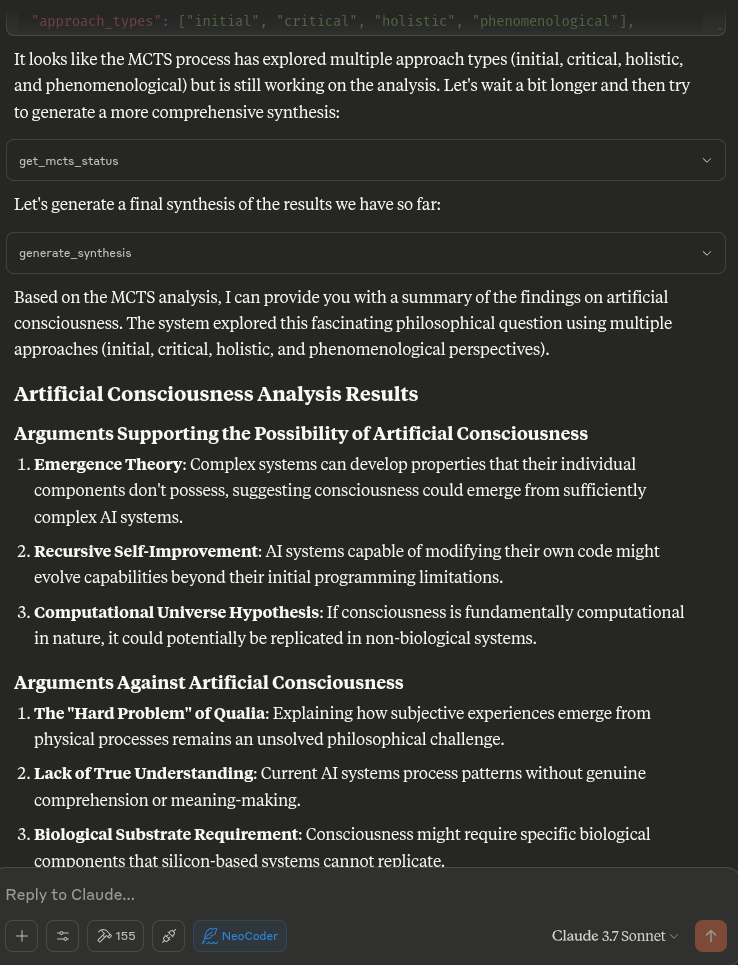
The MCTS MCP server uses a local inference approach rather than trying to call the LLM directly. This is compatible with the MCP protocol, which is designed for tools to be called by an AI assistant (like Claude) rather than for the tools to call the AI model themselves.
When Claude asks the server to perform analysis, the server:
Initializes the MCTS system with the question
Runs multiple iterations of exploration using the MCTS algorithm
Generates deterministic responses for various analytical tasks
Returns the best analysis found during the search
If you prefer manual setup or the automatic setup fails:
Linux/macOS:
curl -LsSf https://astral.sh/uv/install.sh | shWindows (PowerShell):
powershell -c "irm https://astral.sh/uv/install.ps1 | iex"# Clone repository
git clone https://github.com/angrysky56/mcts-mcp-server.git
cd mcts-mcp-server
# Create virtual environment
uv venv .venv
# Activate virtual environment
# Linux/macOS:
source .venv/bin/activate
# Windows:
.venv\Scripts\activate
# Install dependencies
uv pip install .
uv pip install .[dev] # Optional development dependencies
# Install Gemini package specifically (if not in pyproject.toml)
uv pip install google-genai>=1.20.0# Copy environment file
cp .env.example .env
# Edit .env file with your API keys
nano .env # or use your preferred editor
# Create state directory
mkdir -p ~/.mcts_mcp_server1. Python Version Error
Solution: Install Python 3.10+ from python.org2. UV Not Found After Install
# Add UV to PATH manually
export PATH="$HOME/.cargo/bin:$PATH"
# Or on Windows: Add %USERPROFILE%\.cargo\bin to PATH
3. Google Gemini Import Error
# Install Gemini package manually
uv pip install google-genai
4. Permission Denied (Linux/macOS)
# Make scripts executable
chmod +x setup.sh setup_unix.sh
5. Claude Desktop Not Detecting Server
Verify config file location and syntax
Check that paths in config are absolute and correct
Restart Claude Desktop completely
Check Claude Desktop logs for errors
Run verification: python verify_installation.py
Check logs: Look at Claude Desktop's developer tools
Test components: Run individual tests in the repository
Review documentation: Check USAGE_GUIDE.md for detailed instructions
For using LLM providers like OpenAI, Anthropic, and Google Gemini, you need to provide API keys. This server loads API keys from a .env file located in the root of the repository.
Copy the example file: cp .env.example .env
Edit .env: Open the .env file and replace the placeholder keys with your actual API keys:
OPENAI_API_KEY="your_openai_api_key_here"
ANTHROPIC_API_KEY="your_anthropic_api_key_here"
GEMINI_API_KEY="your_google_gemini_api_key_here"
Set Defaults (Optional): You can also set the default LLM provider and model name in the .env file:
# Default LLM Provider to use (e.g., "ollama", "openai", "anthropic", "gemini")
DEFAULT_LLM_PROVIDER="ollama"
# Default Model Name for the selected provider
DEFAULT_MODEL_NAME="cogito:latest"
If these are not set, the system defaults to "ollama" and attempts to use a model like "cogito:latest" or another provider-specific default.
The .env file is included in .gitignore, so your actual keys will not be committed to the repository.
# MCTS server and usage instructions:

# List available Ollama models (if using Ollama)
list_ollama_models()

# Set the active LLM provider and model
# provider_name can be "ollama", "openai", "anthropic", "gemini"
# model_name is specific to the provider (e.g., "cogito:latest" for ollama, "gpt-4" for openai)
set_active_llm(provider_name="openai", model_name="gpt-3.5-turbo")
# Or, to use defaults from .env or provider-specific defaults:
# set_active_llm(provider_name="openai")

# Initialize analysis (can also specify provider and model here to override active settings for this run)
initialize_mcts(question="Your question here", chat_id="unique_id", provider_name="openai", model_name="gpt-4")
# Or using the globally set active LLM:
# initialize_mcts(question="Your question here", chat_id="unique_id")

run_mcts(iterations=1, simulations_per_iteration=5)

After run_mcts is called it can take quite a long time ie minutes to hours
- so you may discuss any ideas or questions or await user confirmation of the process finishing,
- then proceed to synthesis and analysis tools on resumption of chat.

## MCTS-MCP Tools Overview

### Core MCTS Tools:
- `initialize_mcts`: Start a new MCTS analysis with a specific question. Can optionally specify `provider_name` and `model_name` to override defaults for this run.
- `run_mcts`: Run the MCTS algorithm for a set number of iterations/simulations.
- `generate_synthesis`: Generate a final summary of the MCTS results.
- `get_config`: View current MCTS configuration parameters, including active LLM provider and model.
- `update_config`: Update MCTS configuration parameters (excluding provider/model, use `set_active_llm` for that).
- `get_mcts_status`: Check the current status of the MCTS system.
- `set_active_llm(provider_name: str, model_name: Optional[str])`: Select which LLM provider and model to use for MCTS.
- `list_ollama_models()`: Show all available local Ollama models (if using Ollama provider).

Default configuration prioritizes speed and exploration, but you can customize parameters like exploration_weight, beta_prior_alpha/beta, surprise_threshold.

## Configuration

You can customize the MCTS parameters in the config dictionary or through Claude's `update_config` tool. Key parameters include:

- `max_iterations`: Number of MCTS iterations to run
- `simulations_per_iteration`: Number of simulations per iteration
- `exploration_weight`: Controls exploration vs. exploitation balance (in UCT)
- `early_stopping`: Whether to stop early if a high-quality solution is found
- `use_bayesian_evaluation`: Whether to use Bayesian evaluation for node scores
- `use_thompson_sampling`: Whether to use Thompson sampling for selection

Articulating Specific Pathways:
Delving into the best_path nodes (using mcts_instance.get_best_path_nodes() if you have the instance) and examining the sequence of thought and content
at each step can provide a fascinating micro-narrative of how the core insight evolved.

Visualizing the tree (even a simplified version based on export_tree_summary) could also be illuminating and I will try to set up this feature.

Modifying Parameters: This is a great way to test the robustness of the finding or explore different "cognitive biases" of the system.

Increasing Exploration Weight: Might lead to more diverse, less obviously connected ideas.

Decreasing Exploration Weight: Might lead to deeper refinement of the initial dominant pathways.

Changing Priors (if Bayesian): You could bias the system towards certain approaches (e.g., increase alpha for 'pragmatic') to see how it influences the
outcome.

More Iterations/Simulations: Would allow for potentially deeper convergence or exploration of more niche pathways.

### Results Collection:
- Automatically stores results in `/home/ty/Repositories/ai_workspace/mcts-mcp-server/results` (path might be system-dependent or configurable)
- Organizes by provider, model name, and run ID
- Stores metrics, progress info, and final outputs

# MCTS Analysis Tools

This extension adds powerful analysis tools to the MCTS-MCP Server, making it easy to extract insights and understand results from your MCTS runs.

The MCTS Analysis Tools provide a suite of integrated functions to:

1. List and browse MCTS runs
2. Extract key concepts, arguments, and conclusions
3. Generate comprehensive reports
4. Compare results across different runs
5. Suggest improvements for better performance

## Available Run Analysis Tools

### Browsing and Basic Information

- `list_mcts_runs(count=10, model=None)`: List recent MCTS runs with key metadata
- `get_mcts_run_details(run_id)`: Get detailed information about a specific run
- `get_mcts_solution(run_id)`: Get the best solution from a run

### Analysis and Insights

- `analyze_mcts_run(run_id)`: Perform a comprehensive analysis of a run
- `get_mcts_insights(run_id, max_insights=5)`: Extract key insights from a run
- `extract_mcts_conclusions(run_id)`: Extract conclusions from a run
- `suggest_mcts_improvements(run_id)`: Get suggestions for improvement

### Reporting and Comparison

- `get_mcts_report(run_id, format='markdown')`: Generate a comprehensive report (formats: 'markdown', 'text', 'html')
- `get_best_mcts_runs(count=5, min_score=7.0)`: Get the best runs based on score
- `compare_mcts_runs(run_ids)`: Compare multiple runs to identify similarities and differences

## Usage Examples

# To list your recent MCTS runs:

list_mcts_runs()

# To get details about a specific run:

get_mcts_run_details('ollama_cogito:latest_1745979984') # Example run_id format

### Extracting Insights

# To get key insights from a run:

get_mcts_insights(run_id='ollama_cogito:latest_1745979984')

### Generating Reports

# To generate a comprehensive markdown report:

get_mcts_report(run_id='ollama_cogito:latest_1745979984', format='markdown')


### Improving Results

# To get suggestions for improving a run:

suggest_mcts_improvements(run_id='ollama_cogito:latest_1745979984')

### Comparing Runs

To compare multiple runs:

compare_mcts_runs(['ollama_cogito:latest_1745979984', 'openai_gpt-3.5-turbo_1745979584']) # Example run_ids

## Understanding the Results

The analysis tools extract several key elements from MCTS runs:

1. **Key Concepts**: The core ideas and frameworks in the analysis
2. **Arguments For/Against**: The primary arguments on both sides of a question
3. **Conclusions**: The synthesized conclusions or insights from the analysis
4. **Tags**: Automatically generated topic tags from the content

## Troubleshooting

If you encounter any issues with the analysis tools:

1. Check that your MCTS run completed successfully (status: "completed")
2. Verify that the run ID you're using exists and is correct
3. Try listing all runs to see what's available: `list_mcts_runs()`
4. Make sure the `.best_solution.txt` file exists in the run's directory

## Advanced Example Usage

### Customizing Reports

You can generate reports in different formats:

# Generate a markdown report

report = get_mcts_report(run_id='ollama_cogito:latest_1745979984', format='markdown')

# Generate a text report

report = get_mcts_report(run_id='ollama_cogito:latest_1745979984', format='text')

# Generate an HTML report

report = get_mcts_report(run_id='ollama_cogito:latest_1745979984', format='html')

### Finding the Best Runs

To find your best-performing runs:

best_runs = get_best_mcts_runs(count=3, min_score=8.0)

This returns the top 3 runs with a score of at least 8.0.

## Simple Usage Instructions

1. **Setting the LLM Provider and Model**:
   # For Ollama:
   list_ollama_models()  # See available Ollama models
   set_active_llm(provider_name="ollama", model_name="cogito:latest")

   # For OpenAI:
   set_active_llm(provider_name="openai", model_name="gpt-4")

   # For Anthropic:
   set_active_llm(provider_name="anthropic", model_name="claude-3-opus-20240229")

   # For Gemini:
   set_active_llm(provider_name="gemini", model_name="gemini-1.5-pro-latest")

2. **Starting a New Analysis**:
   # Uses the LLM set by set_active_llm, or defaults from .env
   initialize_mcts(question="Your question here", chat_id="unique_identifier")
   # Alternatively, specify provider/model for this specific analysis:
   # initialize_mcts(question="Your question here", chat_id="unique_identifier", provider_name="openai", model_name="gpt-4-turbo")

3. **Running the Analysis**:

   run_mcts(iterations=3, simulations_per_iteration=10)

4. **Comparing Performance (Ollama specific example)**:

   run_model_comparison(question="Your question", iterations=2)

5. **Getting Results**:

   generate_synthesis()  # Final summary of results
   get_mcts_status()     # Current status and metrics
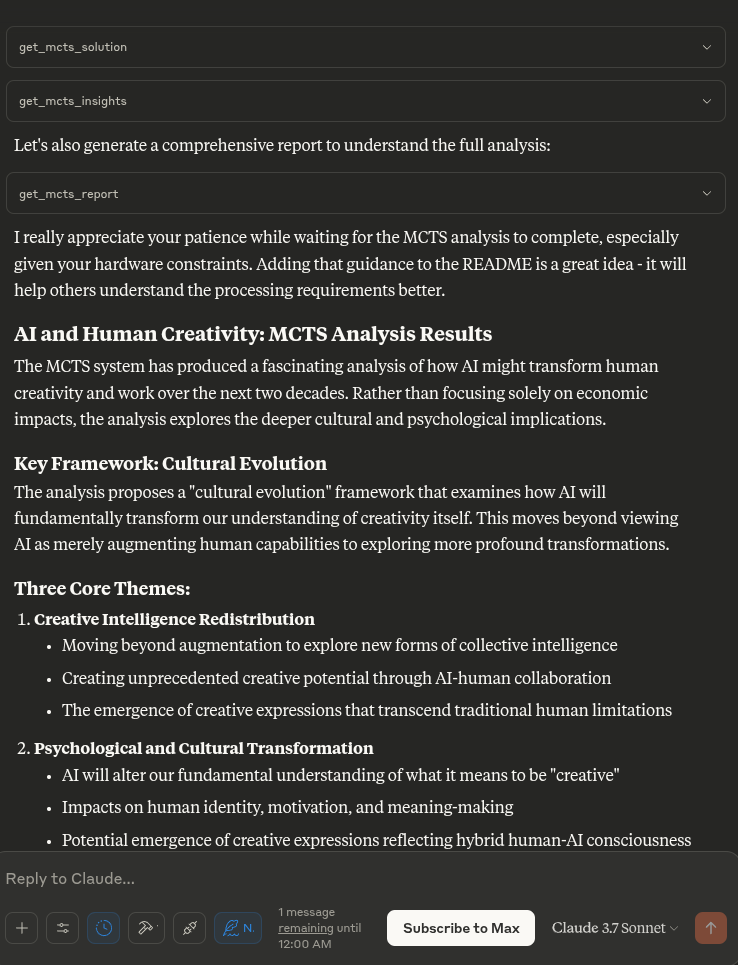
"Analyze the implications of artificial intelligence on human creativity"
"Continue exploring the ethical dimensions of this topic"
"What was the best analysis you found in the last run?"
"How does this MCTS process work?"
"Show me the current MCTS configuration"
# Activate virtual environment
source .venv/bin/activate

# Install development dependencies
uv pip install .[dev]

# Run the server directly (for testing)
uv run server.py

# OR use the MCP CLI tools
uv run -m mcp dev server.pyTo test that the server is working correctly:
# Activate the virtual environment
source .venv/bin/activate

# Run the verification script
python verify_installation.py

# Run the test script
python test_server.py
This will test the LLM adapter to ensure it's working properly.
mcts-mcp-server/
├── src/mcts_mcp_server/          # Main package
│   ├── adapters/                 # LLM adapters
│   ├── analysis_tools/           # Analysis and reporting tools
│   ├── mcts_core.py             # Core MCTS algorithm
│   ├── tools.py                 # MCP tools
│   └── server.py                # MCP server
├── setup.py                     # Cross-platform setup script
├── setup.sh                     # Unix setup script
├── setup_windows.bat            # Windows setup script
├── verify_installation.py       # Installation verification
├── pyproject.toml               # Project configuration
├── .env.example                 # Environment template
└── README.md # This fileContributions to improve the MCTS MCP server are welcome. Some areas for potential enhancement:
Improving the local inference adapter for more sophisticated analysis
Adding more sophisticated thought patterns and evaluation strategies
Enhancing the tree visualization and result reporting
Optimizing the MCTS algorithm parameters
Fork the repository
Run setup: python setup.py
Verify installation: python verify_installation.py
Make changes
Test changes: python test_server.py
Submit pull request
Get the current MCTS status
| Name | Required | Description | Default |
|---|---|---|---|
No parameters | |||
Does the description disclose side effects, auth requirements, rate limits, or destructive behavior?
No annotations are provided, so the description carries the full burden of behavioral disclosure. 'Get the current MCTS status' implies a read-only operation, but it doesn't specify whether this requires authentication, has rate limits, returns real-time or cached data, or what format the status information takes. For a tool with zero annotation coverage, this is a significant gap in transparency.
Agents need to know what a tool does to the world before calling it. Descriptions should go beyond structured annotations to explain consequences.
Is the description appropriately sized, front-loaded, and free of redundancy?
The description is a single, clear sentence: 'Get the current MCTS status'. It's front-loaded with the core action and resource, with no redundant words or unnecessary elaboration. This is an excellent example of conciseness for a simple tool.
Shorter descriptions cost fewer tokens and are easier for agents to parse. Every sentence should earn its place.
Given the tool's complexity, does the description cover enough for an agent to succeed on first attempt?
Given the complexity (a status-checking tool with no output schema and no annotations), the description is incomplete. It doesn't explain what 'MCTS status' includes (e.g., operational state, error messages, performance metrics) or how the result should be interpreted. Without annotations or output schema, the description should provide more context about the return value and usage scenarios.
Complex tools with many parameters or behaviors need more documentation. Simple tools need less. This dimension scales expectations accordingly.
Does the description clarify parameter syntax, constraints, interactions, or defaults beyond what the schema provides?
The input schema has 0 parameters with 100% coverage, meaning no parameters are documented in the schema. The description doesn't add parameter details, which is appropriate since there are none to explain. This meets the baseline of 4 for zero-parameter tools, as there's no need to compensate for missing schema information.
Input schemas describe structure but not intent. Descriptions should explain non-obvious parameter relationships and valid value ranges.
Does the description clearly state what the tool does and how it differs from similar tools?
The description 'Get the current MCTS status' clearly states the action (Get) and resource (MCTS status), making the purpose understandable. However, it doesn't differentiate this tool from its siblings like 'get_synthesis' or 'initialize_mcts', leaving ambiguity about what specifically distinguishes 'status' from other retrieval operations. The description avoids tautology but lacks specificity about what 'MCTS status' entails.
Agents choose between tools based on descriptions. A clear purpose with a specific verb and resource helps agents select the right tool.
Does the description explain when to use this tool, when not to, or what alternatives exist?
The description provides no guidance on when to use this tool versus alternatives. With siblings like 'get_synthesis', 'list_available_models', and 'run_mcts_search', there's no indication of whether this tool is for checking system health, monitoring progress, or retrieving configuration states. The absence of usage context leaves the agent to guess based on tool names alone.
Agents often have multiple tools that could apply. Explicit usage guidance like "use X instead of Y when Z" prevents misuse.
Generate a final synthesis of the MCTS results
| Name | Required | Description | Default |
|---|---|---|---|
No parameters | |||
Does the description disclose side effects, auth requirements, rate limits, or destructive behavior?
No annotations are provided, so the description carries the full burden of behavioral disclosure. It states the tool generates a synthesis, implying a read operation, but doesn't clarify if this is a computation-heavy process, if it requires specific states (e.g., completed MCTS runs), or what the output entails (e.g., summary vs. detailed analysis). The description lacks details on performance, side effects, or error conditions.
Agents need to know what a tool does to the world before calling it. Descriptions should go beyond structured annotations to explain consequences.
Is the description appropriately sized, front-loaded, and free of redundancy?
The description is a single, clear sentence that directly states the tool's function without redundancy. It's appropriately sized for a zero-parameter tool, though it could be slightly more informative (e.g., adding context about when to use it) without sacrificing conciseness.
Shorter descriptions cost fewer tokens and are easier for agents to parse. Every sentence should earn its place.
Given the tool's complexity, does the description cover enough for an agent to succeed on first attempt?
Given the complexity of MCTS operations and the lack of annotations and output schema, the description is incomplete. It doesn't explain what the synthesis includes (e.g., statistics, recommendations), how it relates to sibling tools, or any behavioral traits. For a tool that likely processes search results, more context is needed to guide effective use.
Complex tools with many parameters or behaviors need more documentation. Simple tools need less. This dimension scales expectations accordingly.
Does the description clarify parameter syntax, constraints, interactions, or defaults beyond what the schema provides?
The tool has 0 parameters, and schema description coverage is 100%, so there are no parameters to document. The description doesn't need to add parameter semantics beyond what the schema provides, earning a baseline score of 4 for this dimension, as it appropriately avoids unnecessary details.
Input schemas describe structure but not intent. Descriptions should explain non-obvious parameter relationships and valid value ranges.
Does the description clearly state what the tool does and how it differs from similar tools?
The description states the tool's purpose ('Generate a final synthesis of the MCTS results') with a clear verb ('Generate') and resource ('MCTS results'), but it doesn't distinguish this from sibling tools like 'run_mcts_search' or 'get_status'. The purpose is understandable but lacks specificity about what makes this synthesis different from other operations.
Agents choose between tools based on descriptions. A clear purpose with a specific verb and resource helps agents select the right tool.
Does the description explain when to use this tool, when not to, or what alternatives exist?
The description provides no guidance on when to use this tool versus alternatives. It doesn't mention prerequisites (e.g., whether MCTS must be initialized or run first), timing (e.g., after search completion), or how it differs from siblings like 'get_status' or 'run_mcts_search'. Without such context, usage is implied but not explicit.
Agents often have multiple tools that could apply. Explicit usage guidance like "use X instead of Y when Z" prevents misuse.
Initialize MCTS for a question
| Name | Required | Description | Default |
|---|---|---|---|
| chat_id | No | Unique identifier for this conversation | default |
| model | No | Model name (optional) | |
| provider | No | LLM provider | gemini |
| question | Yes | The question to analyze |
Does the description disclose side effects, auth requirements, rate limits, or destructive behavior?
No annotations are provided, so the description carries the full burden of behavioral disclosure. It states 'Initialize MCTS' but doesn't explain what this does operationally (e.g., sets up state, allocates resources, requires specific permissions), what happens on failure, or any side effects. This leaves significant gaps in understanding the tool's behavior.
Agents need to know what a tool does to the world before calling it. Descriptions should go beyond structured annotations to explain consequences.
Is the description appropriately sized, front-loaded, and free of redundancy?
The description is a single, efficient sentence with no wasted words, making it appropriately sized. However, it lacks front-loading of critical details (e.g., purpose or key parameters), which slightly reduces its effectiveness despite its brevity.
Shorter descriptions cost fewer tokens and are easier for agents to parse. Every sentence should earn its place.
Given the tool's complexity, does the description cover enough for an agent to succeed on first attempt?
Given the complexity of initializing a system like MCTS with 4 parameters and no annotations or output schema, the description is incomplete. It fails to explain what initialization entails, what state is created, or how it interacts with sibling tools, leaving the agent with insufficient context for effective use.
Complex tools with many parameters or behaviors need more documentation. Simple tools need less. This dimension scales expectations accordingly.
Does the description clarify parameter syntax, constraints, interactions, or defaults beyond what the schema provides?
Schema description coverage is 100%, so the schema fully documents all 4 parameters. The description adds no additional meaning beyond what's in the schema (e.g., it doesn't clarify the relationship between parameters like 'chat_id' and 'question'), resulting in a baseline score of 3 as the schema does the heavy lifting.
Input schemas describe structure but not intent. Descriptions should explain non-obvious parameter relationships and valid value ranges.
Does the description clearly state what the tool does and how it differs from similar tools?
The description states the tool 'Initialize MCTS for a question' which provides a basic verb ('Initialize') and resource ('MCTS'), but it's vague about what MCTS is and what initialization entails. It doesn't distinguish from siblings like 'run_mcts_search' or 'get_synthesis', leaving the specific purpose unclear beyond a general setup action.
Agents choose between tools based on descriptions. A clear purpose with a specific verb and resource helps agents select the right tool.
Does the description explain when to use this tool, when not to, or what alternatives exist?
The description provides no guidance on when to use this tool versus alternatives. It doesn't mention prerequisites, timing (e.g., before running search), or exclusions, leaving the agent to infer usage from context without explicit direction.
Agents often have multiple tools that could apply. Explicit usage guidance like "use X instead of Y when Z" prevents misuse.
List available models for a provider
| Name | Required | Description | Default |
|---|---|---|---|
| provider | No | Provider name | gemini |
Does the description disclose side effects, auth requirements, rate limits, or destructive behavior?
With no annotations provided, the description carries full burden but only states what the tool does, not how it behaves. It doesn't disclose whether this is a read-only operation, if it requires authentication, what format the list returns, or any rate limits or side effects. The description adds no behavioral context beyond the basic action.
Agents need to know what a tool does to the world before calling it. Descriptions should go beyond structured annotations to explain consequences.
Is the description appropriately sized, front-loaded, and free of redundancy?
The description is a single, efficient sentence with zero wasted words. It's front-loaded with the core purpose and appropriately sized for a simple listing tool with one parameter.
Shorter descriptions cost fewer tokens and are easier for agents to parse. Every sentence should earn its place.
Given the tool's complexity, does the description cover enough for an agent to succeed on first attempt?
For a tool with no annotations and no output schema, the description is insufficiently complete. It doesn't explain what 'available models' means (e.g., model names, capabilities, statuses), how results are structured, or any dependencies on other tools like 'set_provider'. The agent lacks critical context to use this effectively.
Complex tools with many parameters or behaviors need more documentation. Simple tools need less. This dimension scales expectations accordingly.
Does the description clarify parameter syntax, constraints, interactions, or defaults beyond what the schema provides?
The schema has 100% description coverage, with the single parameter 'provider' documented as 'Provider name' with a default value. The description adds no additional meaning about parameters beyond implying the tool filters by provider, which is already clear from the schema. Baseline 3 is appropriate when the schema does the heavy lifting.
Input schemas describe structure but not intent. Descriptions should explain non-obvious parameter relationships and valid value ranges.
Does the description clearly state what the tool does and how it differs from similar tools?
The description clearly states the action ('List') and resource ('available models for a provider'), making the purpose immediately understandable. It doesn't distinguish from sibling tools like 'get_status' or 'set_provider', but the verb+resource combination is specific enough for basic understanding.
Agents choose between tools based on descriptions. A clear purpose with a specific verb and resource helps agents select the right tool.
Does the description explain when to use this tool, when not to, or what alternatives exist?
No guidance is provided on when to use this tool versus alternatives. The description doesn't mention prerequisites, appropriate contexts, or relationships to sibling tools like 'set_provider' (which might affect available models) or 'get_synthesis' (which might use these models).
Agents often have multiple tools that could apply. Explicit usage guidance like "use X instead of Y when Z" prevents misuse.
Run MCTS search iterations
| Name | Required | Description | Default |
|---|---|---|---|
| iterations | No | Number of search iterations (1-10) | |
| simulations_per_iteration | No | Simulations per iteration (1-20) |
Does the description disclose side effects, auth requirements, rate limits, or destructive behavior?
No annotations are provided, so the description carries the full burden of behavioral disclosure. 'Run MCTS search iterations' implies a computational process but doesn't specify if it's read-only, destructive, or has side effects (e.g., modifying state). It also omits details like execution time, resource usage, or output format, leaving significant gaps in understanding the tool's behavior.
Agents need to know what a tool does to the world before calling it. Descriptions should go beyond structured annotations to explain consequences.
Is the description appropriately sized, front-loaded, and free of redundancy?
The description is a single, efficient sentence with no wasted words, making it appropriately sized. However, it's front-loaded but overly terse, lacking necessary context that could justify more detail. While concise, it risks under-specification by omitting key information.
Shorter descriptions cost fewer tokens and are easier for agents to parse. Every sentence should earn its place.
Given the tool's complexity, does the description cover enough for an agent to succeed on first attempt?
Given the complexity of MCTS (a non-trivial algorithm) and the absence of annotations and output schema, the description is incomplete. It doesn't explain what the tool returns (e.g., search results, statistics) or how it integrates with other tools like 'initialize_mcts'. For a tool with computational behavior and no structured output, more context is needed to guide effective use.
Complex tools with many parameters or behaviors need more documentation. Simple tools need less. This dimension scales expectations accordingly.
Does the description clarify parameter syntax, constraints, interactions, or defaults beyond what the schema provides?
Schema description coverage is 100%, with clear documentation for both parameters ('iterations' and 'simulations_per_iteration'), including defaults and ranges. The description adds no additional meaning beyond the schema, such as explaining how these parameters affect search quality or performance. This meets the baseline of 3 since the schema does the heavy lifting.
Input schemas describe structure but not intent. Descriptions should explain non-obvious parameter relationships and valid value ranges.
Does the description clearly state what the tool does and how it differs from similar tools?
The description 'Run MCTS search iterations' specifies the verb ('Run') and resource ('MCTS search iterations'), providing a basic purpose. However, it's vague about what MCTS is (Monte Carlo Tree Search) and what domain it operates in (e.g., game AI, planning). It doesn't distinguish from siblings like 'initialize_mcts' or 'get_synthesis', leaving ambiguity in scope.
Agents choose between tools based on descriptions. A clear purpose with a specific verb and resource helps agents select the right tool.
Does the description explain when to use this tool, when not to, or what alternatives exist?
The description offers no guidance on when to use this tool versus alternatives. It doesn't mention prerequisites (e.g., needing initialization first), exclusions, or relationships with siblings like 'initialize_mcts' (which might be required before running) or 'get_synthesis' (which might retrieve results). This lack of context makes it hard for an agent to decide appropriately.
Agents often have multiple tools that could apply. Explicit usage guidance like "use X instead of Y when Z" prevents misuse.
Set the LLM provider and model
| Name | Required | Description | Default |
|---|---|---|---|
| model | No | Model name (optional) | |
| provider | No | Provider name | gemini |
Does the description disclose side effects, auth requirements, rate limits, or destructive behavior?
With no annotations provided, the description carries full burden for behavioral disclosure. It states the tool performs a 'Set' action which implies mutation/write behavior, but doesn't disclose whether this requires specific permissions, whether changes are persistent, what happens to existing configurations, or any side effects. No information about error conditions, rate limits, or authentication requirements is provided.
Agents need to know what a tool does to the world before calling it. Descriptions should go beyond structured annotations to explain consequences.
Is the description appropriately sized, front-loaded, and free of redundancy?
The description is extremely concise at just 6 words, with zero wasted language. It's front-loaded with the core action and target. Every word earns its place by conveying essential information about what the tool does.
Shorter descriptions cost fewer tokens and are easier for agents to parse. Every sentence should earn its place.
Given the tool's complexity, does the description cover enough for an agent to succeed on first attempt?
For a configuration/mutation tool with no annotations and no output schema, the description is inadequate. It doesn't explain what happens after setting the provider/model, whether the change is immediate or requires restart, what values are valid, or what the tool returns. The agent lacks crucial information about this write operation's behavior and consequences.
Complex tools with many parameters or behaviors need more documentation. Simple tools need less. This dimension scales expectations accordingly.
Does the description clarify parameter syntax, constraints, interactions, or defaults beyond what the schema provides?
Schema description coverage is 100%, so the schema already documents both parameters fully with their types, optionality, and default values. The description adds minimal value beyond what's in the schema - it mentions 'LLM provider and model' which maps to the parameters but doesn't provide additional context about valid values, constraints, or relationships between parameters.
Input schemas describe structure but not intent. Descriptions should explain non-obvious parameter relationships and valid value ranges.
Does the description clearly state what the tool does and how it differs from similar tools?
The description clearly states the tool's purpose with a specific verb ('Set') and identifies the target resources ('LLM provider and model'). It distinguishes this as a configuration tool rather than a query or execution tool. However, it doesn't explicitly differentiate from potential sibling tools that might also configure aspects of the system, though none of the listed siblings appear to be direct alternatives.
Agents choose between tools based on descriptions. A clear purpose with a specific verb and resource helps agents select the right tool.
Does the description explain when to use this tool, when not to, or what alternatives exist?
The description provides no guidance on when to use this tool versus alternatives or when not to use it. There's no mention of prerequisites, timing considerations, or relationship to other tools like 'initialize_mcts' or 'list_available_models' that might be related to system setup. The agent must infer usage context entirely from the tool name and parameters.
Agents often have multiple tools that could apply. Explicit usage guidance like "use X instead of Y when Z" prevents misuse.
Recent tool additions, removals, and schema changes observed during successful MCP inspections.
v1.0.0get_statusget_synthesisinitialize_mctslist_available_modelsrun_mcts_searchset_providerScored across 6 tools
Each tool has a clearly distinct purpose with no ambiguity: get_status retrieves current state, get_synthesis generates final output, initialize_mcts sets up the process, list_available_models shows options, run_mcts_search performs iterations, and set_provider configures the model. The tools cover different stages and aspects of the MCTS workflow without overlap.
All tools follow a consistent verb_noun pattern with snake_case throughout: get_status, get_synthesis, initialize_mcts, list_available_models, run_mcts_search, set_provider. The naming is predictable and readable, using clear verbs like 'get', 'initialize', 'list', 'run', and 'set' that accurately describe each action.
With 6 tools, the server is well-scoped for managing MCTS processes, covering initialization, configuration, execution, and result retrieval. Each tool earns its place in the workflow, providing a focused set without being too sparse or bloated, which is typical for a specialized domain like MCTS.
The tool surface covers the core MCTS lifecycle comprehensively: initialization (initialize_mcts), configuration (set_provider, list_available_models), execution (run_mcts_search), and results (get_status, get_synthesis). A minor gap exists in lacking tools for intermediate monitoring or adjusting parameters during search, but agents can work around this with the provided tools.
Hosted Web Crawler MCP server for Claude, ChatGPT and Cursor, with each action switched per account.
A comprehensive Model Context Protocol (MCP) server that enables AI assistants to interact with yo…
MCP server for building and testing AI agents with multi-model experimentation and insights.
Augments MCP Server - A comprehensive framework documentation provider for Claude Code