

A
licenseB
qualityD
maintenanceEnables AI models to perform MySQL database operations through a standardized interface, supporting secure connections, query execution, and comprehensive schema management.
7
191 npm
33
MIT

The AnalyticDB for MySQL MCP Server enables AI agents to interact with AnalyticDB for MySQL databases through a standardized interface, providing comprehensive database querying, analysis, and metadata retrieval capabilities.
Core Capabilities:
Execute SQL queries - Run SQL operations directly on AnalyticDB for MySQL clusters
Analyze query performance - Get query execution plans and actual execution plans with runtime statistics to optimize query performance
Browse databases and tables - List all databases in the cluster and tables within specific databases
Access table schemas - Retrieve DDL scripts to understand table structure and definitions
Check cluster configuration - Fetch configuration values for specific keys
Key Features:
Flexible deployment options via pip package or local source code
Local debugging support using the MCP Inspector tool
Seamless integration for AI agents to perform data retrieval, SQL operations, and performance optimization
Provides a universal interface for AI agents to interact with Alibaba Cloud AnalyticDB for MySQL, enabling database metadata retrieval, SQL query execution, query plan analysis, and access to table structures across databases.
Click on "Deploy Server".
Wait a few minutes for the server to deploy. Once ready, it will show a "Started" state.
In the chat, type @ followed by the MCP server name and your instructions, e.g., "@Adb MySQL MCP Server show me the top 10 customers by total sales"
That's it! The server will respond to your query, and you can continue using it as needed.
Here is a step-by-step guide with screenshots.
English | 中文
AnalyticDB for MySQL MCP Server is a universal interface between AI Agents and AnalyticDB MySQL. It provides two tool groups:
SQL Tools & Resources (sql group): Connect directly to ADB MySQL clusters to execute SQL, view execution plans, and browse database metadata. The sql group is only a tool-group switch; execute_sql runs in read-only mode by default, and full SQL execution mode requires the additional explicit setting ENABLE_SQL_WRITE_TOOLS=true.
OpenAPI Tools (openapi group): Manage clusters, whitelists, accounts, networking, monitoring, diagnostics, and audit logs via Alibaba Cloud OpenAPI.
Read-only tools are annotated with ToolAnnotations(readOnlyHint=True) per the MCP protocol, allowing clients to distinguish them from mutating operations.
Python >= 3.13
uv (recommended package manager and runner)
Alibaba Cloud AccessKey (required for OpenAPI tools)
Optional: ADB MySQL connection credentials (for SQL tools in direct-connection mode)
Related MCP server: Hologres MCP Server
Choose the tool groups and extra switches for your scenario before copying a client configuration:
Scenario | Tool groups | Extra switch | Best for |
Read-only SQL queries, EXPLAIN, and metadata browsing |
| None | Recommended default for querying, troubleshooting, and read-only analysis |
Full SQL execution through |
|
| INSERT/UPDATE/DELETE/DDL/multi-statement SQL when the MCP client is trusted |
OpenAPI cluster management tools + SQL read tools |
| Alibaba Cloud AK/SK + | Cluster, account, whitelist, diagnostics, and monitoring operations while keeping SQL read access |
OpenAPI + full SQL execution |
| Alibaba Cloud AK/SK + | Administration plus full SQL execution |
MCP_TOOLSETS=sqlonly enables the SQL tool group. Full SQL execution is not a separate tool group, and there is nosql_writetool group. It must be enabled separately withENABLE_SQL_WRITE_TOOLS=true.
Before configuring a client, check:
Direct database mode: configure ADB_MYSQL_HOST, ADB_MYSQL_PORT, ADB_MYSQL_USER, ADB_MYSQL_PASSWORD, and optionally ADB_MYSQL_DATABASE.
Temporary account mode: if ADB_MYSQL_USER / ADB_MYSQL_PASSWORD are not configured but AK/SK is available, the server creates a temporary database account through OpenAPI; SQL tool calls must provide region_id and db_cluster_id.
Remote SSE / Streamable HTTP: when SERVER_HOST is not a loopback address, configure API_KEY on the server and Authorization: Bearer <API_KEY> on the client.
Full SQL execution: enable it only for trusted users and trusted MCP clients, and use a least-privilege database account.
Download and install cherry-studio
Follow the documentation to install uv, which is required for the MCP environment
Configure and use ADB MySQL MCP according to the documentation. You can quickly import the configuration using the JSON below.
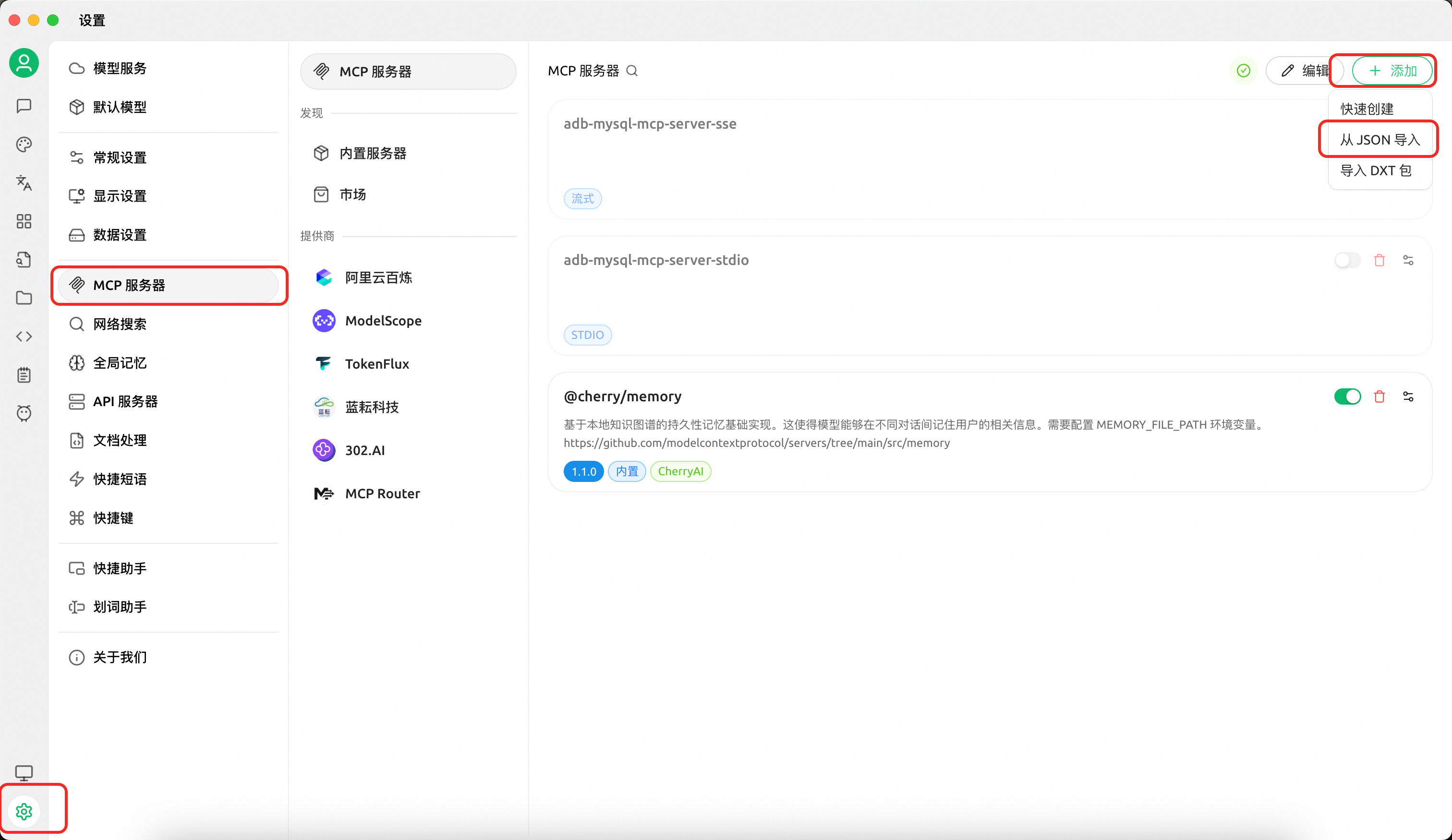
Configuration A — SQL read tools only (execute read-only queries, view plans, browse metadata):
{
  "mcpServers": {
    "adb-mysql-mcp-server": {
      "name": "adb-mysql-mcp-server",
      "type": "stdio",
      "isActive": true,
      "command": "uv",
      "args": [
        "--directory",
        "/path/to/alibabacloud-adb-mysql-mcp-server",
        "run",
        "adb-mysql-mcp-server"
      ],
      "env": {
        "ADB_MYSQL_HOST": "your_adb_mysql_host",
        "ADB_MYSQL_PORT": "3306",
        "ADB_MYSQL_USER": "your_username",
        "ADB_MYSQL_PASSWORD": "your_password",
        "ADB_MYSQL_DATABASE": "your_database",
        "MCP_TOOLSETS": "sql"
      }
    }
  }
}
Configuration B — OpenAPI tools + SQL read tools:
Note: OpenAPI tools include mutating administration capabilities such as account creation, whitelist modification, and query termination. Enable them only when you intentionally need management operations. The example below also keeps the
sqltool group enabled, so it includes direct database connection settings.
{
  "mcpServers": {
    "adb-mysql-mcp-server": {
      "name": "adb-mysql-mcp-server",
      "type": "stdio",
      "isActive": true,
      "command": "uv",
      "args": [
        "--directory",
        "/path/to/alibabacloud-adb-mysql-mcp-server",
        "run",
        "adb-mysql-mcp-server"
      ],
      "env": {
        "ALIBABA_CLOUD_ACCESS_KEY_ID": "your_access_key_id",
        "ALIBABA_CLOUD_ACCESS_KEY_SECRET": "your_access_key_secret",
        "ADB_MYSQL_HOST": "your_adb_mysql_host",
        "ADB_MYSQL_PORT": "3306",
        "ADB_MYSQL_USER": "your_username",
        "ADB_MYSQL_PASSWORD": "your_password",
        "ADB_MYSQL_DATABASE": "your_database",
        "MCP_TOOLSETS": "openapi,sql"
      }
    }
  }
}
If you only want OpenAPI management tools and do not need SQL tools or resources, change MCP_TOOLSETS to openapi and remove the ADB_MYSQL_* direct database settings.
Configuration C — Full SQL execution through execute_sql:
Warning: With
ENABLE_SQL_WRITE_TOOLS=true,execute_sqlexposes full SQL execution. The server only performs basic input validation and does not restrict statement type, comments, semicolons, multi-statement SQL, DDL, DML, DCL, or TCL. Enable it only for trusted users and use a least-privilege database account.
{
  "mcpServers": {
    "adb-mysql-mcp-server": {
      "name": "adb-mysql-mcp-server",
      "type": "stdio",
      "isActive": true,
      "command": "uv",
      "args": [
        "--directory",
        "/path/to/alibabacloud-adb-mysql-mcp-server",
        "run",
        "adb-mysql-mcp-server"
      ],
      "env": {
        "ADB_MYSQL_HOST": "your_adb_mysql_host",
        "ADB_MYSQL_PORT": "3306",
        "ADB_MYSQL_USER": "your_username",
        "ADB_MYSQL_PASSWORD": "your_password",
        "ADB_MYSQL_DATABASE": "your_database",
        "MCP_TOOLSETS": "sql",
        "ENABLE_SQL_WRITE_TOOLS": "true"
      }
    }
  }
}
Configuration D — OpenAPI tools + full SQL execution:
Warning: This configuration enables both OpenAPI management capabilities and full SQL execution through
execute_sql. Use it only with trusted clients, trusted users, and a least-privilege database account.
{
  "mcpServers": {
    "adb-mysql-mcp-server": {
      "name": "adb-mysql-mcp-server",
      "type": "stdio",
      "isActive": true,
      "command": "uv",
      "args": [
        "--directory",
        "/path/to/alibabacloud-adb-mysql-mcp-server",
        "run",
        "adb-mysql-mcp-server"
      ],
      "env": {
        "ALIBABA_CLOUD_ACCESS_KEY_ID": "your_access_key_id",
        "ALIBABA_CLOUD_ACCESS_KEY_SECRET": "your_access_key_secret",
        "ADB_MYSQL_HOST": "your_adb_mysql_host",
        "ADB_MYSQL_PORT": "3306",
        "ADB_MYSQL_USER": "your_username",
        "ADB_MYSQL_PASSWORD": "your_password",
        "ADB_MYSQL_DATABASE": "your_database",
        "MCP_TOOLSETS": "openapi,sql",
        "ENABLE_SQL_WRITE_TOOLS": "true"
      }
    }
  }
}
Without
MCP_TOOLSETS, only thesqlgroup is enabled, andexecute_sqlstill runs in read-only mode by default. When AK/SK is not configured, OpenAPI tools are automatically disabled even if requested.
Download from GitHub and sync dependencies:
git clone https://github.com/aliyun/alibabacloud-adb-mysql-mcp-server
cd alibabacloud-adb-mysql-mcp-server
uv sync
Add the following configuration to the Claude Code MCP config file (project-level: .mcp.json in the project root, or user-level: ~/.claude/settings.json):
stdio transport:
{
  "mcpServers": {
    "adb-mysql-mcp-server": {
      "command": "uv",
      "args": [
        "--directory",
        "/path/to/alibabacloud-adb-mysql-mcp-server",
        "run",
        "adb-mysql-mcp-server"
      ],
      "env": {
        "MCP_TOOLSETS": "sql",
        "ADB_MYSQL_HOST": "your_adb_mysql_host",
        "ADB_MYSQL_PORT": "3306",
        "ADB_MYSQL_USER": "your_username",
        "ADB_MYSQL_PASSWORD": "your_password",
        "ADB_MYSQL_DATABASE": "your_database"
      }
    }
  }
}
For OpenAPI management tools, add ALIBABA_CLOUD_ACCESS_KEY_ID, ALIBABA_CLOUD_ACCESS_KEY_SECRET, and explicitly include openapi in MCP_TOOLSETS. The example below uses the common setting MCP_TOOLSETS=openapi,sql, so it also includes direct database connection settings and the SQL read tools work after copying the config:
{
  "mcpServers": {
    "adb-mysql-mcp-server": {
      "command": "uv",
      "args": [
        "--directory",
        "/path/to/alibabacloud-adb-mysql-mcp-server",
        "run",
        "adb-mysql-mcp-server"
      ],
      "env": {
        "ALIBABA_CLOUD_ACCESS_KEY_ID": "your_access_key_id",
        "ALIBABA_CLOUD_ACCESS_KEY_SECRET": "your_access_key_secret",
        "MCP_TOOLSETS": "openapi,sql",
        "ADB_MYSQL_HOST": "your_adb_mysql_host",
        "ADB_MYSQL_PORT": "3306",
        "ADB_MYSQL_USER": "your_username",
        "ADB_MYSQL_PASSWORD": "your_password",
        "ADB_MYSQL_DATABASE": "your_database"
      }
    }
  }
}
If you only want OpenAPI management tools and do not need SQL tools or resources, change MCP_TOOLSETS to openapi and remove the ADB_MYSQL_* direct database settings.
For full SQL execution through execute_sql, keep MCP_TOOLSETS=sql and set ENABLE_SQL_WRITE_TOOLS=true. Note that neither MCP_TOOLSETS=sql nor MCP_TOOLSETS=all enables full SQL execution by itself:
{
  "mcpServers": {
    "adb-mysql-mcp-server": {
      "command": "uv",
      "args": [
        "--directory",
        "/path/to/alibabacloud-adb-mysql-mcp-server",
        "run",
        "adb-mysql-mcp-server"
      ],
      "env": {
        "MCP_TOOLSETS": "sql",
        "ENABLE_SQL_WRITE_TOOLS": "true",
        "ADB_MYSQL_HOST": "your_adb_mysql_host",
        "ADB_MYSQL_PORT": "3306",
        "ADB_MYSQL_USER": "your_username",
        "ADB_MYSQL_PASSWORD": "your_password",
        "ADB_MYSQL_DATABASE": "your_database"
      }
    }
  }
}
If you need both OpenAPI management and full SQL execution, use MCP_TOOLSETS=openapi,sql and set ENABLE_SQL_WRITE_TOOLS=true:
{
  "mcpServers": {
    "adb-mysql-mcp-server": {
      "command": "uv",
      "args": [
        "--directory",
        "/path/to/alibabacloud-adb-mysql-mcp-server",
        "run",
        "adb-mysql-mcp-server"
      ],
      "env": {
        "ALIBABA_CLOUD_ACCESS_KEY_ID": "your_access_key_id",
        "ALIBABA_CLOUD_ACCESS_KEY_SECRET": "your_access_key_secret",
        "MCP_TOOLSETS": "openapi,sql",
        "ENABLE_SQL_WRITE_TOOLS": "true",
        "ADB_MYSQL_HOST": "your_adb_mysql_host",
        "ADB_MYSQL_PORT": "3306",
        "ADB_MYSQL_USER": "your_username",
        "ADB_MYSQL_PASSWORD": "your_password",
        "ADB_MYSQL_DATABASE": "your_database"
      }
    }
  }
}
SSE transport — start the server first, then configure the client:
export MCP_TOOLSETS=sql
export ADB_MYSQL_HOST="your_adb_mysql_host"
export ADB_MYSQL_PORT="3306"
export ADB_MYSQL_USER="your_username"
export ADB_MYSQL_PASSWORD="your_password"
export ADB_MYSQL_DATABASE="your_database"
export SERVER_TRANSPORT=sse
export SERVER_HOST=127.0.0.1
export SERVER_PORT=8000
# API_KEY is required when SERVER_HOST is not a loopback address. Use at least 32 characters.
# export API_KEY="replace-with-a-random-token-at-least-32-chars"
# To enable OpenAPI management tools, add AK/SK and explicitly include openapi:
# export ALIBABA_CLOUD_ACCESS_KEY_ID="your_access_key_id"
# export ALIBABA_CLOUD_ACCESS_KEY_SECRET="your_access_key_secret"
# export MCP_TOOLSETS=openapi,sql
# To enable full SQL execution through execute_sql, explicitly set:
# export ENABLE_SQL_WRITE_TOOLS=true

uv --directory /path/to/alibabacloud-adb-mysql-mcp-server run adb-mysql-mcp-server
{
"mcpServers": {
"adb-mysql-mcp-server": {
"url": "http://localhost:8000/sse"
}
}
}If the server is bound to a non-loopback host, configure API_KEY on the server side and send it from the client side as an HTTP header. In short: API_KEY is the server-side token, and Authorization: Bearer <API_KEY> is the client-side request header.
# Server side
export SERVER_TRANSPORT=sse
export SERVER_HOST=0.0.0.0
export API_KEY="replace-with-a-random-token-at-least-32-chars"
uv --directory /path/to/alibabacloud-adb-mysql-mcp-server run adb-mysql-mcp-server
{
"mcpServers": {
"adb-mysql-mcp-server": {
"url": "http://your-server-host:8000/sse",
"headers": {
"Authorization": "Bearer replace-with-a-random-token-at-least-32-chars"
}
}
}
}Streamable HTTP transport — start the server first, then configure the client:
export MCP_TOOLSETS=sql
export ADB_MYSQL_HOST="your_adb_mysql_host"
export ADB_MYSQL_PORT="3306"
export ADB_MYSQL_USER="your_username"
export ADB_MYSQL_PASSWORD="your_password"
export ADB_MYSQL_DATABASE="your_database"
export SERVER_TRANSPORT=streamable_http
export SERVER_HOST=127.0.0.1
export SERVER_PORT=8000
# API_KEY is required when SERVER_HOST is not a loopback address. Use at least 32 characters.
# export API_KEY="replace-with-a-random-token-at-least-32-chars"
# To enable OpenAPI management tools, add AK/SK and explicitly include openapi:
# export ALIBABA_CLOUD_ACCESS_KEY_ID="your_access_key_id"
# export ALIBABA_CLOUD_ACCESS_KEY_SECRET="your_access_key_secret"
# export MCP_TOOLSETS=openapi,sql
# To enable full SQL execution through execute_sql, explicitly set:
# export ENABLE_SQL_WRITE_TOOLS=true

uv --directory /path/to/alibabacloud-adb-mysql-mcp-server run adb-mysql-mcp-server
{
"mcpServers": {
"adb-mysql-mcp-server": {
"url": "http://localhost:8000/mcp"
}
}
}For streamable_http on a non-loopback host, use the same server-side API_KEY and client-side Authorization: Bearer <API_KEY> header pattern shown above. Full client JSON configuration example:
{
  "mcpServers": {
    "adb-mysql-mcp-server": {
      "url": "http://your-server-host:8000/mcp",
      "headers": {
        "Authorization": "Bearer replace-with-a-random-token-at-least-32-chars"
      }
    }
  }
}Note: When
ADB_MYSQL_USERandADB_MYSQL_PASSWORDare not configured but AK/SK is available, a temporary database account is automatically created via OpenAPI for SQL execution and cleaned up afterward.
Set environment variables and run the MCP server:
export MCP_TOOLSETS=sql
export ADB_MYSQL_HOST="your_adb_mysql_host"
export ADB_MYSQL_PORT="3306"
export ADB_MYSQL_USER="your_username"
export ADB_MYSQL_PASSWORD="your_password"
export ADB_MYSQL_DATABASE="your_database"
export SERVER_TRANSPORT=sse
export SERVER_HOST=127.0.0.1
export SERVER_PORT=8000
# To enable OpenAPI management tools, add AK/SK and explicitly include openapi:
# export ALIBABA_CLOUD_ACCESS_KEY_ID="your_access_key_id"
# export ALIBABA_CLOUD_ACCESS_KEY_SECRET="your_access_key_secret"
# export MCP_TOOLSETS=openapi,sql

uv --directory /path/to/alibabacloud-adb-mysql-mcp-server run adb-mysql-mcp-server
Then configure the Cline remote server:
remote_server = "http://127.0.0.1:8000/sse"After the server is started and connected to your MCP client, run these read-only statements to verify the setup without modifying data:
select 1 as ok;select current_date as today, current_timestamp as now_time;You can also test query-plan tools with get_query_plan or get_execution_plan:
select 1 as plan_test;In default read-only mode, the following multi-statement SQL should be rejected, which confirms single-statement protection is active:
select 1; select 2;To further confirm write protection, run the following only in a test database or after confirming the table name. It should be rejected in default read-only mode:
update your_table set id = id where 1 = 0;If you do not know a real table name yet, do not run table-specific SQL. Start with show databases;, the MCP resource adbmysql:///databases, or adbmysql:///{database}/tables to inspect metadata.
Variable | Required | Description |
| Yes (OpenAPI tools) | Alibaba Cloud AccessKey ID |
| Yes (OpenAPI tools) | Alibaba Cloud AccessKey Secret |
| No | STS temporary security token |
| No | Database host (direct-connection mode) |
| No | Database port, default 3306 (direct-connection mode) |
| No | Database username (direct-connection mode) |
| No | Database password (direct-connection mode) |
| No | Default database name (direct-connection mode) |
| No | Database connection timeout in seconds, default 2 |
| No | Maximum accepted SQL statement length, default 10000. Must be a positive integer |
| No | OpenAPI connection timeout in milliseconds, default 10000 (10s) |
| No | OpenAPI read timeout in milliseconds, default 300000 (5min) |
| No | Comma-separated tool groups to enable. Default: |
| No | Transport protocol: |
| No | SSE/HTTP bind host, default |
| No | SSE/HTTP server port, default 8000 |
| No | MCP HTTP auth token; clients must send |
| No | Controls whether |
By default, only the sql group is enabled and execute_sql only allows read-only SQL. The openapi group is enabled only when openapi is explicitly included in MCP_TOOLSETS. MCP_TOOLSETS only controls tool-group exposure; full SQL execution through execute_sql must be enabled separately with ENABLE_SQL_WRITE_TOOLS=true.
openapi)Tool | Description |
| List ADB MySQL clusters in a region |
| Get detailed cluster attributes |
| Get cluster IP whitelist |
| Modify cluster IP whitelist |
| List database accounts in a cluster |
| Get cluster network connection info |
| Get current server time |
openapi)Tool | Description |
| Query cluster performance metrics (CPU, memory, QPS, etc.) |
| Query cluster health status |
| Query SQL diagnosis summary records |
| Get SQL execution details (plan, runtime info) |
| Detect bad SQL impacting cluster stability |
| Query SQL pattern list |
| Query table-level statistics |
openapi)Tool | Description |
| Create a database account |
| Modify cluster description |
| Get cluster storage space summary |
| Query SQL audit log records |
openapi)Tool | Description |
| Compute node diagnostics |
| Storage node diagnostics |
| Access node diagnostics |
| Get optimization advices |
| Kill a running query process |
| Get resource group configuration |
| Detect tables with excessive primary keys |
| Detect oversized non-partition tables |
| Diagnose table partitioning issues |
| Detect data-skewed tables |
sql)Tool | Description |
| Execute SQL on an ADB MySQL cluster. Read-only SQL is allowed by default; full SQL execution requires |
| Get EXPLAIN execution plan for a single SELECT or read-only WITH CTE statement |
| Get EXPLAIN ANALYZE actual execution plan for a single SELECT or read-only WITH CTE statement |
sql)MCP resources are assigned to the sql group because they read database metadata through the SQL connection, such as SHOW DATABASES, SHOW TABLES, SHOW CREATE TABLE, and SHOW adb_config. They are read-only metadata resources and are available together with the default SQL read group.
Resource URI | Description |
| List all databases |
| List all tables in a database |
| Get table DDL |
| Get a config key value |
When ENABLE_SQL_WRITE_TOOLS is not set to true, execute_sql runs in read-only mode. The server validates SQL before opening a database connection:
Allows read-only SQL such as SELECT, SHOW, DESCRIBE, DESC, EXPLAIN, and read-only WITH CTE statements.
Allows one optional terminal semicolon and removes it before execution.
Rejects multi-statement SQL.
Rejects SQL comments outside strings or quoted identifiers.
Rejects unclosed strings or quoted identifiers.
Rejects write keywords in SELECT or WITH bodies, including nested write operations.
Rejects SELECT ... INTO OUTFILE and SELECT ... INTO DUMPFILE.
This mode is intended to reduce accidental or unauthorized mutations by AI clients.
Risk notice: Full SQL execution mode means the MCP server provides a general-purpose SQL execution entry point. After it is enabled, the server no longer attempts to classify SQL as read or write, and it does not block multi-statement SQL, comments, DDL, DML, DCL, or TCL. Enable it only for trusted users, trusted MCP clients, and least-privilege database accounts.
When ENABLE_SQL_WRITE_TOOLS=true, execute_sql becomes a full SQL execution entry point. The server only performs basic input validation: the value must be a string, must not be empty after trimming, and must not exceed ADB_MYSQL_MAX_SQL_LENGTH.
After this mode is enabled, the server no longer restricts statement type, comments, semicolons, multi-statement SQL, DDL, DML, DCL, or TCL, and it does not perform SQL syntax validation. Any SQL accepted by the configured database account and database driver may be executed.
get_query_plan and get_execution_plan are not full SQL execution tools. They always validate their input as a single read-only SELECT or read-only WITH CTE statement, even when ENABLE_SQL_WRITE_TOOLS=true.
Do not expose SSE or Streamable HTTP on a public or shared network without a strong API_KEY.
Use high-entropy API keys and rotate them when they may have been shared.
Use read-only database accounts for read-only deployments.
Use least-privilege database accounts when full SQL execution is enabled.
Enable OpenAPI tools only in trusted administration scenarios.
git clone https://github.com/aliyun/alibabacloud-adb-mysql-mcp-server
cd alibabacloud-adb-mysql-mcp-server
uv sync
Run tests:
uv run python -m pytest test/ -vDebug with MCP Inspector:
npx @modelcontextprotocol/inspector \
  -e ALIBABA_CLOUD_ACCESS_KEY_ID=your_ak \
  -e ALIBABA_CLOUD_ACCESS_KEY_SECRET=your_sk \
  -e ADB_MYSQL_HOST=your_adb_mysql_host \
  -e ADB_MYSQL_PORT=3306 \
  -e ADB_MYSQL_USER=your_username \
  -e ADB_MYSQL_PASSWORD=your_password \
  -e ADB_MYSQL_DATABASE=your_database \
  -e MCP_TOOLSETS=openapi,sql \
uv --directory /path/to/alibabacloud-adb-mysql-mcp-server run adb-mysql-mcp-serverIn addition to the MCP server above, this project also provides an independent SKILL under the skill/ directory. The Skill can be deployed directly to Claude Code without relying on this MCP server (it calls ADB MySQL OpenAPI through call_adb_api.py in the SKILL directory).
The Skill covers cluster information queries, performance monitoring, slow query diagnosis, SQL Pattern analysis, and SQL execution, with built-in guided diagnostic workflows for common scenarios.
For setup and usage details, see skill/skill_readme.md.
Note: The evolution of this Skill will be aligned with our next-generation Agent in the future. Stay tuned.
Apache License 2.0
Execute a SQL query in the Adb MySQL Cluster
| Name | Required | Description | Default |
|---|---|---|---|
| query | Yes | The SQL query to execute |
Does the description disclose side effects, auth requirements, rate limits, or destructive behavior?
With no annotations provided, the description carries full burden for behavioral disclosure but provides minimal information. It states what the tool does but doesn't disclose important behavioral traits like whether this is a read-only or write operation, what permissions are required, whether there are query size or complexity limits, what happens with malformed queries, or what the response format will be. The description adds almost no behavioral context beyond the basic action.
Agents need to know what a tool does to the world before calling it. Descriptions should go beyond structured annotations to explain consequences.
Is the description appropriately sized, front-loaded, and free of redundancy?
The description is extremely concise - a single sentence that directly states the tool's purpose without any wasted words. It's front-loaded with the essential information and appropriately sized for what it communicates.
Shorter descriptions cost fewer tokens and are easier for agents to parse. Every sentence should earn its place.
Given the tool's complexity, does the description cover enough for an agent to succeed on first attempt?
Given that this is a SQL execution tool with no annotations and no output schema, the description is insufficiently complete. It doesn't explain what kind of SQL queries are supported, what database/schema context is used, whether transactions are supported, what the return format will be, or any error handling behavior. For a tool that could potentially execute destructive operations, this level of documentation is inadequate.
Complex tools with many parameters or behaviors need more documentation. Simple tools need less. This dimension scales expectations accordingly.
Does the description clarify parameter syntax, constraints, interactions, or defaults beyond what the schema provides?
The input schema has 100% description coverage with the 'query' parameter clearly documented. The description doesn't add any meaningful parameter semantics beyond what the schema already provides - it doesn't specify query syntax requirements, supported SQL dialects, parameter binding methods, or any constraints on the query content. With complete schema coverage, the baseline score of 3 is appropriate.
Input schemas describe structure but not intent. Descriptions should explain non-obvious parameter relationships and valid value ranges.
Does the description clearly state what the tool does and how it differs from similar tools?
The description clearly states the action ('Execute') and target resource ('a SQL query in the Adb MySQL Cluster'), providing specific verb+resource pairing. However, it doesn't explicitly differentiate from sibling tools like get_execution_plan or get_query_plan, which appear to be related query analysis tools rather than execution tools.
Agents choose between tools based on descriptions. A clear purpose with a specific verb and resource helps agents select the right tool.
Does the description explain when to use this tool, when not to, or what alternatives exist?
The description provides no guidance on when to use this tool versus alternatives. It doesn't mention sibling tools, suggest appropriate query types, warn about limitations, or provide any context about when this execution tool should be preferred over the analysis-focused sibling tools.
Agents often have multiple tools that could apply. Explicit usage guidance like "use X instead of Y when Z" prevents misuse.
Get the actual execution plan with runtime statistics for a SQL query
| Name | Required | Description | Default |
|---|---|---|---|
| query | Yes | The SQL query to analyze |
Does the description disclose side effects, auth requirements, rate limits, or destructive behavior?
With no annotations provided, the description carries the full burden of behavioral disclosure. It states the tool retrieves 'actual execution plan with runtime statistics', which implies a read-only, non-destructive operation, but doesn't clarify performance impact, permissions needed, or what 'runtime statistics' include (e.g., execution time, row counts). This leaves significant gaps for a tool that likely interacts with a database system.
Agents need to know what a tool does to the world before calling it. Descriptions should go beyond structured annotations to explain consequences.
Is the description appropriately sized, front-loaded, and free of redundancy?
The description is a single, efficient sentence that front-loads the core purpose without unnecessary words. Every part of the sentence contributes directly to understanding the tool's function, making it highly concise and well-structured.
Shorter descriptions cost fewer tokens and are easier for agents to parse. Every sentence should earn its place.
Given the tool's complexity, does the description cover enough for an agent to succeed on first attempt?
Given the complexity of SQL execution plans and the lack of annotations or output schema, the description is incomplete. It doesn't explain what an 'execution plan' entails, how runtime statistics are presented, or potential limitations (e.g., only for certain databases). For a tool with no structured output documentation, this leaves the agent with insufficient context for effective use.
Complex tools with many parameters or behaviors need more documentation. Simple tools need less. This dimension scales expectations accordingly.
Does the description clarify parameter syntax, constraints, interactions, or defaults beyond what the schema provides?
The schema description coverage is 100%, with the single parameter 'query' fully documented in the schema as 'The SQL query to analyze'. The description adds no additional semantic context beyond this, such as query format requirements or supported SQL dialects, so it meets the baseline for high schema coverage.
Input schemas describe structure but not intent. Descriptions should explain non-obvious parameter relationships and valid value ranges.
Does the description clearly state what the tool does and how it differs from similar tools?
The description clearly states the action ('Get') and resource ('execution plan with runtime statistics for a SQL query'), making the purpose immediately understandable. It distinguishes from 'execute_sql' (which runs queries) and 'get_query_plan' (which likely provides theoretical plans without runtime data), though the distinction from the latter could be more explicit.
Agents choose between tools based on descriptions. A clear purpose with a specific verb and resource helps agents select the right tool.
Does the description explain when to use this tool, when not to, or what alternatives exist?
The description provides no guidance on when to use this tool versus alternatives like 'execute_sql' or 'get_query_plan'. It doesn't mention prerequisites, such as needing a valid SQL query or when runtime statistics are available, leaving the agent to infer usage context.
Agents often have multiple tools that could apply. Explicit usage guidance like "use X instead of Y when Z" prevents misuse.
Get the query plan for a SQL query
| Name | Required | Description | Default |
|---|---|---|---|
| query | Yes | The SQL query to analyze |
Does the description disclose side effects, auth requirements, rate limits, or destructive behavior?
With no annotations provided, the description carries the full burden but only states what the tool does without behavioral details. It doesn't disclose if this is a read-only operation, has side effects, requires specific permissions, or involves rate limits, which are critical for a tool analyzing SQL queries.
Agents need to know what a tool does to the world before calling it. Descriptions should go beyond structured annotations to explain consequences.
Is the description appropriately sized, front-loaded, and free of redundancy?
The description is a single, direct sentence with zero wasted words, making it highly concise and front-loaded. It efficiently communicates the core function without unnecessary elaboration.
Shorter descriptions cost fewer tokens and are easier for agents to parse. Every sentence should earn its place.
Given the tool's complexity, does the description cover enough for an agent to succeed on first attempt?
Given no annotations, no output schema, and a tool that likely returns complex query plan data, the description is insufficient. It doesn't explain the return format, potential errors, or usage context, leaving gaps in understanding for effective tool invocation.
Complex tools with many parameters or behaviors need more documentation. Simple tools need less. This dimension scales expectations accordingly.
Does the description clarify parameter syntax, constraints, interactions, or defaults beyond what the schema provides?
The input schema has 100% description coverage, clearly documenting the 'query' parameter. The description adds no additional meaning beyond this, such as SQL dialect support or query complexity limits, so it meets the baseline for high schema coverage without extra value.
Input schemas describe structure but not intent. Descriptions should explain non-obvious parameter relationships and valid value ranges.
Does the description clearly state what the tool does and how it differs from similar tools?
The description clearly states the action ('Get') and target ('query plan for a SQL query'), making the purpose immediately understandable. It doesn't explicitly differentiate from sibling tools like 'get_execution_plan', which might be similar, so it misses the highest score for sibling distinction.
Agents choose between tools based on descriptions. A clear purpose with a specific verb and resource helps agents select the right tool.
Does the description explain when to use this tool, when not to, or what alternatives exist?
The description provides no guidance on when to use this tool versus alternatives like 'execute_sql' or 'get_execution_plan'. It lacks context such as whether this is for debugging, optimization, or pre-execution analysis, leaving the agent with no usage criteria.
Agents often have multiple tools that could apply. Explicit usage guidance like "use X instead of Y when Z" prevents misuse.
Recent tool additions, removals, and schema changes observed during successful MCP inspections.
execute_sqlget_execution_planget_query_planScored across 3 tools
The tools have overlapping purposes focused on SQL query analysis, with execute_sql clearly distinct for running queries, but get_execution_plan and get_query_plan could be confused as both relate to query plans. Descriptions help differentiate them slightly (one includes runtime statistics), but the boundaries are somewhat unclear.
All tool names follow a consistent verb_noun pattern (execute_sql, get_execution_plan, get_query_plan) with clear, predictable naming. There are no deviations in style or convention across the set.
With only 3 tools, the server feels thin for a MySQL cluster management domain, as it lacks operations for database/table management, user permissions, or monitoring. However, the tools are focused on query execution and analysis, which is a reasonable but limited scope.
For a MySQL server, there are significant gaps in the tool surface: no CRUD operations for databases/tables, no user management, no backup/restore, and no monitoring tools. The set only covers query execution and plan analysis, leaving many core database management tasks unaddressed.
Query Postgres, MySQL, SQL Server, Oracle, BigQuery, ClickHouse and Redshift from your AI client.
PostgreSQL, MySQL, and SQL Server in one session. 26 read-only MCP tools for AI agents.
Safe, read-only Postgres and MySQL access for AI agents. Audit log + column-level controls.
Store, query, and update structured data from any AI agent